
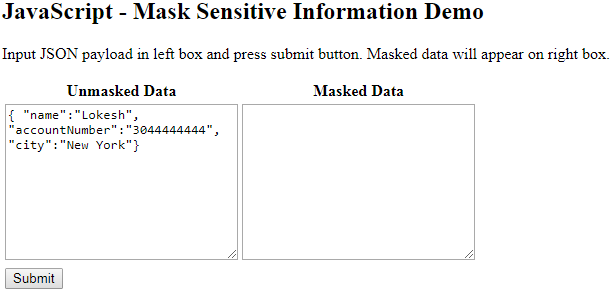
Masking sensitive data in logs means replacing secrets such as passwords, card numbers and tokens with a fixed mask or a partial value before the log line is written. In JavaScript, the log line is most often a JSON string, so we mask the object while it is turned into JSON.
We mask log data because a password that reaches a log file is copied to log shippers and backups, and we cannot take it back from there. For example, a signup endpoint that logs its request body for debugging writes the password of every new user into the log.
The following example shows four techniques, namely a JSON.stringify() replacer function, a partial card mask, a regex for free text and the redact option of the pino logger. The examples use plain JavaScript APIs with TypeScript type annotations, compiled with TypeScript 7.0.2 and run on Node.js 22.
const profile = { name: "Lokesh", password: "secret123", cards: [{ cardNumber: "4111111111111111" }] };
const SENSITIVE = new Set(["password", "cardnumber"]);

// 1. Redact keys with a JSON.stringify() replacer
const json = JSON.stringify(profile, (key, value) =>
  SENSITIVE.has(key.toLowerCase()) ? "[REDACTED]" : value);
// json = {"name":"Lokesh","password":"[REDACTED]","cards":[{"cardNumber":"[REDACTED]"}]}

// 2. Keep the last 4 digits of a card
const card = "4111111111111111".slice(-4).padStart(16, "*");   // card = "************1111"

// 3. Mask a card number inside free text
const CARD = /\b(?:\d[ -]?){12,18}\d\b/g;
const text = "Paid with 4111 1111 1111 1111".replace(CARD, (m) => "****" + m.replace(/\D/g, "").slice(-4));
// text = "Paid with ****1111"

// 4. Redact paths with pino
const logger = pino({ redact: ["password", "cards[*].cardNumber"] });
logger.info(profile, "signup");
// {"level":30,...,"password":"[Redacted]","cards":[{"cardNumber":"[Redacted]"}],"msg":"signup"}
Notice that the replacer reaches cardNumber inside the cards array without extra code, and pino writes its own “[Redacted]” text.
Next, we redact keys in nested objects and arrays and keep the last four digits of a card or the domain of an email. After that, we find card numbers and emails inside free text and configure pino to redact paths.
1. What Does It Mean to Mask Sensitive Data in Logs?
Masking changes a value before it is written, so the log keeps the shape of the data but not the secret. There are three common ways to change a value, and one log line often uses all three.
| Approach | password “secret123” | cardNumber “4111111111111111” | Use it when |
|---|---|---|---|
| Redact | “[REDACTED]” | “[REDACTED]” | The value is never needed for debugging |
| Partial mask | not used | ************1111 | Support staff must recognize the value |
| Remove | key is missing | key is missing | Even the presence of the key is noise |
Which fields count as sensitive depends on the application and on the law that applies to it. Passwords and session IDs are never logged in plain form, whatever the app does. In a signup or payment flow, masking covers four groups of fields.
- Passwords, PINs and security answers are always removed or redacted.
- Card numbers, CVV codes and bank account numbers are redacted or partially masked.
- Session IDs, access tokens, API keys and the Authorization header are redacted.
- Personal data such as email, phone and street address is masked when the logs are not allowed to hold it.
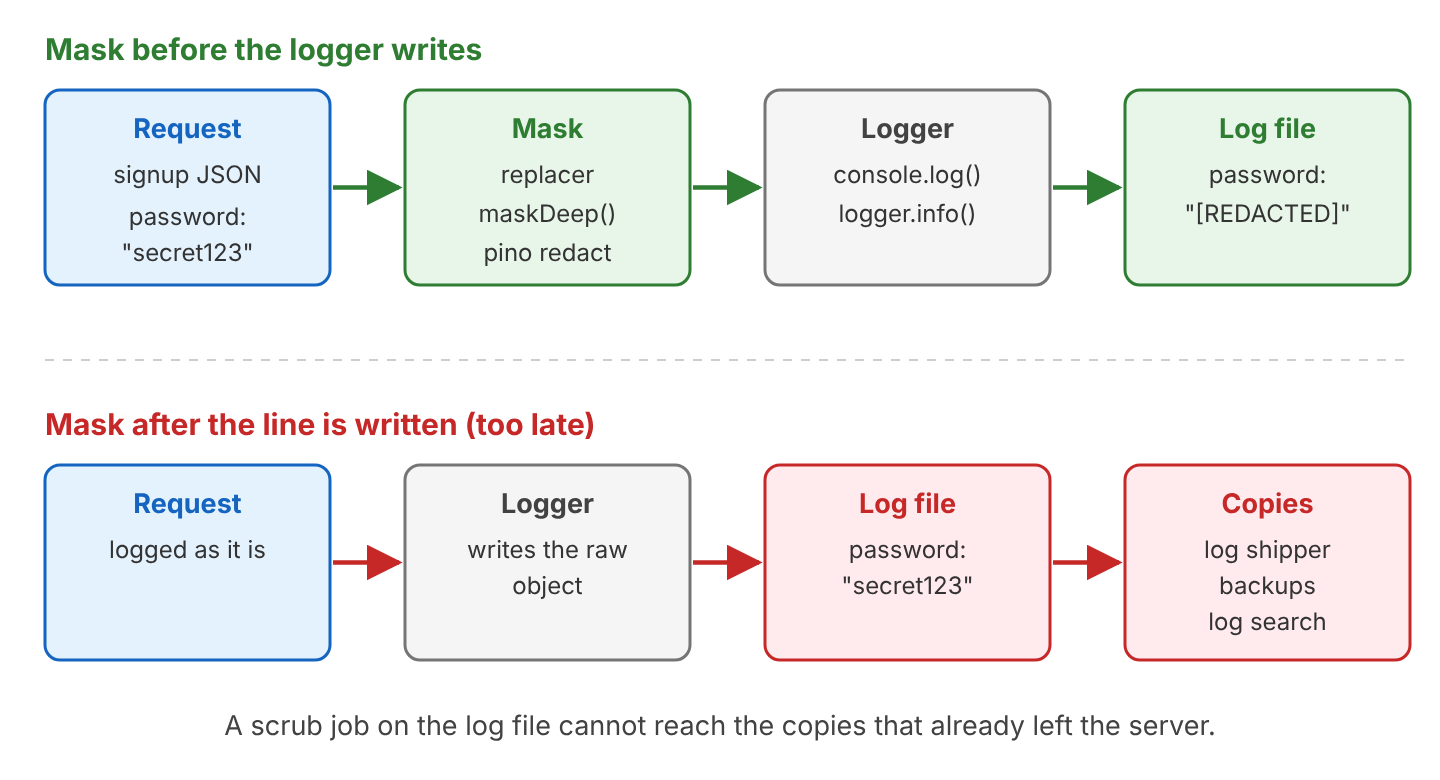
The masking step must run before the logger writes the line. Once a raw line is written, scrubbing the log file later does not help, because copies of the raw line have already left the server.
2. Masking JSON Fields With a JSON.stringify() Replacer
The second argument of JSON.stringify() can be a replacer function. JSON.stringify() calls it once for every key it writes, at every level, and writes whatever the function returns instead of the original value.
- Returning the value unchanged keeps the field.
- Returning a string such as “[REDACTED]” replaces the field.
- Returning undefined removes the key from the output.
2.1. The Sample Signup Profile
All examples in this guide log one signup profile with a nested object (address), an array of objects (cards) and an array of strings (tokens). The values are fake test data. The numbers 4111111111111111 and 5555555555554444 are public test card numbers, and 555-0100 is a fictional phone number.
const profile = {
  name: "Lokesh",
  email: "lokesh@example.com",
  password: "secret123",
  phone: "555-0100",
  address: { city: "Delhi", street: "12 Park Road" },
  cards: [
    { cardNumber: "4111111111111111", expiry: "12/30" },
    { cardNumber: "5555555555554444", expiry: "01/29" },
  ],
  tokens: ["tok-a", "tok-b"],
};
The complete project on GitHub contains every snippet in this guide and a benchmark, with the reusable helpers in a mask.ts file. It uses TypeScript 7.0.2 and pino 10.4.0, and needs Node.js 22 or newer. We run it with npm install and then npm start (or npm run bench for the timings in section 8).
2.2. Redacting Keys Case-Insensitively
Say a support engineer reads the log of a failed signup and needs every field except the password and the card number. We keep the sensitive key names in a Set in lower case and compare key.toLowerCase() against it, so password and PASSWORD both match. The type annotations key: string and value: unknown are the TypeScript part; in plain JavaScript, we drop them.
const SENSITIVE_KEYS = new Set(["password", "cardnumber", "cvv", "tokens", "authorization"]);

function redactKeys(key: string, value: unknown): unknown {
  return SENSITIVE_KEYS.has(key.toLowerCase()) ? "[REDACTED]" : value;
}

// 1. Without a replacer, every field is written
const raw = JSON.stringify(profile);
// raw = {...,"password":"secret123",...,"cards":[{"cardNumber":"4111111111111111",...

// 2. With the replacer (2 = indent by two spaces)
const masked = JSON.stringify(profile, redactKeys, 2);

// 3. Key case does not matter
const upper = JSON.stringify({ PASSWORD: "secret123" }, redactKeys);   // upper = {"PASSWORD":"[REDACTED]"}
The masked JSON shows that one flat key list covers every level. The replacer reached cardNumber inside each element of the cards array, and it replaced the whole tokens array because the key tokens is on the list.
{
  "name": "Lokesh",
  "email": "lokesh@example.com",
  "password": "[REDACTED]",
  "phone": "555-0100",
  "address": {
    "city": "Delhi",
    "street": "12 Park Road"
  },
  "cards": [
    {
      "cardNumber": "[REDACTED]",
      "expiry": "12/30"
    },
    {
      "cardNumber": "[REDACTED]",
      "expiry": "01/29"
    }
  ],
  "tokens": "[REDACTED]"
}
Logging the keys the replacer receives explains why nested data needs no extra code. The first call gets an empty key for the root object, and array elements arrive with their index as a string key.
JSON.stringify({ cards: [{ cardNumber: "4111111111111111" }] }, (key, value) => {
  console.log(JSON.stringify(key));           // "", "cards", "0", "cardNumber"
  return value;
});
The replacer receives a value after its toJSON() method has run. A Date therefore arrives as an ISO string, and a class with toJSON() (section 6) arrives as the object that toJSON() returned.
2.3. Writing Only Allowed Keys
A block list fails without any warning when a developer adds a new sensitive field, such as ssn, and forgets the list. An allow list fails the other way, because it leaves out unknown fields. When the second argument of JSON.stringify() is an array of strings, only those keys are written, at every level, so nested keys must be listed too.
const safe = JSON.stringify(profile, ["name", "address", "city"]);
// safe = {"name":"Lokesh","address":{"city":"Delhi"}}
For audit and access logs that always write the same few fields, we prefer an allow list. For debug logs of whole payloads, the block list in section 2.2 is more practical.
3. Partial Masking of Card Numbers and Emails
Partial masking keeps enough of a value to recognize it. Support staff can match “card ending in 1111” with the customer, and an email such as “l***@example.com” still shows the domain. Each kind of field needs its own small function.
function maskCard(card: string): string {
  const digits = card.replace(/\D/g, "");
  return digits.slice(-4).padStart(digits.length, "*");
}

function maskEmail(email: string): string {
  const at = email.indexOf("@");
  if (at < 1) return "[REDACTED]";
  return email[0] + "***" + email.slice(at);
}

const card = maskCard("4111 1111 1111 1111");   // card = "************1111"
const email = maskEmail("lokesh@example.com");   // email = "l***@example.com"
const broken = maskEmail("not-an-email");        // broken = "[REDACTED]"
The maskCard() helper removes spaces and dashes first (\D matches any non-digit), and padStart() then fills the string with “*” up to the original length. The maskEmail() helper always writes three stars, so the log does not reveal the length of the name. When the input is not a valid email, maskEmail() redacts the whole value instead of guessing.
To use different masks for different keys, we map each key to its function with a Record and look up the lower-case key in the replacer. A key that has a rule but a value that is not a string (such as the tokens array) is redacted completely.
const maskRules: Record<string, (value: string) => string> = {
  password: () => "[REDACTED]",
  cardnumber: maskCard,
  email: maskEmail,
  tokens: () => "[REDACTED]",
};

function maskFields(key: string, value: unknown): unknown {
  const rule = maskRules[key.toLowerCase()];
  if (!rule) return value;
  return typeof value === "string" ? rule(value) : "[REDACTED]";
}

const json = JSON.stringify(profile, maskFields);
// json = {"name":"Lokesh","email":"l***@example.com","password":"[REDACTED]",...,
//   "cards":[{"cardNumber":"************1111","expiry":"12/30"},
//            {"cardNumber":"************4444","expiry":"01/29"}],"tokens":"[REDACTED]"}
4. Masking a Copy of the Object With structuredClone()
A replacer produces a string, but some loggers want an object instead. For example, pino serializes the object itself, and console.log() prints objects in its own format, so for pino and console.log() we build a masked copy. The global structuredClone() function makes a deep copy, so we can change the copy and leave the original untouched.
function maskDeep<T>(input: T): T {
  const copy = structuredClone(input);
  const walk = (node: unknown): void => {
    if (node === null || typeof node !== "object") return;
    const record = node as Record<string, unknown>;
    for (const [key, value] of Object.entries(record)) {
      if (SENSITIVE_KEYS.has(key.toLowerCase())) record[key] = "[REDACTED]";
      else walk(value);
    }
  };
  walk(copy);
  return copy;
}

const safe = maskDeep(profile);
const maskedPassword = safe.password;         // maskedPassword = "[REDACTED]"
const maskedCard = safe.cards[0].cardNumber;  // maskedCard = "[REDACTED]"
const original = profile.password;            // original = "secret123"
The walk() function visits every object and array in the copy. Object.entries() returns index keys for arrays, so the same loop handles both. The generic type T keeps the return type equal to the input type, so safe.cards[0] still type-checks.
A shorter way to get a masked object is a JSON round trip through the replacer from section 2.
const copy = JSON.parse(JSON.stringify(profile, redactKeys));
const secondCard = copy.cards[1].cardNumber;  // secondCard = "[REDACTED]"
The two copies behave differently with values that are not plain JSON. The two rows with an error come from the try/catch blocks in the project, where we catch the error as unknown.
| Value in the object | Replacer or JSON round trip | structuredClone() copy |
|---|---|---|
| Date | Becomes an ISO string | Stays a Date |
| BigInt such as 10n | Throws “Do not know how to serialize a BigInt” | Stays a bigint |
| Map, Set | Becomes {} | Copied with its entries, but walk() does not look inside |
| Function | Key is dropped | Throws DataCloneError |
| Class instance | toJSON() runs | Becomes a plain object; methods and toJSON() are lost |
| Result | A string, ready to write | An object, for loggers that serialize themselves |
When the logger writes strings, the replacer is the better choice, because it needs one pass and no copy, and it ran about three times faster in our measurement (section 8). The structuredClone() copy fits when the masked data must stay an object, for example for console.log() or for an error tracker that accepts objects.
5. Masking Card Numbers and Emails Inside Free Text
Key-based masking does not help when the secret sits inside a string, such as an error message or a URL with query parameters. For free text, we search the text with regular expressions and replace each match. For example, a payment library throws an error whose message contains the full card number, and our error handler logs that message.
const CARD = /\b(?:\d[ -]?){12,18}\d\b/g;
const EMAIL = /\b([\w.+-])[\w.+-]*@([\w-]+(?:\.[\w-]+)+)\b/g;
const SECRET_PARAM = /\b(password|token)=[^&\s]+/gi;

function maskText(text: string): string {
  return text
    .replace(CARD, (match) => "****" + match.replace(/\D/g, "").slice(-4))
    .replace(EMAIL, "$1***@$2")
    .replace(SECRET_PARAM, "$1=[REDACTED]");
}
Each pattern targets one kind of secret.
- CARD matches 13 to 19 digits, with an optional space or dash after each digit, and the callback keeps the last four.
- EMAIL captures the first character of the name ($1) and the domain ($2), and the replacement string puts stars between them.
- The SECRET_PARAM pattern finds password=… and token=… in URLs and query strings, and the i flag makes it case-insensitive.
The results on four log messages show both a match and a deliberate non-match.
| Input | maskText() result |
|---|---|
| “Card 4111-1111-1111-1111 declined” | “Card ****1111 declined” |
| “Welcome mail sent to lokesh@example.com” | “Welcome mail sent to l***@example.com” |
| “GET /login?user=lokesh&password=secret123” | “GET /login?user=lokesh&password=[REDACTED]” |
| “Call 555-0100 about order 1042” | “Call 555-0100 about order 1042” (too few digits) |
Patterns only add a second layer of protection. Any 13 to 19 digit number matches CARD, including long order IDs, and a card number split across two log fields is missed. So we mask known keys first and run maskText() on message strings after that. The CARD replacement uses the callback form of String.prototype.replace(), which gets each match and returns its masked text.
6. Controlling Serialization With toJSON() in a Class
When a class defines a toJSON() method, JSON.stringify() writes the object that toJSON() returns instead of the instance fields. A toJSON() method puts the masking rule next to the data, so every place that serializes a Customer gets the masked version. The password is stored in a private field (#password), which JSON.stringify() and console.log() never write.
class Customer {
  name: string;
  email: string;
  cardNumber: string;
  #password: string;

  constructor(name: string, email: string, cardNumber: string, password: string) {
    this.name = name;
    this.email = email;
    this.cardNumber = cardNumber;
    this.#password = password;
  }

  toJSON() {
    return { name: this.name, email: maskEmail(this.email), cardNumber: maskCard(this.cardNumber) };
  }
}

const customer = new Customer("Lokesh", "lokesh@example.com", "4111111111111111", "secret123");

const json = JSON.stringify(customer);
// json = {"name":"Lokesh","email":"l***@example.com","cardNumber":"************1111"}

const event = JSON.stringify({ event: "signup", customer });
// event = {"event":"signup","customer":{"name":"Lokesh","email":"l***@example.com",...}}
The nested case works too, because toJSON() runs wherever the instance appears in the object tree. There is one exception. Node’s console.log() does not call toJSON(). It prints the instance with util.inspect(), so the public card number appears in full.
Customer {
  name: 'Lokesh',
  email: 'lokesh@example.com',
  cardNumber: '4111111111111111'
}
Node.js checks for a custom inspect method under the symbol Symbol.for(“nodejs.util.inspect.custom”) before it prints an object. Returning the toJSON() result from that method makes console.log() print the masked fields as well.
class SafeCustomer extends Customer {
  [Symbol.for("nodejs.util.inspect.custom")]() {
    return this.toJSON();
  }
}

console.log(new SafeCustomer("Lokesh", "lokesh@example.com", "4111111111111111", "secret123"));
// { name: 'Lokesh', email: 'l***@example.com', cardNumber: '************1111' }
7. Logging Masked Data With console and pino
Our masking functions produce either a string or an object. How we pass that result to the logger decides whether the mask survives.
7.1. Logging With Node’s console
The console.log() function formats objects with util.inspect(), not with JSON.stringify(). A replacer or a toJSON() method has no effect on it. We give console.log() either the masked JSON string or a masked copy.
// 1. Wrong: prints the secret
console.log(profile.password);                // secret123

// 2. Masked JSON string, one line per entry
console.log(JSON.stringify(profile, redactKeys));

// 3. Masked object, printed in util.inspect format
console.log(maskDeep(profile));
For server logs, the one-line JSON string in option 2 is the better format, because log tools can parse it. Option 3 is more readable during local development.
7.2. Redacting Paths With pino
The pino library is a JSON logger for Node.js. Version 10.4.0, released on 2 October 2026, is the latest at the time of writing. Its redact option takes a list of paths and replaces the values at those paths in every log line. Since version 10, pino uses the @pinojs/redact package for redaction, which works on a copy and leaves the logged object unchanged.
npm install pino@10.4.0A path starts at the object passed to logger.info(), and dots go into nested objects. A [*] or .* covers every element of an array or every key of an object, whereas bracket notation handles keys with dashes.
| Redact path | What it matches in the profile |
|---|---|
| “password” | The top-level password key |
| “address.street” | street inside address |
| “cards[*].cardNumber” | cardNumber in every element of cards |
| “address.*” | Every key one level inside address |
| “tokens” | The whole tokens array |
| ‘headers[“x-api-key”]’ | A key that contains dashes |
const logger = pino({
  redact: ["password", "email", "cards[*].cardNumber", "tokens", "address.*"],
});
logger.info(profile, "signup");{"level":30,"time":1791055365880,"pid":1779,"hostname":"vm","name":"Lokesh","email":"[Redacted]","password":"[Redacted]","phone":"555-0100","address":{"city":"[Redacted]","street":"[Redacted]"},"cards":[{"cardNumber":"[Redacted]","expiry":"12/30"},{"cardNumber":"[Redacted]","expiry":"01/29"}],"tokens":"[Redacted]","msg":"signup"}The object form of redact adds two settings. The censor setting replaces the default “[Redacted]” text, and when censor is a function, pino calls it with the original value and the path as an array of keys, which allows partial masks. The setting remove: true drops the key completely. In TypeScript, the value parameter of censor has the type unknown, so we convert it with String() before masking.
// 1. Partial mask through a censor function
const partial = pino({
  redact: {
    paths: ["cards[*].cardNumber", "password"],
    censor: (value, path) => (path.at(-1) === "cardNumber" ? maskCard(String(value)) : "***"),
  },
});
partial.info({ cards: profile.cards, password: profile.password }, "censor");
// "cards":[{"cardNumber":"************1111",...},{"cardNumber":"************4444",...}],"password":"***"

// 2. Remove the keys
const removing = pino({ redact: { paths: ["password", "tokens"], remove: true } });
removing.info({ name: "Lokesh", password: "secret123", tokens: ["tok-a"] }, "remove");
// "name":"Lokesh","msg":"remove"
Redact paths must never come from user input, so we keep them as constants in the logger setup.
8. Which Masking Technique to Use
Each technique handles nested data and arrays differently, and only some of them can keep part of a value. The comparison sums up the techniques from section 2 to section 7.
| Technique | Nested objects | Arrays | Partial mask | Library needed |
|---|---|---|---|---|
| JSON.stringify() replacer, block list | Yes, any depth | Yes | Yes, with rules per key | No |
| JSON.stringify() replacer array (allow list) | Yes, if nested keys are listed | Yes | No | No |
| structuredClone() + walk | Yes, any depth | Yes | Yes, if the walk calls a mask function | No |
| Regex on free text | Not applicable | Not applicable | Yes | No |
| Class toJSON() | Yes, wherever the instance appears | Yes | Yes | No |
| pino redact | Yes, one path per location | Yes, with [*] | Yes, with a censor function | pino |
Speed matters only for very busy loggers, but the differences are large enough to know. We timed each technique on the signup profile with npm run bench (200,000 calls after a warm-up). These numbers were measured on our test sandbox (Node.js 22.22.0, Linux, 2-core Intel Xeon at 2.10 GHz). They varied by about 10 to 20 percent between runs, so they are only useful for comparing the rows with each other.
| Operation on the sample profile | Time per call (sandbox) |
|---|---|
| JSON.stringify() without masking | 0.6 to 0.7 us |
| JSON.stringify() with redactKeys replacer | 1.6 to 1.9 us |
| JSON.stringify() with maskFields partial masks | 2.2 to 2.4 us |
| JSON round trip with the replacer (masked copy) | 2.7 to 2.9 us |
| maskDeep() with structuredClone(), then JSON.stringify() | 5.4 to 6.2 us |
| pino info() without redact (to /dev/null) | 3.3 us |
| pino info() with three redact paths, one with [*] | 4.5 to 4.6 us |
A replacer makes JSON.stringify() about two and a half times slower, and the structuredClone() copy costs about three times the replacer. In pino, two plain paths (“password”, “tokens”) made no measurable difference, while adding the cards[*].cardNumber wildcard added about 1.2 us per call. So we prefer explicit paths in pino and use a wildcard only for arrays.
9. Masking Sensitive Data FAQs
9.1. Can We Mask Passwords After the Log Is Written?
No. Scrubbing a log file with a script after the fact leaves every copy that was made before it ran, such as the log shipper’s buffer, the log search index, backups and any terminal that tailed the file. The masking step belongs before the logger, as the image in section 1 shows. Writing secrets into a log file is a known weakness, listed as CWE-532 “Insertion of Sensitive Information into Log File”.
9.2. Is It Safe to Log the Whole Request Object?
No. A request object carries the Authorization and Cookie headers, and the body of a signup or payment request carries the password and card data, so we log either the few fields we need or a masked copy. These lines use an Express-style req object.
// Wrong: headers and body with every secret
logger.info(req.body, "signup");
console.log(req);

// Right: chosen fields, masked
logger.info({ name: req.body.name, email: maskEmail(req.body.email) }, "signup");
9.3. Why Did Masking Change the Original Object?
The spread operator copies only the top level of an object. Nested objects and arrays in the copy are the same objects as in the original, so masking them changes the data the application still needs, such as the card number we are about to charge.
const signup = { password: "secret123", cards: [{ cardNumber: "4111111111111111" }] };

const forLog = { ...signup };
forLog.password = "[REDACTED]";               // only the copy changes
forLog.cards[0].cardNumber = "[REDACTED]";    // changes signup too

const password = signup.password;             // password = "secret123"
const card = signup.cards[0].cardNumber;      // card = "[REDACTED]"
A replacer never changes the input, and maskDeep() works on a structuredClone() copy, so both avoid the shallow-copy bug.
9.4. Why Does pino Not Redact Some Password Fields?
The pino library matches paths as written, without case folding or a deep search. Four rules explain most missed fields, and the log line after the list shows each of them for the path *.password.
- Paths are case-sensitive, so “password” does not match Password.
- A * stands for one level only, so *.password matches user.password but not password at the top or user.login.password.
- Paths start at the logged object, so “password” does not match the nested user.password.
- The message string is not redacted, so logger.info(“password=secret123”) is written as it is.
{"level":30,...,"password":"a","user":{"password":"[Redacted]","Password":"c","login":{"password":"d"}},"msg":"wildcard"}For keys at unknown depths or in mixed case, a replacer with a lower-case key list (section 2.2) is the more reliable tool. We can also combine both, i.e. pass maskDeep(profile) to pino and keep the redact paths for the fields we know.
10. Conclusion
To mask sensitive data in logs, we change the data before the logger writes it. A JSON.stringify() replacer with a lower-case key list covers nested objects and arrays with no library, and rules per key add partial masks for cards and emails. A structuredClone() copy helps when the logger needs an object. Regular expressions catch card numbers and emails inside message text as a second layer. With pino, the redact option masks fixed paths with little overhead, as long as we remember that its paths are case-sensitive and that each * covers one level only.
11. References
The MDN and Node.js pages describe the APIs used in the examples, and OWASP and CWE describe the risk of secrets in logs.
- MDN: JSON.stringify()
- MDN: structuredClone()
- MDN: Private elements
- MDN: String.prototype.replace()
- Node.js: util.inspect.custom
- pino: Redaction
- OWASP Logging Cheat Sheet
- CWE-532: Insertion of Sensitive Information into Log File
Happy Learning !!
