
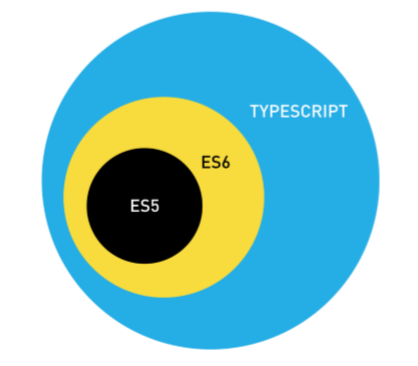
TypeScript is JavaScript with static types, so we write the types of variables, parameters and return values, and the TypeScript compiler (tsc) checks them before the program runs and outputs plain JavaScript. Microsoft made TypeScript public in 2012, and it is open source.
We use TypeScript for JavaScript code that grows past a few files, such as a Node.js REST API or an Angular front end, because the compiler finds a wrong argument type or a misspelled property in the build instead of in production. Getting started takes four steps, namely installing the compiler with npm, writing a .ts file, compiling it and running the result with Node.js or in a browser.
The following example goes through the whole workflow with TypeScript 7.0.2 and Node.js 22. The commands assume a folder that contains only the hello.ts file from section 3.
# 1. Install TypeScript 7 in the project
npm init -y
npm install --save-dev typescript@7.0.2
npx tsc --version                   # Version 7.0.2

# 2. Create tsconfig.json
npx tsc --init

# 3. Check types and compile hello.ts to JavaScript
npx tsc                             # writes hello.js

# 4. Run the compiled JavaScript
node hello.js                       # Hello, TypeScript!

# 5. Or run the .ts file directly (Node.js 22.18+, no type check)
node hello.ts                       # Hello, TypeScript!
Notice that step 5 runs hello.ts without compiling it, and Node.js skips the type check there. The npx tsc –init config used in step 3 writes hello.js next to hello.ts, together with declaration and source map files, and section 4 shows a config that puts the output in a separate dist folder.
Next, we install TypeScript 7.0, the release that replaced the old JavaScript-based compiler with a native one written in Go, and compile a first program. After that, we see what Node.js type stripping does not do and which old tsconfig.json settings TypeScript 7 no longer accepts.
1. What TypeScript Adds to JavaScript
TypeScript is a superset of JavaScript, which means every valid JavaScript program is also valid TypeScript syntax. TypeScript adds type annotations, which are the : string and : number parts after a name. When we leave out an annotation, the compiler infers the type from the value, so most local variables need no annotation.
// 1. Annotated variables
const name: string = "Lokesh";
const age: number = 37;

// 2. Inferred type: number
const nextAge = age + 1;                      // nextAge = 38

// 3. Typed function
function greet(person: string): string {
  return "Hello, " + person;
}
const text = greet(name);                     // text = "Hello, Lokesh"
The types exist only at compile time, so the compiler uses them to find mistakes and then removes them from the output. If we call greet() with a number, JavaScript would run the call and build the string “Hello, 42”. The TypeScript compiler reports the call as an error before the code runs.
function greet(name: string): string {
  return "Hello, " + name;
}

greet(42);
greet.ts(5,7): error TS2345: Argument of type 'number' is not assignable to parameter of type 'string'.Errors found before runtime are the main reason teams use TypeScript. A wrong argument type or a possibly undefined value shows up in the editor and in the build, not in production. For example, when a team renames the field price to unitPrice in an order type, tsc lists every file that still reads price.
Editors also use the types for autocompletion and safe renaming, which is one of the practical differences between TypeScript and JavaScript in daily work.
2. Installing TypeScript 7
TypeScript is an npm package, so we need Node.js and npm first. We install it per project as a development dependency, because it is a build tool and the compiled program does not need it at runtime. A local install also pins the version in package.json, so every developer and the CI server use the same compiler.
npm init -y
npm install --save-dev typescript@7.0.2
npx tsc --version
Version 7.0.2The npx command runs the tsc binary from the project’s node_modules folder. A global install with npm install -g typescript also works, but every project on the machine shares one compiler version, which causes “works on my machine” differences. We prefer the local install.
TypeScript 7.0 was released in July 2026 as a port of the compiler from TypeScript to Go, and the TypeScript team reports full builds 8 to 12 times faster than TypeScript 6 on large open source projects, with less memory. The package name and the tsc command did not change, so for our own code nothing changes except the speed.
Tools that call the compiler’s programmatic API, such as typescript-eslint, Vue, Svelte and Angular template checking, still need TypeScript 6, because 7.0 ships without that API. For those tools, we install the @typescript/typescript6 package next to TypeScript 7.
3. Writing and Compiling the First Program
A TypeScript source file uses the .ts extension. We create hello.ts with one typed variable.
const message: string = "Hello, TypeScript!";
console.log(message);
In a folder without a tsconfig.json file, we can compile a single file by passing its name to the compiler. The compiler writes hello.js next to the source, and node runs that JavaScript file.
npx tsc hello.ts
node hello.js
Hello, TypeScript!The generated hello.js shows what compiling means here. The compiler removed the : string annotation and added “use strict”, because TypeScript 7 always compiles in JavaScript strict mode. The rest is the same JavaScript we wrote.
"use strict";
const message = "Hello, TypeScript!";
console.log(message);
Two details surprise beginners.
- The compiler still writes the .js file when it finds type errors, unless we turn on the noEmitOnError option. The exit code is not zero, so build scripts can stop on errors.
- When the folder contains a tsconfig.json, TypeScript 7 refuses file names on the command line and reports error TS5112.
error TS5112: tsconfig.json is present but will not be loaded if files are specified on commandline. Use '--ignoreConfig' to skip this error.In a project with a tsconfig.json, we run npx tsc without file names, and the compiler reads the file list and the options from the config.
4. Setting Up a Project With tsconfig.json
Real projects have many files, so we describe them once in tsconfig.json instead of passing options on every call. The npx tsc –init command creates a starter file with recommended settings, such as strict mode and module set to nodenext. The example project for this article uses a shorter config.
{
  "compilerOptions": {
    "target": "es2024",
    "lib": ["es2024"],
    "module": "nodenext",
    "strict": true,
    "rootDir": ".",
    "outDir": "dist",
    "types": ["node"],
    "skipLibCheck": true
  },
  "include": ["src"]
}
The config compiles everything in the src folder to the dist folder, writes ES2024 JavaScript, follows the Node.js rules for ES modules, and enables every strict type check. The types entry loads the Node.js type definitions from the @types/node package, and the other tsconfig.json options control the output layout and the type checks.
With the config in place, two commands cover daily work.
npx tsc                  # compile the whole project once
npx tsc --watch          # recompile on every file change
When another tool produces the JavaScript (for example a bundler such as Vite or esbuild), we still run npx tsc –noEmit in the build. It checks the types and writes no files.
5. Running TypeScript Directly With Node.js
Since version 22.18.0, Node.js can run a .ts file without a build step. Node.js calls this feature type stripping, because Node.js replaces the type annotations with spaces and runs the remaining JavaScript. Node.js 22.6 to 22.17 needed the –experimental-strip-types flag, whereas from 22.18.0 type stripping is on by default and prints no warning.
node hello.tsHello, TypeScript!Type stripping does not check types. A file with the greet(42) error from section 1 runs without any error message, because Node.js never looks at what the types mean. We still need tsc (for example npx tsc –noEmit) to find type errors.
Node.js also rejects TypeScript features that generate JavaScript code instead of only adding types. The most common one is enum.
SyntaxError [ERR_UNSUPPORTED_TYPESCRIPT_SYNTAX]: TypeScript enum is not supported in strip-only modeThe same rule applies to namespace blocks with runtime code and to class constructors that declare fields in their parameter list (parameter properties). The compiler option erasableSyntaxOnly makes tsc report these constructs, so code that passes the build also runs with node file.ts. Node.js type stripping has a few more rules.
- Relative imports must include the .ts extension.
- Imports of types need the import type form.
- Node.js ignores tsconfig.json.
Running .ts files without a build step is useful for scripts and small tools, such as a script that seeds a test database before a demo. For applications we publish, we still compile with tsc.
6. What Changed in TypeScript 7
TypeScript 7.0 type-checks code the same way as TypeScript 6.0, but it turns the settings that 6.0 deprecated into errors and adopts 6.0’s new defaults. Old tutorials and old projects often use those settings, so before the upgrade we check our config for each TypeScript 7.0 change.
- The strict option is true by default, and module defaults to esnext.
- The target option no longer accepts es5; the lowest output level is ES2015.
- The moduleResolution values node (also called node10) and classic are removed; nodenext and bundler replace them.
- The module values amd, umd, systemjs and none are removed, and so is baseUrl.
- The types option defaults to an empty list, so Node.js globals such as process need “types”: [“node”].
- The rootDir option defaults to the folder of tsconfig.json, so projects with a src folder set it explicitly.
The compiler reports each removed option by name. For example, a config with “target”: “es5” fails with error TS5108.
tsconfig.json(1,50): error TS5108: Option 'target=ES5' has been removed. Please remove it from your configuration.TypeScript syntax for our own code did not change between 6 and 7. All browsers in use today and every supported Node.js version run ES2015+ code, so dropping ES5 output affects only projects that still support very old browsers.
7. Running Your First TypeScript Project
The example project on GitHub contains the snippets from this article, the tsconfig.json from section 4, and the hello.ts file used for the Node.js type stripping demo. The package.json pins TypeScript 7.0.2, and running hello.ts without compiling it requires Node.js 22.18 or later.
npm install
npm start               # compile with tsc, then run dist/src/index.js
npm run hello           # run src/hello.ts directly with Node.js
=== Type annotations ===
nextAge = 38
text = Hello, Lokesh
=== First program ===
Hello, TypeScript!
Hello, Lokesh. Visits: 3The last line comes from npm run hello, and the other lines come from npm start.
8. Conclusion
TypeScript adds a type checker to JavaScript. We install it per project with npm install –save-dev typescript and describe the project in tsconfig.json. After that, npx tsc checks the types and produces JavaScript. TypeScript 7 does this much faster than earlier versions and rejects outdated settings such as target es5.
For quick scripts, Node.js 22.18+ runs .ts files without a build step, but it skips type checking, so tsc remains part of every build. The next step is to learn the basic types and how to declare variables with var, let and const.
9. References
The release notes and the official documentation are the sources for the version-specific facts in this article.
- Announcing TypeScript 7.0
- TypeScript download and install
- TypeScript for JavaScript Programmers
- TSConfig reference
- Node.js 22: Modules: TypeScript
Happy Learning !!
