
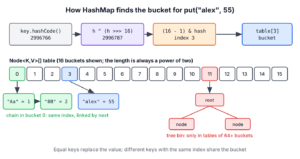
Internally, a Java HashMap stores its entries in an array of buckets, and it picks the bucket for a key from the key’s hashCode(). Two or more keys in the same bucket are kept in a linked list, and since Java 8 a crowded bucket turns into a red-black tree. When the map fills up past its load factor, it doubles the array and moves the entries. Bucket selection, chaining and resizing together are how HashMap works internally in Java.
Knowing these internals helps us write correct equals() and hashCode() methods for our keys, size maps for large data, and answer the most common Java collections interview question. The following example stores and reads a player score, with the bucket each step uses as a comment.
Map<String, Integer> scores = new HashMap<>();
Integer first = scores.put("alex", 40);      // null, the table of 16 buckets is created here
Integer old = scores.put("alex", 55);        // 40, same key, so the value is replaced
Integer score = scores.get("alex");          // 55
int hash = "alex".hashCode();                // 2996766
int spread = hash ^ (hash >>> 16);           // 2996787
int bucket = spread & (16 - 1);              // 3, the bucket for "alex"
Notice that the second put() returns the old value and does not add a second entry, because HashMap found an equal key in bucket 3. We follow a key from hashCode() to its bucket, look at collisions and tree bins, and see when and how the array grows.
1. A Quick Recap of HashMap
The HashMap class is a member of the Collections framework and stores key-value pairs. Each key maps to one value, and a key can appear only once, so a second put() with an equal key replaces the value. HashMap allows one null key and any number of null values.
Map<String, Integer> scores = new HashMap<>();
Integer added = scores.put("maria", 70);     // null, no previous value
Integer found = scores.get("maria");         // 70
Integer missing = scores.get("sam");         // null, no such key
int size = scores.size();                    // 1
Internally, every key-value pair is a Node object, which implements Map.Entry. A Node keeps the key, the value, the spread hash of the key and a reference to the next node in the same bucket.
// does not compile: excerpt from java.util.HashMap in JDK 25
static class Node<K, V> implements Map.Entry<K, V> {
    final int hash;
    final K key;
    V value;
    Node<K, V> next;
    // constructor, getKey(), getValue(), setValue() ...
}
HashMap stores the hash in the node so it never calls hashCode() again for that key. Comparing two stored int hashes is much cheaper than calling equals(), so most non-matching nodes are skipped after one integer comparison.
2. Internal Implementation of HashMap
The HashMap class is a hash table based implementation of the Map interface. In the source, the hash table is a plain array of nodes called table, and each index of this array is a bucket.
// does not compile: excerpt from java.util.HashMap in JDK 25
transient Node<K, V>[] table;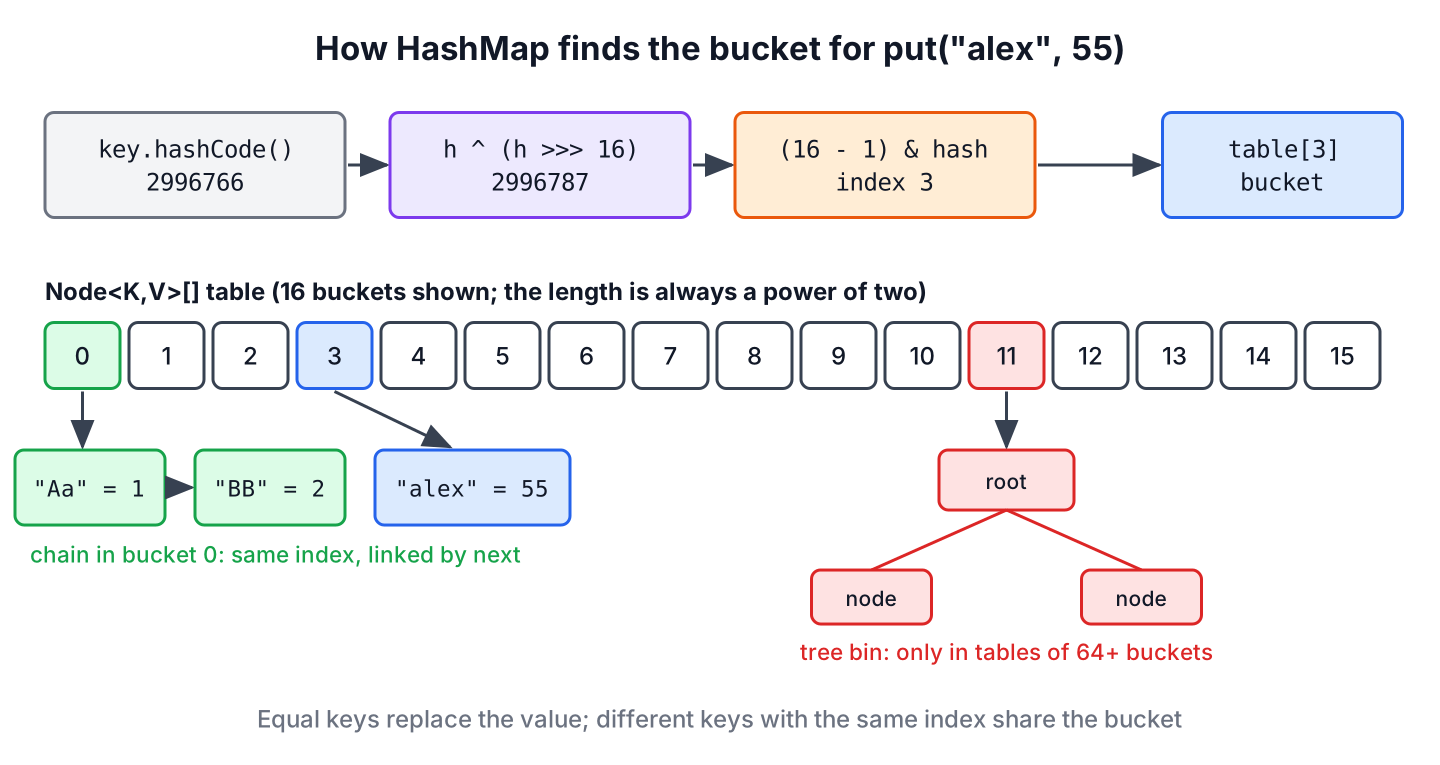
The array length is always a power of two. With the default constructor, the table does not exist until the first put(), which creates it with 16 buckets. A bucket is empty (null), holds a chain of Node objects linked through next, or holds a tree of TreeNode objects.
| Constant in HashMap.java | Value | Meaning |
|---|---|---|
| DEFAULT_INITIAL_CAPACITY | 16 | Buckets created by the first put() of a default map |
| DEFAULT_LOAD_FACTOR | 0.75 | Resize when the entry count goes over capacity x 0.75 |
| TREEIFY_THRESHOLD | 8 | A bucket that already has 8 nodes is turned into a tree when a node is added |
| UNTREEIFY_THRESHOLD | 6 | During a resize, a tree half with 6 or fewer nodes goes back to a list |
| MIN_TREEIFY_CAPACITY | 64 | Below 64 buckets, a crowded bucket triggers a resize instead of a tree |
| MAXIMUM_CAPACITY | 230 | The table never grows past this length |
3. How Hashing is Used to Locate Buckets
A hash function turns an object into an int. The contract of Object.hashCode() requires that equal objects return the same hash code. It does not require different objects to return different codes, so two unequal keys can share a hash code, and a map must handle that case.
The default Object.hashCode() is not the memory address of the object in HotSpot. The hashCode() contract allows an address-based value but does not require one, and current JVMs use a random number that is stored in the object header on the first call. Classes such as String, Integer and records override hashCode() and compute it from their content, which is why they work as map keys.
HashMap does not use the hash code as it is. It first mixes the high 16 bits into the low 16 bits in its hash() method.
static final int hash(Object key) {
    int h;
    return (key == null) ? 0 : (h = key.hashCode()) ^ (h >>> 16);
}
The bucket index is (n – 1) & hash, where n is the table length, so only the lowest bits of the hash pick the bucket. For 16 buckets that is the lowest 4 bits. Without the spread step, keys whose hash codes differ only in the high bits would all land in one bucket. The following example shows a hash code of 65536, which has only bit 16 set.
int h = 65536;                       // 65536 is 0x10000, only bit 16 is set
int rawIndex = h & (16 - 1);         // 0, the high bit is ignored
int spread = h ^ (h >>> 16);         // 65537
int index = spread & (16 - 1);       // 1, the high bit now changes the bucket
A null key gets the hash 0, so it always goes to bucket 0, and HashMap never calls a method on it. The mask works only because the length is a power of two, which is the reason HashMap rounds every requested capacity up to the next power of two.
4. HashMap.put() Operation
The put() method computes the spread hash of the key and passes it to the internal method putVal(), which does the actual work.
// does not compile: excerpt from java.util.HashMap in JDK 25
public V put(K key, V value) {
    return putVal(hash(key), key, value, false, true);
}
The putVal() method goes through these steps, in this order.
- If table is null or empty, it calls resize() to create it.
- It computes the index (n – 1) & hash and reads that bucket.
- If the bucket is empty, it stores a new Node there.
- If the bucket is not empty, it searches it for an equal key, as described in section 5. An equal key gets the new value, and put() returns the old one.
- If no equal key exists, it appends a new node, and it turns the bucket into a tree when the bucket had 8 nodes already.
- It increments size, and when size goes over threshold (capacity x load factor), it calls resize().
The return value tells us which case happened. A null return means the key was new or was mapped to null, and any other value is the value that was replaced.
5. How are Collisions Resolved in the Same Bucket?
A collision happens when two different keys get the same bucket index. They either have the same hash code or different hash codes that share the same low bits. HashMap keeps both entries in the bucket, chained through the next field of Node.
To find an equal key in a chain, HashMap compares the stored hash first and calls equals() only when the hashes match. The check in putVal() is the same one get() uses.
// does not compile: excerpt from java.util.HashMap in JDK 25
// inside putVal(), p is the current node of the bucket
if (p.hash == hash &&
        ((k = p.key) == key || (key != null && key.equals(k)))) {
    e = p;                                   // equal key found, the value is replaced later
}
If the walk reaches the end of the chain without an equal key, the new node is appended at the tail. Java 7 added new nodes at the head of the chain, and Java 8 changed it to the tail.
// does not compile: excerpt from java.util.HashMap in JDK 25
if ((e = p.next) == null) {
    p.next = newNode(hash, key, value, null);
    if (binCount >= TREEIFY_THRESHOLD - 1)   // the bucket had 8 nodes
        treeifyBin(tab, hash);
    break;
}
We can watch a collision with two strings that Java developers know well, because “Aa” and “BB” have the same hash code. Both end up in one bucket, and the map still keeps them apart through equals().
Map<String, Integer> codes = new HashMap<>();
int h1 = "Aa".hashCode();                    // 2112
int h2 = "BB".hashCode();                    // 2112
Integer a = codes.put("Aa", 1);              // null
Integer b = codes.put("BB", 2);              // null, a second node in the same bucket
Integer readA = codes.get("Aa");             // 1
Integer readB = codes.get("BB");             // 2
int count = codes.size();                    // 2
For the same reason, a key class must override equals() and hashCode() together. If two equal keys return different hash codes, they go to different buckets and the map stores both. The rules are in hashCode() and equals(), and designing a good key for HashMap covers key classes in detail.
6. Treeification of Crowded Buckets
A long chain makes get() slow, because the map walks the nodes one by one. JEP 180 (Java 8) added tree bins, so a crowded bucket becomes a red-black tree with O(log n) lookups instead of O(n). The tree nodes are TreeNode objects, and a tree bin works like a small TreeMap inside one bucket.
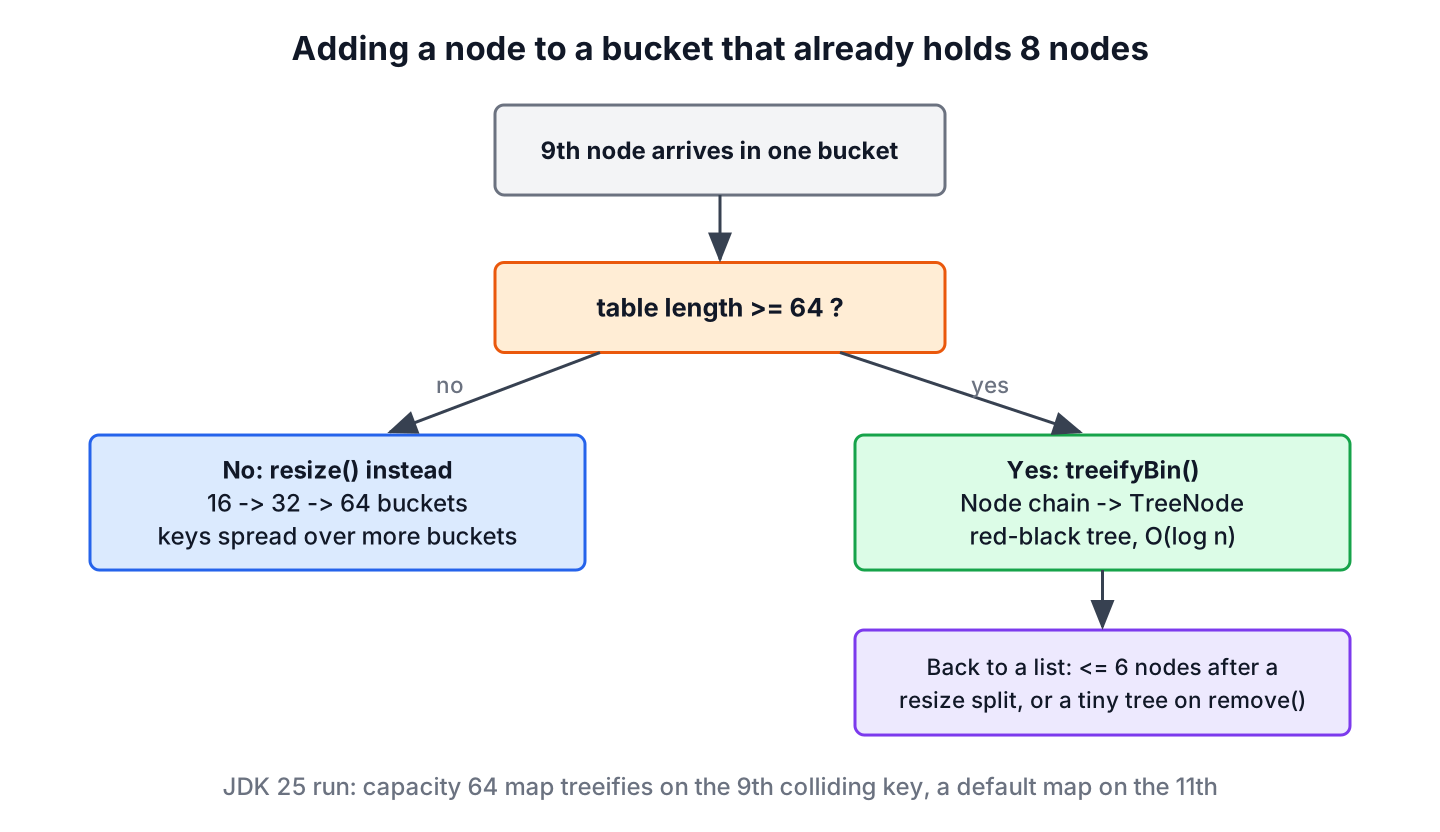
Two conditions decide what happens when a node is added to a bucket that already holds 8 nodes.
- If the table has fewer than 64 buckets (MIN_TREEIFY_CAPACITY), treeifyBin() calls resize() instead, because a bigger table spreads the keys over more buckets.
- If the table has 64 buckets or more, the chain becomes a red-black tree.
Let us add keys that all return the same hash code. In a map created with capacity 64, the bucket stays a list up to 8 entries and becomes a tree on the 9th. In a default map of 16 buckets, the 9th entry resizes the table to 32, the 10th to 64, and the 11th entry turns the bucket into a tree.
To order the keys inside a tree, HashMap compares the hashes first. For equal hashes it uses compareTo() when the keys are Comparable with each other, such as String or a record that implements Comparable. Other keys are ordered by class name and identity hash code, so lookups for them can still walk many nodes.
A tree goes back to a linked list in two cases. During a resize, each half of a split tree with 6 or fewer nodes (UNTREEIFY_THRESHOLD) becomes a list. During remove(), the map checks the shape of the tree and converts it only when the tree is very small, somewhere between 2 and 6 nodes depending on the shape of the tree. A TreeNode is about twice the size of a Node, so HashMap uses trees only when they pay off.
7. HashMap.get() Operation
The get() method takes the key and returns the mapped value, or null when the map has no mapping for the key. It finds the bucket the same way as put(), with hash(key) and the index mask.
Map<String, Integer> scores = new HashMap<>(Map.of("alex", 55, "maria", 70));
Integer alex = scores.get("alex");                     // 55
Integer nobody = scores.get("sam");                    // null
Integer orZero = scores.getOrDefault("sam", 0);        // 0
boolean hasSam = scores.containsKey("sam");            // false
Inside getNode(), the first node of the bucket is checked first. If the first node is a TreeNode, the search continues in the tree with getTreeNode(). Otherwise the method walks the chain and compares the stored hash and equals() on every node.
// does not compile: excerpt from java.util.HashMap in JDK 25
if (first instanceof TreeNode)
    return ((TreeNode<K, V>) first).getTreeNode(hash, key);
do {
    if (e.hash == hash &&
            ((k = e.key) == key || (key != null && key.equals(k))))
        return e;
} while ((e = e.next) != null);
Because get() returns null both for a missing key and for a key mapped to null, we use containsKey() or getOrDefault() when the map can hold null values.
8. Resizing the Bucket Array
HashMap keeps the chains short by growing the table. The field threshold holds capacity x load factor, and when size goes over it after a put(), resize() creates an array twice as long and moves every node into it.
| Entries added to a default map | Table length after the put | New threshold |
|---|---|---|
| 1 | 16 | 12 |
| 13 | 32 | 24 |
| 25 | 64 | 48 |
| 49 | 128 | 96 |
| 97 | 256 | 192 |
The move does not call hashCode() again, because each node already holds its hash. Doubling the length adds one bit to the index mask, so every node either stays at its index or moves to index + old length. The resize() method checks that one bit with (e.hash & oldCap) == 0 and splits each bucket into a low list and a high list, which keeps the order of the nodes within each list.
// does not compile: excerpt from java.util.HashMap in JDK 25
// inside resize(), oldCap is the old table length
if ((e.hash & oldCap) == 0) {
    // stays at index j in the new table
} else {
    // moves to index j + oldCap
}
Each resize walks the whole table, so a map that grows from 16 to a million entries resizes 17 times. When we know the size up front, we create the map with HashMap.newHashMap(expectedSize), which sizes the table so it never resizes for that many entries. Sizing and load factor have their own article, HashMap initial capacity and load factor.
9. When a Bad hashCode() Slows Down a Real App
A delivery app caches route results in a HashMap keyed by grid cells, and the cell class has a hand-written hashCode() that returns x + y. Every cell on the same diagonal gets the same hash code, so a 100 x 100 grid produces only 199 different hash codes for 10,000 keys.
record Cell(int x, int y) {
    @Override
    public int hashCode() {
        return x + y;                        // poor: (1, 2) and (2, 1) collide
    }
}
List<Cell> cells = IntStream.range(0, 10_000).mapToObj(i -> new Cell(i / 100, i % 100)).toList();
long badCodes = cells.stream().map(Cell::hashCode).distinct().count(); // 199
long betterCodes = cells.stream().map(c -> Objects.hash(c.x(), c.y())).distinct().count(); // 3169With 199 hash codes, up to 100 cells share one hash code, so lookups for those cells walk long chains or deep trees. Tree bins limit the damage only when the keys are Comparable, and our Cell record is not. Deleting the custom method and letting the record generate hashCode() from both fields fixes the slow cache without any other change.
10. FAQs on How HashMap Works Internally in Java
Interviews about HashMap internals often end with one of these five questions.
10.1. What happens when two keys have the same hashCode?
Both entries go into the same bucket, and the map keeps them apart with equals(). The bucket holds a linked list, or a red-black tree once it has more than 8 nodes in a table of at least 64 buckets. Lookups get slower as the bucket grows, but the result stays correct.
10.2. Why is the HashMap capacity always a power of two?
A power-of-two length lets HashMap compute the index with the fast mask (n – 1) & hash instead of a division. It also makes resizing cheap, because each node either keeps its index or moves by the old length. Any capacity we pass to the constructor is rounded up.
Map<String, Integer> sized = new HashMap<>(10); // table of 16 buckets on the first put10.3. Is HashMap get() always O(1)?
No. It is O(1) on average with a reasonable hashCode(). A bucket that collects many keys costs O(log n) as a tree of Comparable keys, and up to O(n) for non-comparable keys with equal hashes.
10.4. Where does HashMap store a null key?
In bucket 0. The hash() method returns 0 for a null key without calling hashCode(), so there is no NullPointerException. Only one null key can exist, because a second put(null, value) replaces the value.
10.5. Can a mutable object be a HashMap key?
Yes, but we must not change the object after putting it in the map. HashMap stores the entry in a bucket chosen from the key’s hash code. If a field used in hashCode() changes, get() searches a different bucket and returns null, even though the entry is still in the map. Safe keys include records with immutable fields, String and the wrapper classes.
11. Conclusion
A HashMap is an array of buckets whose length is a power of two. The hash() method mixes the high bits of hashCode() into the low ones, and (n – 1) & hash picks the bucket.
Collisions form a chain that compares the stored hash before equals(), and since Java 8 a chain becomes a red-black tree on the 9th node once the table has 64 buckets. When the entry count passes capacity x 0.75, the table doubles and every node either stays in place or moves by the old length.
Most of the speed of a HashMap depends on our keys. Immutable keys with a hashCode() that uses all fields keep buckets small, and a known size passed to HashMap.newHashMap() avoids resizes.
12. References
- HashMap Javadoc (Java 25)
- HashMap.java source (OpenJDK)
- Object.hashCode() Javadoc
- JEP 180: Handle Frequent HashMap Collisions with Balanced Trees
Happy Learning !!

I believe you missed one scenario: when putting new entry into Hashmap, then the entry with the same key may already be in. In such case the value gets replaced for given key. So following statement might need be adjusted, since it is not always true:
“If an object is already sitting on the calculated index, its
nextattribute is checked. If it isnull, and current Node object becomes next node in LinkedList. Ifnextvariable is notnull, the process is followed untilnextis evaluated asnull.”Thanks for the feedback. I added the additional information.
The bigger the table (initial capacity HashMap constructor parameter), the lesser will index collision occurs (more collisions equals slower HashMap performance). The default is only 16 and the recommended value is x2 of expected total size (bigger is better). I think for performance, it’s better to set the initial capacity to x4 of expected size and load factor of 0.3. Note rehashing (when current size > initial capacity * load factor) also slows down performance.
“Tree bins (i.e., bins whose elements are all TreeNodes) are ordered primarily by hashCode” … since the elements have collided already, don’t they have the same hashcode?
One more thing is since it relies on the ordering provided by the comparable interface in case of ties, what if the interface was not implemented?
““Tree bins (i.e., bins whose elements are all TreeNodes) are ordered primarily by hashCode” … since the elements have collided already, don’t they have the same hashcode?” Not necessarily. Since the put() function calls another internal hash() function on the hash of the key to ensure the entry falls within the array indices (for keys’ hash values that are too big), you can end up with keys with different hashcodes in the same bucket.
Hope that helps.
Excellent article. I have one question.
HashMap hm = new HashMap();
hm.put(“Suyog”, “yes”);
hm.put(“SUYOG”, “yes1”);
hm.put(“SuyoG”, “ye2”);
System.out.println(hm.size());
The above code will print 3. But if I want to have hashMap size 1 then how can we override the hashCode() and equals() methods. And in which class we should override them.
Looking forward for reply from you.
-Suyog
@Suyog, In order to achieve what you want you should add all String values (“yes”, “yes2″…) under an equal key. In this case you should override the String’s equals/hashCode which is not possible ;) So the second option would be to pack your String keys in something like MyStringKeyWrapper which treats Strings as equal ignoring the case
In that way only the last value would be present in the HashMap (1st would be replaced with the 2nd and the 2nd one with 3rd).
You would have to override String hashcode and equals methods which is not possible since String class is final.
If you want to achieve such behaviour, better solution would be to make String key uppercase or lowercase BEFORE putting into (and before getting from) the map.
hi Lokesh,
really awesome article, I have one doubt. As you said The HashMap is internally based on LinkedList. And the Entry in Entry class is pointing to the link of the next Node or we say Entry. how objects with the same bucket value(index), I understood here that the map will check for the next node and put the new but equal hashcode entry to the next link. so doesn’t it changes the index position? how it is managed.
like if I have a object A with hashcode 50 and B also with hashcode 50 this is how it will be?
[n]–[A]–[B]–[G] or [n]–[A]–[G]
|–[B]– –|
I mean to say does N points to A and B both or just A and A points to B.
Thanks Lokesh for the nice explanation. I have a small query.
I have a class
package com.test.demo;

public class Employee {

	@Override
	public int hashCode() {
		return 20;
	}

	@Override
	public boolean equals(Object obj) {
		return false;
	}

}


package com.test.demo;

import java.util.HashMap;
import java.util.Set;

public class HashMapTest {

	public static void main(String[] args) {
		Employee employee = new Employee();
		Employee employee1 = new Employee();

		HashMap<Employee, String> hashMap = new HashMap<Employee, String>();
		hashMap.put(employee, "employee1");
		hashMap.put(employee1, "employee2");
		hashMap.put(employee, "employee3");

		System.out.println(hashMap.size() + "	size of hashmap");

		Set<Employee> keySet = hashMap.keySet();

		for (Employee employee2 : keySet) {
			System.out.println(hashMap.get(employee2));
		}
	}

}
So, what I am doing is creating a class (Employee) and only implementing the hashCode and equals method. The equals method is returning false, but the hashcode is same.
In another class I create 2 different instances of Employee
and I am inserting the records in hashmap
Ideally what should happen is the size of the hashmap should be 3 as hashcode is same and equals method is returning false. But I see the size as two and the last two entries in hahmap.
Can you please advise
Thanks
Shubh
HashMap uses below condition for presence of existing key:
if (e.hash == hash && ((k = e.key) == key || key.equals(k)))You returning fixed hash so e.hash == hash will be true. Similarily, you are inserting same object as key in first and 3rd statement so e.key==key is also true. It makes whole if statement true, so first entry is replaced with third entry.
Hmm… once encountered similar question at interview.