

An exception tells us that an operation could not finish normally. Handling it well means deciding what the caller can do next while keeping enough information to understand the failure. An empty catch block hides the problem, but adding a catch block to every method does not necessarily help either.
The practices below cover how we choose exceptions, preserve their causes, release resources and report failures. We begin with the difference between checked exceptions, unchecked exceptions and errors so the recommendations have a clear foundation.
1. Understand What Java Requires Us to Handle
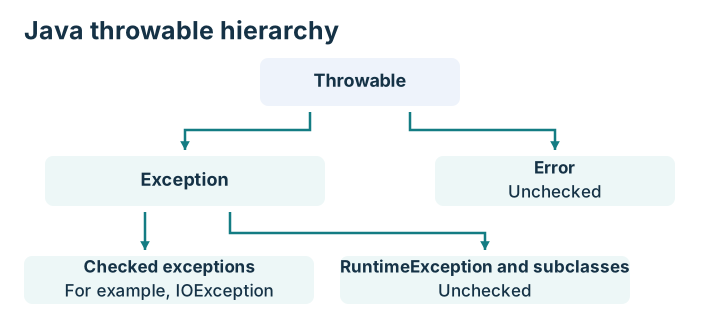
All exceptions and errors inherit from Throwable. The compiler treats checked exceptions differently from unchecked exceptions.
| Category | Examples | Compiler requirement |
|---|---|---|
| Checked exceptions | IOException, SQLException | We must catch them or declare them when they can leave a method |
| Unchecked exceptions | IllegalArgumentException, NullPointerException | We do not have to catch or declare them |
| Errors | OutOfMemoryError, LinkageError | We do not have to catch or declare them |
RuntimeException and its subclasses are unchecked. Error and its subclasses are also unchecked, but they represent a different branch of the hierarchy. Errors generally indicate serious runtime or linkage problems that ordinary recovery code usually cannot resolve.
These categories do not tell us whether retrying is safe. An IOException caused by a missing local file may need a corrected path, while an unchecked exception from a network library may represent a temporary failure. We decide how to respond from the operation and the cause, not from checked versus unchecked alone.
2. Best Practices for Exception Handling
2.1. Catch an Exception Where We Can Make a Useful Decision
We catch an exception when we can recover, translate it into a meaningful application result, add useful context or report the final failure. If a method can do none of those things, allowing the exception to propagate is often clearer. Propagating means leaving the exception for a calling method to handle. A checked exception that can leave the method must also appear in its throws declaration.
For example, a file-reading helper may declare IOException. A command-line entry point can catch it and explain which input could not be read. The helper does not need to print a message and then throw the same failure again.
2.2. Do Not Silently Ignore a Failure
An empty catch block makes a failed operation look successful. Returning null after an unexpected database failure can have a similar effect when the caller interprets null as “record not found.”
If a failure is intentionally harmless, we make that policy clear. A best-effort cleanup operation may have different requirements from a payment write. Ignoring a documented, irrelevant condition is different from hiding an unknown failure.
2.3. Catch Specific Exception Types
We catch the types associated with the behavior we intend to handle. A catch for IOException is clearer than a catch for Exception around a file operation.
A broad catch may be appropriate at a task or request boundary that must convert unexpected failures into a final response. It should not silently turn programming defects into normal results. Catching Throwable also catches errors, so it is rarely appropriate in ordinary application code.
2.4. Declare Meaningful Checked Exceptions
A method that reads a file can declare IOException instead of the broad Exception. The caller then knows which kind of failure to handle.
We use the exceptions that fit the abstraction. A public application API may translate a storage-specific exception into an application exception, while an internal file utility may expose IOException directly.
2.5. Preserve the Original Cause When Wrapping
We pass the original exception to the new exception’s constructor. That attached exception is the cause, and its stack trace records where the underlying failure occurred. Copying only its message loses this cause chain.
import java.io.IOException;
import java.nio.file.Files;
import java.nio.file.Path;

final class ReportReadException extends RuntimeException {
    ReportReadException(String message, Throwable cause) {
        super(message, cause);
    }
}

final class ReportLoader {
    String load(Path path) {
        try {
            return Files.readString(path);
        } catch (IOException cause) {
            throw new ReportReadException("Could not read report " + path, cause);
        }
    }
}
ReportLoader translates a file failure into a report-loading failure. The message identifies the operation, and the cause preserves the original IOException. This example uses an unchecked application exception; whether callers need a checked exception is an API design decision.
2.6. Add a Custom Exception Only When It Adds Meaning
A custom exception can help callers distinguish a domain failure, such as an expired reservation. It is less useful when it merely renames Exception and gives callers no different decision to make.
We prefer an existing suitable type, such as IllegalArgumentException, for an invalid method argument. We do not wrap every NullPointerException as a file-not-found exception because those failures mean different things.
2.7. Include Useful Context Without Exposing Sensitive Data
A message such as “Could not load invoice 812” is more useful than “Something failed.” It identifies the operation and a relevant identifier.
We do not include passwords, access tokens, full payment details or unnecessary personal data. We also distinguish internal diagnostics from a user-facing response. A useful server log does not justify returning a stack trace to an API client.
2.8. Give Failure Logging a Clear Owner
If every layer logs the same exception before rethrowing it, one failure can produce several stack traces. We usually let the layer that handles the final outcome own the failure log.
Lower layers can add context by preserving and wrapping the cause. There are legitimate reasons for separate audit or retry records, but those records serve a different purpose from repeatedly logging the same final failure.
2.9. Use the Logger’s Exception Argument
Logging only exception.getMessage() omits the stack trace. With SLF4J, we pass the exception as the throwable argument.
logger.error("Could not load report {}", reportId, exception);
Here, logger is an SLF4J logger, reportId identifies the report and exception is the caught failure. The stack trace is part of the log event. printStackTrace() may help in a small local exercise, but an application’s logger gives us control over destinations, formatting and correlation.
2.10. Prefer Try-with-resources for Resources We Own
We close files, database connections and similar resources when we are responsible for their lifetime. The try-with-resources statement closes resources that implement AutoCloseable, including when the body fails.
import java.io.BufferedReader;
import java.io.IOException;
import java.nio.file.Files;
import java.nio.file.Path;

String firstLine(Path path) throws IOException {
    try (BufferedReader reader = Files.newBufferedReader(path)) {
        return reader.readLine();
    }
}
This method returns the first line, or null for an empty file. The reader is closed when control leaves the block. We do not close a caller-owned resource unless the API says that ownership is transferred.
2.11. Do Not Replace the Original Failure During Cleanup
A return or a new exception from a finally block can hide the outcome of the try block. We keep cleanup from accidentally replacing the failure we need to investigate.
Try-with-resources has a defined rule when both the body and closing fail. The body’s exception remains primary and the closing failure is attached as a suppressed exception. We can inspect suppressed exceptions with getSuppressed() when investigating resource failures.
2.12. Validate Inputs Before Performing Avoidable Work
We check required values, ranges and combinations before doing expensive or irreversible work. An invalid quantity should be rejected before a payment attempt, for example.
Validation does not replace database constraints or transactions. Another request may change the data after validation. We still need a transaction for related database writes and constraints for rules that the database must enforce.
2.13. Do Not Use Exceptions as Ordinary Loop Conditions
We do not read past the end of a list and catch IndexOutOfBoundsException to stop iterating. A loop condition expresses that behavior directly.
Some APIs legitimately use exceptions to report a failed operation, such as parsing invalid numeric input. We handle the API’s contract rather than forcing a replacement design, but we avoid using exceptions to disguise ordinary branching in our own code.
2.14. Retry Only When the Operation and Failure Allow It
A retry can help with a temporary connection failure. It cannot fix a malformed query or an invalid password. We classify the failure, limit attempts and wait between them according to the service’s policy.
We also check whether repeating the operation is safe. If a payment was accepted but its response was lost, sending the same payment again may create a duplicate. An idempotent operation has the same intended effect when the same request is repeated as when it is performed once. A stable request identifier can help the receiving service recognize a repeated operation, but that service must implement the duplicate-handling policy. Adding an identifier or a retry loop alone does not provide this protection.
2.15. Respect Thread Interruption
Interruption is a cooperative signal that a task may need to stop. If we can declare InterruptedException, we can let the caller handle it. If we catch it in a task that cannot propagate it, we commonly restore the interrupt status and return.
@Override
public void run() {
    try {
        Thread.sleep(1000);
    } catch (InterruptedException exception) {
        Thread.currentThread().interrupt();
        return;
    }

    performNextStep();
}
This is a Runnable task method, and performNextStep() represents the task’s next operation. If sleep is interrupted, that operation is not called. The Thread.sleep() contract explains that throwing InterruptedException clears the interrupt status, which is why this catch restores it.
We do not call Thread.stop() or assume that interruption forcibly terminates another thread.
2.16. Keep One Failure’s Context Together
Concurrent requests can interleave log events. We include the relevant operation and identifier in the same event as its failure. A request or trace identifier helps connect related events without relying on adjacent log lines.
This does not mean that an entire request must produce only one log entry. Several useful events can describe its progress, as long as we can correlate them and avoid leaking sensitive values.
2.17. Share a Failure Policy Without Hiding Important Differences
If several operations need the same exception translation or response mapping, we can centralize that policy. For example, a web application’s exception handler can map a known domain exception to a suitable HTTP response.
We do not introduce a generic helper that catches every exception, logs it and returns null. That helper makes failures uniform by hiding them, rather than by giving callers a clear policy. We also prefer try-with-resources over a handwritten close helper for resources it supports.
2.18. Document the Exceptions Callers Need to Understand
Javadoc can explain which conditions cause a declared exception and what callers can do about them. We also document important unchecked exceptions when they form part of the public contract.
We do not list every possible implementation failure as if it were a supported outcome. Documentation is most useful when it describes meaningful conditions, such as an invalid argument, an unavailable resource or a missing domain record.
2.19. Check Failure Behavior in Tests
We test important rejected inputs, dependency failures, cleanup and retry limits. A test should fail if a failure is accidentally swallowed or translated into a successful result.
JUnit’s assertThrows() checks that an operation throws the expected type or a subtype. The unit testing guide shows how to use it without catch blocks that let a test pass accidentally.
2.20. Translate Failures at the Application Boundary
A command-line program can print a clear failure message and return an appropriate exit code. A web API can return an appropriate HTTP status and a safe error body. A background job can record a failed state that its operator can inspect.
We preserve the technical cause internally, but give the caller the information needed for its next action. A missing resource, rejected input and an unexpected server failure do not all mean the same thing.
3. Conclusion
We handle exceptions where a useful decision can be made, preserve their causes and release the resources we own. Clear failure policies and focused tests help callers respond correctly without hiding the information needed to investigate a problem.
Happy Learning!

Hello,
This blog is java exception handing best practices assignment help and benefits information. thank you for share this blog.
Thank you! A very nice article for newbie. (Like me! :D)
Nice article.
Question you missed;
Use “try-catch” block surrounding only the line that throws the Exception, when?
Use “try-catch” block surrounding more than only the line that throws the Exception, when?
Thanks.
Most valuable post ever .you help me a lot through this post really … thanks a lot ….
Thanks a lot. Very informative article.
Hi,
My app code is analysed by Sonar and this one is showing Major issues when a public methods throw several checked exceptions.
The message shown is: “Refactor this method to throw at most one checked exception instead of: MyException1, MyException2, etc…”
And sonar’s explanation is: “Using checked exceptions forces method callers to deal with errors, either by propagating them or by handling them.
This makes those exceptions fully part of the API of the method.
To keep the complexity for callers reasonable, methods should not throw more than one kind of checked exception.”
This sonar tip conflicts with your point no 2 in this article.
So it is a bit confusing. What is the best way of doing so?
Should we throw only one kinf of exception embedding the real exception in his cause?
Best regards,
Lucas
Point 2 ONLY talk about being specific (rather than being generic) which is preferred way.
Sonar follows fixed set of static rules – and does not understand the context. You as developer is the most suitable person to decide the behavior.
Also, you can apply the point 5 for this kind of rules, which still make point 2 as valid.
Very informative article. Keep Posting..)
Hi Lokesh,
Thanks for the blog it’s all gold dust.
I have query when you say “8) Always catch only those exceptions that you can actually handle” what if I want log some info that will help or add customize the message to add some more details.
Would not be a good idea to catch customize the message an and re throw it?
Yes, you can do it this as well. A little more context information is always helpful.
Thanks Lokesh.
First of all I would like to thank you for such a nice article. I have a small doubt i.e in the 7th point you written that never throw an exception from finally block but in the 19th point you used a try-catch template in finally block which is throwing an exception which means that finally block is throwing the exception. Please make me understand in this regard.
Updated point – 19. It’s was wrong example. If there is an error while closing the exception, then you cannot anything about it. So log it for reference.
okay. Can you please make similar post about threads(like multiple threads of same object on methods, multiple threads of same object on static methods, multiple threads of different objects on methods , multiple threads of different objects on static methods )
I will find time.
I was asked in an interview say we have a class a where v have try catch block with exception handling.. We call this method from other class ..how to show the exception and message in current class.
Class A{ void somemethod(){ try{ // some code }catch(Exception e){ String s= "Error is "+e; } Class B{ A a = new A(); a.some method(); //how to display the string error here }1) Set the error message in e in class A.
2) Wrap a.someMethod() in try catch block in class B. and in catch block, print the exception in logger/console.
Hi ,
Can you please explain below code,is that right ?
protected String someMethod(String className)
{
String packageName = “”;
try
{
//Some Code
}
catch (Throwable t)
{
packageName = “”;
}
return packageName;
}
Syntactically code is correct. No compilation issues.
Other than above two debatable issues : Method parameter “className” is not used. And catch block used for controlling application logic. Both are debatable.
Nice article Sir!!
You just broke your own rule (7) Never throw any exception from finally block) only a few lines later – you said not to throw exceptions from the finally clause. Then you did it with this:
finally{
DBUtil.closeConnection(conn);
// which equals this:
try{
conn.close();
} catch(SQLException ex){
throw new RuntimeException(“Cannot close connection”, ex);
// and voila – you are throwing an exception from a finally clause – lol.
}
}
Good catch. Though the example I taken is broken, idea still stand relevant. Thanks for pointing out.
Hi Sir,Nice Post.Sir please tell me,how to handle exception in web-application of struts-spring-Hibernate. eg-Suppose if exception has come in DAO layer of application,how to handle this exception. Please give with proper example.
There is no hard and fast rule for handling exceptions in any specific way. In struts-spring-hibernate project or any other project, you need to identify that
1) Which exceptions you want to handle and which one you want to pass on to framework?
2) How the application must behave in event of any certain exception?
Above two questions will guide you everytime you have any confusion.
Sir,Good suggestion.
Can you please provide some sample code for this.Suppose in DAO layer the data is not available,then where i have to handle the exception in DAO layer or pass on to Service Layer for handling.
Unfortunately that also depends on scenario you are facing. E.g. In a search page, if the record does not exist then you want to let ue know that record does not exist. If he typed something wrong which resulted in exception then also you want him to notify.
But if there is exception during query execution e.g. timeout; then you would not like to show it to user, rather you will re-try it immediately or try any other data source possibly.
Again above arguments are completely fiction based :) and they change as per need of the time.
Finally a good post, 99% of what u get from google is very basic information which only helps u to do some certification, Rather this one is more in depth which might help u in day to day use . Please let me know if you have something for collection too.
Thanks Lokesh for such nice text…
Here is one more blog targeting “Exception Handling in Threading Environment”, if someone interested can read…
Exceptions handling of single-threaded and multi-threaded programs are different from each other. When single-threaded program terminates due to uncaught exception, it stop running and print exception stack trace on console. In other hand, when multi-threaded program encounter with uncaught exception, the stack trace may be printed, but no one may be watch that console. Because when that thread fail, application may appear continuously working. Therefore, there might be change that its failure may go unnoticed.
Read more from here
Thanks a lot
It’s really useful. Thanks
The example in 19 is bad chosen, as it conflicts with 7.
You are right. I agree. But sometimes it happens when you try to make any point you actually mess with another. Anyways, logically both are correct if read independently.
Good list to memorize for all devs, even i, as an experienced dev, learnt a new practice.
At point 19 you recommend using template methods. But your example is missing a real template method. Template method means in pseudo code:
public abstract class SuperClass {
public void importantMethod() {
// do something before
this.theTemplateMethod();
// do something after
}
public abstract void theTemplateMethod();
}
public class SubClass extends SuperClass {
private Knowledge knowledge;
public void theTemplateMethod() {
// special things we can only do in subClass,
// because only the subClass has some special knowledge.
}
}
Instead your code shows delegation of closing a connection to a class named DBUtil, which better should be called ConnectionService or ConnectionCloseService. So in turn you really describe a “delegation of closing a connection to a service to hide exception handling”.
good work