
The best way to iterate HashMap entries is a for-each loop over entrySet() or the Map.forEach() method, because both read every key and value in one pass without looking up any key again. Looping over keySet() and calling get() for each key does an extra hash lookup per entry, which makes it the slowest of the common ways.
We iterate a map whenever we need all its entries, for example to export stock levels to a CSV file, to total the values, or to remove entries that match a condition. The following example walks the same small stock map in each common way, and every loop computes the total units.
Map<String, Integer> stock = new HashMap<>(Map.of("tea", 5, "mug", 2, "pot", 3));
int a = 0;
for (Map.Entry<String, Integer> e : stock.entrySet()) { a += e.getValue(); }
int viaEntrySet = a;                                                      // 10
int[] b = {0};
stock.forEach((sku, units) -> b[0] += units);
int viaForEach = b[0];                                                    // 10
int viaValues = stock.values().stream().mapToInt(Integer::intValue).sum(); // 10
int c = 0;
for (String sku : stock.keySet()) { c += stock.get(sku); }
int viaKeySet = c;                                                        // 10, one extra get() per key
Notice that all four loops give the same total, and the order in which they visit the keys is not defined for a HashMap. We compare the ways in a table, remove and update entries safely during a loop, control the order, and look at a JMH run on JDK 25 that shows which differences are real.
1. Ways to Iterate HashMap Entries
A HashMap is not a Collection, so a for-each loop cannot take the map itself. We loop over one of its three views, namely entrySet(), keySet() or values(), or we pass a lambda to forEach(). The views are live, so they reflect the map and do not copy it.
| Way | Gives us | Remove during the loop | Extra lookup |
|---|---|---|---|
| for-each over entrySet() | Key and value | No (use an Iterator) | No |
| Map.forEach((k, v) -> …) | Key and value | No | No |
| for-each over values() | Value only | No | No |
| for-each over keySet() + get() | Key, value through get() | No | Yes, one get() per key |
| Iterator over entrySet() | Key and value | Yes, iterator.remove() | No |
| entrySet().stream() | Key and value in a pipeline | No (collect a new map) | No |
1.1. Looping Over entrySet()
The entrySet() view returns each mapping as a Map.Entry, so getKey() and getValue() read the fields of the internal node without any hashing. It is the default choice when the loop body needs both the key and the value, or uses break or a checked exception.
Map<String, Integer> stock = new HashMap<>(Map.of("tea", 5, "mug", 0));
List<String> soldOut = new ArrayList<>();
for (Map.Entry<String, Integer> entry : stock.entrySet()) {
    if (entry.getValue() == 0) {
        soldOut.add(entry.getKey());
    }
}
List<String> result = soldOut;                     // [mug]
With var the loop header gets shorter, and since Java 22 we can name an unused lambda parameter _ when we only need one side of the entry.
Map<String, Integer> stock = new HashMap<>(Map.of("tea", 5, "mug", 2));
int units = 0;
for (var entry : stock.entrySet()) {
    units += entry.getValue();
}
int total = units;                                 // 7
int[] sum = {0};
stock.forEach((_, u) -> sum[0] += u);
int viaUnnamed = sum[0];                           // 7
1.2. Using Map.forEach()
The Map.forEach() method, added in Java 8, takes a BiConsumer that gets the key and the value. HashMap overrides it and walks its own bucket array, so it creates no iterator object. It is the shortest form for a loop body that is one statement.
Map<String, Integer> stock = new HashMap<>(Map.of("tea", 5, "mug", 2));
StringBuilder csv = new StringBuilder();
stock.forEach((sku, units) -> csv.append(sku).append(',').append(units).append('\n'));
int lines = csv.toString().lines().toList().size();         // 2
A lambda cannot change a local variable or throw a checked exception, so a body that needs either one is clearer as an entrySet() loop. A return inside the lambda only skips the current entry and does not stop the loop.
1.3. Looping Over keySet() or values()
When we need only the keys or only the values, the keySet() and values() views skip the part we do not use. The problem starts when a keySet() loop calls get() to read the value, because get() computes the hash of the key again and searches its bucket, which repeats work the iterator already did.
Map<String, Integer> stock = new HashMap<>(Map.of("tea", 5, "mug", 2));
Set<String> skus = new TreeSet<>(stock.keySet());          // [mug, tea]
int units = 0;
for (int u : stock.values()) {
    units += u;
}
int total = units;                                         // 7
1.4. Using an Iterator
An explicit Iterator is what the for-each loop uses behind the scenes, so it is not faster. We write it out only when we need iterator.remove(), which deletes the current entry without breaking the loop, as shown in section 2.
Map<String, Integer> stock = new HashMap<>(Map.of("tea", 5, "mug", 0, "pot", 0));
Iterator<Map.Entry<String, Integer>> it = stock.entrySet().iterator();
while (it.hasNext()) {
    Map.Entry<String, Integer> entry = it.next();
    if (entry.getValue() == 0) {
        it.remove();
    }
}
int left = stock.size();                                   // 1
1.5. Streaming the Entries
A stream over entrySet() fits when the loop filters, transforms or collects into a new structure. For a plain loop it adds the cost of the pipeline objects, which is noticeable on small maps, as the measurements in section 4 show.
Map<String, Integer> stock = new HashMap<>(Map.of("tea", 5, "mug", 2, "pot", 0));
List<String> lowStock = stock.entrySet().stream()
        .filter(e -> e.getValue() < 3)
        .map(Map.Entry::getKey)
        .sorted()
        .toList();
List<String> result = lowStock;                            // [mug, pot]
Parallel streams split the bucket array between threads, which pays off only for large maps with an expensive body. The Java Streams guide covers the stream operations used here.
2. Removing and Updating Entries During Iteration
The iterators of HashMap are fail-fast. If we call map.remove() or map.put() with a new key inside a for-each loop or a forEach() call on a view, the next call to the iterator throws ConcurrentModificationException. Changing the value of an existing key is not a structural change, so it is allowed.
Map<String, Integer> stock = new HashMap<>(Map.of("tea", 5, "mug", 0, "pot", 3));
stock.keySet().forEach(sku -> { if (stock.get(sku) == 0) stock.remove(sku); });   // ConcurrentModificationException
To remove entries while iterating, we call removeIf() on a view, or remove() on the iterator, never remove() on the map. The removeIf() method, added in Java 8, is the shortest safe form, and it works on entrySet(), keySet() and values().
Map<String, Integer> stock = new HashMap<>(Map.of("tea", 5, "mug", 0, "pot", 0));
boolean removed = stock.values().removeIf(units -> units == 0);      // true
int left = stock.size();                                             // 1
Map<String, Integer> prices = new HashMap<>(Map.of("tea", 450, "mug", 1200));
prices.replaceAll((sku, cents) -> cents + 50);
Integer mug = prices.get("mug");                                     // 1250
To update values in a loop that also reads the key, we call setValue() on the entry. It writes the value into the map, and the iterator keeps working.
Map<String, Integer> stock = new HashMap<>(Map.of("tea", 5, "mug", 2));
for (Map.Entry<String, Integer> entry : stock.entrySet()) {
    entry.setValue(entry.getValue() * 2);
}
Integer tea = stock.get("tea");                            // 10
When several threads change the map during the loop, none of these rules help, because HashMap is not thread-safe. A ConcurrentHashMap iterates without throwing ConcurrentModificationException, as explained in ConcurrentHashMap vs Collections.synchronizedMap().
3. Iteration Order of a HashMap
A HashMap visits entries in bucket order, which depends on the hash codes, the capacity and the insertion history. The order is not insertion order, and it can change after a resize or between Java versions, so code must never depend on it.
When the order matters, we pick a map that defines it, or we sort while iterating.
- LinkedHashMap iterates in insertion order, and since Java 21 it also implements SequencedMap, so reversed(), firstEntry() and lastEntry() work on it.
- TreeMap iterates in key order, or in the order of a Comparator.
- A stream sorted with Map.Entry.comparingByKey() or comparingByValue() gives an order for one loop without changing the map.
Map<String, Integer> stock = new HashMap<>(Map.of("tea", 5, "mug", 2, "pot", 3));
List<String> byKey = stock.entrySet().stream()
        .sorted(Map.Entry.comparingByKey())
        .map(e -> e.getKey() + "=" + e.getValue())
        .toList();                                         // [mug=2, pot=3, tea=5]
List<String> keys = byKey;                                 // [mug=2, pot=3, tea=5]
LinkedHashMap<String, Integer> ordered = new LinkedHashMap<>();
Integer p1 = ordered.put("tea", 5);                        // null
Integer p2 = ordered.put("mug", 2);                        // null
String last = ordered.reversed().firstEntry().getKey();    // "mug"
4. Measuring Iteration Performance on JDK 25
Iteration speed depends on how much work each way does per entry. The entrySet() loop, the values() loop and the explicit Iterator run the same internal HashIterator, which walks the bucket array and returns each node. HashMap.forEach() walks the same array in a plain loop. The keySet() + get() loop does that walk too and adds a hash lookup per key, and a stream adds pipeline objects on top of the walk.
We checked this reasoning with a JMH 1.35 benchmark on JDK 25.0.4, run on a cloud VM with 2 vCPUs, one fork, 5 warm-up and 5 measured iterations of one second each. The map held String keys such as “key42” and Integer values, and each benchmark summed the key lengths and the values. The numbers are average microseconds per full iteration, lower is better, and they come from this one run.
| Way | 100 entries (us) | 100,000 entries (us) |
|---|---|---|
| for-each over values() (value only) | 0.31 +- 0.06 | 1,037 +- 349 |
| for-each over entrySet() | 0.34 +- 0.03 | 1,017 +- 142 |
| Map.forEach() | 0.35 +- 0.21 | 974 +- 277 |
| Iterator over entrySet() | 0.35 +- 0.06 | 1,027 +- 235 |
| entrySet().stream() + mapToLong().sum() | 0.64 +- 0.04 | 1,346 +- 248 |
| for-each over keySet() + get() | 0.75 +- 0.17 | 1,361 +- 177 |
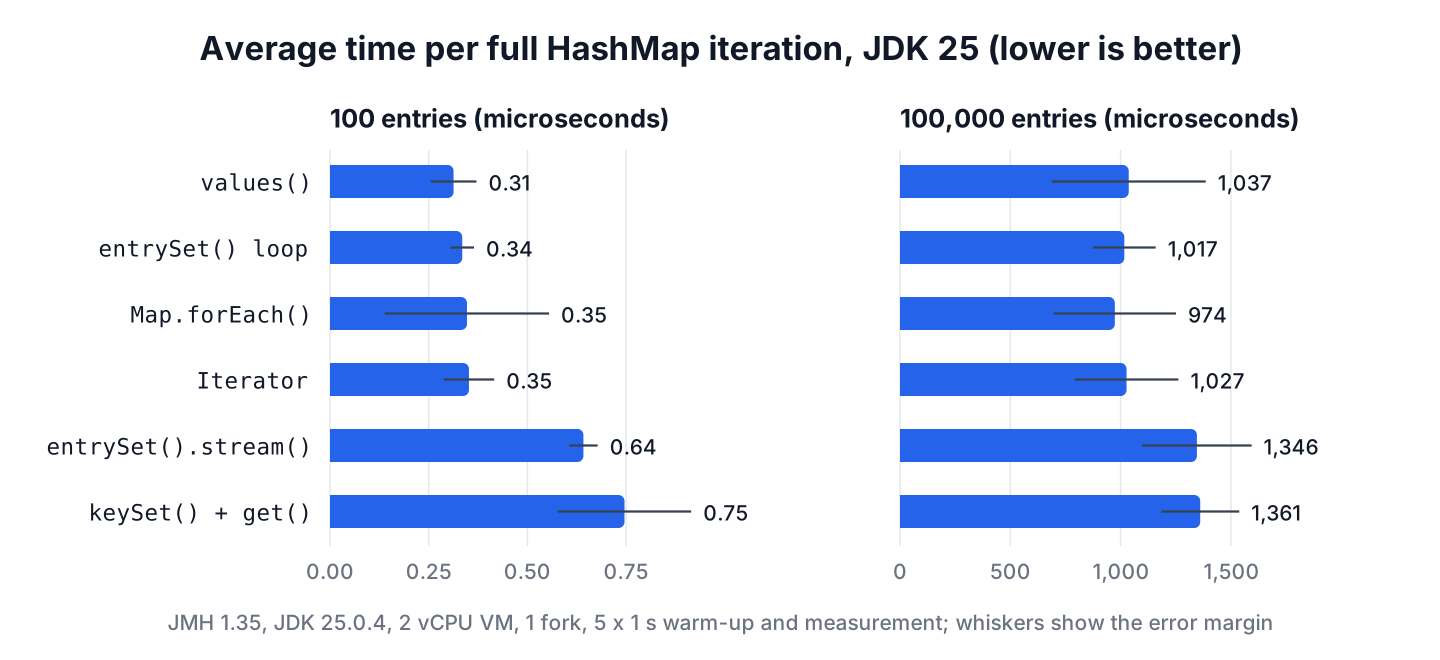
The first four ways tie within the error margins at both sizes, so the old advice that forEach() or the Iterator is slower does not hold on JDK 25. The keySet() + get() loop took about twice as long on 100 entries and about a third longer on 100,000, where cache misses on the scattered nodes dominate every way. The stream cost about twice as much on the small map, because building the pipeline costs as much as walking 100 entries.
Capacity matters as well. Iterating the views takes time proportional to the capacity plus the number of entries, so a map created with a huge initial capacity and few entries iterates slowly over empty buckets. We size maps for the expected entries, as explained in HashMap initial capacity and load factor, and we measure our own workload with JMH before we optimize a loop.
5. Exporting a Product Report From a HashMap
A warehouse app keeps the units of each product in a HashMap and exports a nightly report. The report lists products sorted by name, drops products that are out of stock, and flags the ones below a reorder level. One pass over entrySet() as a stream does all three, and the map itself stays unchanged for the next day.
record ReportLine(String sku, int units, boolean reorder) {}Map<String, Integer> stock = new HashMap<>(Map.of("tea", 40, "mug", 3, "pot", 0, "cup", 12));
List<ReportLine> report = stock.entrySet().stream()
.filter(e -> e.getValue() > 0)
.sorted(Map.Entry.comparingByKey())
.map(e -> new ReportLine(e.getKey(), e.getValue(), e.getValue() < 10))
.toList();
int lines = report.size(); // 3
String first = report.getFirst().sku(); // "cup"
boolean mugReorder = report.get(1).reorder(); // trueWe picked a stream because the job filters, sorts and maps. For a nightly job that only writes each entry to a file, an entrySet() loop with a BufferedWriter is the better fit, because it can throw IOException without wrapping it.
6. HashMap Iteration FAQs
Most searches about looping over a HashMap ask about speed, removal or order.
6.1. Which is faster, entrySet() or keySet()?
The entrySet() view is faster when we also need the values. A keySet() loop must call get() for each key, which hashes the key and searches its bucket again. In our JDK 25 run, it took about twice as long on 100 entries. When we need only the keys, keySet() costs the same as entrySet().
6.2. Is Map.forEach() slower than a for-each loop?
No. On JDK 25, HashMap.forEach() was as fast as the entrySet() loop within the error margin, because HashMap overrides it and walks the bucket array without an iterator. We choose between them for readability.
6.3. How do we remove entries from a HashMap while iterating?
We call removeIf() on a view, or remove() on an explicit Iterator. Calling map.remove() inside a for-each loop throws ConcurrentModificationException on the next step.
Map<String, Integer> stock = new HashMap<>(Map.of("tea", 5, "mug", 0));
boolean removed = stock.entrySet().removeIf(e -> e.getValue() == 0);   // true
6.4. Why does a HashMap print its entries in a different order?
A HashMap orders entries by bucket, not by insertion, and the bucket of a key depends on its hash code and the capacity. We use LinkedHashMap for insertion order, TreeMap for sorted keys, or sort the entries in a stream.
6.5. Can we iterate a HashMap in reverse order?
No, because a HashMap has no defined order to reverse. A LinkedHashMap or TreeMap has one, and since Java 21 both offer reversed() through SequencedMap.
TreeMap<String, Integer> sorted = new TreeMap<>(Map.of("tea", 5, "mug", 2, "pot", 3));
String firstKey = sorted.reversed().firstKey();            // "tea"
7. Conclusion
We iterate a HashMap through its views or forEach(). For key and value, a for-each loop over entrySet() or Map.forEach() is the right default, and both ran equally fast on JDK 25.
The keySet() + get() pattern repeats a hash lookup per key and was the slowest way we measured, so we replace it whenever we see it. To delete during a loop we use removeIf() or iterator.remove(), and when order matters we move to LinkedHashMap, TreeMap or a sorted stream. The Java HashMap guide lists the other everyday HashMap tasks.
8. References
Happy Learning !!

So, I’ve found that entry set is only faster after the first loop through (as the entry objects are cached, I’d assume).
Using entrySet() in for-each loop for key/value #1: 95
Using entrySet() in for-each loop for key/value #2: 66
Using keySet() in for-each loop for key/value: 68
Using entrySet() in for-each loop for key: 33
Using keySet() in for-each loop for key: 31
Using entrySet() in for-each loop for value: 33
Using values() in for-each loop for value: 33
I’m assuming your example is “optimizing” a bit since many of your methods have no-op code in the loop itself. Add a System.out.println for each of your values so Java can’t ignore what’s happening in the loop and you’ll probably get different results. Also, if you really want to do timing, don’t use the Calendar. System.nanoTime() is much more accurate. (System.currentTimeInMillis() isn’t guaranteed to be consistently as accurate last I checked, anyway)
It’s always better to use JMH for nano/microbenchmarks ;)
https://gist.github.com/AFulgens/42ef34d625dd5b00f62d9ed77e727ccb
Bottomline: I would say it’s a best practice to use `entrySet()` over `keySet()` when you are iterating over a Map.
Thanks for sharing your analysis, and confirming my conclusion.
Hi Lokesh,
I am little confuse about working of entrySet method.
public Set<Map.Entry> entrySet() {
return entrySet0();
}
private Set<Map.Entry> entrySet0() {
Set<Map.Entry> es = entrySet;
return es != null ? es : (entrySet = new EntrySet());
}
When this entrySet is assigning values into this , i can see its called the constructor which is default one.Initially this entrySet is null but when its assigned values into this entrySet.
keyset iterator() is bound to be slow, since there is an extra step to lookup of value .
Great compairsion!
Thanks for that! That helped me to solve a problem I had using Primefaces bar charts… thanks!
Hi Lokesh,
Firstly Brilliant article on HashMap working.
QUERY:Will there be an issue if I create the Hashmap inside the static block itself?
I don’t see any adverse effect on HashMap when you create HashMap inside static block. Only one thing concern me is that HashMap instance will also be static; so all the objects it refers from either keys OR values will not be garbage collected by GC for longer time. Usually static variables in application live longer than their non-static counterparts.
Got the point.:) :)
but first thing still holds TRUE ..ARTICLE WAS IMMENSLY HELPFUL…
Please explain it bit more i.e the same u explained in loop concepts….
Hi Lokesh,
As per my Analysis, If you want to retrieve some value from Map based on “key” search then keySet would be faster(little bit) But if you want to parse the whole Map then entrySet would be faster 30 to 40 % based on data size. If required then I can post the code also.
Please share.
Hi Lokesh,
I also tried to find the best way to parse a Map and found that results are better with keySet. Here I am posting the code that I used for my analysis. Kindly have a look…and please let me know if you find something valuable to share…Thanks in advance..
—————————————————————————————————–
package com.himanshu;
import java.util.HashMap;
import java.util.Map;
import java.util.Map.Entry;
public class Test
{
static Integer finalKey = 10000;
public static void main(String[] args)
{
Map map = new HashMap();
for(int i=1 ; i <= 1000000; i++)
{
map.put(i, "a");
}
long first = parseThroughEntrySet(map);
long second = parseThroughKeySet(map);
System.out.println("First :"+first);
System.out.println("Second :"+second);
}
static long parseThroughEntrySet(Map map)
{
long startTime = System.currentTimeMillis();
String value;
for (Entry entry : map.entrySet())
{
Integer key = entry.getKey();
if(key.equals(finalKey))
{
value = entry.getValue();
}
}
long endTime = System.currentTimeMillis();
long totalTime = endTime – startTime;
return totalTime;
}
static long parseThroughKeySet(Map map)
{
long startTime = System.currentTimeMillis();
String value;
for(Integer key : map.keySet())
{
if(key.equals(finalKey))
{
value = map.get(key);
System.out.println(“Done in parseThroughKeySet !!!” +value);
}
}
long endTime = System.currentTimeMillis();
long totalTime = endTime – startTime;
return totalTime;
}
}
————————————————————————————————————————————–
It will be good if you explain the reason for performance differences
Hi ,
I have tried this and come with different results everytime , however i find that results are better with key set , even i read somewhere that key set is more better than entry set .
Regards,
chandra
Can you please the code you used.