
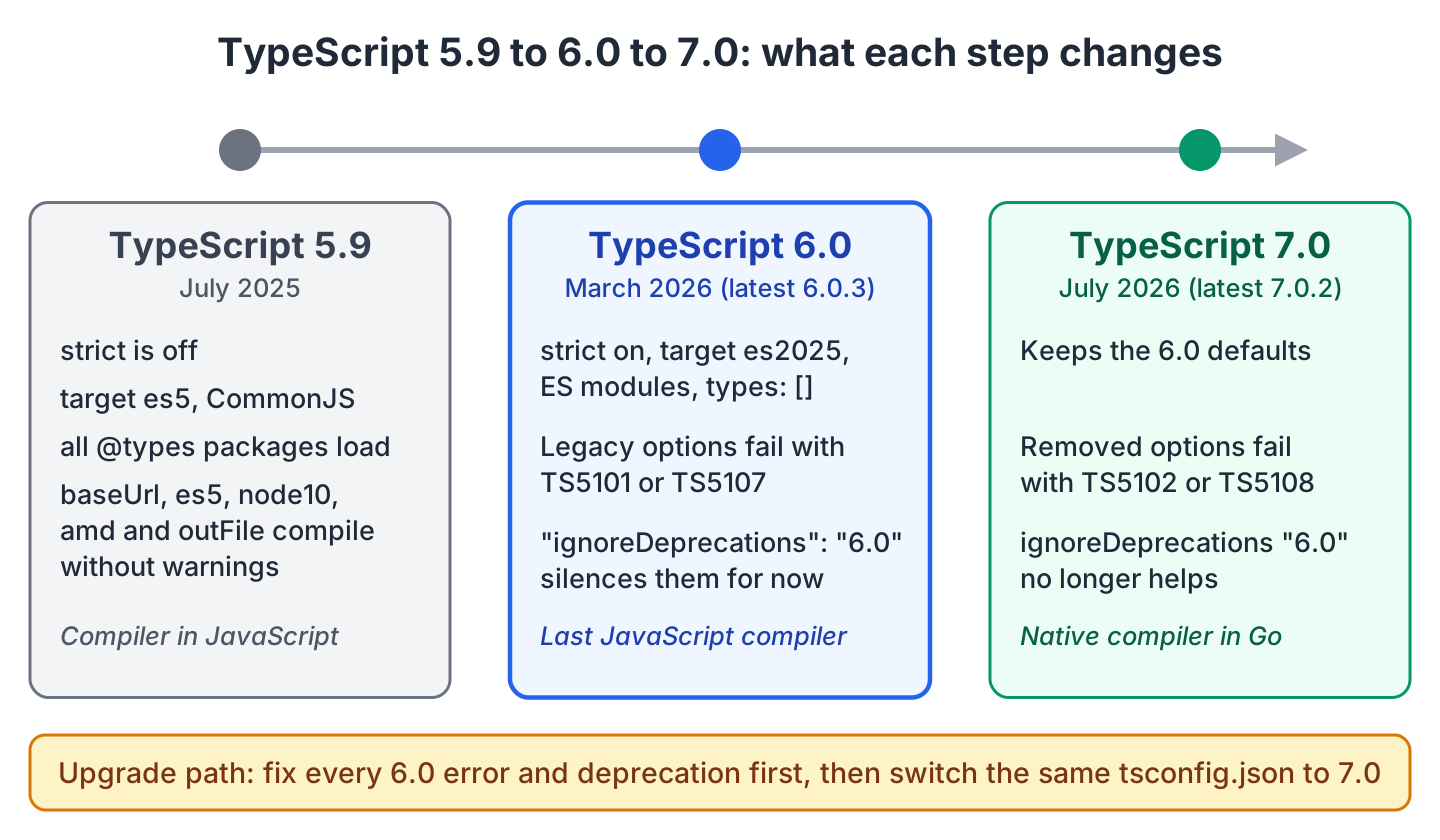
TypeScript 6 (version 6.0) is the last TypeScript release with a compiler written in TypeScript itself, and it prepares our projects for TypeScript 7. It changes the defaults in tsconfig.json and deprecates the old options that TypeScript 7 removes. Microsoft released it on March 23, 2026, with only a few new language features on top of 5.9.
We get types for the newest JavaScript APIs and a small inference fix. Old compiler options are reported but still work. A 5.x project that relies on the defaults gets new compile errors right away.
The following example compiles one file with an empty tsconfig.json (the file contains only {}) using TypeScript 6.0.3 on Node.js 22. The complete project is in the typescript-6-whats-new folder on GitHub.
function greet(name) { return "Hello, " + name; }               // error TS7006
function greetTyped(name: string) { return "Hello, " + name; }   // OK
const args = process.argv.slice(2);                              // error TS2591
With @types/node installed, TypeScript 5.9 compiles the same file without any error. In 6.0, strict mode is on by default, so the untyped parameter fails with TS7006. The compiler also no longer loads the Node.js types, so it reports TS2591 for process. We type the parameter and add “types”: [“node”] to tsconfig.json.
Next come a summary table, the tsc output per change and an upgrade checklist.
1. Summary of TypeScript 6.0 Changes
Most changes are new defaults or deprecations, not new syntax. They move our projects to the settings that TypeScript 7 expects.
| Change | Kind | What it does | Section |
|---|---|---|---|
| Inference for methods without this | New feature | Method order no longer changes the inferred type | 2.1 |
| #/* subpath imports | New feature | package.json imports can start with #/ | 2.2 |
| es2025 target and lib | New feature | Adds RegExp.escape(), and Promise.try(), the new Set methods and iterator helpers no longer need esnext | 2.3 |
| Temporal and Map.getOrInsert() | New feature | Adds types for both APIs to the esnext lib | 2.4 |
| strict, types | New default | strict is true, and no @types package loads by default | 3.1 |
| rootDir | New default | The folder that holds tsconfig.json | 3.2 |
| target, module, moduleResolution | New default | es2025, ES modules and bundler instead of es5, commonjs and node10 | 3.3 |
| noUncheckedSideEffectImports | New default | A missing file in import “./polyfills” fails the build | 3.4 |
| es5, baseUrl, node10, amd, outFile and others | Deprecated | Builds fail with TS5101 or TS5107 | 4 |
| tsc file.ts next to a tsconfig.json | New error | Fails with TS5112 instead of ignoring the config | 5 |
In 6.0, a deprecated option still works when we set ignoreDeprecations, whereas TypeScript 7 rejects it. We compare the two compilers in TypeScript 7 vs TypeScript 6.
2. New Features in TypeScript 6.0
Most new features are types for finished JavaScript APIs. A type only tells the compiler that an API exists, so code that compiles on TypeScript 6.0 can still fail at runtime on an older Node.js version.
2.1. Better Inference for Methods That Do Not Use this
When we pass an object with methods to a generic function, TypeScript infers T from those methods. In 5.9, it skipped methods in the first round because a method could use this, so method order changed the result. TypeScript 6.0 treats a method that does not use this like an arrow function, so the order no longer matters.
function pipeline<T>(steps: { load(): T; print(value: T): string }): string {
  return steps.print(steps.load());
}

const out = pipeline({
  print(value) { return value.toFixed(1); },   // 5.9: error TS18046: 'value' is of type 'unknown'.
  load() { return 5; },
});                                            // 6.0: out = "5.0"
2.2. Subpath Imports That Start With #/
Node.js subpath imports are short import names for a package’s own files, set in the imports field of package.json. With the mapping “#/*”: “./src/*”, import { price } from “#/util/price.ts” points to src/util/price.ts. TypeScript 6.0 accepts names that start with #/ when moduleResolution is nodenext or bundler, whereas 5.9 reports TS2307 (Cannot find module).
At runtime, Node.js 22 rejects the import with ERR_INVALID_MODULE_SPECIFIER, while Node.js 24 and 26 run it.
2.3. The es2025 Target and Library
TypeScript 6.0 accepts es2025 for target and lib. The lib option decides which built-in APIs the compiler knows. The es2025 lib adds RegExp.escape() and has Promise.try(), iterator helpers and the new Set methods, which needed esnext before. Because es2025 is also the default target, we get these types without setting lib.
const fruits = new Set(["apple", "banana", "kiwi"]);
const both = fruits.intersection(new Set(["kiwi", "mango"]));   // Set { "kiwi" }
const pattern = RegExp.escape("(1+1)");                         // \(1\+1\)
const found = new RegExp(pattern).test("2 = (1+1)");            // true
The Set methods run on Node.js 22, whereas RegExp.escape() needs Node.js 24 or newer, so the example project skips it on 22.
2.4. Types for Temporal and Map.getOrInsert()
Temporal is the new JavaScript date and time API that replaces the old Date object. The method getOrInsert() returns the value of a key in a Map, or inserts a default when the key is missing. TypeScript 6.0 has types for both only in the esnext lib, so by default tsc reports TS2550 or TS2304 until we add “lib”: [“esnext”].
const stock = new Map<string, number>();
const apples = stock.getOrInsert("apple", 5);                          // 5, inserted
const again = stock.getOrInsert("apple", 9);                           // 5, key exists
const later = Temporal.PlainDate.from("2026-03-23").add({ days: 10 }); // 2026-04-02
Both APIs need Node.js 26 at runtime. Smaller changes are that bundler resolution works with “module”: “commonjs”, the dom lib includes dom.iterable, and a –stableTypeOrdering flag orders types the way TypeScript 7 does.
3. New tsconfig.json Defaults in TypeScript 6.0
A default applies only when tsconfig.json does not set the option, so a short tsconfig.json gets new errors or compiled files in different folders. All options are in tsconfig.json compiler options.
3.1. Strict Mode Is On and types Is Empty
With strict set to true, all strict checks are on. One of them, noImplicitAny, rejects the untyped intro parameter with TS7006. The types option lists the @types packages whose globals the compiler loads, such as process or describe(). In 5.9, TypeScript loaded every package in node_modules/@types. In 6.0, types is [], so these globals are missing until we name their package.
{
  "compilerOptions": {
    "types": ["node"]       // or ["*"] to load every @types package as in 5.9
  }
}
When we see TS2591 or TS2304 for a Node.js or test runner global after the upgrade, the fix is a “types” entry, not a new import.
3.2. The rootDir Default Is the tsconfig.json Folder
The rootDir option decides which part of a source path is kept in the output folder. In 5.9, tsc used the common folder of all input files, so src/app.ts with “outDir”: “dist” compiled to dist/app.js. In 6.0, rootDir defaults to the folder of tsconfig.json. When our files are in src, tsc 6.0.3 reports TS5011 instead of moving the output.
tsconfig.json(1,43): error TS5011: The common source directory of 'tsconfig.json' is './src'. The 'rootDir' setting must be explicitly set to this or another path to adjust your output's file layout.To keep the 5.x layout, we set “rootDir”: “./src”. The example project sets “rootDir”: “.” instead and runs node dist/src/index.js.
3.3. ES2025 Output Instead of ES5 and CommonJS
In 5.9, a project without target and module got ES5 code in CommonJS format, with var declarations and exports assignments. In 6.0, target defaults to the newest JavaScript version, es2025 today, so the same file compiles to const, arrow functions and export.
For a Node.js project, we set “module”: “nodenext” ourselves. The value nodenext also sets moduleResolution, the way the compiler finds imported files, to nodenext.
3.4. Side-Effect Imports Are Checked
A side-effect import such as import “./polyfills” runs a file without importing any name from it. In 5.9, a typo in its path compiled without an error. In 6.0, noUncheckedSideEffectImports is true, so a missing file fails the build.
src/main.ts(1,8): error TS2882: Cannot find module or type declarations for side-effect import of './polyfils'.Projects that import CSS files through a bundler get TS2882 for every import “./theme.css”. One file such as css.d.ts with the line declare module “*.css”; fixes all of them.
4. What TypeScript 6.0 Deprecates
A deprecated option in tsconfig.json fails the build with TS5107, or with TS5101 for options such as baseUrl and outFile. The compiler still writes the JavaScript files, but tsc exits with code 2, so CI jobs fail.
tsconfig.json(3,15): error TS5107: Option 'target=ES5' is deprecated and will stop functioning in TypeScript 7.0. Specify compilerOption '"ignoreDeprecations": "6.0"' to silence this error.Setting “ignoreDeprecations”: “6.0” in compilerOptions makes the same config compile, so we can upgrade first and clean up later. Each deprecated option has a replacement that works on 7.0.
| Deprecated in 6.0 | What to use instead |
|---|---|
| “target”: “es5”, downlevelIteration | es2015 or newer |
| “moduleResolution”: “node” (node10) or “classic” | nodenext for Node.js, bundler for bundlers |
| baseUrl | The full prefix in each paths entry |
| “module”: “amd”, “umd”, “systemjs” or “none”, and outFile | A bundler such as esbuild or Vite |
| esModuleInterop, allowSyntheticDefaultImports or alwaysStrict set to false | Remove the line |
Two pieces of syntax are deprecated as well. A namespace declared with the module keyword fails with TS1540, so we write namespace Shop { … } instead. An import that uses assert fails with TS2880, so we switch to import attributes, such as import stock from “./stock.json” with { type: “json” }.
5. Running tsc With File Names Fails When tsconfig.json Exists
In 5.9, tsc src/app.ts ignored the tsconfig.json in the same folder without a warning. In 6.0, the same command fails with TS5112 and exit code 1.
$ npx tsc src/app.ts
error TS5112: tsconfig.json is present but will not be loaded if files are specified on commandline. Use '--ignoreConfig' to skip this error.
We change such a script to tsc -p ., which uses tsconfig.json, or add –ignoreConfig when it compiles a single file on purpose.
6. Upgrading a 5.x Project Step by Step
Most new errors come from the changed defaults, so we fix those first and the deprecation errors last.
- Run npm install -D typescript@6.0.3 and npx tsc –noEmit to see all errors at once without writing files.
- Add “types”: [“node”] plus the test runner package, for example “jest”.
- Set rootDir when outDir is set, either “./src” for the 5.x layout or “.” for the new one.
- Fix the strict-mode errors, or set “strict”: false and plan the fixes.
- Replace each deprecated option using the table in section 4. The ts5to6 tool rewrites baseUrl and rootDir for us.
- Fix scripts that call tsc with file names, and remove ignoreDeprecations once the build is clean.
After these steps, a Node.js project needs only module, rootDir, outDir and types in tsconfig.json, as the example project shows. Its extra lib line is only for the types from section 2.4.
7. Moving On to TypeScript 7
TypeScript 7.0 is the new compiler written in Go (latest release 7.0.2). It has the same defaults as 6.0 but ignores ignoreDeprecations, so every option from section 4 fails there with TS5102 or TS5108 (“has been removed”). A project that builds on 6.0 without ignoreDeprecations is ready for 7.0. The install steps are in Getting Started with TypeScript 7.
8. Conclusion
TypeScript 6 mostly changes configuration, with a few new types and a small inference fix. We notice the new defaults first, because a short 5.x tsconfig.json fails with TS7006, TS2591, TS5011 or TS2882 until we set those options ourselves. We fix the deprecations before moving to TypeScript 7, because ignoreDeprecations hides them only on 6.0.
9. References
- TypeScript 6.0 release notes
- Announcing TypeScript 6.0
- TypeScript 6.0 migration guide (microsoft/TypeScript issue 62508)
- ignoreDeprecations in the TSConfig reference
- Node.js subpath imports
Happy Learning !!
