
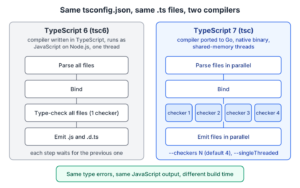
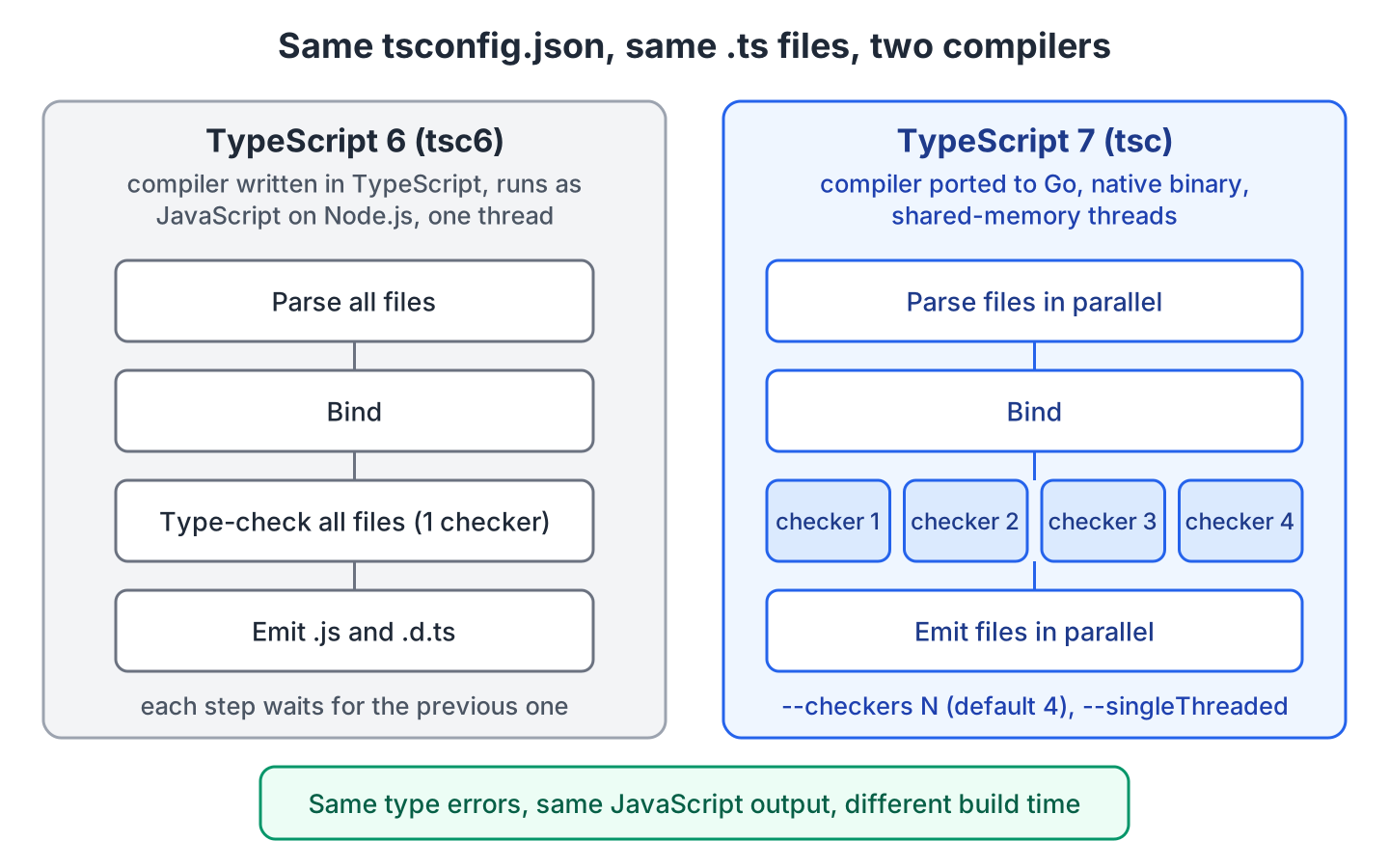
TypeScript 7 is the TypeScript compiler rewritten in the Go language, and it type-checks the same TypeScript code as TypeScript 6 about 10 times faster. Our code, tsconfig.json and the tsc command stay the same. Only the program behind tsc changes, and it runs as a native program on several threads, without Node.js.
We move to TypeScript 7 for faster tsc builds in CI and a faster editor on large projects. We keep TypeScript 6 next to it when a tool such as typescript-eslint calls the compiler from its own code, or when we use Vue or Svelte, whose editor tooling is built on TypeScript 6.
The following example installs TypeScript 6.0.3 and TypeScript 7.0.2 in one Node.js 22 project, the typescript-7-vs-6 project on GitHub, and builds the same sources with both compilers.
npx tsc6 --version     # Version 6.0.3
npx tsc --version      # Version 7.0.2
npx tsc6               # no errors, writes dist/src/catalog.js and dist/src/index.js
npx tsc                # no errors, writes the same two files with identical content
Notice that the project needs no code changes. Both compilers read the same tsconfig.json and write the same JavaScript files, so only the build time differs.
Next, we compare and time both compilers, and look at the tools that still need TypeScript 6.
1. TypeScript 7 vs TypeScript 6 at a Glance
The TypeScript team built TypeScript 7 by translating the existing compiler to Go file by file, so the type checker follows the same rules as before. The differences are in speed and in the tools around it.
| Aspect | TypeScript 6.0 | TypeScript 7.0 |
|---|---|---|
| Compiler written in | TypeScript, runs on Node.js | Go, runs as a native binary |
| Latest version (October 2026) | 6.0.3 | 7.0.2 |
| npm package and command | typescript, tsc (or @typescript/typescript6, tsc6) | typescript, tsc |
| Language and type checking | The baseline | Same results as 6.0 |
| Full build speed | 1x | 8x to 12x faster on large projects (official numbers) |
| Threads | One | Parallel parsing, checking and output (–checkers, –singleThreaded) |
| Options deprecated in 6.0 | Errors that ignoreDeprecations can silence | Removed, always an error |
| Compiler API (import ts from “typescript”) | Stable | Not in 7.0, planned for 7.1 |
| Editor support | tsserver | New language server (LSP) |
| Vue, Svelte, Astro, MDX tooling | Supported | Not yet, stay on 6.0 |
The main difference is how the work is split. TypeScript 6 runs every step on one thread. TypeScript 7 reads and writes files in parallel, and it splits type checking between 4 checker workers by default.
1.1. What Happened to tsgo?
Many older posts run TypeScript 7 with a command named tsgo. That was the nightly preview of the typescript-go project in the npm package @typescript/native-preview. From the 7.0 release candidate on, the Go compiler ships in the regular typescript package as tsc. So on 7.0.2 we need neither tsgo nor @typescript/native-preview.
2. Same Language, Same Type Errors
TypeScript 7 adds no new syntax and no new types. The release notes say that code that compiles cleanly on TypeScript 6.0 should compile the same way on 7.0. This holds when the 6.0 build uses stableTypeOrdering (which sorts types like 7.0) and not ignoreDeprecations.
The checks/type-error.ts file in our example project has two type errors. One passes a genre that is not part of the Genre union, and the other assigns a possibly undefined value to a number.
const catalog = new Catalog();
catalog.add({ title: "Dune", genre: "poetry", pages: 412 });   // error TS2322
const pages: number = catalog.find("Dune")?.pages;             // error TS2322
Both compilers report the same error codes at the same positions. The check:output script of the project also compares the JavaScript that each compiler writes for src/, and the files are identical.
--- tsc6 (TypeScript 6)
checks/type-error.ts(4,30): error TS2322: Type '"poetry"' is not assignable to type 'Genre'.
checks/type-error.ts(6,7): error TS2322: Type 'number | undefined' is not assignable to type 'number'.
  Type 'undefined' is not assignable to type 'number'.
--- tsc (TypeScript 7)
checks/type-error.ts(4,30): error TS2322: Type '"poetry"' is not assignable to type 'Genre'.
checks/type-error.ts(6,7): error TS2322: Type 'number | undefined' is not assignable to type 'number'.
  Type 'undefined' is not assignable to type 'number'.
Exceptions are rare. For example, in 7.0 template literal types split a string by whole Unicode characters, and plain .js files with JSDoc type comments are checked more like .ts files. The full list is in the CHANGES.md file of the Go repository.
3. Build Times of tsc 6.0 and tsc 7.0
In the official numbers, the VS Code codebase builds in 10.6 seconds instead of 125.7 seconds (11.9x), and other large projects such as Playwright build 7.7x to 8.9x faster.
Our bench script times full builds of two projects with both compilers. The first is the catalog example, with 2 source files plus the types from @types/node. The second is a generated project with 400 modules that use generic functions and types.
Node v22.22.0, 2 CPU cores, median of 5 runs

Catalog example (src/ plus @types/node)
  tsc6                        2841 ms   1.0x
  tsc (7)                      766 ms   3.7x
  tsc (7) --singleThreaded     740 ms   3.8x

Large project (bench/, 400 files)
  tsc6                        8933 ms   1.0x
  tsc (7)                     1215 ms   7.4x
  tsc (7) --singleThreaded    1070 ms   8.3x
Even the 2-file project builds 3.7x faster, because tsc6 spends most of its 2.8 seconds starting Node.js and loading the compiler. On our shared 2-core cloud VM, the 400-module speedup ranged from 4.5x to 7.4x between runs.
On small CI runners, set –checkers to the number of CPU cores instead of keeping the default of 4. Four checkers on 2 cores compete for the same cores, which is why –singleThreaded was faster above. Use the same value on every machine, because the release notes warn that a different number of checkers can, in rare cases, change results that depend on the checking order.
4. Installing TypeScript 6 and TypeScript 7 Side by Side
A regular install of TypeScript 7 is the usual npm install -D typescript command, covered step by step in Getting Started with TypeScript. We need the side-by-side setup only when a tool still loads TypeScript 6 from the typescript package.
For that case, the TypeScript team published the package @typescript/typescript6. It contains the TypeScript 6.0 compiler API and a command named tsc6, so it does not clash with the tsc of TypeScript 7. We install both with npm aliases, which install a package under a different name, so each version gets its own folder in node_modules.
"devDependencies": {
  "@typescript/native": "npm:typescript@7.0.2",
  "typescript": "npm:@typescript/typescript6@6.0.2"
}
With this layout, npx tsc runs TypeScript 7.0.2 and npx tsc6 runs TypeScript 6.0.3, which version 6.0.2 of the compatibility package installs as a dependency. Tools such as typescript-eslint load whatever the typescript name points to, so they get the TypeScript 6 API.
Keep the npm aliases. If we list typescript@7.0.2 and @typescript/typescript6 under their own names, @typescript/typescript6 installs a second copy of TypeScript 6 with its own tsc command. In that case npm can link node_modules/.bin/tsc to that copy. Run npx tsc –version after every install to see which compiler we got.
5. What Fails When a 6.0 Config Moves to 7.0
TypeScript 6.0 marked some old tsconfig.json options as deprecated, such as “target”: “es5”, “moduleResolution”: “node10” and baseUrl. On 6.0 we can hide those errors with “ignoreDeprecations”: “6.0”. TypeScript 7.0 removed them, so each one is a hard error, even with ignoreDeprecations. The replacements are covered in TypeScript 6.0 new features.
Our checks/tsconfig.legacy.json uses three of these options. TypeScript 6.0 reports them as deprecated (errors TS5101 and TS5107), whereas TypeScript 7.0 reports that each option has been removed.
checks/tsconfig.legacy.json(3,15): error TS5108: Option 'target=ES5' has been removed. Please remove it from your configuration.
checks/tsconfig.legacy.json(5,25): error TS5108: Option 'moduleResolution=node10' has been removed. Please remove it from your configuration.
checks/tsconfig.legacy.json(6,5): error TS5102: Option 'baseUrl' has been removed. Please remove it from your configuration.
  Use '"paths": {"*": ["./*"]}' instead.
We fix the config on 6.0 first, because its error messages link to the migration notes.
6. Compiler API, Plugins and Editor Support
The biggest gap in TypeScript 7.0 is the compiler API, the functions that other tools call to run the compiler. In 7.0.2, the main entry point of the typescript package exports only the version number. The team plans a new, different API for TypeScript 7.1. Until then, any tool that calls ts.createProgram() or ts.transpileModule() needs the TypeScript 6 package.
The api-check.ts script imports both packages of our side-by-side setup. Only the typescript alias has functions such as transpileModule().
import ts from "typescript";                     // @typescript/typescript6 alias
import { version } from "@typescript/native";     // TypeScript 7 package

const hasApi = typeof ts.transpileModule;         // "function"
const apiVersion = ts.version;                    // "6.0.3"
const nativeVersion = version;                    // "7.0.2"
Most projects notice the gap in their editor and framework tools.
- TypeScript 7 does not ship tsserver, the editor server of TypeScript 6. Editors connect to its new language server through the Language Server Protocol (LSP). In VS Code, the TypeScript 7 extension turns it on.
- Vue, Svelte, Astro and MDX tooling (such as Volar) is built on the TypeScript 6 API, so these projects stay on TypeScript 6.0 until their tooling supports 7.x. The same goes for teams that use an editor plugin listed in compilerOptions.plugins.
- Angular projects can run TypeScript 7 tsc for a fast type check in CI. They keep TypeScript 6.0 for the Angular compiler, which also type-checks the templates.
7. Should We Stay on TypeScript 6 or Move to TypeScript 7?
The type system is the same in both versions, so the decision depends on two things outside our own code. The first is whether tsconfig.json still uses an option that 7.0 removed. The second is whether a tool in the build or the editor needs the compiler API.
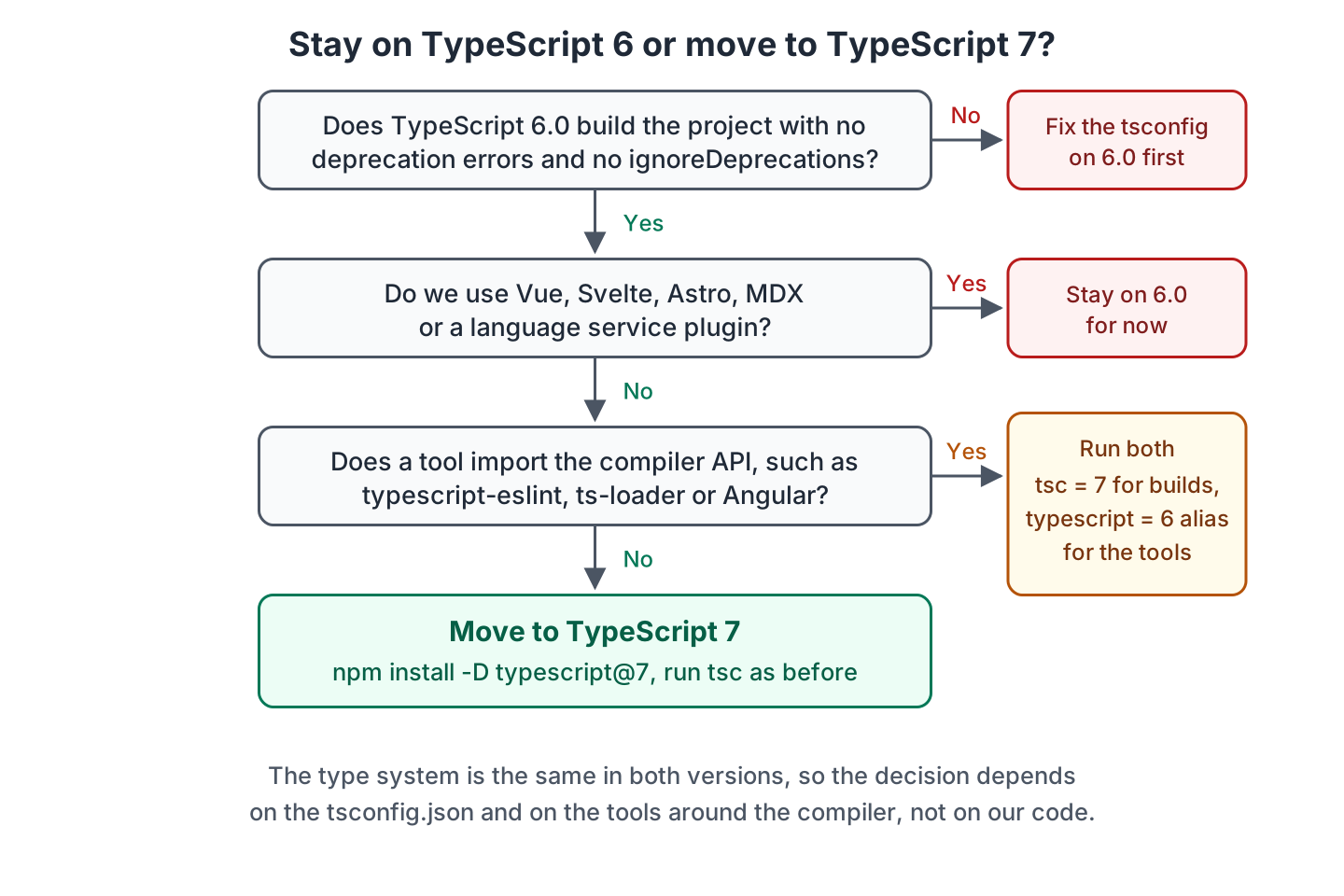
Most Node.js services, libraries and React projects end up in the green box. A project with typescript-eslint runs both versions side by side.
8. Switching a Project to TypeScript 7
Once the project builds on 6.0 without ignoreDeprecations, the switch takes a few minutes.
- Run npx tsc on TypeScript 6.0, fix every TS5101 and TS5107 deprecation error, and remove ignoreDeprecations from tsconfig.json.
- Install TypeScript 7 with npm install -D typescript@7.0.2, or use the npm aliases from section 4 when a tool needs the TypeScript 6 API.
- Run npx tsc –version to confirm 7.0.2, run the build, and compare the error list with the 6.0 build.
- Set –checkers in CI to match the core count of the runner, as described in section 3.
- Replace scripts that call tsgo or install @typescript/native-preview with tsc and the typescript package, and install the TypeScript 7 extension in VS Code.
9. Conclusion
TypeScript 7 and TypeScript 6 compile the same language with the same rules. Our catalog example gets the same two type errors and identical JavaScript from both compilers. So a move to 7.0 changes the build time, not the program.
The cost of the move is in configuration and tooling. Options that 6.0 deprecated fail the 7.0 build, and tools that need the compiler API stay on TypeScript 6 until the new API arrives in 7.1. With the @typescript/typescript6 package and npm aliases, we get the fast tsc today, and typescript-eslint and Vue tooling keep working.
10. References
- Announcing TypeScript 7.0
- A 10x Faster TypeScript (native port announcement)
- microsoft/typescript-go on GitHub
- TypeScript 6.0 vs 7.0 differences (CHANGES.md)
- TSConfig Reference
Happy Learning !!
