
Gson JsonParser parses JSON text into a tree of JsonElement objects, and from the root JsonObject we read each value by its key with get(). We call the static method JsonParser.parseString() for a String and JsonParser.parseReader() for a file or a stream.
We use JsonParser when we need a few values from a JSON document and do not want to write a Java class for it, for example the status field of an API response or one setting in a config file.
The following example parses an employee JSON and reads a number, a text, a nested value and an array element, with the result of each line as a comment.
String json = """
    {"id": 1001, "firstName": "Lokesh", "address": {"city": "Delhi"}, "skills": ["Java", "Spring"]}""";

JsonObject employee = JsonParser.parseString(json).getAsJsonObject();

int id = employee.get("id").getAsInt();                                        // 1001
String firstName = employee.get("firstName").getAsString();                    // Lokesh
String city = employee.getAsJsonObject("address").get("city").getAsString();   // Delhi
String skill = employee.getAsJsonArray("skills").get(0).getAsString();         // Java
boolean hasPhone = employee.has("phone");                                      // false
Optional<String> phone = getString(employee, "phone");                         // Optional.empty (helper from section 5.2)
Notice that get() returns a JsonElement, so we call getAsInt() or getAsString() to get the Java value, and a missing key such as “phone” needs a check before we read it.
Next, we look at the parse methods and the element types in the tree. After that, we read nested objects and arrays, handle missing keys and invalid JSON, read a file, and compare JsonParser with Gson.fromJson().
1. Parsing JSON
The examples use Gson 2.14.0 on Java 25.
<dependency>
  <groupId>com.google.code.gson</groupId>
  <artifactId>gson</artifactId>
  <version>2.14.0</version>
</dependency>
Since Gson 2.8.6, we can directly use one of the following static methods in this class.
- The method parseString(String) parses a JSON string.
- The method parseReader(Reader) parses JSON from a java.io.Reader, such as a file reader.
- The method parseReader(JsonReader) parses JSON from a Gson JsonReader, which lets us set options such as the strictness.
// string is of type java.lang.String
JsonElement fromString = JsonParser.parseString(string);

// ioReader is of type java.io.Reader
JsonElement fromReader = JsonParser.parseReader(ioReader);

// jsonReader is of type com.google.gson.stream.JsonReader
JsonElement fromJsonReader = JsonParser.parseReader(jsonReader);
Before version 2.8.6, JsonParser class had only one default constructor. The old style new JsonParser().parse(json) still compiles in Gson 2.14.0, but the constructor and the parse() methods are deprecated, so we replace them with the static methods.
By default, the three methods parse in lenient mode, which means they also accept JSON that breaks the specification, such as single quotes or keys without quotes. Only a JsonReader with an explicitly set strictness keeps its own mode. For example, JsonParser.parseString(“{‘id’: 1001}”) returns {“id”:1001}. We look at strict parsing in section 5.3.
2. JsonElement, JsonObject and JsonArray
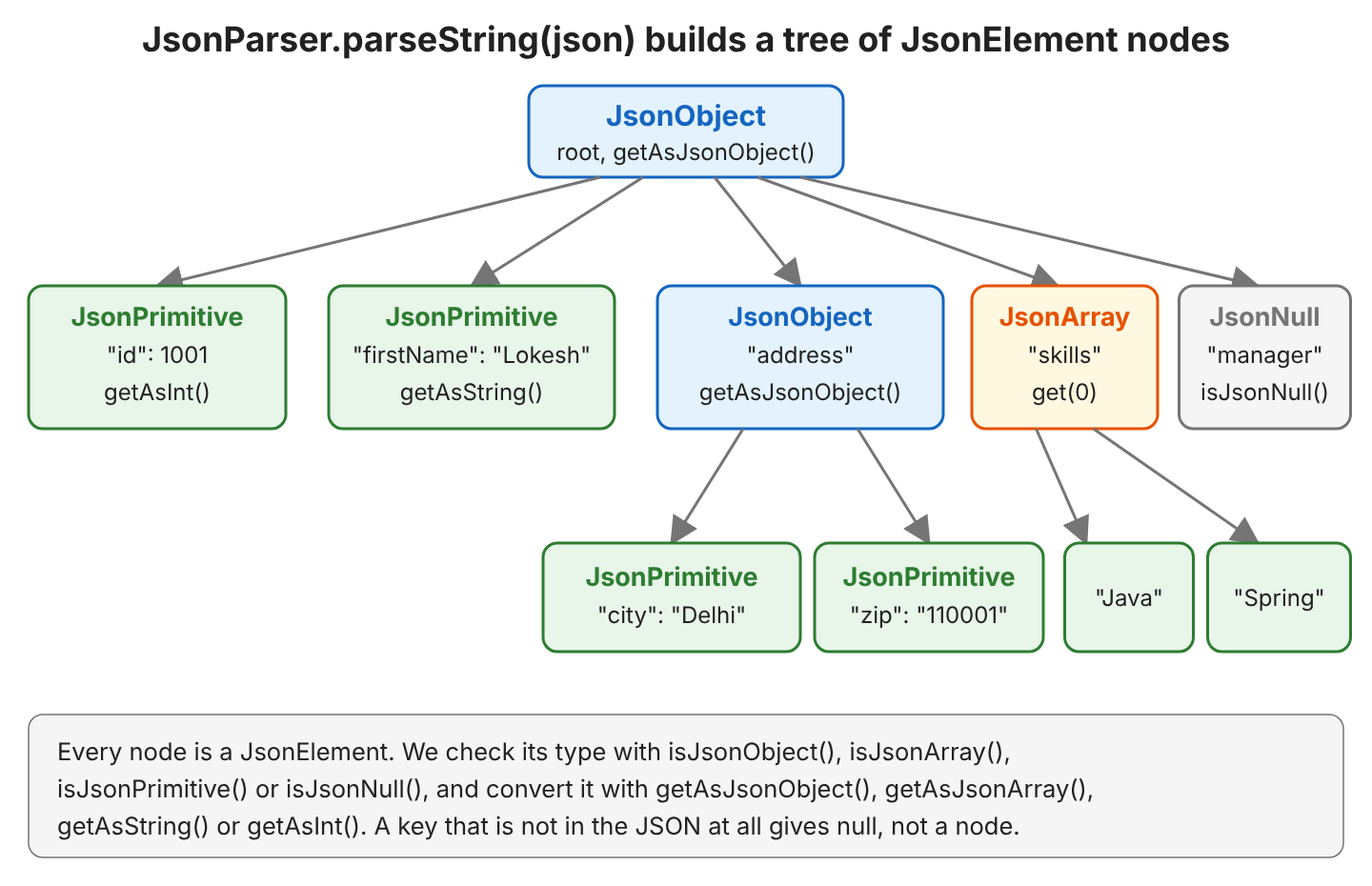
Once we have the JSON string parsed in a JsonElement tree, we can use its various methods to access JSON data elements. JsonElement is the abstract parent class of the four node types.
| Node type | JSON value | Example in our JSON |
|---|---|---|
| JsonObject | { … }, a set of key-value pairs | the root, “address” |
| JsonArray | [ … ], an ordered list | “skills” |
| JsonPrimitive | a string, a number or a boolean | “id”, “firstName” |
| JsonNull | null | “manager” |
The diagram shows the tree for the employee JSON from section 4. Every key of an object points to one child node, and an array holds its elements in order.
For example, find out what type of JSON element it represents using one of the type checking methods.
JsonElement root = JsonParser.parseString(json);

boolean isObject = root.isJsonObject();                              // true
boolean isArray = root.isJsonArray();                                // false
boolean isNull = employee.get("manager").isJsonNull();               // true
boolean isPrimitive = employee.get("id").isJsonPrimitive();          // true
boolean isNumber = employee.getAsJsonPrimitive("id").isNumber();     // true
We can convert the JsonElement to JsonObject and JsonArray using respective methods.
JsonObject jsonObject = jsonElement.getAsJsonObject();
JsonArray jsonArray = jsonElement.getAsJsonArray();
Once we have a JsonObject or JsonArray instances, we can extract fields from it using its get() method. A conversion to the wrong type throws an exception, e.g. getAsJsonObject() on an array throws an IllegalStateException, so we check the type first when the JSON comes from outside our app.
3. Gson JsonParser Example
Java program to parse JSON into JsonElement (and JsonObject) using JsonParser and fetch JSON values using keys.
import com.google.gson.JsonElement;
import com.google.gson.JsonObject;
import com.google.gson.JsonParser;

public class JsonElementExample {
  public static void main(String[] args) {
    String json = "{'id': 1001, "
        + "'firstName': 'Lokesh',"
        + "'lastName': 'Gupta',"
        + "'email': 'howtodoinjava@gmail.com'}";

    JsonElement jsonElement = JsonParser.parseString(json);

    JsonObject jsonObject = jsonElement.getAsJsonObject();

    System.out.println( jsonObject.get("id") );
    System.out.println( jsonObject.get("firstName") );
    System.out.println( jsonObject.get("lastName") );
    System.out.println( jsonObject.get("email") );
  }
}
Program output.
1001
"Lokesh"
"Gupta"
"howtodoinjava@gmail.com"
The JSON in the program uses single quotes, which works because of the lenient mode from section 1. Notice also the quotes around “Lokesh” in the output. The method println() calls toString() on the JsonElement, and toString() returns the value as JSON text, whereas getAsString() returns the plain Java String.
JsonElement nameElement = jsonObject.get("firstName");

String asJson = nameElement.toString();           // "Lokesh" (with quotes)
String asText = nameElement.getAsString();        // Lokesh
4. Reading Nested Objects and Arrays
Real JSON is rarely flat. For example, an HR app gets an employee from a REST API, and the response has the address as a nested object and the skills as an array.
{
  "id": 1001,
  "firstName": "Lokesh",
  "lastName": "Gupta",
  "email": "howtodoinjava@gmail.com",
  "address": {"city": "Delhi", "zip": "110001"},
  "skills": ["Java", "Spring"],
  "manager": null
}
The methods getAsJsonObject(key) and getAsJsonArray(key) of JsonObject combine get() and the conversion in one call. A JsonArray has size() and get(index), and we can loop over it like a List. For JSON text that starts with an array, read parsing a JSON array with Gson.
JsonObject employee = JsonParser.parseString(json).getAsJsonObject();

String city = employee.getAsJsonObject("address").get("city").getAsString();   // Delhi
int zip = employee.getAsJsonObject("address").get("zip").getAsInt();           // 110001 (the text "110001" is converted)

JsonArray skills = employee.getAsJsonArray("skills");
int count = skills.size();                                                     // 2
String first = skills.get(0).getAsString();                                    // Java
List<String> skillNames = skills.asList().stream()
    .map(JsonElement::getAsString)
    .toList();                                                                 // [Java, Spring]
To go through all keys of an object, we loop over entrySet(). The method keySet() returns only the keys, in the order of the JSON text.
for (Map.Entry<String, JsonElement> entry : employee.entrySet()) {
  System.out.println(entry.getKey() + " = " + entry.getValue());
}
id = 1001
firstName = "Lokesh"
lastName = "Gupta"
email = "howtodoinjava@gmail.com"
address = {"city":"Delhi","zip":"110001"}
skills = ["Java","Spring"]
manager = null5. Handling Missing Keys, JSON null and Invalid JSON
The tree reflects the JSON text, so the code breaks as soon as the text has a different shape than we expect. Each kind of mismatch throws a different exception.
| Code | Situation | Result |
|---|---|---|
| employee.get(“phone”).getAsString() | the key is missing | NullPointerException (get() returns null) |
| employee.get(“manager”).getAsString() | the value is JSON null | UnsupportedOperationException: JsonNull |
| employee.get(“firstName”).getAsInt() | the text is not a number | NumberFormatException: For input string: “Lokesh” |
| employee.get(“skills”).getAsJsonObject() | the value is an array | IllegalStateException: Not a JSON Object: [“Java”,”Spring”] |
| JsonParser.parseString(“{\”id\”: }”) | the JSON is invalid | JsonSyntaxException |
| JsonParser.parseString(“”).getAsJsonObject() | the text is empty | IllegalStateException: Not a JSON Object: null |
Notice the difference between a missing key and a JSON null. For “phone”, has() returns false and get() returns Java null. For “manager”, has() returns true and get() returns a JsonNull node.
5.1. Checking Before Reading
When a key is optional, we check it with has() and isJsonNull() before we read the value.
String phone = employee.has("phone") ? employee.get("phone").getAsString() : "n/a";   // n/a

JsonElement manager = employee.get("manager");
boolean hasManager = manager != null && !manager.isJsonNull();                        // false
5.2. A Safe Helper Returning Optional
Checks at every call make the code long, so we put them in one small helper method. The helper returns an Optional that is empty for a missing key, a JSON null, an object or an array.
static Optional<String> getString(JsonObject object, String key) {
  JsonElement value = object.get(key);
  if (value == null || !value.isJsonPrimitive()) {
    return Optional.empty();
  }
  return Optional.of(value.getAsString());
}
Optional<String> name = getString(employee, "firstName"); // Optional[Lokesh]
Optional<String> phone = getString(employee, "phone"); // Optional.empty
Optional<String> manager = getString(employee, "manager"); // Optional.empty
String phoneOrDefault = getString(employee, "phone").orElse("n/a"); // n/aFor invalid JSON, we catch JsonSyntaxException, which is an unchecked exception, and we also check that the root is an object.
static Optional<JsonObject> parseObject(String json) {
  try {
    JsonElement root = JsonParser.parseString(json);
    return root.isJsonObject() ? Optional.of(root.getAsJsonObject()) : Optional.empty();
  } catch (JsonSyntaxException e) {
    return Optional.empty();
  }
}

Optional<JsonObject> valid = parseObject("{\"id\": 1001}");    // Optional[{"id":1001}]
Optional<JsonObject> invalid = parseObject("{\"id\": }");      // Optional.empty
Optional<JsonObject> array = parseObject("[1, 2]");            // Optional.empty
5.3. Strict Parsing
The lenient mode accepts single quotes and keys without quotes, which is handy for hand-written test data but hides broken JSON from other systems. When we must reject invalid JSON, we create a JsonReader, set Strictness.STRICT (available since Gson 2.11), and pass the reader to parseReader().
JsonReader reader = new JsonReader(new StringReader("{'id': 1001}"));
reader.setStrictness(Strictness.STRICT);

JsonElement strict = JsonParser.parseReader(reader);
// JsonSyntaxException: MalformedJsonException: Use JsonReader.setStrictness(Strictness.LENIENT) to accept malformed JSON at line 1 column 3 path $.
6. Parsing a JSON File
The method parseReader(Reader) reads JSON from a file without loading it into a String first. We open the file in a try-with-resources block, so the reader is closed even when parsing fails.
Path file = Path.of("employee.json");

try (Reader reader = Files.newBufferedReader(file)) {
  JsonObject employee = JsonParser.parseReader(reader).getAsJsonObject();
  String lastName = employee.get("lastName").getAsString();   // Gupta
} catch (IOException e) {
  System.out.println("Cannot read " + file + ": " + e);   // Cannot read employee.json: java.nio.file.NoSuchFileException: employee.json
}
JsonParser builds the whole tree in memory. For a file of hundreds of megabytes, we read it token by token with JsonReader instead, as shown in Gson streaming.
7. Using fromJson() to Get JsonObject
We can use Gson instance and its fromJson() method to achieve the same result.
String json = "{'id': 1001, "
    + "'firstName': 'Lokesh',"
    + "'lastName': 'Gupta',"
    + "'email': 'howtodoinjava@gmail.com'}";

JsonObject jsonObject = new Gson().fromJson(json, JsonObject.class);

System.out.println(jsonObject.get("id"));
System.out.println(jsonObject.get("firstName"));
System.out.println(jsonObject.get("lastName"));
System.out.println(jsonObject.get("email"));
Program output.
1001
"Lokesh"
"Gupta"
"howtodoinjava@gmail.com"
Both ways give the same tree. JsonParser.parseString() is shorter when we need only the tree, while fromJson() fits code that already has a configured Gson instance. When we know the shape of the JSON, we skip the tree and map the JSON or a JsonElement to a Java class with fromJson(), as described in Gson serialization and deserialization.
record Employee(int id, String firstName, String lastName, String email) {}

Employee pojo = new Gson().fromJson(employee, Employee.class);
// Employee[id=1001, firstName=Lokesh, lastName=Gupta, email=howtodoinjava@gmail.com]
8. Gson JsonParser FAQs
8.1. Is JsonParser Deprecated in Gson?
No, only its constructor and the instance method parse() are deprecated. The class itself is current, and we call its static methods parseString() and parseReader(), which exist since Gson 2.8.6.
JsonElement oldStyle = new JsonParser().parse(json);    // deprecated
JsonElement newStyle = JsonParser.parseString(json);    // use this
8.2. How Do I Convert a JsonObject Back to a JSON String?
We call toString(), which returns compact JSON, or toJson() on a Gson instance built with setPrettyPrinting() for indented JSON.
String compact = employee.getAsJsonObject("address").toString();   // {"city":"Delhi","zip":"110001"}

Gson pretty = new GsonBuilder().setPrettyPrinting().create();
String indented = pretty.toJson(employee.getAsJsonObject("address"));
{
"city": "Delhi",
"zip": "110001"
}8.3. Should I Use JsonParser or Map the JSON to a Class?
We use JsonParser for a few values or for JSON whose shape changes, such as different event types in one webhook. We map the JSON to a class with fromJson() when we use most of the fields, because a class gives us types and names that the compiler checks.
9. Conclusion
Gson JsonParser turns JSON text into a tree of JsonElement nodes with its static methods parseString() and parseReader(). From the root JsonObject, we read values with get() and a conversion such as getAsString(), and we go into nested objects and arrays with getAsJsonObject() and getAsJsonArray().
The parser is lenient by default, and a missing key returns null. So for JSON from outside our app, we read optional keys through a helper that returns an Optional, and we catch JsonSyntaxException for invalid text.
10. References
Happy Learning !!
