

Aggregate functions in Hibernate compute one value from many rows, such as the number of runners or the average finish time. The function count() counts rows or values, min() and max() return the smallest and the largest value, sum() adds the values and avg() returns their average. We write them in the select clause of an HQL or JPQL query, for example the count query select count(r) from Runner r, and Hibernate sends the same functions to the database in SQL.
We use aggregate functions for reports and dashboards, for example a marathon results page that shows the number of finishers per age group without loading every runner into Java. With group by, we get one result row per group instead of one value for the whole table. The Java type of each result is fixed, so count() returns Long, avg() returns Double, and sum() of an Integer field returns Long.
The following example maps one marathon result per row and runs count, min, sum, avg and group by queries, with the result of each one as a comment.
@Id @GeneratedValue
private Long id;
private String name;
private String ageGroup;          // "30-39"
private String city;
private Integer finishMinutes;    // null = did not finish
private BigDecimal entryFee;
Long runners = em.createQuery("select count(r) from Runner r", Long.class)
.getSingleResult(); // runners = 6
Integer fastest = em.createQuery("select min(r.finishMinutes) from Runner r", Integer.class)
.getSingleResult(); // fastest = 182
Long total = em.createQuery("select sum(r.finishMinutes) from Runner r", Long.class)
.getSingleResult(); // total = 1040
Double average = em.createQuery("select avg(r.finishMinutes) from Runner r", Double.class)
.getSingleResult(); // average = 208.0 (John's null is skipped)
List<Object[]> perGroup = em.createQuery("""
select r.ageGroup, count(r), avg(r.finishMinutes)
from Runner r group by r.ageGroup order by r.ageGroup""", Object[].class)
.getResultList(); // [20-29, 2, 193.5], [30-39, 2, 206.5], [40-49, 2, 240.0]
// select count(r1_0.id) from Runner r1_0
// select r1_0.ageGroup,count(r1_0.id),avg(cast(r1_0.finishMinutes as float(53)))
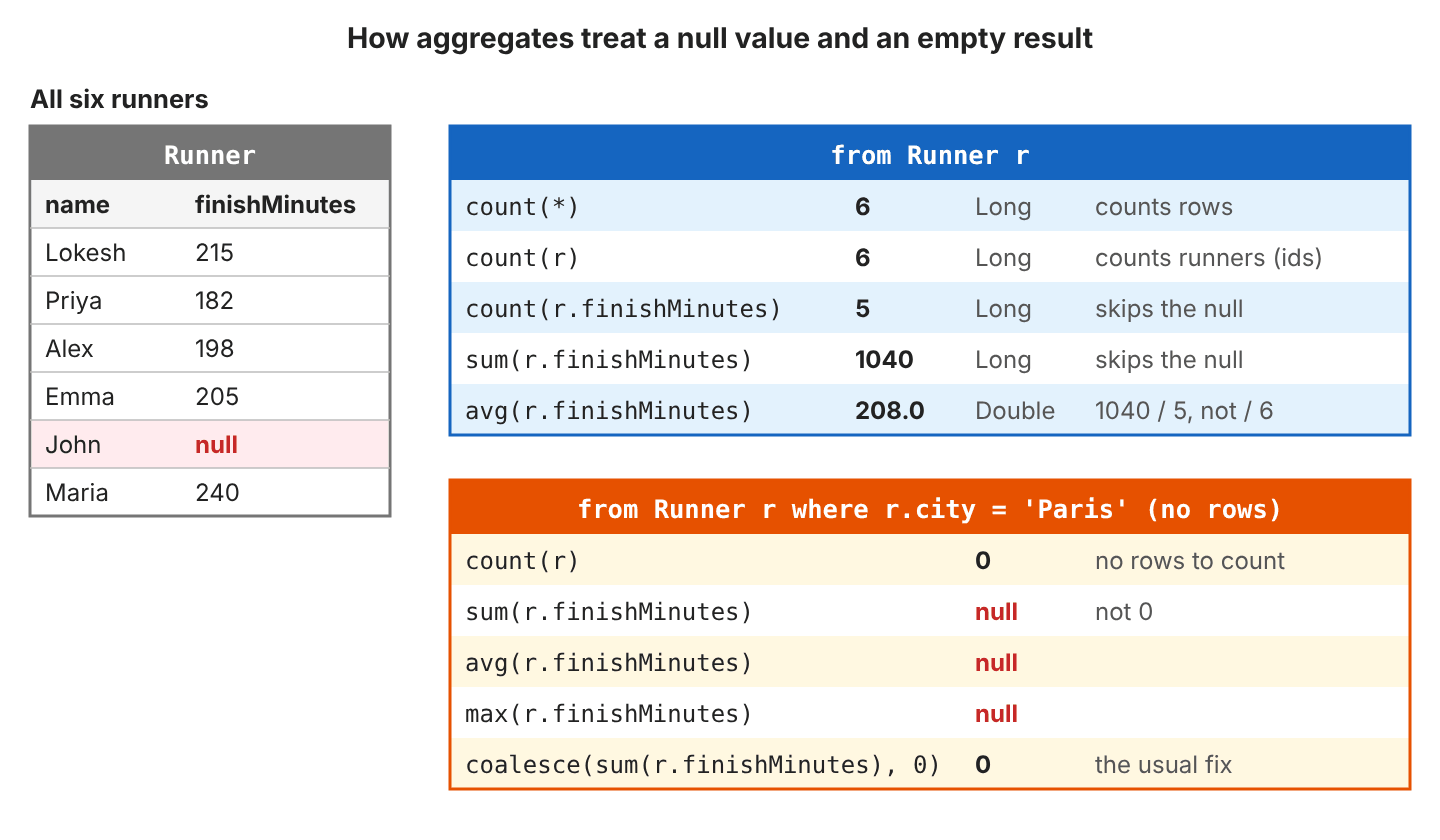
// from Runner r1_0 group by r1_0.ageGroup order by r1_0.ageGroupNotice that avg() returns 208.0, because it skips John’s null time and divides 1040 by 5 values.
Next, we look at the return type of each function and at how null values change the results. After that, we group and filter rows, aggregate over joins, map the results to a record and use the HQL functions beyond JPQL.
1. What Are Aggregate Functions in HQL?
A normal query returns one result per row, so select r from Runner r gives six Runner objects. An aggregate query reads the same rows in the database and returns one value, such as the number of runners or the best finish time. Only that value is sent over the network, and no entity is loaded into the persistence context.
JPQL defines five aggregate functions, and HQL accepts all of them. The Jakarta Persistence specification also fixes the Java type that each one returns.
| Query | What it computes | Java type | Result |
|---|---|---|---|
| count(r) or count(*) | Number of rows | Long | 6 |
| count(r.finishMinutes) | Number of non-null values | Long | 5 |
| count(distinct r.city) | Number of different non-null values | Long | 3 |
| min(r.finishMinutes) | Smallest value | Integer (type of the field) | 182 |
| max(r.name) | Largest value; works on strings and dates too | String (type of the field) | “Priya” |
| sum(r.finishMinutes) | Total of an Integer or Long field | Long | 1040 |
| sum(r.entryFee) | Total of a BigDecimal field | BigDecimal | 270.00 |
| sum(r.finishMinutes / 60.0) | Total of a decimal expression | Double | 17.33333 |
| avg(r.finishMinutes) | Average of any numeric field | Double | 208.0 |
| avg(r.entryFee) | Average of a BigDecimal field | Double | 45.0 |
Every aggregate function skips null values, and count(*) and count(r) are the only ones that count rows instead of values. John did not finish the race, so his finishMinutes is null. He is one of the 6 rows, but avg() divides 1040 by 5 values. When no row matches at all, count() returns 0 and the other four functions return null.
2. Aggregate Functions Example
The following example stores the results of a city marathon in an in-memory H2 database and runs every query with Hibernate 7.4 and Java 25. The complete project on GitHub prints the SQL of each query and checks each result with 27 JUnit tests (mvn -q compile exec:java, mvn test).
2.1. Marathon Results Model
Six runners took part. Each one has an age group, a home city, a finish time in minutes and an entry fee, and most of them belong to a running club.
| name | ageGroup | city | finishMinutes | entryFee | club |
|---|---|---|---|---|---|
| Lokesh | 30-39 | Delhi | 215 | 40.00 | Delhi Striders |
| Priya | 20-29 | Delhi | 182 | 40.00 | Delhi Striders |
| Alex | 30-39 | London | 198 | 50.00 | Thames Runners |
| Emma | 20-29 | London | 205 | 50.00 | Thames Runners |
| John | 40-49 | London | null | 50.00 | Thames Runners |
| Maria | 40-49 | Madrid | 240 | 40.00 | no club |
A third club, “Night Owls”, has no members yet, which we need later to see how a join changes the counts. The runner points to its club with a many-to-one association, and the club lists its members.
@ManyToOne(fetch = FetchType.LAZY)
@JoinColumn(name = "club_id")
private Club club;
private String name;
@OneToMany(mappedBy = "club")
private List<Runner> members = new ArrayList<>();The factory comes from HibernatePersistenceConfiguration with the H2 URL and showSql(true), so each query prints its SQL.
2.2. Several Aggregates in One Query
A query can return more than one aggregate. The result is an Object[] with one element per expression, in the order of the select clause.
Object[] stats = em.createQuery(
    "select count(r), min(r.finishMinutes), max(r.finishMinutes), avg(r.finishMinutes) from Runner r",
    Object[].class).getSingleResult();      // [6, 182, 240, 208.0]

// select count(r1_0.id),min(r1_0.finishMinutes),max(r1_0.finishMinutes),
//        avg(cast(r1_0.finishMinutes as float(53))) from Runner r1_0
Hibernate casts the column to float(53) inside avg(), and the result arrives as a Double. To read the values by name instead of by position, we give them aliases and ask for a Tuple.
Tuple t = em.createQuery(
    "select count(r) as runners, avg(r.finishMinutes) as avgMinutes from Runner r",
    Tuple.class).getSingleResult();

Long runners = t.get("runners", Long.class);                 // 6
Double avgMinutes = t.get("avgMinutes", Double.class);       // 208.0
Any expression works inside the function. The expression sum(r.finishMinutes / 60.0) adds the finish times in hours and returns the Double 17.33333.
2.3. Grouping Rows With group by
The group by clause splits the rows into groups that share a value, and every aggregate in the select clause runs once per group. For example, the results page shows one line per age group with the number of runners and their average time. Each field in the select clause must either appear in group by or be the argument of an aggregate function.

List<Object[]> rows = em.createQuery("""
    select r.ageGroup, count(r), avg(r.finishMinutes)
    from Runner r
    group by r.ageGroup
    order by r.ageGroup""", Object[].class).getResultList();

// [20-29, 2, 193.5]
// [30-39, 2, 206.5]
// [40-49, 2, 240.0]

// select r1_0.ageGroup,count(r1_0.id),avg(cast(r1_0.finishMinutes as float(53)))
// from Runner r1_0 group by r1_0.ageGroup order by r1_0.ageGroup
An aggregate can also order the groups. In the next query, the city with the most runners comes first.
select r.city, count(r) from Runner r group by r.city order by count(r) desc
-- [London, 3], [Delhi, 2], [Madrid, 1]
2.4. Filtering Groups With having
The where and having clauses both filter, but at different moments. The where clause removes rows before the groups are built, and having removes whole groups after the aggregates are computed.
| Clause | Filters | Can use aggregates | Example |
|---|---|---|---|
| where | Rows, before grouping | No | where r.finishMinutes is not null |
| having | Groups, after grouping | Yes | having avg(r.finishMinutes) < 210 |
select r.ageGroup, avg(r.finishMinutes) from Runner r
group by r.ageGroup
having avg(r.finishMinutes) < 210
order by r.ageGroup
-- [20-29, 193.5], [30-39, 206.5]

-- select r1_0.ageGroup,avg(cast(r1_0.finishMinutes as float(53))) from Runner r1_0
-- group by r1_0.ageGroup having avg(cast(r1_0.finishMinutes as float(53)))<210 order by r1_0.ageGroup
Both clauses can appear in one query. The next query counts only finishers and keeps the cities with at least two of them.
select r.city, count(r) from Runner r
where r.finishMinutes is not null
group by r.city
having count(r) >= 2
order by r.city
-- [Delhi, 2], [London, 2]      (London has 3 runners, but John did not finish)
2.5. Handling Empty Results and Nulls
The method getSingleResult() on an aggregate query without group by always gets one row, even when no runner matches. The value in that row is the problem, because sum() returns null, and unboxing it into a long throws a NullPointerException. Wrap sum() in coalesce() when the code expects 0 for “no rows”.
select count(r) from Runner r where r.city = 'Paris'                    -- 0
select sum(r.finishMinutes) from Runner r where r.city = 'Paris'        -- null
select avg(r.finishMinutes) from Runner r where r.city = 'Paris'        -- null
select coalesce(sum(r.finishMinutes), 0) from Runner r where r.city = 'Paris'   -- 0 (Long)
With group by, an empty input gives an empty list, not a row with zeros.
select r.city, count(r) from Runner r where r.city = 'Paris' group by r.city
-- []
The function coalesce() also changes what avg() means. Without it, John is left out of the 40-49 average. With it, his missing time counts as 0.
select r.ageGroup, avg(r.finishMinutes) ...                -- [40-49, 240.0]
select r.ageGroup, avg(coalesce(r.finishMinutes, 0)) ...   -- [40-49, 120.0]
2.6. Aggregates Over a Join
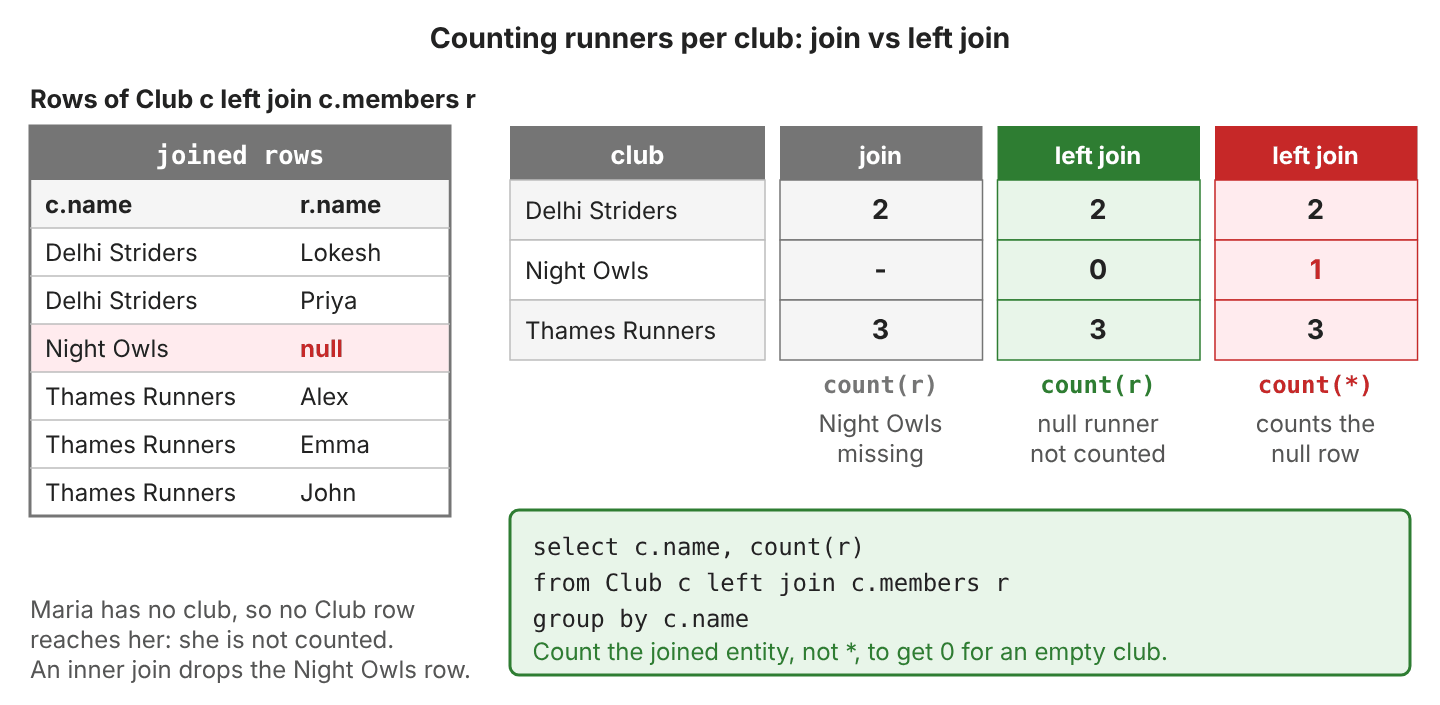
To count runners per club, we start from Club and join its members. The join type decides whether a club without members shows up, and the argument of count() decides what it shows.
select c.name, count(r) from Club c join c.members r group by c.name order by c.name
-- [Delhi Striders, 2], [Thames Runners, 3]

select c.name, count(r) from Club c left join c.members r group by c.name order by c.name
-- [Delhi Striders, 2], [Night Owls, 0], [Thames Runners, 3]

select c.name, count(*) from Club c left join c.members r group by c.name order by c.name
-- [Delhi Striders, 2], [Night Owls, 1], [Thames Runners, 3]

-- select c1_0.name,count(m1_0.id) from Club c1_0
-- left join Runner m1_0 on c1_0.id=m1_0.club_id group by c1_0.name order by c1_0.name
The left join adds one row for “Night Owls” with null in every runner column. In SQL, count(r) becomes count(m1_0.id) and skips that null, while count(*) counts the row.
A path such as r.club.name creates an inner join on its own. Maria has no club, so she drops out of this average.
select r.club.name, avg(r.finishMinutes) from Runner r group by r.club.name order by 1
-- [Delhi Striders, 198.5], [Thames Runners, 201.5]

-- select c1_0.name,avg(cast(r1_0.finishMinutes as float(53))) from Runner r1_0
-- join Club c1_0 on c1_0.id=r1_0.club_id group by c1_0.name order by 1
2.7. Mapping Aggregate Results to a Record
In an Object[] row, we read each value by its position and cast it, whereas a Java record gives each value a name and a type. The record’s component types follow the aggregate types: Long for count() and Double for avg().
public record AgeGroupStats(String ageGroup, Long runners, Double avgMinutes) {}The JPQL way is a constructor expression, select new with the fully qualified class name.
List<AgeGroupStats> stats = em.createQuery("""
    select new com.howtodoinjava.hibernate.aggregate.AgeGroupStats(
        r.ageGroup, count(r), avg(r.finishMinutes))
    from Runner r group by r.ageGroup order by r.ageGroup""", AgeGroupStats.class)
    .getResultList();
// [AgeGroupStats[ageGroup=20-29, runners=2, avgMinutes=193.5],
//  AgeGroupStats[ageGroup=30-39, runners=2, avgMinutes=206.5],
//  AgeGroupStats[ageGroup=40-49, runners=2, avgMinutes=240.0]]
Hibernate 6 and 7 also accept a plain select list with the record as the result class. Hibernate matches the three values to the record’s constructor and returns the same list.
List<AgeGroupStats> stats = em.createQuery("""
    select r.ageGroup, count(r), avg(r.finishMinutes)
    from Runner r group by r.ageGroup order by r.ageGroup""", AgeGroupStats.class)
    .getResultList();
Both forms run the same SQL as the Object[] query in section 2.3.
2.8. Aggregates With the Criteria API
The Criteria API builds the same queries in Java code. Every JPQL function has a CriteriaBuilder method.
| JPQL | CriteriaBuilder | Result |
|---|---|---|
| count(r) | cb.count(r) | 6 (Long) |
| count(distinct r.city) | cb.countDistinct(r.get(“city”)) | 3 (Long) |
| avg(r.finishMinutes) | cb.avg(r.get(“finishMinutes”)) | 208.0 (Double) |
| sum(r.finishMinutes) | cb.sumAsLong(r.get(“finishMinutes”)) | 1040 (Long) |
| min() / max() on numbers | cb.min(…) / cb.max(…) | 182 / 240 (Integer) |
| min() / max() on strings or dates | cb.least(…) / cb.greatest(…) | “Alex” / “Priya” |
CriteriaBuilder cb = em.getCriteriaBuilder();
CriteriaQuery<Long> q = cb.createQuery(Long.class);
Root<Runner> r = q.from(Runner.class);
q.select(cb.count(r));

Long runners = em.createQuery(q).getSingleResult();    // 6
// select count(r1_0.id) from Runner r1_0
The method cb.sum() behaves differently from JPQL sum(). Its Java signature returns the type of the argument, and Hibernate 7.4 returns an Integer for cb.sum() of an Integer field, which can overflow on large totals. The method cb.sumAsLong() returns a Long, like JPQL.
The methods groupBy(), having() and cb.construct() complete the age group report from section 2.7.
CriteriaQuery<AgeGroupStats> q = cb.createQuery(AgeGroupStats.class);
Root<Runner> r = q.from(Runner.class);
q.select(cb.construct(AgeGroupStats.class,
        r.get("ageGroup"), cb.count(r), cb.avg(r.get("finishMinutes"))))
    .groupBy(r.get("ageGroup"))
    .having(cb.lt(cb.avg(r.get("finishMinutes")), 210.0))
    .orderBy(cb.asc(r.get("ageGroup")));

List<AgeGroupStats> stats = em.createQuery(q).getResultList();
// [AgeGroupStats[ageGroup=20-29, runners=2, avgMinutes=193.5],
//  AgeGroupStats[ageGroup=30-39, runners=2, avgMinutes=206.5]]

// select r1_0.ageGroup c0,count(r1_0.id) c1,avg(cast(r1_0.finishMinutes as float(53))) c2
// from Runner r1_0 group by c0 having avg(cast(r1_0.finishMinutes as float(53)))<? order by 1
2.9. HQL Functions Beyond JPQL
HQL in Hibernate 6 and 7 supports more of the SQL standard than JPQL does. These queries are HQL only, so they do not run on other JPA providers, and support depends on the database. On H2 2.5, each function returns the result in the last column.
| HQL | What it does | Result for our runners |
|---|---|---|
| count(*) filter (where r.finishMinutes < 210) | Aggregates only the rows that match, per item of the select list | 20-29: 2, 30-39: 1, 40-49: 0 |
| listagg(r.name, ‘, ‘) within group (order by r.name) | Joins the values of a group into one string | London: “Alex, Emma, John” |
| percentile_disc(0.5) within group (order by r.finishMinutes) | Median, taken from an existing value | 205 |
| mode() within group (order by r.city) | Most frequent value | “London” |
| every(r.finishMinutes < 250) / any(r.finishMinutes < 190) | true if all rows / at least one row match (bool_and / bool_or on H2) | true / true |
| rank() over (partition by r.ageGroup order by r.finishMinutes) | Position inside the group, keeping every row | Priya 1, Emma 2 |
The filter clause counts a subset of each group without a case expression. Hibernate sends it to the database as written.
select r.ageGroup, count(*) filter (where r.finishMinutes < 210) from Runner r
group by r.ageGroup order by r.ageGroup
-- [20-29, 2], [30-39, 1], [40-49, 0]

-- select r1_0.ageGroup,count(*) filter (where r1_0.finishMinutes<210) from Runner r1_0
-- group by r1_0.ageGroup order by r1_0.ageGroup
The function listagg() gives each city one line with all its runners.
select r.city, listagg(r.name, ', ') within group (order by r.name) from Runner r
group by r.city order by r.city
-- [Delhi, Lokesh, Priya], [London, Alex, Emma, John], [Madrid, Maria]
For a median of an Integer field, cast it to Double inside percentile_cont(). Hibernate types the result like the ordered field, so the median of 182 and 205 comes back rounded to 194 instead of 193.5.
select r.ageGroup, percentile_cont(0.5) within group (order by r.finishMinutes) ...
-- [20-29, 194], [30-39, 207], [40-49, 240]              (Integer, rounded)

select r.ageGroup, percentile_cont(0.5) within group (order by cast(r.finishMinutes as Double)) ...
-- [20-29, 193.5], [30-39, 206.5], [40-49, 240.0]        (Double)
A window function, written with over, computes an aggregate without collapsing the rows. Each runner keeps a row and gets the overall average or the rank inside the age group next to it.
select r.name, r.finishMinutes, avg(r.finishMinutes) over ()
from Runner r where r.finishMinutes is not null order by r.finishMinutes
-- [Priya, 182, 208.0], [Alex, 198, 208.0], [Emma, 205, 208.0], [Lokesh, 215, 208.0], [Maria, 240, 208.0]

select r.name, r.ageGroup, r.finishMinutes,
       rank() over (partition by r.ageGroup order by r.finishMinutes)
from Runner r where r.finishMinutes is not null order by r.ageGroup, r.finishMinutes
-- [Priya, 20-29, 182, 1], [Emma, 20-29, 205, 2], [Alex, 30-39, 198, 1],
-- [Lokesh, 30-39, 215, 2], [Maria, 40-49, 240, 1]
3. Aggregate Functions FAQs
3.1. Why Does count() Return Long and Not Integer?
The specification says count() returns Long, and sum() of an integral field returns Long too, so that large totals do not overflow. Asking for Integer.class fails before the query runs.
org.hibernate.query.QueryTypeMismatchException: Incorrect query result type: query produces 'java.lang.Long' but type 'java.lang.Integer' was givenWe read the result as Long and convert it in Java when an int is needed, for example with Math.toIntExact(runners), which throws instead of overflowing.
3.2. Why Do I Get “must be in the GROUP BY list”?
The query selects a plain field next to an aggregate but has no group by. The database cannot know which ageGroup to show next to the single count.
org.hibernate.exception.SQLGrammarException: JDBC exception executing SQL [Column "R1_0.AGEGROUP" must be in the GROUP BY list; SQL statement:
select r1_0.ageGroup,count(r1_0.id) from Runner r1_0 [90016-252]]
Adding group by r.ageGroup fixes the error.
3.3. Can I Use an Aggregate Function in the where Clause?
No. The where clause runs before the aggregates exist, so where r.finishMinutes < avg(r.finishMinutes) fails with Invalid use of aggregate function. We filter groups with having, or compare each row with a subquery.
select r.name from Runner r
where r.finishMinutes < (select avg(r2.finishMinutes) from Runner r2)
order by r.finishMinutes
-- [Priya, Alex, Emma]
3.4. What Replaced Projections.rowCount() in Hibernate 6 and 7?
Projections.rowCount(), Projections.sum() and the rest belonged to the legacy org.hibernate.Criteria API. Hibernate 6 removed that API, and the 7.4 jar contains no org.hibernate.criterion package. The replacements are an HQL query or the Jakarta Criteria API.
| Legacy Criteria | Hibernate 6 and 7 |
|---|---|
| Projections.rowCount() | cb.count(root) or select count(r) |
| Projections.countDistinct(“city”) | cb.countDistinct(root.get(“city”)) |
| Projections.sum(“finishMinutes”) | cb.sumAsLong(root.get(“finishMinutes”)) |
| Projections.groupProperty(“ageGroup”) | q.groupBy(root.get(“ageGroup”)) |
3.5. Are HQL Aggregate Function Names Case-Sensitive?
No. SELECT COUNT(r) FROM Runner r returns the same 6 as select count(r) from Runner r. Entity and field names are case-sensitive, because they are Java names. The clause from runner r fails with Could not resolve root entity ‘runner’, and r.FinishMinutes fails with Could not resolve attribute ‘FinishMinutes’.
4. Conclusion
The functions count(), min(), max(), sum() and avg() let the database compute totals and averages, and Hibernate returns only the result. We read count() and integer sum() as Long and avg() as Double, and guard sum() with coalesce() for empty results. Every function except count(*) skips null values.
The group by and having clauses turn the same functions into per-group reports, and a record keeps those rows readable. HQL’s filter, listagg(), percentiles and window functions cover the reports that plain JPQL cannot express.
5. References
- Jakarta Persistence 3.2 specification: Aggregate Functions in the SELECT Clause
- CriteriaBuilder JavaDoc (Jakarta Persistence 3.2)
- Hibernate ORM 7.4 User Guide: Aggregate functions
- Hibernate ORM 7.4 User Guide: Group by
- H2 Database: Aggregate Functions
Happy Learning !!
