

Hibernate Query Language (HQL) is an object-oriented query language that we write against entity classes and their attributes instead of tables and columns. A query such as select a.title from Artwork a names the Artwork entity and its title field, and Hibernate translates it into the SQL of our database before it runs.
We use HQL for most reads and bulk changes in a Hibernate app, for example to list the artworks of one artist in a museum catalog or to raise the estimated value of every photo. HQL is a superset of JPQL, the query language of Jakarta Persistence, so every JPQL query is valid HQL, and HQL adds features such as limit, common table expressions and insert statements.
The following example maps an Artwork entity and runs a select, a join, a group by and an update in HQL.
@Entity
@Table(name = "artworks")
public class Artwork {

  @Id @GeneratedValue
  private Long id;
  private String title;
  @Column(name = "created_year")
  private Integer year;
  private BigDecimal estimatedValue;
  @Enumerated(EnumType.STRING)
  private Medium medium;                 // PAINTING, SCULPTURE, PHOTO
  @ManyToOne(fetch = FetchType.LAZY)
  @JoinColumn(name = "artist_id")
  private Artist artist;
  @ManyToOne(fetch = FetchType.LAZY)
  @JoinColumn(name = "gallery_id")
  private Gallery gallery;               // null = in storage
}
List<Artwork> recent = em.createQuery(
"select a from Artwork a where a.year > 2019 order by a.year", Artwork.class)
.getResultList(); // [Red Fields, Old Bridge, Night Train]
// select a1_0.id,...,a1_0.created_year from artworks a1_0 where a1_0.created_year>2019 order by a1_0.created_year
List<String> french = em.createQuery(
"select a.title from Artwork a where a.artist.country = :country order by a.title", String.class)
.setParameter("country", "France")
.getResultList(); // [Iron Leaf, Old Bridge, Red Fields, Stone Bird]
// select a1_0.title from artworks a1_0 join artists a2_0 on a2_0.id=a1_0.artist_id where a2_0.country=? ...
List<Object[]> perGallery = em.createQuery(
"select g.name, count(a) from Gallery g join g.artworks a group by g.name order by g.name", Object[].class)
.getResultList(); // [Modern Wing, 3], [Sculpture Hall, 2]
int updated = em.createQuery("update Artwork a set a.estimatedValue = a.estimatedValue * 1.1 where a.medium = :m")
.setParameter("m", Medium.PHOTO)
.executeUpdate(); // updated = 1Notice that the queries name Artwork, a.year and a.artist.country, and never the artworks table or the created_year column.
Next, we compare HQL with JPQL and SQL. After that, we write select, join, update, delete and insert queries in Hibernate 7 and check the SQL that Hibernate generates for each of them.
1. HQL vs JPQL vs SQL
SQL works with what the database stores (tables, columns and foreign keys), whereas HQL and JPQL work with what our Java code sees (entity names, attribute names and associations). Hibernate reads the entity mappings, replaces each Java name with its table or column, and then writes the SQL in the dialect of our database.
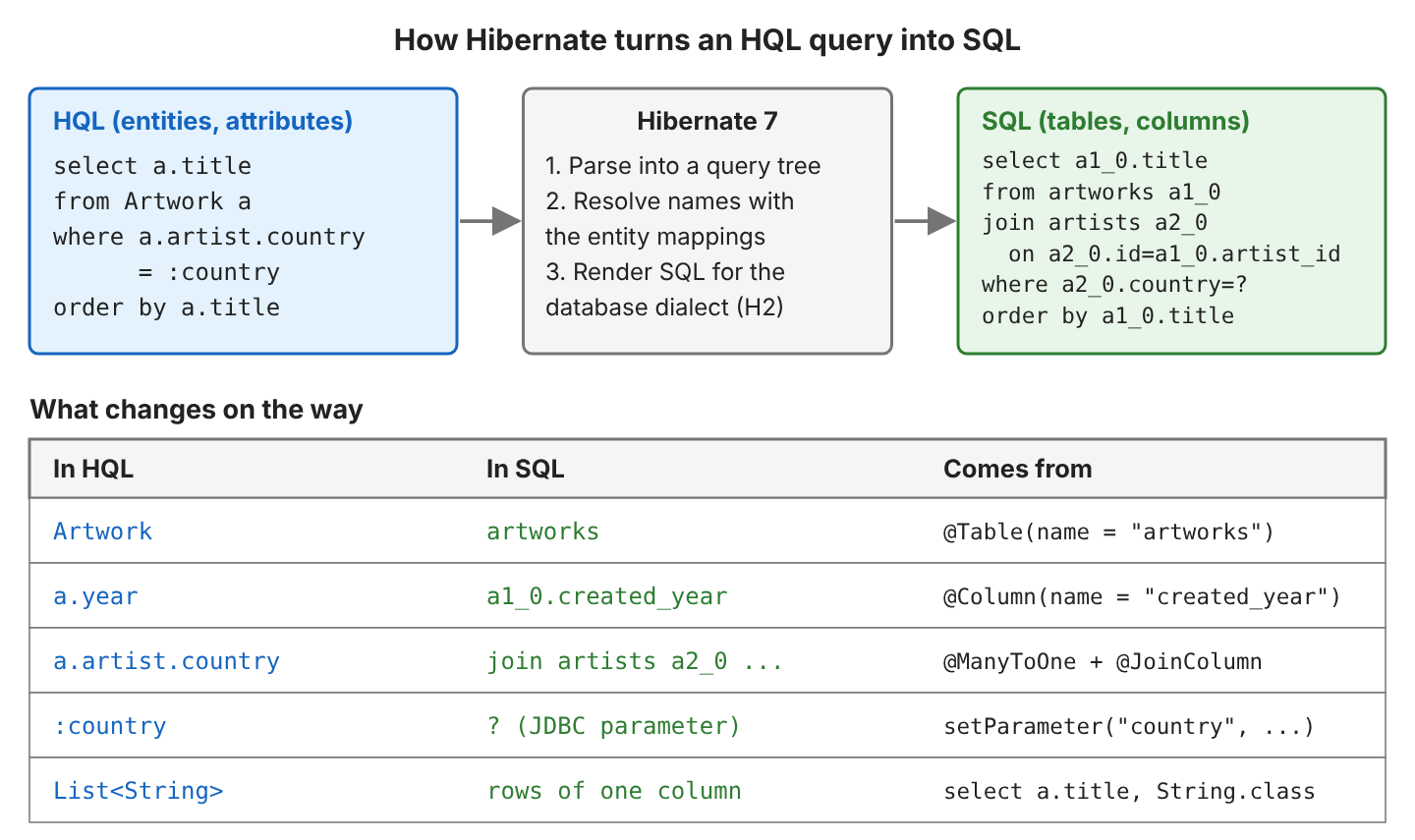
HQL is case-sensitive for entity and attribute names, because they are Java names. The clause from Artwork works, while the table name from artwork fails with Could not resolve root entity ‘artwork’. Keywords such as select or SELECT are not case-sensitive.
JPQL is the standard query language, defined by the Jakarta Persistence 3.2 specification, so it runs on any provider. HQL is Hibernate’s own extension of JPQL.
| Feature | SQL | JPQL (Jakarta Persistence 3.2) | HQL (Hibernate 7) |
|---|---|---|---|
| Queries refer to | Tables and columns | Entities and attributes | Entities and attributes |
| Joins | on a foreign key | Path or association (a.artist) | Same as JPQL |
| Result | Rows of columns | Entities, values, Object[], DTOs | Same, plus records without select new |
| select clause | Required | Optional since 3.2 | Optional |
| union, intersect, except | Yes | Yes, since 3.2 | Yes |
| limit / offset in the query | Depends on the database | No, use setFirstResult() | Yes |
| with (common table expression) | Yes | No | Yes |
| insert statement | Yes | No | insert … values and insert … select |
| Runs on | One database dialect | Any JPA provider | Hibernate only |
When an application must stay portable, we can make Hibernate reject the HQL extensions by setting hibernate.jpa.compliance.query to true, which turns on strict JPQL checks.
java.lang.IllegalArgumentException: org.hibernate.query.sqm.StrictJpaComplianceViolation: Strict JPA query language compliance was violated: use of LIMIT/OFFSET clause2. HQL Examples With Hibernate 7
Our examples query a small art museum in an in-memory H2 database with Hibernate 7.4, Java 25 and Jakarta Persistence 3.2. The complete project on GitHub prints the SQL of every query, and its 40 JUnit tests check every result in this guide (mvn -q compile exec:java, mvn test).
2.1. The Art Museum Model
A museum has galleries and artists, and each artwork belongs to one artist and is shown in one gallery, unless it is in storage and has no gallery. Each association is a many-to-one on Artwork, and Gallery and Artist list their artworks.
// Gallery: name, floor
@OneToMany(mappedBy = "gallery")
private List<Artwork> artworks = new ArrayList<>();

// Artist: name, country
@OneToMany(mappedBy = "artist")
private List<Artwork> artworks = new ArrayList<>();
The @Table annotation names the tables galleries, artists and artworks, and the year attribute is stored in the created_year column, so the SQL shows which names come from the mapping. The museum has six artworks.
| title | year | estimatedValue | medium | artist (country) | gallery |
|---|---|---|---|---|---|
| Blue River | 2019 | 1200.00 | PAINTING | Lokesh (India) | Modern Wing |
| Old Bridge | 2021 | 800.00 | PAINTING | Emma (France) | Modern Wing |
| Night Train | 2023 | 450.00 | PHOTO | Lokesh (India) | Modern Wing |
| Stone Bird | 2015 | 3000.00 | SCULPTURE | Hugo (France) | Sculpture Hall |
| Iron Leaf | 2018 | 2200.00 | SCULPTURE | Emma (France) | Sculpture Hall |
| Red Fields | 2020 | 950.00 | PAINTING | Hugo (France) | null (storage) |
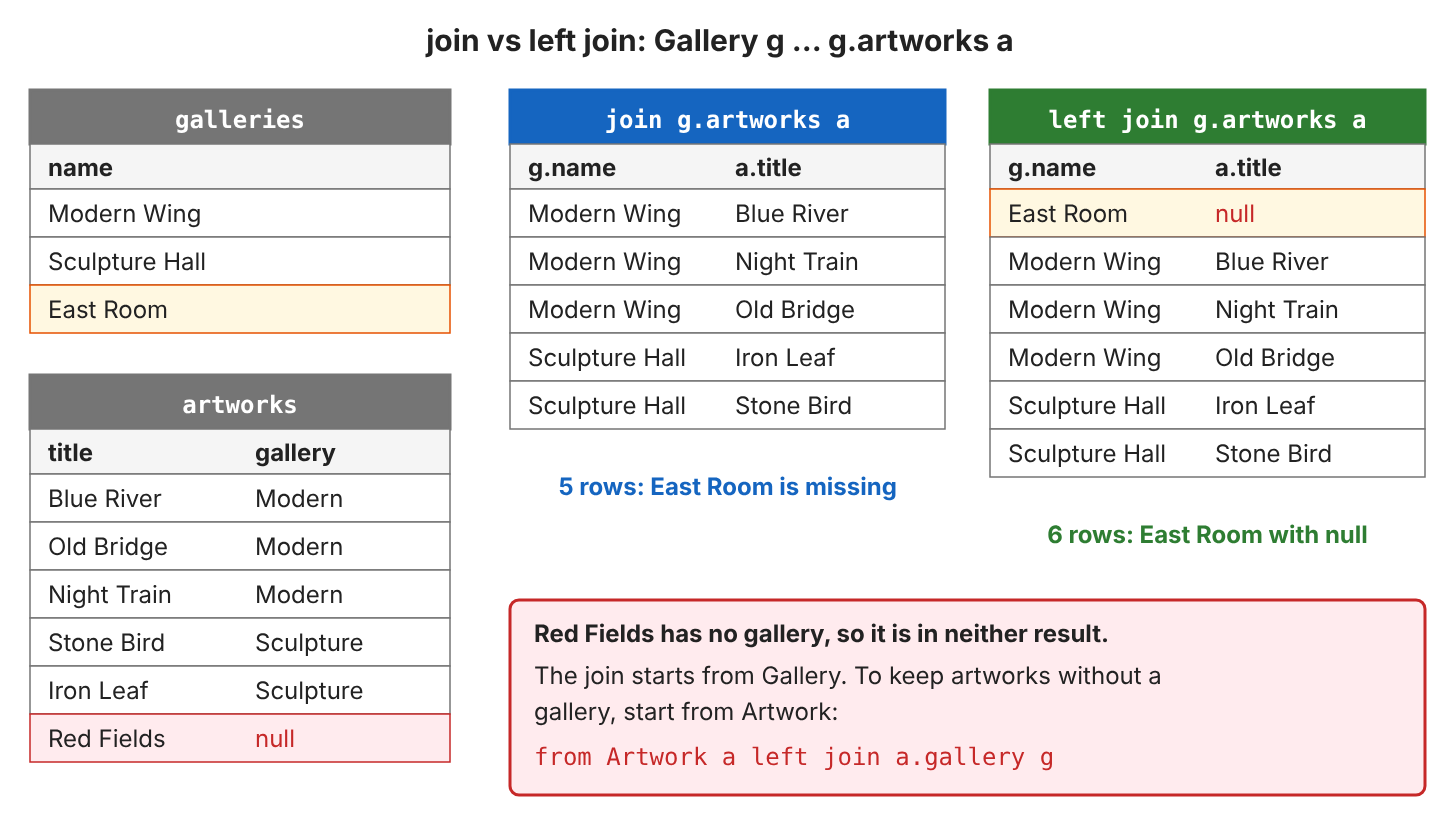
Two rows have no related rows. The gallery “East Room” has no artworks yet, and the artist “Mia” from Japan has no artworks either. Later, East Room and Mia show the difference between the join types.
We build the EntityManagerFactory with HibernatePersistenceConfiguration and showSql(true, false, false), so every query prints its SQL.
2.2. Creating and Running a Query
An HQL query is a String that we pass to a factory method together with the Java type of the result, and the method returns a typed query object. Jakarta Persistence and Hibernate’s Session offer four such methods.
| Method | Returns | Use it for |
|---|---|---|
| em.createQuery(hql, Artwork.class) | TypedQuery<Artwork> | Select queries, standard API |
| em.createQuery(hql) | Query | Untyped results and executeUpdate() |
| session.createSelectionQuery(hql, Artwork.class) | SelectionQuery<Artwork> | Select queries; an update or delete fails with IllegalSelectQueryException |
| session.createMutationQuery(hql) | MutationQuery | update, delete and insert; a select fails with IllegalMutationQueryException |
We get the Session from the EntityManager with unwrap(). When the query returns the entity itself, we can leave out the select clause, which HQL always allowed and JPQL allows since Jakarta Persistence 3.2.
Session session = em.unwrap(Session.class);
List<Artwork> sculptures = session.createSelectionQuery(
        "from Artwork a where a.medium = :medium order by a.title", Artwork.class)
    .setParameter("medium", Medium.SCULPTURE)
    .getResultList();                     // [Iron Leaf, Stone Bird]
// select a1_0.id,...,a1_0.created_year from artworks a1_0 where a1_0.medium=? order by a1_0.title
Three methods read the result. For one row, getSingleResultOrNull() returns null when nothing matches, while getSingleResult() throws a NoResultException.
List<Artwork> all = query.getResultList();               // all matching rows
Artwork bird = em.createQuery("from Artwork a where a.title = :title", Artwork.class)
    .setParameter("title", "Stone Bird").getSingleResult();         // Stone Bird
Artwork none = em.createQuery("from Artwork a where a.title = :title", Artwork.class)
    .setParameter("title", "Sunflowers").getSingleResultOrNull();   // null
2.3. Filtering With where and Parameters
The where clause filters rows with the same operators as SQL, such as =, <>, >, between, in, like, is null, and, or and not. Values from outside the query go in as parameters, which come in two forms.
- A named parameter starts with a colon, as in :medium, and is set with setParameter(“medium”, value).
- A positional parameter is a question mark with a number, as in ?1, and is set with setParameter(1, value).
List<Artwork> range = em.createQuery("""
    select a from Artwork a
    where a.estimatedValue between ?1 and ?2
    order by a.estimatedValue desc""", Artwork.class)
    .setParameter(1, new BigDecimal("800"))
    .setParameter(2, new BigDecimal("2500"))
    .getResultList();                     // [Iron Leaf, Blue River, Red Fields, Old Bridge]
// ... from artworks a1_0 where a1_0.estimatedValue between ? and ? order by a1_0.estimatedValue desc
Both forms become JDBC ? placeholders, and the database receives the value separately from the SQL text. We use one style per query. The Jakarta Persistence specification says that named and positional parameters must not be mixed in a single query. Hibernate runs such an HQL query without an error, but it fails once hibernate.jpa.compliance.query is turned on, and other providers can reject it. Never concatenate user input into an HQL string. With the input x’ or ‘1’=’1, the concatenated query where a.title = ‘x’ or ‘1’=’1′ returns all 6 artworks, and the same input as a parameter returns 0.
2.4. Sorting and Pagination
The order by clause takes attributes, paths or expressions, each with asc (the default) or desc, and sorting also works on several attributes and controls where null values go. For pagination, we pick a page of the sorted result, for example when the museum website lists the collection two titles per page. The standard way sets the page in Java code, but Hibernate 6 and 7 also accept limit and offset inside the query.
List<String> page = em.createQuery("select a.title from Artwork a order by a.title", String.class)
    .setFirstResult(2)                    // skip 2 rows
    .setMaxResults(2)                     // return 2 rows
    .getResultList();                     // [Night Train, Old Bridge]
// select a1_0.title from artworks a1_0 order by a1_0.title offset ? rows fetch first ? rows only

List<String> same = em.createQuery(
    "select a.title from Artwork a order by a.title limit 2 offset 2", String.class)
    .getResultList();                     // [Night Train, Old Bridge]
// select a1_0.title from artworks a1_0 order by a1_0.title offset 2 rows fetch first 2 rows only
Hibernate writes the paging clause in the syntax of the database dialect, which is offset … fetch first … rows only for H2. We always sort a paged query, because otherwise the database may return rows in a different order on each page.
2.5. Selecting Attributes Instead of Entities
A select clause with attributes is a projection, which reads only those columns and returns values, not managed entities. The Java type of the result depends on what we select.
| select clause | Result class | One result |
|---|---|---|
| select a | Artwork.class | The Artwork entity “Stone Bird” |
| select a.title | String.class | “Blue River” |
| select a.title, a.year | Object[].class | [Stone Bird, 2015] |
| select a.title as title, a.estimatedValue as value | Tuple.class | t.get(“title”) = “Stone Bird” |
| select new …ArtworkSummary(a.title, a.artist.name) | ArtworkSummary.class | ArtworkSummary[title=Blue River, artist=Lokesh] |
List<String> titles = em.createQuery("select a.title from Artwork a order by a.title", String.class)
    .getResultList();                     // [Blue River, Iron Leaf, Night Train, Old Bridge, Red Fields, Stone Bird]
// select a1_0.title from artworks a1_0 order by a1_0.title

List<Object[]> rows = em.createQuery(
    "select a.title, a.year from Artwork a where a.medium = :m order by a.year", Object[].class)
    .setParameter("m", Medium.SCULPTURE)
    .getResultList();                     // [Stone Bird, 2015], [Iron Leaf, 2018]
With Object[], we read each value by position and cast it. A Java record gives every value a name and a type instead.
public record ArtworkSummary(String title, String artist) {}JPQL fills the record with a constructor expression, that is, select new followed by the fully qualified class name. Hibernate 6 and 7 also accept a plain select list when we pass the record as the result class, and Hibernate matches the list to the record’s constructor.
List<ArtworkSummary> withNew = em.createQuery("""
    select new com.howtodoinjava.hibernate.hql.ArtworkSummary(a.title, a.artist.name)
    from Artwork a where a.medium = :m order by a.title""", ArtworkSummary.class)
    .setParameter("m", Medium.PAINTING)
    .getResultList();

List<ArtworkSummary> implicit = em.createQuery("""
    select a.title, a.artist.name
    from Artwork a where a.medium = :m order by a.title""", ArtworkSummary.class)
    .setParameter("m", Medium.PAINTING)
    .getResultList();

// both: [ArtworkSummary[title=Blue River, artist=Lokesh],
//        ArtworkSummary[title=Old Bridge, artist=Emma],
//        ArtworkSummary[title=Red Fields, artist=Hugo]]
// both: select a1_0.title,a2_0.name from artworks a1_0 join artists a2_0 on a2_0.id=a1_0.artist_id
//         where a1_0.medium=? order by a1_0.title
2.6. Joining Associations
A join combines an entity with an associated entity. In HQL, we join through the association attribute (g.artworks, a.artist), and Hibernate writes the on condition from the foreign key. HQL has three ways to join.
- An implicit join is a path such as a.artist.country. Hibernate adds an inner join to the SQL for it.
- An explicit join names the association with an alias in the from clause and keeps only rows that have a related entity.
- A left join keeps every row of the left entity and fills the missing related entity with null.
select g.name, a.title from Gallery g join g.artworks a order by g.name, a.title
-- 5 rows: [Modern Wing, Blue River], [Modern Wing, Night Train], ..., [Sculpture Hall, Stone Bird]
-- SQL: from galleries g1_0 join artworks a1_0 on g1_0.id=a1_0.gallery_id

select g.name, a.title from Gallery g left join g.artworks a order by g.name, a.title
-- 6 rows: [East Room, null], [Modern Wing, Blue River], ..., [Sculpture Hall, Stone Bird]
-- SQL: from galleries g1_0 left join artworks a1_0 on g1_0.id=a1_0.gallery_id
The join type decides which rows stay in the result, and the entity in the from clause decides which side is kept. Starting from Gallery, the artwork in storage is in neither result.
An on clause adds a condition to the join itself. With a left join, the artist stays in the result even when no artwork matches the condition.
select ar.name, a.title from Artist ar
left join ar.artworks a on a.medium = :m          -- m = SCULPTURE
order by ar.name
-- [Emma, Iron Leaf], [Hugo, Stone Bird], [Lokesh, null], [Mia, null]
-- SQL: left join artworks a2_0 on a1_0.id=a2_0.artist_id and a2_0.medium=?
Moving a.medium = :m into where would remove Lokesh and Mia, because where filters after the join and null never equals SCULPTURE.
2.7. Loading Collections With join fetch
Artist.artworks is LAZY, so from Artist loads only the artists, and Hibernate reads each artist’s list from the database the first time our code uses it. For four artists, that is one query for the artists plus one query per artist, which is called the “N+1 select problem”.
The join fetch clause loads the association in the same SQL statement and fills the collections.
List<Artist> artists = em.createQuery(
    "select ar from Artist ar left join fetch ar.artworks order by ar.name", Artist.class)
    .getResultList();                     // 4 artists, artworks already loaded
// select a1_0.id,a2_0.artist_id,a2_0.id,...,a2_0.title,...,a1_0.name
//   from artists a1_0 left join artworks a2_0 on a1_0.id=a2_0.artist_id order by a1_0.name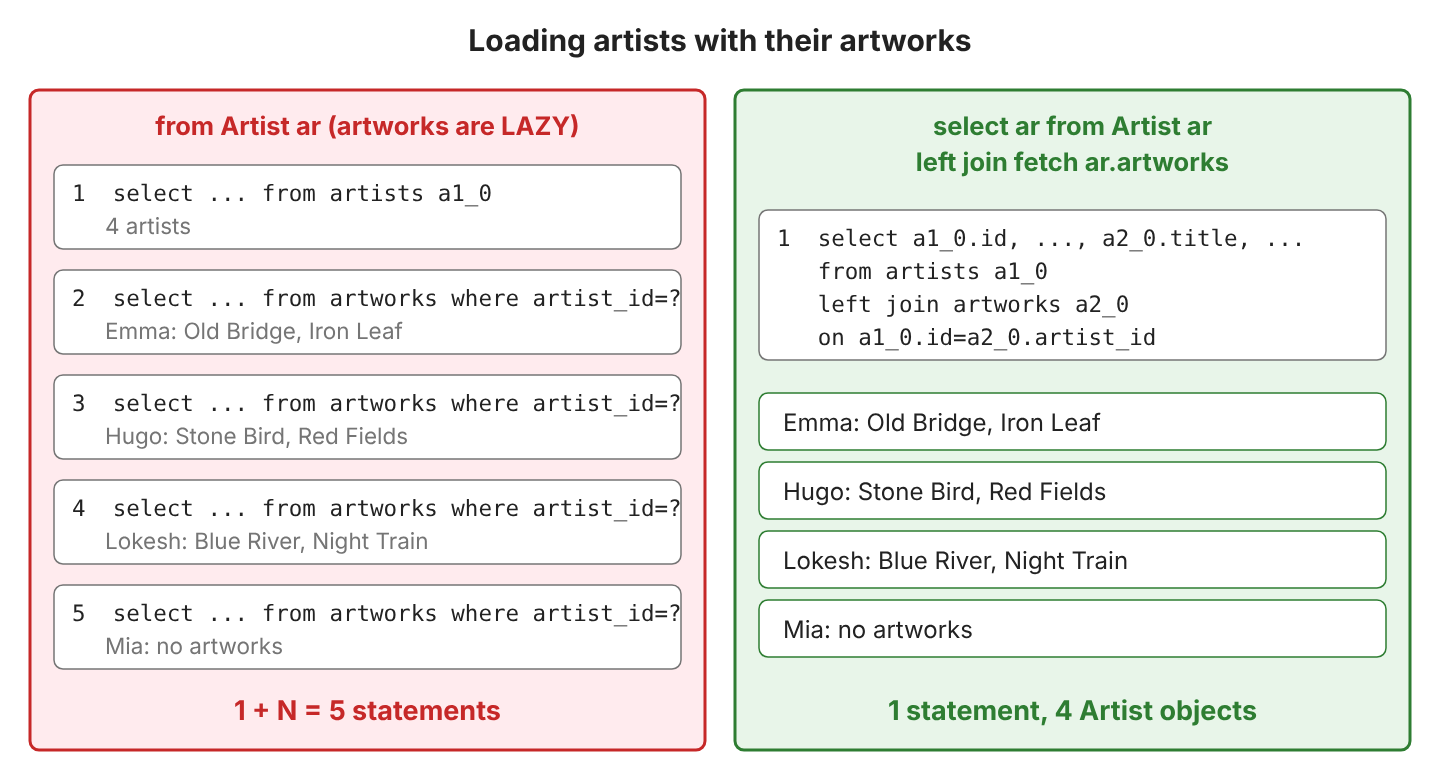
We use left join fetch when entities without children must stay in the result, because Mia has no artworks and a plain join fetch would drop her.
2.8. Aggregate Functions, group by and having
HQL has the SQL aggregate functions count(), sum(), avg(), min() and max(). The group by clause computes them once per group, and having filters the groups after the aggregates are computed. For example, the front desk wants to know which galleries show more than one artwork and what their artworks are worth.
select g.name, count(a), sum(a.estimatedValue)
from Gallery g join g.artworks a
group by g.name
having count(a) > 1
order by g.name
-- [Modern Wing, 3, 2450.00], [Sculpture Hall, 2, 5200.00]
-- SQL: ... group by g1_0.name having count(a1_0.id)>1 order by g1_0.name
The function count() returns a Long, so the second value in each Object[] is 3L, not an Integer.
2.9. Subqueries and exists
A subquery is a query in parentheses inside another query, and it can return one value for a comparison. For example, a curator looks for the artworks worth more than the average value (1433.33).
select a.title from Artwork a
where a.estimatedValue > (select avg(a2.estimatedValue) from Artwork a2)
order by a.title
-- [Iron Leaf, Stone Bird]
The exists operator checks whether a subquery finds at least one row. Because the subquery refers to the outer alias ar, the database checks it for each artist, so not exists finds the artists without any artwork.
select ar.name from Artist ar
where exists (select 1 from Artwork a where a.artist = ar and a.medium = :m)   -- m = SCULPTURE
order by ar.name
-- [Emma, Hugo]
-- SQL: where exists(select 1 from artworks a2_0 where a2_0.artist_id=a1_0.id and a2_0.medium=?)

select ar.name from Artist ar
where not exists (select 1 from Artwork a where a.artist = ar)
-- [Mia]
2.10. case, coalesce and Other Functions
The case expression returns a value chosen by conditions, and coalesce() returns its first argument that is not null. For example, a printed visitor list shows each artwork with a price label and a location, and the artwork without a gallery gets the location “Storage”.
select a.title,
       case when a.estimatedValue >= 2000 then 'high' else 'normal' end,
       coalesce(g.name, 'Storage')
from Artwork a left join a.gallery g
order by a.title
-- [Blue River, normal, Modern Wing]
-- [Iron Leaf, high, Sculpture Hall]
-- ...
-- [Red Fields, normal, Storage]
HQL has the common string, numeric and date functions, and Hibernate translates each function for the database. For example, length() became character_length() on H2.
select upper(ar.name), ar.name || ' (' || ar.country || ')', length(ar.name)
from Artist ar where ar.country = 'France' order by ar.name
-- [EMMA, Emma (France), 4], [HUGO, Hugo (France), 4]
-- SQL: select upper(a1_0.name),(((a1_0.name||' (')||a1_0.country)||')'),character_length(a1_0.name) ...
Other functions include lower(), trim(), substring(), locate(), abs(), round(), mod(), current_date and extract(), and Hibernate translates every function in the HQL function list for the dialect in the same way.
2.11. update, delete and insert Statements
HQL can change many rows with one statement. The update and delete statements are also standard JPQL, whereas insert is HQL only. Hibernate’s createMutationQuery() runs all three, and executeUpdate() returns the number of rows changed.
Bulk statements must run inside a transaction, because without one, executeUpdate() throws a TransactionRequiredException.
int updated = em.unwrap(Session.class).createMutationQuery(
        "update Artwork a set a.estimatedValue = a.estimatedValue * 1.1 where a.medium = :m")
    .setParameter("m", Medium.PHOTO)
    .executeUpdate();                     // updated = 1
// update artworks a1_0 set estimatedValue=(a1_0.estimatedValue*1.1) where a1_0.medium=?
A bulk statement changes the rows in the database, not the entities already loaded in the persistence context. “Night Train” was loaded before the update and keeps its old value until we call em.refresh().
BigDecimal before = train.getEstimatedValue();   // 450.00 (loaded before the update)
em.refresh(train);
BigDecimal after = train.getEstimatedValue();    // 495.00
The delete statement removes the matching rows, and the JPA method em.createQuery(…).executeUpdate() works as well.
int deleted = em.createQuery("delete from Artwork a where a.gallery is null")
    .executeUpdate();                     // deleted = 1 (Red Fields)
// delete from artworks a1_0 where a1_0.gallery_id is null
To delete a single entity with its cascades, we load it and delete it with em.remove() instead.
HQL insert has two forms. The insert … values form adds rows from literal values, and Hibernate generates the id from the sequence.
int inserted = session.createMutationQuery(
        "insert into Artist (name, country) values ('Ravi', 'India'), ('Sara', 'Italy')")
    .executeUpdate();                     // inserted = 2
// insert into artists(name,country,id) values ('Ravi','India',?), ('Sara','Italy',?)
The insert … select form copies the result of a query into another entity. For example, the museum copies the expensive artworks into the Highlight entity for a guided tour.
int copied = session.createMutationQuery("""
    insert into Highlight (title, artistName)
    select a.title, a.artist.name from Artwork a where a.estimatedValue > 2000""")
    .executeUpdate();                     // copied = 2: [Iron Leaf by Emma, Stone Bird by Hugo]
Because each new Highlight needs an id from a sequence, Hibernate first copies the selected rows into a temporary table HTE_highlights and assigns the ids, and then runs insert into highlights(title,artistName,id) select ….
2.12. HQL Features in Hibernate 6 and 7
Hibernate 6 rewrote the HQL parser, which made many SQL features available in HQL. Each feature in the table runs on Hibernate 7.4.11 with H2.
| Feature | HQL | Result |
|---|---|---|
| Set operations | select ar.name from Artist ar where ar.country = ‘France’ union select g.name from Gallery g where g.floor = 0 | Emma, Hugo, Sculpture Hall |
| select without from | select 2 + 3 | 5 (Integer); SQL: select (2+3) |
| limit and offset | … order by a.title limit 2 offset 2 | Night Train, Old Bridge |
| Records without select new | select a.title, a.artist.name with ArtworkSummary.class | See section 2.5 |
| Multi-row insert … values | insert into Artist (name, country) values (…), (…) | 2 rows |
| Common table expression | with expensive as (…) select … | See the with example |
A common table expression (CTE) gives a subquery a name with with, so the main query can read the CTE like an entity.
with expensive as (
  select a.title as title, a.estimatedValue as price
  from Artwork a where a.estimatedValue > 1000
)
select e.title from expensive e order by e.price desc
-- [Stone Bird, Iron Leaf, Blue River]
-- SQL on H2: select e1_0.title from (select a1_0.title,a1_0.estimatedValue from artworks a1_0
--            where a1_0.estimatedValue>1000) e1_0(title,price) order by e1_0.price desc
On H2, Hibernate rendered the CTE as a subquery in the from clause. Support for the Hibernate 6 and 7 features depends on the database dialect, so we test them on the database that we deploy to.
2.13. HQL Clause Cheat Sheet
Hibernate translates each HQL clause into the same SQL pattern every time, so we can match each statement in the SQL log to its HQL query. The table pairs each clause with the SQL that Hibernate 7.4 generated on H2.
| Clause | HQL | Generated SQL |
|---|---|---|
| from | from Artwork a | from artworks a1_0 |
| select | select a.title | select a1_0.title |
| where | where a.year > 2019 | where a1_0.created_year>2019 |
| Parameter | a.medium = :medium | a1_0.medium=? |
| Implicit join | a.artist.country | join artists a2_0 on a2_0.id=a1_0.artist_id |
| join | Gallery g join g.artworks a | galleries g1_0 join artworks a1_0 on g1_0.id=a1_0.gallery_id |
| left join … on | left join ar.artworks a on a.medium = :m | left join artworks a2_0 on a1_0.id=a2_0.artist_id and a2_0.medium=? |
| join fetch | left join fetch ar.artworks | Same left join, with all artworks columns in the select |
| group by / having | group by g.name having count(a) > 1 | group by g1_0.name having count(a1_0.id)>1 |
| exists | exists (select 1 from Artwork a where a.artist = ar) | exists(select 1 from artworks a2_0 where a2_0.artist_id=a1_0.id) |
| order by | order by a.title | order by a1_0.title |
| Paging | limit 2 offset 2 | offset 2 rows fetch first 2 rows only |
| update | update Artwork a set a.estimatedValue = … | update artworks a1_0 set estimatedValue=(…) |
| delete | delete from Artwork a where a.gallery is null | delete from artworks a1_0 where a1_0.gallery_id is null |
| insert | insert into Artist (name, country) values (…) | insert into artists(name,country,id) values (…,?) |
3. HQL FAQs
3.1. Why Does HQL Throw “Could not resolve root entity”?
Because the query uses a name that is not an entity, most often the table name. HQL needs the entity name, which is the simple class name unless @Entity(name = …) sets another name.
java.lang.IllegalArgumentException: org.hibernate.query.sqm.UnknownEntityException: Could not resolve root entity 'artwork'The query select a from Artwork a fixes the error. A column name, such as a.created_year, fails with Could not resolve attribute, because the attribute name is a.year. If the name is correct, we check that the class is registered as a managed class of the persistence unit.
3.2. What Replaced Query.list(), setString() and createSQLQuery()?
In Hibernate 7.4, Query.list() and uniqueResult() still exist, but the typed setters and the old native query method are removed. Old HQL tutorials use the Hibernate 3 to 5 API.
| Old API | Hibernate 6 and 7 |
|---|---|
| session.createQuery(hql) without a type | em.createQuery(hql, Artwork.class) or session.createSelectionQuery(hql, Artwork.class) |
| query.setString(“name”, v), setInteger(), setDouble() | query.setParameter(“name”, v) |
| query.list() | getResultList() (list() still works) |
| query.uniqueResult() | getSingleResult() or getSingleResultOrNull() (uniqueResult() still works) |
| session.createSQLQuery(sql) | createNativeQuery(sql), see native SQL queries |
| session.createQuery(hql).executeUpdate() | session.createMutationQuery(hql).executeUpdate(), which rejects a select |
| Session.save(entity) | em.persist(entity) |
We declare a query that we reuse in several places once, as a named query with @NamedQuery.
3.3. Why Does a Path Like a.gallery.name Skip Some Rows?
Because a path through an association is an inner join. “Red Fields” has no gallery, so sorting by a.gallery.name returns five titles instead of six.
select a.title from Artwork a order by a.gallery.name, a.title
-- [Blue River, Night Train, Old Bridge, Iron Leaf, Stone Bird]
-- SQL: from artworks a1_0 join galleries g1_0 on g1_0.id=a1_0.gallery_id ...
When the association can be null, we write an explicit left join and use its alias, as in the coalesce(g.name, ‘Storage’) query of section 2.10.
3.4. Do I Still Need distinct With join fetch?
No. In Hibernate 5, join fetch on a collection returned the parent once per child, so we added distinct to remove the duplicates.
In Hibernate 6 and 7, the result list holds each entity once. For example, select ar from Artist ar left join fetch ar.artworks returned 4 artists, even though the SQL produced 7 rows (Emma, Hugo and Lokesh twice each, Mia once).
3.5. Should I Use HQL, the Criteria API or Native SQL?
It depends on how the query is built and which database features it needs, because all three run through the same EntityManager.
| Option | Use it when |
|---|---|
| HQL / JPQL string | The query is known at compile time; it is the shortest to read |
| Criteria API | Filters are added at runtime, for example from optional search fields |
| Native SQL | The query needs a database feature HQL does not have |
3.6. How Do I See the SQL Generated for an HQL Query?
We turn on SQL logging when building the factory, and showSql(showSql, formatSql, highlightSql) prints each statement to the console.
HibernatePersistenceConfiguration config = new HibernatePersistenceConfiguration("hql")
    .showSql(true, false, false);         // Hibernate: select a1_0.title from artworks a1_0 ...
As configuration properties, for example in persistence.xml, the same settings are hibernate.show_sql, hibernate.format_sql and hibernate.highlight_sql. The property hibernate.use_sql_comments adds the HQL text as a comment in front of each SQL statement.
4. Conclusion
HQL lets us query entities and attributes, and Hibernate translates each query into SQL for our database. Entity names become table names, and paths through associations become joins.
We write select queries with createQuery() or createSelectionQuery() and a result type, and we bind every value as a parameter. We choose join, left join or join fetch based on which rows and collections we need. For bulk update, delete and insert, we use createMutationQuery(), followed by refresh() for entities already loaded.
Hibernate 6 and 7 add limit, set operations, CTEs and records without select new. When the code must run on another JPA provider, strict JPQL compliance mode rejects extensions such as limit and with.
5. References
- Hibernate ORM 7.4: A Guide to Hibernate Query Language
- Hibernate ORM 7.4 Query Language Guide: Common table expressions
- Hibernate ORM 7.4 Query Language Guide: insert statements
- Jakarta Persistence 3.2 specification: Query Language
- TypedQuery JavaDoc (Jakarta Persistence 3.2)
- SelectionQuery JavaDoc (Hibernate 7.4)
- MutationQuery JavaDoc (Hibernate 7.4)
Happy Learning !!

Thank you for this tutorial it was helpful.
I have a question and maybe you have the right response,
you wrote in chapter “What is HQL” the following:
HQL queries are translated by Hibernate into conventional SQL queries. Note that Hibernate also provides the APIs that allow us to directly issue SQL queries as well.
can you tell me how can I translate HQL to native SQL, please
I have a project that uses hibernate version 3 and I am migrating to version 6.*
in version 3 I used ASTQueryTranslatorFactory and QueryTranslator to do that but in version 6 i didn’t find a way
Thank You
One way can be to enable debug logging and capture the SQL queries from logs. Then work with DBA to fine-tune if needed.
Logging can be enabled by setting logger
org.hibernate.SQLto DEBUG.<logger name="org.hibernate.SQL" level="DEBUG" />Hi Lokesh,
In the Update syntax you have mentioned optional [FROM] . Could you please explain we should use from in update ?
Use of FROM is completely optional. It’ more of readability perspective. Even if use like below:
Above update statement is completely valid and will run similarly as: