
The error “No validator could be found for constraint” means that a Bean Validation annotation sits on a field whose type that annotation cannot check, for example @NotBlank on an Integer. Hibernate Validator looks for a validator class that handles both the annotation and the declared field type. When none exists, validate() throws UnexpectedTypeException with the code HV000030 instead of returning violations. To fix it, we either change the constraint or its position so that it matches the type, or write a validator for our own type.
We see the error at the first validate() call, often after a field changed its type while its old annotation stayed, as when a quantity moves from String to Integer but keeps @NotBlank.
The following example shows the error that Hibernate Validator 9.1 throws for @NotBlank on an Integer field.
Exception in thread "main" jakarta.validation.UnexpectedTypeException: HV000030: No validator could be found for constraint 'jakarta.validation.constraints.NotBlank' validating type 'java.lang.Integer'. Check configuration for 'quantity'
	at org.hibernate.validator.internal.engine.constraintvalidation.ConstraintTree.getExceptionForNullValidator(ConstraintTree.java:99)
	at org.hibernate.validator.internal.engine.constraintvalidation.ConstraintTree.getInitializedConstraintValidator(ConstraintTree.java:145)
	...
Notice that the message names the constraint (NotBlank) and the field (quantity) together with its declared type (java.lang.Integer). In older projects, the constraint name starts with javax.validation instead of jakarta.validation, but the cause and the fixes are the same.
For quantity, the fix is a pair of number constraints in place of @NotBlank.
@NotBlank                 // HV000030: NotBlank cannot check an Integer
private Integer quantity;

@NotNull                  // quantity: must not be null
@Positive                 // quantity: must be greater than 0
private Integer quantity;
Next, we look at why the validator lookup fails, go through the common wrong mappings and fix each of them.
1. Why No Validator Could Be Found for the Constraint
A constraint annotation such as @NotBlank has no logic of its own. The logic is in ConstraintValidator classes, and each one is written for one annotation and one type, for example “@NotBlank for CharSequence“. During validate(), Hibernate Validator takes the declared type of the field and looks up a matching validator.
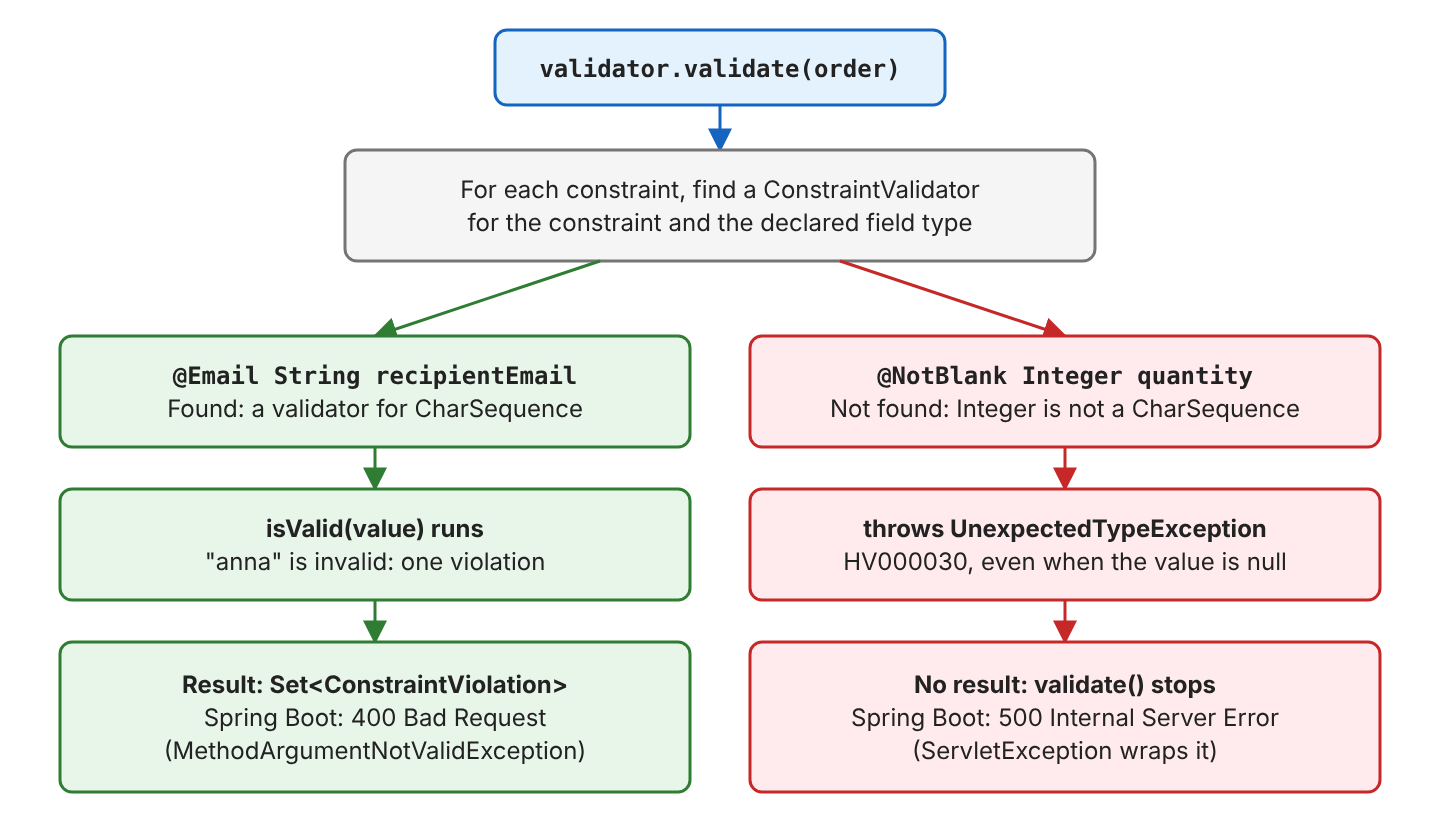
The lookup uses the declared type, not the value, so the exception comes even when the field is null. Hibernate Validator throws it only at the first validate() call, because building the ValidatorFactory succeeds with wrong annotations.
A gift card order shows each cause. It has an amount, a recipientEmail, a message, a quantity, a deliveryDate and a list of ccEmails. Each wrong mapping in this section runs in its own class, because one wrong field stops the whole validate() call.
1.1. @NotBlank or @NotEmpty on a Number or a Date
@NotBlank checks only character sequences, and @NotEmpty checks character sequences, collections, maps and arrays. A number or a date has no length, so neither annotation can check it.
@NotBlank
private Integer quantity;          // ... constraint 'jakarta.validation.constraints.NotBlank'
                                   //     validating type 'java.lang.Integer'. Check configuration for 'quantity'
@NotEmpty
private LocalDate deliveryDate;    // ... constraint 'jakarta.validation.constraints.NotEmpty'
                                   //     validating type 'java.time.LocalDate'. Check configuration for 'deliveryDate'
The @NotBlank on a number often shows up after a refactoring. For example, a team changes quantity from String to Integer to calculate totals with it, and the old @NotBlank stays on the field.
1.2. @Size on a Number
@Size counts characters in a string or elements in a collection. It does not compare numeric values, so @Size(min = 1, max = 10) on a quantity fails.
@Size(min = 1, max = 10)
private Integer quantity;          // ... constraint 'jakarta.validation.constraints.Size'
                                   //     validating type 'java.lang.Integer'. Check configuration for 'quantity'
1.3. @Email or @Past on the Wrong Type
@Email checks only character sequences. Putting it on our own Recipient record (a name and an email) fails, even though the record contains a string. @Past checks only date and time types, so a date stored as a String instead of a LocalDate fails too.
public record Recipient(String name, String email) { }

@Email
private Recipient recipient;       // ... constraint 'jakarta.validation.constraints.Email' validating type
                                   //     'com.howtodoinjava.hibernate.unexpectedtype.Recipient'. Check configuration for 'recipient'
@Past
private String deliveryDate;       // ... constraint 'jakarta.validation.constraints.Past'
                                   //     validating type 'java.lang.String'. Check configuration for 'deliveryDate'
1.4. A Constraint on the Container Instead of Its Elements
An annotation in front of the field type applies to the whole object. On List<String>, @Email receives the list, not the strings inside it. Optional<String> behaves the same way.
@Email
private List<String> ccEmails;      // ... validating type 'java.util.List<java.lang.String>'.
                                    //     Check configuration for 'ccEmails'
@NotBlank
private Optional<String> message;   // ... validating type 'java.util.Optional<java.lang.String>'.
// Check configuration for 'message'![Left: @Email List<String> ccEmails applies @Email to the whole List object holding ok@example.com and broken, a List is not a CharSequence, so UnexpectedTypeException is thrown for type java.util.List<java.lang.String>; the same happens for @NotBlank Optional<String>. Right: List<@Email String> ccEmails applies @Email to each String, ok@example.com passes, broken gives the violation ccEmails[1].<list element>: must be a well-formed email address; the same works for Optional<@NotBlank String>](https://howtodoinjava.com/wp-content/uploads/2026/10/hibernate-validator-unexpectedtypeexception-left-email-list-string-ccemails.png)
2. How to Fix It
Every fix puts a constraint on a type that has a validator for it. The grid shows which built-in constraints each field type accepts in Hibernate Validator 9.1.4.
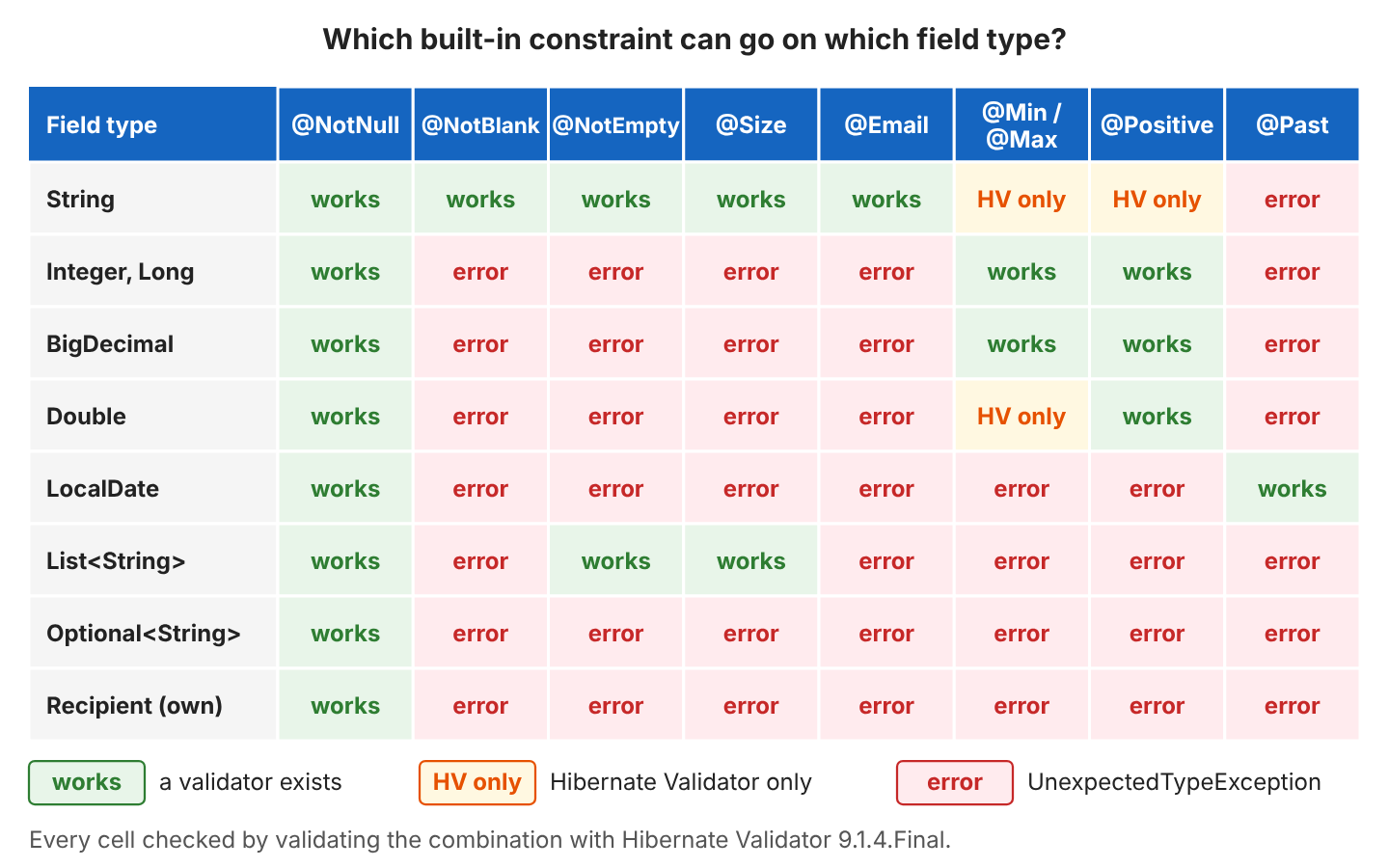
Types outside the grid follow the same families.
| Field type | Constraints to use | Do not use |
|---|---|---|
| String | @NotNull, @NotBlank, @NotEmpty, @Size, @Email, @Pattern | @Past, @Future |
| Integer, Long, BigDecimal | @NotNull, @Min, @Max, @Positive, @Digits | @NotBlank, @NotEmpty, @Size |
| LocalDate, LocalDateTime, Instant | @NotNull, @Past, @Future, @FutureOrPresent | @NotBlank, @NotEmpty, @Size |
| List, Set, Map | @NotNull, @NotEmpty, @Size; element rules inside <…> | @NotBlank, @Email on the field |
| Own class or record | @NotNull, @Valid, a custom constraint | Any built-in value rule |
2.1. Use @NotNull With @Positive or @Min for Numbers
A number cannot be blank, only missing. Replace @NotBlank or @NotEmpty on a number with @NotNull, and replace @Size with @Min, @Max or @Positive.
// Before
@NotBlank
@Size(min = 1, max = 10)
private Integer quantity;     // UnexpectedTypeException

// After
@NotNull
@Min(1)
@Max(10)
private Integer quantity;     // null -> quantity: must not be null
                              // 0    -> quantity: must be greater than or equal to 1
For the gift card amount, BigDecimal accepts the same number rules, so @Positive @Min(5) @Max(500) gives “must be less than or equal to 500” for 600.00 and no violation for 40.00.
2.2. Put @Size on the String and @Past on a Date Type
@Size stays where it belongs, on a text field such as the greeting message. A date field gets a real date type, so @Past or @FutureOrPresent can compare it.
@Size(max = 200)
private String message;          // 201 characters -> message: size must be between 0 and 200

@NotNull
@FutureOrPresent
private LocalDate deliveryDate;  // yesterday -> deliveryDate: must be a date in the present or in the future
2.3. Move the Constraint Inside the Container Type
We write the annotation inside the angle brackets, so it applies to each element. @Size stays on the list itself, where it counts the elements.
// Before
@Email List<String> ccEmails;            // UnexpectedTypeException
@NotBlank Optional<String> message;      // UnexpectedTypeException

// After
@Size(max = 3)
List<@Email String> ccEmails;            // ["ok@example.com", "broken"]
                                         // -> ccEmails[1].<list element>: must be a well-formed email address
Optional<@NotBlank String> message;      // Optional.of("  ") -> message: must not be blank
                                         // Optional.empty()  -> message: must not be blank
2.4. Validate Our Own Type With @Valid or a Custom Validator
For a class we wrote, we have two options. The first one keeps the built-in rules on the String components and adds @Valid, which tells Hibernate Validator to validate the nested object too.
public record Recipient(@NotBlank String name, @NotBlank @Email String email) { }

@Valid
private Recipient recipient;     // new Recipient("", "anna@example.com")
                                 // -> recipient.name: must not be blank
The second option is a custom constraint. Its ConstraintValidator declares Recipient as the second type parameter, which is the type the lookup needs.
@Target({ElementType.FIELD, ElementType.PARAMETER, ElementType.TYPE_USE})
@Retention(RetentionPolicy.RUNTIME)
@Constraint(validatedBy = RecipientValidator.class)
public @interface ValidRecipient {
  String message() default "must have a name and an email address";
  Class<?>[] groups() default {};
  Class<? extends Payload>[] payload() default {};
}

public class RecipientValidator implements ConstraintValidator<ValidRecipient, Recipient> {
  public boolean isValid(Recipient recipient, ConstraintValidatorContext context) {
    if (recipient == null) return true;     // leave null checks to @NotNull
    return recipient.name() != null && !recipient.name().isBlank()
        && recipient.email() != null && recipient.email().contains("@");
  }
}

@ValidRecipient
private Recipient recipient;     // new Recipient("Lokesh", "no-at-sign")
                                 // -> recipient: must have a name and an email address
Prefer @Valid when the rules belong to the fields of the type. We write a custom validator when the rule needs several fields together.
2.5. Catch the Mistake at Compile Time
Hibernate Validator ships an annotation processor that checks constraint types while javac runs. We add it to the compiler plugin.
<configuration>
  <annotationProcessorPaths>
    <path>
      <groupId>org.hibernate.validator</groupId>
      <artifactId>hibernate-validator-annotation-processor</artifactId>
      <version>9.1.4.Final</version>
    </path>
  </annotationProcessorPaths>
</configuration>
With the processor, the build fails before any test runs.
[ERROR] .../Order.java:[4,3] The annotation @NotBlank is disallowed for this data type.
[ERROR] .../Order.java:[6,3] The annotation @NotBlank is disallowed for this data type.
[ERROR] .../Order.java:[5,3] The annotation @Email is disallowed for this data type.
The example project uses Hibernate Validator 9.1.4.Final (Jakarta Validation 3.1) with the Expressly EL implementation on Java 25. Its 26 JUnit tests reproduce every error message and check every cell of the grid and the table.
3. UnexpectedTypeException FAQs
3.1. Why Does Spring Boot Return 500 Instead of 400?
A @Valid @RequestBody parameter goes through the same lookup. A wrong value becomes a MethodArgumentNotValidException, and Spring Boot answers 400 Bad Request. A wrong type throws UnexpectedTypeException, which Spring wraps in a ServletException, so the client gets 500 Internal Server Error.
Servlet.service() for servlet [dispatcherServlet] in context with path [] threw exception [Request processing failed: jakarta.validation.UnexpectedTypeException: HV000030: No validator could be found for constraint 'jakarta.validation.constraints.NotBlank' validating type 'java.lang.Integer'. Check configuration for 'quantity'] with root causeDo not catch UnexpectedTypeException in a @ControllerAdvice to turn it into a 400, because it reports a bug in the request class, not bad input. We fix the annotation instead.
3.2. Can I Use @Min, @Max or @Positive on a String?
Yes, but only with Hibernate Validator. The Jakarta Validation specification lists numeric types only, whereas Hibernate Validator also reads the number inside a String.
| @Positive @Min(5) @Max(500) String amount | Result |
|---|---|
| “40.00” | No violation |
| “-5” | must be greater than 0, must be greater than or equal to 5 |
| “forty” | All three rules fail |
Code that relies on the String support is not portable to another provider. Also, “forty” gives three confusing messages, so a BigDecimal field is the better choice for money.
3.3. Does the Value of the Field Matter?
No. The exception depends only on the annotation and the declared type, so @NotBlank Integer quantity throws for 2 and for null alike. A test that validates an object with every field filled in finds the mistake, and so does the annotation processor from section 2.5.
4. Conclusion
UnexpectedTypeException with HV000030 means a constraint and a field type do not fit together. We read the constraint and the field type from the message, then use @NotNull with number rules for numbers, @Size and @NotBlank for strings, date rules for date types, element annotations such as List<@Email String> for containers, and @Valid or a custom ConstraintValidator for our own types.
5. References
- Hibernate Validator 9.1 Reference Guide: Built-in constraints
- Hibernate Validator 9.1 Reference Guide: Container element constraints
- Hibernate Validator 9.1 Reference Guide: Creating custom constraints
- Hibernate Validator 9.1 Reference Guide: Annotation processor with Maven
- UnexpectedTypeException JavaDoc (Jakarta Validation 3.1)
- Jakarta Validation 3.1 Specification
- Spring Boot Reference: Validation
Happy Learning !!

What could be a problem with String fields as following:
    @NotEmpty
    @Length(max = 512)
   private String shortDescription;
I got an error:
HV000030: No validator could be found for constraint ‘javax.validation.constraints.NotEmpty’ validating type ‘java.lang.String’ .Checkconfiguration for ‘updateContest.arg1.shortDescription’
@NotBlank(“shortDescription is not null”)
@Length(max = 512)
private String shortDescription;
Is there any way if we can catch this error ?