
Java Bean Validation is a Jakarta EE standard that checks the fields of a Java object against rules written as annotations, such as @NotBlank on a name or @Email on an email address. Each annotation rule is called a constraint. Hibernate Validator is the reference implementation of Bean Validation. We pass an object to its Validator, and the Validator returns one ConstraintViolation for every broken rule instead of throwing an exception at the first one.
We use Bean Validation to check form input, REST request bodies, method parameters and entities before they reach the database, with the same rules in every layer.
The following example puts constraints on an Attendee class and validates one valid and one invalid attendee.
@NotBlank
@Size(min = 2, max = 40)
private String name;

@NotNull
@Email
private String email;

@Min(18)
private int age;
Validator validator = Validation.buildDefaultValidatorFactory().getValidator();
Attendee lokesh = new Attendee("Lokesh", "lokesh@example.com", 37, TicketType.STANDARD);
Set<ConstraintViolation<Attendee>> none = validator.validate(lokesh); // [] (no violations)
Attendee invalid = new Attendee("L", "lokesh.example.com", 16, null);
Set<ConstraintViolation<Attendee>> violations = validator.validate(invalid); // 4 violations:
// age: must be greater than or equal to 18
// email: must be a well-formed email address
// name: name must have 2 to 40 characters
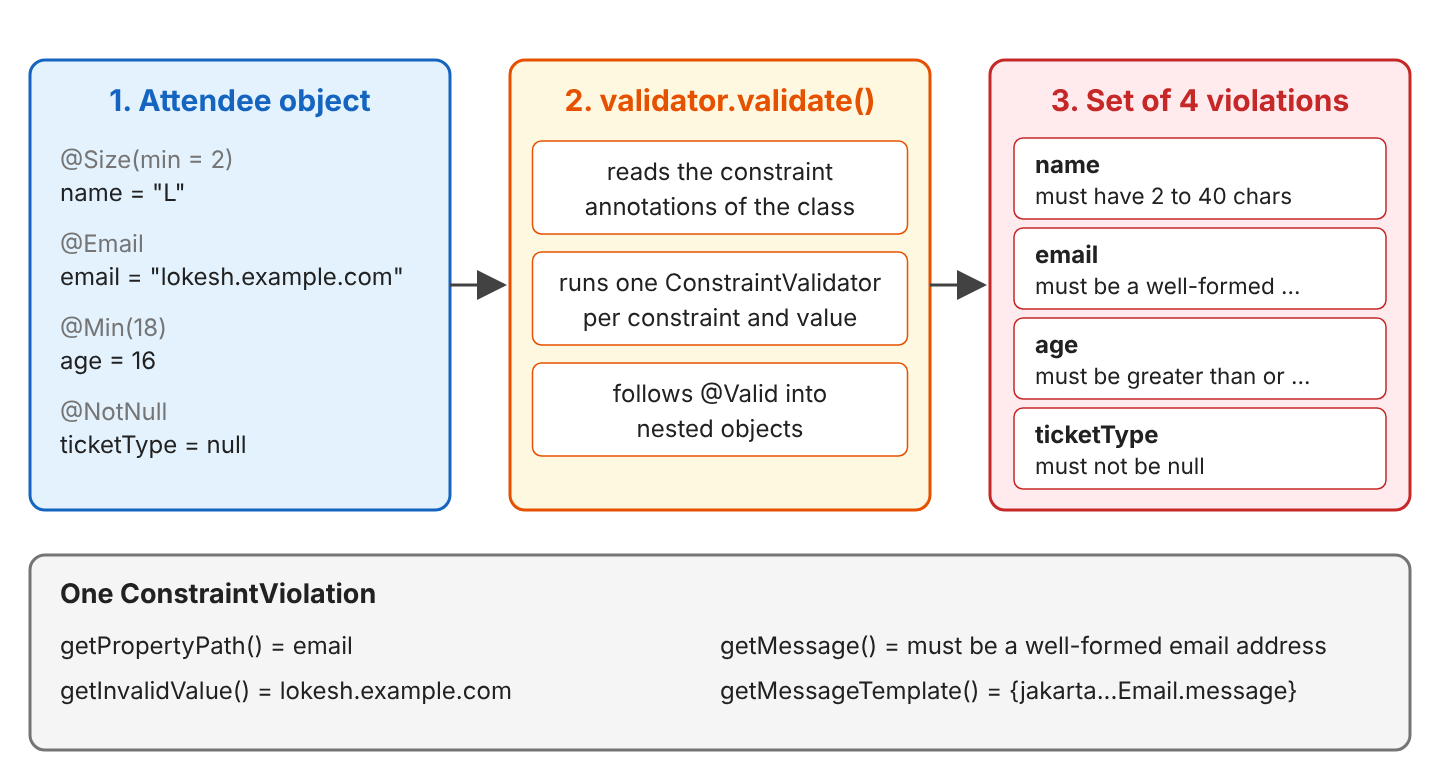
// ticketType: must not be nullNotice that validate() returns all four violations of the invalid attendee at once, each with the property name and the message.
We start with the dependencies and the built-in constraints, then move on to custom messages, nested objects and lists, records, method validation, groups and custom constraints. Finally, we look at the automatic check that Hibernate ORM 7 runs before every insert, and at fail-fast mode.
1. How Bean Validation Works
The rules are part of the class, and the check runs only when some code asks for it. The method validate() reads the constraint annotations and runs one small checker class (a ConstraintValidator) for each constraint and value. It collects every failure in a Set, and each ConstraintViolation in it names the failed property and the message, together with the rejected value.
For example, a conference registration form sends a name, an email and an age, and the server must show the user every wrong field at once, not one by one. Bean Validation returns all of them in one call.
Three names show up in every project, and they refer to three different artifacts.
| Name | What it is | Maven artifact |
|---|---|---|
| Jakarta Validation 3.1 (Bean Validation) | The specification and the API: annotations, Validator, ConstraintViolation | jakarta.validation:jakarta.validation-api |
| Hibernate Validator 9.1 | The implementation that runs the checks | org.hibernate.validator:hibernate-validator |
| Expressly 6.0 | An implementation of Jakarta Expression Language, used to build the messages | org.glassfish.expressly:expressly |
Older tutorials use javax.validation (Bean Validation 2.0, Hibernate Validator 6.x). Since Jakarta Validation 3.0 the package is jakarta.validation, and only the import changes.
2. Bean Validation Example
Our example is a conference registration. An Attendee has a name, an email, an age, a ticket type and an optional address, and the same class is also a Hibernate entity, so section 5 can save it.
2.1. Dependencies
Hibernate Validator brings the Jakarta Validation API with it. It also needs an Expression Language implementation to build the messages, so we add Expressly.
<dependency>
  <groupId>org.hibernate.validator</groupId>
  <artifactId>hibernate-validator</artifactId>
  <version>9.1.4.Final</version>
</dependency>
<dependency>
  <groupId>org.glassfish.expressly</groupId>
  <artifactId>expressly</artifactId>
  <version>6.0.0</version>
</dependency>
Hibernate Validator 9.1 needs Java 17 or newer, and our project runs on Java 25.
2.2. The Attendee Class
Each field carries the rules it must follow. An annotation can sit on a field, on a getter, on the class, or inside a generic type such as List<@Email String>.
@NotBlank
@Size(min = 2, max = 40, message = "{attendee.name.size}")
private String name;

@NotNull
@Email
private String email;

@Min(18)
@Max(120)
private int age;

@NotNull
@Enumerated(EnumType.STRING)
private TicketType ticketType;        // STANDARD, STUDENT, VIP

@Valid
@Embedded
private Address address;

@ElementCollection
private List<@Email String> guestEmails = new ArrayList<>();
Address is an @Embeddable class with its own rules.
@NotBlank
private String city;

@Pattern(regexp = "[0-9]{5}", message = "must have 5 digits")
private String zip;
2.3. Validating an Object and Reading the Violations
We build one Validator and reuse it, because it is thread-safe and building the factory is the expensive part. Besides validate() for a whole object, it has validateProperty() for one property and validateValue() for a value before we set it.
ValidatorFactory factory = Validation.buildDefaultValidatorFactory();
Validator validator = factory.getValidator();

Set<ConstraintViolation<Attendee>> all = validator.validate(invalid);                           // 4 violations
Set<ConstraintViolation<Attendee>> emailOnly = validator.validateProperty(invalid, "email");     // 1 violation, only email
Set<ConstraintViolation<Attendee>> age16 = validator.validateValue(Attendee.class, "age", 16);   // 1 violation
Set<ConstraintViolation<Attendee>> age18 = validator.validateValue(Attendee.class, "age", 18);   // 0 violations
The returned Set has no fixed order, so we sort the violations by path when we print them. For the invalid email, each getter of the ConstraintViolation returns one part of the report.
ConstraintViolation<Attendee> v = validator.validateProperty(invalid, "email").iterator().next();

Path path = v.getPropertyPath();                                      // email
String message = v.getMessage();                                      // must be a well-formed email address
String template = v.getMessageTemplate();                             // {jakarta.validation.constraints.Email.message}
Object value = v.getInvalidValue();                                   // lokesh.example.com
Class<Attendee> rootClass = v.getRootBeanClass();                     // Attendee
Annotation annotation = v.getConstraintDescriptor().getAnnotation();   // the @Email annotation
In a web application, the path and the message are what we send back to the client, one entry per field.
2.4. Built-in Constraints
Jakarta Validation defines 22 constraints, and every implementation supports them. All of them except @NotNull, @NotEmpty and @NotBlank accept null as valid. For example, a null zip passes @Pattern, and a null email passes @Email, so we add @NotNull when the value is required.
| Constraint | Checks | Works on |
|---|---|---|
| @NotNull, @Null | The value is (not) null | Any type |
| @NotEmpty | Not null and size greater than 0 | String, Collection, Map, array |
| @NotBlank | Not null and at least one non-space character | CharSequence |
| @Size(min, max) | Length or number of elements | String, Collection, Map, array |
| @Min, @Max | Number limits, inclusive | int, long, BigDecimal, … |
| @DecimalMin, @DecimalMax | Limits written as text, for example “0.01” | Numbers |
| @Positive, @PositiveOrZero, @Negative, @NegativeOrZero | Sign of a number | Numbers |
| @Digits(integer, fraction) | Number of digits before and after the point | Numbers |
| A well-formed email address | CharSequence | |
| @Pattern(regexp) | Matches a regular expression | CharSequence |
| @Past, @PastOrPresent, @Future, @FutureOrPresent | A date or time compared with now | LocalDate, Instant, … |
| @AssertTrue, @AssertFalse | A boolean value | boolean, Boolean |
A constraint on a type it cannot check, such as @NotBlank on an Integer, fails with an UnexpectedTypeException at the first validate() call.
The three “not empty” constraints are the ones developers mix up most. They differ in how they treat an empty string and a string with only spaces.
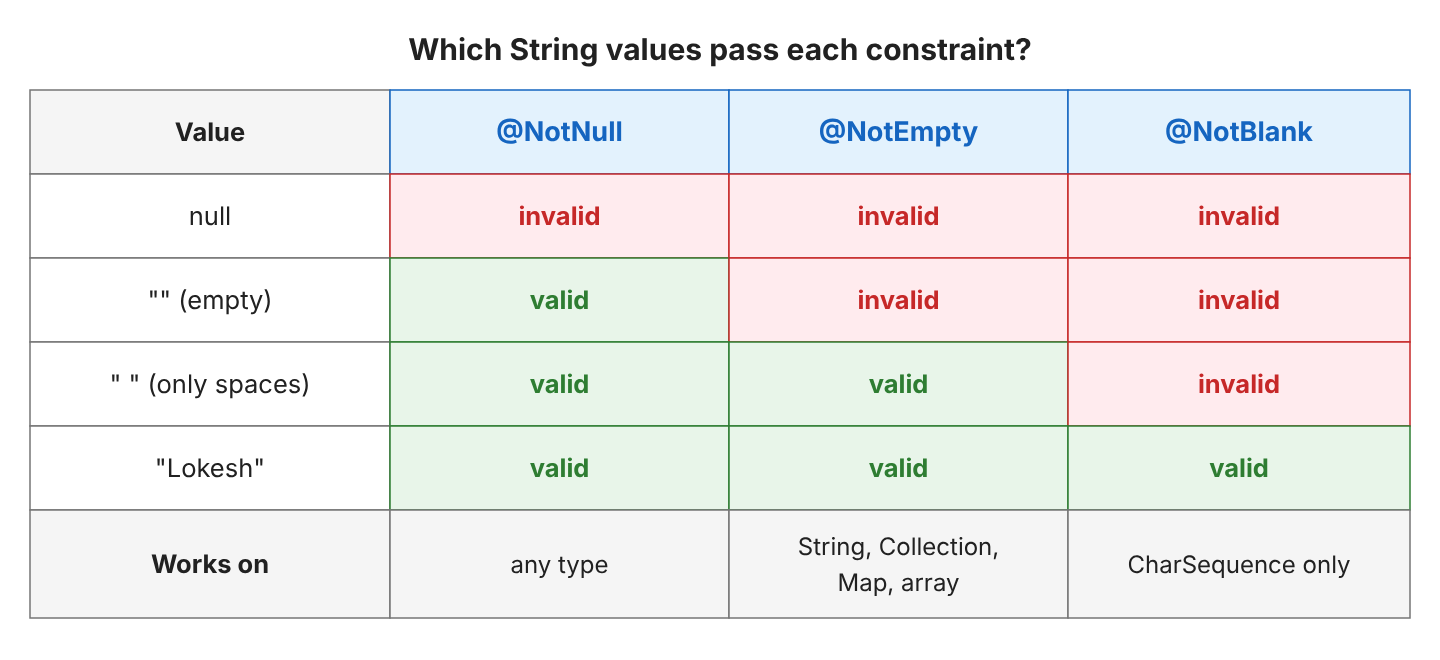
//              @NotNull   @NotEmpty   @NotBlank
// null         invalid    invalid     invalid
// ""           valid      invalid     invalid
// " "          valid      valid       invalid
// "Lokesh"     valid      valid       valid
Hibernate Validator adds its own constraints in the org.hibernate.validator.constraints package. They work only with Hibernate Validator.
@Length(max = 5) String code;                // "abcdefg" -> length must be between 0 and 5
@Range(min = 1, max = 3) int days;           // 4 -> must be between 1 and 3
@URL String website;                         // "example" -> must be a valid URL
@UniqueElements List<String> tags;           // [java, java] -> must only contain unique elements
2.5. Custom Messages and ValidationMessages.properties
Every constraint has a message attribute. The default is a key in curly braces, such as {jakarta.validation.constraints.Email.message}, and Hibernate Validator replaces it with text from its own bundle in the JVM’s language. Replacing the key with text is called message interpolation. We can change the message in two ways.
- Write the text in the annotation, such as @Pattern(regexp = “[0-9]{5}”, message = “must have 5 digits”).
- Write a key such as {attendee.name.size} and put the text in ValidationMessages.properties at the root of the classpath (src/main/resources).
Inside the text, Hibernate Validator replaces {min}, {max} or any other attribute name in curly braces with the attribute’s value.
attendee.name.size=name must have {min} to {max} characters
attendee.student.age=student tickets are for attendees aged {maxAge} or younger
@Size(min = 2, max = 40, message = "{attendee.name.size}")
private String name; // "L" -> name must have 2 to 40 charactersThe built-in messages follow the default Locale. A validator built for German returns “darf nicht null sein” instead of “must not be null”.
Validator german = Validation.byProvider(HibernateValidator.class)
    .configure()
    .defaultLocale(Locale.GERMAN)
    .buildValidatorFactory()
    .getValidator();      // ticketType = null -> darf nicht null sein
For our own keys, a ValidationMessages_de.properties file next to the default one holds the German texts. With attendee.name.size=Name muss {min} bis {max} Zeichen haben in it, the German validator returns “Name muss 2 bis 40 Zeichen haben” for “L”.
3. Validating Nested Objects, Lists and Records
A constraint on a field checks only that field. Objects inside the object, elements inside a list and the parameters of a method need one more step each.
3.1. Cascading Into Nested Objects With @Valid
@Valid on a field tells the validator to validate the object it points to as well. The path of each violation starts with the field name.
anna.setAddress(new Address(" ", "4110"));
Set<ConstraintViolation<Attendee>> violations = validator.validate(anna);   // address.city: must not be blank (value:  )
                                                                            // address.zip: must have 5 digits (value: 4110)
Without @Valid, Hibernate Validator does not check the rules of the nested class, and the same address gives no violation. A null address gives no violation either; we add @NotNull next to @Valid when the address is required.
3.2. Constraints on List Elements
An annotation inside the angle brackets applies to each element instead of the list. An annotation in that position is called a container element constraint, and it works for List, Set, Map keys and values, and Optional.
@ElementCollection
private List<@Email String> guestEmails = new ArrayList<>();

anna.getGuestEmails().add("ravi@example.com");
anna.getGuestEmails().add("meera-at-example");
Set<ConstraintViolation<Attendee>> violations = validator.validate(anna);   // guestEmails[1].<list element>: must be a well-formed email address
The path contains the index of the bad element ([1]), so a form can mark the exact entry. @Size or @NotEmpty on the field itself still checks the list as a whole.
3.3. Validating Java Records
Since Jakarta Validation 3.1, the specification says clearly that records are supported. A constraint on a record component applies to the generated field, the accessor and the constructor parameter.
public record Talk(
    @NotBlank String title,
    @NotBlank String speaker,
    @Min(15) @Max(60) int minutes) {
}

Talk talk = new Talk("", "Lokesh", 90);                                 // created, no exception
Set<ConstraintViolation<Talk>> violations = validator.validate(talk);   // minutes: must be less than or equal to 60
                                                                        // title: must not be blank
Creating an invalid record does not fail by itself. The annotations are only metadata until a Validator reads them.
3.4. Validating Method and Constructor Parameters
Constraints can also sit on method parameters and return values. We check them with the ExecutableValidator from validator.forExecutables().
@NotNull
@Valid
public Attendee register(@NotBlank String name, @NotNull @Email String email, @Min(18) int age) { ... }

@NotNull
public Attendee findByEmail(String email) { ... }
ExecutableValidator executables = validator.forExecutables();
Method register = RegistrationService.class.getMethod("register", String.class, String.class, int.class);
Set<ConstraintViolation<RegistrationService>> paramViolations =
executables.validateParameters(service, register, new Object[] {"Lokesh", "lokesh", 17});
// register.age: must be greater than or equal to 18
// register.email: must be a well-formed email address
Method find = RegistrationService.class.getMethod("findByEmail", String.class);
Set<ConstraintViolation<RegistrationService>> returnViolations =
executables.validateReturnValue(service, find, service.findByEmail("nobody@example.com"));
// findByEmail.<return value>: must not be null
Constructor<Talk> constructor = Talk.class.getDeclaredConstructor(String.class, String.class, int.class);
Set<ConstraintViolation<Talk>> constructorViolations =
executables.validateConstructorParameters(constructor, new Object[] {"Hibernate Tips", " ", 5});
// Talk.minutes: must be greater than or equal to 15
// Talk.speaker: must not be blankA plain Java call to register(“Lokesh”, “lokesh”, 17) runs without any check. Something must call the ExecutableValidator before and after the method. Spring does it for beans annotated with @Validated, and CDI containers do it for their managed beans.
4. Groups and Custom Constraints
Some rules apply only at a certain step, and some rules need several fields at once. Groups solve the first problem and custom constraints the second.
4.1. Validation Groups
A group is an empty interface that we name in the groups attribute. A constraint without groups belongs to the Default group, and validate(object) checks only Default. Our attendee must accept the terms, but only at payment.
public interface Checkout { }

@AssertTrue(groups = Checkout.class, message = "terms must be accepted before payment")
private boolean termsAccepted;
Set<ConstraintViolation<Attendee>> defaults = validator.validate(lokesh); // [] (Checkout rules are skipped)
Set<ConstraintViolation<Attendee>> checkout = validator.validate(lokesh, Checkout.class); // termsAccepted: terms must be accepted before payment
lokesh.setTermsAccepted(true);
Set<ConstraintViolation<Attendee>> accepted = validator.validate(lokesh, Checkout.class); // []The call validate(invalid, Checkout.class) reports only termsAccepted, even though the same attendee breaks four Default rules. We pass several groups, for example validate(a, Default.class, Checkout.class), to check both.
4.2. Group Sequences
@GroupSequence checks groups in order and stops after the first group that has violations. We use it when a later check makes no sense for invalid data, or when it is expensive. For example, there is no point in asking for accepted payment terms while the email of the attendee is still invalid.
@GroupSequence({Default.class, Checkout.class})
public interface RegistrationChecks { }

Set<ConstraintViolation<Attendee>> first = validator.validate(invalid, RegistrationChecks.class);   // 4 Default violations, termsAccepted not checked
Set<ConstraintViolation<Attendee>> second = validator.validate(lokesh, RegistrationChecks.class);   // termsAccepted: terms must be accepted before payment
4.3. Writing a Custom Constraint
A custom constraint has two parts, an annotation marked with @Constraint and a ConstraintValidator class with the logic. Our rule says that student tickets are for attendees aged 25 or younger. It needs both ticketType and age, so it goes on the class.
@Constraint(validatedBy = StudentTicketValidator.class)
@Target(TYPE)
@Retention(RUNTIME)
public @interface StudentTicket {
  String message() default "{attendee.student.age}";
  int maxAge() default 25;
  Class<?>[] groups() default {};
  Class<? extends Payload>[] payload() default {};
}
The message, groups and payload attributes are required by the specification. The maxAge attribute is our own, and the message reads it as {maxAge}.
public class StudentTicketValidator implements ConstraintValidator<StudentTicket, Attendee> {

  private int maxAge;

  @Override
  public void initialize(StudentTicket annotation) {
    maxAge = annotation.maxAge();
  }

  @Override
  public boolean isValid(Attendee attendee, ConstraintValidatorContext context) {
    if (attendee == null || attendee.getTicketType() != TicketType.STUDENT) {
      return true;
    }
    if (attendee.getAge() <= maxAge) {
      return true;
    }
    context.disableDefaultConstraintViolation();
    context.buildConstraintViolationWithTemplate(context.getDefaultConstraintMessageTemplate())
        .addPropertyNode("age")
        .addConstraintViolation();      // report it on the age field, not on the class
    return false;
  }
}
@Entity
@StudentTicket
public class Attendee { ... }
Set<ConstraintViolation<Attendee>> tooOld = validator.validate(new Attendee("Ravi", "ravi@example.com", 30, TicketType.STUDENT));
// age: student tickets are for attendees aged 25 or younger
Set<ConstraintViolation<Attendee>> student = validator.validate(new Attendee("Ravi", "ravi@example.com", 22, TicketType.STUDENT)); // []Return true for null in isValid() and leave the null check to @NotNull, as the built-in constraints do. For a class-level constraint, getInvalidValue() returns the whole Attendee, not the age.
5. Automatic Validation in Hibernate ORM 7
Hibernate ORM finds Hibernate Validator on the classpath and validates every entity before it writes it. The Jakarta Persistence specification ties this check to the lifecycle events of the entity, and it checks the Default group. Our project bootstraps Hibernate with HibernatePersistenceConfiguration and an in-memory H2 database.
5.1. Saving an Invalid Entity
Hibernate inserts a valid attendee as usual, whereas an attendee with a bad email never reaches the database.
emf.runInTransaction(em -> em.persist(lokesh));    // insert into Attendee (city,zip,age,email,...) values (?,?,?,?,...)

emf.runInTransaction(em -> {
  em.persist(new Attendee("Lokesh", "not-an-email", 37, TicketType.VIP));   // returns, no check yet
  em.flush();                                                               // throws, no INSERT
});
jakarta.validation.ConstraintViolationException: Validation failed for classes [com.howtodoinjava.hibernate.validator.Attendee] during persist time for groups [jakarta.validation.groups.Default, ]
List of constraint violations:[
ConstraintViolationImpl{interpolatedMessage='must be a well-formed email address', propertyPath=email, rootBeanClass=class com.howtodoinjava.hibernate.validator.Attendee, messageTemplate='{jakarta.validation.constraints.Email.message}'}
]The transaction rolls back, and the table still holds one row. Hibernate runs the check right before the INSERT or UPDATE, so the place where the exception appears depends on when that statement runs.
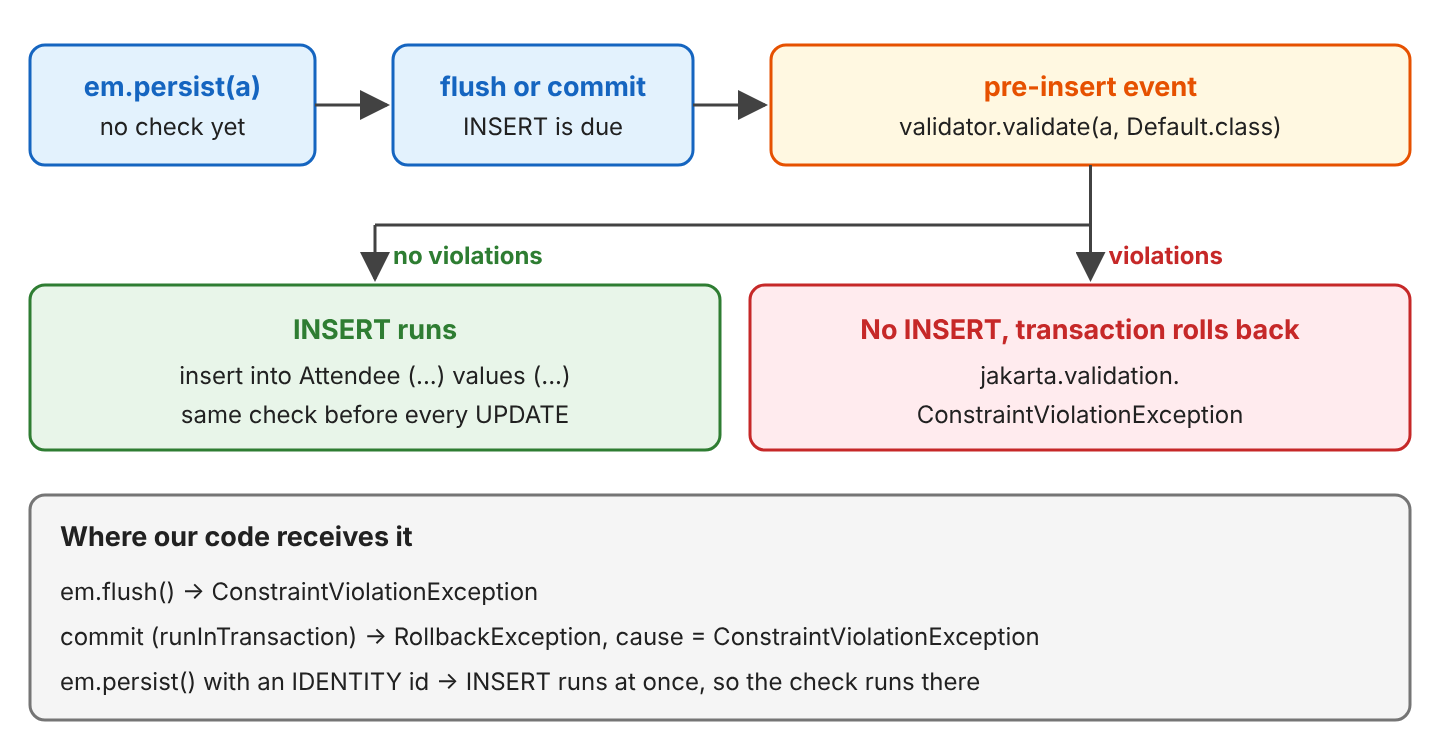
| Where the SQL runs | What our code receives |
|---|---|
| em.flush() | ConstraintViolationException |
| Commit of runInTransaction() | RollbackException with the ConstraintViolationException as cause |
| em.persist() of an entity with an IDENTITY id | ConstraintViolationException from persist() itself |
Changing a managed entity works the same way, so setEmail(“lokesh”) on a loaded attendee fails at commit with “Validation failed for classes […Attendee] during update time”, and the row keeps the old email.
5.2. Constraints in the Generated Schema
When Hibernate creates the tables, it also turns some constraints into column definitions. @NotNull and @NotBlank become not null, @Size(max = 40) sets the column length, and @Min with @Max become a check constraint.
create table Attendee (
  age integer not null check ((age>=18) and (age<=120)),
  termsAccepted boolean not null,
  id bigint not null,
  name varchar(40) not null,
  city varchar(255),
  email varchar(255) not null,
  zip varchar(255),
  ticketType enum ('STANDARD','STUDENT','VIP') not null,
  primary key (id))
The Checkout rule is not in the Default group, so Hibernate saves an attendee with termsAccepted = false without complaint. The groups Hibernate checks are set with the jakarta.persistence.validation.group.pre-persist and jakarta.persistence.validation.group.pre-update properties. To turn the check off, we set the validation mode to NONE.
new HibernatePersistenceConfiguration("conference")
    .validationMode(ValidationMode.NONE)    // invalid attendees are inserted
    ...
The complete project on GitHub runs every example with Hibernate Validator 9.1.4, Hibernate ORM 7.4.11 and Java 25, and checks each result with 33 JUnit tests (mvn -q compile exec:java, mvn test).
6. Bean Validation FAQs
6.1. How Do I Stop at the First Violation?
We enable Hibernate Validator’s fail-fast mode, in which validate() returns as soon as one constraint fails. Fail-fast mode is useful for large object graphs when we only need a yes or no answer.
Validator failFast = Validation.byProvider(HibernateValidator.class)
    .configure()
    .failFast(true)        // or .addProperty("hibernate.validator.fail_fast", "true")
    .buildValidatorFactory()
    .getValidator();

int allViolations = validator.validate(invalid).size();    // 4
int firstOnly = failFast.validate(invalid).size();         // 1
Do not use fail-fast for form input, because the user would fix one field, submit again and only then see the next error.
6.2. Do I Need the Expression Language Dependency?
Yes, for the default setup. Without Expressly (or another Jakarta EL implementation) on the classpath, creating the ValidatorFactory fails.
jakarta.validation.ValidationException: HV000183: Unable to initialize 'jakarta.el.ExpressionFactory'. Check that you have the EL dependencies on the classpath, or use ParameterMessageInterpolator instead
Caused by: java.lang.NoClassDefFoundError: jakarta/el/ELManager
In a Jakarta EE server or in Spring Boot, the EL implementation is already there. The ParameterMessageInterpolator named in the message works without EL, but it is not compliant with the specification, so adding Expressly is the better fix. For injecting the ValidatorFactory with CDI instead of building it, Hibernate Validator has a separate CDI module.
6.3. Does Spring Boot Use Hibernate Validator?
Yes. The spring-boot-starter-validation starter brings hibernate-validator and tomcat-embed-el, and Spring Boot 4.1.1 manages Hibernate Validator 9.1.3.Final. Spring validates @Valid @RequestBody parameters and the methods of @Validated beans with the same constraints shown here.
6.4. Why Is My Constraint Ignored?
A constraint is only metadata, so it does nothing until a Validator checks the object in the right way. The usual causes are a missing call, a missing @Valid, a different group or a null value.
- The object is never passed to a Validator, because a constructor or a plain method call does not validate (sections 3.3 and 3.4).
- A nested object has no @Valid on its field (section 3.1).
- The constraint is in another group than the one being validated, such as Checkout during em.persist() (sections 4.1 and 5.2).
- The value is null, and the constraint is not @NotNull, @NotEmpty or @NotBlank (section 2.4).
7. Conclusion
Hibernate Validator checks the constraint annotations of an object and returns every broken rule as a ConstraintViolation, which holds the path and the message together with the rejected value. We use @NotBlank for required text, @Valid for nested objects, element annotations for lists, groups for step-specific rules and a ConstraintValidator for rules that span several fields. With Hibernate ORM 7, the same rules run again before every insert and update, so invalid data cannot reach the table.
8. References
- Jakarta Validation 3.1 Specification
- ConstraintViolation JavaDoc (Jakarta Validation 3.1)
- Hibernate Validator 9.1 Reference Guide
- Hibernate Validator 9.1 Reference Guide: Built-in constraints
- Hibernate Validator 9.1 Reference Guide: Message interpolation
- Hibernate Validator 9.1 Reference Guide: Fail fast mode
- Jakarta Persistence 3.2 Specification: Bean Validation
- Hibernate ORM 7.4 User Guide: Jakarta Validation Integration Settings
Happy Learning !!

How to stop the next constraints checks for single field .
for example there is bean User and has String userName;
Certificate Number is mandatory
here if first constraint fail means NotNull then i dont want check pattren check i have to stop here
Certificate Number should not contain spaces
.*[\S]+.*