
In Hibernate, merge() copies the state of a detached object onto a managed instance and returns that instance, while refresh() reloads a managed object from its database row and overwrites its fields. So the two methods move data in opposite directions, because merge() takes the values from our object and saves them at commit, whereas refresh() takes the values from the database and throws away whatever the object held.
We use merge() to save an object that a web form or another layer edited outside the current EntityManager, and refresh() to read a row again after a bulk update or a database trigger changed it.
The following example changes a detached Shipment with merge() and undoes a change to a managed one with refresh().
@Id
@GeneratedValue(strategy = GenerationType.IDENTITY)
private Long id;

private String destination;
private String status;

@Version
private int version;
pune.setStatus("shipped"); // pune is detached, no SQL
Shipment copy = em.merge(pune); // select s1_0.id,...,s1_0.version from Shipment s1_0 where s1_0.id=?
boolean same = copy == pune; // false, continue with copy
// commit: update Shipment set destination=?,status=?,version=? where id=? and version=?
Shipment shipment = em.find(Shipment.class, 1L); // status = "shipped"
shipment.setStatus("lost"); // not saved yet
em.refresh(shipment); // select s1_0.id,...,s1_0.version from Shipment s1_0 where s1_0.id=?
String status = shipment.getStatus(); // "shipped", "lost" is goneNotice that merge() returns a different object, so we continue with copy, whereas refresh() overwrites the unsaved status “lost”.
Next, we look at the SQL that each method sends and at the OptimisticLockException that an outdated merge() throws. After that, we cover the cases that need a refresh().
1. Hibernate merge() vs refresh()
Both methods work on the persistence context (that is, the set of objects one EntityManager tracks). An object in it is managed, so Hibernate compares it with the row at flush and writes the changes, whereas an object that has a row but is not tracked is a detached entity. An entity becomes detached in four ways.
- The transaction ends and the EntityManager is closed, as with emf.runInTransaction().
- We call em.close().
- We call em.clear(), which detaches every managed entity.
- We call em.detach(entity) for one entity.
The method merge() brings the data of a detached (or new) object back into the persistence context, whereas refresh() copies in the other direction, from the row to a managed object.
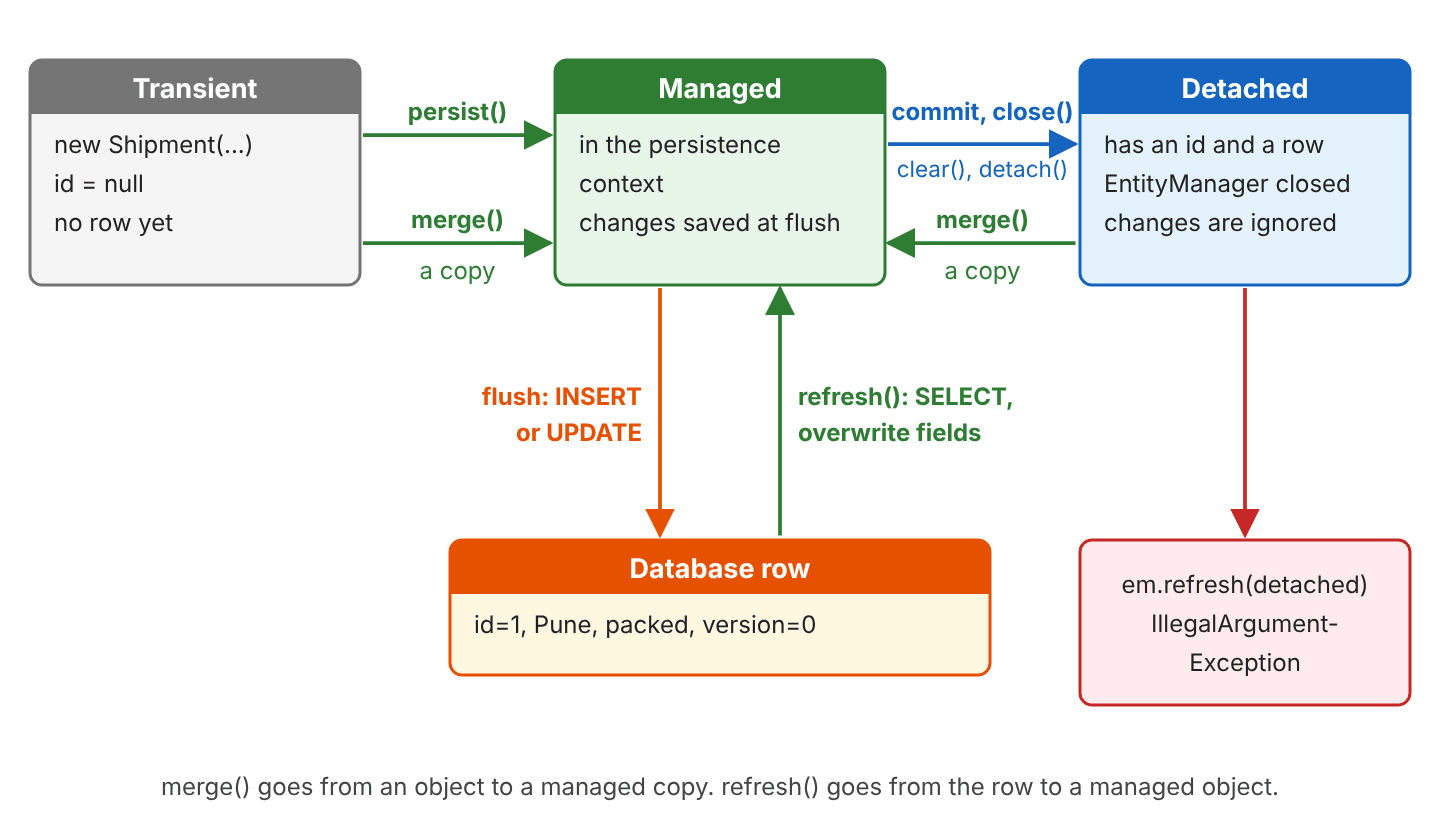
We add persist() to the comparison, because developers often pick between persist() and merge().
| persist(s) | merge(s) | refresh(s) | |
|---|---|---|---|
| Direction | Object to database | Object to database | Database to object |
| Accepts | A new object | A new or detached object | A managed object only |
| Returns | void | A managed instance | void |
| The object we pass | Becomes managed | Stays as it was | Stays managed, fields overwritten |
| SQL | INSERT | SELECT (unless loaded), then UPDATE at flush; INSERT for a new object | SELECT |
| Detached object | EntityExistsException | Normal use | IllegalArgumentException |
| Unsaved changes in the object | Saved | Saved on the copy | Lost |
2. Merge and Refresh Example
The following example tracks shipments in a warehouse and runs on Hibernate 7.4.11, Java 25 and an in-memory H2 database.
2.1. The Shipment Entity
A shipment has a destination and a status such as “packed”, “shipped” or “delivered”. The @Version field is a counter that Hibernate increases on every UPDATE, so Hibernate can detect that a row changed after we read it (this is called optimistic locking).
@Entity
public class Shipment {

  @Id
  @GeneratedValue(strategy = GenerationType.IDENTITY)
  private Long id;

  private String destination;
  private String status;

  @Version
  private int version;
}
Every case starts with one row, saved in its own transaction, and after that transaction pune is detached.
Shipment pune = new Shipment("Pune", "packed");
emf.runInTransaction(em -> em.persist(pune));   // insert into Shipment (destination,status,version,id) values (?,?,?,default)
                                                // pune: id = 1, version = 0
2.2. Changing a Detached Entity
A detached object is a plain Java object that Hibernate does not watch, so a setter call on it never reaches the database.
pune.setStatus("shipped");                                                             // no SQL
String status = emf.callInTransaction(em -> em.find(Shipment.class, 1L)).getStatus();   // "packed"
A web app runs into detached entities all the time. One request loads the shipment, the user edits it in a form, and a later request has to save the edited object with a new EntityManager.
2.3. Merging a Detached Entity
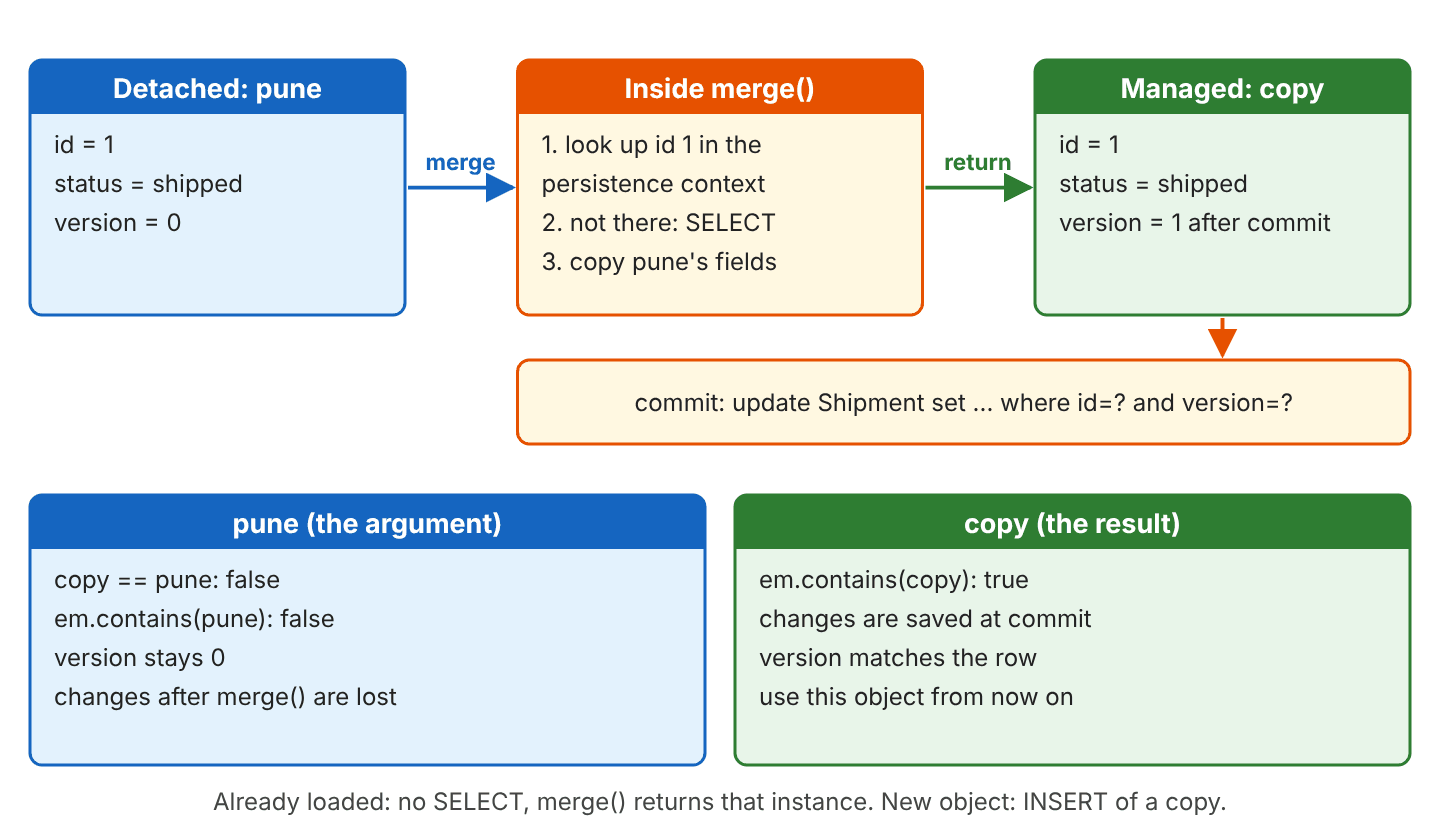
The method merge() looks for a managed shipment with the same id, and because there is none in the new EntityManager, Hibernate loads the row, copies the fields of pune onto the loaded instance and returns it. The UPDATE runs at commit.
pune.setStatus("shipped");

emf.runInTransaction(em -> {
  Shipment copy = em.merge(pune);              // select s1_0.id,...,s1_0.version from Shipment s1_0 where s1_0.id=?
  boolean same = copy == pune;                 // false
  boolean copyManaged = em.contains(copy);     // true
  boolean puneManaged = em.contains(pune);     // false
});                                            // update Shipment set destination=?,status=?,version=? where id=? and version=?

// copy = Shipment[id=1, destination=Pune, status=shipped, version=1]
// pune = Shipment[id=1, destination=Pune, status=shipped, version=0]
The argument and the result are two different objects. The object pune stays detached and keeps version = 0, and only the returned copy is managed and gets the new version.
2.4. Keep Using the Returned Copy
Because pune is still detached after the call, a change to it is lost, whereas a change to the returned copy is saved.
emf.runInTransaction(em -> {
  Shipment copy = em.merge(pune);
  pune.setDestination("Mumbai");    // ignored, pune is not managed
  copy.setStatus("shipped");        // saved at commit
});
After merge(), we always continue with the returned object and drop the argument. The common bug is a line like em.merge(shipment); that discards the result, followed by more changes to shipment.
2.5. Merging When the Entity Is Already Loaded
When the EntityManager already holds a shipment with the same id, merge() runs no SELECT, copies the fields onto that instance and returns it.
detached.setStatus("in transit");

emf.runInTransaction(em -> {
  Shipment loaded = em.find(Shipment.class, 1L);   // select s1_0.id,...,s1_0.version from Shipment s1_0 where s1_0.id=?
  Shipment copy = em.merge(detached);              // no SQL
  boolean same = copy == loaded;                   // true
  String status = loaded.getStatus();              // "in transit"
});                                                // update Shipment set destination=?,status=?,version=? where id=? and version=?
The same rule makes em.merge(loaded) on a managed entity return loaded itself, with no SQL.
2.6. Merging a New Entity
The method merge() also accepts an object that has no id. Hibernate inserts a copy, and only the copy gets the generated id.
Shipment delhi = new Shipment("Delhi", "packed");
Shipment saved = emf.callInTransaction(em -> em.merge(delhi));   // insert into Shipment (destination,status,version,id) values (?,?,?,default)

Long delhiId = delhi.getId();   // null
Long savedId = saved.getId();   // 2
For new objects, persist() is the better choice, because it inserts the object we pass, so there is no second object to keep track of.
2.7. Merging an Outdated Copy With @Version
Remember that pune kept version = 0 in section 2.3, while the row has version = 1. Merging pune again compares the two versions after the SELECT and fails at once.
pune.setStatus("lost");
emf.runInTransaction(em -> em.merge(pune));   // select s1_0.id,...,s1_0.version from Shipment s1_0 where s1_0.id=?
jakarta.persistence.OptimisticLockException: Row was already updated or deleted by another transaction for entity [com.howtodoinjava.hibernate.mergerefresh.Shipment with id '1']The same check protects us when two users edit one shipment. The second user’s merge() finds a newer version in the row and throws instead of overwriting the first user’s change. The fix in our code is the rule from section 2.4, so we continue with the returned copy, which carries the current version.
Shipment copy = emf.callInTransaction(em -> em.merge(pune));   // version 1
copy.setStatus("delivered");
Shipment again = emf.callInTransaction(em -> em.merge(copy));  // version 2, no error
2.8. Discarding Unsaved Changes With refresh()
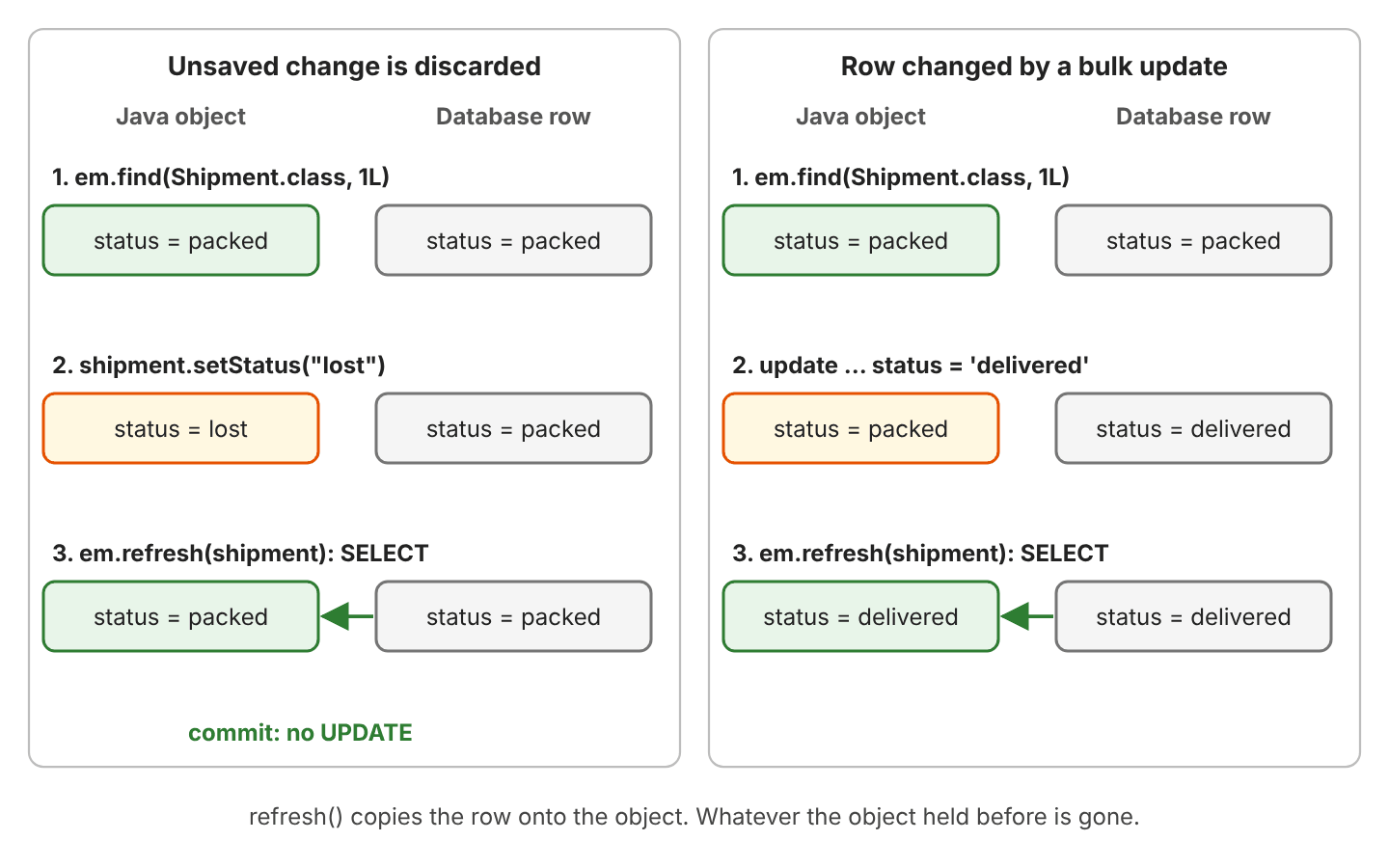
The method refresh() runs a SELECT for a managed entity and writes the row’s values into its fields. A change we made and did not flush is overwritten, and since the object equals the row again, Hibernate sends no UPDATE at commit.
emf.runInTransaction(em -> {
  Shipment shipment = em.find(Shipment.class, 1L);   // select ...   status = "packed"
  shipment.setStatus("lost");
  em.refresh(shipment);                              // select s1_0.id,...,s1_0.version from Shipment s1_0 where s1_0.id=?
  String status = shipment.getStatus();              // "packed"
});                                                  // no UPDATE
The left side of the next picture shows this case. The right side shows the more common reason for refresh(), a row that changed in the database.
2.9. Refreshing After a Bulk or Native Update
A bulk JPQL update goes straight to the database and does not touch the objects in the persistence context, so our shipment keeps the old status. Even a new query returns the cached object with the old value, because Hibernate never overwrites a managed entity with query results.
Shipment shipment = em.find(Shipment.class, 1L);                // status = "packed"

em.createQuery("update Shipment set status = 'delivered' where destination = 'Pune'")
    .executeUpdate();                                           // update Shipment s1_0 set status='delivered' where s1_0.destination='Pune'

String found = em.find(Shipment.class, 1L).getStatus();         // "packed", no SQL
String queried = em.createQuery("from Shipment where id = :id", Shipment.class)
    .setParameter("id", 1L)
    .getSingleResult().getStatus();                             // "packed", although the SELECT ran

em.refresh(shipment);                                           // select s1_0.id,...,s1_0.version from Shipment s1_0 where s1_0.id=?
String refreshed = shipment.getStatus();                        // "delivered"
int version = shipment.getVersion();                            // 0
The last line shows a second trap, because a bulk update does not increase the @Version column. We add version = version + 1 to the set clause when other code relies on the version.
A native update in plain SQL or a stored procedure changes the row the same way, and so does another application that writes to the table. In every case, refresh() is the fix.
Shipment shipment = em.find(Shipment.class, 2L);    // status = "packed"
em.createNativeQuery("update Shipment set status = 'shipped' where id = ?")
    .setParameter(1, 2L)
    .executeUpdate();                               // update Shipment set status = 'shipped' where id = ?
String before = shipment.getStatus();               // "packed"
em.refresh(shipment);                               // select ...
String after = shipment.getStatus();                // "shipped"
2.10. Reading a Value Set by a Database Trigger
A database trigger is code in the database that runs on an INSERT or UPDATE and can change the row. In our example, a trigger sets the status of a new shipment to “received” when we leave it empty. Hibernate does not know about the trigger, so the Java object still holds null after the insert. We call flush() so the INSERT runs, and after that we call refresh().
Shipment chennai = new Shipment("Chennai", null);
em.persist(chennai);                    // insert into Shipment (destination,status,version,id) values (?,?,?,default)
em.flush();
String before = chennai.getStatus();    // null
em.refresh(chennai);                    // select ...
String after = chennai.getStatus();     // "received"
2.11. refresh() Needs a Managed Entity
Since Hibernate 7.0, refresh() follows the Jakarta Persistence rule and rejects an object that the current EntityManager does not manage. Older Hibernate versions refreshed detached objects too, so code that relied on refreshing a detached object fails in Hibernate 7.
emf.runInTransaction(em -> em.refresh(pune));java.lang.IllegalArgumentException: org.hibernate.DetachedObjectException: Given entity is not associated with the persistence contextA new object that was never persisted fails with the same IllegalArgumentException. To read the current row for a detached object, we call em.find(Shipment.class, pune.getId()) in the new EntityManager instead.
The complete project on GitHub contains every case from this section, prints the SQL and includes 28 JUnit tests (mvn -q compile exec:java, mvn test).
3. Merge and Refresh FAQs
3.1. What Replaced Session.update() and saveOrUpdate() in Hibernate 7?
Hibernate 6 deprecated saveOrUpdate(), update() and save(), and Hibernate 7 removed them from Session, so code that calls them no longer compiles.
| Hibernate 5 and 6 | Hibernate 7 |
|---|---|
| session.update(shipment) | session.merge(shipment), and use the returned object |
| session.saveOrUpdate(shipment) | persist() for a new object, merge() for a detached one |
| session.save(shipment) | session.persist(shipment) |
| session.refresh(shipment) | Unchanged, but only for managed objects |
The old update() attached the object we passed, whereas merge() attaches a copy, so the variable has to change.
Session session = em.unwrap(Session.class);
Shipment managed = session.merge(shipment);   // select ...
                                              // commit: update Shipment set destination=?,status=?,version=? where id=? and version=?
3.2. Why Does merge() Set My Other Columns to NULL?
Because merge() copies every field of the object we pass, including the null ones. The problem shows up when we build an entity from a form or a DTO that carries only some fields.
Shipment form = new Shipment(null, "returned");   // no destination
form.setId(1L);
em.merge(form);                                   // update Shipment set destination=?,status=?,version=? where id=? and version=?
// row: destination = null, status = returned
To change one field, load the entity and call its setter. Hibernate updates the row from a complete object, so the other columns keep their values.
em.find(Shipment.class, 1L).setStatus("returned");
// row: destination = Pune, status = returned
3.3. What Happens When We Merge an Entity Whose Row Was Deleted?
With a @Version field, Hibernate treats a deleted row as a concurrent change. The SELECT finds nothing, and merge() throws the same exception as in section 2.7.
emf.runInTransaction(em -> em.remove(em.find(Shipment.class, 1L)));   // delete from Shipment where id=? and version=?
emf.runInTransaction(em -> em.merge(pune));                           // select ...
// OptimisticLockException: Row was already updated or deleted by another transaction for entity [... with id '1']
3.4. Does refresh() Flush Pending Changes First?
No. A refresh() right after a merge() in the same transaction undoes the merge, because the UPDATE has not run yet and the row still holds the old values. We call flush() between them when we need both.
Shipment copy = em.merge(late);   // late.status = "on hold"
em.refresh(copy);                 // select ...
String lost = copy.getStatus();   // "in transit", the merged value is lost

copy = em.merge(late);
em.flush();                       // update Shipment set ... where id=? and version=?
em.refresh(copy);                 // select ...
String kept = copy.getStatus();   // "on hold"
3.5. Can refresh() Lock the Row?
Yes, because refresh() accepts a LockModeType. With PESSIMISTIC_WRITE, Hibernate reads the current row with for update, so other transactions cannot change it until ours ends.
Shipment shipment = em.find(Shipment.class, 2L);
em.refresh(shipment, LockModeType.PESSIMISTIC_WRITE);
// select s1_0.id,...,s1_0.version from Shipment s1_0 where s1_0.id=? for update
3.6. Should We Use merge() or find() to Update an Entity?
Inside one transaction, the entity we got from em.find() is already managed, so its setters are enough and merge() adds nothing. We use merge() only for an object that came from outside the current EntityManager.
| Situation | Use |
|---|---|
| The entity was loaded in this transaction | Setters only, no merge() |
| The object comes from an earlier transaction or another layer | merge(), then use the result |
| Only some fields arrive, for example from a form | find(), then set those fields |
| A new object | persist() |
| The row changed outside Hibernate | refresh() on the managed entity |
4. Conclusion
The method merge() copies a detached or new object onto a managed instance and returns it. The argument stays detached, so we keep working with the returned copy, and @Version stops an outdated copy with OptimisticLockException.
The method refresh() reloads a managed entity from its row, which we need after a bulk update or a trigger changed the row, and it discards any change that was not flushed. In Hibernate 7, merge() also replaces the removed Session.update() and saveOrUpdate().
5. References
- EntityManager JavaDoc (Jakarta Persistence 3.2)
- OptimisticLockException JavaDoc (Jakarta Persistence 3.2)
- Hibernate ORM 7.4 User Guide: Merging detached data
- Hibernate ORM 7.4 User Guide: Refresh entity state
- Hibernate ORM 7.4 User Guide: Optimistic locking
- Hibernate ORM 7.0 Migration Guide: Session save, update and saveOrUpdate
Happy Learning !!
