
The error Could not find or load main class means the java launcher did not find a .class file for the class name we passed on any classpath entry, or found a file whose package does not match that name. The fix is to compile into a folder that mirrors the package, put that folder on the classpath with -cp and run the class by its fully qualified name.
We get the error when we start a program from a terminal, from a JAR file, from an IDE run configuration or from a build tool, and the cause is almost always one of a few mistakes in the command, the folder or the classpath. The examples run on Java 25 on Linux, and the Windows commands differ only in the path separators.
The following example compiles and runs a class OrderApp in the package com.example.shop from the project root.
javac -d out src/com/example/shop/OrderApp.java   # writes out/com/example/shop/OrderApp.class
java -cp out com.example.shop.OrderApp            # prints: Orders loaded: 0
Notice that the class name has dots and no .class extension, and that -cp out names the folder above com, not the folder that holds the class file. We first read the “Caused by” line to find the cause and fix each case in turn, including JAR files, IDEs, build tools and the source-file mode that skips javac.
1. How the java Launcher Finds the Main Class
The command java com.example.shop.OrderApp turns the name into the relative path com/example/shop/OrderApp.class and looks for it under each classpath entry in order. Without -cp and without a CLASSPATH variable, the only entry is the current folder. When it finds the file, it checks that the package inside matches the name, loads the superclass and interfaces, and looks for a main method.
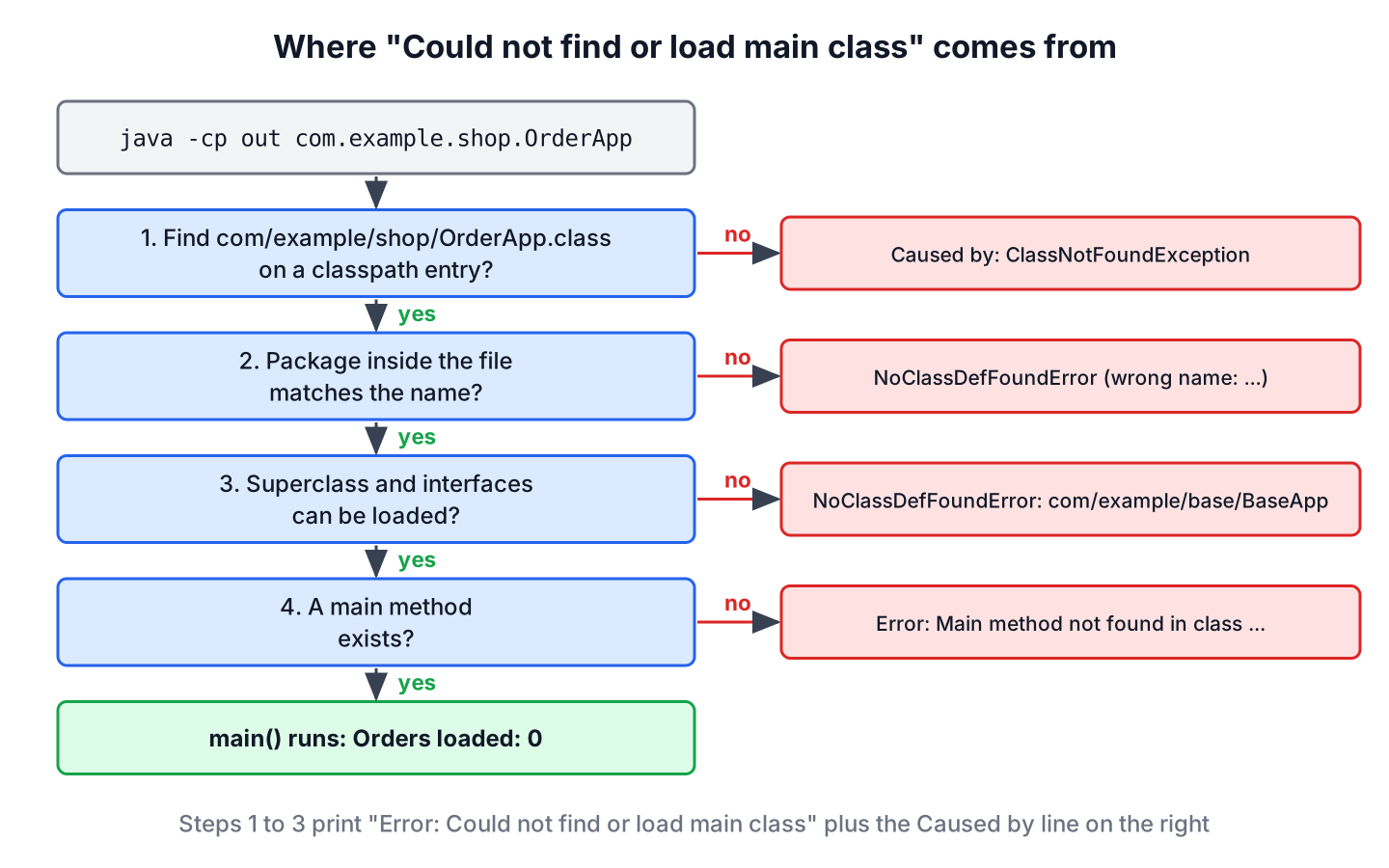
Since the error text is the same for all failures, the second line is what we read. It is one of three exceptions.
| Second line of the error | What happened | Typical fix |
|---|---|---|
| Caused by: java.lang.ClassNotFoundException: X | No classpath entry contains the path for X | Fix the class name or the -cp folder |
| Caused by: java.lang.NoClassDefFoundError: X (wrong name: a/b/X) | A file was found, but its package is a.b | Run a.b.X from the folder above a |
| Caused by: java.lang.NoClassDefFoundError: a/b/Base | The main class was found, but a class it extends is missing | Add the library JAR to -cp |
A missing main method gives a different message, Error: Main method not found in class …, and a JAR without a Main-Class entry prints no main manifest attribute. Both mean the class was loaded, so the classpath is fine.
2. Running a Class That Declares a Package
A class inside a package is the case behind most reports of the error. A developer compiles a class inside its own package folder and runs it from the same folder by its simple name. The project has the following layout.
/home/dev/app
  src/
    com/example/shop/OrderApp.java

// OrderApp.java
package com.example.shop;

public class OrderApp {
    public static void main(String[] args) {
        System.out.println("Orders loaded: " + args.length);
    }
}
Compiling and running inside src/com/example/shop fails, because the launcher finds OrderApp.class in the current folder, opens it and sees the package com.example.shop.
cd /home/dev/app/src/com/example/shop
javac OrderApp.java
java OrderApp
Error: Could not find or load main class OrderApp
Caused by: java.lang.NoClassDefFoundError: OrderApp (wrong name: com/example/shop/OrderApp)A class that declares a package must be run by its fully qualified name, from the folder that contains the first package folder. We have three ways to do that.
# 1. From the source root, where the class file sits next to the .java file
cd /home/dev/app/src
java com.example.shop.OrderApp

# 2. From anywhere, pointing -cp at the source root
java -cp /home/dev/app/src com.example.shop.OrderApp

# 3. Recommended: compile into a separate output folder
cd /home/dev/app
javac -d out src/com/example/shop/OrderApp.java
java -cp out com.example.shop.OrderApp a b
Orders loaded: 0
Orders loaded: 0
Orders loaded: 2The option -d out makes javac create the package folders under out, so the source tree stays free of class files. The launcher also accepts slashes, as in java com/example/shop/OrderApp, but the dotted name is the documented form.
3. Typos in the Class Name
The launcher takes a class name, not a file name, and Java class names are case-sensitive on every operating system. Each of the following commands fails with ClassNotFoundException, even on Windows, where the file system ignores case.
java -cp out com.example.shop.OrderApp.class   # file extension added
java -cp out com.example.shop.OrderApp.java    # source extension added
java -cp out com.example.shop.orderapp         # wrong case
java -cp out OrderApp                          # package missing
Error: Could not find or load main class com.example.shop.OrderApp.class
Caused by: java.lang.ClassNotFoundException: com.example.shop.OrderApp.classThe name printed after main class is the literal text the launcher received. Comparing it with the package line and the class declaration in the source file shows the typo in a few seconds.
4. A Wrong or Missing Classpath
A classpath entry must be the root of the package folders, i.e. the folder that contains com. An entry one level too deep turns into the wrong name case, and an entry that does not exist gives ClassNotFoundException.
java -cp out/com/example/shop OrderApp     # too deep: NoClassDefFoundError (wrong name)
java -cp target com.example.shop.OrderApp  # folder does not exist: ClassNotFoundException
A CLASSPATH environment variable is a less obvious cause. When it is set, the launcher searches only its entries and no longer the current folder, so a command that works in one terminal fails in another.
cd /home/dev/app/src
export CLASSPATH=/opt/tools/lib/legacy.jar
java com.example.shop.OrderApp         # ClassNotFoundException
java -cp . com.example.shop.OrderApp   # works, -cp replaces CLASSPATH
The separator between entries is a colon on Linux and macOS and a semicolon on Windows. On Linux, -cp “out;lib/base.jar” is one entry with a semicolon in its name, so the class is not found. The rules for separators, wildcards and quoting are in setting the classpath from the command line, and the search order is explained in Java classpath.
| Shell | Run command for the example |
|---|---|
| Linux, macOS | java -cp out:lib/base.jar com.example.shop.ReportApp |
| Windows cmd and PowerShell | java -cp “out;lib\base.jar” com.example.shop.ReportApp |
| Windows, folder with spaces | java -cp “C:\My Projects\app\out” com.example.shop.OrderApp |
5. A Missing Library of the Main Class
A reporting tool has a main class ReportApp that extends BaseApp from a shared library. The JVM must load the superclass before it can start ReportApp, so a missing library JAR stops the launch with the same error and a different cause line.
javac -cp lib/base.jar -d out src/com/example/shop/ReportApp.java
java -cp out com.example.shop.ReportApp
Error: Could not find or load main class com.example.shop.ReportApp
Caused by: java.lang.NoClassDefFoundError: com/example/base/BaseAppThe class named in the cause line is the one to look for. Here, javac got the library and the java command did not, so the fix is java -cp out:lib/base.jar com.example.shop.ReportApp. Classes that the program uses only inside methods do not stop the launch, and a missing one fails later with a NoClassDefFoundError at runtime.
6. Running a JAR File
The command java -jar app.jar reads the main class from the Main-Class attribute of META-INF/MANIFEST.MF and ignores -cp and CLASSPATH completely. Each wrong manifest gives its own message.
jar --create --file app.jar -C out .
java -jar app.jar                     # no Main-Class attribute

jar --create --file app.jar --main-class com.example.shop.Main -C out .
java -jar app.jar                     # Main-Class names a class that is not in the JAR

jar --create --file app.jar --main-class com.example.shop.OrderApp -C out .
java -jar app.jar                     # works
no main manifest attribute, in app.jar
Error: Could not find or load main class com.example.shop.Main
Caused by: java.lang.ClassNotFoundException: com.example.shop.Main
Orders loaded: 0Libraries of a JAR go into the Class-Path attribute of the manifest, or the build packs them into one file, as shown in executable JAR with dependencies. The jar command guide covers the other options of the tool. To start a class from a JAR that has no or a different Main-Class, we use -cp instead of -jar, as in java -cp app.jar com.example.shop.OrderApp.
7. The Error in IDEs and Build Tools
A team renames the package com.example.orders to com.example.shop with a refactoring tool. The code compiles, but the saved run configuration still names com.example.orders.OrderApp, and the IDE prints Could not find or load main class on the next run. IDEs and build tools build the classpath for us, so the fix is in their settings.
- In IntelliJ IDEA, open Run > Edit Configurations and pick the main class again with the browse button. If the class is right, Build > Rebuild Project removes stale output, and File > Invalidate Caches helps when the index is out of date.
- In Eclipse, run Project > Clean and check that the source folder is listed under Java Build Path. A launch configuration from before a rename keeps the old class name, so we delete it and use Run As > Java Application.
- With Maven, mvn compile exec:java -Dexec.mainClass=com.example.shop.OrderApp needs the fully qualified name, and the manifest of a packaged JAR comes from the mainClass setting of the maven-jar-plugin or the shade plugin.
- With Gradle, the application plugin reads application { mainClass = ‘com.example.shop.OrderApp’ }, and a stale value after a rename gives the same error on gradle run.
8. Skipping javac With Source-File Mode
Since Java 11 (JEP 330), the launcher can run a .java file. It compiles the file in memory and runs the first top-level class, so no output folder and no -cp are needed. Since Java 22, a file that declares a package must sit in the matching folder, otherwise the launcher stops with end of path to source file does not match its package name. Java 22 (JEP 458) extended source-file mode to programs made of several source files.
cd /home/dev/app
java src/com/example/shop/OrderApp.java x   # prints: Orders loaded: 1
Source-file mode is good for scripts, small tools and learning, and it pairs well with compact source files and instance main methods from Java 25. Real projects still compile with javac or a build tool. The rules for the main method itself are in Java main method.
9. Could Not Find or Load Main Class FAQs
Four related launcher messages and situations show up in forum threads next to this error.
9.1. Why does the program run in the IDE but not in the terminal?
The IDE passes its own -cp with the output folder (such as out/production/app or target/classes) and the libraries. In the terminal, we have to pass the same folder and JAR files ourselves, so we copy the full command from the IDE run log when in doubt.
9.2. What is the difference between this error and “Main method not found”?
The error Could not find or load main class means the class itself was not loaded. The message Main method not found in class X means the class loaded, but it has no main method that the launcher accepts, so the classpath is correct and the method signature needs fixing.
9.3. What does “LinkageError occurred while loading main class” mean?
The class was found but compiled for a newer Java version than the one running it. The second line names the class file versions, for example a class built with Java 26 on a Java 25 runtime.
Error: LinkageError occurred while loading main class com.example.shop.OrderApp
	java.lang.UnsupportedClassVersionError: com/example/shop/OrderApp has been compiled by a more recent version of the Java Runtime (class file version 70.0), this version of the Java Runtime only recognizes class file versions up to 69.0
We either run it on the newer JDK or compile with javac –release 25.
9.4. Does the main method still have to be public static in Java 25?
No. Since Java 25, the launcher also accepts non-public and instance main methods, as well as main() without parameters (JEP 512). The class must still be found on the classpath, so the classpath rules in this article do not change.
10. Conclusion
The error Could not find or load main class always comes down to the class name, the classpath or the package folders. The “Caused by” line tells us which one. ClassNotFoundException points to a wrong name or folder, a wrong name message points to the package, and a NoClassDefFoundError for another class points to a missing library.
Compiling with javac -d out and running java -cp out plus the fully qualified name avoids most cases, and for a JAR the Main-Class attribute plays the role of the class name. Setting the classpath, building JAR files and other launcher tasks sit next to this page in the Java examples.
11. References
- The java Command (Java 25)
- The javac Command (Java 25)
- JEP 330, Launch Single-File Source-Code Programs
- JEP 458, Launch Multi-File Source-Code Programs
- Oracle tutorial, Setting an Application’s Entry Point
Happy Learning !!
