
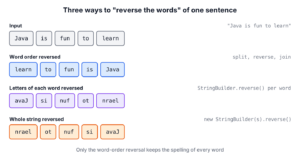
To reverse words in a string in Java, we split the string into words and join the words back in reverse order. In this task, a word is any group of characters between spaces, tabs or line breaks.
We need word reversal in coding interviews, and in text tasks such as showing a breadcrumb path from the last part to the first.
The following example reverses the word order with split(“\\s+”), Collections.reverse() (or List.reversed() on Java 21 and later) and String.join(), and also shows three other variants, with the result of each line as a comment.
String sentence = "Java is fun to learn";

// 1. Reverse the order of words (Java 8+)
List<String> words = Arrays.asList(sentence.strip().split("\\s+"));
Collections.reverse(words);
String reversed = String.join(" ", words);                                    // "learn to fun is Java"

// 2. Reverse the order of words (Java 21+)
String reversed21 = String.join(" ", List.of(sentence.strip().split("\\s+")).reversed());   // "learn to fun is Java"

// 3. Reverse the letters of each word, keep the word order
String eachWord = Arrays.stream(sentence.split(" "))
    .map(word -> new StringBuilder(word).reverse())
    .collect(Collectors.joining(" "));                                          // "avaJ si nuf ot nrael"

// 4. Reverse the whole string
String whole = new StringBuilder(sentence).reverse().toString();              // "nrael ot nuf si avaJ"

// 5. Apache Commons Lang
String commons = StringUtils.reverseDelimited(sentence, ' ');                 // "learn to fun is Java"
Notice that strip() runs before split(“\\s+”) in the first two variants, so spaces at the start of the sentence cannot turn into an empty word.
Before more code, we compare three kinds of reversal that developers often mix up. After that, we write a loop without library methods and a stream version, followed by the two-pointer solution that interviewers ask for, and finish with extra spaces and punctuation.
1. Reversing Word Order vs Reversing Each Word vs Reversing the Whole String
“Reverse the words” can mean three different things, and the same input gives a different output in each case, so we first decide which result we want.
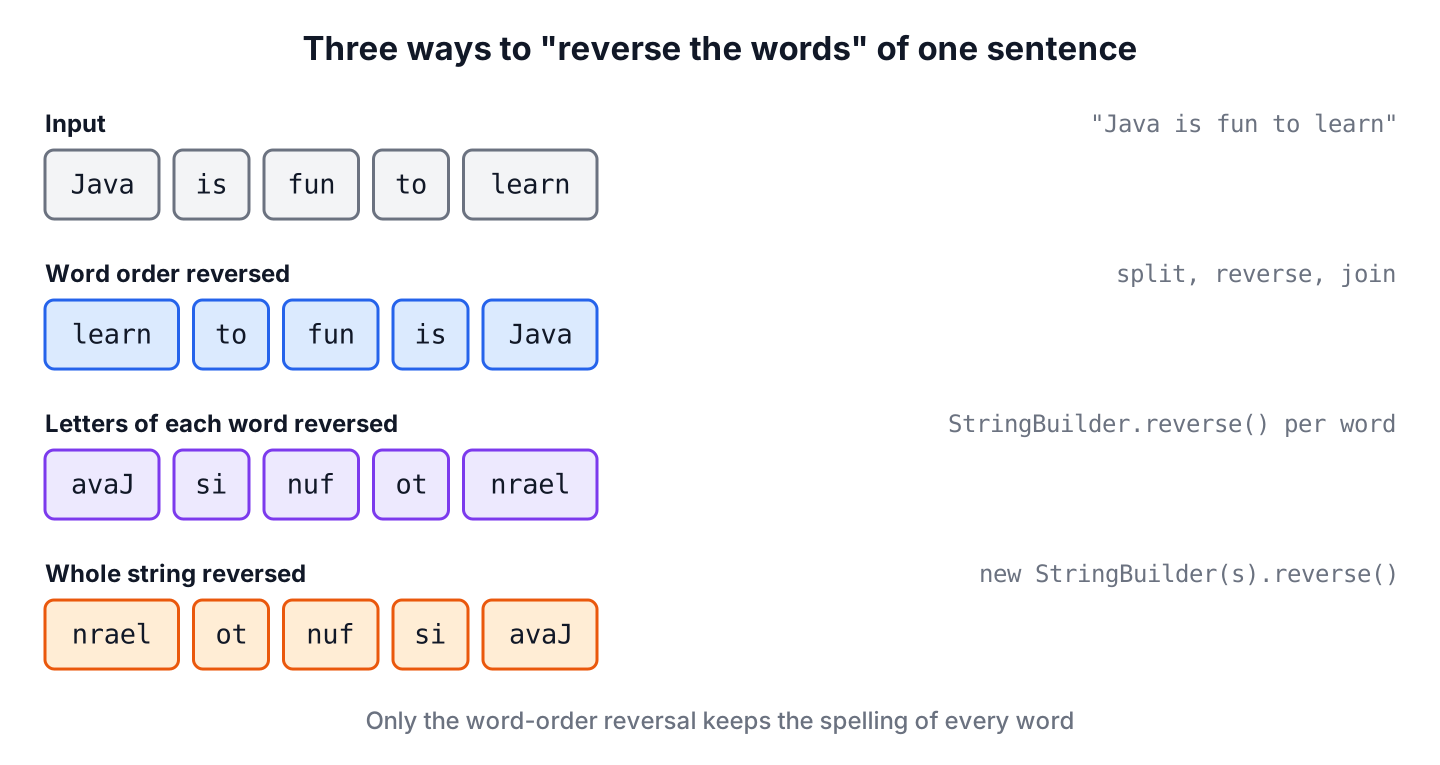
| What we reverse | Input | Output | Typical code |
|---|---|---|---|
| Order of the words | Java is fun to learn | learn to fun is Java | split(), Collections.reverse(), String.join() |
| Letters of each word | Java is fun to learn | avaJ si nuf ot nrael | split(), StringBuilder.reverse() per word, joining() |
| The whole string | Java is fun to learn | nrael ot nuf si avaJ | new StringBuilder(s).reverse() |
Most people who search “reverse words in a string” mean the first row, and so does LeetCode problem 151 with the same name. The words change places, but each word keeps its spelling. To reverse the whole string, we reverse a string in Java with StringBuilder.reverse().
2. Reverse Word Order with split() and Collections.reverse()
A String in Java is immutable (it cannot be changed after we create it), so every approach builds a new string. The shortest version takes three steps.
- Split the string into a String[] with split(“\\s+”). The pattern \\s+ means “one or more spaces, tabs or line breaks”.
- Wrap the array in a List with Arrays.asList() and reverse the list with Collections.reverse(), which changes the list itself and returns nothing.
- Join the words with one space between them using String.join().
static String sentence = "Java is fun to learn";We keep the sentence in a static field, so every later snippet can use it from a main() method.
List<String> words = Arrays.asList(sentence.strip().split("\\s+"));   // [Java, is, fun, to, learn]
Collections.reverse(words);                                            // [learn, to, fun, is, Java]
String reversed = String.join(" ", words);                             // "learn to fun is Java"
The method Arrays.asList() returns a fixed-size list backed by the array, so we cannot add or remove items, but we can replace them. Collections.reverse() only swaps items with set(), so this list works. A list from List.of() does not work with Collections.reverse(). A List.of() list is unmodifiable, so the call throws UnsupportedOperationException.
2.1. Using List.reversed() in Java 21
Java 21 added sequenced collections (JEP 431), so every List has a reversed() method. The method reversed() does not copy the list. It returns a reverse-ordered view (an object that reads the original list from the end) and leaves the original list as it was, so reversed() also works on an unmodifiable List.of() list.
String reversed21 = String.join(" ", List.of(sentence.strip().split("\\s+")).reversed()); // "learn to fun is Java"On Java 21 or later, List.reversed() is the one-line answer. Before Java 21, we use Collections.reverse().
3. Reverse Word Order with a Loop
Interview questions often say “without using library functions” such as Collections.reverse(). The classic answer is a for loop that walks the words array backward, starting at the last word and appending each word to a StringBuilder (a mutable sequence of characters that we can keep appending to).
String[] words = sentence.strip().split("\\s+");
StringBuilder result = new StringBuilder();

for (int i = words.length - 1; i >= 0; i--) {
  result.append(words[i]);
  if (i > 0) {
    result.append(' ');          // no space after the last word
  }
}
String reversed = result.toString();   // "learn to fun is Java"
Many beginner programs build the result with reversedString = ” ” + words[i] + reversedString. That code also works, but it is slow for long text, because each + on a String copies all the characters collected so far, so the work grows with the square of the length, O(n^2). A StringBuilder appends to one growing buffer instead, so the loop stays O(n), where n is the number of characters.
4. Reverse Words with Java Streams
Java streams have no built-in reverse() step, so we count indexes with IntStream.range() and turn each index into a position from the end. Index 0 reads the last word, index 1 reads the word before it, and so on.
String[] words = sentence.strip().split("\\s+");

String reversed = IntStream.range(0, words.length)
    .mapToObj(i -> words[words.length - 1 - i])     // learn, to, fun, is, Java
    .collect(Collectors.joining(" "));              // "learn to fun is Java"
The stream version is no faster than the loop. It helps when the stream does more work, for example a filter() or map() before joining(), but for a plain reversal, List.reversed() is shorter and clearer.
5. In-Place Reversal with Two Pointers (Interview Version)
A common follow-up question is “reverse the words without split() and without extra lists, in O(n) time”. The trick is to reverse the whole character array first and each word back after that. For “Java is fun”, the first step gives “nuf si avaJ”, where the words are already in the right order but spelled backward. The second step reverses each word again and gives “fun is Java”.
Both steps use the same two-pointer swap. One index starts at the left end and one at the right end, we swap the two characters, and both indexes move one step toward the middle until they meet. The same swap is used to reverse an array in Java.
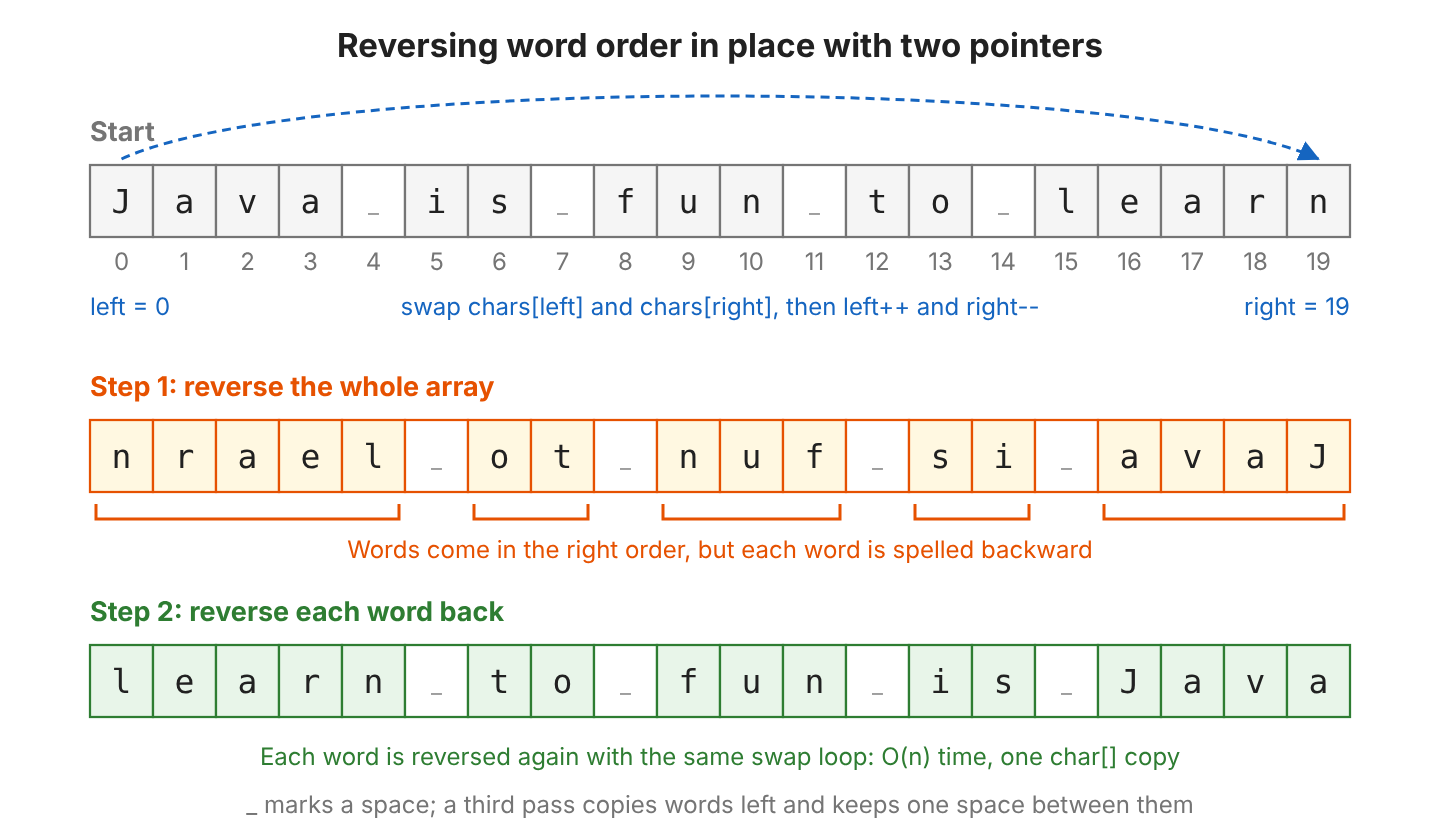
A String cannot be changed, so the code works on a char[] copy of the string. A third pass removes extra spaces, and section 7 explains why they need care.
static String reverseInPlace(String text) {
  char[] chars = text.toCharArray();
  int n = chars.length;

  // 1. Reverse the whole array: "Java is fun" -> "nuf si avaJ"
  reverse(chars, 0, n - 1);

  // 2. Reverse each word back: "nuf si avaJ" -> "fun is Java"
  int start = 0;
  while (start < n) {
    while (start < n && chars[start] == ' ') start++;
    int end = start;
    while (end < n && chars[end] != ' ') end++;
    reverse(chars, start, end - 1);
    start = end;
  }

  // 3. Copy words left, one space between them
  int write = 0, read = 0;
  while (read < n) {
    while (read < n && chars[read] == ' ') read++;
    if (read == n) break;
    if (write > 0) chars[write++] = ' ';
    while (read < n && chars[read] != ' ') chars[write++] = chars[read++];
  }
  return new String(chars, 0, write);
}

static void reverse(char[] chars, int left, int right) {
  while (left < right) {
    char tmp = chars[left];
    chars[left++] = chars[right];
    chars[right--] = tmp;
  }
}
String reversed = reverseInPlace("Java is fun to learn"); // "learn to fun is Java"
String cleaned = reverseInPlace(" Java is fun "); // "fun is Java"Each character is touched a fixed number of times, so the time is O(n). The extra memory is the one char[] copy, which is O(n). In C or C++, a string can be changed in place, so the same code needs only O(1) extra memory, whereas in Java the char[] copy is the minimum.
6. Reverse the Characters of Each Word
The second case from the table keeps the word order and reverses only the letters inside every word, so “Java” becomes “avaJ”. Without any reverse() method, we read each word from its last character to its first with charAt() and append each character to a StringBuilder.
String[] words = sentence.strip().split("\\s+");
StringBuilder result = new StringBuilder();

for (int i = 0; i < words.length; i++) {
  String word = words[i];
  for (int j = word.length() - 1; j >= 0; j--) {
    result.append(word.charAt(j));
  }
  if (i < words.length - 1) {
    result.append(' ');
  }
}
String eachWord = result.toString();   // "avaJ si nuf ot nrael"
A common bug in this program is an extra space after the last word (“avaJ si nuf ot nrael “), and the if check prevents it. With library methods, the stream from the quick reference does the same job in three lines. More string programs for interview practice are on the Java examples page.
7. Handling Multiple Spaces and Leading or Trailing Spaces
Real input often has two spaces between words or a space at the start, and these extra spaces can turn into empty words. The pattern we pass to split() decides whether we get empty words. Take the string messy from the next snippet, which has two spaces at the start, three spaces after Java and two spaces at the end. Three split calls give three different arrays.
| Call | Result array | Problem |
|---|---|---|
| messy.split(” “) | [, , Java, , , is, fun] | One empty string for every extra space |
| messy.split(“\\s+”) | [, Java, is, fun] | One empty string for the spaces at the start |
| messy.strip().split(“\\s+”) | [Java, is, fun] | None |
The method split() drops empty strings at the end of the array but keeps the ones at the start. In the second row, the empty string comes first, so after the reversal it comes last, and String.join() adds a space before it. As a result, the reversed string ends with a space.
String messy = "  Java   is fun  ";

String withSpace = String.join(" ", List.of(messy.split("\\s+")).reversed());       // "fun is Java " (trailing space)
String clean = String.join(" ", List.of(messy.strip().split("\\s+")).reversed());   // "fun is Java"
The safe recipe is to call strip() before split(“\\s+”). The strip() method, added in Java 11, removes white space at both ends, including the Unicode white space characters that the older trim() misses. The same recipe handles tabs and line breaks too, and a null or blank input needs one extra check.
static String reverseWordOrder(String text) {
  if (text == null || text.isBlank()) {
    return "";
  }
  return String.join(" ", List.of(text.strip().split("\\s+")).reversed());
}
String spaced = reverseWordOrder(" Java is fun "); // "fun is Java"
String tabs = reverseWordOrder("Java\tis\nfun"); // "fun is Java"
String single = reverseWordOrder("Java"); // "Java"
String blank = reverseWordOrder(" "); // ""
String missing = reverseWordOrder(null); // ""Without the isBlank() check, a blank string gives an array with one empty string and the method still returns “”, so that part of the check only makes the intent clear. The null check matters more, because a form field or a request parameter can be null, and text.isBlank() would throw NullPointerException for it. To keep the word order and only clean the spacing, we remove extra white spaces between words.
8. Handling Punctuation
The call split(“\\s+”) cuts only at white space, so a comma or an exclamation mark stays attached to its word. In the first line of the snippet, “Hello,” moves to the end with its comma, and “Java!” moves to the front with its “!”.
String moved = reverseWordOrder("Hello, world of Java!");          // "Java! of world Hello,"
String kept = reverseKeepEndPunctuation("Hello, world of Java!");  // "Java of world Hello!"
For many uses, such as reversing a path or a list of tags, moving punctuation is fine. For a sentence, we want the final ., ! or ? to stay at the end and the commas to go away. The helper method works in four steps. It takes off the last punctuation mark, removes commas at the end of words, reverses the words and puts the mark back.
static String reverseKeepEndPunctuation(String text) {
  String body = text.strip();
  String end = "";
  if (!body.isEmpty() && ".!?".indexOf(body.charAt(body.length() - 1)) >= 0) {
    end = body.substring(body.length() - 1);            // "!"
    body = body.substring(0, body.length() - 1);        // "Hello, world of Java"
  }
  List<String> words = new ArrayList<>();
  for (String word : body.split("\\s+")) {
    words.add(word.replaceAll("[,;:]+$", ""));          // "Hello," -> "Hello"
  }
  return String.join(" ", words.reversed()) + end;      // "Java of world Hello!"
}
Punctuation rules depend on the text, because quotes, abbreviations such as e.g. and several sentences in one string all need their own rules. So we decide the rules for our input first and write a test for each case.
9. Using Apache Commons StringUtils.reverseDelimited()
The StringUtils class of Apache Commons Lang has reverseDelimited(String str, char separatorChar), which splits the string at a separator character and reverses the order of the parts. With a space as the separator, the parts are words, so the method reverses the word order. First we add the library to the project.
<dependency>
  <groupId>org.apache.commons</groupId>
  <artifactId>commons-lang3</artifactId>
  <version>3.21.0</version>
</dependency>
String words = StringUtils.reverseDelimited("Java is fun to learn", ' '); // "learn to fun is Java"
String spaces = StringUtils.reverseDelimited(" Java is fun ", ' '); // "fun is Java"
String parts = StringUtils.reverseDelimited("com.howtodoinjava.core", '.'); // "core.howtodoinjava.com"
String nothing = StringUtils.reverseDelimited(null, ' '); // null
// Letters of each word: reverse everything, then reverse the word order back
String letters = StringUtils.reverseDelimited(StringUtils.reverse("Java is fun to learn"), ' '); // "avaJ si nuf ot nrael"The second line shows how reverseDelimited() handles extra spaces. Repeated spaces count as one, and spaces at the start and end are dropped. A null input returns null. The separator is a single char, so tabs or line breaks between words are not treated as separators. If the project already uses Commons Lang, reverseDelimited() is a good choice, but we should not add the library for this one call.
10. Reverse Words in a String FAQs
Interview candidates and developers who clean up user text ask these follow-up questions after the basic split-and-join solution.
10.1. How Do We Reverse Words in a String Without Using split()?
We use the two-pointer approach from section 5. First we reverse the whole char[], and after that we reverse each word between spaces. The code needs no split(), no list and no regex, and it runs in O(n) time.
10.2. What Is the Time Complexity of Reversing Words in a String?
Every approach we covered is O(n) in time and O(n) in extra memory, where n is the length of the string. This holds as long as we build the result with StringBuilder, String.join() or Collectors.joining(), because building it with += in a loop is O(n^2).
10.3. Why Does Collections.reverse() Throw UnsupportedOperationException?
Because the list is unmodifiable and Collections.reverse() changes the list itself. Lists from List.of() and Stream.toList() are unmodifiable, so the call throws the exception. To fix it, we either copy the list first with new ArrayList<>(list) or, on Java 21, call list.reversed(). A list from Arrays.asList() also works.
Collections.reverse(List.of("a", "b"));   // java.lang.UnsupportedOperationException
List<String> reversed = List.of("a", "b").reversed();   // [b, a]
10.4. How Do We Reverse a Sentence Word by Word From User Input?
We read the line with Scanner.nextLine() or BufferedReader.readLine() and pass it to reverseWordOrder() from section 7. The reversal code stays the same, and only the input source changes.
11. Conclusion
On Java 21 or later, String.join(” “, List.of(text.strip().split(“\\s+”)).reversed()) reverses the word order in one line. On older versions, Collections.reverse() on Arrays.asList() does the same. Calling strip() before split(“\\s+”) stops extra spaces from turning into empty words. For interviews, we use the backward StringBuilder loop or the two-pointer char[] reversal, because both show the steps without library help. If the project already has Commons Lang, StringUtils.reverseDelimited() is the shortest option.
12. References
- String Javadoc (Java 25)
- Collections Javadoc (Java 25)
- SequencedCollection Javadoc (Java 25)
- StringBuilder Javadoc (Java 25)
- JEP 431, Sequenced Collections
- StringUtils Javadoc (Apache Commons Lang)
Happy Learning !!

Here is my code for this question: without using split or reverse functions :
import java.util.ArrayList; import java.util.Scanner; class ReverseWordSentence { public static void main(String[] args) { System.out.println("Enter the phrase to be reversed: "); Scanner sc = new Scanner(System.in); String phrase = sc.nextLine(); char[] ch = phrase.toCharArray(); ArrayList<Character> wdl = new ArrayList<Character>(); for(int i=0; i<ch.length; i++) { if(String.valueOf(ch[i]).equals(" ") || (i == phrase.length()-1) ) { if (i == phrase.length()-1) { wdl.add(ch[i]); } for(int j=wdl.size()-1; j>-1;--j) { System.out.print(wdl.get(j)); } if(ch[i]==' ') { System.out.print(" "); } wdl.clear(); } else { wdl.add(ch[i]); } } } }Thanks for sharing.
This is one is much easy…..
package com.coding; import java.util.Scanner; public class Java { public static void main(String[] args) { String str="welcome to java akash"; String words[] = str.split(" "); String reversedString = ""; //Reverse each word's position for (int i = 0; i < words.length; i++) { reversedString = " " + words[i] + reversedString; } // Displaying the string after reverse System.out.print("Reversed string : " + reversedString); } }2 code is not proper,question is without using any function.But there is split function is used to solve the problem.
That is quite true. BUT, the author referred to not using any IMPORTED CLASS Function. Of course, he had to use the Scanner class so the user can interact with the program. The .split() function is a base function that doesn’t belong in any imported class. The author used a function that is within Vanilla Java.
This code works well. This code is proper.