

To count vowels and consonants in a string in Java, we convert the text to lower case, loop over its characters and add one to the vowel counter for a, e, i, o and u, or to the consonant counter for every other letter from a to z. Digits, spaces and punctuation belong to neither group, so the program skips them.
We use vowel and consonant counts in beginner programming exercises and interview rounds, and in real text tools such as syllable estimates for readability scores or simple word-game scoring.
The following example counts both groups in a song title that contains spaces and digits.
String title = "Rhythm and Blues 1979";
int vowels = 0;
int consonants = 0;
for (char ch : title.toLowerCase(Locale.ROOT).toCharArray()) {
    if ("aeiou".indexOf(ch) >= 0) {
        vowels++;
    } else if (ch >= 'a' && ch <= 'z') {
        consonants++;
    }
}
String result = vowels + " vowels, " + consonants + " consonants";   // "3 vowels, 11 consonants"
Notice that the letter y in Rhythm counts as a consonant and the digits 1979 count as nothing. In the next sections, we write the same count with a switch, with streams and with regular expressions, count each vowel separately, and handle accented letters and locale problems that break the simple version.
1. Which Characters Are Vowels and Which Are Consonants
English has five vowel letters, namely a, e, i, o and u, and the remaining 21 letters are consonants. Programs for counting vowels and consonants in a string treat y as a consonant, because the classic exercise defines the vowels as a fixed set of five letters. A Java string can also hold digits, spaces, punctuation, emoji and letters from other alphabets, so the program first decides whether a character is a letter at all.
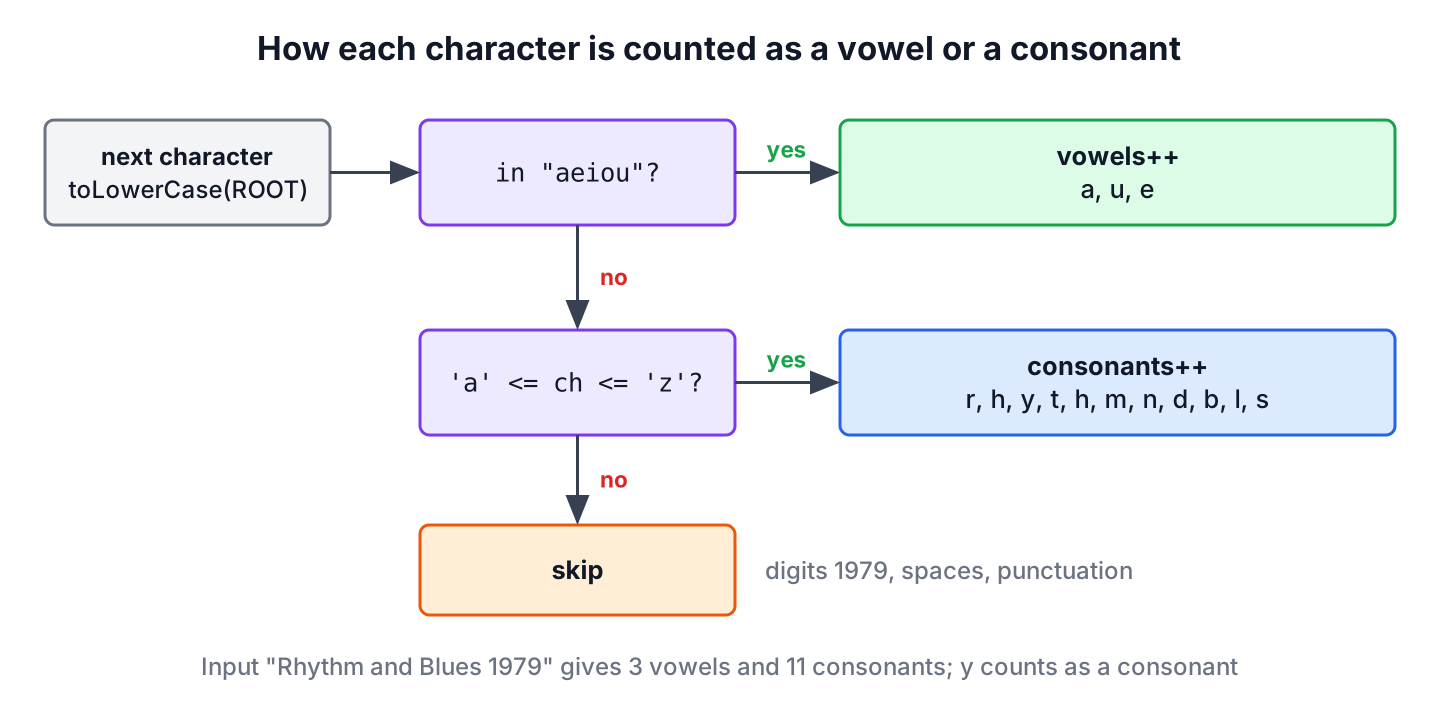
The decision for each character has three outcomes, and in the input “Rhythm and Blues 1979” the capital letters reach a counter only after the case conversion.
| Character | Check | Result |
|---|---|---|
| a, u, e | Found in “aeiou” | Vowel |
| r, h, y, t, b, s … | Letter from a to z, not a vowel | Consonant |
| 1, 9, 7, space | Not a letter | Skipped |
| R, B | Converted to r and b first | Consonant |
The program must convert the text to one case before comparing, otherwise every capital letter is skipped. We call toLowerCase(Locale.ROOT) instead of the no-argument toLowerCase(), for a reason we show in section 6.
2. Counting With a for Loop and a switch
A loop over the characters does the least work of all versions, and it is the one interviewers expect first. It reads the string once and needs no extra memory beyond two counters, so it runs in O(n) time for a string of n characters.
The following example puts the loop in a method that returns both numbers in a small record. A switch with several labels in one case lists the vowels in one place, which reads better than a chain of || comparisons.
record LetterCount(int vowels, int consonants) {}static LetterCount countLetters(String text) {
int vowels = 0;
int consonants = 0;
for (char ch : text.toLowerCase(Locale.ROOT).toCharArray()) {
switch (ch) {
case 'a', 'e', 'i', 'o', 'u' -> vowels++;
default -> {
if (ch >= 'a' && ch <= 'z') {
consonants++;
}
}
}
}
return new LetterCount(vowels, consonants);
}LetterCount song = countLetters("Rhythm and Blues 1979"); // LetterCount[vowels=3, consonants=11]
LetterCount empty = countLetters(""); // LetterCount[vowels=0, consonants=0]
LetterCount digits = countLetters("2025-10-10"); // LetterCount[vowels=0, consonants=0]We can see that an empty string and a string of digits both return zero for each group, so the method needs no special case for them. A null argument throws NullPointerException, which is the right outcome for a method that expects text.
The check ch >= ‘a’ && ch <= ‘z’ accepts only the 26 ASCII letters. The method Character.isLetter() also accepts letters such as é or Greek letters, and counts them as consonants, which is wrong for most inputs. We keep the ASCII range check and normalize accented letters first when the input needs it.
3. Count Vowels and Consonants With Streams
The chars() method of String returns an IntStream of the characters, so we can filter the letters and split them into two groups in one pipeline. The collector Collectors.partitioningBy() fits this task better than groupingBy(), because a vowel test has two outcomes and the result map always contains both keys.
String title = "Rhythm and Blues 1979";
Map<Boolean, Long> byType = title.toLowerCase(Locale.ROOT).chars()
        .filter(ch -> ch >= 'a' && ch <= 'z')
        .boxed()
        .collect(Collectors.partitioningBy(ch -> "aeiou".indexOf(ch) >= 0, Collectors.counting()));
long vowels = byType.get(true);                  // 3
long consonants = byType.get(false);             // 11
String asMap = byType.toString();                // "{false=11, true=3}"
For an input without letters, partitioningBy() still returns both keys with the value 0, whereas Collectors.groupingBy() returns an empty map and get(true) returns null. When we need only one of the two numbers, a filter() and count() pair is shorter.
long vowelCount = "Rhythm and Blues 1979".toLowerCase(Locale.ROOT).chars()
        .filter(ch -> "aeiou".indexOf(ch) >= 0)
        .count();
long count = vowelCount;                         // 3
The stream versions box each character into an Integer before collecting, so they create more objects than the loop. For a form field or a sentence, the difference does not matter, but the plain loop is the better choice for large files.
4. Counting With Regular Expressions
A regular expression can delete every character that is not a vowel, and the length of what remains is the vowel count. The same trick with a character class of consonants gives the consonant count. The class [b-df-hj-np-tv-z] lists the five ranges of letters between the vowels.
String lower = "Rhythm and Blues 1979".toLowerCase(Locale.ROOT);
int vowels = lower.replaceAll("[^aeiou]", "").length();                  // 3
int consonants = lower.replaceAll("[^b-df-hj-np-tv-z]", "").length();    // 11
int letters = lower.replaceAll("[^a-z]", "").length();                   // 14
Each replaceAll() call compiles a pattern and builds a new string, so the regex version does the most work of the three. It is a good fit for a one-off check in a test or a script. For repeated use, we compile the pattern once with Pattern.compile() and keep it in a static final field.
5. Counting Each Vowel Separately
Some exercises ask how often each vowel appears, not only the total. A groupingBy() collector with a TreeMap factory keeps the vowels in alphabetical order, and vowels that do not occur are absent from the map.
Map<Character, Long> perVowel = "Jazz in New Orleans".toLowerCase(Locale.ROOT).chars()
        .filter(ch -> "aeiou".indexOf(ch) >= 0)
        .mapToObj(ch -> (char) ch)
        .collect(Collectors.groupingBy(ch -> ch, TreeMap::new, Collectors.counting()));
String counts = perVowel.toString();             // "{a=2, e=2, i=1, o=1}"
long missingU = perVowel.getOrDefault('u', 0L);  // 0
Notice that getOrDefault() returns 0 for u, which has no entry. The same pattern counts any set of characters, for example, the duplicate characters in a string.
6. Upper Case, Accents and the Turkish Locale
Text from users brings two problems that the classroom version ignores. The first is the default locale. The no-argument toLowerCase() uses the locale of the JVM, and in Turkish the capital I becomes a dotless i (U+0131), which is not in “aeiou”.
String city = "ISTANBUL";
long rootVowels = city.toLowerCase(Locale.ROOT).chars()
        .filter(ch -> "aeiou".indexOf(ch) >= 0).count();
long turkishVowels = city.toLowerCase(Locale.forLanguageTag("tr")).chars()
        .filter(ch -> "aeiou".indexOf(ch) >= 0).count();
long withRoot = rootVowels;                      // 3
long withTurkish = turkishVowels;                // 2
A server with a Turkish default locale counts one vowel too few for every capital I, and the bug never shows up on a developer laptop with an English locale. Locale.ROOT gives the same result on every machine.
The second problem is accented letters. A product catalog for a coffee shop lists Café crème, and the ASCII check skips é and è, so it reports 2 vowels instead of 4. The class Normalizer splits each accented letter into its base letter and a separate accent mark, and a regex removes the marks.
String drink = "Caf\u00e9 cr\u00e8me";
String plain = Normalizer.normalize(drink, Normalizer.Form.NFD).replaceAll("\\p{M}", "");   // "Cafe creme"
LetterCount before = countLetters(drink);        // LetterCount[vowels=2, consonants=5]
LetterCount after = countLetters(plain);         // LetterCount[vowels=4, consonants=5]
We normalize only when the input can contain accented Latin letters. Letters from other scripts, such as Greek or Cyrillic, have their own vowels, and a program for those languages needs its own vowel set.
7. Estimating Syllables for a Readability Score
A blogging platform shows a readability score next to each draft, and the common formulas need the number of syllables per word. A good estimate counts groups of consecutive vowels, where y also counts as a vowel because it often sounds like one, as in city. The word reading has the groups ea and i, so the estimate is two syllables.
final class Syllables {
    private static final Pattern VOWEL_GROUP = Pattern.compile("[aeiouy]+");

    static long estimate(String word) {
        long groups = VOWEL_GROUP.matcher(word.toLowerCase(Locale.ROOT)).results().count();
        return Math.max(1, groups);
    }
}
long read = Syllables.estimate("reading"); // 2
long city = Syllables.estimate("city"); // 2
long readability = Syllables.estimate("Readability"); // 5
long rhythm = Syllables.estimate("rhythm"); // 1The estimate is wrong for some words, such as rhythm, which has two syllables, and words with a silent final e. Readability formulas average the syllable count over hundreds of words, so an error of one syllable in a few words changes the score very little.
8. Loop vs Streams vs Regex
All three versions give the same counts for ASCII text, so the choice depends on where the code runs and who reads it.
| Approach | Passes over the text | Extra objects | Good fit |
|---|---|---|---|
| for loop with switch | One | None | Interviews, large inputs, hot code paths |
| Streams with partitioningBy() | One | A boxed Integer per letter | Code that already uses streams |
| filter() and count() | One per group | None | Only one of the two counts |
| replaceAll() with a regex | One per group | New strings and patterns | Tests, scripts, one-off checks |
We use the loop in library code and in interview answers, because it shows that we understand the character checks. The stream and regex versions are shorter to read when the count is a small part of a larger method.
9. Counting Vowels and Consonants FAQs
Classroom exercises and coding interviews change the basic task in a few predictable ways, such as treating y as a vowel, reading user input or adding digit counts.
9.1. Is y a vowel in a Java vowel counting program?
No, not in the standard exercise, which defines only five vowels. If our task treats y as a vowel, we add it to the vowel set, as in “aeiouy”, and remove it from the consonant check.
9.2. How do we count vowels in a string entered by the user?
We read a whole line with Scanner.nextLine() and pass it to the counting method. Reading with next() stops at the first space, so the count would cover only the first word. The console input and output guide shows the other ways to read text.
Scanner scanner = new Scanner("Rhythm and Blues 1979");
String line = scanner.hasNextLine() ? scanner.nextLine() : "";
LetterCount typed = countLetters(line);          // LetterCount[vowels=3, consonants=11]
9.3. How do we also count digits, spaces and special characters?
We add more branches with the Character class methods. The order of the checks matters, because a vowel is also a letter.
String text = "Order #42 ships today!";
int vowels = 0, consonants = 0, digits = 0, spaces = 0, others = 0;
for (char ch : text.toLowerCase(Locale.ROOT).toCharArray()) {
    if ("aeiou".indexOf(ch) >= 0) vowels++;
    else if (ch >= 'a' && ch <= 'z') consonants++;
    else if (Character.isDigit(ch)) digits++;
    else if (Character.isWhitespace(ch)) spaces++;
    else others++;
}
String summary = vowels + " " + consonants + " " + digits + " " + spaces + " " + others;   // "5 10 2 3 2"
9.4. Can we count vowels with recursion?
Yes. The method checks the first character and adds the count of the rest of the string. Every call creates a new substring and a new stack frame, so a long string throws StackOverflowError, and we keep recursion for exercises.
static int countVowels(String s) {
    if (s.isEmpty()) {
        return 0;
    }
    int first = "aeiouAEIOU".indexOf(s.charAt(0)) >= 0 ? 1 : 0;
    return first + countVowels(s.substring(1));
}
int recursive = countVowels("Rhythm and Blues 1979"); // 39.5. What is the time complexity of counting vowels and consonants?
The loop is O(n) in time and O(1) in extra space, because it reads each character once and keeps two counters. The indexOf() lookup in a five-character string costs a constant amount of work per character, so it does not change the complexity.
10. Conclusion
Counting vowels and consonants comes down to one loop with two checks per character. A character is a vowel when it is one of a, e, i, o and u, and a consonant when it is any other letter from a to z, so digits, spaces and punctuation stay out of both counts.
For real input, we convert the text with toLowerCase(Locale.ROOT) and normalize accented letters when they can appear. Streams with partitioningBy() and regex replacements give the same numbers in fewer lines, and more programs of this kind are in our Java examples collection.
11. References
- String.chars() (Java SE 25 API)
- Collectors (Java SE 25 API)
- Normalizer (Java SE 25 API)
- Locale (Java SE 25 API)
- Character (Java SE 25 API)
Happy Learning !!
