
Java has no cast between int[] and Integer[], so to convert int[] to Integer[] we box every element into a new array, most often with Arrays.stream(ints).boxed().toArray(Integer[]::new), and to go back we unbox every element with mapToInt(Integer::intValue).toArray(). Both directions create a new array and leave the original unchanged.
We need an Integer[] when an API works only with objects, for example Arrays.sort() with a Comparator or a generic method that takes T[]. We go back to int[] for arithmetic and for compact storage of large numeric data.
The following example converts an array of game scores in both directions.
int[] scores = {70, 85, 90};
Integer[] boxed = Arrays.stream(scores).boxed().toArray(Integer[]::new);    // [70, 85, 90]
int[] unboxed = Arrays.stream(boxed).mapToInt(Integer::intValue).toArray();  // [70, 85, 90]
Notice the Integer[]::new argument, because without it toArray() returns an Object[]. We start with the reason a cast fails and cover loops, null elements in an Integer[], the other primitive types and Apache Commons Lang, and we finish with a sorting use case and a comparison table.
1. Why int[] Cannot Be Cast to Integer[]
Autoboxing, the boxing conversion of the JLS, converts one int value into one Integer object. It never applies to a whole array, because int[] and Integer[] are unrelated types with a different memory layout.
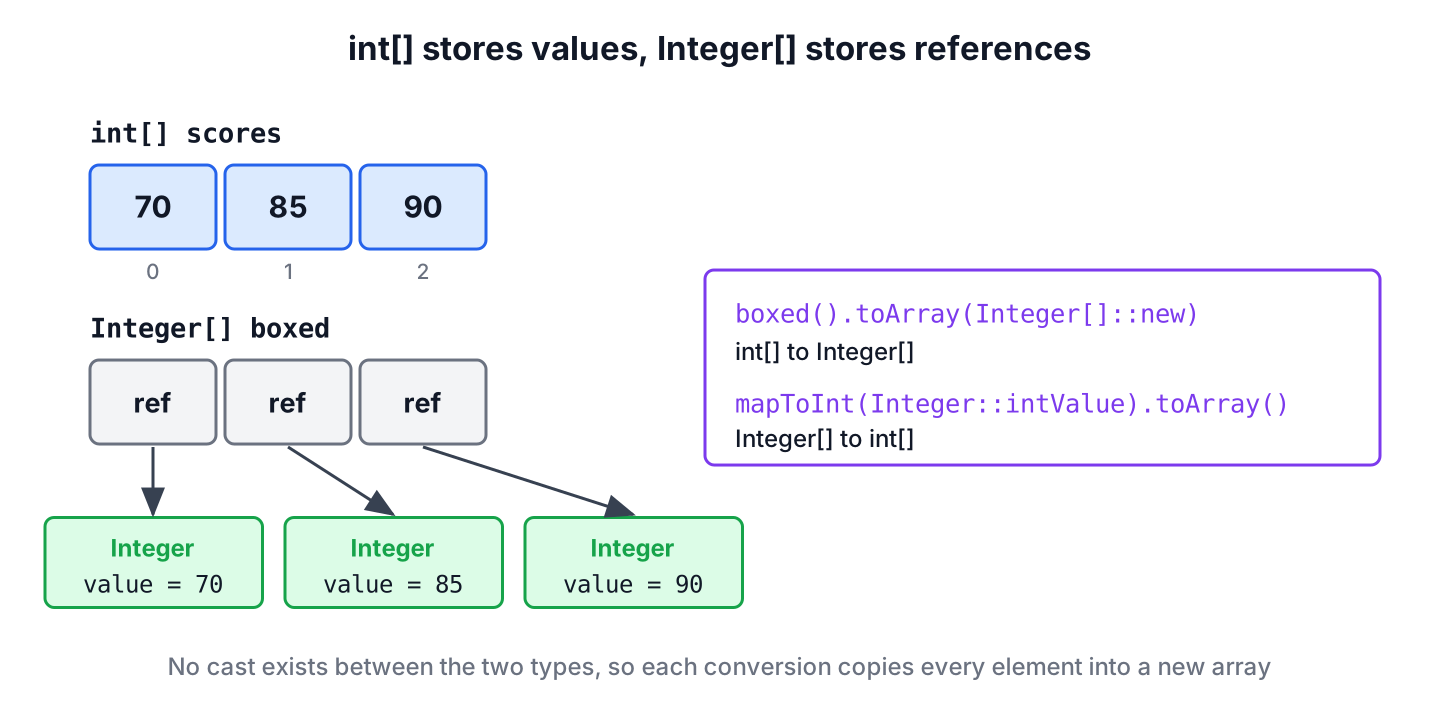
An int[] stores the numbers next to each other. An Integer[] stores references, and each reference points to a separate Integer object on the heap, which is also why an Integer[] takes several times more memory. The compiler rejects a cast in either direction.
// does not compile: incompatible types, int[] cannot be converted to Integer[]
int[] scores = {70, 85, 90};
Integer[] boxed = (Integer[]) scores;
So every conversion visits each element once and copies it into a new array. The approaches in this article differ only in how much code we write for that loop.
2. Convert int[] to Integer[] by Boxing
The IntStream.boxed() method turns each int into an Integer, and toArray() collects the results. The generator argument decides the array type, and leaving it out is a common mistake.
int[] scores = {70, 85, 90};
Integer[] boxed = IntStream.of(scores).boxed().toArray(Integer[]::new);   // [70, 85, 90]
Object[] objects = IntStream.of(scores).boxed().toArray();               // [70, 85, 90], but typed Object[]
The no-argument toArray() returns an Object[], and casting that result to Integer[] throws ClassCastException at runtime. Passing Integer[]::new creates an array of the right type from the start.
Without streams, a loop or Arrays.setAll() does the same job. Both fill a pre-sized array, and each assignment autoboxes one value.
int[] scores = {70, 85, 90};
Integer[] viaLoop = new Integer[scores.length];
for (int i = 0; i < scores.length; i++) {
    viaLoop[i] = scores[i];
}
Integer[] viaSetAll = new Integer[scores.length];
Arrays.setAll(viaSetAll, i -> scores[i]);
String result = Arrays.toString(viaSetAll);   // "[70, 85, 90]"
The loop creates no stream objects, which can matter for very large arrays in hot code, whereas the stream version reads better everywhere else. Boxing goes through Integer.valueOf(), which caches the values from -128 to 127, so small numbers reuse the same objects.
3. Unboxing Integer[] into int[]
The reverse direction maps each Integer to its int value with mapToInt(), which returns an IntStream, and toArray() on an IntStream returns an int[] with no generator needed.
Integer[] ratings = {4, 5, 3};
int[] values = Arrays.stream(ratings).mapToInt(Integer::intValue).toArray();   // [4, 5, 3]
An Integer[] can contain null, and unboxing a null element throws NullPointerException, so we decide up front what a missing value means. For example, a survey app stores an Integer[] of ratings in which null means the user skipped the question.
Integer[] ratings = {4, null, 3};
int[] crash = Arrays.stream(ratings).mapToInt(Integer::intValue).toArray();          // NullPointerException
int[] withZero = Arrays.stream(ratings).mapToInt(r -> r == null ? 0 : r).toArray();  // [4, 0, 3]
int[] answered = Arrays.stream(ratings).filter(Objects::nonNull).mapToInt(Integer::intValue).toArray();   // [4, 3]
Replacing null with 0 keeps the positions, so index 1 still belongs to the second question. Filtering keeps only real answers, which is the right choice for an average, because a 0 would pull the average down.
4. long, double and char Arrays
The same two patterns work for long and double, because Java has LongStream and DoubleStream next to IntStream. The other primitive types have no stream, so they need a loop.
| Primitive array | To wrapper array | Back to primitive array |
|---|---|---|
| long[] | Arrays.stream(a).boxed().toArray(Long[]::new) | Arrays.stream(b).mapToLong(Long::longValue).toArray() |
| double[] | Arrays.stream(a).boxed().toArray(Double[]::new) | Arrays.stream(b).mapToDouble(Double::doubleValue).toArray() |
| char[], boolean[], byte[], short[], float[] | Loop, or ArrayUtils.toObject() | Loop, or ArrayUtils.toPrimitive() |
For a char[], we can also go through String.chars(), which returns the characters as an IntStream, and cast each value back to char before boxing.
long[] sizes = {2048L, 512L};
Long[] boxedSizes = Arrays.stream(sizes).boxed().toArray(Long[]::new);   // [2048, 512]
char[] grades = {'A', 'B'};
Character[] boxedGrades = new String(grades).chars().mapToObj(c -> (char) c).toArray(Character[]::new);   // [A, B]
5. ArrayUtils.toObject() and toPrimitive() from Commons Lang
If the project already uses Apache Commons Lang, its ArrayUtils class does both conversions in one call and has overloads for all eight primitive types. We add the current commons-lang3 version.
<dependency>
    <groupId>org.apache.commons</groupId>
    <artifactId>commons-lang3</artifactId>
    <version>3.21.0</version>
</dependency>
The toPrimitive() method has a second overload with a default value for null elements, which saves us the ternary from section 3. Both methods return null for a null array instead of throwing.
int[] scores = {70, 85, 90};
Integer[] boxed = ArrayUtils.toObject(scores);           // [70, 85, 90]
Integer[] ratings = {4, null, 3};
int[] safe = ArrayUtils.toPrimitive(ratings, 0);         // [4, 0, 3]
int[] strict = ArrayUtils.toPrimitive(ratings);          // NullPointerException
int[] none = ArrayUtils.toPrimitive((Integer[]) null);   // null
Internally, ArrayUtils runs the same loop as section 2, so it is not faster. We add it only for the shorter code, not for a single conversion in a project without the library.
6. Sorting a Leaderboard in Descending Order
A leaderboard shows the highest scores first. The scores arrive as an int[] from the game engine, but Arrays.sort(int[]) sorts only in ascending order, and the overload that takes a Comparator exists only for object arrays.
int[] scores = {70, 95, 85, 60};
Integer[] boxed = Arrays.stream(scores).boxed().toArray(Integer[]::new);
Arrays.sort(boxed, Comparator.reverseOrder());
int[] ranked = Arrays.stream(boxed).mapToInt(Integer::intValue).toArray();   // [95, 85, 70, 60]
We box, sort with Comparator.reverseOrder() and unbox again. For a large array, sorting the int[] ascending and reversing the array in place avoids the boxing, so it is faster and uses less memory.
7. Streams, Loops or ArrayUtils
All the methods take O(n) time and create a new array, so the choice comes down to the Java version, the element type and how null elements must be handled.
| Method | Direction | Types | null elements | Dependency |
|---|---|---|---|---|
| boxed().toArray(Integer[]::new) | int[] to Integer[] | int, long, double | Not possible in int[] | None |
| mapToInt(Integer::intValue).toArray() | Integer[] to int[] | int, long, double | NullPointerException unless mapped or filtered | None |
| Loop or Arrays.setAll() | Both | All eight | Handled in our own code | None |
| ArrayUtils.toObject() and toPrimitive() | Both | All eight | Default value with the two-argument toPrimitive() | commons-lang3 |
When the target is a collection instead of an array, we skip the wrapper array and convert the primitive array to a List with boxed().toList().
8. int[] and Integer[] Conversion FAQs
Most follow-up questions are about casting, type erasure, null values and lists.
8.1. Can we cast an int[] to an Integer[] in Java?
No. The two types are unrelated array types, so a cast does not compile. Autoboxing works only for single values, as section 1 shows, so we copy the elements into a new array.
8.2. Why does toArray() return Object[] instead of Integer[]?
Because of type erasure, a Stream<Integer> does not know its element type at runtime. The toArray(IntFunction) overload takes a generator such as Integer[]::new and creates an array of the type we pass.
8.3. How do we convert an Integer[] with null values to int[]?
We either map each null to a default with mapToInt(r -> r == null ? 0 : r), or drop it with filter(Objects::nonNull). With Commons Lang, ArrayUtils.toPrimitive(array, 0) does the mapping for us.
8.4. Does changing the Integer[] change the original int[]?
No. Every method in this article creates a new array with copies of the values, so the two arrays are independent after the conversion.
8.5. How do we convert an int[] to a List<Integer>?
We call IntStream.of(array).boxed().toList(). For more options, including the mutable versions, see the article on converting between a List and an array.
9. Conclusion
An int[] and an Integer[] cannot be cast to each other, so each conversion copies the elements into a new array. The stream versions are one line in each direction, boxed().toArray(Integer[]::new) and mapToInt(Integer::intValue).toArray().
The main source of errors is null, which an Integer[] allows and an int[] does not, so we map or filter it before unboxing. For char, boolean and the other small types, a loop or ArrayUtils covers what the streams do not.
10. References
- IntStream (Java SE 25 API)
- Stream.toArray() (Java SE 25 API)
- JLS 25, Boxing Conversion
- ArrayUtils (Apache Commons Lang API)
Happy Learning !!
