
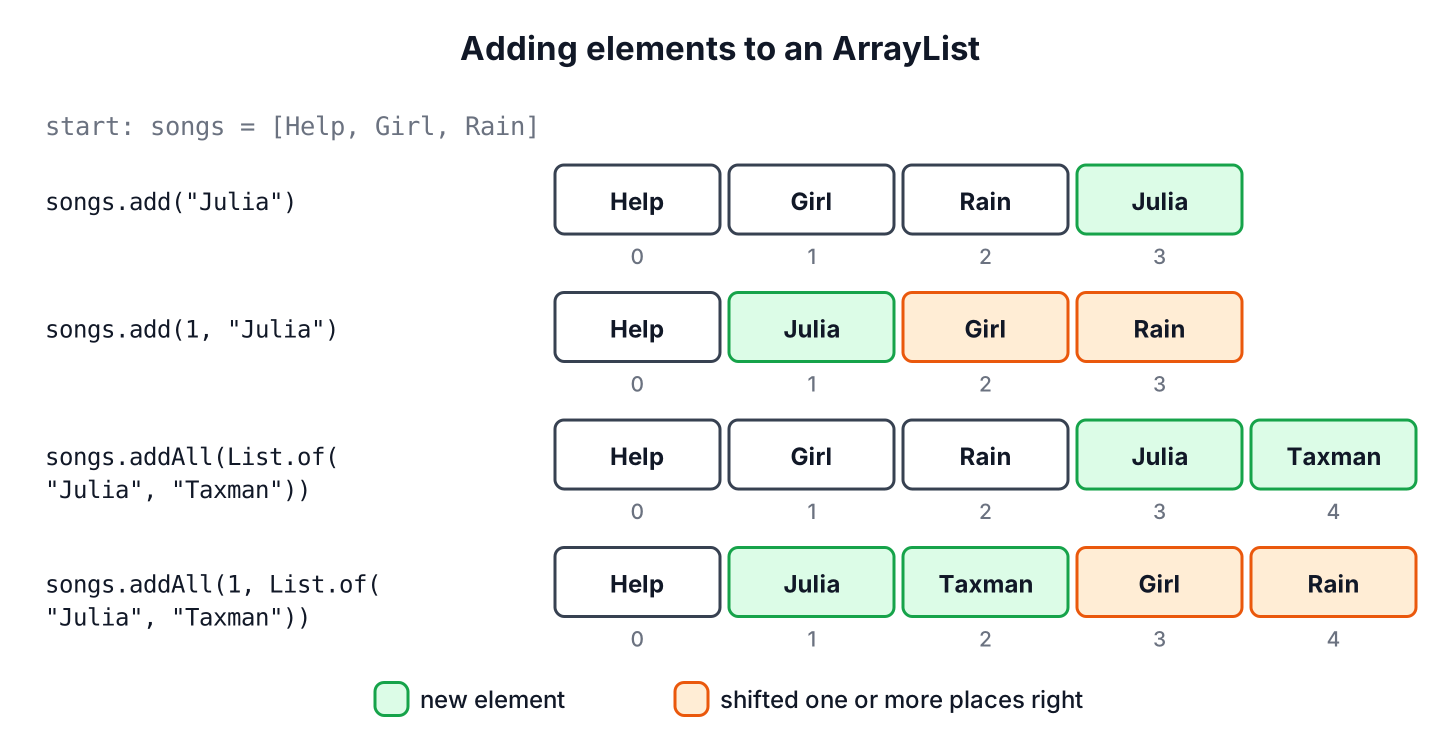
To add multiple elements to an ArrayList in Java, we call addAll() with a collection of the new elements, or Collections.addAll() with the elements written one by one. Both calls append every element in a single statement, and an index argument inserts the whole group at a position instead of at the end.
We add several elements at once when a music app loads a saved playlist, when a feed appends the next page of search results, or when a test builds its sample data. For a single element, the method add() appends it or inserts it at an index.
The following example builds a playlist of song titles with each of these calls.
List<String> songs = new ArrayList<>(List.of("Help", "Girl"));         // [Help, Girl]
boolean merged = songs.addAll(List.of("Rain", "Something"));           // true, songs = [Help, Girl, Rain, Something]
boolean listed = Collections.addAll(songs, "Michelle", "Yesterday");   // true, songs = [Help, Girl, Rain, Something, Michelle, Yesterday]
boolean front = songs.addAll(0, List.of("Taxman"));                    // true, songs = [Taxman, Help, Girl, Rain, Something, Michelle, Yesterday]
boolean one = songs.add("Julia");                                      // true, songs ends with Julia
songs.add(1, "Intro");                                                 // [Taxman, Intro, Help, Girl, Rain, Something, Michelle, Yesterday, Julia]
Notice that the list must be modifiable. We wrap List.of() in new ArrayList<>(…), because the list from List.of() rejects every change. We compare the four add methods first, cover each one with its edge cases, and finish with streams, a playlist import and the questions developers ask most.
1. Which Add Method to Use
An ArrayList stores its elements in an array, so adding at the end is cheap, whereas adding at an index moves every element after that index one place to the right. The four methods differ in two ways, one element or many, and at the end or at a position.
Every method in the table belongs to the ArrayList class or the Collections utility class, and works on any modifiable List.
| Task | Method | Returns |
|---|---|---|
| Append one element | add(e) or addLast(e) | true (or nothing for addLast()) |
| Insert one element at a position | add(index, e) or addFirst(e) | Nothing (void) |
| Append all elements of a collection | addAll(collection) | true if the list changed |
| Insert a collection at a position | addAll(index, collection) | true if the list changed |
| Append values written one by one, or an array | Collections.addAll(list, e1, e2, …) | true if the list changed |
| Create a new list with elements | new ArrayList<>(List.of(e1, e2)) | A new ArrayList |
2. Adding One Element with add()
The method add(e) appends one element at the end of the list and returns true. An ArrayList accepts duplicates and null, so the call never returns false. The boolean return type comes from the Collection interface, where a Set returns false for a duplicate.
List<String> queue = new ArrayList<>();
boolean first = queue.add("Help");            // true, queue = [Help]
boolean again = queue.add("Help");            // true, queue = [Help, Help]
boolean empty = queue.add(null);              // true, queue = [Help, Help, null]
When the backing array is full, add() creates a larger array and copies the elements into it. Adding at the end runs in amortized constant time, and the OpenJDK implementation grows the array by about half its current size each time. We use generics such as List<String> so the compiler rejects an element of the wrong type, instead of a ClassCastException showing up later when we read the element.
2.1. addFirst() and addLast() in Java 21
Java 21 added sequenced collections, and List extends SequencedCollection. The methods addFirst(e) and addLast(e) name the position in the method itself, which reads better than add(0, e) in code that treats the list as a queue.
List<String> upNext = new ArrayList<>(List.of("Girl", "Rain"));
upNext.addFirst("Help");                      // [Help, Girl, Rain]
upNext.addLast("Julia");                      // [Help, Girl, Rain, Julia]
String playing = upNext.getFirst();           // "Help"
3. Inserting Elements at an Index
The method add(index, e) inserts the element at the given position and shifts the element at that position, and every element after it, one place to the right. List indexes start at 0, and a valid index for insertion goes from 0 to size(). Passing size() appends the element, which is the same as add(e).
List<String> songs = new ArrayList<>(List.of("Help", "Girl", "Rain"));
songs.add(1, "Taxman");                       // [Help, Taxman, Girl, Rain]
songs.add(0, "Intro");                        // [Intro, Help, Taxman, Girl, Rain]
songs.add(songs.size(), "Outro");             // [Intro, Help, Taxman, Girl, Rain, Outro]
An index below 0 or above size() throws an IndexOutOfBoundsException. The list does not fill the gap with null values, so we cannot use add(index, e) to place an element at position 9 of a list with 3 elements.
List<String> songs = new ArrayList<>(List.of("Help", "Girl", "Rain"));
songs.add(9, "Taxman");                       // IndexOutOfBoundsException: Index: 9, Size: 3
songs.add(-1, "Taxman");                      // IndexOutOfBoundsException: Index: -1, Size: 3
When the position comes from user input, such as a drag and drop in a playlist editor, we clamp it to the valid range before the call.
static void insertAt(List<String> list, int index, String song) {
    int safeIndex = Math.clamp(index, 0, list.size());
    list.add(safeIndex, song);
}
List<String> songs = new ArrayList<>(List.of("Help", "Girl"));
insertAt(songs, 1, "Rain"); // [Help, Rain, Girl]
insertAt(songs, 50, "Julia"); // [Help, Rain, Girl, Julia]Each insertion at the front or in the middle copies every element after the index, so inserting one element costs time in proportion to the list size. Inserting thousands of elements one by one at index 0 is slow. We collect them first and insert them with one addAll(0, collection) call, or pick an ArrayDeque when the code adds at both ends all the time.
4. Adding a Collection with addAll()
The method addAll(collection) appends every element of another collection, in the order that the collection’s iterator returns them. It returns true when the list changed, so an empty argument gives false. The argument can be any Collection, such as a List, a Set or the values() of a Map.
List<String> playlist = new ArrayList<>(List.of("Help", "Girl"));
List<String> shared = List.of("Rain", "Julia");
boolean changed = playlist.addAll(shared);                 // true, playlist = [Help, Girl, Rain, Julia]
boolean nothing = playlist.addAll(List.of());              // false
boolean fromSet = playlist.addAll(new TreeSet<>(Set.of("Taxman", "Michelle")));   // true, playlist = [Help, Girl, Rain, Julia, Michelle, Taxman]
The overload addAll(index, collection) inserts the whole group at a position and shifts the existing elements right in one step. With index 0, it prepends the collection.
List<String> playlist = new ArrayList<>(List.of("Help", "Girl", "Rain"));
boolean middle = playlist.addAll(1, List.of("Taxman", "Julia"));   // true, playlist = [Help, Taxman, Julia, Girl, Rain]
boolean start = playlist.addAll(0, List.of("Intro"));              // true, playlist = [Intro, Help, Taxman, Julia, Girl, Rain]
Both overloads throw a NullPointerException when the collection itself is null, so a method that receives an optional list checks it first. The index overload also throws an IndexOutOfBoundsException for an index outside 0 to size().
List<String> playlist = new ArrayList<>(List.of("Help"));
List<String> missing = null;
boolean failed = playlist.addAll(missing);                   // NullPointerException
boolean safe = playlist.addAll(Objects.requireNonNullElse(missing, List.of()));   // false, playlist unchanged
The method addAll() copies references, not objects. Both lists point to the same element objects afterward, which matters for mutable elements, whereas adding or removing elements in one list never changes the other list.
5. Adding Values One by One with Collections.addAll()
The static method Collections.addAll(collection, elements…) takes the target collection and a variable number of elements. We use it when the values are not in a collection yet, so we do not have to wrap them in List.of() first. It also accepts an array, because a varargs parameter is an array.
List<String> songs = new ArrayList<>(List.of("Help"));
boolean added = Collections.addAll(songs, "Girl", "Rain", "Julia");   // true, songs = [Help, Girl, Rain, Julia]

String[] fromFile = {"Taxman", "Michelle"};
boolean copied = Collections.addAll(songs, fromFile);                 // true, songs = [Help, Girl, Rain, Julia, Taxman, Michelle]
The method Collections.addAll() behaves like c.addAll(Arrays.asList(elements)) and is likely to run faster in most implementations. Unlike List.of(), it accepts null elements, because the target ArrayList accepts them.
6. Creating an ArrayList with Elements in One Line
When the list does not exist yet, we pass the elements to the ArrayList constructor. The constructor that takes a collection copies its elements into a new, modifiable ArrayList, so later add() calls work. The List initialization in one line article covers more variants.
List<String> songs = new ArrayList<>(List.of("Help", "Girl", "Rain"));   // modifiable
boolean more = songs.add("Julia");                                      // true

List<String> fixed = List.of("Help", "Girl");
boolean rejected = fixed.add("Rain");                                   // UnsupportedOperationException
The factory methods List.of() and Arrays.asList() do not return an ArrayList we can grow. The list from List.of() is unmodifiable and rejects null elements, and the list from Arrays.asList() has a fixed size, so it allows set() but throws an UnsupportedOperationException on add().
List<String> fromArray = Arrays.asList("Help", "Girl");
String old = fromArray.set(1, "Rain");                // "Girl", fromArray = [Help, Rain]
boolean grow = fromArray.add("Julia");                // UnsupportedOperationException
List<String> withNull = List.of("Help", null);        // NullPointerException
7. Adding Only Selected Elements with Streams
Sometimes only part of a collection belongs in the list, for example the songs shorter than four minutes. A stream with filter() picks the matching elements, and addAll() appends the result in one call. The stream’s toList() method returns an unmodifiable list, which is fine here because addAll() only reads it.
record Song(String title, int seconds) {}List<String> shortSongs = new ArrayList<>(List.of("Help"));
List<Song> album = List.of(new Song("Girl", 153), new Song("Something", 182), new Song("Hey Jude", 431));
List<String> picks = album.stream().filter(s -> s.seconds() < 240).map(Song::title).toList(); // [Girl, Something]
boolean picked = shortSongs.addAll(picks); // true, shortSongs = [Help, Girl, Something]We avoid stream.forEach(list::add) for this job, because it fails when someone later makes the stream parallel, whereas addAll() with toList() stays correct. To combine two lists into a new list without changing either one, we use Stream.concat(), and the merge ArrayLists article compares more options.
List<String> sideA = List.of("Help", "Girl");
List<String> sideB = List.of("Rain", "Julia");
List<String> both = Stream.concat(sideA.stream(), sideB.stream()).toList();   // [Help, Girl, Rain, Julia]
8. Importing a Shared Playlist Without Duplicates
Say a music app lets a user import a friend’s playlist into the play queue. The queue already holds some songs, and the app must append only the songs that are not queued yet, in the friend’s order. A plain addAll() would add the duplicates too.
static int importSongs(List<String> queue, List<String> shared) {
    Set<String> queued = new HashSet<>(queue);
    List<String> fresh = shared.stream()
            .filter(queued::add)
            .toList();
    queue.addAll(fresh);
    return fresh.size();
}
List<String> queue = new ArrayList<>(List.of("Help", "Girl"));
int imported = importSongs(queue, List.of("Girl", "Rain", "Julia", "Rain")); // 2, queue = [Help, Girl, Rain, Julia]The HashSet answers “is this song queued?” in constant time, whereas queue.contains() scans the whole list for every shared song. The method Set.add() returns false for a song the set already has, so the filter also drops the second “Rain” in the shared list. The queue receives all new songs in one addAll() call, which grows the array at most once.
9. Add Multiple Elements to ArrayList FAQs
Developers who add several elements to a list run into the same few questions, mostly about unmodifiable lists and speed.
9.1. Can We Add Multiple Elements with One add() Call?
No. The method add() takes only one element. Passing a list to add() on a List<Object> adds the list as a single nested element, and on a List<String> the code does not compile. We use addAll() or Collections.addAll() instead.
List<Object> mixed = new ArrayList<>();
boolean nested = mixed.add(List.of("Help", "Girl"));   // true, mixed = [[Help, Girl]]
int size = mixed.size();                               // 1
9.2. What Is the Difference Between add() and addAll()?
The method add() inserts one element, and addAll() inserts every element of a collection. Both have an overload with an index, and both shift the following elements right when we pass one. For a single element, add() is clearer and avoids creating a temporary list.
9.3. Why Does add() Throw UnsupportedOperationException?
The list is unmodifiable or has a fixed size. Lists from List.of(), Stream.toList(), Collections.unmodifiableList() and Arrays.asList() reject add(), as we saw in section 6. We copy them into new ArrayList<>(list) before adding.
9.4. Is addAll() Faster Than Calling add() in a Loop?
Yes, for large collections. The method addAll() grows the backing array once to the final size and copies the new elements in one block, whereas a loop of add() calls may grow the array several times on the way. For a handful of elements, the difference does not matter, so we pick the version that reads better.
9.5. Can We Add a List to Itself with addAll()?
Yes, an ArrayList copies the argument to an array first, so list.addAll(list) doubles the list. For lists in general, List.addAll() leaves this case undefined, so code that must work with any List implementation copies the list first.
List<String> loop = new ArrayList<>(List.of("Help", "Girl"));
boolean doubled = loop.addAll(new ArrayList<>(loop));   // true, loop = [Help, Girl, Help, Girl]
10. Conclusion
To add multiple elements to an ArrayList, we call addAll() with a collection or Collections.addAll() with separate values or an array. The index overloads insert the group at a position and shift the rest, and an index outside 0 to size() throws an IndexOutOfBoundsException.
For one element, add() appends and add(index, e) inserts, and Java 21 adds addFirst() and addLast(). A list from List.of() or Arrays.asList() cannot grow, so we wrap it in new ArrayList<>(…) before adding anything.
11. References
- ArrayList Javadoc (Java 25)
- List Javadoc (Java 25)
- Collections Javadoc (Java 25)
- SequencedCollection Javadoc (Java 25)
- JEP 431, Sequenced Collections
Happy Learning !!

Add one value multiple to ArrayList of size n.
import java.util.*;
public class Program {
	public static void main(String[] args) {

		var result = new ArrayList<Integer>(Arrays.asList( new Integer[10] ));
                Collections.fill(result, 10);

                System.out.println( result );
}	}