
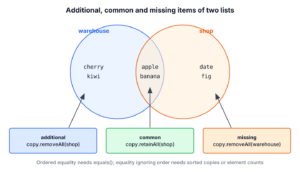
Two lists in Java are equal when list1.equals(list2) returns true, which happens only if both lists have the same size and the same elements in the same order. To compare them ignoring order, we compare sorted copies or element counts, and to find the differences, we call removeAll() and retainAll() on a copy of one list.
We compare lists to check an API response in a test, to find which products a sync job must add or delete, or to show a user which permissions changed. Each of these questions needs a different comparison, so we pick the method by the question.
The following example compares the stock list of a warehouse with the list of products shown in a web shop.
List<String> warehouse = List.of("apple", "banana", "cherry");
List<String> shop = List.of("cherry", "banana", "date");
List<String> reordered = List.of("banana", "cherry", "apple");

boolean equal = warehouse.equals(shop);                    // false
boolean sameIgnoringOrder = warehouse.stream().sorted().toList()
        .equals(reordered.stream().sorted().toList());     // true

List<String> onlyInWarehouse = new ArrayList<>(warehouse);
onlyInWarehouse.removeAll(shop);                           // [apple]
List<String> missingInWarehouse = new ArrayList<>(shop);
missingInWarehouse.removeAll(warehouse);                   // [date]
List<String> common = new ArrayList<>(warehouse);
common.retainAll(shop);                                    // [banana, cherry]
Notice that we always copy a list before calling removeAll() or retainAll(), because both methods change the list they are called on. We start with equality checks, with and without order, and continue with additional, missing and common items, lists of objects and a stock sync example.
1. Comparing Two Lists for Equality
Equality has two meanings for lists, and mixing them up is a common bug in list comparisons. Ordered equality treats [a, b] and [b, a] as different lists, whereas unordered equality treats them as equal as long as each element appears the same number of times.
1.1. Order-Sensitive Comparison With equals()
The List.equals() contract says two lists are equal when they contain the same elements in the same order. It compares the elements with their own equals() method, and the list types do not matter, so an ArrayList can equal a LinkedList or a List.of() list.
List<String> warehouse = new ArrayList<>(List.of("apple", "banana"));
boolean sameTypeFree = warehouse.equals(new LinkedList<>(List.of("apple", "banana")));   // true
boolean reordered = warehouse.equals(List.of("banana", "apple"));   // false
List<String> missing = null;
boolean nullSafe = Objects.equals(missing, warehouse);     // false
The method Objects.equals() returns true for two null references and false when only one is null, so it saves a separate null check. A List is never equal to a Set, even with the same elements, because the two interfaces define equality differently.
1.2. Sorting Copies Before Comparing
To compare lists ignoring order, we sort copies of both lists and compare the copies with equals(). Sorting keeps duplicates, so [a, a, b] and [a, b, b] stay different, which is the correct result. The elements must be Comparable, or we pass a Comparator.
static <T extends Comparable<T>> boolean equalIgnoringOrder(List<T> first, List<T> second) {
    if (first.size() != second.size()) {
        return false;
    }
    return first.stream().sorted().toList().equals(second.stream().sorted().toList());
}
List<String> warehouse = List.of("apple", "banana", "cherry");
boolean same = equalIgnoringOrder(warehouse, List.of("cherry", "apple", "banana")); // true
boolean diff = equalIgnoringOrder(List.of("a", "a", "b"), List.of("a", "b", "b")); // falseThe old approach of calling Collections.sort() on both lists works too, but it reorders the caller’s lists as a side effect and throws UnsupportedOperationException for unmodifiable lists. Sorted copies from a stream avoid both problems, and the size check skips the sort when the answer is already clear.
1.3. Counting Occurrences With a Frequency Map
When the elements have no natural order, we count how often each element appears and compare the two counts. Two lists are equal ignoring order only when their frequency maps are equal, and the check runs in linear time. A null element makes groupingBy() throw NullPointerException, so lists that may contain null need a HashMap filled in a loop or CollectionUtils.isEqualCollection().
static <T> boolean sameElements(List<T> first, List<T> second) {
    if (first.size() != second.size()) {
        return false;
    }
    Map<T, Long> counts = first.stream()
            .collect(Collectors.groupingBy(Function.identity(), Collectors.counting()));
    return counts.equals(second.stream()
            .collect(Collectors.groupingBy(Function.identity(), Collectors.counting())));
}
boolean same = sameElements(List.of("pear", "fig", "pear"), List.of("fig", "pear", "pear")); // true
boolean counted = sameElements(List.of("pear", "pear", "fig"), List.of("pear", "fig", "fig")); // falseComparing with HashSet or with containsAll() in both directions gives wrong answers when a list has duplicates. Both checks see [a, a, b] and [a, b, b] as equal, because they only ask whether each value appears at least once.
List<String> first = List.of("a", "a", "b");
List<String> second = List.of("a", "b", "b");
boolean setsEqual = new HashSet<>(first).equals(new HashSet<>(second));   // true, wrong
boolean containsBoth = first.containsAll(second) && second.containsAll(first);   // true, wrong
1.4. Using Commons Collections
If the project has the commons-collections4 dependency, CollectionUtils.isEqualCollection() compares the elements of both lists ignoring order and checks that each element appears the same number of times. The examples use version 4.5.0.
import org.apache.commons.collections4.CollectionUtils;boolean same = CollectionUtils.isEqualCollection(List.of("a", "b", "c"), List.of("c", "a", "b")); // true
boolean counted = CollectionUtils.isEqualCollection(List.of("a", "a", "b"), List.of("a", "b", "b")); // false1.5. Comparing Lists in Unit Tests
In tests, an assertion library compares the lists and also prints which elements differ. With AssertJ, we use containsExactlyInAnyOrderElementsOf(), and with Hamcrest, the two-argument assertThat() from MatcherAssert together with containsInAnyOrder().
import static org.hamcrest.MatcherAssert.assertThat;
import static org.hamcrest.Matchers.containsInAnyOrder;
List<String> actual = List.of("cherry", "apple", "banana");
List<String> expected = List.of("apple", "banana", "cherry");
assertThat(actual, containsInAnyOrder(expected.toArray()));
org.assertj.core.api.Assertions.assertThat(actual).containsExactlyInAnyOrderElementsOf(expected);The article on asserting two lists are equal ignoring order compares these matchers with the plain JUnit options and shows their failure messages.
2. Finding Additional Items in the First List
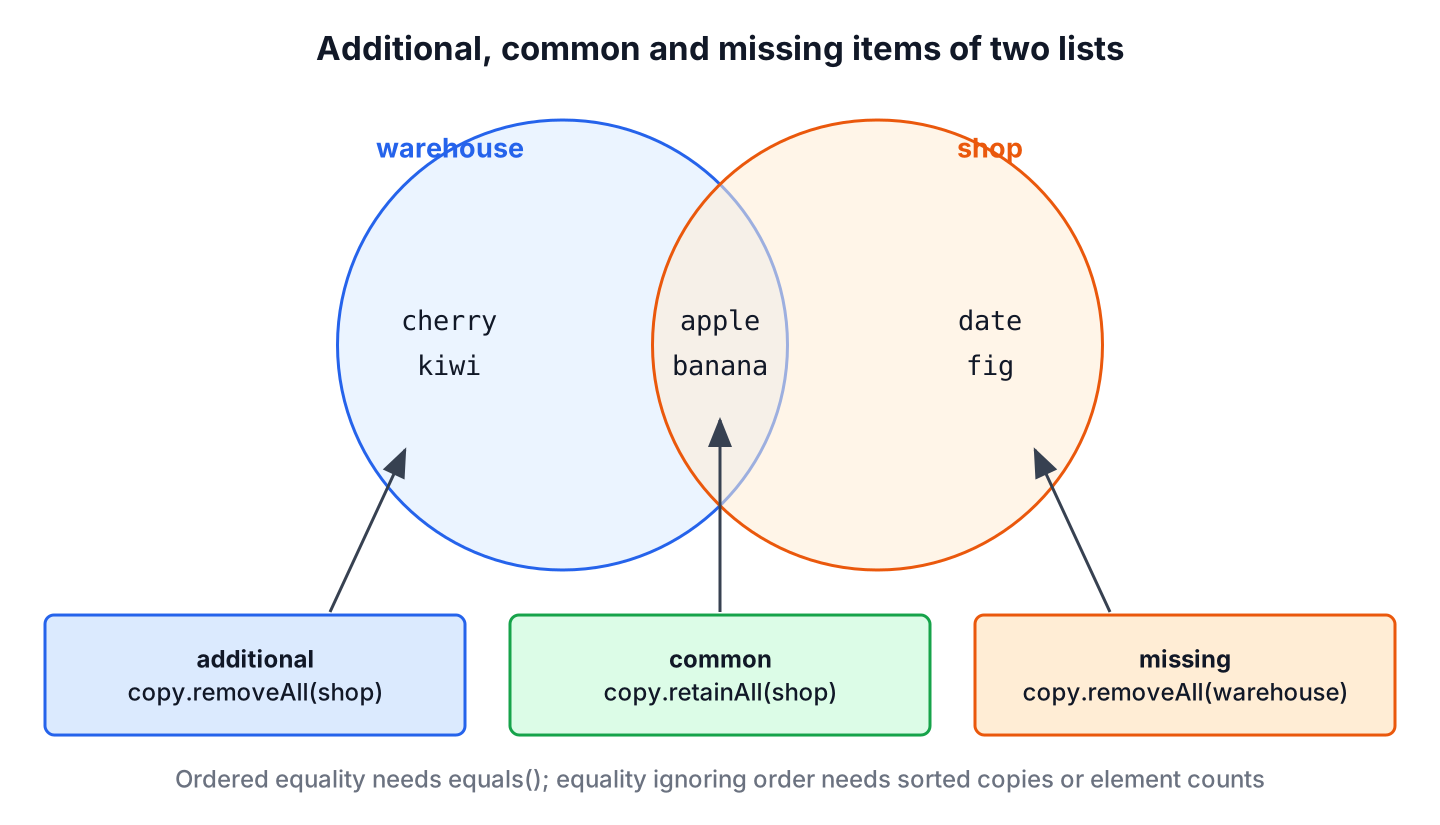
The additional items are the elements of the first list that the second list does not contain, which is the set difference first – second. In the stock example, these are the products the warehouse has but the web shop does not show yet.
2.1. Plain Java
The method removeAll() removes from a list every element that the argument contains. We call it on a copy, so the original list stays unchanged.
List<String> warehouse = List.of("apple", "banana", "cherry", "kiwi");
List<String> shop = List.of("apple", "banana", "date", "fig");
List<String> additional = new ArrayList<>(warehouse);
additional.removeAll(shop);
List<String> result = additional;                          // [cherry, kiwi]
2.2. Using Stream API
A stream with filter() builds the difference as a new list in one expression. We put the second list into a HashSet first, because contains() on a HashSet is a constant-time lookup, whereas contains() on a list scans it, which makes the whole comparison quadratic for large lists.
List<String> warehouse = List.of("apple", "banana", "cherry", "kiwi");
Set<String> shop = new HashSet<>(List.of("apple", "banana", "date", "fig"));
List<String> additional = warehouse.stream()
        .filter(item -> !shop.contains(item))
        .toList();                                         // [cherry, kiwi]
The same rule applies to removeAll() in section 2.1. Passing a HashSet as the argument makes each lookup fast, which matters once both lists hold thousands of elements.
2.3. Using CollectionUtils.subtract()
Commons Collections offers two methods for the difference, and they treat duplicates differently. The method CollectionUtils.removeAll() behaves like List.removeAll() and removes every occurrence, while CollectionUtils.subtract() removes one occurrence for each match in the second list.
List<String> picked = List.of("apple", "apple", "banana");
List<String> packed = List.of("apple", "banana");
Collection<String> allRemoved = CollectionUtils.removeAll(picked, packed);   // []
Collection<String> stillToPack = CollectionUtils.subtract(picked, packed);   // [apple]
In a packing app, subtract() is the right choice, because two picked apples and one packed apple leave one apple to pack. The method removeAll() would report nothing left.
3. Finding Missing Items
The missing items are the elements of the second list that the first list lacks. We get them with the same code as in section 2, with the two lists swapped.
List<String> warehouse = List.of("apple", "banana", "cherry", "kiwi");
List<String> shop = List.of("apple", "banana", "date", "fig");
List<String> missing = new ArrayList<>(shop);
missing.removeAll(warehouse);
List<String> result = missing;                             // [date, fig]
Set<String> stock = new HashSet<>(warehouse);
List<String> viaStream = shop.stream().filter(item -> !stock.contains(item)).toList();   // [date, fig]
When we need both groups at once, CollectionUtils.disjunction() returns the symmetric difference, i.e. the elements that appear in only one of the two lists. Its result order is not defined, so we sort it when the order matters.
List<String> warehouse = List.of("apple", "banana", "cherry", "kiwi");
List<String> shop = List.of("apple", "banana", "date", "fig");
List<String> differences = CollectionUtils.disjunction(warehouse, shop).stream().sorted().toList();   // [cherry, date, fig, kiwi]
4. Finding Common Items
To find the common elements of two lists, we use retainAll() on a copy. It keeps only the elements that the argument contains and removes the rest, so the result keeps the order of the first list.
List<String> warehouse = List.of("apple", "banana", "cherry", "kiwi");
List<String> shop = List.of("apple", "banana", "date", "fig");
List<String> common = new ArrayList<>(warehouse);
common.retainAll(shop);
List<String> result = common;                              // [apple, banana]
Set<String> listed = new HashSet<>(shop);
List<String> viaStream = warehouse.stream().filter(listed::contains).toList();   // [apple, banana]
The method CollectionUtils.intersection() returns the common elements with the smaller count of each duplicate, and like disjunction() it does not promise an order.
List<String> picked = List.of("apple", "apple", "banana");
List<String> packed = List.of("apple", "kiwi");
List<String> both = CollectionUtils.intersection(picked, packed).stream().sorted().toList();   // [apple]
5. Comparing Lists of Objects by a Key
All the methods above call equals() on the elements, so lists of our own classes compare correctly only when the class defines equals() and hashCode(). A record gets both from its components, which makes it the easiest element type for comparisons.
Say a web shop syncs its listings with the warehouse every night. Both systems export a list of products with a code and a quantity, and the job must find the products to publish, to delete and to update. Comparing whole records would treat a changed quantity as a missing product, so we compare by the product code.
record Product(String code, int qty) {}List<Product> warehouse = List.of(new Product("apple", 5), new Product("kiwi", 2), new Product("fig", 7));
List<Product> shop = List.of(new Product("apple", 5), new Product("kiwi", 4), new Product("date", 1));
Map<String, Product> shopByCode = shop.stream()
.collect(Collectors.toMap(Product::code, Function.identity()));
Set<String> warehouseCodes = warehouse.stream().map(Product::code).collect(Collectors.toSet());
List<String> toPublish = warehouse.stream().map(Product::code).filter(c -> !shopByCode.containsKey(c)).toList(); // [fig]
List<String> toDelete = shop.stream().map(Product::code).filter(c -> !warehouseCodes.contains(c)).toList(); // [date]
List<String> toUpdate = warehouse.stream()
.filter(p -> shopByCode.containsKey(p.code()) && !shopByCode.get(p.code()).equals(p))
.map(Product::code)
.toList(); // [kiwi]The map and the set turn every lookup into a constant-time operation, so the job stays linear even with 100,000 products. The same pattern works for users, permissions or any list where an ID identifies the element and other fields can change.
6. Comparing Lists FAQs
Searchers who compare lists in Java often follow up with these questions.
6.1. How do we compare two lists regardless of order?
We compare sorted copies, as in section 1.2, or frequency maps, as in section 1.3. Both keep duplicates in mind, whereas a HashSet comparison does not.
6.2. Does removeAll() remove duplicates from the result?
No. It removes every occurrence of each value found in the argument and keeps the other duplicates as they are. For example, [a, a, b].removeAll([a]) leaves [b], and [a, b, b].removeAll([a]) leaves [b, b].
6.3. Why does equals() return false for lists with the same elements?
Either the order differs, or the element class does not override equals(). Without the override, equals() compares object references, so two objects with the same fields are different.
6.4. What is the fastest way to compare two large lists?
For equality ignoring order, a frequency map is linear. For differences and common items, we put one list into a HashSet and filter the other list, which is also linear, whereas list.contains() inside a loop is quadratic.
7. Conclusion
The method equals() answers whether two lists hold the same elements in the same order. For unordered equality, we compare sorted copies or frequency maps, or call CollectionUtils.isEqualCollection(), and we avoid HashSet and containsAll() checks when duplicates are possible.
For the differences, removeAll() on a copy returns the additional or missing items, and retainAll() on a copy returns the common ones. With large lists, we look elements up in a HashSet, and with objects, we compare by a key such as a product code.
8. References
- List.equals() Javadoc
- Collection.removeAll() Javadoc
- Collection.retainAll() Javadoc
- Apache Commons Collections CollectionUtils
Happy Learning !!

ArrayList<String> listOne = new ArrayList<>(Arrays.asList(“a”, “b”, “c”, “d”));
ArrayList<String> listTwo = new ArrayList<>(Arrays.asList(“a”, “b”, “e”, “f”));
//missing items in listOne
listTwo.removeAll(listOne);
System.out.println(listOne); //[e, f]
##The output is wrong as listOne will give only “a”,”b”,”c”,”d” and so we have to print listTwo it will give “e”,”f” as the output as we are removing listTwo.removeAll(listOne)
Please let me know i am correct!!!
Thanks for the feedback. It was a typo error and has been fixed.
create a list with cases sensitive characters and special characters and try to sort the list ascending and descending
for me ascending works with case sensitive option
public ArrayList<String> sortAscending() {
		Collections.sort(this.arrayList, String.CASE_INSENSITIVE_ORDER);
		return this.arrayList;
but descending does not
public ArrayList<String> sortDescending() {
		Collections.sort(this.arrayList, Collections.reverseOrder());
		return this.arrayList;
any help please ?
public ArrayList sortDescending(){
    Collections.sort(this.arrayList,String.CASE_INSENSITIVE_ORDER);
    Collections.sort(this.arrayList,Collection.reverseOrder());
    return this.arrayList;
}