

To swap two elements in an ArrayList, we call Collections.swap(list, i, j), which exchanges the elements at index i and index j in place. The method returns nothing, works on any modifiable List and throws IndexOutOfBoundsException when either index is outside the list.
Swapping is the core of every “move up” and “move down” button in a to-do app, a playlist editor or a page builder, and of many sorting and shuffling algorithms. For moving an element across several positions, a rotation or a remove-and-insert fits better, which we cover too.
The following example reorders a list of household chores.
List<String> chores = new ArrayList<>(List.of("dishes", "laundry", "vacuum", "trash"));
Collections.swap(chores, 0, 2);
List<String> swapped = chores;                             // [vacuum, laundry, dishes, trash]
String old = chores.set(1, chores.set(3, chores.get(1)));  // "laundry", swaps 1 and 3
List<String> manual = chores;                              // [vacuum, trash, dishes, laundry]
Collections.swap(chores, 0, 4);                            // IndexOutOfBoundsException
Notice that the indexes start at 0 and that the last valid index is size() – 1, which is why index 4 fails for a list of four chores. We look at how swap() works, swap without it and by value, handle bad input, swap array elements and build a “move up” feature.
1. How Collections.swap() Works
The Collections.swap() method takes the list and two indexes. It reads the element at i, writes it to j with set(), and writes the element that set() returned back to i. No element is added or removed, so the size and all other positions stay the same.
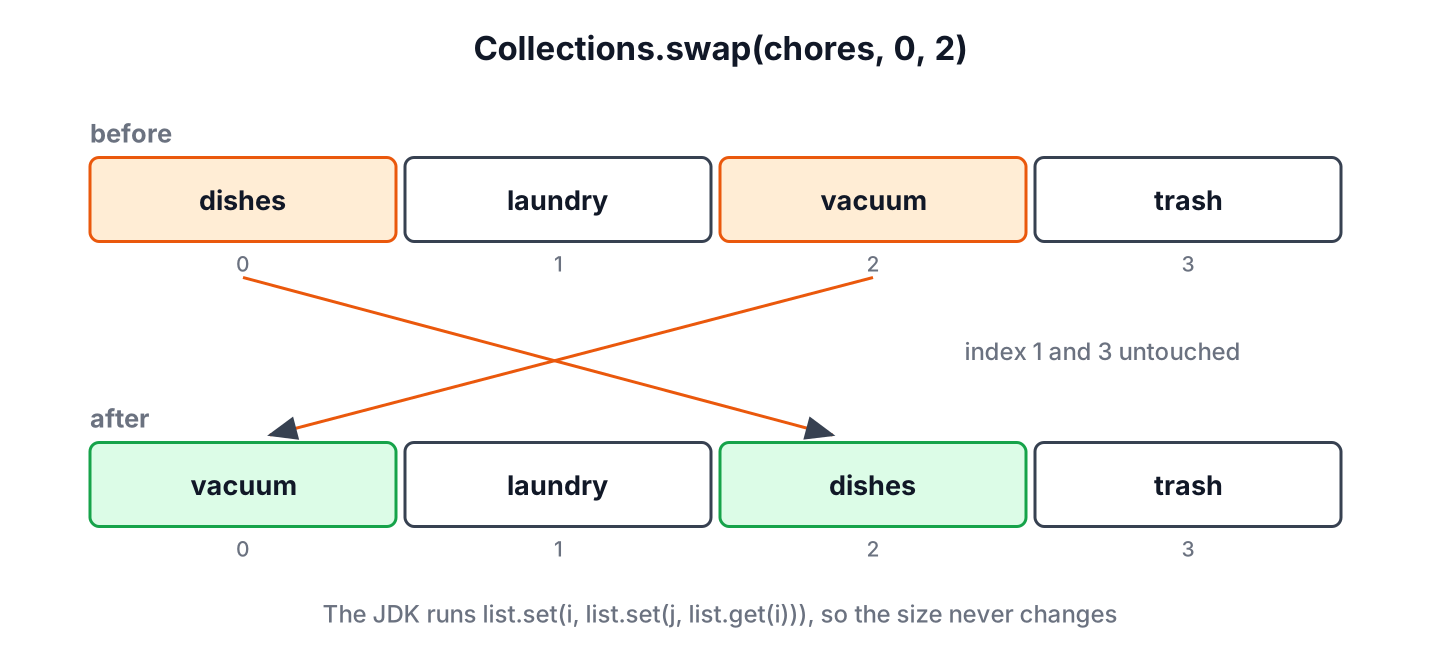
The full signature is public static void swap(List<?> list, int i, int j), and the List<?> parameter accepts a list of any element type. The Javadoc gives two rules for the indexes.
- Either index outside the range 0 to size() – 1, including a negative index, throws IndexOutOfBoundsException.
- When both indexes are equal, the call leaves the list unchanged.
List<String> chores = new ArrayList<>(List.of("dishes", "laundry", "vacuum"));
Collections.swap(chores, 1, 1);
List<String> same = chores;                                // [dishes, laundry, vacuum]
Collections.swap(chores, -1, 2);                           // IndexOutOfBoundsException
Because the method only calls get() and set(), it also works on a fixed-size list from Arrays.asList(), which supports set() but not add(). On an ArrayList, both calls are constant-time array accesses, so a swap costs the same for any position.
2. Swapping Elements Without Collections.swap()
A manual swap with a temporary variable does the same work in three statements. It is a common interview answer, and it shows each step of the swap, although it makes one more get() call than Collections.swap().
List<String> chores = new ArrayList<>(List.of("dishes", "laundry", "vacuum"));
String temp = chores.get(0);
chores.set(0, chores.get(2));
chores.set(2, temp);
List<String> swapped = chores;                             // [vacuum, laundry, dishes]
The method set() returns the element it replaced, which allows the one-line form list.set(i, list.set(j, list.get(i))) from the intro. That line is the same code that Collections.swap() runs, so in real code we call swap() and let the method name explain the intent.
3. Swapping Two Elements by Value
Sometimes we know the values, not the positions, for example when a user drags the “trash” card onto the “dishes” card. We look up both positions with indexOf() and swap only when both values exist, because indexOf() returns -1 for a missing value and -1 is not a valid index.
static boolean swapValues(List<String> list, String first, String second) {
    int i = list.indexOf(first);
    int j = list.indexOf(second);
    if (i < 0 || j < 0) {
        return false;
    }
    Collections.swap(list, i, j);
    return true;
}
List<String> chores = new ArrayList<>(List.of("dishes", "laundry", "trash"));
boolean done = swapValues(chores, "trash", "dishes"); // true
List<String> result = chores; // [trash, laundry, dishes]
boolean missing = swapValues(chores, "trash", "garden"); // falseWith duplicate values, indexOf() finds the first occurrence only, so the helper swaps the first match of each value. The article on checking whether an ArrayList contains an element explains the search methods in more detail.
4. Invalid Indexes and Unmodifiable Lists
A swap fails in two situations, and both throw an unchecked exception that ends the request if we do not handle it. An index outside the list throws IndexOutOfBoundsException, and an unmodifiable list, such as one from List.of() or stream().toList(), throws UnsupportedOperationException.
List<String> fixed = List.of("dishes", "laundry");
Collections.swap(fixed, 0, 1);                             // UnsupportedOperationException
List<String> copy = new ArrayList<>(fixed);
Collections.swap(copy, 0, 1);
List<String> swapped = copy;                               // [laundry, dishes]
When the indexes come from user input, we check them before the swap and return a clear result instead of letting the exception escape. The check costs two comparisons and turns a crash into a message such as “cannot move the last item down”.
static boolean trySwap(List<?> list, int i, int j) {
    if (i < 0 || j < 0 || i >= list.size() || j >= list.size()) {
        return false;
    }
    Collections.swap(list, i, j);
    return true;
}
List<String> chores = new ArrayList<>(List.of("dishes", "laundry"));
boolean ok = trySwap(chores, 0, 1); // true
boolean outside = trySwap(chores, 1, 2); // false5. Swapping Elements in an Array
Arrays have no swap() method in the JDK. For a primitive array such as int[], we swap with a temporary variable. For an object array, Arrays.asList() returns a list view that writes through to the array, so Collections.swap() on that view swaps the array elements.
int[] scores = {10, 20, 30};
int temp = scores[0];
scores[0] = scores[2];
scores[2] = temp;
int[] swappedScores = scores;                              // [30, 20, 10]

String[] days = {"mon", "tue", "wed"};
Collections.swap(Arrays.asList(days), 0, 1);
String[] swappedDays = days;                               // [tue, mon, wed]
The list view does not work for int[], because Arrays.asList(scores) creates a list with one element, the array itself. More array operations are in the array vs ArrayList comparison.
6. Moving a Task Up in a To-Do List
Say a to-do app shows the tasks of the day in a list, and each row has an up arrow and a down arrow. A click swaps the task with its neighbor, and the arrow does nothing on the first or the last row.
static List<String> moveUp(List<String> tasks, int index) {
    if (index > 0 && index < tasks.size()) {
        Collections.swap(tasks, index, index - 1);
    }
    return tasks;
}
List<String> tasks = new ArrayList<>(List.of("email", "standup", "review", "lunch"));
List<String> afterClick = moveUp(tasks, 2); // [email, review, standup, lunch]
List<String> topRow = moveUp(tasks, 0); // [email, review, standup, lunch]A drag that moves a task several rows at once is not a swap, because the tasks in between must shift by one position. The method Collections.rotate() on a subList() view does that shift in place, and a pair of remove() and add() calls gives the same result.
List<String> tasks = new ArrayList<>(List.of("email", "standup", "review", "lunch"));
Collections.rotate(tasks.subList(0, 4), 1);
List<String> lunchFirst = tasks;                           // [lunch, email, standup, review]
List<String> other = new ArrayList<>(List.of("email", "standup", "review", "lunch"));
other.add(0, other.remove(3));
List<String> sameResult = other;                           // [lunch, email, standup, review]
A swap of rows 0 and 3 would give [lunch, standup, review, email] instead, which moves email to the end. So we use swap() for neighbors and for exchanging two items, and a rotation for moving one item.
7. Swapping List Elements FAQs
Readers who swap list elements also look up these questions.
7.1. Does Collections.swap() return the new list?
No. The method returns void and changes the list we pass in, so we read the result from the same list variable.
7.2. How do we swap the first and the last element of a list?
We pass 0 and size() – 1 as the indexes. On an empty list, size() – 1 is -1, so we check isEmpty() first.
List<String> chores = new ArrayList<>(List.of("dishes", "laundry", "trash"));
Collections.swap(chores, 0, chores.size() - 1);
List<String> ends = chores;                                // [trash, laundry, dishes]
7.3. What is the time complexity of Collections.swap()?
For an ArrayList, the swap is constant time, because get() and set() access the array by index. For a LinkedList, each index access walks the nodes, so a swap costs time proportional to the distance between the index and the nearer end of the list.
7.4. Does Collections.swap() work on a list from Arrays.asList()?
Yes. A list from Arrays.asList() has a fixed size but supports set(), so swapping works and also changes the backing array. Only adding or removing elements throws UnsupportedOperationException.
8. Conclusion
The method Collections.swap(list, i, j) is the standard way to swap two elements in an ArrayList. It exchanges the elements in place with two set() calls, accepts any modifiable List and throws IndexOutOfBoundsException for an index below 0 or at or above size().
For values instead of positions, we find the indexes with indexOf() and check for -1 first, and for input from users, we validate both indexes before the call. Arrays of objects can use Collections.swap() through Arrays.asList(), and moving one item across several positions calls for Collections.rotate() instead of a swap.
9. References
Happy Learning !!
