
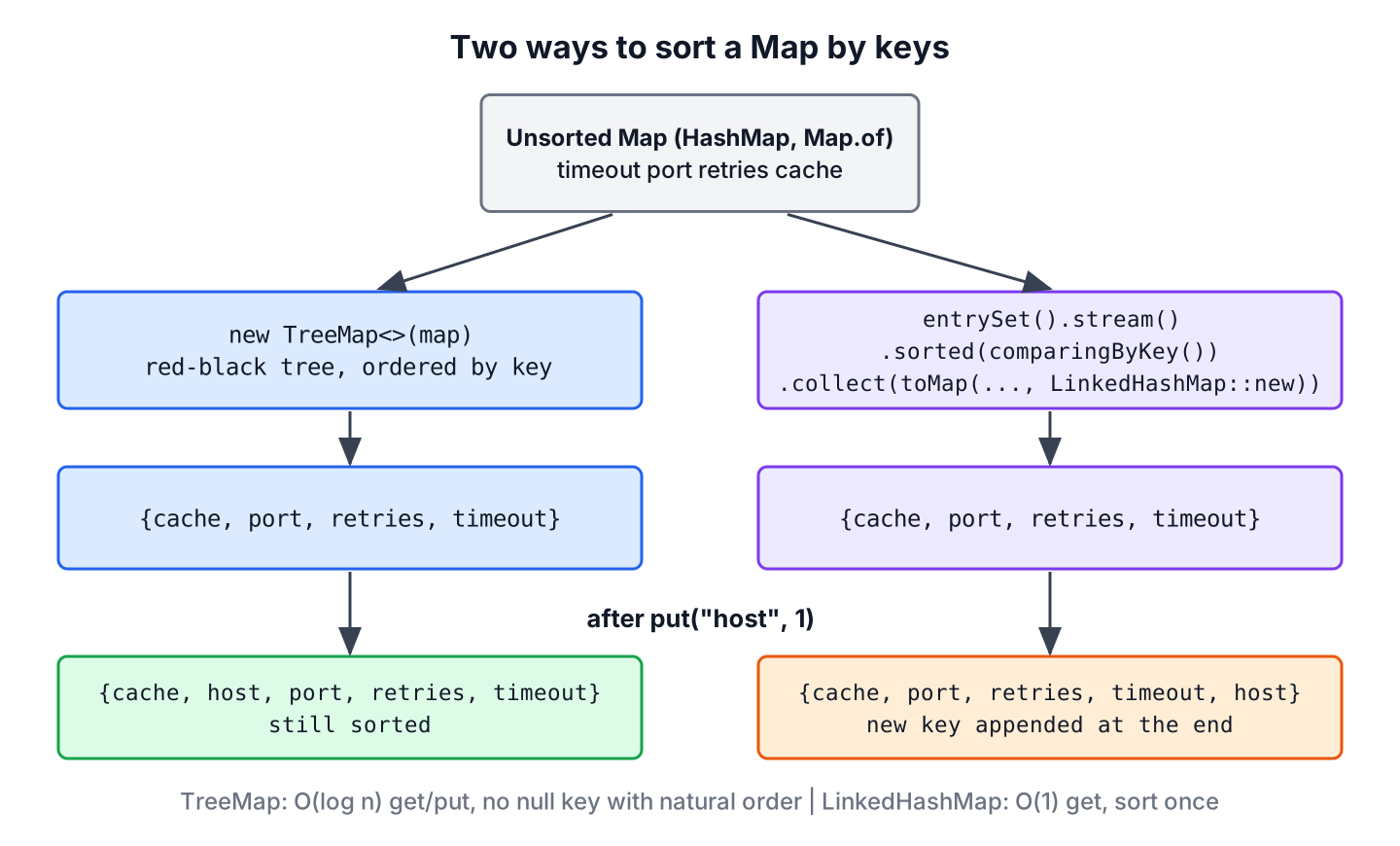
The shortest way to sort a Map by keys in Java is to copy it into a TreeMap, which keeps its entries sorted by key, and the other way is to sort the entries in a stream with Map.Entry.comparingByKey() and collect them into a LinkedHashMap. Both work in ascending and descending order, and both accept a Comparator for a custom key order.
Sorted keys make output predictable, for example when we print configuration settings, show a glossary from A to Z, or compare two maps in a test without depending on the hash order.
The following example sorts a map of app settings by key in both directions, with both approaches.
Map<String, Integer> settings = Map.of("timeout", 30, "port", 8080, "retries", 3, "cache", 64);

Map<String, Integer> treeAsc = new TreeMap<>(settings);                                     // {cache=64, port=8080, retries=3, timeout=30}
Map<String, Integer> treeDesc = new TreeMap<>(Comparator.reverseOrder());
treeDesc.putAll(settings);
Map<String, Integer> descending = treeDesc;                                                 // {timeout=30, retries=3, port=8080, cache=64}

Map<String, Integer> streamAsc = settings.entrySet().stream()
        .sorted(Map.Entry.comparingByKey())
        .collect(Collectors.toMap(Map.Entry::getKey, Map.Entry::getValue, (a, b) -> a, LinkedHashMap::new));   // {cache=64, port=8080, retries=3, timeout=30}
Notice that the TreeMap sorts its keys by itself, whereas the stream sorts once and relies on the LinkedHashMap to keep that order. The difference matters as soon as we add new keys, as we will see in section 3. After that, we sort keys ignoring case, sort numeric string keys, handle null keys and get only the sorted list of keys.
1. Using TreeMap
A TreeMap stores its entries in a red-black tree, ordered by the natural order of its keys or by a Comparator provided at map creation time. Every put(), get() and remove() takes O(log n) time, and iteration always returns the keys in sorted order. Note that TreeMap is not synchronized, so we do not share a modifiable instance between threads without locking.
1.1. Ascending Order or Default Order
By default, all key-value pairs in a TreeMap are sorted in the natural ordering of the keys. To sort the entries of an unsorted map in that order, we pass the map to the TreeMap constructor, which copies all entries.
Map<String, Integer> settings = Map.of("timeout", 30, "port", 8080, "retries", 3, "cache", 64);
Map<String, Integer> sortedTreeMap = new TreeMap<>(settings);   // {cache=64, port=8080, retries=3, timeout=30}
String keys sort by char value, so uppercase keys come before lowercase keys. If the map mixes “Port” and “cache”, the natural order puts “Port” first, and section 4 fixes that.
1.2. Descending Order or Reverse Order
To sort the map entries by keys in reverse order, we pass Comparator.reverseOrder() to the TreeMap constructor and add the entries with putAll(). For a map that is already a TreeMap, the method descendingMap() returns a reversed view without copying, and since Java 21, reversed() does the same.
Map<String, Integer> settings = Map.of("timeout", 30, "port", 8080, "retries", 3, "cache", 64);
Map<String, Integer> sortedTreeMap = new TreeMap<>(Comparator.reverseOrder());
sortedTreeMap.putAll(settings);
Map<String, Integer> reverse = sortedTreeMap;                   // {timeout=30, retries=3, port=8080, cache=64}

TreeMap<String, Integer> ascending = new TreeMap<>(settings);
NavigableMap<String, Integer> view = ascending.descendingMap();   // {timeout=30, retries=3, port=8080, cache=64}
SequencedMap<String, Integer> reversedView = ascending.reversed();   // {timeout=30, retries=3, port=8080, cache=64}
The TreeMap guide covers the other navigation methods, such as firstKey(), headMap() and ceilingKey().
2. Sorting Keys With a Stream
The interface Map.Entry has a static method comparingByKey(), which returns a Comparator that compares map entries in the natural order of their keys. We use it with Stream.sorted() to sort the stream of entries, and collect the result into a map type that keeps the order.
Comparator<Map.Entry<String, Integer>> byKey = Map.Entry.comparingByKey();
int cacheFirst = byKey.compare(Map.entry("cache", 64), Map.entry("port", 8080));   // -13
The value -13 is the difference between the char values of c and p, which String.compareTo() returns. Only the sign matters for sorting.
2.1. Ascending Order
The following program sorts the entries of a map by keys in the natural order and collects them in a LinkedHashMap. The LinkedHashMap keeps its entries in insertion order, so the order of the sorted stream survives in the map.
Map<String, Integer> settings = Map.of("timeout", 30, "port", 8080, "retries", 3, "cache", 64);

LinkedHashMap<String, Integer> sortedMap = settings.entrySet()
        .stream()
        .sorted(Map.Entry.comparingByKey())
        .collect(Collectors.toMap(
                Map.Entry::getKey,
                Map.Entry::getValue,
                (oldValue, newValue) -> oldValue, LinkedHashMap::new));   // {cache=64, port=8080, retries=3, timeout=30}
The merge function (oldValue, newValue) -> oldValue is only there because the toMap() overload with a map factory has no version without it. The keys of the source map are unique, so the function never runs.
2.2. Keys in Reverse Order
We pass Comparator.reverseOrder() to Map.Entry.comparingByKey() to reverse the order of the Map.Entry elements.
Map<String, Integer> settings = Map.of("timeout", 30, "port", 8080, "retries", 3, "cache", 64);

LinkedHashMap<String, Integer> sortedMap = settings.entrySet()
        .stream()
        .sorted(Map.Entry.comparingByKey(Comparator.reverseOrder()))
        .collect(Collectors.toMap(
                Map.Entry::getKey,
                Map.Entry::getValue,
                (oldValue, newValue) -> oldValue, LinkedHashMap::new));   // {timeout=30, retries=3, port=8080, cache=64}
3. TreeMap or LinkedHashMap for Sorted Keys
Both results print the same, but they behave differently after the sort. A TreeMap places every new key in its sorted position. A LinkedHashMap appends new keys at the end, because it remembers insertion order, not key order.
Map<String, Integer> settings = Map.of("timeout", 30, "port", 8080, "retries", 3, "cache", 64);
TreeMap<String, Integer> tree = new TreeMap<>(settings);
LinkedHashMap<String, Integer> snapshot = settings.entrySet().stream()
        .sorted(Map.Entry.comparingByKey())
        .collect(Collectors.toMap(Map.Entry::getKey, Map.Entry::getValue, (a, b) -> a, LinkedHashMap::new));
tree.put("host", 1);
snapshot.put("host", 1);
Map<String, Integer> treeAfter = tree;                          // {cache=64, host=1, port=8080, retries=3, timeout=30}
Map<String, Integer> snapshotAfter = snapshot; // {cache=64, port=8080, retries=3, timeout=30, host=1}| TreeMap | LinkedHashMap from a stream | |
|---|---|---|
| Order after new put() | Still sorted by key | New key at the end |
| get() and put() | O(log n) | O(1) on average |
| null key | Not with natural order | Allowed |
| Navigation (floorKey(), headMap()) | Yes | No |
| Best for | Maps that keep changing | Sort once, read many times |
We use a TreeMap when the map keeps changing and must stay sorted, and a sorted LinkedHashMap when we sort once and only read the result. The comparison of TreeMap and HashMap covers the performance side in more detail.
4. Sorting Keys Ignoring Case
HTTP header names are a typical case, because “Accept”, “content-type” and “Host” can arrive in any case. The natural order puts all uppercase names first, so we pass String.CASE_INSENSITIVE_ORDER as the comparator.
Map<String, String> headers = Map.of("Host", "shop.dev", "accept", "json", "Content-Type", "text");
Map<String, String> natural = new TreeMap<>(headers);                                  // {Content-Type=text, Host=shop.dev, accept=json}
Map<String, String> ignoreCase = new TreeMap<>(String.CASE_INSENSITIVE_ORDER);
ignoreCase.putAll(headers);
Map<String, String> sortedHeaders = ignoreCase;                                        // {accept=json, Content-Type=text, Host=shop.dev}
A case-insensitive TreeMap also treats “Host” and “host” as the same key, so the second put() replaces the value of the first. That is what we want for headers, but it loses data when the keys must stay distinct. In that case, we sort with a stream and comparingByKey(String.CASE_INSENSITIVE_ORDER), which keeps every key. The post on case-insensitive maps covers more options.
5. Sorting Numeric String Keys
Keys such as page numbers or invoice numbers are often stored as strings. Strings compare char by char, so “10” comes before “9”, which looks wrong to a reader. We sort them by their numeric value with a comparator that parses the key.
Map<String, String> pages = Map.of("10", "index", "9", "faq", "2", "about", "1", "home");
Map<String, String> asText = new TreeMap<>(pages);                                     // {1=home, 10=index, 2=about, 9=faq}
Map<String, String> asNumbers = new TreeMap<>(Comparator.comparingInt(Integer::parseInt));
asNumbers.putAll(pages);
Map<String, String> sortedPages = asNumbers;                                           // {1=home, 2=about, 9=faq, 10=index}
Integer.parseInt() throws a NumberFormatException for a key that is not a number, so we use the numeric comparator only when every key is numeric. When we control the data, a Map<Integer, String> is the cleaner choice.
6. Sorting a Map With a null Key
A HashMap allows one null key. A TreeMap with natural ordering calls compareTo() on the key, so it throws a NullPointerException for a null key. We pass a comparator wrapped in Comparator.nullsFirst() or Comparator.nullsLast() to accept it.
Map<String, Integer> withNullKey = new HashMap<>();
withNullKey.put("port", 8080);
withNullKey.put(null, 0);
withNullKey.put("cache", 64);

Map<String, Integer> broken = new TreeMap<>(withNullKey);                              // NullPointerException
Map<String, Integer> nullsFirst = new TreeMap<>(Comparator.nullsFirst(Comparator.naturalOrder()));
nullsFirst.putAll(withNullKey);
Map<String, Integer> sortedWithNull = nullsFirst;                                      // {null=0, cache=64, port=8080}
The same wrapper works in a stream, as comparingByKey(Comparator.nullsLast(Comparator.naturalOrder())). Both wrappers get a full walkthrough in sorting with null values.
7. Getting Only the Sorted Keys
Sometimes we need only the keys, for example to fill a dropdown or to compare key sets in a test. A sorted stream of keySet() returns a List, and a TreeSet returns a sorted set that also removes duplicates.
Map<String, Integer> settings = Map.of("timeout", 30, "port", 8080, "retries", 3, "cache", 64);
List<String> keys = settings.keySet().stream().sorted().toList();                      // [cache, port, retries, timeout]
List<String> keysDesc = settings.keySet().stream().sorted(Comparator.reverseOrder()).toList();   // [timeout, retries, port, cache]
TreeSet<String> keySet = new TreeSet<>(settings.keySet());                             // [cache, port, retries, timeout]
String firstKey = keySet.first();                                                      // "cache"
8. Real-World Example: Printing Settings in Key Order
A service logs its effective configuration at startup. The settings come from a HashMap, and the log line must look the same on every start, so that a diff between two deployments shows only the real changes. We sort the keys with a TreeMap and join the entries into one line.
Map<String, Integer> settings = new HashMap<>(Map.of("timeout", 30, "port", 8080, "retries", 3, "cache", 64));
String logLine = new TreeMap<>(settings).entrySet().stream()
        .map(e -> e.getKey() + "=" + e.getValue())
        .collect(Collectors.joining(", ", "config: ", ""));   // "config: cache=64, port=8080, retries=3, timeout=30"
For sorting by the values instead, for example to show the largest cache sizes first, read sorting a Map by values. Sorting lists and arrays is covered in the Java sorting guide.
9. Sort Map by Keys FAQs
A plain HashMap that looks sorted, the first and last key, sorting by key length and the fate of the original map are the usual next questions.
9.1. Is a HashMap Sorted by Key?
No. The position of an entry in a HashMap depends on the hash code of its key, and the order can change when the map resizes. Small maps with Integer keys often print in ascending order, but the Javadoc does not guarantee it, so we never rely on it.
9.2. How Do We Get the First and Last Key of a Sorted Map?
A TreeMap has firstKey() and lastKey(). Since Java 21, both TreeMap and LinkedHashMap implement SequencedMap, so firstEntry() and lastEntry() work on both.
TreeMap<String, Integer> sorted = new TreeMap<>(Map.of("timeout", 30, "port", 8080, "cache", 64));
String first = sorted.firstKey();                                  // "cache"
Map.Entry<String, Integer> last = sorted.lastEntry();              // timeout=30
9.3. How Do We Sort a Map by Key Length?
We pass a comparator on the length and add the natural order as a tie-breaker. Without the tie-breaker, a TreeMap treats two keys of the same length as one key and drops an entry.
Map<String, Integer> settings = Map.of("timeout", 30, "port", 8080, "retries", 3, "cache", 64);
Map<String, Integer> byLength = new TreeMap<>(Comparator.comparingInt(String::length).thenComparing(Comparator.naturalOrder()));
byLength.putAll(settings);
Map<String, Integer> sortedByLength = byLength;                    // {port=8080, cache=64, retries=3, timeout=30}
9.4. Does Sorting by Key Modify the Source Map?
No. The TreeMap constructor and the stream both copy the entries into a new map. Nothing in the source map changes, neither the entries nor their order.
10. Conclusion
To sort a map by keys, we copy it into a TreeMap or sort its entries with Map.Entry.comparingByKey() and collect them into a LinkedHashMap. Both approaches take Comparator.reverseOrder() for descending order.
A TreeMap stays sorted when we add keys, whereas a LinkedHashMap holds a one-time sorted copy. Custom comparators handle case-insensitive keys, numeric string keys and null keys, and keySet().stream().sorted() gives only the keys.
11. References
- TreeMap Javadoc (Java 25)
- Map.Entry Javadoc (Java 25)
- SequencedMap Javadoc (Java 25)
- String.CASE_INSENSITIVE_ORDER Javadoc (Java 25)
Happy Learning !!

Slightly confused, shouldn’t forEachOrdered(…) be redundant if the stream is sequential, like here?
Yes, it seems redundant but using
forEachOrdered()clearly communicates the intent where element ordering matters, without sacrificing the performance.Hello Lokesh,
Thanks for this article.I have a question.
After sorting, if i want to print the largest value and corresponding key only? How do I do it?
Sample Output:{alex=1, brian=5, charles=4, david=2, elle=3}
If I want to print brian=5 alone which has the largest value.
Regards,
Ashwin
This is done most easily by sorting differently (by value, descending). You can do that by using Map.Entry.comparingByValue(Comparator.reverseOrder()) instead of comparingByKey(…). Afterwards, you simply replace the forEachOrdered(…) with a findFirst() and print the return value.