
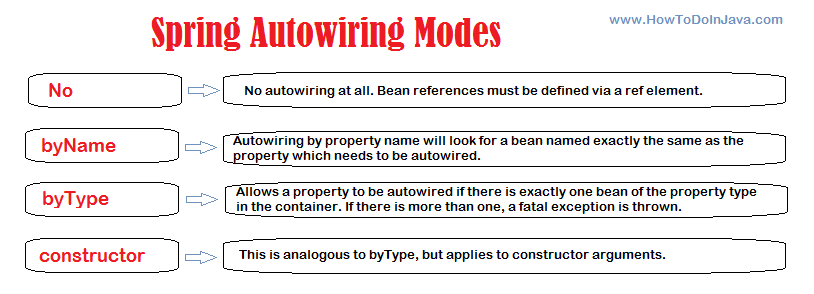
In Spring Framework, autowiring by name is a feature that allows developers to inject dependencies into a bean by matching the property name with the name of the target bean. This is achieved using the @Autowired annotation (Java Configuration) along with the byName attribute (XML Configuration).
For dependency injection in Spring framework:
- The recommended approach is to use the constructor injection.
- The default autowiring mode is by Type.
1. What is Autowiring By Name?
When autowiring by name, Spring searches for a bean whose name matches the name of the property being autowired.
- If a match is found, Spring injects that bean into the property.
- If no matching bean is found, Spring throws NoUniqueBeanDefinitionException unless the property is marked as optional with @Autowired (required = false).
Spring will inject a bean named “circle” into the field in the following example.
public class ShapeService {

  @Autowired
  private Shape circle;

}
2. Autowiring By Name with Examples
Suppose we have a ShapeService class that performs some action on the Shape object whatever is injected into it.
public class ShapeService {

  @Autowired
  private Shape shape;

  public void drawShape() {
    if (shape != null) {
      shape.draw();
    } else {
      System.out.println("No shape set.");
    }
  }
}
The Shape is an abstract type that can have multiple implementations.
public abstract class Shape {
  abstract void draw();
}
Now imagine we created two such implementations of Shape as follows:
public class Square extends Shape {
  @Override
  void draw() {
    System.out.println("Drawing the Square");
  }
}

public class Circle extends Shape {
  @Override
  void draw() {
    System.out.println("Drawing the Circle");
  }
}
To create the beans from the above classes, we create the BeanConfig class. Here we can define all the beans that must be present in the application context.
import org.springframework.context.annotation.Bean;
import org.springframework.context.annotation.Configuration;

@Configuration
public class BeanConfig {

  @Bean
  Square square() {
    return new Square();
  }

  @Bean
  Circle circle() {
    return new Circle();
  }

  @Bean
  ShapeService shapeService() {
    return new ShapeService();
  }
}
To run the program, we use the AnnotationConfigApplicationContext to load the beans and access any of the bean methods.
public class AutowiredByTypeExample {

  public static void main(String[] args) {

    AnnotationConfigApplicationContext context = new AnnotationConfigApplicationContext(BeanConfig.class);

    ShapeService shapeService = context.getBean(ShapeService.class);
    shapeService.drawShape();
  }
}
2.1. Bean Exists with the Specified Name
Let’s change the ShapeService and rename the property to circle.
public class ShapeService {

  @Autowired
  private Shape circle;

  public void drawShape() {
    if (circle != null) {
      circle.draw();
    } else {
      System.out.println("No shape set.");
    }
  }
}
When we run the program, we get the expected message :
Drawing the CircleSimilarly, when we rename the variable to square then also we get the bean injected successfully.
public class ShapeService {

  @Autowired
  private Shape square;

  public void drawShape() {
    if (square != null) {
      square.draw();
    } else {
      System.out.println("No shape set.");
    }
  }
}
The program output:
Drawing the Square2.2. When No Bean is Present with Matching Name
When no bean matching the field name is present in the context then autowiring byType is applied and Spring searches the beans with the matching types.
When autowiring by type, Spring looks for a bean of the same type as the property being autowired.
- if there is exactly one bean of the property type in the container, it injects that bean.
- If there are multiple candidates of the same type, Spring throws NoUniqueBeanDefinitionException because it cannot determine which one to inject.
- In cases where no matching bean is found:
- Spring throws NoSuchBeanDefinitionException if the dependency is required.
- The field is unset (remains null) if the dependency is optional.
3. Conclusion
Autowiring by name in Spring is a convenient way to inject dependencies by matching the property name with the name of the target bean. It simplifies configuration and reduces the need for explicit wiring.
However, be cautious of conflicts when multiple beans of the same name exist.
Happy Learning !!

Hi Lokesh, I get NullPointerException for line employee.getDeptBean().getDeptName() until I modify Employee Bean as:-
It prints only Aniruddh Dwivedi i.e. fullName only.
Best explanation….
i am new with spring and i am going through this example and i am getting BeanCreationException error, that string property cannot convert into the bean, no matching editors or conversion strategy found..
how do you confirm that it is wiring by name?
Use autowire=”byName”
Your property name is departmentBean but the bean id is department. So I don’t think you are using byName autowiring. To verify this, you should add one more DepartmentBean in you application context. If there’s exception, that means you are still using byType.
Hi, Thanks for pointing out. I have clean the code so that others will not confuse.
Just a little feedback. The above example does not wire “byName”…. the @autowire annotation implicitly wires by type. Test it by turning off the annotation and configure purely by xml using the autowire=”byName” attribute on the EmployeeBean.