
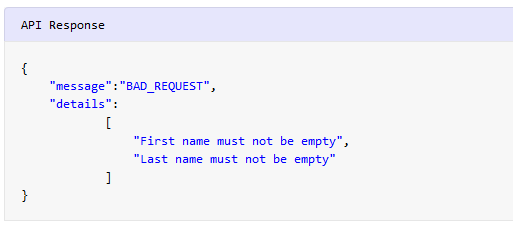
Spring Boot can check the data of a REST request before our controller method runs. We write the rules as annotations from the Jakarta Bean Validation standard, such as @NotBlank, @Email and @Min, and Spring checks the JSON body, the path variables and the query parameters against them. If a value breaks a rule, Spring never calls the controller method, and the client gets 400 Bad Request.
We use request validation to reject bad input before it reaches our service code. For example, a booking form that sends a blank name or 9 seats gets a 400 response, and no booking is stored.
The following example shows the setup for a booking API. We add the spring-boot-starter-validation dependency, put the rules on the fields of the request record, mark the body parameter with @Valid, and put rules on the @PathVariable and @RequestParam parameters. Since Spring Framework 6.1 (Spring Boot 3.2), the controller class does not need @Validated for the parameters.
public record BookingRequest(
    @NotBlank @Size(max = 40) String name,
    @NotBlank @Email String email,
    @NotNull @Min(1) @Max(4) Integer seats) { }

@RestController
@RequestMapping("/bookings")
public class BookingController {

  @PostMapping              // {"name":"","email":"lokesh-at-example","seats":9} -> 400
  public ResponseEntity<Booking> create(@Valid @RequestBody BookingRequest request) { ... }

  @GetMapping("/{id}")      // GET /bookings/0 -> 400
  public Booking one(@PathVariable @Min(1) Long id) { ... }

  @GetMapping               // GET /bookings?name=Lokesh&limit=100 -> 400
  public List<Booking> search(@RequestParam @NotBlank String name,
                              @RequestParam(defaultValue = "10") @Min(1) @Max(50) int limit) { ... }
}
Notice that each comment shows a request that breaks a rule and ends with a 400. The invalid POST returns a ProblemDetail body (a standard JSON error format) that names every broken field, once we add a small @RestControllerAdvice class (section 2.4).
HTTP/1.1 400
Content-Type: application/problem+json

{"detail":"Validation failed","instance":"/bookings","status":400,"title":"Bad Request","errors":{"email":"must be a well-formed email address","name":"must not be blank","seats":"must be less than or equal to 4"}}
Next, we see which exception Spring throws for body errors and for parameter errors (MethodArgumentNotValidException and HandlerMethodValidationException), and how @RestControllerAdvice replaces the default 400 response with field errors. After that, we validate nested objects and lists, use validation groups, write a custom rule and test everything with MockMvc.
1. What Is Request Validation in Spring Boot?
Jakarta Bean Validation is the Java standard for writing rules on data as annotations, and each rule annotation is called a constraint. For example, @NotBlank means the string has at least one non-space character, and @Max(4) means the number is at most 4.
The standard only defines the annotations, so a library must check them while the program runs. In Spring Boot, that library is Hibernate Validator.
Before Spring MVC calls a controller method, it prepares the method arguments and asks the validator to check them. When a constraint fails, the controller method never runs, and the client gets 400 Bad Request. Each part of the request gets its constraints in a different place.
| Request part | Where the constraints go | What starts the check |
|---|---|---|
| JSON body | Fields of the request record or class | @Valid (or @Validated) before @RequestBody |
| Path variable, /bookings/{id} | On the @PathVariable parameter | The constraint itself |
| Query parameter, ?limit=100 | On the @RequestParam parameter | The constraint itself |
| Header | On the @RequestHeader parameter | The constraint itself |
| Nested object or list element in the body | Fields of the nested type | @Valid on the field or the type argument |
The annotation @Valid is not a constraint; it tells the validator to check the constraints inside an object. Spring reads the @PathVariable and @RequestParam values from the URL before it checks them.
1.1. Adding the spring-boot-starter-validation Dependency
The Spring Boot web starter does not include a validator, so we add the validation starter, which brings Hibernate Validator. Spring Boot creates a validator object, and Spring MVC uses that validator without any extra configuration.
<dependency>
  <groupId>org.springframework.boot</groupId>
  <artifactId>spring-boot-starter-webmvc</artifactId>
</dependency>
<dependency>
  <groupId>org.springframework.boot</groupId>
  <artifactId>spring-boot-starter-validation</artifactId>
</dependency>
For Gradle, the line is implementation ‘org.springframework.boot:spring-boot-starter-validation’. The example runs on Spring Boot 4.1.1 and Java 25, and Spring Boot manages the versions of the other libraries, so we get Spring Framework 7.0.9, Hibernate Validator 9.1.3.Final, Jakarta Validation API 3.1.1 and Jackson 3.1.5. On Spring Boot 3.x, the same code works with the spring-boot-starter-web starter.
All annotations come from the jakarta.validation packages. Spring Boot 2.x used javax.validation instead, and old code may still have a javax import. In a Spring Boot 3 or 4 project, that import compiles only if the old API jar is on the classpath, and even then Spring ignores the annotation.
1.2. Common Constraint Annotations and Their Default Messages
Every constraint has a default error message, and Hibernate Validator fills the annotation values into it, for example the 4 in “must be less than or equal to 4”. The messages in the table are the ones Hibernate Validator 9.1.3 prints with the default English locale.
| Annotation | Checks | Default message |
|---|---|---|
| @NotNull | Value is not null | must not be null |
| @NotEmpty | String, collection or map is not null and not empty | must not be empty |
| @NotBlank | String is not null and has a non-space character | must not be blank |
| @Size(min = 2, max = 5) | Length of a string or size of a collection | size must be between 2 and 5 |
| @Min(1) / @Max(4) | Number range | must be greater than or equal to 1 / must be less than or equal to 4 |
| @Positive | Number above 0 | must be greater than 0 |
| Well-formed email address | must be a well-formed email address | |
| @Pattern(regexp = “\\d+”) | String matches the regular expression | must match “\d+” |
| @Past / @FutureOrPresent | Date before today / today or later | must be a past date / must be a date in the present or in the future |
| @Null | Value is null | must be null |
When a request leaves out seats, the value is null, and @Min(1) does not complain about it, because every constraint except @NotNull, @NotEmpty and @NotBlank accepts null as valid.
So we add @NotNull next to @Min or @Email when the field is required. BookingRequest does this for seats. To replace the default text, we set the message attribute, as in @Pattern(regexp = “\\d{10}”, message = “must be 10 digits”).
1.3. MethodArgumentNotValidException vs HandlerMethodValidationException
Spring MVC has two ways to run validation, and each way throws its own exception.
- Argument validation checks one object marked with @Valid, such as the request body. A failure throws MethodArgumentNotValidException.
- Method validation runs when a constraint is placed on a method parameter itself, such as @PathVariable @Min(1) Long id. Spring MVC has had method validation built in since Spring Framework 6.1. A failure throws HandlerMethodValidationException.
A method can use both ways, for example when it has a @Valid body and also a constraint on a parameter. In that case, Spring checks the body through method validation too, so the body errors also arrive as HandlerMethodValidationException. For example, PUT /bookings/0 with a blank name throws one exception that carries both the id error and the name error.
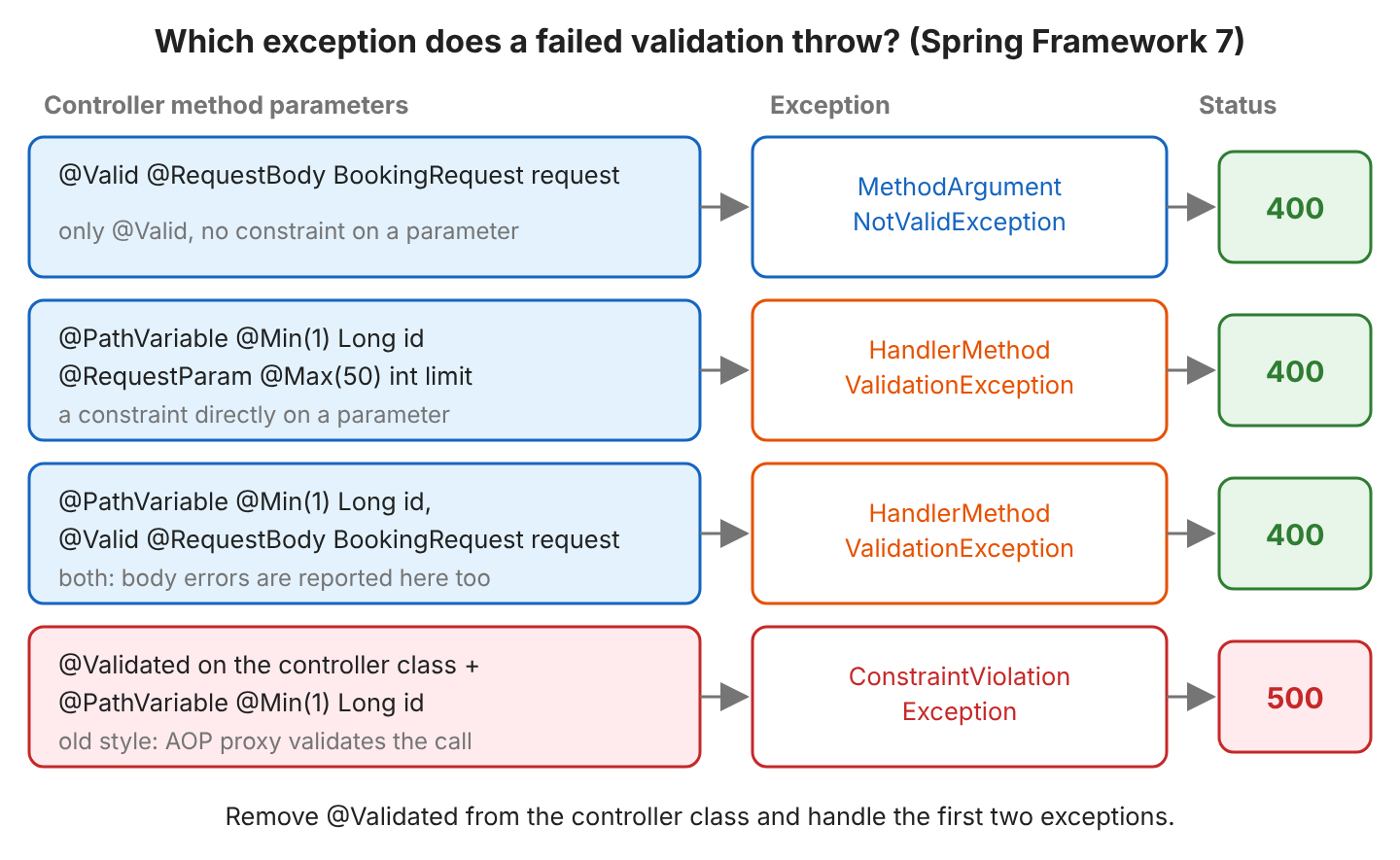
A small change in the method parameters switches from one exception to the other, which is why Spring MVC asks applications to handle both. Both exceptions extend Spring’s ErrorResponse type, so both already carry a ready-made 400 ProblemDetail body.
| MethodArgumentNotValidException | HandlerMethodValidationException | |
|---|---|---|
| Thrown for | One @Valid / @Validated argument | Constraints on method parameters (plus any @Valid argument of the same method) |
| Method to read the errors | getBindingResult().getFieldErrors() | getParameterValidationResults() or visitResults(…) |
| Names in the errors | Field names: name, contact.email | Parameter names (id, limit) and field names for @Valid objects |
| Default detail text | Invalid request content. | Validation failure |
| Package | org.springframework.web.bind | org.springframework.web.method.annotation |
2. Spring Boot Request Validation Example
The following example is a booking API for a yoga studio, where a booking has a name, an email and the number of seats, and a group booking also has a contact person and a list of attendees. The complete project with 16 tests is in the Spring-Boot-Examples repository.
2.1. Validating the Request Body With @Valid
A Java record holds the request body. Constraints on the record components apply to the fields that Java generates, so the record from the intro needs nothing else. Jackson first converts the JSON into the record, and then @Valid in front of @RequestBody starts the validation.
@PostMapping
public ResponseEntity<Booking> create(@Valid @RequestBody BookingRequest request) {
  Booking booking = bookingService.create(request);
  return ResponseEntity.created(URI.create("/bookings/" + booking.id())).body(booking);
}
A valid request reaches the method, and the method creates the booking.
curl -i -X POST localhost:8080/bookings -H "Content-Type: application/json" \
     -d '{"name":"Lokesh","email":"lokesh@example.com","seats":2}'
HTTP/1.1 201
Location: /bookings/1
Content-Type: application/json
{"id":1,"name":"Lokesh","email":"lokesh@example.com","seats":2}The validator checks all constraints and reports every failure, not only the first one. When we sent {“name”:””,”email”:”lokesh-at-example”,”seats”:9}, Spring logged one exception with three field errors.
WARN ... DefaultHandlerExceptionResolver : Resolved [org.springframework.web.bind.MethodArgumentNotValidException: Validation failed for argument [0] in public org.springframework.http.ResponseEntity<com.howtodoinjava.validation.Booking> com.howtodoinjava.validation.BookingController.create(com.howtodoinjava.validation.BookingRequest) with 3 errors: [Field error in object 'bookingRequest' on field 'seats': rejected value [9]; ... default message [must be less than or equal to 4]] [Field error in object 'bookingRequest' on field 'name': rejected value []; ... default message [must not be blank]] [Field error in object 'bookingRequest' on field 'email': rejected value [lokesh-at-example]; ... default message [must be a well-formed email address]] ]2.2. Validating @PathVariable and @RequestParam Values
A parameter constraint goes on the parameter itself, next to @PathVariable or @RequestParam. The controller class has no @Validated annotation, because Spring MVC sees the constraint and runs method validation by itself.
@GetMapping("/{id}")
public Booking one(@PathVariable @Min(1) Long id) { ... }            // GET /bookings/0 -> 400

@GetMapping
public List<Booking> search(@RequestParam @NotBlank String name,       // ?name=%20 -> 400
                            @RequestParam(defaultValue = "10")
                            @Min(1) @Max(50) int limit) { ... }       // ?limit=100 -> 400
A bad parameter can fail at three different steps, and only the last step is Bean Validation.
| Request | What fails | Exception | Default detail |
|---|---|---|---|
| /bookings?limit=5 (no name) | Required parameter missing | MissingServletRequestParameterException | Required parameter ‘name’ is not present. |
| /bookings/abc | Type conversion to Long | MethodArgumentTypeMismatchException | Failed to convert ‘id’ with value: ‘abc’ |
| /bookings/0, ?limit=100 | The constraint | HandlerMethodValidationException | Validation failure |
A missing parameter has its own exception, so a custom handler for HandlerMethodValidationException does not cover it.
2.3. The Default 400 Response Without Custom Handling
First, we send the invalid booking without any exception handler. Spring Boot answers with its standard error JSON, which says 400 but does not say which field failed.
HTTP/1.1 400
Content-Type: application/json

{"timestamp":"2026-10-03T22:56:39.568Z","status":400,"error":"Bad Request","path":"/bookings"}
ProblemDetail is a standard JSON format for HTTP API errors, defined in RFC 9457, with the fields type, title, status, detail and instance. If we set spring.mvc.problemdetails.enabled=true, Spring Boot switches the error body to that format, but the field names are still missing.
spring.mvc.problemdetails.enabled=truePOST /bookings (invalid body)
{"detail":"Invalid request content.","instance":"/bookings","status":400,"title":"Bad Request"}
GET /bookings/0
{"detail":"Validation failure","instance":"/bookings/0","status":400,"title":"Bad Request"}
GET /bookings?name=Lokesh&limit=100
{"detail":"Validation failure","instance":"/bookings","status":400,"title":"Bad Request"}With these bodies, a client app cannot show “email is invalid” next to the right input field, so the next section adds the field errors.
2.4. Returning Field Errors With @RestControllerAdvice
A class marked with @RestControllerAdvice holds exception handlers for all controllers. Our class extends Spring’s ResponseEntityExceptionHandler, which already turns every Spring MVC exception into a ProblemDetail. We override only the two validation methods, and each override takes the ready-made 400 body from the exception and adds an errors map to it.
@RestControllerAdvice
public class ApiExceptionHandler extends ResponseEntityExceptionHandler {

  @Override   // @Valid @RequestBody failed, no constraint directly on a parameter
  protected ResponseEntity<Object> handleMethodArgumentNotValid(
      MethodArgumentNotValidException ex, HttpHeaders headers,
      HttpStatusCode status, WebRequest request) {

    Map<String, String> errors = new TreeMap<>();
    ex.getBindingResult().getFieldErrors()
        .forEach(error -> errors.put(error.getField(), error.getDefaultMessage()));

    return handleExceptionInternal(ex, problem(ex.getBody(), errors), headers, status, request);
  }

  @Override   // a constraint directly on a parameter failed
  protected ResponseEntity<Object> handleHandlerMethodValidationException(
      HandlerMethodValidationException ex, HttpHeaders headers,
      HttpStatusCode status, WebRequest request) {

    Map<String, String> errors = new TreeMap<>();
    ex.getParameterValidationResults().forEach(result -> {
      if (result instanceof ParameterErrors bodyErrors) {          // a @Valid object
        Integer index = bodyErrors.getContainerIndex();             // set for List<@Valid ...> elements
        String prefix = (index == null) ? ""
            : result.getMethodParameter().getParameterName() + "[" + index + "].";
        bodyErrors.getFieldErrors()
            .forEach(error -> errors.put(prefix + error.getField(), error.getDefaultMessage()));
      } else {                                                       // a simple parameter
        String name = result.getMethodParameter().getParameterName();
        result.getResolvableErrors()
            .forEach(error -> errors.put(name, error.getDefaultMessage()));
      }
    });

    return handleExceptionInternal(ex, problem(ex.getBody(), errors), headers, status, request);
  }

  private ProblemDetail problem(ProblemDetail body, Map<String, String> errors) {
    body.setDetail("Validation failed");
    body.setProperty("errors", errors);     // extra member in the JSON
    return body;
  }
}
A TreeMap sorts the keys, so the JSON looks the same on every call. Extending ResponseEntityExceptionHandler also switches off Spring Boot’s own ProblemDetail handler, so we no longer need the spring.mvc.problemdetails.enabled property. The parameter names id and limit come from the -parameters compiler flag, which the Spring Boot parent POM turns on. With ApiExceptionHandler in place, the same requests name the failing values.
POST /bookings {"name":"","email":"lokesh-at-example","seats":9}
{"detail":"Validation failed","instance":"/bookings","status":400,"title":"Bad Request","errors":{"email":"must be a well-formed email address","name":"must not be blank","seats":"must be less than or equal to 4"}}

GET /bookings/0
{"detail":"Validation failed","instance":"/bookings/0","status":400,"title":"Bad Request","errors":{"id":"must be greater than or equal to 1"}}

GET /bookings?name=%20&limit=0
{"detail":"Validation failed","instance":"/bookings","status":400,"title":"Bad Request","errors":{"limit":"must be greater than or equal to 1","name":"must not be blank"}}

PUT /bookings/0 {"name":"","email":"lokesh@example.com","seats":2}
{"detail":"Validation failed","instance":"/bookings/0","status":400,"title":"Bad Request","errors":{"id":"must be greater than or equal to 1","name":"must not be blank"}}
The last response holds two errors, one for the path variable and one for the body, and both come from one HandlerMethodValidationException (section 1.3). We can shape the body further with ProblemDetail and ErrorResponse, and write REST exception handlers for our own exceptions, such as the 404 for an unknown booking.
2.5. Validating Nested Objects and Lists
A group booking has a contact object and a list of attendees. The validator does not look inside a nested object or inside list elements unless the field has @Valid. So both fields get @Valid, and for a list, @Valid goes on the type argument, as in List<@Valid Attendee>, which tells the validator to check each element of the list.
public record GroupBookingRequest(
    @NotBlank String groupName,
    @NotNull @OpenDay LocalDate date,                          // custom constraint, section 2.7
    @NotNull @Valid Contact contact,                           // check the fields of Contact
    @NotEmpty @Size(max = 4) List<@Valid Attendee> attendees) {   // check every Attendee

  public record Contact(
      @NotBlank @Email String email,
      @Pattern(regexp = "\\d{10}", message = "must be 10 digits") String phone) { }

  public record Attendee(
      @NotBlank String name,
      @NotNull @Min(12) Integer age) { }
}
Each error key shows where the value is in the JSON. For example, contact.email is a field of the nested object, and attendees[1].age is a field of the second list element.
Request:  {"groupName":"Morning crew","date":"2026-10-05",
           "contact":{"email":"amit-at-example","phone":"12345"},
           "attendees":[{"name":"Amit","age":35},{"name":"","age":9}]}

Response: 400
{"detail":"Validation failed","instance":"/group-bookings","status":400,"title":"Bad Request","errors":{"attendees[1].age":"must be greater than or equal to 12","attendees[1].name":"must not be blank","contact.email":"must be a well-formed email address","contact.phone":"must be 10 digits","date":"studio is closed on Mondays"}}
When we removed both @Valid annotations and sent the same invalid contact and attendee, the API returned 201 Created and stored the bad data. @NotNull and @NotEmpty on the fields still worked, because those two constraints check the field itself, not the content of the object.
When the whole body is a JSON array, @Valid goes inside the generic type of the parameter, as in @RequestBody List<@Valid BookingRequest> requests. Spring checks a list body with method validation, so the errors arrive as HandlerMethodValidationException. ParameterErrors.getContainerIndex() gives the index of the bad element, and our handler adds that index to the key.
{"detail":"Validation failed","instance":"/bookings/batch","status":400,"title":"Bad Request","errors":{"requests[1].name":"must not be blank","requests[1].seats":"must be less than or equal to 4"}}2.6. Validation Groups for Create and Update
The id field is a common problem, because a create request must not send an id, whereas an update request must send one. A validation group (an empty marker interface that selects which constraints run) solves the id problem. Each constraint lists its groups, and @Validated(OnCreate.class) on the parameter picks the group to check.
public interface OnCreate extends Default { }     // jakarta.validation.groups.Default
public interface OnUpdate extends Default { }

public record YogaClassRequest(
    @Null(groups = OnCreate.class) @NotNull(groups = OnUpdate.class) Long id,
    @NotBlank String title,
    @NotNull @Min(5) @Max(30) Integer capacity) { }

@PostMapping("/classes")
public YogaClassRequest create(@Validated(OnCreate.class) @RequestBody YogaClassRequest request) { ... }

@PutMapping("/classes")
public YogaClassRequest update(@Validated(OnUpdate.class) @RequestBody YogaClassRequest request) { ... }
A constraint without groups belongs to the Default group. When we validate with only OnCreate.class, the Default constraints such as @NotBlank do not run. Our group interfaces extend Default, so the Default constraints stay active, as the responses confirm.
POST /classes {"id":3,"title":"","capacity":12}
{... "errors":{"id":"must be null","title":"must not be blank"}}

PUT /classes {"title":"Hatha basics","capacity":40}
{... "errors":{"capacity":"must be less than or equal to 30","id":"must not be null"}}
With groups, one record works for two operations, but each group adds one more rule to remember. When the create and update payloads differ in more than the id, two separate records are easier to read.
2.7. Creating a Custom Constraint Annotation
The built-in constraints check formats and ranges, but no built-in constraint knows that our studio is closed on Mondays, so we write our own. A custom constraint has two parts, namely an annotation marked with @Constraint and a class that implements ConstraintValidator and holds the check.
@Documented
@Constraint(validatedBy = OpenDayValidator.class)
@Target({FIELD, PARAMETER})
@Retention(RUNTIME)
public @interface OpenDay {
  String message() default "studio is closed on Mondays";
  Class<?>[] groups() default {};
  Class<? extends Payload>[] payload() default {};
}

public class OpenDayValidator implements ConstraintValidator<OpenDay, LocalDate> {

  @Override
  public boolean isValid(LocalDate date, ConstraintValidatorContext context) {
    return date == null || date.getDayOfWeek() != DayOfWeek.MONDAY;   // 2026-10-05 -> false
  }
}
The Jakarta Validation specification requires three attributes on every constraint annotation, namely message, groups and payload. Like the built-in constraints, the validator returns true for null, so @NotNull stays a separate choice. The date error in section 2.5 comes from OpenDayValidator. A custom constraint annotation can also go on a class and compare two fields.
2.8. Testing Validation With MockMvc
A validation test sends an invalid request and then checks the status and the error body. @WebMvcTest starts only the web layer of Spring Boot, including the @RestControllerAdvice, and MockMvc sends requests to the controllers without a real server. In Spring Boot 4, the test dependency is spring-boot-starter-webmvc-test.
@WebMvcTest(BookingController.class)
@Import(BookingService.class)
class BookingValidationTest {

  @Autowired MockMvc mockMvc;

  @Test
  void invalidBodyReturnsFieldErrors() throws Exception {
    mockMvc.perform(post("/bookings")
            .contentType(MediaType.APPLICATION_JSON)
            .content("""
                {"name": "", "email": "lokesh-at-example", "seats": 9}
                """))
        .andExpect(status().isBadRequest())                                     // 400
        .andExpect(content().contentType(MediaType.APPLICATION_PROBLEM_JSON))
        .andExpect(jsonPath("$.errors", aMapWithSize(3)))
        .andExpect(jsonPath("$.errors.seats").value("must be less than or equal to 4"));
  }

  @Test
  void invalidRequestParams() throws Exception {
    mockMvc.perform(get("/bookings").param("name", "Lokesh").param("limit", "100"))
        .andExpect(status().isBadRequest())
        .andExpect(jsonPath("$.errors.limit").value("must be less than or equal to 50"));
  }
}
A key like attendees[1].age has dots and brackets, so JsonPath needs the bracket notation for it, for example jsonPath(“$.errors[‘attendees[1].age’]”). We can also test a custom validator without Spring, because a plain Jakarta Validator is enough.
Validator validator = Validation.buildDefaultValidatorFactory().getValidator();

Set<ConstraintViolation<GroupBookingRequest>> violations = validator.validate(request);  // date 2026-10-05
// violations.size()                     -> 1
// violation.getPropertyPath()           -> date
// violation.getMessage()                -> studio is closed on Mondays
[INFO] Tests run: 9, Failures: 0, Errors: 0, Skipped: 0, Time elapsed: 3.141 s -- in com.howtodoinjava.validation.BookingValidationTest
[INFO] Tests run: 5, Failures: 0, Errors: 0, Skipped: 0, Time elapsed: 0.327 s -- in com.howtodoinjava.validation.GroupBookingValidationTest
[INFO] Tests run: 2, Failures: 0, Errors: 0, Skipped: 0, Time elapsed: 0.069 s -- in com.howtodoinjava.validation.OpenDayValidatorTest
[INFO] Tests run: 16, Failures: 0, Errors: 0, Skipped: 0
[INFO] BUILD SUCCESS3. Request Validation FAQs
3.1. Why Is @Valid Ignored in My Spring Boot Application?
The most common cause is a missing validator. When we replaced spring-boot-starter-validation with only the jakarta.validation-api jar, the project still compiled, but the invalid body was saved with 201 Created, and the path variable check failed with a 500.
POST /bookings {"name":"","email":"lokesh-at-example","seats":9}
HTTP/1.1 201
{"id":1,"name":"","email":"lokesh-at-example","seats":9}

GET /bookings/0
HTTP/1.1 500
ERROR ... threw exception [Request processing failed: java.lang.IllegalStateException: No target Validator set] with root cause
Other common causes are a missing @Valid before @RequestBody or on a nested field (section 2.5), and javax.validation imports in a Spring Boot 3 or 4 project.
3.2. Why Does @Validated on the Controller Return 500 Instead of 400?
Class-level @Validated switches Spring to a different validation path. Older tutorials, including the earlier version of this page, put @Validated on the controller class to make parameter constraints work. On Spring Framework 6.1 and later, class-level @Validated is not needed, and it changes the error.
With that annotation, Spring validates through an AOP proxy (a wrapper object around the controller). The proxy throws ConstraintViolationException, and Spring MVC does not map that exception to 400. We added a second controller with class-level @Validated and called it.
HTTP/1.1 500
{"timestamp":"2026-10-03T22:57:41.238Z","status":500,"error":"Internal Server Error","path":"/old/bookings/0"}

ERROR ... threw exception [Request processing failed: jakarta.validation.ConstraintViolationException: one.id: must be greater than or equal to 1] with root cause
The fix is to remove @Validated from the controller class. Spring MVC then throws HandlerMethodValidationException with a 400. Class-level @Validated is still correct for @Service beans, where method validation always works through the proxy and throws ConstraintViolationException.
3.3. What Is the Difference Between @Valid and @Validated?
Both annotations start validation of a @RequestBody parameter, but they differ in where they come from and what extras they offer.
- @Valid comes from Jakarta Validation (jakarta.validation.Valid) and also marks nested fields and list elements for validation (section 2.5).
- @Validated comes from Spring (org.springframework.validation.annotation.Validated) and accepts validation groups, as in @Validated(OnCreate.class) (section 2.6). On a class, @Validated turns on method validation through a proxy for Spring beans.
On a request body without groups, both annotations behave the same. For nested fields, only @Valid works, because the allowed targets of @Validated are types, methods and parameters, not fields.
3.4. Why Does the 400 Response Say “Failed to read request” Instead of Listing Field Errors?
Validation runs only after Jackson has converted the JSON into the record. When the JSON is broken, or a value has the wrong type, such as “seats”:”two”, Jackson fails first, and Spring throws HttpMessageNotReadableException.
{"detail":"Failed to read request","instance":"/bookings","status":400,"title":"Bad Request"}

DEBUG ... Resolved [org.springframework.http.converter.HttpMessageNotReadableException: JSON parse error: Cannot deserialize value of type `java.lang.Integer` from String "two": not a valid `java.lang.Integer` value]
To report the wrong type, we override handleHttpMessageNotReadable() in the same ResponseEntityExceptionHandler subclass. A missing seats field is a different case, because Jackson sets the Integer to null, and then validation reports “seats”:”must not be null”.
3.5. Should Validation Errors Return 400 or 422?
Either works, but most Spring APIs keep 400, which Spring returns for both validation exceptions. Some APIs return 422 Unprocessable Content instead when the JSON is well-formed but the values break a rule.
To use 422, the overrides in section 2.4 pass HttpStatus.UNPROCESSABLE_CONTENT instead of status and set the same status on the ProblemDetail body. Both are standard HTTP status codes for client errors. Whichever code we pick, every endpoint of the API should use the same one.
4. Conclusion
Spring Boot validates a request when spring-boot-starter-validation is on the classpath. The body parameter needs @Valid, and the @PathVariable or @RequestParam parameters carry their own constraints.
Body errors throw MethodArgumentNotValidException, whereas parameter errors throw HandlerMethodValidationException, and a method with both kinds reports everything through HandlerMethodValidationException. A ResponseEntityExceptionHandler subclass handles both exceptions and turns the default 400 into a ProblemDetail with field names.
Nested objects and list elements need @Valid, and groups pick the rules for each operation. A custom ConstraintValidator covers business rules, and MockMvc tests check the error body field by field. Class-level @Validated on a controller is an old Spring 5 practice that causes 500 errors.
5. References
- Spring Framework Reference: Validation in Spring MVC
- Spring Framework Reference: Java Bean Validation
- Spring Framework Reference: Error Responses
- HandlerMethodValidationException JavaDoc
- Spring Boot Reference: Validation
- Jakarta Validation 3.1 Specification
- Hibernate Validator 9.1 Reference Guide
- RFC 9457: Problem Details for HTTP APIs
Happy Learning !!

Hi Lokesh :
How to send back the Employee details back to response to the client ? -such as id etc
Thanks ,
peethan
What is ErrorResponse ???
Git link.