

To check if a variable is a number in JavaScript, we call Number.isFinite(value), which returns true only when the value has the type number and is a real, finite value. JavaScript has one number type for integers and decimals (a 64-bit floating-point value, like double in Java), and the special values NaN (“not a number”) and Infinity belong to that type too. So the common check typeof value === “number” is not enough, because it accepts NaN and Infinity as well.
We check numbers whenever a value reaches our code from outside. Most outside values arrive as text, such as a quantity field in a shop form or an age in a JSON request.
The following example shows each check with the result of each line as a comment.
// Helpers
function isNumber(value: unknown): value is number {
  return Number.isFinite(value);
}

function isNumericString(value: string): boolean {
  const text = value.trim();
  return /^-?\d+(\.\d+)?$/.test(text) && Number.isFinite(Number(text));
}

const age = 37;
const quantity = "3";                             // form inputs are strings
const price = " 19.99 ";

// 1. Check the type
const isNumberType = typeof age === "number";     // isNumberType = true
const nanType = typeof NaN;                       // nanType = "number"

// 2. Check for a finite number (recommended)
const finite = Number.isFinite(age);              // finite = true
const finiteNaN = Number.isFinite(NaN);           // finiteNaN = false
const finiteText = Number.isFinite(quantity);     // finiteText = false, no conversion

// 3. Check for NaN
const notANumber = Number.isNaN(Number("abc"));   // notANumber = true

// 4. Check for whole numbers
const whole = Number.isInteger(5.0);              // whole = true
const safe = Number.isSafeInteger(2 ** 53);       // safe = false

// 5. Convert and check a string
const qty = Number(quantity);                     // qty = 3
const empty = Number("");                         // empty = 0, not NaN
const px = parseFloat("12px");                    // px = 12
const valid = isNumericString(price);             // valid = true

// 6. BigInt has its own type
const bigType = typeof 10n;                       // bigType = "bigint"

// 7. TypeScript type guard
const input: unknown = JSON.parse("42");
const total = isNumber(input) ? input * 2 : 0;    // total = 84
Notice that typeof NaN returns “number”, whereas Number.isFinite(quantity) returns false for the string “3”, because Number.isFinite() never converts its argument.
Next, we look at what typeof returns and how Number.isFinite() and Number.isNaN() differ from the global isFinite() and isNaN(). After that, we validate numeric strings and write a TypeScript type guard for values of type unknown. A table near the end shows what each check returns for 16 typical values.
1. What Counts as a Number in JavaScript?
JavaScript stores every number, integer or decimal, as a 64-bit floating-point value of the type number, so there is no separate int, long or float type as in Java. Two kinds of special values also have the type number.
- NaN is the result of a calculation or a conversion that failed, for example Number(“abc”) or 0 / 0.
- Infinity and -Infinity are the results of dividing by zero or of numbers too large to store.
The typeof operator returns the type of a value as a string. It tells us whether a value has the type number, but not whether the value is a usable number. The type number is one of the seven primitive types in JavaScript.
// 1. Every numeric value has the type "number"
const intType = typeof 37;                        // intType = "number"
const decimalType = typeof 19.99;                 // decimalType = "number"
const nanType = typeof NaN;                       // nanType = "number"
const infinityType = typeof Infinity;             // infinityType = "number"

// 2. Values that are not of type "number"
const textType = typeof "37";                     // textType = "string"
const nullType = typeof null;                     // nullType = "object"
const bigType = typeof 37n;                       // bigType = "bigint"
const boxedType = typeof new Number(37);          // boxedType = "object"
Two results surprise Java developers. The check typeof null returns “object”, a behavior kept from the first version of JavaScript. The check typeof new Number(37) also returns “object” because new Number() creates a wrapper object, similar to Integer in Java. We handle BigInt values and Number objects in section 6.
1.1. Why typeof Alone Lets Bad Values Through
In JavaScript, a failed conversion does not throw an error but returns NaN, and every calculation with NaN returns NaN again. Because a typeof check accepts NaN, an invalid price ends up in the order total without any error.
const price = Number("abc");                      // price = NaN
const ratio = 10 / 0;                             // ratio = Infinity
const total = price * 3;                          // total = NaN

const passes = typeof price === "number";         // passes = true
const passesToo = typeof ratio === "number";      // passesToo = true
To accept only usable numbers, we check with Number.isFinite() instead of typeof. The typeof check is still useful in TypeScript, where it narrows a type (section 7).
2. Number.isFinite() vs the Global isFinite()
Number.isFinite() returns true when the value has the type number and is neither NaN nor Infinity. It never converts its argument, so the string “37” returns false. The strict behavior makes Number.isFinite() the best single check to test whether a variable is a number.
const age = Number.isFinite(37);                  // age = true
const price = Number.isFinite(19.99);             // price = true
const nan = Number.isFinite(NaN);                 // nan = false
const infinite = Number.isFinite(10 / 0);         // infinite = false
const text = Number.isFinite("37");               // text = false
const empty = Number.isFinite(null);              // empty = false
The older global isFinite() function converts its argument to a number first and then checks the result. Because Number(“”) and Number(null) both return 0, an empty form field passes the check. The snippet is plain JavaScript, because TypeScript declares the parameter of isFinite() as number and rejects a string.
const text = isFinite("37");                      // text = true, "37" becomes 37
const empty = isFinite("");                       // empty = true, "" becomes 0
const nothing = isFinite(null);                   // nothing = true, null becomes 0
const flag = isFinite(true);                      // flag = true, true becomes 1
const unit = isFinite("12px");                    // unit = false
The global isFinite() and isNaN() functions treat “”, ” “, null and true as numbers because they convert them to 0 or 1 first. In new code, we use Number.isFinite() and Number.isNaN().
3. Number.isNaN() vs the Global isNaN()
NaN is the only JavaScript value that is not equal to itself, so even the strict equality check price === NaN is always false. To test for NaN, we call Number.isNaN(), which returns true only for the NaN value itself.
const price = Number("abc");                      // price = NaN

// 1. NaN is not equal to itself
const selfEqual = price === price;                // selfEqual = false

// 2. Number.isNaN() is true only for the NaN value
const nan = Number.isNaN(price);                  // nan = true
const text = Number.isNaN("abc");                 // text = false, a string is not NaN
const missing = Number.isNaN(undefined);          // missing = false
The global isNaN() checks something different. It tests whether the value becomes NaN after conversion to a number, so isNaN(x) returns the same result as Number.isNaN(Number(x)).
const word = isNaN("abc");                        // word = true
const empty = isNaN("");                          // empty = false, "" becomes 0
const blank = isNaN(" ");                         // blank = false, " " becomes 0
const nothing = isNaN(null);                      // nothing = false, null becomes 0
const missing = isNaN(undefined);                 // missing = true
const flag = isNaN(true);                         // flag = false, true becomes 1
Every result follows from the conversion. In the coercion table, the Number() column holds the value that isNaN() tests.
| Value | Number() | isNaN() | Number.isNaN() |
|---|---|---|---|
| “abc” | NaN | true | false |
| “” | 0 | false | false |
| ” 42 “ | 42 | false | false |
| “12px” | NaN | true | false |
| null | 0 | false | false |
| undefined | NaN | true | false |
| true | 1 | false | false |
| NaN | NaN | true | true |
TypeScript reports both mistakes at compile time. The global isNaN() only accepts a number, and since TypeScript 4.9 a comparison with NaN is an error.
const quantity = "3";
const price = Number("abc");

const invalid = isNaN(quantity);
const same = price === NaN;
The TypeScript 7.0 compiler reports one error for each of the last two lines.
src/nan-errors.ts(4,23): error TS2345: Argument of type 'string' is not assignable to parameter of type 'number'.
src/nan-errors.ts(5,14): error TS2845: This condition will always return 'false'.
When we do want to test a string, we convert it ourselves with Number.isNaN(Number(quantity)). The conversion is then visible in the code instead of hidden inside isNaN().
4. Checking for Integers With Number.isInteger() and Number.isSafeInteger()
A quantity or an age must be a whole number. Number.isInteger() returns true for a number without a fractional part, and false for strings and for the special values NaN and Infinity. Because JavaScript has one number type, 37.0 and 37 are the same value.
Number.isSafeInteger() also checks that the integer lies between -Number.MAX_SAFE_INTEGER and Number.MAX_SAFE_INTEGER (2^53 – 1). Above that limit, a 64-bit floating-point value cannot store every integer, so two different integers can become the same number.
// 1. Whole numbers
const age = Number.isInteger(37);                 // age = true
const zeroFraction = Number.isInteger(37.0);      // zeroFraction = true, 37.0 is 37
const fraction = Number.isInteger(37.5);          // fraction = false
const text = Number.isInteger("37");              // text = false

// 2. Safe integers
const max = Number.MAX_SAFE_INTEGER;              // max = 9007199254740991
const safe = Number.isSafeInteger(max);           // safe = true
const unsafe = Number.isSafeInteger(max + 1);     // unsafe = false
const sameValue = max + 1 === max + 2;            // sameValue = true, precision lost
The safe-integer limit matters for IDs that come from a Java backend. A Java long goes up to 2^63 – 1, far above Number.MAX_SAFE_INTEGER, so the frontend keeps a large long ID either as a string or as a BigInt value (section 6). For example, an order ID of 9007199254740993 from a Spring Boot API becomes 9007199254740992 after JSON.parse(), and the app loads the wrong order.
For a quantity field, we combine the integer check with a range check.
const quantity = Number("3");
const validQuantity = Number.isInteger(quantity) && quantity > 0;    // validQuantity = true

const half = Number("2.5");
const validHalf = Number.isInteger(half) && half > 0;                // validHalf = false
5. Checking if a String Is a Number
Values from an HTML form are always strings. The value property of an input element returns a string even for type=”number”, and valueAsNumber returns NaN for an empty field. So we validate a form field in two steps. We check the string format first, and then we convert the string.
5.1. Converting With Number() and parseFloat()
JavaScript has two common ways to turn a string into a number.
- Number() converts the whole string and returns NaN when any character is invalid. Spaces around the number are ignored.
- The parseFloat() function reads digits from the start of the string and stops at the first invalid character.
// 1. Number() converts the whole string
const qty = Number("42");                         // qty = 42
const padded = Number(" 42 ");                    // padded = 42, spaces are ignored
const exponent = Number("4e2");                   // exponent = 400
const hex = Number("0x10");                       // hex = 16
const empty = Number("");                         // empty = 0
const unit = Number("12px");                      // unit = NaN

// 2. parseFloat() reads up to the first invalid character
const pixels = parseFloat("12px");                // pixels = 12
const hexPrefix = parseFloat("0x10");             // hexPrefix = 0
const emptyText = parseFloat("");                 // emptyText = NaN
Neither function is a validation on its own, because Number(“”) returns 0 and parseFloat(“12px”) returns 12. The Number() function also accepts formats that a price field should reject, such as “0x10” (hexadecimal) and “4e2” (exponent notation).
5.2. Validating the Format With a Regular Expression
A regular expression describes which strings we accept. For quantities and prices, a plain decimal format is enough. The pattern /^-?\d+(\.\d+)?$/ for that format has four parts.
| Part | What it matches |
|---|---|
| ^ and $ | The start and the end of the string, so nothing else is allowed |
| -? | An optional minus sign |
| \d+ | One or more digits |
| (\.\d+)? | An optional dot followed by one or more digits |
const decimal = /^-?\d+(\.\d+)?$/;

const price = decimal.test("19.99");              // price = true
const negative = decimal.test("-5");              // negative = true
const padded = decimal.test(" 42 ");              // padded = false
const exponent = decimal.test("4e2");             // exponent = false
const empty = decimal.test("");                   // empty = false
The regex rejects ” 42 “ because of the spaces. Users often type or paste spaces into form fields, so the helper in the next section trims the string first.
5.3. A Reusable isNumericString() Helper
The isNumericString() helper trims the surrounding spaces and checks the format with the regex. It also confirms that the converted value is finite, which rejects strings with hundreds of digits that Number() turns into Infinity.
export function isNumericString(value: string): boolean {
  const text = value.trim();
  return /^-?\d+(\.\d+)?$/.test(text) && Number.isFinite(Number(text));
}
For form input, we validate with isNumericString() first and convert with Number() second.
const priceInput = " 19.99 ";
const valid = isNumericString(priceInput);        // valid = true
const price = Number(priceInput);                 // price = 19.99

const unit = isNumericString("12px");             // unit = false
const empty = isNumericString("");                // empty = false
const hex = isNumericString("0x10");              // hex = false
const huge = isNumericString("9".repeat(400));    // huge = false, Number() gives Infinity
To accept other formats, we change only the regex. For example, /^\d+$/ accepts only non-negative whole numbers, which suits a quantity field.
6. BigInt Values and Number Objects
BigInt values and Number wrapper objects look like numbers but fail most number checks. BigInt values appear when we work with very large integers, whereas Number objects appear mostly in old code.
6.1. Checking a BigInt
A BigInt stores an integer of any size and is written with an n suffix, as in 10n. It is a separate primitive type, so typeof returns “bigint” and Number.isFinite() returns false. The global isFinite() and isNaN() throw a TypeError (“Cannot convert a BigInt value to a number”). For example, an analytics dashboard keeps a view counter as a BigInt when the count can grow beyond Number.MAX_SAFE_INTEGER, and a Number.isFinite() check would reject the counter.
const views = 10n;
const bigType = typeof views;                     // bigType = "bigint"
const finite = Number.isFinite(views);            // finite = false
const numeric = typeof views === "number" || typeof views === "bigint";   // numeric = true
const converted = Number(views);                  // converted = 10
Number(views) converts a BigInt to a number. Values above Number.MAX_SAFE_INTEGER lose precision in the conversion.
6.2. Number Objects Created With new Number()
The expression new Number(37) creates a wrapper object around the value, similar to Integer in Java, and most checks treat it as an object, not as a number. Calling Number() without new returns a primitive, which is what we want in practice. The instanceof operator detects the wrapper.
const boxed = new Number(37);
const boxedType = typeof boxed;                   // boxedType = "object"
const finite = Number.isFinite(boxed);            // finite = false
const instance = boxed instanceof Number;         // instance = true
const value = boxed.valueOf();                    // value = 37
const equal = boxed === new Number(37);           // equal = false, different objects
In TypeScript, the lowercase type number is the primitive, and the uppercase Number is the wrapper object type. The lowercase type is the recommended type for annotations, and the compiler rejects arithmetic on the uppercase one.
const age: Number = new Number(37);
const nextAge = age + 1;
src/boxed-errors.ts(2,17): error TS2365: Operator '+' cannot be applied to types 'Number' and 'number'.7. Writing a Type Guard for Numbers in TypeScript
In strict mode, TypeScript gives the variable of a catch block the type unknown, and we give the same type to data from JSON.parse() or an API response. TypeScript then allows no arithmetic on an unknown value until a check proves its type. A check that proves the type is called narrowing, and inside the if block the compiler uses a narrower type than the declared one.
For example, a checkout page reads the cart total from an API response as unknown, and the code must prove that the total is a number before it adds the shipping cost.
7.1. Narrowing unknown With typeof
A typeof check narrows unknown to number inside the if block.
const input: unknown = JSON.parse("3");

if (typeof input === "number") {
  const doubled = input * 2;                      // input is number here
  console.log("doubled = " + doubled);            // doubled = 6
}
Number.isFinite() is the better runtime check, but its declared return type is a plain boolean. The compiler cannot narrow the type from it, so the type stays unknown.
const input: unknown = JSON.parse("3");

if (Number.isFinite(input)) {
  const doubled = input * 2;
}
src/guard-errors.ts(4,19): error TS18046: 'input' is of type 'unknown'.7.2. A Type Guard With value is number
A type guard is a function whose return type is a type predicate such as value is number. When the function returns true, TypeScript treats the argument as a number. Inside, Number.isFinite() does the runtime check, so NaN and Infinity are rejected as well.
function isNumber(value: unknown): value is number {
  return Number.isFinite(value);
}
Type guards also work as callbacks. Passing isNumber to filter() returns an array of type number[], not unknown[].
const values: unknown[] = JSON.parse('[3, "3", null, 4.5]');

const numbers = values.filter(isNumber);          // numbers = [3, 4.5], type number[]
const sum = numbers.reduce((a, b) => a + b, 0);   // sum = 7.5
7.3. Converting Form and JSON Values With toNumber()
In real input, a JSON field can hold 37 or “37”. The toNumber() helper combines the two checks and returns number | undefined, a union type that forces the caller to handle the invalid case.
export function toNumber(value: unknown): number | undefined {
  if (isNumber(value)) return value;
  if (typeof value === "string" && isNumericString(value)) return Number(value);
  return undefined;
}
const age = toNumber(37); // age = 37
const price = toNumber(" 19.99 "); // price = 19.99
const unit = toNumber("12px"); // unit = undefined
const nan = toNumber(NaN); // nan = undefined8. Comparing the Ways to Check if a Variable Is a Number
Each row shows one value and each column one check. A TypeError cell means that the call throws. The Number.isFinite() column is true only for real numbers, whereas the isFinite() column is also true for values such as “” and null. The toNumber() column from section 7.3 returns undefined for every value that a form should reject.
| Value | typeof | Number.isFinite() | isFinite() | Number.isNaN() | isNaN() | Number.isInteger() | Number() | parseFloat() | toNumber() |
|---|---|---|---|---|---|---|---|---|---|
| 42 | “number” | true | true | false | false | true | 42 | 42 | 42 |
| 4.5 | “number” | true | true | false | false | false | 4.5 | 4.5 | 4.5 |
| NaN | “number” | false | false | true | true | false | NaN | NaN | undefined |
| Infinity | “number” | false | false | false | false | false | Infinity | Infinity | undefined |
| “42” | “string” | false | true | false | false | false | 42 | 42 | 42 |
| ” 42 “ | “string” | false | true | false | false | false | 42 | 42 | 42 |
| “4e2” | “string” | false | true | false | false | false | 400 | 400 | undefined |
| “” | “string” | false | true | false | false | false | 0 | NaN | undefined |
| “0x10” | “string” | false | true | false | false | false | 16 | 0 | undefined |
| “12px” | “string” | false | false | false | true | false | NaN | 12 | undefined |
| “abc” | “string” | false | false | false | true | false | NaN | NaN | undefined |
| null | “object” | false | true | false | false | false | 0 | NaN | undefined |
| undefined | “undefined” | false | false | false | true | false | NaN | NaN | undefined |
| true | “boolean” | false | true | false | false | false | 1 | NaN | undefined |
| 10n | “bigint” | false | TypeError | false | TypeError | false | 10 | 10 | undefined |
| new Number(42) | “object” | false | true | false | false | false | 42 | 42 | undefined |
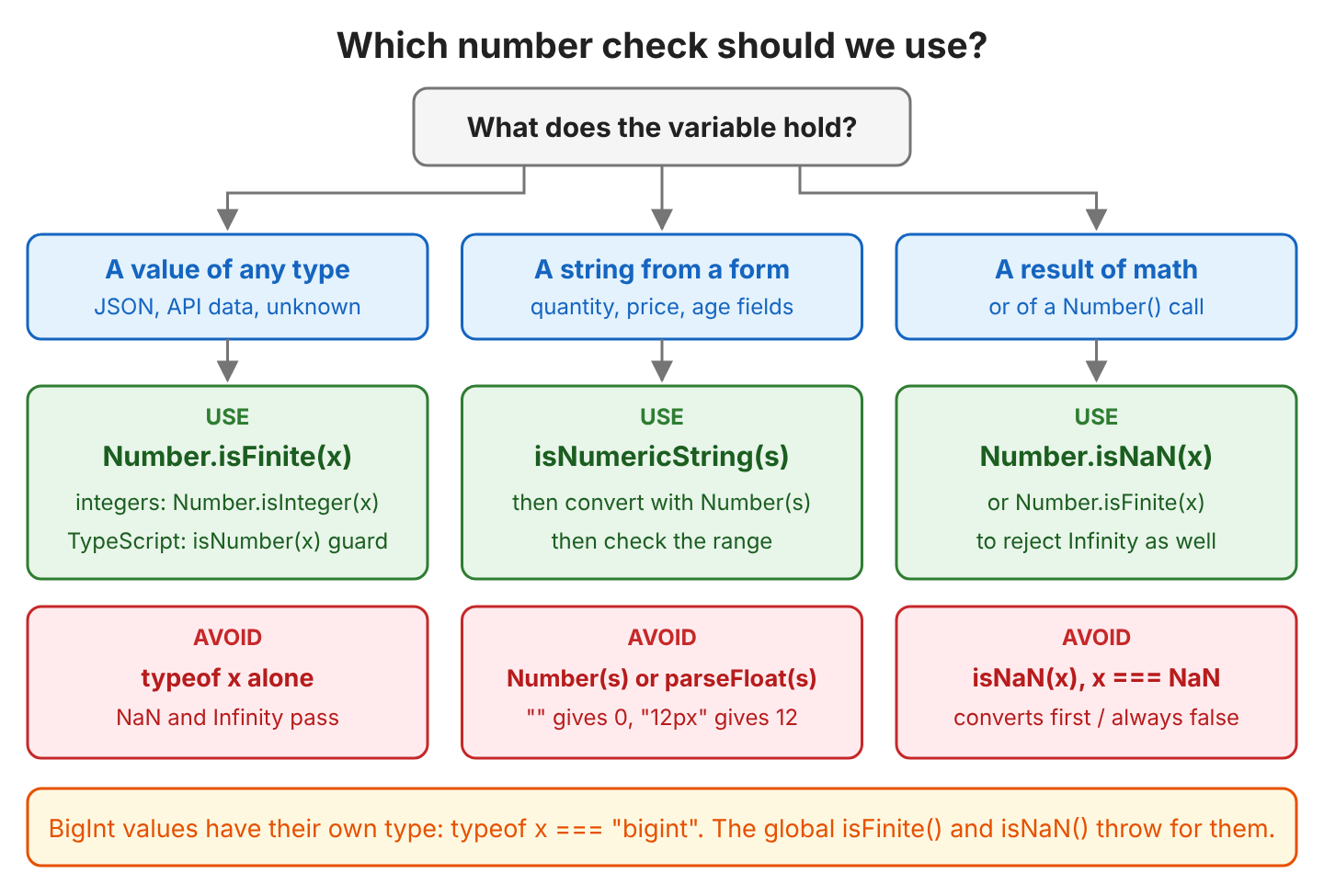
The right check depends on where the value comes from.
- For values of any type, we use Number.isFinite().
- For strings from a form, we check the format before the conversion.
- For results of math or of Number(), we use either Number.isNaN() or Number.isFinite().
9. Number Checking FAQs
Form validation code often raises the same four questions, about truthiness, parseInt(), thousands separators and ranges.
9.1. Can We Use if (value) to Check for a Number?
No. An if statement converts the value to a boolean, and the rules for that are about truthy and falsy values, not numbers. The number 0 is falsy, so a valid quantity of 0 fails, while the string “0” is truthy.
const quantity = 0;
const price = NaN;
const text: string = "0";

const quantityOk = quantity ? "valid" : "invalid";    // quantityOk = "invalid", 0 is falsy
const priceOk = price ? "valid" : "invalid";          // priceOk = "invalid", NaN is falsy
const textOk = text ? "valid" : "invalid";            // textOk = "valid", "0" is truthy
9.2. Should We Use parseInt() or Number()?
The parseInt() function reads an integer from the start of a string and drops the rest, including the decimal part. We use it to read a number from text such as “12px”, always with the radix 10. For validation, Number() is stricter because it rejects the whole string when any character is invalid. The unary plus operator (+value, see arithmetic operators) converts the same way as Number().
const cut = parseInt("4.5", 10);                  // cut = 4
const prefix = parseInt("12px", 10);              // prefix = 12
const strict = Number("12px");                    // strict = NaN
const plus = +"42";                               // plus = 42, same as Number("42")
const plusEmpty = +"";                            // plusEmpty = 0, same trap as Number("")
9.3. How Do We Check a Number With Commas Such as “1,000”?
Number(“1,000”) returns NaN because a comma is not valid in a number literal. We remove the thousands separators first and then validate the result. In countries where the comma is the decimal separator, “1,5” means 1.5, so the cleanup rule depends on the user’s locale.
const input = "1,000";
const direct = Number(input);                     // direct = NaN
const cleaned = input.replaceAll(",", "");        // cleaned = "1000"
const valid = isNumericString(cleaned);           // valid = true
const amount = Number(cleaned);                   // amount = 1000
9.4. How Do We Check That a Number Is Within a Range?
We check the type first and the range second. Every comparison with NaN returns false, so a range check alone can let NaN through when the condition is negated, as in !(broken < 0).
const age = Number("37");
const validAge = Number.isInteger(age) && age >= 0 && age <= 130;    // validAge = true

const price = Number("-5");
const validPrice = Number.isFinite(price) && price >= 0;             // validPrice = false

const broken = Number("abc");
const notNegative = !(broken < 0);                                   // notNegative = true, NaN passes
10. Running the Example Project
The example project on GitHub has one file per section of this guide, and src/index.ts runs them in order. It uses TypeScript 7.0.2 and needs Node.js 22 or newer. The file src/02-03-global-functions.js is plain JavaScript because TypeScript does not allow strings in the global isFinite() and isNaN(), and the allowJs option in tsconfig.json compiles it with the rest. The file src/08-comparison-table.ts prints both tables of this guide by calling every check on every value.
npm install
npm start
11. Conclusion
Number.isFinite() is the check we use in most code, because it accepts only values of type number and rejects NaN and Infinity without converting anything. Number.isNaN() and Number.isInteger() answer narrower questions. The global isNaN() and isFinite() convert their argument first, so we do not use them in new code. Strings from forms need a format check, such as isNumericString(), before Number() converts them. In TypeScript, an isNumber() type guard uses the same runtime check and narrows the type to number.
12. References
MDN documents the runtime behavior of every function used here, and the TypeScript documentation covers type guards and the NaN comparison error.
- MDN: typeof
- MDN: Number.isFinite()
- MDN: Number.isNaN()
- MDN: isNaN()
- MDN: Number.isSafeInteger()
- MDN: Number() constructor
- MDN: BigInt
- TypeScript Handbook: Narrowing and type predicates
- TypeScript 4.9 release notes: Checks for equality on NaN
Happy Learning !!
