
TypeScript 7 refers to the TypeScript release in which the compiler and the language service are ported from JavaScript to Go. The tsc command is a native binary in this release, and it checked our 1,000-module test project 4.2 times faster than TypeScript 6. The TypeScript team published TypeScript 7.0 on 2026-07-08, and 7.0.2 is the current patch release.
Whether we can switch today depends on what else in the build loads the compiler, so these three cases decide it. We read them in order and stop at the first one that matches our project.
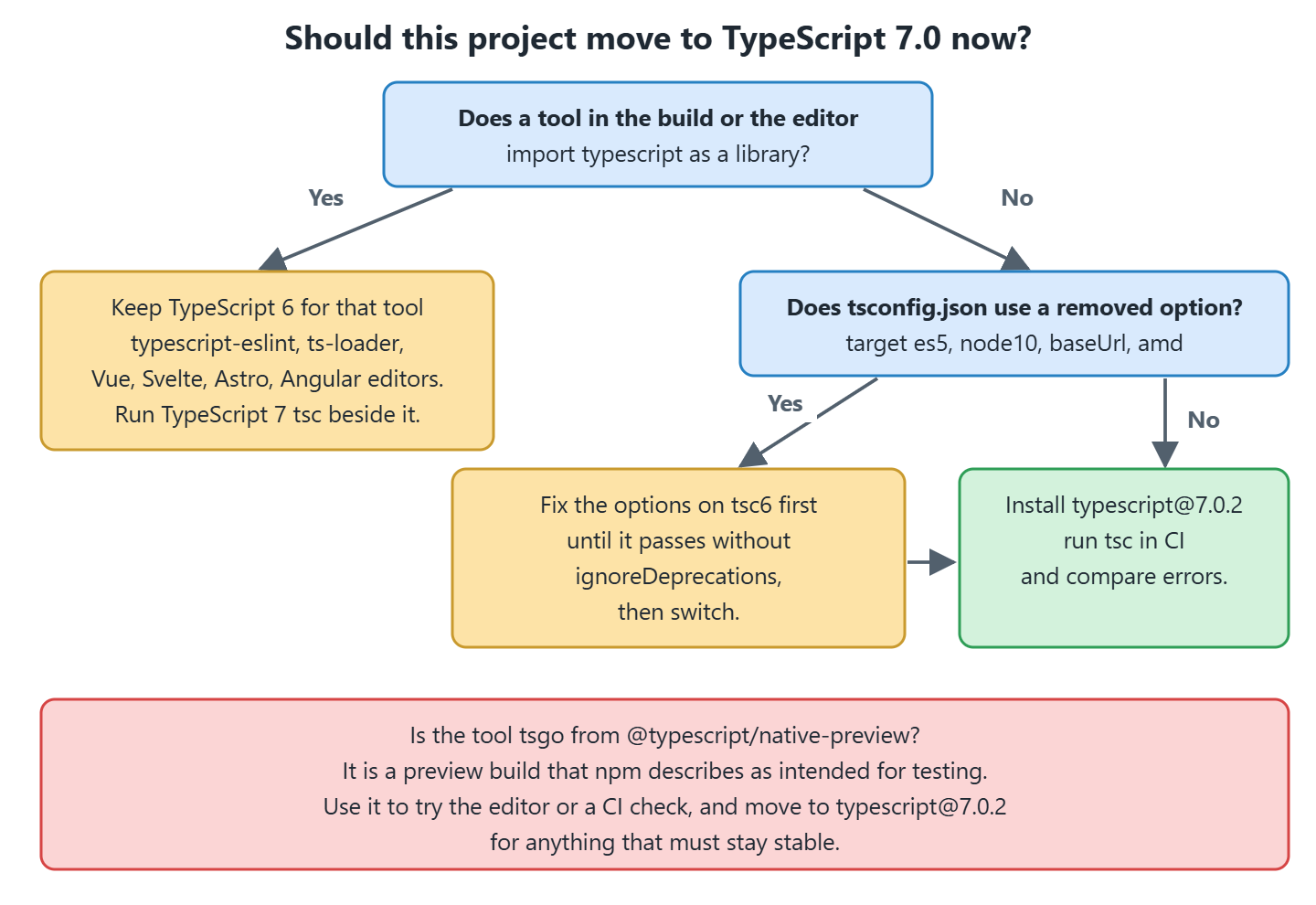
- A tool in our build imports typescript as a library, such as typescript-eslint or ts-loader. That tool stays on TypeScript 6, because TypeScript 7.0 ships no programmatic API, which is the set of JavaScript functions such as createProgram that a tool calls to run the compiler itself.
- Our tsconfig.json still sets target: es5, baseUrl, moduleResolution: node10 or module: amd. We remove those options while still on TypeScript 6, because TypeScript 7 rejects them with a hard error.
- Nothing but tsc runs in our build. We install typescript@7.0.2 and the type check gets faster with no change to our code.
The third case is one install and one version check.
npm install -D typescript@7.0.2   # native compiler, command tsc

npx tsc --version                 # Version 7.0.2
That version check isn’t a formality. A second TypeScript package in the same project can take the tsc command away from version 7, and section 2 shows when that happens. The sections before it cover how the compiler works, what we measured on a project of our own and how to migrate a configuration, and section 6 is the decision table on its own if that is all you came for.
1. How the TypeScript Compiler Works
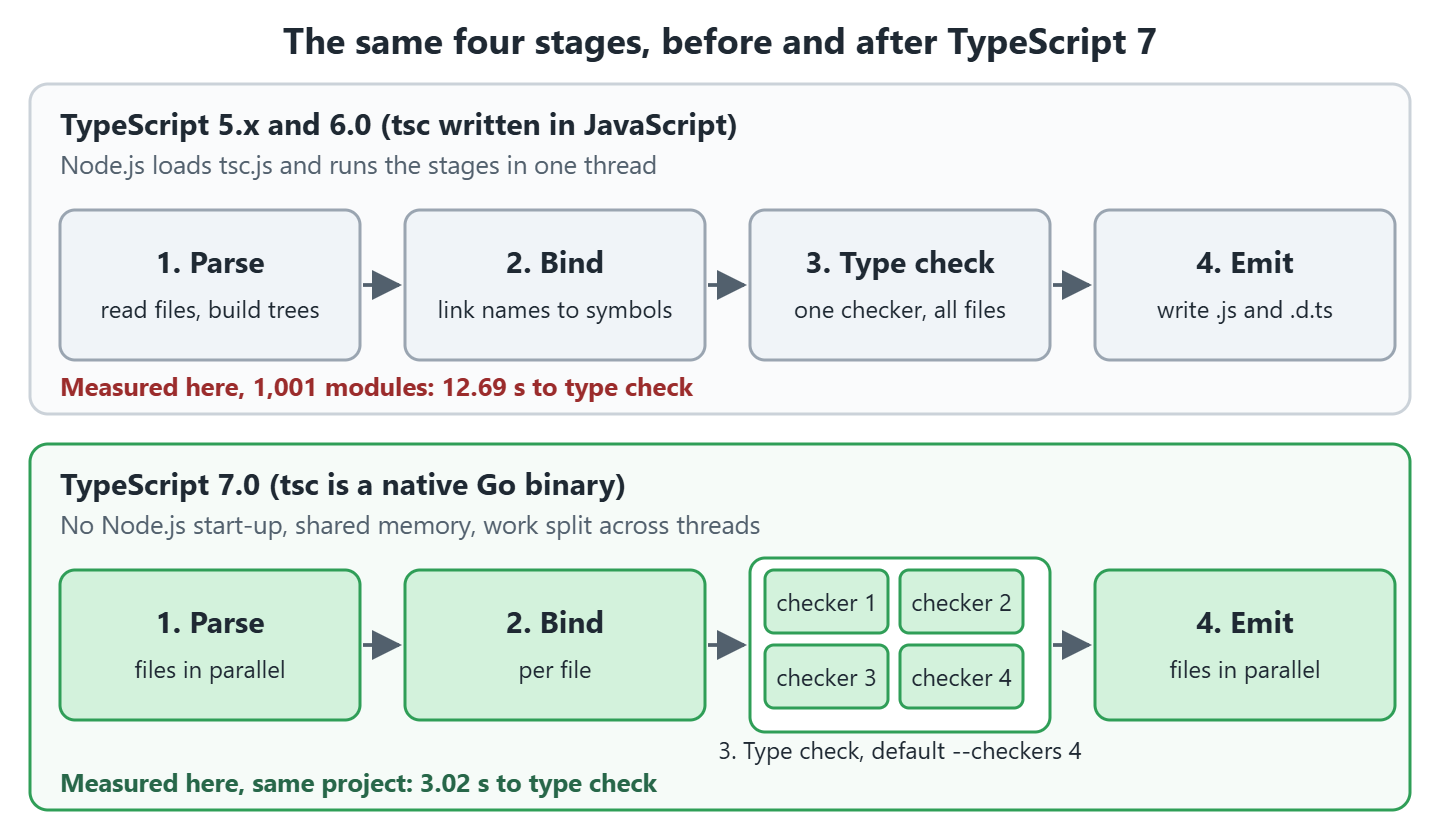
A compiler reads source code, checks it against the rules of the language and writes the code in another form. The TypeScript compiler reads .ts files, reports type errors, and writes JavaScript files (.js) and type declaration files (.d.ts). It does this in four stages.
- Parse. The compiler reads each file and builds a syntax tree.
- Bind. The compiler links every name in the tree to the symbol it refers to, such as a variable or a class.
- Type check. The checker (the part that applies the type rules) compares the types of values and reports errors such as TS2322.
- Emit. The compiler writes the .js and .d.ts files, or skips this stage when we pass –noEmit.
The same checker has a second consumer, the language service. A language service is a long-running process that answers an editor’s questions about the code, which are hover text, completions, go to definition and the red squiggles under an error. In TypeScript 7 it talks to editors through the Language Server Protocol (LSP), the standard way for an editor to start an external language tool.
1.1. Why Compile Time Matters
Let’s say a recipe app runs the type check on every pull request. The check time is added to every push, and the same check runs again in the editor each time a project opens. Compile time grows with the number of files and with the number of types the checker has to resolve, so a large project feels it on every commit.
The TypeScript team measured full builds of five open source projects, with the compiler splitting the checking across its default of four worker processes (the –checkers option in section 2.1 sets that number). The announcement doesn’t state the hardware it ran on, so we measure our own project in section 3.
| Project | TypeScript 6 | TypeScript 7 | Speedup |
|---|---|---|---|
| vscode | 125.7 s | 10.6 s | 11.9x |
| sentry | 139.8 s | 15.7 s | 8.9x |
| bluesky | 24.3 s | 2.8 s | 8.7x |
| playwright | 12.8 s | 1.47 s | 8.7x |
| tldraw | 11.2 s | 1.46 s | 7.7x |
Two changes produce that speedup. The native binary needs no JavaScript engine start-up, and the work is split across threads that share memory. Our own run in section 3 separates the two, because a machine with few cores gets most of the gain from the native code alone.
2. TypeScript 7, Corsa and tsgo
The port has two codenames in the team’s own posts, which is why both turn up in release notes. Strada is the old JavaScript codebase and Corsa is the Go one. A port is not a rewrite, so the behavior is meant to match, and the native port repository keeps the intentional differences from TypeScript 6.0 in a file named CHANGES.md.
The command tsgo belonged to the preview build, shipped in the npm package @typescript/native-preview. That package published nightly builds and stopped on 2026-07-07, the day before the stable release.
TypeScript 6.0 is the transition release between 5.9 and 7.0. It is the last release built on the JavaScript codebase, and it reports the options that TypeScript 7 removes.
| Release | Date | Status |
|---|---|---|
| TypeScript 5.9 | 2025-08-01 | Last 5.x release |
| TypeScript 6.0 | 2026-03-23 | Transition release, last JavaScript codebase |
| TypeScript 7.0 Beta | 2026-04-21 | First beta of the native compiler |
| TypeScript 7.0 RC | 2026-06-18 | Release candidate, tsc is native |
| TypeScript 7.0 | 2026-07-08 | Stable, typescript@7.0.2 is the latest tag |
| TypeScript 7.1 | Not released | Nightly builds on the next tag, new API expected |
Four npm packages carry a TypeScript compiler on 2026-10-17, and each one installs a command of its own.

| npm package | Command | Compiler it runs |
|---|---|---|
| typescript@7.0.2 | tsc | TypeScript 7.0.2, the stable native compiler |
| @typescript/typescript6@6.0.2 | tsc6 | TypeScript 6.0.3 and its API, for tools that need the old compiler |
| @typescript/native-preview | tsgo | The last preview build, 7.0.0-dev.20260707.2 |
| typescript@next | tsc | A nightly build of the unreleased TypeScript 7.1 |
Note that the npm version and the compiler version of the second row don’t match. The package @typescript/typescript6 is at 6.0.2 and the compiler inside it reports 6.0.3, so tsc6 –version prints a number that is nowhere in our package.json.
Problem with installing that package next to typescript@7.0.2 is that both of them want the name tsc. @typescript/typescript6 pulls in a dependency called @typescript/old, which ships a tsc binary of its own, and npm links whichever one it writes last into node_modules/.bin. In our test it was the old one, so npx tsc –version printed 6.0.3 after a plain npm install and again after npm ci. So we print the version after every install, and section 4.5 gives the package layout that keeps tsc on version 7.
2.1. New Command Line Options
Parallel work brings three new options, all marked experimental in the announcement. The fourth row below isn’t new in 7.0, and it sits here because it is the one flag that changes how every command line invocation is read.
| Option | What it sets | Default and notes |
|---|---|---|
| –checkers | Number of type checker workers per project | 4. A higher value uses more memory and can show order-dependent results in rare cases. |
| –builders | Number of projects that –build builds at the same time | Multiplies with –checkers, so –checkers 4 –builders 4 allows up to 16 checkers. |
| –singleThreaded | Turns off parallel work | Limits checkers to 1 and makes parsing and emit single-threaded. |
| –ignoreConfig | Ignores tsconfig.json when files are passed on the command line | Added in TypeScript 6.0. Both 6.0 and 7.0 need it to compile a named file in a folder that has a tsconfig.json, see section 4.6. |
All three parallel options go on the same command line as the project flag.
npx tsc --checkers 8 --noEmit -p tsconfig.json       # 8 checker workers
npx tsc --singleThreaded --noEmit -p tsconfig.json   # 1 checker, no parallel work
More checkers than cores doesn’t help, which is why we left the default alone for the measurements in the next section and timed –singleThreaded instead.
3. Measuring TypeScript 7 on a Generated Project
Published numbers come from other people’s repositories, so we generated a project of our own and timed all three compilers on it. The generator writes a recipe app of 1,000 modules into 8 folders, such as recipes, ingredients and planner, plus one src/index.ts that imports the last module, which makes 1,001 source files. Each module declares an interface, a mapped type (a type that builds its members from the keys of another type), a repository class with generic methods and a view function, and it imports three earlier modules.
The project has 65,854 lines of source, and the compiler reads 1,175 files (183,611 lines) once the library and Node.js typings are counted. We ran it on a Linux virtual machine with 2 vCPUs, which are two virtual cores on an Intel Xeon at 2.8 GHz, 8 GB of RAM and Node.js 22.22.0.
{
  "devDependencies": {
    "@typescript/native": "npm:typescript@7.0.2",
    "@typescript/native-preview": "7.0.0-dev.20260707.2",
    "@typescript/typescript6": "6.0.2",
    "@types/node": "^24.0.0"
  }
}
The first line is an npm alias. No package called @typescript/native exists on npm, we invented that name, and npm:typescript@7.0.2 tells npm to install the real typescript package under it. We do that so the name typescript stays free and the tsc command keeps pointing at version 7, as section 2 explains. Every number below therefore comes from one pinned set of packages, including the 6.0.2 release of @typescript/typescript6.
The generator and the benchmark script are in the example project. The benchmark runs each compiler five times for a type check with –noEmit and five times for a type check with emit, deletes the output folder before each run, and reports the median, which is the middle of the five times rather than the average, so one slow run doesn’t move it.
npm install
npm run generate     # writes 1000 modules and src/index.ts into src/
npm run bench        # 5 runs per compiler, check and emit
== Type check only (--noEmit) ==
tsc6 (TypeScript 6.0) median 12.69 s min 10.18 s max 21.24 s
tsc (TypeScript 7.0.2) median 3.02 s min 2.87 s max 3.63 s
tsc (TypeScript 7.0.2) --singleThreaded median 3.42 s min 3.31 s max 3.72 s
tsgo (native-preview) median 3.96 s min 3.08 s max 4.35 s
== Type check and emit (.js and .d.ts) ==
tsc6 (TypeScript 6.0) median 12.98 s min 12.43 s max 14.53 s
tsc (TypeScript 7.0.2) median 4.43 s min 3.48 s max 4.56 s
tsc (TypeScript 7.0.2) --singleThreaded median 5.34 s min 4.94 s max 6.52 s
tsgo (native-preview) median 4.15 s min 3.21 s max 4.65 sTypeScript 7.0.2 checked the project 4.2 times faster than TypeScript 6.0 (12.69 s against 3.02 s) and 2.9 times faster with emit (12.98 s against 4.43 s). That is well under the 7.7x to 11.9x of the published table. Our machine has 2 cores and the hardware behind the published numbers isn’t stated, and the TypeScript 6.0 runs varied a lot on their own, since the slowest check took 21.24 s against a median of 12.69 s.
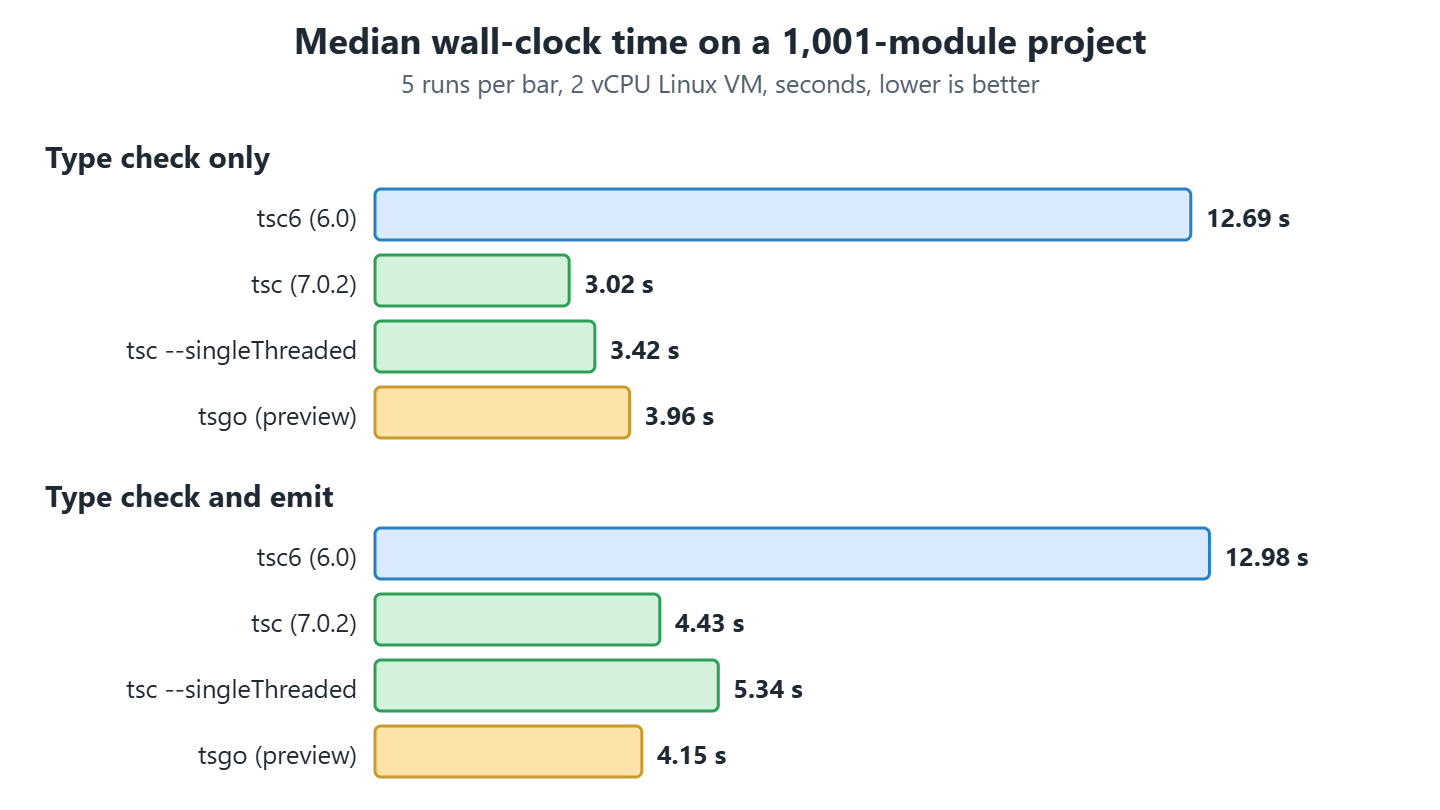
Turning the threads off with –singleThreaded cost 13 percent on the check (3.42 s against 3.02 s) and 0.9 s on the check with emit. So almost all of the speedup on this machine comes from the native code, and the threads add a little on top of it. Two cores give the checker only two pieces of work to run at once, which is also why our numbers sit below the published ones.
The two native builds land in the same range, and the emit rows look odd at first, because tsgo at 4.15 s beats tsc at 4.43 s while losing on the check. Their ranges overlap almost completely (3.48 s to 4.56 s against 3.21 s to 4.65 s), so five runs on a shared virtual machine can’t separate them. The gap between check and emit is real, though. Emit costs TypeScript 6.0 about 0.3 s and TypeScript 7.0.2 about 1.4 s, because the stage that writes the files gained nothing like the speedup the checker did.
The compiler reports where the time goes with –extendedDiagnostics. One run of each compiler printed these lines, and the memory figures are in KiB, so TypeScript 7 used about 219 MiB against 316 MiB for TypeScript 6, a drop of 31 percent.
tsc6   Files: 1175   Memory used: 323488K   Check time: 5.82s   Total time: 10.07s
tsc    Files: 1175   Memory used: 223973K   Check time:  1.14s  Total time:  2.64s
tsgo   Files: 1175   Memory used: 224060K   Check time:  1.03s  Total time:  2.51s
A faster check is only useful while the compiler writes the same files, so we emitted the project three times, once per compiler, each into its own folder.
npx tsc6 -p tsconfig.json --outDir dist-ts6    # TypeScript 6.0
npx tsc  -p tsconfig.json --outDir dist-ts7    # TypeScript 7.0.2
npx tsgo -p tsconfig.json --outDir dist-tsgo   # preview build

diff -rq dist-ts6 dist-ts7     # no output, the folders are identical
diff -rq dist-ts7 dist-tsgo    # no output, the folders are identical
Each folder holds 2,002 files, one .js and one .d.ts for each of the 1,001 source files, and the three folders are byte-identical. Note that this project emits plain ES2022, so the result says nothing about a configuration with JSX, decorators or downlevel output. Declaration emit for .js input files is documented as different by design.
4. Migrating From TypeScript 6 to TypeScript 7
The byte-identical output of the last section is what makes the migration a configuration job rather than a code job. TypeScript 6.0 deprecated every option that TypeScript 7 removes, so a project that compiles under 6.0 without ignoreDeprecations compiles the same under 7.0, according to the announcement.
The example project has a folder named legacy for this walkthrough. It holds two source files and four configurations, one per step, and we move from the first to the last by running the compiler and reading what it says.
Each step has a command and a result, and the step is done when the result column is true for our own project. The first two steps run on TypeScript 6, so every problem shows up while we can still fall back to the working version.
| Step | Command | What you have afterwards |
|---|---|---|
| 4.1. Run TypeScript 6 first | npx tsc6 -p tsconfig.json –noEmit | The list of deprecated options TypeScript 6.0 still accepts, each with the replacement it names. |
| 4.2. Run TypeScript 7 and read the errors | npx tsc -p tsconfig.json –noEmit | The same options as hard errors, confirming which ones TypeScript 7 refuses outright. |
| 4.3. Remove the options and read the new errors | Edit tsconfig.json, then npx tsc -p tsconfig.step2.json –noEmit | Two new errors, TS2307 and TS2591, caused by the removed baseUrl and the new empty types default. |
| 4.4. Set types and rootDir | npx tsc -p tsconfig.migrated.json | A clean type check and a working dist/main.js that runs on Node.js. |
| 4.5. Run both versions in one project | npm install, then npx tsc –version and npx tsc6 –version | An npm alias layout where tsc stays on version 7 even after a tool that needs version 6 is installed. |
| 4.6. Files on the command line | npx tsc –noEmit –strict –ignoreConfig bad.ts | A single file checked on the command line without TS5112, for the case where naming a file bypasses tsconfig.json on purpose. |
A project with none of the four removed options in its tsconfig.json can skip to section 4.5, since steps 4.1 to 4.4 have nothing to find.
// src/lib/recipe.ts
export interface Recipe {
  title: string;
  minutes: number;
}

export function describe(recipe: Recipe): string {
  return recipe.title + ' takes ' + recipe.minutes + ' minutes';
}
// src/main.ts, before the migration
import { describe } from 'lib/recipe';
const text: string = describe({ title: 'pancakes', minutes: 20 });
console.log(text);
console.log(process.argv.length);That import has no ./ in front of it, so it only resolves because baseUrl points at ./src. TypeScript 7 removes baseUrl, so this one line is the source of one of the errors in section 4.3.
4.1. Run TypeScript 6 First
We start on TypeScript 6, because it names every problem before version 7 refuses to run at all. The starting configuration is legacy/tsconfig.json. It targets ES5, resolves modules with node10, sets baseUrl and turns esModuleInterop off.
{
  "compilerOptions": {
    "target": "es5",
    "module": "commonjs",
    "moduleResolution": "node10",
    "baseUrl": "./src",
    "esModuleInterop": false,
    "outDir": "./dist"
  },
  "include": ["./src"]
}
$ npx tsc6 -p tsconfig.json --noEmit
tsconfig.json(3,15): error TS5107: Option 'target=ES5' is deprecated and will stop functioning in TypeScript 7.0. Specify compilerOption '"ignoreDeprecations": "6.0"' to silence this error.
tsconfig.json(5,25): error TS5107: Option 'moduleResolution=node10' is deprecated and will stop functioning in TypeScript 7.0. Specify compilerOption '"ignoreDeprecations": "6.0"' to silence this error.
tsconfig.json(6,5): error TS5101: Option 'baseUrl' is deprecated and will stop functioning in TypeScript 7.0. Specify compilerOption '"ignoreDeprecations": "6.0"' to silence this error.
tsconfig.json(7,24): error TS5107: Option 'esModuleInterop=false' is deprecated and will stop functioning in TypeScript 7.0. Specify compilerOption '"ignoreDeprecations": "6.0"' to silence this error.4.2. Run TypeScript 7 and Read the Errors
Those four errors have an escape hatch on version 6, since setting ignoreDeprecations to “6.0” silences them. Version 7 has none. It doesn’t accept the options at all, and for baseUrl it prints the replacement on a second line.
$ npx tsc -p tsconfig.json --noEmit
tsconfig.json(3,15): error TS5108: Option 'target=ES5' has been removed. Please remove it from your configuration.
tsconfig.json(5,25): error TS5108: Option 'moduleResolution=node10' has been removed. Please remove it from your configuration.
tsconfig.json(6,5): error TS5102: Option 'baseUrl' has been removed. Please remove it from your configuration.
  Use '"paths": {"*": ["./src/*"]}' instead.
tsconfig.json(7,24): error TS5108: Option 'esModuleInterop=false' has been removed. Please remove it from your configuration.
The preview tsgo printed the same TS5108 and TS5102 errors for this configuration. Each removed option either has a replacement or is dropped.
| Removed option | Replacement |
|---|---|
| target=ES5 | A newer target. The default is the stable ECMAScript version before esnext. |
| downlevelIteration | Remove it. |
| moduleResolution=node10, node or classic | nodenext or bundler. |
| module=amd, umd, systemjs or none | esnext or preserve. |
| baseUrl | Relative targets in paths, as the snippet in section 4.4 shows. |
| esModuleInterop=false, allowSyntheticDefaultImports=false or alwaysStrict=false | Remove them. The values are always true. |
| asserts in imports | with, as in import data from “./data.json” with { type: “json” }. |
Either value works for moduleResolution, and what settles it is who resolves the imports at run time. We pick bundler when Vite, webpack, esbuild or another bundler loads the code, because a bundler allows an import without a file extension. We pick nodenext when Node.js runs the output, because Node.js needs the .js extension in the import and separates ES modules from CommonJS by file extension and by the type field in package.json.
4.3. Remove the Options and Read the New Errors
Our output runs on Node.js, so we delete the four options and set module to nodenext. That configuration is legacy/tsconfig.step2.json. The compiler stops complaining about removed options and reports two new errors instead, one caused by a removed option and one by a changed default.
{
  "compilerOptions": {
    "module": "nodenext",
    "outDir": "./dist"
  },
  "include": ["./src"]
}
$ npx tsc -p tsconfig.step2.json --noEmit
src/main.ts(1,26): error TS2307: Cannot find module 'lib/recipe' or its corresponding type declarations.
src/main.ts(5,13): error TS2591: Cannot find name 'process'. Do you need to install type definitions for node? Try `npm i --save-dev @types/node` and then add 'node' to the types field in your tsconfig.The TS2307 comes from the removed baseUrl, which was the only reason the bare lib/recipe import resolved. The TS2591 comes from the new default of types, an empty list, so the compiler loads no @types package unless we name it. TypeScript 6.0 reports both errors for the same configuration, so we can fix them while still on version 6.
| Option | TypeScript 5.9 | TypeScript 6.0 and 7.0 |
|---|---|---|
| strict | false | true |
| module | commonjs | esnext |
| target | es5 | Stable ECMAScript version before esnext, which is es2025 in 6.0 and in 7.0.2 |
| types | All @types packages | An empty list, so each package must be listed |
| rootDir | Common folder of the input files | The folder of tsconfig.json |
| noUncheckedSideEffectImports | false | true |
| libReplacement | true | false |
Note that a project coming straight from 5.9 meets the whole middle column at once. The strict row is the one that produces real work, because strictNullChecks comes with it and every value that can be null or undefined has to say so in its type. So a 5.9 project sets strict to false in the first run on 6.0, fixes the rest, then turns it on and works through what it finds.
4.4. Set types and rootDir
Both errors go away in one edit, saved as legacy/tsconfig.migrated.json. We name node in types, set rootDir to ./src so the output lands in dist/main.js and not in dist/src/main.js, and change the import in main.ts to ‘./lib/recipe.js’, which is relative and carries the extension that nodenext wants.
{
  "compilerOptions": {
    "module": "nodenext",
    "rootDir": "./src",
    "outDir": "./dist",
    "types": ["node"]
  },
  "include": ["./src"]
}
$ npx tsc -p tsconfig.migrated.json
$ node dist/main.js
pancakes takes 20 minutes
2The first output line is the string that describe() builds, and the second is process.argv.length, which is 2 because Node.js passes its own path and the script path and nothing else. If you have hundreds of bare imports, rewriting them all is a bigger change than the migration itself, and for that case we keep the old import style and map it in paths instead, saved as legacy/tsconfig.step3.json.
{
  "compilerOptions": {
    "module": "nodenext",
    "rootDir": "./src",
    "outDir": "./dist",
    "types": ["node"],
    "paths": { "lib/*": ["./src/lib/*"] }
  },
  "include": ["./src"]
}
With that mapping the import line reads import { describe } from ‘lib/recipe.js’;, still without the leading ./ but now with the extension, and the type check passes. Running the output is a different matter.
$ npx tsc -p tsconfig.step3.json
$ node dist/main.js
Error: Cannot find module 'lib/recipe.js'
Require stack:
- /legacy/dist/main.js
    at Function._resolveFilename (node:internal/modules/cjs/loader:1383:15)
  code: 'MODULE_NOT_FOUND'
So paths teaches the type checker where the module is and nothing else. Node.js never reads tsconfig.json, so a bundler, a loader or a package.json imports map has to resolve the same alias at run time. The relative import in tsconfig.migrated.json needs none of that, which is why it is the one we keep.
4.5. Run Both Versions in One Project
A migrated configuration is only half the job when a tool in the build still needs the old compiler. Some tools look for TypeScript 6 under the package name typescript, while tsc should run version 7, and the announcement recommends npm aliases for exactly this. This package.json points typescript at version 6 for the tools and installs version 7 under the invented name @typescript/native.
{
  "devDependencies": {
    "@typescript/native": "npm:typescript@^7.0.2",
    "typescript": "npm:@typescript/typescript6@^6.0.2"
  }
}
This layout is the one that survives the tsc collision from section 2, because @typescript/native is the only package here that ships a command called tsc. The symlinks after npm install show which binary each name reaches.
$ ls -l node_modules/.bin
tsc -> ../@typescript/native/bin/tsc
tsc6 -> ../typescript/bin/tsc6

$ npx tsc --version    # Version 7.0.2
$ npx tsc6 --version   # Version 6.0.3
Note that npx falls back to downloading a package when a command isn’t in node_modules/.bin, so a CI job that wants no surprises calls the binary by its path, as node node_modules/@typescript/native/bin/tsc –noEmit, or puts that line in an npm script. Either way we print the version in the job log, because a lockfile change can move the tsc symlink without touching a line of our code.
4.6. Files on the Command Line
One habit breaks in both new versions, which is checking a single file by naming it. TypeScript 6.0 and 7.0 both stop with error TS5112 when a file name is passed and the folder has a tsconfig.json, because older versions ignored the configuration in that case without saying so. We add –ignoreConfig when skipping it is what we meant.
// bad.ts
const count: number = 'two';
$ npx tsc --noEmit --strict bad.ts
error TS5112: tsconfig.json is present but will not be loaded if files are specified on commandline. Use '--ignoreConfig' to skip this error.
$ npx tsc --noEmit --strict --ignoreConfig bad.ts
bad.ts(1,7): error TS2322: Type 'string' is not assignable to type 'number'.The second command reaches the type error we were after. Running the same two lines with tsc6 gives the same two outputs, so this isn’t a change to plan for when upgrading from 6.0 to 7.0.
5. What TypeScript 7 Supports and What It Does Not
Nothing in section 4 needed a tool other than the compiler, and that is the line the 7.0 release draws. The command line compiler and the editor support are in, and the API that other tools build on is not. This table gives the status of each area on 2026-10-17, and the rows marked preview or unreleased are builds that are not stable releases.
| Area | Status | Details |
|---|---|---|
| tsc command, tsconfig.json, –build, project references, –incremental | Supported | Project references are the references field that splits one repository into several compiled projects. |
| Type checking | Supported | Same logic as TypeScript 6.0, with one difference noted below the table. |
| –watch | Supported | The watcher is a Go port of the one from the Parcel bundler, so it is notified by the operating system instead of polling for changes. |
| Declaration emit | Supported with changes | Identical for our TypeScript project. Output for .js input differs from 6.0 by design. |
| JavaScript and JSDoc checking | Supported with changes | Closure types, @enum, @class and constructor functions are no longer special. See CHANGES.md. |
| Editors using LSP | Supported | VS Code, Visual Studio and other LSP editors such as WebStorm. The VS Code steps are below the table. |
| Programmatic API, such as createProgram | Not in 7.0 | Planned for TypeScript 7.1, which is unreleased. |
| typescript-eslint | Not supported | Its peer range stops below 7. Run it on TypeScript 6. |
| ts-loader for webpack | Not supported | A draft pull request needs a TypeScript 7.1 nightly build. It is not merged. |
| Vue, MDX, Astro, Svelte and Angular template checks in the editor | Not supported | The announcement says these will probably need TypeScript 6.0 for editor support. |
| target=ES5, amd, umd, systemjs, baseUrl and node10 | Removed | Hard errors, see section 4. |
| tsgo from @typescript/native-preview | Preview | Last build 7.0.0-dev.20260707.2, and the package says it will be replaced by the official one. |
The type checking row hides one change worth knowing. When two .d.ts files declare the same name with different types, TypeScript 7 reports the clash in every file that uses the name, and skipLibCheck doesn’t hide it, even though that option exists to skip type checking inside declaration files. A build that was quiet on 6.0 can therefore print a page of errors on 7.0 without a line of our code having changed.
5.1. Turning On TypeScript 7 in VS Code
Installing typescript@7.0.2 changes what CI runs and leaves the editor alone, because VS Code starts its own language service. The one that ships with VS Code is the TypeScript 6 service, and the native one comes from the marketplace extension TypeScriptTeam.native-preview. The extension keeps the preview name even though the npm package of that name stopped publishing, and Microsoft still labels the feature experimental.
{
  "js/ts.experimental.useTsgo": true,
  "js/ts.tsdk.path": "./node_modules/@typescript/native"
}
We add the first setting to .vscode/settings.json after installing the extension, or run the command TypeScript: Enable TypeScript 7 from the command palette, which writes the same line. The second setting is optional and points the extension at a compiler in our own node_modules rather than the copy bundled with the extension, which is how we keep the editor and CI on the same version.
5.2. Tools That Load the Compiler as a Library
Two kinds of tool run TypeScript. One kind shells out to the tsc command and doesn’t care which version answers. The other kind imports the typescript package and calls its functions, and that kind needs the API that 7.0 doesn’t have. The quickest way to tell which one we are holding is the typescript entry in the tool’s own peerDependencies, the list of packages a tool expects us to install alongside it, with the version range it accepts.
npm info typescript-eslint peerDependencies # typescript: '>=4.8.4 <6.1.0'These are the ranges that the current release of each tool declared on 2026-10-17. A range that stops below 7 is a refusal we can read before we try, and a wide range is not a promise, because every tool in this table loads the compiler as a library.
| Tool | Version | Declared typescript range | What it means for us |
|---|---|---|---|
| typescript-eslint | 8.71.2 | >=4.8.4 <6.1.0 | Refuses 7. Keep TypeScript 6 for linting. |
| ts-jest | 29.4.15 | >=4.3 <7 | Refuses 7. Keep TypeScript 6 for the test transform. |
| typedoc | 0.28.20 | 5.0.x to 6.0.x | Refuses 7. Keep TypeScript 6 for the docs build. |
| ts-node | 10.9.2 | >=2.7 | Installs next to 7, then fails at run time on the missing API. |
| vue-tsc | 3.3.13 | >=5.0.0 | Installs next to 7, and the announcement expects Vue to need 6 for a while. |
| ts-loader | 9.6.2 | * | Accepts anything, and its TypeScript 7 pull request is still a draft. |
| @microsoft/api-extractor | 7.59.4 | None | Bundles typescript 5.9.3 as a dependency, so it ignores ours either way. |
The missing API is one line to confirm in our own project. The example project runs npm run api-check, which imports both packages and prints what each one exports.
TypeScript 7 exports: version, versionMajorMinor
TypeScript 7 createProgram: undefined
TypeScript 6 createProgram: function
TypeScript 7 exports two names where TypeScript 6 exports several hundred. A tool that calls createProgram on it gets undefined and crashes somewhere inside its own code, with no message about the compiler version. So the maintainers put the limit in their peer range instead, where npm reports it at install time.
6. When to Switch to TypeScript 7
Everything in the last section points the same way, which is that the decision turns on what loads the compiler in our build rather than on how our code is written. A project that only runs tsc switches today. A project with tools that import the compiler keeps TypeScript 6 for those tools. Size still matters, since a large codebase saves the most minutes, and that is a reason to migrate it early rather than a reason it can migrate at all.
| Situation | Recommendation |
|---|---|
| CI runs tsc --noEmit and nothing else uses typescript | Switch to typescript@7.0.2. Compare the error list with TypeScript 6 on the first run. |
| tsconfig.json uses target=ES5, node10, baseUrl or amd | Remove the options on TypeScript 6 first, then switch. |
| The build uses typescript-eslint, ts-loader or another tool that imports typescript | Keep typescript on TypeScript 6 for the tool and run tsc 7 as a second check. |
| The editor is for Vue, Svelte, Astro or Angular templates | Keep TypeScript 6 in the editor, and use TypeScript 7 for the command line check. |
| A large monorepo with long CI times | The gain is largest here, so this is the project to migrate first once its tools allow it. |
| A library that publishes .d.ts files | Switch, and compare the .d.ts output of both versions before the release. |
| The tool is tsgo from @typescript/native-preview | Use typescript@7.0.2 for anything stable. The preview package has no new builds after 2026-07-07. |
7. TypeScript 7 FAQs
Is tsgo the Same Thing as TypeScript 7?
Not anymore. The command tsgo belongs to the preview package @typescript/native-preview, which published nightly builds of the native compiler before the release. Since TypeScript 7.0 the package typescript ships the same compiler under the command tsc, so a new project has no reason to install the preview.
Can We Run TypeScript 6 and TypeScript 7 in the Same Repo?
Yes. The package @typescript/typescript6 carries the TypeScript 6 compiler and its API under the command tsc6, so our tools keep version 6 while tsc runs version 7. The one thing to get right is which package owns the name tsc, and section 4.5 gives the layout that works.
Is TypeScript 7 Backwards Compatible With Our Code?
Yes for TypeScript code that passes TypeScript 6.0 without ignoreDeprecations, according to the announcement. The language and the type rules are the same. What changes around them is the removed options, the new defaults in section 4.3, the conflicting declarations that skipLibCheck no longer hides, and the reworked checking of plain JavaScript and JSDoc.
Does TypeScript 7 Change the Emitted JavaScript?
Not in our test. TypeScript 6.0, TypeScript 7.0.2 and tsgo wrote byte-identical output for the 1,000-module project with target set to es2022. One result on one configuration proves little, so a library compares its own .d.ts and .js output across both versions before a release.
When Does the Programmatic API Arrive?
The announcement expects it in TypeScript 7.1, and the team plans a release every 3 to 4 months. TypeScript 7.1 is unreleased on 2026-10-17, and its nightly builds on the next tag are the only way to try it today.
Is the 10x Speedup Real?
On large projects and a machine with many cores, yes. The published full builds range from 7.7x to 11.9x, and our generated project on 2 cores gave less than half of that, as section 3 shows. So the honest answer is that the speedup depends on the project and on the hardware, and the only number worth planning around is the one from our own repository.
8. Conclusion
TypeScript 7 is a stable release, and the tsc in it is the Go compiler. A project that runs only tsc in CI can switch as soon as it removes the options that TypeScript 6.0 deprecated, and the emitted files were identical in our comparison.
Tools are the part that holds teams back. typescript-eslint, ts-jest, typedoc and ts-loader all load the compiler as a library, so they stay on TypeScript 6 until the API lands in TypeScript 7.1. A new project has no reason to install the tsgo preview build.
A good first step costs one CI job. Add typescript@7.0.2 under an npm alias, run tsc --noEmit with it next to the existing check, and compare the two error lists for a week before anything depends on the new one.
9. References
- Announcing TypeScript 7.0
- Announcing TypeScript 7.0 RC
- Announcing TypeScript 6.0
- microsoft/typescript-go repository
- typescript-go CHANGES.md
- typescript on npm
- @typescript/native-preview on npm
- @typescript/typescript6 on npm
- TypeScript Native Preview extension for VS Code
- typescript-eslint issue 12518, TypeScript 7 support
- ts-loader pull request 1704, TypeScript 7.1 API
- TSConfig reference
- Language Server Protocol
Drop me your questions related to TypeScript 7 and the native compiler in the comments.
Happy Learning !!
