
The TypeScript satisfies operator checks that a value matches a type, without changing the type that TypeScript works out for the value. We write value satisfies Type. When the value does not fit, the compiler reports an error. When it fits, the variable keeps its exact type, e.g. “dark” instead of “dark” | “light”.
We use satisfies mostly on constant objects, such as app settings or a lookup table with fixed keys. The compiler catches a typo or a missing key, and we still get exact types when we read the values.
The following example uses TypeScript 7.0.2 and Node.js 22 and checks an editor settings object against a Settings type. The runnable project is in the satisfies-operator folder of our GitHub repo, with a script that prints the compiler errors.
type Theme = "dark" | "light";
type Settings = { theme: Theme; fontSize: number; fontFamily?: string };

const settings = {
  theme: "dark",
  fontSize: 14,
} satisfies Settings;

const theme = settings.theme;            // type "dark", value "dark"
const bigger = settings.fontSize + 2;    // 16
Notice that settings.theme has the type “dark”, not Theme. The check did not make any property type wider.
Next, we compare satisfies with a type annotation and an as assertion. After that, we cover where satisfies helps most and the tsc errors of common mistakes.
1. How the TypeScript satisfies Operator Checks a Value
The satisfies operator was added in TypeScript 4.9 (November 2022), so a project on 4.8 or older has to upgrade first. We put it after a value, and the compiler runs two checks.
- The value must fit the target type. A missing property or a value of the wrong type is a compile error.
- An object literal must not have extra properties that the target type does not declare. This rule is called the excess property check, which also runs for a type annotation.
When both checks pass, the value keeps the type that TypeScript inferred for it. The target type is only a hint. So the string “dark” keeps its literal type, which allows only the value “dark”, even when the target property is “dark” | “light”.
The satisfies operator exists only at compile time, so it never changes what our code does at runtime. The compiler removes it from the JavaScript output, as we can see in section 5.1.
2. satisfies vs as vs a Type Annotation
A type annotation sets the type of the variable, so the variable gets that wider type. An as assertion tells the compiler which type to use, and the compiler checks only that one type is a narrower or wider version of the other. The satisfies operator checks the value and does not touch the variable type.
The following example writes the same Settings value in all three ways and reads the theme property back.
const annotated: Settings = { theme: "dark", fontSize: 14 };
const asserted = { theme: "dark", fontSize: 14 } as Settings;
const checked = { theme: "dark", fontSize: 14 } satisfies Settings;

const t1 = annotated.theme;   // type Theme
const t2 = asserted.theme;    // type Theme
const t3 = checked.theme;     // type "dark"
An annotation and satisfies report the same errors (the table shows the tsc codes in strict mode). The real difference is the type that the variable ends up with.
| Type annotation | as assertion | satisfies | |
|---|---|---|---|
| Checks the value against the type | Yes | Only that the types overlap | Yes |
| Missing property | Error TS2741 | No error | Error TS2741 |
| Extra property in an object literal | Error TS2353 | No error | Error TS2353 |
| Type of the variable | Settings | Settings | The inferred type, e.g. { theme: “dark”; fontSize: number } |
| Literal values kept | No | No | Yes |
| Optional property that we set | string or undefined | string or undefined | string |
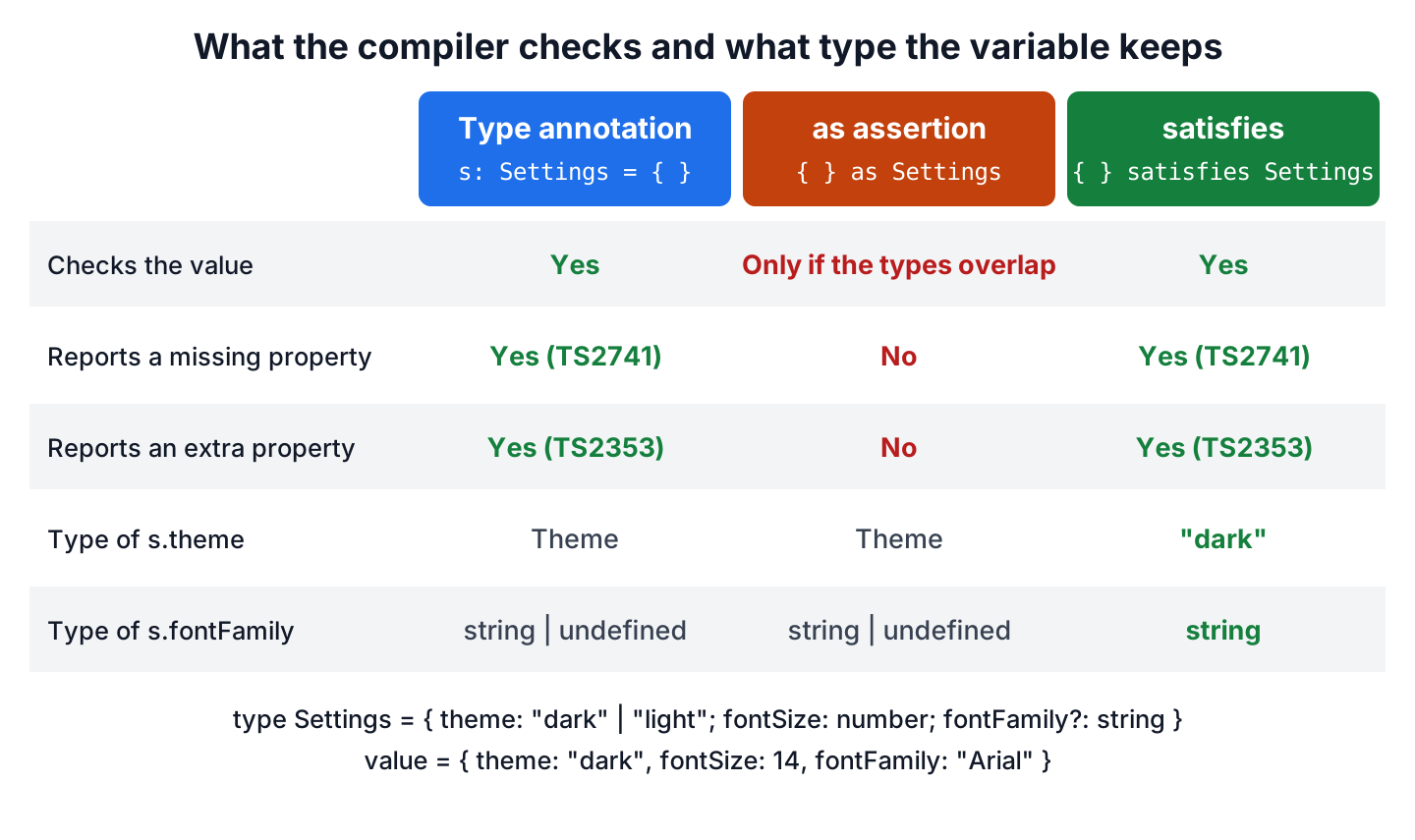
The as column is the risky one, because an assertion accepts a missing property and the mistake shows up only at runtime.
const broken = { theme: "dark" } as Settings;      // compiles
const size = broken.fontSize + 2;                  // NaN at runtime

const a3 = { theme: "dark" } satisfies Settings;   // error TS2741: Property 'fontSize' is missing
3. Where satisfies Helps Most
The satisfies operator helps most with values that we define once and read in many places. An annotation would make their types wider, so the reading code loses details.
3.1. Settings Objects With Optional and Literal Properties
A note-taking app keeps its editor settings in one constant object, and fontFamily is optional in the Settings type. With an annotation, fontFamily keeps the type string | undefined even though we set it, so every read needs a check for undefined. With satisfies, the property is a plain string.
const annotated: Settings = { theme: "light", fontSize: 14, fontFamily: "Arial" };
const len1 = annotated.fontFamily?.length ?? 0;      // 5, needs ?. and ??

const settings = {
  theme: "light",
  fontSize: 14,
  fontFamily: "Arial",
} satisfies Settings;

const len2 = settings.fontFamily.length;             // 5
Without ?. and ??, the annotated version fails with error TS18048: ‘annotated.fontFamily’ is possibly ‘undefined’.
3.2. Checking Record Keys While Keeping Narrow Values
A TypeScript Record type such as Record<Fruit, number | string> lists the allowed keys and gives all of them one value type. When we use it with satisfies, the compiler checks every key against Fruit. Each property still keeps its own type from the union.
type Fruit = "apple" | "banana";

const stock = {
  apple: 5,
  banana: "sold out",
} satisfies Record<Fruit, number | string>;

const apples = stock.apple.toFixed(1);          // "5.0"
const banana = stock.banana.toUpperCase();      // "SOLD OUT"
With the annotation Record<Fruit, number | string>, every value has the full union type, so annotatedStock.apple.toFixed(1) fails with error TS2339: Property ‘toFixed’ does not exist on type ‘string | number’.
The same idea catches typos in keys when we use Record<string, number>. As an annotation, that type accepts any string key, so a typo compiles and returns undefined. As a satisfies target, it checks only the values. The object keeps its real keys, so a typo is an error, and keyof typeof checked gives those keys as a type.
const loose: Record<string, number> = { apple: 5, banana: 3 };
const typo1 = loose.appel;                  // no error, undefined

const checked = { apple: 5, banana: 3 } satisfies Record<string, number>;
const typo2 = checked.appel;                // error TS2551: ... Did you mean 'apple'?

type PricedFruit = keyof typeof checked;    // "apple" | "banana"
3.3. Readonly Literal Values With as const satisfies
The as const assertion makes every property readonly and keeps each value as its exact literal, such as 12 instead of number. When we add satisfies after it, the compiler also checks the values against a type. The as const part must come first, as section 4.2 shows.
const fontSizes = {
  small: 12,
  medium: 14,
  large: 18,
} as const satisfies Record<string, number>;

type FontSize = (typeof fontSizes)[keyof typeof fontSizes];   // 12 | 14 | 18
const medium: FontSize = fontSizes.medium;                    // 14
We can see the readonly part when we try to change a value. The assignment fontSizes.small = 13 fails with error TS2540: Cannot assign to ‘small’ because it is a read-only property.
4. Mistakes With satisfies and the tsc Errors They Cause
For most satisfies mistakes, tsc reports the line and column of the bad property. The let mistake in section 4.3 compiles without any error, so it is the hardest one to spot.
4.1. Missing Keys, Extra Keys and Wrong Value Types
A Record with a fixed set of keys, such as Record<Fruit, number>, needs every key from Fruit and rejects any other key. It also checks each value type, so one typo gives one of these three errors.
const missing = { apple: 5 } satisfies Record<Fruit, number>;
const extra = { apple: 5, banana: 3, mango: 7 } satisfies Record<Fruit, number>;
const wrongValue = { apple: 5, banana: "3" } satisfies Record<Fruit, number>;
errors/compile-errors.ts(7,30): error TS2741: Property 'banana' is missing in type '{ apple: number; }' but required in type 'Record<Fruit, number>'.
errors/compile-errors.ts(8,38): error TS2353: Object literal may only specify known properties, and 'mango' does not exist in type 'Record<Fruit, number>'.
errors/compile-errors.ts(9,32): error TS2322: Type 'string' is not assignable to type 'number'.Each message tells us the fix, for example adding the banana key or changing “3” to the number 3.
4.2. Writing as const After satisfies
The as const assertion works only on a literal, such as an object or a string, or on an enum member. The expression x satisfies T is neither, so putting as const after satisfies is a compile error. The fix is the order from section 3.3, as const satisfies.
const sizes = { small: 12 } satisfies Record<string, number> as const;errors/compile-errors.ts(31,29): error TS1355: A 'const' assertion can only be applied to references to enum members, or string, number, boolean, array, or object literals.4.3. Using satisfies on a let Variable
The satisfies check runs only once, on the first value. A let variable gets the wider type string instead of “dark”, so a later assignment of an invalid theme compiles without any error.
let theme = "dark" satisfies Theme;
theme = "blue";                                     // no error, theme is string
For a variable that we reassign, we use a type annotation, because the annotation checks every assignment.
let theme: Theme = "dark";
theme = "light";                                     // OK, "blue" is a compile error
4.4. Checking Against a Wide Type Such as string
The target type decides whether a value keeps its literal type. When the target property is string, the type of “dark” becomes string too. Assigning it to a “dark” variable fails with error TS2322: Type ‘string’ is not assignable to type ‘”dark”‘. Writing as const before satisfies keeps the literal type, and the check still runs.
const wideCheck = { theme: "dark" } as const satisfies { theme: string };
const onlyDark: "dark" = wideCheck.theme;                      // "dark"
5. TypeScript satisfies FAQs
Two more questions come up often, namely what satisfies leaves in the JavaScript output and when as is still the right choice.
5.1. Does satisfies Change the Compiled JavaScript?
No. The compiler removes satisfies and the type after it, so for the intro example tsc outputs only the object.
const settings = {
    theme: "dark",
    fontSize: 14,
};
5.2. Should We Use satisfies or as?
We use satisfies for values we create in our own code, because it reports missing and extra properties. A type assertion is only for a type the compiler cannot work out, for example when a library returns a wider type than the value holds. Neither of them checks data at runtime. So we put the any result of JSON.parse() in an unknown variable and check it before use.
6. Conclusion
The satisfies operator gives us the same checks as a type annotation, and the value keeps its own inferred type. So the rest of the code sees the literal values and the real keys of a Record.
For fixed tables we write as const satisfies, with as const first. A type annotation is still the better choice for let variables and function signatures, and for exported values that callers read through an interface. We keep the as assertion for types the compiler cannot know.
7. References
- TypeScript 4.9 release notes, The satisfies Operator
- TypeScript Handbook, Type Assertions
- TypeScript Handbook, Excess Property Checks
Happy Learning !!
