
Spring Boot microservices are small Spring Boot applications that each own one business capability and its data, and call each other over the network, mostly over HTTP or through a message broker. Each service has its own database and its own release cycle, so one team can change and deploy its service without waiting for the others.
Teams move to microservices when parts of a system need to scale or ship on different schedules, for example a checkout that gets ten times more traffic than the product catalog. The price is network calls that can fail and harder debugging, so most of the work in a microservices system goes into the code between the services.
The following example is the core of every Spring Boot microservices system, one service calling another. A loan service declares a Spring HTTP interface for the book service, and Spring generates the client at startup.
@HttpExchange("/books")
public interface BookClient {

  @GetExchange("/{id}")
  Book getBook(@PathVariable String id);         // GET http://book-service:8081/books/{id}
}

Book book = bookClient.getBook("1");             // Book[id=1, title=Dune, copies=2]
Book none = bookClient.getBook("9");             // throws HttpClientErrorException.NotFound (404)
Notice that the interface contains no host name and no HTTP code. The base URL comes from configuration, so the same client works on a laptop, in Docker Compose and in Kubernetes.
In this tutorial, we build a small library system with two business services, an API gateway, resilient service-to-service calls, distributed tracing, Docker Compose and tests. We also look at when microservices are the wrong choice.
1. What Are Microservices in Spring Boot?
A monolith is one deployable application that contains every feature, such as the catalog and the loans of a library. Microservices split those features into separate applications that run in their own processes and talk over the network.
Spring Boot fits this style because each service is a self-contained JAR with an embedded server, health checks and metrics. Spring Cloud adds the parts that only exist between services, such as API gateways and central configuration. The biggest change in daily work is that a call between features becomes a network call that can fail.
| Concern | Monolith | Microservices |
|---|---|---|
| Deployment | One artifact, one release | One artifact per service, independent releases |
| A call between features | Method call, nanoseconds, never “down” | HTTP call, milliseconds, can time out or fail |
| Data | One database, one transaction | One database per service, no shared transaction |
| Scaling | Scale the whole app | Scale only the busy service |
| Debugging | One log file, one stack trace | Logs in many containers, joined by a trace id |
| Local setup | Run one app | Run several apps plus infrastructure (Docker Compose) |
Older tutorials pair every system with the full Netflix-era stack of Spring Cloud components. Today we need fewer of them, because Docker and Kubernetes already provide service discovery through DNS and configuration through environment variables.
1.1. When Not to Use Microservices
Microservices solve organizational and scaling problems, and they create technical ones from day one. A team of four developers that builds a new product rarely has the first kind of problem, which is why Martin Fowler recommends a monolith first.
We stay with a well-structured monolith (one Spring Boot application with clear module boundaries) in these cases.
- The team is small, and everybody works on all of the code anyway.
- The domain is new, so the boundaries will move. Moving code between packages is cheap, whereas moving it between services means new APIs and data migration.
- Features need one transaction, such as “reserve the book and create the loan”. Across services, this becomes a saga with compensating actions.
- Nobody owns operations, although every service needs its own build, deployment, monitoring and alerts.
- The app has no part that needs to scale or ship separately from the rest.
Split a service out when a real pressure demands it, such as a team that is blocked by another team’s releases or one feature that needs ten times the instances of the rest. Our example is small on purpose, so we can see every moving part; in a real project, two services of this size would be one application.
2. Spring Boot Microservices Example
The following example is a library system with two business services and a gateway. The book-service owns the catalog and answers GET /books/{id}. The loan-service creates loans with POST /loans, and before it creates one, it asks book-service whether the book exists and has copies left. Clients never call the services themselves; they call the gateway on port 8080, which routes /api/books/** and /api/loans/** to the right service.
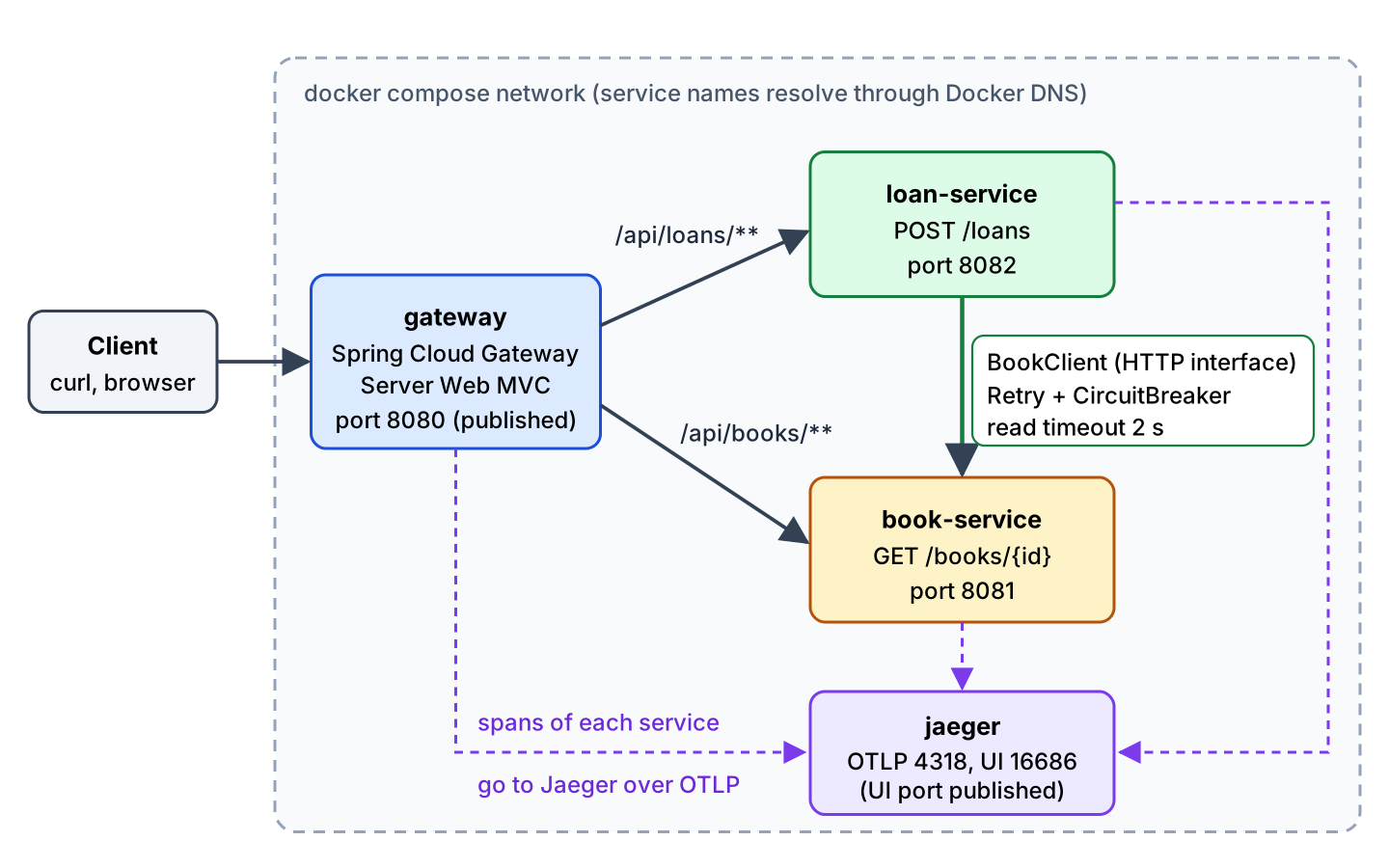
We use Spring Boot 4.1.1 with Java 25 and the Spring Cloud release train 2025.1.3 (“Oakwood”). The 2025.1.x train supports Spring Boot 4.1 from 2025.1.2 on. The services use Resilience4j 2.4.0, Micrometer Tracing 1.7.1 with OpenTelemetry, and WireMock 3.13.2 for tests. The complete multi-module Maven project is on GitHub.
| Module | Port | What it does | Key dependencies |
|---|---|---|---|
| book-service | 8081 | Book catalog, GET /books/{id} | spring-boot-starter-webmvc |
| loan-service | 8082 | Creates loans, calls book-service | spring-boot-starter-restclient, resilience4j-spring-boot4 |
| gateway | 8080 | Single entry point, routes by path | spring-cloud-starter-gateway-server-webmvc |
| jaeger (Docker image) | 16686 | Stores and shows traces | jaegertracing/jaeger:2.21.0 |
All three Spring Boot modules also add spring-boot-starter-actuator and spring-boot-starter-opentelemetry. The parent POM imports two BOMs. The order matters, because Maven uses the first imported BOM that manages an artifact, and the Spring Cloud BOM would otherwise pin Resilience4j to 2.3.0.
<parent>
  <groupId>org.springframework.boot</groupId>
  <artifactId>spring-boot-starter-parent</artifactId>
  <version>4.1.1</version>
</parent>

<dependencyManagement>
  <dependencies>
    <dependency>
      <groupId>io.github.resilience4j</groupId>
      <artifactId>resilience4j-bom</artifactId>
      <version>2.4.0</version>
      <type>pom</type>
      <scope>import</scope>
    </dependency>
    <dependency>
      <groupId>org.springframework.cloud</groupId>
      <artifactId>spring-cloud-dependencies</artifactId>
      <version>2025.1.3</version>
      <type>pom</type>
      <scope>import</scope>
    </dependency>
    <dependency>
      <groupId>io.github.resilience4j</groupId>
      <artifactId>resilience4j-spring-boot4</artifactId>
      <version>2.4.0</version>
    </dependency>
  </dependencies>
</dependencyManagement>
3. Building the Two Business Services
Each business service is an ordinary Spring Boot REST API. What makes it a microservice is the boundary, because book-service is the only code that reads or changes book data, and every other service goes through its API.
3.1. The Book Service
The book-service keeps two books in memory to keep the focus on the communication between services. In a real system, it would have its own database that no other service connects to.
private final Map<String, Book> books = Map.of(
    "1", new Book("1", "Dune", 2),
    "2", new Book("2", "Clean Code", 0));

@GetMapping("/{id}")
public Book byId(@PathVariable String id) {
  Book book = books.get(id);
  if (book == null) {
    log.info("Book {} not found", id);
    throw new ResponseStatusException(HttpStatus.NOT_FOUND, "Book " + id + " not found");
  }
  log.info("Found book {} with {} copies", book.title(), book.copies());
  return book;
}
server:
port: 8081
spring:
application:
name: book-service
mvc:
problemdetails:
enabled: trueThe property spring.application.name is more than a label. Spring Boot prints it in every log line, and the tracing setup in section 7 uses it as the service name in Jaeger.
3.2. Calling Another Service with an HTTP Interface Client
A service-to-service call is a REST call with extra requirements, such as a configurable base URL, timeouts and the propagation of the trace context. Spring offers three common ways to write the client.
| Client | How we write it | Status in 2026 |
|---|---|---|
| RestClient | Fluent calls such as restClient.get().uri(…).retrieve() | Current, part of Spring Framework |
| HTTP interface (@HttpExchange) | Annotated Java interface, Spring generates the class | Current, configured by Spring Boot 4 through HTTP service groups |
| OpenFeign | Annotated Java interface with @FeignClient | Feature-complete, bug fixes only |
We pick the HTTP interface. It reads like OpenFeign, but it is part of Spring Framework 7 and runs on RestClient, so it needs no extra Spring Cloud dependency. For existing OpenFeign code, there is no rush, because the project still gets bug fixes.
We register the BookClient interface from the intro in a group named books. Spring Boot builds one RestClient per group and applies every RestClientCustomizer bean to it, including the observation customizer that adds the tracing header to each call.
@SpringBootApplication
@ImportHttpServices(group = "books", types = BookClient.class)
public class LoanServiceApplication {
  // main method
}
spring:
application:
name: loan-service
http:
serviceclient:
books:
base-url: http://localhost:8081
connect-timeout: 1s
read-timeout: 2sThe HTTP service client properties start with spring.http.serviceclient.<group>. The controller in loan-service uses the client through a small BookCatalog bean, which we decorate with retry and a circuit breaker in section 6.
@PostMapping
@ResponseStatus(HttpStatus.CREATED)
public Loan borrow(@RequestBody LoanRequest request) {
  Book book = bookCatalog.findBook(request.bookId());       // HTTP call to book-service
  if (book.copies() < 1) {
    throw new ResponseStatusException(HttpStatus.CONFLICT, "No copies of " + book.title() + " left");
  }
  Loan loan = new Loan(ids.incrementAndGet(), book.id(), book.title(), request.member());
  loans.put(loan.id(), loan);
  log.info("Created loan {} for {}", loan.id(), loan.member());
  return loan;
}
The loan-service has its own copy of the Book record with only the fields it needs. Sharing a model JAR between services looks tidy, but every change to the book model forces a release of all services that depend on it.
4. Adding an API Gateway
An API gateway is the single entry point in front of the services. Clients call one host, and the gateway forwards each request to a service based on the path, so we can split or move services without changing the clients. The gateway is also the place for cross-cutting concerns such as authentication or rate limiting.
We use Spring Cloud Gateway Server Web MVC, the servlet-based flavor, because our services are servlet apps too. The reactive Server WebFlux flavor suits a gateway that holds many slow connections open at once. Since Spring Cloud Gateway 4.3, the starters are named spring-cloud-starter-gateway-server-webmvc and spring-cloud-starter-gateway-server-webflux, and the project replaced the older Netflix Zuul gateway. The Spring Cloud Gateway tutorial covers filters, rate limiting and CORS in depth, so here we keep the gateway to two routes.
@Bean
RouterFunction<ServerResponse> libraryRoutes(LibraryServices services) {
  return route("books")
      .route(path("/api/books/**"), http())
      .before(logRoute("books"))
      .before(uri(services.bookService()))
      .before(stripPrefix(1))                          // /api/books/1 -> /books/1
      .build()
      .and(route("loans")
          .route(path("/api/loans/**"), http())
          .before(logRoute("loans"))
          .before(uri(services.loanService()))
          .before(stripPrefix(1))                      // /api/loans -> /loans
          .build());
}
The stripPrefix(1) filter removes the first path segment, so /api/books/1 reaches book-service as /books/1. The logRoute() filter is our own one-line function that logs the route id and the path. The backend URLs come from a constructor-bound @ConfigurationProperties record instead of hard-coded strings, and @ConfigurationPropertiesScan on GatewayApplication registers the record as a bean.
@ConfigurationProperties("library")
public record LibraryServices(URI bookService, URI loanService) {
}

// application.yaml:  library.book-service: http://localhost:8081
//                    library.loan-service: http://localhost:8082
With everything running (see section 8), a client talks only to port 8080.
$ curl -i localhost:8080/api/books/1
HTTP/1.1 200
Content-Type: application/json
Content-Length: 36

{"id":"1","title":"Dune","copies":2}

$ curl -i -X POST localhost:8080/api/loans -H 'Content-Type: application/json' -d '{"bookId":"1","member":"Lokesh"}'
HTTP/1.1 201
Content-Type: application/json
Content-Length: 54

{"id":1,"bookId":"1","title":"Dune","member":"Lokesh"}

$ curl -i -X POST localhost:8080/api/loans -H 'Content-Type: application/json' -d '{"bookId":"2","member":"Lokesh"}'
HTTP/1.1 409
Content-Type: application/problem+json

{"detail":"No copies of Clean Code left","instance":"/loans","status":409,"title":"Conflict"}
When a route target cannot be reached at all, for example because loan-service is still starting, the Web MVC gateway answers with a plain 500 Internal Server Error. Add a circuit breaker filter with a fallback in the gateway if clients need a clearer status.
5. Configuration and Service Discovery
Every service needs environment-specific settings, such as the URL of another service, and it needs to find the other services on the network. Both problems have a Spring Cloud solution and a platform solution, and for most new systems the platform solution is enough.
5.1. Profiles and Environment Variables Instead of a Config Server
We keep the defaults for a laptop in each application.yaml and override them with environment variables in compose.yaml. Spring Boot binds an environment variable to a property when we replace dots with underscores, remove dashes and use uppercase. The same binding works in Kubernetes, where the variables come from a ConfigMap or a Secret.
| Property in application.yaml | Environment variable in compose.yaml | Value in Docker |
|---|---|---|
| spring.http.serviceclient.books.base-url | SPRING_HTTP_SERVICECLIENT_BOOKS_BASEURL | http://book-service:8081 |
| library.book-service | LIBRARY_BOOKSERVICE | http://book-service:8081 |
| library.loan-service | LIBRARY_LOANSERVICE | http://loan-service:8082 |
| management.opentelemetry.tracing.export.otlp.endpoint | MANAGEMENT_OPENTELEMETRY_TRACING_EXPORT_OTLP_ENDPOINT | http://jaeger:4318/v1/traces |
For settings that differ by environment, such as log levels, Spring Boot profiles like application-prod.yaml do the same job. Secrets come from the platform’s secret store, never from the Git repository.
A Spring Cloud Config Server with Git helps when many services share settings or when operations staff change configuration without a redeploy. The Config Server is one more service to run and secure, and every service depends on it at startup, so we add it only when such a need is real.
5.2. Docker DNS, Kubernetes Services or Eureka?
Service discovery finds the current host and port of a service such as book-service. In Docker Compose, every service name is a DNS name inside the Compose network, so loan-service calls http://book-service:8081 and Docker resolves it. Kubernetes does the same with a Service and its DNS name, and it also spreads the calls over all healthy pods.
| Option | Who keeps the list of instances | Extra moving parts | Good fit |
|---|---|---|---|
| Docker Compose DNS | Docker | None | Local development, small single-host setups |
| Kubernetes Service | Kubernetes, based on readiness probes | None in our code | Production on Kubernetes |
| Netflix Eureka or Consul | A registry server; services register and send heartbeats | Registry server, client library in every service, client-side load balancing | VMs or bare metal without platform DNS, or services spread over several platforms |
We don’t use Eureka, because Docker and Kubernetes already keep that list for us. A registry on top of Kubernetes adds a second source of truth that can disagree with the platform, whereas on plain VMs nothing else knows which instances are alive.
When we stop the book-service container, its name disappears from Docker DNS, and loan-service gets java.nio.channels.UnresolvedAddressException instead of “connection refused”, as the logs in section 6.1 show.
6. Retry, Circuit Breaker and Timeouts with Resilience4j
Between services, every call can be slow or fail, and a slow dependency is worse than a dead one, because each waiting request holds a thread. For example, if book-service hangs for 30 seconds and loan-service waits for it, loan-service runs out of threads and stops answering too.
We protect each remote call with three tools, and the order in which they apply matters.
- Timeouts limit how long one call may wait. We set connect-timeout: 1s and read-timeout: 2s on the HTTP service group in section 3.2. The @TimeLimiter annotation of Resilience4j works only on methods that return a CompletionStage or a reactive type, so for a blocking client the read timeout on the client is the right place.
- Retry repeats a failed call a few times, which helps with short glitches such as a restarting instance. We retry only on I/O errors and 5xx responses, never on 4xx, because a missing book stays missing.
- A circuit breaker stops calling a dependency that keeps failing. After enough failures, it opens and rejects calls at once with CallNotPermittedException, so the caller fails in milliseconds instead of waiting for timeouts.
We use Resilience4j, the library that replaced Netflix Hystrix in Spring Cloud. Its resilience4j-spring-boot4 module adds the annotations and needs AOP, so loan-service also adds spring-boot-starter-aspectj. The library also has a rate limiter and a bulkhead.
// Retry wraps CircuitBreaker: every attempt is recorded by the circuit breaker
@Retry(name = "books")
@CircuitBreaker(name = "books")
public Book findBook(String id) {
  log.info("Calling book-service for book {}", id);
  return bookClient.getBook(id);
}
resilience4j:
retry:
instances:
books:
max-attempts: 3
wait-duration: 200ms
retry-exceptions:
- org.springframework.web.client.ResourceAccessException
- org.springframework.web.client.HttpServerErrorException
circuitbreaker:
instances:
books:
sliding-window-type: COUNT_BASED
sliding-window-size: 4
minimum-number-of-calls: 4
failure-rate-threshold: 50
wait-duration-in-open-state: 10s
permitted-number-of-calls-in-half-open-state: 1
ignore-exceptions:
- org.springframework.web.client.HttpClientErrorExceptionThe small window of 4 calls lets the circuit open after a few requests in the demo; in production, a window of 50 to 100 calls keeps a few unlucky requests from opening it. By default, Resilience4j applies the aspects as Retry(CircuitBreaker(method)), so with 3 attempts per request, the circuit sees 3 failures from one request.
We don’t use a fallbackMethod. A fallback fits when a default answer exists, such as cached data, but a loan without a book check has no safe default. Instead, a @RestControllerAdvice turns the three failure types into a problem detail with status 503. A second handler in the same class maps HttpClientErrorException.NotFound to 404.
@ExceptionHandler({ResourceAccessException.class, HttpServerErrorException.class,
    CallNotPermittedException.class})
ProblemDetail bookServiceDown(Exception e) {
  log.warn("book-service unavailable: {}", NestedExceptionUtils.getMostSpecificCause(e).toString());
  return ProblemDetail.forStatusAndDetail(HttpStatus.SERVICE_UNAVAILABLE,
      "Book service is not available, try again later");
}
6.1. Stopping a Service and Watching the Circuit Open
Let us stop book-service and send three loan requests right after a docker compose restart loan-service, so the sliding window is empty. The -w option prints the status and the total time of each request.
$ docker compose stop book-service
$ for i in 1 2 3; do curl -s -w "  (HTTP %{http_code}, %{time_total}s)\n" -X POST localhost:8080/api/loans \
    -H 'Content-Type: application/json' -d '{"bookId":"1","member":"Lokesh"}'; done
{"detail":"Book service is not available, try again later","instance":"/loans","status":503,"title":"Service Unavailable"}  (HTTP 503, 0.772445s)
{"detail":"Book service is not available, try again later","instance":"/loans","status":503,"title":"Service Unavailable"}  (HTTP 503, 0.243321s)
{"detail":"Book service is not available, try again later","instance":"/loans","status":503,"title":"Service Unavailable"}  (HTTP 503, 0.036060s)
19:51:36.728Z INFO [b223af9af039aadf5e96399c6b54105d-5f811ea927fc3efd] BookCatalog : Calling book-service for book 1
19:51:37.018Z INFO [b223af9af039aadf5e96399c6b54105d-5f811ea927fc3efd] BookCatalog : Calling book-service for book 1
19:51:37.224Z INFO [b223af9af039aadf5e96399c6b54105d-5f811ea927fc3efd] BookCatalog : Calling book-service for book 1
19:51:37.240Z WARN [b223af9af039aadf5e96399c6b54105d-5f811ea927fc3efd] LoanErrorHandler : book-service unavailable: java.nio.channels.UnresolvedAddressException
19:51:37.311Z INFO [a77f18c505ab36aa9a8def0a74e1ff84-918bf3ef21ed32a8] BookCatalog : Calling book-service for book 1
19:51:37.521Z WARN [a77f18c505ab36aa9a8def0a74e1ff84-918bf3ef21ed32a8] LoanErrorHandler : book-service unavailable: io.github.resilience4j.circuitbreaker.CallNotPermittedException: CircuitBreaker 'books' is OPEN and does not permit further calls
19:51:37.563Z WARN [c91687b3e2fc8ff20792267543d88314-19885e0066b44a8d] LoanErrorHandler : book-service unavailable: io.github.resilience4j.circuitbreaker.CallNotPermittedException: CircuitBreaker 'books' is OPEN and does not permit further callsWe can see three “Calling” lines with the same trace id for the first request, one for each attempt, about 200 ms apart. The second request makes one call, and that fourth failure fills the window with 4 failed calls out of 4, so the circuit opens and the second attempt is rejected. The third request never calls book-service and returns in 36 ms.
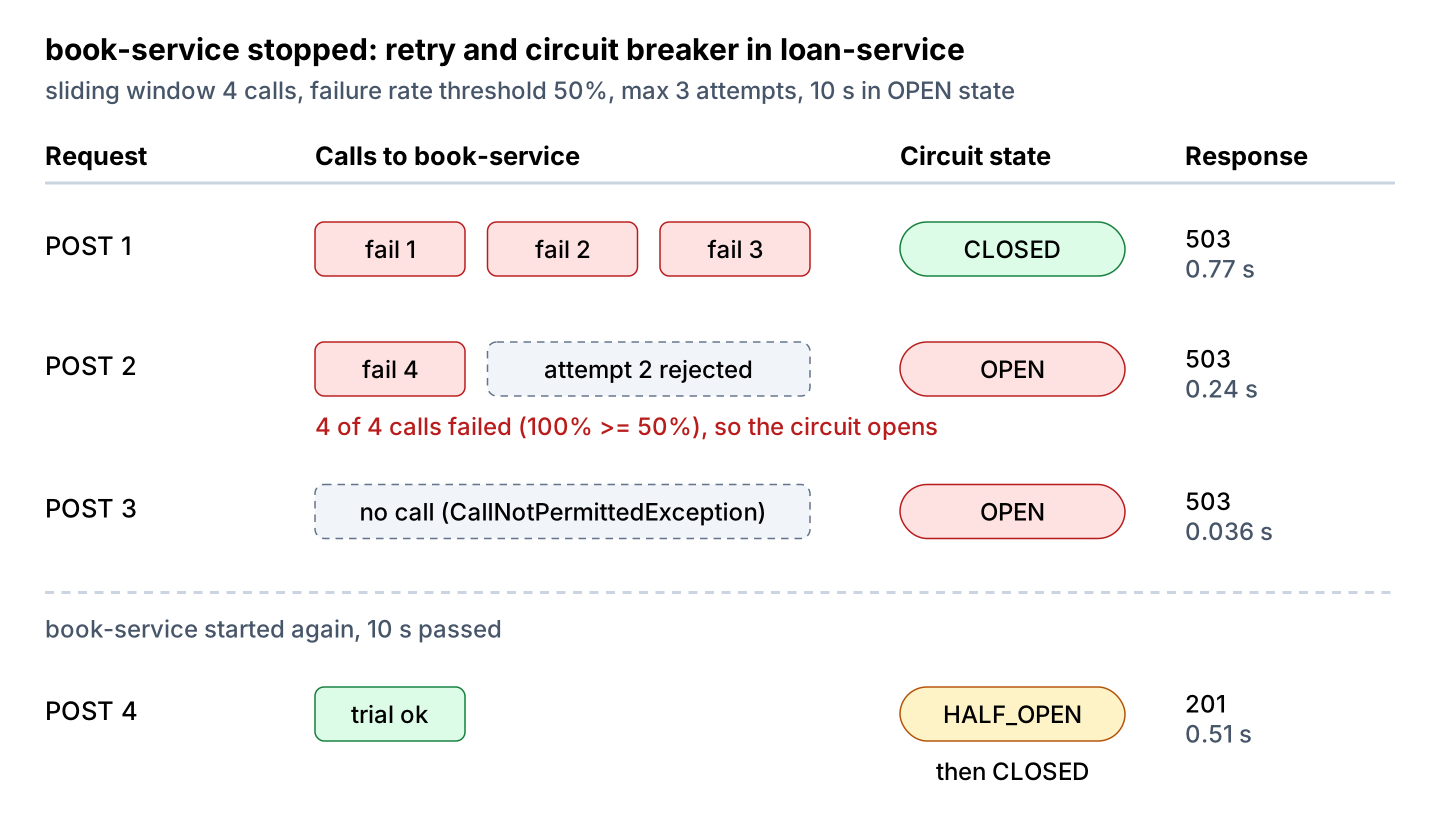
After docker compose start book-service and the 10-second wait, the next request is the trial call in the HALF_OPEN state. It succeeds with 201 in 0.51 s, and the circuit closes again.
6.2. A Slow Service and the Read Timeout
A stopped container fails fast, whereas a hanging one is the dangerous case. The command docker compose pause book-service freezes the process, so connections still open but no response ever comes back.
$ docker compose pause book-service
$ curl -s -w "  (HTTP %{http_code}, %{time_total}s)\n" -X POST localhost:8080/api/loans \
    -H 'Content-Type: application/json' -d '{"bookId":"1","member":"Lokesh"}'
{"detail":"Book service is not available, try again later","instance":"/loans","status":503,"title":"Service Unavailable"}  (HTTP 503, 6.450456s)
19:51:58.861Z INFO [261b9f1b03fba5c1956b08891853eae2-3292a62a71b3e688] BookCatalog : Calling book-service for book 1
19:52:01.072Z INFO [261b9f1b03fba5c1956b08891853eae2-3292a62a71b3e688] BookCatalog : Calling book-service for book 1
19:52:03.278Z INFO [261b9f1b03fba5c1956b08891853eae2-3292a62a71b3e688] BookCatalog : Calling book-service for book 1
19:52:05.284Z WARN [261b9f1b03fba5c1956b08891853eae2-3292a62a71b3e688] LoanErrorHandler : book-service unavailable: java.net.http.HttpTimeoutException: Request cancelledThe request took 6.45 seconds, which is three read timeouts of 2 seconds plus two waits of 200 ms. Retries multiply timeouts, so the worst-case latency of a call is roughly max-attempts times read-timeout plus the waits, and the caller’s own timeout must be larger than that. Without a read timeout, the JDK HttpClient behind our RestClient waits for the response with no time limit. The REST API timeout article covers timeouts on the server side as well.
7. Distributed Tracing with Micrometer and OpenTelemetry
A single loan request touches three services, and each one writes its own log. Distributed tracing gives every request a trace id at the first service and passes it along in the W3C traceparent header on each call. Each service records spans under that trace id. A span is a timed unit of work, such as “handle POST /loans” or “call book-service”.
In Spring Boot 4, one starter sets this up. The spring-boot-starter-opentelemetry adds Micrometer Tracing with the OpenTelemetry bridge and an OTLP exporter. Spring Cloud Sleuth, which older Zipkin and Sleuth tutorials use, does not work with Spring Boot 3 or 4 anymore.
management:
  tracing:
    sampling:
      probability: 1.0
  opentelemetry:
    tracing:
      export:
        otlp:
          endpoint: http://localhost:4318/v1/traces
  otlp:
    metrics:
      export:
        enabled: false
  logging:
    export:
      otlp:
        enabled: false
By default, Spring Boot samples only 10% of requests, so we set the probability to 1.0 for the demo. We switch off the OTLP export of metrics and logs because our Jaeger container stores only traces.
When tracing is active, Spring Boot adds [traceId-spanId] to the default log pattern, which it reads from the MDC. The trace propagation works only for clients built from the auto-configured builders, such as RestClient.Builder, which the HTTP service groups use. A RestClient created with RestClient.create() sends no traceparent header.
Let us find all log lines of the successful loan request from section 4 by its trace id.
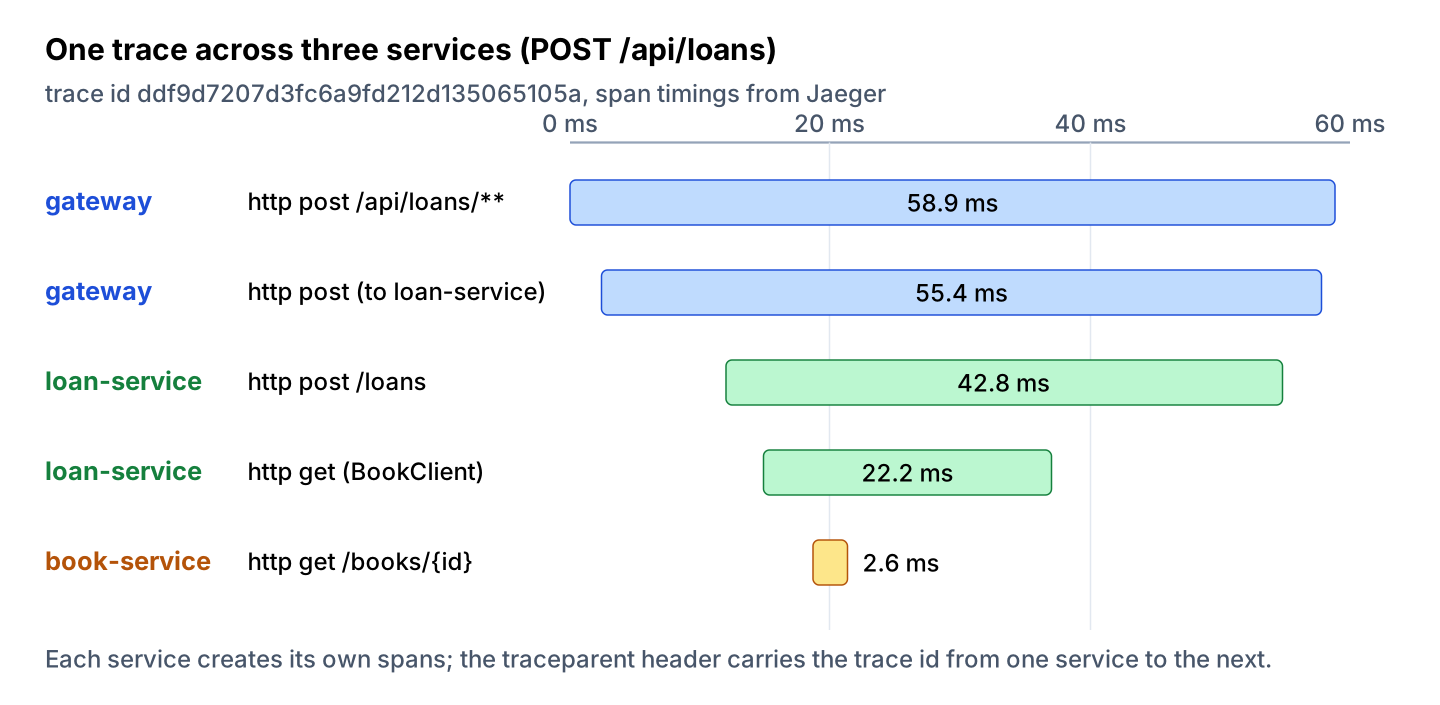
gateway-1      | 2026-10-04T19:51:16.425Z INFO 1 --- [gateway] [nio-8080-exec-6] [ddf9d7207d3fc6a9fd212d135065105a-9852040e5383b7ab] c.h.library.gateway.RouteConfig : Route loans: POST /api/loans
loan-service-1 | 2026-10-04T19:51:16.438Z INFO 1 --- [loan-service] [nio-8082-exec-5] [ddf9d7207d3fc6a9fd212d135065105a-a97647645fb06a18] c.h.library.loan.BookCatalog : Calling book-service for book 1
book-service-1 | 2026-10-04T19:51:16.444Z INFO 1 --- [book-service] [nio-8081-exec-9] [ddf9d7207d3fc6a9fd212d135065105a-8a1a7ebe15a41524] c.h.library.book.BookController : Found book Dune with 2 copies
loan-service-1 | 2026-10-04T19:51:16.467Z INFO 1 --- [loan-service] [nio-8082-exec-5] [ddf9d7207d3fc6a9fd212d135065105a-a97647645fb06a18] c.h.library.loan.LoanController : Created loan 1 for Lokesh
Notice that the trace id, the first part of the bracket, is the same in all three services, whereas the span id after the dash changes per service. In production, we ship these logs to one place, for example as structured JSON logs, and search by trace id.
The spans themselves go to Jaeger, which accepts OTLP on port 4318 and shows the traces at http://localhost:16686. For the same trace, Jaeger shows five spans.
8. Running Everything with Docker Compose
Each service runs as its own container. A minimal Dockerfile copies the JAR that Maven builds, which is enough for a demo; the Docker image for Spring Boot article shows layered images for production.
FROM eclipse-temurin:25-jre
COPY target/*.jar /app.jar
ENTRYPOINT ["java", "-jar", "/app.jar"]
The compose.yaml starts the three services and Jaeger in one network. Only the gateway and the Jaeger UI publish ports to the host, so clients cannot bypass the gateway. The environment variables are the overrides from section 5.1.
services:
  book-service:
    build: ./book-service
    environment:
      MANAGEMENT_OPENTELEMETRY_TRACING_EXPORT_OTLP_ENDPOINT: http://jaeger:4318/v1/traces

  loan-service:
    build: ./loan-service
    environment:
      SPRING_HTTP_SERVICECLIENT_BOOKS_BASEURL: http://book-service:8081
      MANAGEMENT_OPENTELEMETRY_TRACING_EXPORT_OTLP_ENDPOINT: http://jaeger:4318/v1/traces

  gateway:
    build: ./gateway
    ports:
      - "8080:8080"
    environment:
      LIBRARY_BOOKSERVICE: http://book-service:8081
      LIBRARY_LOANSERVICE: http://loan-service:8082
      MANAGEMENT_OPENTELEMETRY_TRACING_EXPORT_OTLP_ENDPOINT: http://jaeger:4318/v1/traces

  jaeger:
    image: jaegertracing/jaeger:2.21.0
    ports:
      - "16686:16686"
$ mvn package -DskipTests
$ docker compose up -d --build
$ docker compose ps
$ docker compose logs -f loan-service
$ docker compose downCompose starts the containers in parallel, so the first requests can fail until every service has logged “Started”. On Kubernetes, the same images run with readiness probes on the Actuator health endpoint, as the Kubernetes for beginners guide shows.
Spring Boot Docker Compose support is a different feature. It starts the databases and brokers of a single app during development, whereas our compose.yaml runs the whole system.
9. Testing Spring Boot Microservices with WireMock
Each service needs tests that don’t start the other services. For loan-service, the dependency is an HTTP API, so we replace book-service with WireMock, a stub HTTP server that returns canned responses and records every request. When a service owns a database or a Kafka topic, Testcontainers starts the real thing in Docker instead.
The test starts WireMock on a random port and points the books group at it with @DynamicPropertySource. The @AutoConfigureTracing annotation from spring-boot-starter-opentelemetry-test matters here, because Spring Boot does not set up the reporting tracing components in @SpringBootTest tests, and without it the traceparent assertion fails.
@SpringBootTest(properties = "spring.http.serviceclient.books.read-timeout=500ms")
@AutoConfigureMockMvc
@AutoConfigureTracing
class LoanServiceTest {

  static final WireMockServer bookService = new WireMockServer(
      wireMockConfig().dynamicPort().http2PlainDisabled(true));

  static {
    bookService.start();
  }

  @DynamicPropertySource
  static void bookServiceUrl(DynamicPropertyRegistry registry) {
    registry.add("spring.http.serviceclient.books.base-url", bookService::baseUrl);
  }

  @Autowired
  CircuitBreakerRegistry circuitBreakers;

  @BeforeEach
  void reset() {
    bookService.resetAll();                                   // stubs and request log
    circuitBreakers.circuitBreaker("books").reset();          // circuit state is shared
  }

  // borrow(id) posts {"bookId": id, "member": "Lokesh"} to /loans with MockMvcTester

  @Test
  void createsLoanAndPropagatesTraceContext() {
    bookService.stubFor(get("/books/1").willReturn(okJson("""
        {"id":"1","title":"Dune","copies":2}
        """)));

    assertThat(borrow("1")).hasStatus(HttpStatus.CREATED);

    // W3C trace context header: 00-<trace id>-<span id>-<flags>
    bookService.verify(getRequestedFor(urlEqualTo("/books/1"))
        .withHeader("traceparent", matching("00-[0-9a-f]{32}-[0-9a-f]{16}-[0-9a-f]{2}")));
  }

  @Test
  void retriesThreeTimesThenOpensCircuit() {
    bookService.stubFor(get("/books/1").willReturn(aResponse().withStatus(503)));

    assertThat(borrow("1")).hasStatus(HttpStatus.SERVICE_UNAVAILABLE);
    bookService.verify(3, getRequestedFor(urlEqualTo("/books/1")));     // 3 attempts

    assertThat(borrow("1")).hasStatus(HttpStatus.SERVICE_UNAVAILABLE);
    bookService.verify(4, getRequestedFor(urlEqualTo("/books/1")));     // circuit opened
    assertThat(circuitBreakers.circuitBreaker("books").getState())
        .isEqualTo(CircuitBreaker.State.OPEN);
  }
}
The http2PlainDisabled(true) option stops WireMock from accepting the HTTP/2 upgrade that the JDK HttpClient offers; without it, the gateway test failed with “Received RST_STREAM”. The @BeforeEach method matters too, because all tests share one application context, so an open circuit from one test would fail the next. The full test class also covers a 404 that is not retried, a book with no copies, and a slow response that hits the 500 ms test timeout.
[INFO] Tests run: 2, Failures: 0, Errors: 0, Skipped: 0 -- in com.howtodoinjava.library.book.BookControllerTest
[INFO] Tests run: 5, Failures: 0, Errors: 0, Skipped: 0 -- in com.howtodoinjava.library.loan.LoanServiceTest
[INFO] Tests run: 3, Failures: 0, Errors: 0, Skipped: 0 -- in com.howtodoinjava.library.gateway.GatewayRoutesTest
[INFO] BUILD SUCCESS
The WireMock tests check each service against a stub, not against the real API of the other service. If book-service renames a field, both test suites stay green. Consumer-driven contract tests, for example with Spring Cloud Contract, close that gap, at the cost of one more tool in the build.
10. What the Example Leaves Out
A production system needs a few more pieces than our example, and each of them is a topic of its own.
- Data consistency is the biggest gap. The loan-service checks the number of copies but does not reserve one, so two members can borrow the last copy at the same time. A common fix is an event such as “LoanCreated” on Kafka, which book-service consumes to update its stock, with a compensating event when the stock runs out.
- For security, the gateway is the place to validate tokens, and the services check them again for defense in depth. The Spring Security tutorial covers the resource server setup.
11. Conclusion
A Spring Boot microservices system is a set of ordinary Spring Boot applications plus the code between them. Our library example used an HTTP interface client for service calls and Spring Cloud Gateway Server Web MVC as the single entry point, with environment variables and Docker DNS instead of a config server and a registry.
Every remote call gets a read timeout plus a retry for short glitches, and a circuit breaker protects the caller during longer outages. Remember that retries multiply the timeout. With spring-boot-starter-opentelemetry, one trace id follows a request through all services, in the logs and in Jaeger.
Finally, start with a monolith when the team is small or the domain is new, and split services out when a real need for separate scaling or releases shows up.
12. References
- Spring Cloud project page and release train compatibility
- Spring Framework REST Clients and HTTP Interface
- Spring Boot HTTP Service Clients
- Spring Cloud Config reference
- Spring Cloud Gateway Server Web MVC reference
- Spring Boot Tracing
- Spring Boot Testing Spring Boot Applications
- Resilience4j CircuitBreaker
- Resilience4j Spring Boot getting started
- W3C Trace Context
- Docker Compose networking
- Kubernetes DNS for Services and Pods
- Martin Fowler, Microservices
- Martin Fowler, MonolithFirst
Happy Learning !!
