

A SAX parser (Simple API for XML) reads an XML document from top to bottom and calls methods of our handler class, such as startElement(), characters() and endElement(), for every tag and every piece of text it finds. The parser keeps no tree in memory, so a Java SAX parser reads a 5 MB file and a 5 GB file with the same small amount of heap.
We use SAX to read large XML files in a single pass, for example a product feed, a log export or the sheets inside an Excel .xlsx file, and to pull a few values out of a document without building a DOM tree first.
The following example reads all recipe names from a recipes.xml file with SAXParserFactory and an anonymous DefaultHandler on Java 25. The setFeature() call rejects any DOCTYPE, which blocks XML external entity (XXE) attacks.
SAXParserFactory factory = SAXParserFactory.newInstance();
factory.setFeature("http://apache.org/xml/features/disallow-doctype-decl", true);

List<String> names = new ArrayList<>();
factory.newSAXParser().parse(Path.of("recipes.xml").toFile(), new DefaultHandler() {
    private final StringBuilder text = new StringBuilder();

    @Override
    public void startElement(String uri, String localName, String qName, Attributes attributes) {
        text.setLength(0);
    }

    @Override
    public void characters(char[] ch, int start, int length) {
        text.append(ch, start, length);
    }

    @Override
    public void endElement(String uri, String localName, String qName) {
        if (qName.equals("name")) {
            names.add(text.toString());
        }
    }
});
int count = names.size();                     // 3
String third = names.get(2);                  // "Mac & Cheese"
Notice that characters() only appends to a buffer, and the name is read in endElement(). That pattern is the core of every correct SAX handler, and the sections cover why, how to map the file to Java records, how to secure and validate the parser, how to report errors and how to stop parsing early.
1. Events and Callbacks in a SAX Parser
SAX is a push parser. Once we call parse(), the parser owns the loop. It reads the input in order and, for each part of the document, calls the matching method of the handler we passed in. Our code never asks for the next element; it reacts to what the parser reports.
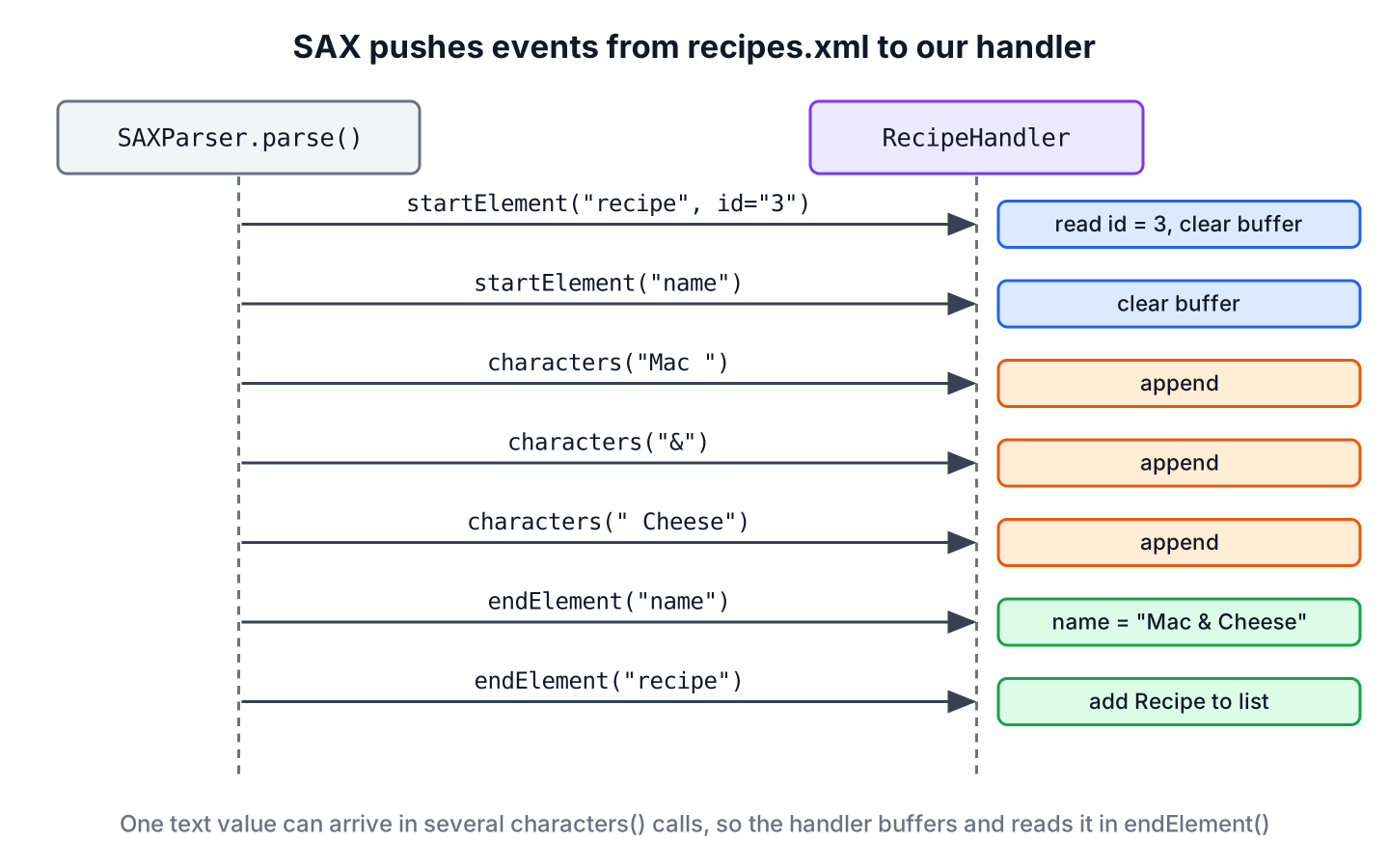
In most code, the handler is a subclass of DefaultHandler, which implements ContentHandler, ErrorHandler, DTDHandler and EntityResolver with empty methods. We override only the callbacks we need.
| Callback | Called when the parser reads | Typical use |
|---|---|---|
| startDocument() | The start of the input | Reset state |
| startElement(uri, localName, qName, attributes) | A start tag such as <recipe id=”1″> | Read attributes, clear the text buffer |
| characters(ch, start, length) | Text, in one or more chunks | Append to a StringBuilder |
| endElement(uri, localName, qName) | An end tag such as </recipe> | Use the collected text, finish an object |
| endDocument() | The end of the input | Final checks |
| error() and fatalError() | A validation error or malformed XML | Report or stop |
SAX was created by David Megginson and the XML-DEV mailing list in 1998, and Java has shipped it with JAXP since J2SE 1.4. Today it is part of the java.xml module, next to DOM and the StAX parser.
2. Mapping XML to Java Records with DefaultHandler
Reading a whole file into objects means keeping some state between callbacks, because the id comes in startElement() of <recipe>, the name and the minutes come later in their own elements, and the recipe is complete only at </recipe>.
The following example reads this recipes.xml file into Recipe records. Each recipe has an id attribute and two child elements, and the third name contains the entity &.
<?xml version="1.0" encoding="UTF-8"?>
<recipes>
<recipe id="1">
<name>Pancakes</name>
<minutes>20</minutes>
</recipe>
<recipe id="2">
<name>Tomato Soup</name>
<minutes>35</minutes>
</recipe>
<recipe id="3">
<name>Mac & Cheese</name>
<minutes>25</minutes>
</recipe>
</recipes>record Recipe(int id, String name, int minutes) {}class RecipeHandler extends DefaultHandler {
private final List<Recipe> recipes = new ArrayList<>();
private final StringBuilder text = new StringBuilder();
private int id;
private int minutes;
private String name;
@Override
public void startElement(String uri, String localName, String qName, Attributes attributes) {
text.setLength(0);
if (qName.equals("recipe")) {
id = Integer.parseInt(attributes.getValue("id"));
}
}
@Override
public void characters(char[] ch, int start, int length) {
text.append(ch, start, length);
}
@Override
public void endElement(String uri, String localName, String qName) throws SAXException {
switch (qName) {
case "name" -> name = text.toString().strip();
case "minutes" -> minutes = Integer.parseInt(text.toString().strip());
case "recipe" -> recipes.add(new Recipe(id, name, minutes));
default -> { }
}
}
List<Recipe> recipes() {
return recipes;
}
}We parse the file with a parser from secureParser(), which we build in section 4. The method parse(File, DefaultHandler) opens and closes the file for us.
RecipeHandler handler = new RecipeHandler();
secureParser().parse(Path.of("recipes.xml").toFile(), handler);
List<Recipe> recipes = handler.recipes();
int count = recipes.size();                                               // 3
Recipe third = recipes.get(2);                                            // Recipe[id=3, name=Mac & Cheese, minutes=25]
long quick = recipes.stream().filter(r -> r.minutes() <= 25).count();     // 2
The handler reads the attribute by name with attributes.getValue(“id”), which returns null when the attribute is missing. Reading by position, such as getValue(0), breaks as soon as someone adds a second attribute before id. A new handler instance is needed for every parse, because it keeps the list and the buffer as fields.
3. Why characters() Returns Text in Pieces
A parser may return one text value in a single characters() call or split it into several chunks. The JDK parser splits text at entity references such as & and at the edges of its internal buffer, which depend on the file size. A handler that treats each call as the full value works in tests and loses data in production.
The class LastChunkHandler shows the mistake, because it keeps only the text of the last characters() call inside <name>.
class LastChunkHandler extends DefaultHandler {
    final List<String> names = new ArrayList<>();
    private boolean inName;
    private String last;

    @Override
    public void startElement(String uri, String localName, String qName, Attributes attributes) {
        inName = qName.equals("name");
    }

    @Override
    public void characters(char[] ch, int start, int length) {
        if (inName) {
            last = new String(ch, start, length);
        }
    }

    @Override
    public void endElement(String uri, String localName, String qName) {
        if (qName.equals("name")) {
            names.add(last);
        }
        inName = false;
    }
}
LastChunkHandler wrong = new LastChunkHandler();
secureParser().parse(Path.of("recipes.xml").toFile(), wrong);
String first = wrong.names.get(0); // "Pancakes"
String broken = wrong.names.get(2); // " Cheese"We always append text to a StringBuilder in characters(), clear it in startElement() and read it in endElement(). The RecipeHandler from section 2 does that, so it returns “Mac & Cheese” for the same file.
4. Secure SAXParserFactory Settings
A DOCTYPE in an XML file can declare an external entity that points to a file on our server or to a URL. The JDK parser resolves such entities by default, even in Java 25, so a SAX parser that reads uploaded XML can be used to read server files. That attack is called XML external entity (XXE) injection.
The method secureParser() turns on three settings. The first rejects every document that contains a DOCTYPE, the second enables the JAXP secure processing limits, and the third makes the parser namespace-aware.
static SAXParser secureParser() throws ParserConfigurationException, SAXException {
    SAXParserFactory factory = SAXParserFactory.newInstance();
    factory.setFeature("http://apache.org/xml/features/disallow-doctype-decl", true);
    factory.setFeature(XMLConstants.FEATURE_SECURE_PROCESSING, true);
    factory.setNamespaceAware(true);
    return factory.newSAXParser();
}
String untrusted = """
<?xml version="1.0"?>
<!DOCTYPE recipe [<!ENTITY x SYSTEM "file:secret.txt">]>
<recipe>&x;</recipe>""";
secureParser().parse(new InputSource(new StringReader(untrusted)), new DefaultHandler()); // SAXParseException: DOCTYPE is disallowedMost data files never need a DTD, so rejecting the DOCTYPE costs nothing. If a partner format does contain a DOCTYPE, we keep it but turn off the features http://xml.org/sax/features/external-general-entities and http://xml.org/sax/features/external-parameter-entities, as the OWASP XXE prevention cheat sheet describes.
Namespace awareness changes what the handler receives. By default, SAXParserFactory is not namespace-aware, and the parser passes an empty localName and puts the element name only in qName. With setNamespaceAware(true), localName holds the name without a prefix, and uri holds the namespace.
| Element in the file | Namespace-aware | localName | qName |
|---|---|---|---|
| <recipe> | No (default) | “” (empty) | “recipe” |
| <recipe> | Yes | “recipe” | “recipe” |
| <r:recipe xmlns:r=”…”> | Yes | “recipe” | “r:recipe” |
Code that compares localName on a default factory never matches anything, which is a common reason for a handler that “does nothing”. Our handlers compare qName, which works in both modes for files without prefixes.
5. Validation Errors, Line Numbers and ErrorHandler
The parser reports two kinds of problems. A fatal error means the XML is not well-formed, for example an end tag is missing, and the parser always stops with a SAXParseException that carries the line and column. A recoverable error is a validation error, such as a value that breaks the schema, and DefaultHandler.error() ignores it.
String notWellFormed = "<recipes><recipe id=\"4\"><name>Toast</recipe></recipes>";
secureParser().parse(new InputSource(new StringReader(notWellFormed)), new RecipeHandler());   // SAXParseException: The element type "name" must be terminated by the matching end-tag "</name>".
For validation, we attach an XSD schema to the factory with setSchema(). The file bad-recipes.xml has <minutes>-5</minutes>, but the schema declares the element as xs:positiveInteger. The handler subclass overrides error() and rethrows the exception, because without that override the invalid file is parsed as if nothing happened.
static SAXParser validatingParser(Path xsd) throws ParserConfigurationException, SAXException {
    Schema schema = SchemaFactory.newInstance(XMLConstants.W3C_XML_SCHEMA_NS_URI).newSchema(xsd.toFile());
    SAXParserFactory factory = SAXParserFactory.newInstance();
    factory.setFeature("http://apache.org/xml/features/disallow-doctype-decl", true);
    factory.setNamespaceAware(true);
    factory.setSchema(schema);
    return factory.newSAXParser();
}
class StrictRecipeHandler extends RecipeHandler {
@Override
public void error(SAXParseException e) throws SAXException {
throw e;
}
}RecipeHandler lenient = new RecipeHandler();
validatingParser(Path.of("recipes.xsd")).parse(Path.of("bad-recipes.xml").toFile(), lenient);
int parsed = lenient.recipes().size(); // 1, the error was ignored
validatingParser(Path.of("recipes.xsd")).parse(Path.of("bad-recipes.xml").toFile(), new StrictRecipeHandler()); // SAXParseException: cvc-minInclusive-valid: Value '-5' is not facet-valid with respect to minInclusive '1' for type 'positiveInteger'.The exception message contains the line number, and e.getLineNumber() and e.getColumnNumber() return it as numbers, so an import job can log the line and column where a partner file is broken.
6. Stopping a SAX Parser Early
SAX has no method to stop the parser, because the parser owns the loop. The standard way is to throw a SAXException subclass from a callback and catch that subclass around parse(). The parser stops reading at once and passes our exception through.
Say a meal-planning app gets a nightly feed with thousands of recipes, and a preview screen needs only the first recipe that takes longer than 30 minutes. The following handler throws StopParsing as soon as it finds one, so the rest of the feed is never read.
class StopParsing extends SAXException {
    StopParsing() {
        super("match found");
    }
}
class FirstSlowRecipe extends RecipeHandler {
String found;
int seen;
@Override
public void endElement(String uri, String localName, String qName) throws SAXException {
super.endElement(uri, localName, qName);
if (qName.equals("recipe")) {
seen++;
Recipe last = recipes().getLast();
if (last.minutes() > 30) {
found = last.name();
throw new StopParsing();
}
}
}
}FirstSlowRecipe finder = new FirstSlowRecipe();
try {
secureParser().parse(Path.of("recipes.xml").toFile(), finder);
} catch (StopParsing done) {
// expected, the handler found a match
}
String found = finder.found; // "Tomato Soup"
int seen = finder.seen; // 2The handler saw only two of the three recipes. When stopping early is a common need, the pull model of StAX is simpler, because the loop can return without an exception.
7. SAX Compared with DOM and StAX
The JDK has three standard ways to read XML, and SAX is the oldest streaming one. The DOM vs SAX vs StAX article compares them in depth.
| SAX | StAX | DOM | |
|---|---|---|---|
| Model | Push, the parser calls our handler | Pull, our loop asks for events | Tree of nodes in memory |
| Memory | Small and constant | Small and constant | Grows with the document |
| Random access and XPath | No | No | Yes |
| Writes XML | No | Yes | Yes, with a Transformer |
| Stop early | Throw an exception | return or break | Not applicable, the file is already parsed |
We choose SAX for large files that we read once from start to end, especially when a library already gives us a SAX source, such as Apache POI for reading large Excel files. For small configuration files, reading XML with DOM or XPath needs less code.
8. SAX Parser FAQs
Most SAX questions start with a handler that compiles but collects nothing, or with old code built on deprecated classes.
8.1. What is the difference between localName and qName in startElement()?
The qName argument is the name as written in the file, including a prefix such as r:recipe. The localName argument is the name without the prefix, and the parser fills it only when the factory is namespace-aware. With the default factory, localName is an empty string.
8.2. Is XMLReaderFactory deprecated?
Yes. XMLReaderFactory is deprecated since Java 9, and SAXParserFactory replaces it. When we need the lower-level XMLReader, for example to set a ContentHandler and an ErrorHandler separately, we get it from saxParser.getXMLReader().
8.3. Is SAXParser thread-safe?
No. A SAXParser is not guaranteed to work when two threads use it at the same time. We create one parser per thread or per parse, and a handler with fields also needs a new instance per parse. Creating a parser is cheap compared with reading a large file.
8.4. How do we read CDATA sections with SAX?
The text of a CDATA section arrives in characters() like any other text, so the StringBuilder pattern reads it without changes. If we need to know where the CDATA section starts and ends, we extend org.xml.sax.ext.DefaultHandler2 and override startCDATA() and endCDATA() from LexicalHandler.
8.5. Can a SAX parser read XML from a String?
Yes. We wrap the string in an InputSource with a StringReader, as in parser.parse(new InputSource(new StringReader(xml)), handler). For a file, we pass a File, an InputStream or a URI string.
9. Conclusion
A SAX parser pushes events to a handler as it reads, so it handles files of any size with little memory. A correct handler buffers text from characters() in a StringBuilder and reads it in endElement(), because a single value can arrive in several chunks.
We create the parser from a SAXParserFactory that rejects DOCTYPE declarations, override error() when we validate against a schema, and throw a custom SAXException to stop early. For code that needs to stop often or write XML, StAX is the better fit.
10. References
- SAXParserFactory Javadoc (Java 25)
- ContentHandler Javadoc (Java 25)
- DefaultHandler Javadoc (Java 25)
- SAX Project
- OWASP XML External Entity Prevention Cheat Sheet
Happy Learning !!

Need an help ….have used SAX-reader but for the description field for eg Test & return values
the reader doesn’t read the complete value but reads value after &.
i.e. it displays “return values” only
<work>
            <ratings_sum type="integer">26798</ratings_sum>
            <ratings_count type="integer">7324</ratings_count>
        </work>
using your method, how would you suggest i parse the info for ratings sum
i’m trying to parse some data and i’m trying to get the isbn (above). i am aware that you deal with cdata within the part of the characters function where the value.length == 0, so do you have any idea i can access and obtain the isbn?
Hi
I want a generic solution for this . Means let say User has changed the xml , no need to those attributes in the Pojo class and i will run and will get correct output. Also anways suppose i will eliminate that Pojo also its very good . Bcoz i dont know what will be the xml format . So that it will work for the all xml input file . I want to go for only SAX parser.
Thanks
Tony
Sax will support to read XML file with multiple root elements? XML file has multiple encoding declarions for every root element?
Multiple root elements?? It’s something new for me. Can you please share any example or such sample xml.
If we see below xml which has “multiple encoding declarations” for each “Contact” element..The is my target xml got from client. So please suggest me how to proceed with below formatted file.
00000009151666829922
1
00000009151666829922
1
While reading getting error: The processing instruction target matching “[xX][mM][lL]” is not allowed
Thanks for your quick response.
At start of characters method, use this better code:
Hi
Will you please explain how to read file from URL instead of local resource.
Thanks
– Noman
Try this
URL oracle = new URL("http://www.oracle.com/"); BufferedReader in = new BufferedReader(new InputStreamReader(oracle.openStream())); String inputLine; while ((inputLine = in.readLine()) != null) System.out.println(inputLine); in.close();Its a nice try, but SAX means parse on fly. but you holds the data into some Stacks and Arrays.. seems its not a good arch. idea
if you have any better idea, plz share. it will benefit all.
Nice Tutorial, but today using a standalone JAXB implementation is way better!
hello can u plz me out by telling how parse any xml file without knowing the elements i mean the tags of xml.. jst knowing the xml file source… i want to parse webservices available on net jst by giving url n get the content of that xml content which is returned by the webservice. so how to get it done. plz help me
interesting question. what you are planning to do with data without knowing what you are getting? programmatically it’s possible, but I can not think of why somebody would like to do this.
example
for example above only tag seperator will be same and inside content can vary, this is wen you are not sure about input
how can we parse to read only the content between tag_seprator
Nice article Lokesh. Is there any possibility to get single employee detail alone based on “id” attribute?
Thanks,
Sasi
Hello, Thank you very much for your tutorial. I am learning SAX parsing at the same time that I have a very basic kwoledge of Java. I’ve been fiercely googling around trying to make sense of this error but ArrayList is driving me crazy.
Can you tell me why your UsersXmlParser.java is throwing this compile error (I copy and paste your source code):
( just in case is relevant, I am writing in Linux )
$ javac model.java UserParserHandler.java UsersXmlParser.java TestSAXParser.java
UsersXmlParser.java:17: illegal start of type
ArrayList users = new ArrayList();
^
UsersXmlParser.java:17: ‘(‘ or ‘[‘ expected
ArrayList users = new ArrayList();
^
UsersXmlParser.java:17: illegal start of expression
ArrayList users = new ArrayList();
^
UsersXmlParser.java:17: illegal start of expression
ArrayList users = new ArrayList();
^
4 errors
—
thank you again!
Andres
Edit: I caught a typo in the javac statement (model.java was renamed to User.java)…it did not change the output, still getting same compile errors.
Glad, you made it.
Hey nice article man.Which parser do we use to parse files with 40 to 50 mB of size.
SAX only.
Hey nice tutorial! However I spot a little bug in the sample code paste on this page: in the xml file, value node “firstname” and “lastname” should be changed to “firstName” and “lastName”, otherwise the firstname and lastname value will never be set to the User object. Anyway great tutorial buddy!
Excellent article. Thanks. I’ve been trying to wrap my head around an XML parsing example I found elsewhere and it wasn’t making sense. Yours is the cleanest, clearest example I’ve found. Thanks a bunch.