

To get an attribute value with XPath in Java, we put @ in front of the attribute name in the expression, for example /playlist/song[@id=’s2′]/@genre, and call XPath.evaluate(expression, document), which returns the value as a String. The @ sign selects the attribute node, and the javax.xml.xpath API in the JDK evaluates it without any library.
We read attributes with XPath when the value we need sits deep in a document, such as a currency code on a price element, a version on a config entry or the id of every item in a feed. One expression replaces a loop over getElementsByTagName() calls and if checks.
The following example reads attributes from a small playlist file, playlist.xml.
<?xml version="1.0" encoding="UTF-8"?>
<playlist name="Road trip">
  <song id="s1" genre="rock" seconds="215">Highway Song</song>
  <song id="s2" genre="jazz" seconds="340">Blue Evening</song>
  <song id="s3" genre="rock" seconds="198" explicit="true">Engine Noise</song>
</playlist>
DocumentBuilderFactory factory = DocumentBuilderFactory.newInstance();
factory.setFeature("http://apache.org/xml/features/disallow-doctype-decl", true);
Document doc = factory.newDocumentBuilder().parse(new File("playlist.xml"));
XPath xpath = XPathFactory.newInstance().newXPath();
String genre = xpath.evaluate("/playlist/song[@id='s2']/@genre", doc); // "jazz"
String name = xpath.evaluate("/playlist/@name", doc); // "Road trip"Notice that the parser refuses DOCTYPE declarations, which keeps external entities out of untrusted files. The next sections explain the @ syntax and show how to read one value, all values, numbers instead of strings, and when Element.getAttribute() is the better tool.
1. Selecting Attributes With @ in an XPath Expression
In the XPath data model, an attribute is a node of its own that belongs to an element, but it is not a child of that element. A path such as /playlist/song walks the child axis and never reaches attributes. The @ abbreviation switches to the attribute axis, so song/@genre means “the genre attribute of each song element”.
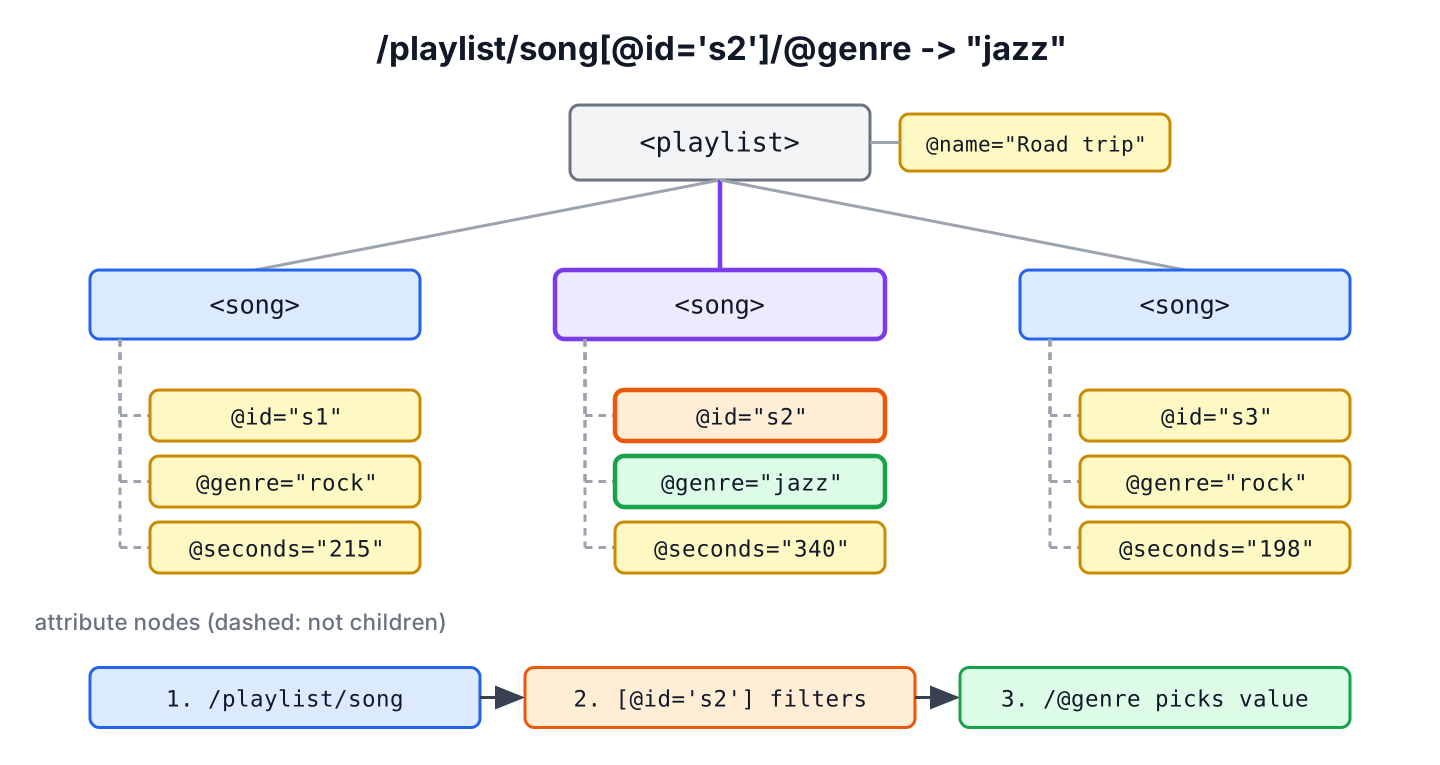
A few expression shapes cover almost every case. The predicate in square brackets filters elements before @ picks the attribute, and @* matches every attribute of an element. The JDK parser does not keep the attribute order of the source file, so @* returns attributes sorted by name.
| XPath expression | Selects | Result for playlist.xml |
|---|---|---|
| /playlist/@name | Attribute of the root element | Road trip |
| //song/@genre | The attribute on every song | rock, jazz, rock |
| //song[@id=’s2′]/@genre | The attribute on one filtered element | jazz |
| //song[2]/@seconds | The attribute on the second song | 340 |
| //song[@id=’s3′]/@* | All attributes of one element | true, rock, s3, 198 (sorted by attribute name) |
| @genre | The attribute of the context node (relative path) | Depends on the node we pass in |
The order of the steps matters. The expression //song/@genre returns attribute nodes, whereas //song[@genre] returns the song elements that have a genre attribute. The second form belongs to filtering, which the article on finding XML nodes by attribute value covers in depth.
2. Get a Single Attribute Value With XPath
The two-argument evaluate(String, Object) method returns a String. It applies the XPath string() function to the result, and that function has two rules we need to know. If the expression matches several nodes, it returns the value of the first one in document order. If it matches nothing, it returns an empty string, not null.
Every example from here on uses one small helper to load the file. It creates a fresh factory with DOCTYPE declarations turned off, which is the setting the OWASP XXE cheat sheet recommends for the JDK parser.
static Document loadXml(Path file) throws Exception {
    DocumentBuilderFactory factory = DocumentBuilderFactory.newInstance();
    factory.setFeature("http://apache.org/xml/features/disallow-doctype-decl", true);
    return factory.newDocumentBuilder().parse(file.toFile());
}
Document doc = loadXml(Path.of("playlist.xml"));
XPath xpath = XPathFactory.newInstance().newXPath();
String first = xpath.evaluate("//song/@genre", doc); // "rock"
String missing = xpath.evaluate("//song[@id='s9']/@genre", doc); // ""
String noAttr = xpath.evaluate("//song[@id='s1']/@explicit", doc); // ""
boolean exists = (Boolean) xpath.evaluate("boolean(//song[@id='s1']/@explicit)", doc, XPathConstants.BOOLEAN); // falseThe two empty strings look the same, although one song does not exist and the other song exists without the attribute. When the difference matters, we test with boolean(), which returns false for an empty node set. An attribute written as explicit=”” also returns an empty string, so boolean() is the only reliable presence check.
We never treat an empty string from evaluate() as proof that a value was set, because XPath reports a missing attribute and an empty attribute the same way. For example, a music import job that reads @seconds and passes it to Integer.parseInt() gets a NumberFormatException for a song without a duration, so it either checks presence first or reads the value as a number, as section 4 shows.
3. Getting All Values of an Attribute as a List
To read every match, we ask for a node set. Since Java 9, evaluateExpression() with XPathNodes returns an Iterable of nodes, so we can use a for-each loop. Each node is an Attr, and getNodeValue() returns its value.
Document doc = loadXml(Path.of("playlist.xml"));
XPath xpath = XPathFactory.newInstance().newXPath();

XPathNodes nodes = xpath.evaluateExpression("//song/@id", doc, XPathNodes.class);
List<String> ids = new ArrayList<>();
for (Node node : nodes) {
    ids.add(node.getNodeValue());
}
List<String> allIds = ids;                 // [s1, s2, s3]
int count = nodes.size();                  // 3
Older code passes XPathConstants.NODESET and casts the result to NodeList. It works on every Java version, but NodeList is not Iterable, so the loop goes by index.
Document doc = loadXml(Path.of("playlist.xml"));
XPath xpath = XPathFactory.newInstance().newXPath();

NodeList list = (NodeList) xpath.evaluate("//song/@genre", doc, XPathConstants.NODESET);
List<String> genres = new ArrayList<>();
for (int i = 0; i < list.getLength(); i++) {
    genres.add(list.item(i).getNodeValue());
}
List<String> allGenres = genres;           // [rock, jazz, rock]
Duplicates stay in the list, because XPath returns one attribute node per element. A LinkedHashSet removes them and keeps the document order.
4. Getting Numbers and Booleans Instead of Strings
Attribute values are always text in XML, but XPath can convert them. The evaluateExpression() method accepts Double, Integer, Long, Boolean and String as the target class, and XPath functions such as sum() and count() work on attribute values in the same expression.
Document doc = loadXml(Path.of("playlist.xml"));
XPath xpath = XPathFactory.newInstance().newXPath();

Integer seconds = xpath.evaluateExpression("//song[@id='s2']/@seconds", doc, Integer.class);   // 340
Double total = xpath.evaluateExpression("sum(//song/@seconds)", doc, Double.class);            // 753.0
Double rockSongs = xpath.evaluateExpression("count(//song[@genre='rock'])", doc, Double.class); // 2.0
Double none = xpath.evaluateExpression("//song[@id='s9']/@seconds", doc, Double.class);        // NaN
A missing or non-numeric attribute becomes NaN as a Double, so we check Double.isNaN() before using it. The Integer conversion is less forgiving. It truncates NaN to 0, which hides a missing value, so Double is the safer target when the attribute is optional.
Document doc = loadXml(Path.of("playlist.xml"));
XPath xpath = XPathFactory.newInstance().newXPath();

Integer hidden = xpath.evaluateExpression("//song[@id='s9']/@seconds", doc, Integer.class);    // 0
5. Reading Attributes of the Current Node
A common pattern selects elements with one expression and reads several attributes from each of them. The second argument of evaluate() is the context node, so a relative expression such as @genre runs against the element we pass in. For example, a music app that imports a partner playlist loops over the songs, reads three attributes from each and builds a record per song.
record Song(String id, String genre, int seconds) {}Document doc = loadXml(Path.of("playlist.xml"));
XPath xpath = XPathFactory.newInstance().newXPath();
List<Song> songs = new ArrayList<>();
for (Node node : xpath.evaluateExpression("//song", doc, XPathNodes.class)) {
Element song = (Element) node;
songs.add(new Song(
xpath.evaluate("@id", song),
song.getAttribute("genre"),
Integer.parseInt(song.getAttribute("seconds"))));
}
Song second = songs.get(1); // Song[id=s2, genre=jazz, seconds=340]The loop mixes both styles on purpose. Once we hold an Element, getAttribute() is shorter and faster than a relative XPath, because no expression is parsed. XPath pays off for the first step, where it finds the elements anywhere in the tree.
| Need | Use | Missing attribute returns |
|---|---|---|
| Value from anywhere in the document | xpath.evaluate(“//a[@x=’1′]/@y”, doc) | Empty string |
| Value on an element we already hold | element.getAttribute(“y”) | Empty string |
| Presence check on an element | element.hasAttribute(“y”) | false |
| Presence check in a document | boolean(//a/@y) with XPathConstants.BOOLEAN | false |
| Numeric value | evaluateExpression(expr, doc, Double.class) | NaN |
6. Compiling an Expression Once and Reusing It
When the same expression runs many times, such as once per uploaded file in a web app, we compile it with compile() and keep the XPathExpression. Compiling parses the expression once, and each evaluate() call only walks the tree.
Document doc = loadXml(Path.of("playlist.xml"));
XPathExpression genreOf = XPathFactory.newInstance().newXPath().compile("@genre");

NodeList songs = doc.getElementsByTagName("song");
String firstGenre = genreOf.evaluate(songs.item(0));     // "rock"
String secondGenre = genreOf.evaluate(songs.item(1));    // "jazz"
The JDK does not make XPath or XPathExpression objects thread-safe. In a multi-threaded service, each thread needs its own instance, for example by compiling the expression inside the request method or by holding it in a ThreadLocal. Creating an XPath object is cheap compared with parsing the XML document.
7. XPath Attribute Value FAQs
Most attribute questions come up once the first expression works and real files start to arrive with namespaces, odd values or a different library.
7.1. What Is the Difference Between //song/@genre and //song[@genre]?
The first expression returns the genre attribute nodes, so evaluate() gives their values. The second returns the song elements that have a genre attribute, so evaluate() gives the text content of the first matching song, “Highway Song” in our file.
7.2. Why Does My XPath Return an Empty String for an Attribute That Exists?
In most cases, the document uses a namespace and the expression does not. An element such as <m:song xmlns:m=”…”> matches only a prefixed name test that is bound through a NamespaceContext. The article on XPath namespace resolution shows the setup. Plain attributes without a prefix are in no namespace, so @genre works once the element step matches.
7.3. How Do I Get an Attribute Value Without XPath?
We call getAttribute() on the Element, after finding it with getElementsByTagName() or by walking the tree. The DOM parser tutorial shows that approach, and JDOM2 offers getAttributeValue(), which returns null for a missing attribute, as the article on reading XML with JDOM2 explains.
7.4. Does the JDK Support XPath 2.0 or 3.1?
No. The javax.xml.xpath API in Java 25 implements XPath 1.0, so functions such as ends-with(), lower-case() and regular expressions are not available. Projects that need XPath 3.1 add a library such as Saxon-HE. For attribute values, XPath 1.0 covers everything shown here.
8. Conclusion
An attribute value in XPath is one @ away from its element. The expression //song[@id=’s2′]/@genre picks the element with a predicate and steps to its attribute, and evaluate() returns the value as a String, or an empty string when nothing matches.
For all values, we ask for XPathNodes and read getNodeValue() from each node. For numbers, evaluateExpression() with Double.class makes missing values visible as NaN. Inside a loop over elements, getAttribute() is simpler than another XPath call. More XPath syntax, such as axes and operators, is in the Java XPath tutorial.
9. References
- XPath Javadoc (Java 25)
- XPathNodes Javadoc
- XML Path Language (XPath) 1.0
- OWASP XML External Entity Prevention Cheat Sheet
Happy Learning !!

I need to check child tag contain text() using xPath. I have one parent tag it have more child and Sub child. I need to check any of my child tag contain text(). If it may ,, or any customize tag too. and I nee to print it nodeName.
private static void addAttributeId(Node someNode, Document doc) { XPath xPath = XPathFactory.newInstance().newXPath(); // NodeList nodesName; try { XPathExpression expr = xPath.compile("//itemBody/text()"); Object result = expr.evaluate(doc, XPathConstants.NODESET); NodeList nodes = (NodeList) result; for (int i = 0; i < nodes.getLength(); i++) { System.out.println(nodes.item(i).getNodeValue()); } } catch (XPathExpressionException e) { e.printStackTrace(); } }I am getting following exception at
XPath xpathExpression = XPath.newInstance(“//*[@id]”);
Exception in thread “main” java.lang.NoClassDefFoundError: org/jaxen/JaxenException at java.lang.Class.forName0(Native Method) at java.lang.Class.forName(Class.java:186) at org.jdom.xpath.XPath.newInstance(XPath.java:134) at xmlattributes.Main.main(Main.java:61)
pl guide me me added jdom1.2.2 jar
Rajendra
Rajendra, please make sure to add both jars i.r. jdom and jaxen in your class path.
Download from below locations:
https://mvnrepository.com/artifact/org.jdom
http://www.java2s.com/Code/Jar/j/Downloadjaxen111jar.htm