
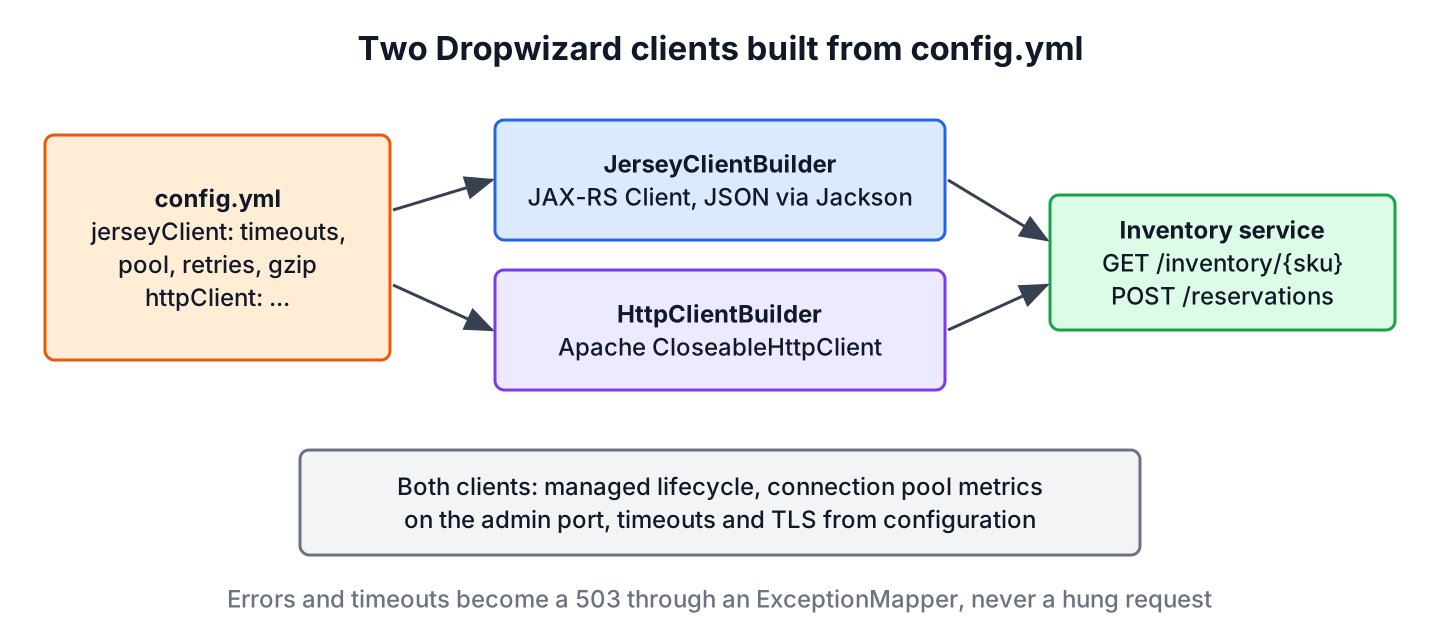
An HTTP client is the part of an application that sends requests to another service and reads the responses. In Dropwizard, the client module (dropwizard-client) builds these clients, either a JAX-RS Client with JerseyClientBuilder or an Apache CloseableHttpClient with HttpClientBuilder, both configured from config.yml. The builders take timeouts, connection pool sizes, retries, gzip and TLS settings from the configuration, register the client with the application lifecycle and publish connection pool metrics.
We use the client module whenever a Dropwizard service calls another REST API, such as an order service that checks the stock in an inventory service before it accepts an order. The following example builds a Jersey client from the jerseyClient block of the configuration.
Client client = new JerseyClientBuilder(environment)
        .using(configuration.getJerseyClientConfiguration())
        .build("inventory-client");
The name inventory-client appears in the metrics, so each client needs its own name. In this article, we configure both client types on Dropwizard 5.0.2 and Java 25, call a real inventory API, handle timeouts and errors, and test the client with JUnit 6. All Dropwizard articles are on the Dropwizard tutorials page.
1. Jersey Client vs Apache HttpClient in Dropwizard
Dropwizard offers two clients for different needs. The Jersey client is the JAX-RS client API, so it uses the same annotations and the same Jackson ObjectMapper as our resources and reads JSON into records with one call. The Apache client gives low-level control over requests and responses, which helps with streaming or unusual protocols.
| Feature | JerseyClientBuilder | HttpClientBuilder |
|---|---|---|
| Returns | jakarta.ws.rs.client.Client | org.apache.hc.client5.http.impl.classic.CloseableHttpClient |
| JSON mapping | Automatic with the app ObjectMapper | Manual with ObjectMapper |
| Configuration class | JerseyClientConfiguration | HttpClientConfiguration |
| Extra settings | Thread pool for async calls, gzip for requests | Base settings only |
Dropwizard 5 builds both clients on Apache HttpClient 5, so the Jersey client also uses a pooled, configurable connection manager. For most REST calls, the Jersey client is the better default.
2. Maven Dependency and Configuration Class
The dropwizard-client module is versioned by the Dropwizard BOM, which the Dropwizard tutorial sets up.
<dependency>
  <groupId>io.dropwizard</groupId>
  <artifactId>dropwizard-client</artifactId>
</dependency>
The configuration class holds one field per client. Both fields have defaults, and @Valid makes Dropwizard validate the nested settings at startup.
@Valid
@NotNull
private JerseyClientConfiguration jerseyClient = new JerseyClientConfiguration();

@Valid
@NotNull
private HttpClientConfiguration httpClient = new HttpClientConfiguration();
3. Client Settings in config.yml
Every setting has a default, but the defaults are not right for every service. The most important ones are the timeouts, because a client without a short timeout lets one slow dependency block our request threads.
jerseyClient:
  timeout: 2s
  connectionTimeout: 500ms
  connectionRequestTimeout: 500ms
  timeToLive: 1h
  keepAlive: 30s
  maxConnections: 64
  maxConnectionsPerRoute: 16
  retries: 1
  userAgent: order-service
  gzipEnabled: true
  gzipEnabledForRequests: false
  minThreads: 1
  maxThreads: 32
workQueueSize: 8| Setting | What it controls |
|---|---|
| timeout | Socket read timeout for each request |
| connectionTimeout | Time to open the TCP connection |
| connectionRequestTimeout | Time to wait for a free connection from the pool |
| maxConnections, maxConnectionsPerRoute | Size of the connection pool in total and per host |
| retries | How many times a failed request is retried |
| gzipEnabled, gzipEnabledForRequests | Accept gzip responses, and compress request bodies |
| minThreads, maxThreads, workQueueSize | Thread pool for async Jersey requests |
Only idempotent calls should be retried. For a payment or a reservation, set retries to 0 or make the server side idempotent, or a retry can create a second reservation.
4. Build the Clients in run()
We build both clients in run() and pass them to small wrapper classes. The builders register the clients as managed objects, so Dropwizard closes them when the server stops.
CloseableHttpClient httpClient = new HttpClientBuilder(environment)
        .using(configuration.getHttpClientConfiguration())
        .build("inventory-http-client");
InventoryClient inventoryClient = new InventoryClient(client, inventoryUrl);new InventoryHttpClient(httpClient, environment.getObjectMapper(), inventoryUrl);5. GET and POST With the Jersey Client
The wrapper holds a WebTarget for the inventory base path. The GET method reads the stock level of one product, maps 404 to an empty Optional and converts connection problems into our own exception.
public Optional<StockLevel> findStock(String sku) {
    try (Response response = inventory.path(sku)
            .request(MediaType.APPLICATION_JSON)
            .get()) {
        if (response.getStatus() == 404) {
            return Optional.empty();
        }
return Optional.of(response.readEntity(StockLevel.class));
} catch (ProcessingException e) {
throw new InventoryUnavailableException("Inventory call failed: " + e.getMessage(), e);
}
}Notice the try-with-resources around Response. Closing the response returns the connection to the pool, and a leaked response eventually exhausts the pool. The POST method sends a record as JSON with Entity.json() and maps a 409 from the inventory to a 409 for our caller.
try (Response response = inventory.path("reservations")
        .request(MediaType.APPLICATION_JSON)
        .post(Entity.json(reservation))) {
    if (response.getStatus() == 409) {
        throw new ClientErrorException("Not enough stock for " + reservation.sku(), 409);
    }
6. A GET With the Apache HttpClient
With the Apache client, we build the request ourselves and read the body with the application ObjectMapper. The response handler passed to execute() closes the response for us.
URI uri = UriBuilder.fromUri(inventoryUrl).path("inventory/{sku}").build(sku);
HttpGet request = new HttpGet(uri);
request.addHeader(HttpHeaders.ACCEPT, "application/json");
return Optional.of(mapper.readValue(response.getEntity().getContent(), StockLevel.class));7. Run the Example
The demo app serves the inventory API itself, so one process shows both sides. Both clients return the same stock level, and the source field shows which client made the call.
$ curl -s http://localhost:18090/orders/availability/coffee
{"sku":"coffee","quantity":5,"available":true,"source":"jersey-client"}
$ curl -s http://localhost:18090/orders/availability/coffee/http-client
{"sku":"coffee","quantity":5,"available":true,"source":"http-client"}
Ordering two units reserves them through the POST call, and ordering more than the stock returns the 409 from the inventory.
{"sku":"coffee","quantity":3}{"code":409,"message":"Not enough stock for coffee"}The request log shows the user agent from the configuration on the outgoing calls.
127.0.0.1 - - [11/Oct/2026:16:11:26 +0000] "GET /inventory/coffee HTTP/1.1" 200 29 "-" "order-service" 328. Timeouts, Errors and Metrics
When the inventory is down, the client fails within the configured connection timeout, and an ExceptionMapper converts our exception into a 503 response instead of a stack trace.
@Override
public Response toResponse(InventoryUnavailableException e) {
    LOG.warn(e.getMessage());
    return Response.status(Response.Status.SERVICE_UNAVAILABLE)
            .type(MediaType.APPLICATION_JSON_TYPE)
            .entity(new ErrorMessage(503, "Inventory service unavailable"))
            .build();
}
$ curl -s http://localhost:18090/orders/availability/coffee
{"code":503,"message":"Inventory service unavailable"}Each client publishes connection pool metrics under its name on the admin port, such as leased and pending connections. A growing pending-connections value means the pool is too small or responses are not closed.
inventory-client.max-connections 64
inventory-http-client.max-connections 32
For HTTPS calls, the tls block of the client configuration sets the trust store, key store and protocols. A service with a certificate the trust store does not know fails with SSLHandshakeException, which our mapper also turns into a 503.
9. Test the Client With DropwizardClientExtension
The DropwizardClientExtension from dropwizard-testing starts a real HTTP server with only the resources we pass, which makes it a good fake for the remote service. We point our client at its base URI.
private static final DropwizardClientExtension INVENTORY =
        new DropwizardClientExtension(new InventoryResource());
@Test
void returnsEmptyForUnknownSku() {
Optional<StockLevel> milk = inventoryClient.findStock("milk");
assertTrue(milk.isEmpty());
}All nine tests of the example pass with mvn test, including tests for the timeout and the 503 mapping. A Dropwizard health check that calls the inventory with the same client is the next step for production.
10. Dropwizard Client FAQs
Timeouts and connection pools cause most production problems with HTTP clients, so the questions focus on them.
10.1. Which Dropwizard Client Should We Use?
Use the Jersey client for REST calls with JSON, because it maps bodies to records and shares the application ObjectMapper. Use the Apache client when we need low-level control over requests, headers or streaming.
10.2. What Are the Default Timeouts of the Dropwizard Client?
The default is 500 milliseconds for timeout, connectionTimeout and connectionRequestTimeout. Set them per client in config.yml to match the slowest normal response of the remote service.
10.3. Do We Need to Close the Jersey Client?
No, not for clients built with JerseyClientBuilder(environment), because Dropwizard manages and closes them. We must close every Response, though, or the connections never return to the pool.
11. Conclusion
The Dropwizard client module gives us configured, monitored HTTP clients with a few lines in run(). The Jersey client fits JSON REST calls and the Apache client fits low-level work, and both read timeouts, pool sizes, retries and TLS from config.yml.
Short timeouts, closed responses and an exception mapper stop a slow dependency from making our service fail. To protect our own endpoints, continue with the Dropwizard basic auth example.
12. References
Happy Learning !!
