
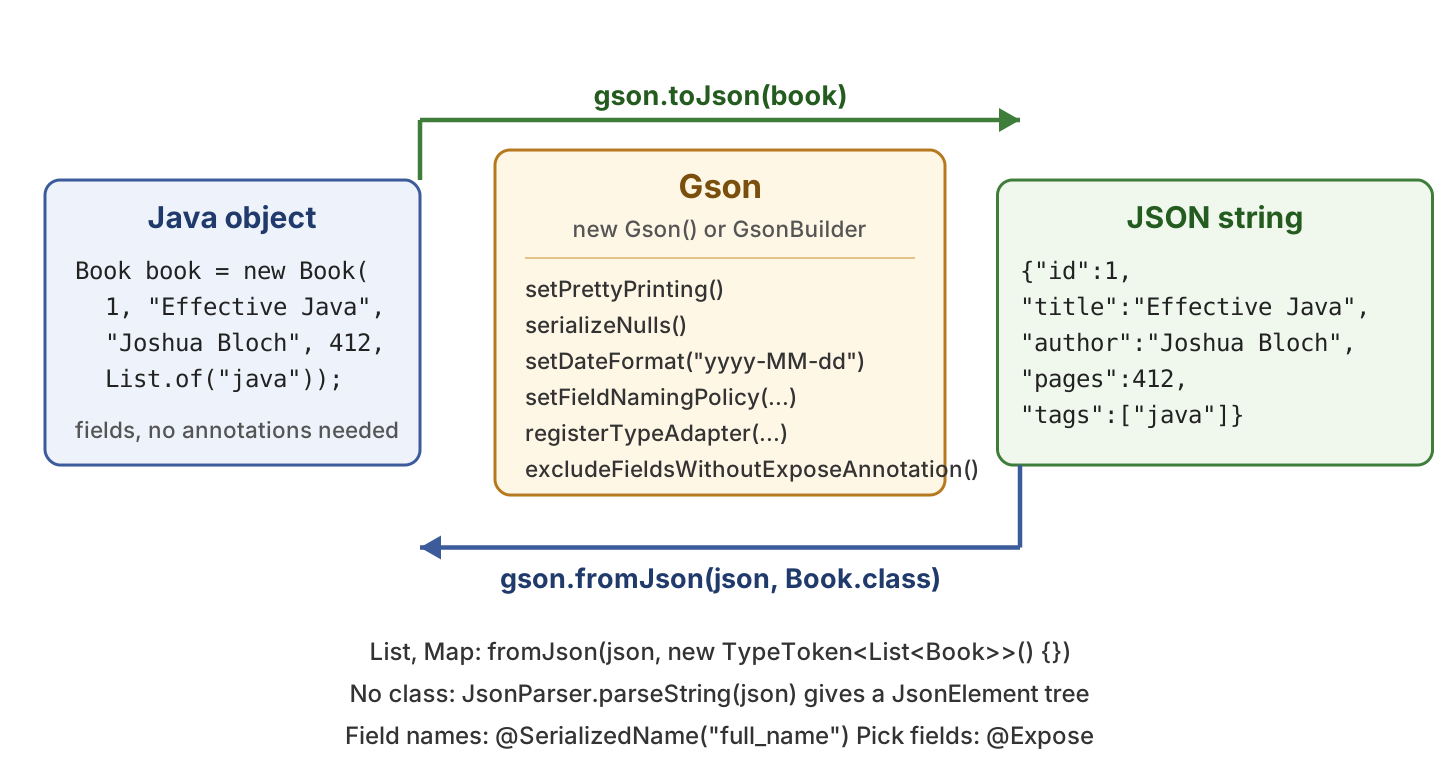
Gson is Google’s Java library that converts a Java object to a JSON string with toJson() and a JSON string back to a Java object with fromJson(). Gson finds the fields of our class on its own (through reflection), so a plain class with no annotations is enough to get started.
We use Gson when our app calls a REST API, stores settings as JSON, or reads a JSON file from disk. Gson is also the JSON library that Android apps have used for years.
The following example writes a Book object as JSON and reads it back with Gson 2.14.0. The last three lines show the two things that come up right after that, a list and a differently formatted output.
Gson gson = new Gson();

Book book = new Book(1, "Effective Java", "Joshua Bloch", 412, List.of("java", "design"));
String json = gson.toJson(book);
// {"id":1,"title":"Effective Java","author":"Joshua Bloch","pages":412,"tags":["java","design"]}

Book parsed = gson.fromJson(json, Book.class);
String title = parsed.getTitle();                 // Effective Java
boolean same = book.equals(parsed);               // true

String listJson = gson.toJson(List.of(book));                                  // [{"id":1,"title":"Effective Java",...}]
List<Book> books = gson.fromJson(listJson, new TypeToken<List<Book>>() {});   // books.get(0).getTitle() = Effective Java
Gson pretty = new GsonBuilder().setPrettyPrinting().serializeNulls().create(); // indented JSON that keeps null fields
Notice that the Book class has no annotations and no Gson code in it. The sections below cover lists and maps, the GsonBuilder options, the @SerializedName and @Expose annotations, reading JSON without a class with JsonParser, a custom TypeAdapter and a short comparison with Jackson.
1. Gson Maven Dependency
Gson is a single jar with no other dependencies. Gson 2.12.0 and newer need Java 8 or newer, and the examples in this article run on Java 25. The current version is on Maven Central.
<dependency>
    <groupId>com.google.code.gson</groupId>
    <artifactId>gson</artifactId>
    <version>2.14.0</version>
</dependency>
The Gradle dependency is one line.
dependencies {
  implementation 'com.google.code.gson:gson:2.14.0'
}
2. Creating the Gson Instance
A Gson object does all the reading and writing, and we create it once and reuse it. The Gson instance does not keep any state while it works, so it is thread-safe and one shared instance serves the whole app.
2.1. Using the Default Constructor
The simplest way to get a Gson instance is to call its empty constructor. It creates a Gson instance with the following default configuration.
- Generates compact JSON by removing all the unneeded whitespace.
- Omits all the fields that are null. The nulls in arrays and lists are kept as is.
- Writes a java.util.Date in the default format of the JVM locale, which ignores the milliseconds.
- Excludes transient and static fields from serialization and deserialization.
- Ignores the @Expose and @Since annotations.
Gson gson = new Gson();2.2. Using GsonBuilder
To override the default configuration, we use the GsonBuilder class. After calling its constructor, we call its configuration methods and finally call create() to get the Gson instance. Section 4 shows what each of the common options does.
Gson gson = new GsonBuilder()
    .setPrettyPrinting()
    .serializeNulls()
    .setDateFormat("yyyy-MM-dd")
    .setFieldNamingPolicy(FieldNamingPolicy.LOWER_CASE_WITH_UNDERSCORES)
    .create();
The GsonBuilder has many more options, such as registerTypeAdapter() for custom types, setVersion() for field versioning with @Since and excludeFieldsWithoutExposeAnnotation(). The GsonBuilder configuration guide lists all of them.
3. Read and Write JSON with Gson
Gson maps a Java class to a JSON object by its fields. Each field name becomes a JSON key, and the field value becomes a JSON string, number, boolean, array or nested object. Getters and setters play no part, and the class needs no annotation. We only need a class whose fields match the JSON keys.
The following example is a Book class for a small library catalog. It has an int, two String fields, another int and a List of tags, plus a no-args constructor and the usual getters and setters.
public class Book {

  private int id;
  private String title;
  private String author;
  private int pages;
  private List<String> tags;

  public Book() {
  }

  // all-args constructor, getters, setters, equals(), hashCode() and toString()
}
3.1. Convert Java Object to JSON String
To convert a Java object to a JSON string, we call toJson() on the Gson instance and pass the object. Gson writes the fields in declaration order and skips the fields that are null.
Gson gson = new Gson();

Book book = new Book(1, "Effective Java", "Joshua Bloch", 412, List.of("java", "design"));
String json = gson.toJson(book);
// {"id":1,"title":"Effective Java","author":"Joshua Bloch","pages":412,"tags":["java","design"]}
3.2. Convert JSON String to Java Object
To convert the JSON string to a Java object, we call fromJson() with the string and the target class. Gson creates a new Book, fills every field whose name matches a JSON key and returns it.
Book parsed = gson.fromJson(json, Book.class);
// Book[id=1, title=Effective Java, author=Joshua Bloch, pages=412, tags=[java, design]]

String title = parsed.getTitle();       // Effective Java
boolean same = book.equals(parsed);     // true
JSON from a real API rarely matches our class one to one, and Gson is relaxed about that. A key that is missing from the JSON leaves the field at its default value, and a key that has no matching field is ignored. Only broken JSON throws an exception. It is a JsonSyntaxException, and its message names the line, column and path of the problem.
Book partial = gson.fromJson("{\"id\":2,\"title\":\"Clean Code\"}", Book.class);
// Book[id=2, title=Clean Code, author=null, pages=0, tags=null]

Book extra = gson.fromJson("{\"id\":3,\"title\":\"Refactoring\",\"isbn\":\"0134757599\"}", Book.class);
// Book[id=3, title=Refactoring, author=null, pages=0, tags=null]

try {
  Book bad = gson.fromJson("{\"id\":4,\"title\":", Book.class);
} catch (JsonSyntaxException e) {
  String reason = e.getMessage();   // java.io.EOFException: End of input at line 1 column 17 path $.title
}
3.3. Lists, Arrays and Maps with TypeToken
Writing a List or a Map works like writing a single object. A List becomes a JSON array, and a Map becomes a JSON object whose keys are the map keys.
List<Book> books = List.of(first, second);
String listJson = gson.toJson(books);
// [{"id":1,"title":"Effective Java",...},{"id":2,"title":"Clean Code",...}]

Map<String, Integer> stock = new LinkedHashMap<>();
stock.put("Effective Java", 5);
stock.put("Clean Code", 3);
String mapJson = gson.toJson(stock);
// {"Effective Java":5,"Clean Code":3}
Reading them back needs one more step. At runtime, Java forgets the element type of a List, so List.class does not tell Gson that the elements are Book objects. We pass a TypeToken instead. The odd-looking new TypeToken<List<Book>>() {} creates a small subclass, and a subclass remembers the full generic type, so Gson can read it. An array keeps its element type, so Book[].class is enough for arrays.
List<Book> parsedBooks = gson.fromJson(listJson, new TypeToken<List<Book>>() {});
String second = parsedBooks.get(1).getTitle();                 // Clean Code

Book[] bookArray = gson.fromJson(listJson, Book[].class);
int count = bookArray.length;                                  // 2

Map<String, Integer> parsedStock = gson.fromJson(mapJson, new TypeToken<Map<String, Integer>>() {});
Integer left = parsedStock.get("Clean Code");                  // 3

List<?> untyped = gson.fromJson(listJson, List.class);
String type = untyped.get(0).getClass().getSimpleName();      // LinkedTreeMap, not Book
The last line shows what happens without a TypeToken. Gson has no element type, so it fills the list with its own LinkedTreeMap objects, and the first cast to Book throws a ClassCastException. The separate guides on JSON arrays, maps and sets go deeper into each collection type.
4. GsonBuilder Options
The default Gson writes compact JSON, drops nulls and uses the field names as they are. Most apps change at least one of these, for example to log readable JSON or to match the snake_case keys of an API. We set each option once on the GsonBuilder, and the Gson instance it creates applies the option to every call.
| Option | GsonBuilder call | Effect on the output |
|---|---|---|
| Pretty printing | setPrettyPrinting() | Indents the JSON with two spaces and one key per line |
| Null fields | serializeNulls() | Writes “author”:null instead of skipping the field |
| Date format | setDateFormat(“yyyy-MM-dd”) | Writes a java.util.Date with the given pattern |
| Field naming | setFieldNamingPolicy(LOWER_CASE_WITH_UNDERSCORES) | Writes bookTitle as book_title |
| Custom type | registerTypeAdapter(Type, adapter) | Uses our code for one type, see section 7 |
| Only marked fields | excludeFieldsWithoutExposeAnnotation() | Writes only the fields with @Expose |
4.1. Pretty Printing
Compact JSON is the right choice for an API response, but it is hard to read in a log or a test failure. The setPrettyPrinting() option writes one key per line with two spaces of indentation. The pretty print guide shows how to change the indent as well.
Gson pretty = new GsonBuilder().setPrettyPrinting().create();
String prettyJson = pretty.toJson(book);
{
"id": 1,
"title": "Effective Java",
"author": "Joshua Bloch",
"pages": 412,
"tags": [
"java",
"design"
]
}4.2. Serializing Null Fields
By default, Gson skips a field whose value is null, so the key does not appear in the JSON at all. Some APIs treat a missing key and a null value differently, and for them we turn on serializeNulls(). Reading is not affected, because a null in the JSON always sets the field to null.
Book noAuthor = new Book(2, "Clean Code", null, 464, null);

String withoutNulls = new Gson().toJson(noAuthor);
// {"id":2,"title":"Clean Code","pages":464}

String withNulls = new GsonBuilder().serializeNulls().create().toJson(noAuthor);
// {"id":2,"title":"Clean Code","author":null,"pages":464,"tags":null}
4.3. Date Format
Gson writes a java.util.Date with the default DateFormat of the JVM locale, which gives text such as Jan 1, 2025, 12:00:00 AM and changes from machine to machine. The setDateFormat() option takes a SimpleDateFormat pattern and uses it for writing and for reading, so both sides of an API agree on the format.
Date added = new Date(1735689600000L);                        // 2025-01-01T00:00:00Z
LibraryEntry entry = new LibraryEntry("Effective Java", added);

Gson dated = new GsonBuilder().setDateFormat("yyyy-MM-dd").create();
String datedJson = dated.toJson(entry);
// {"bookTitle":"Effective Java","addedOn":"2025-01-01"}
The option covers only java.util.Date and its subclasses. For LocalDate and the other java.time classes we register a type adapter, as shown in section 7.
4.4. Field Naming Policy
Java fields use camelCase, whereas many JSON APIs use snake_case keys. A FieldNamingPolicy renames all fields together, in both directions. The policy LOWER_CASE_WITH_UNDERSCORES is the one we need for snake_case, and UPPER_CAMEL_CASE or LOWER_CASE_WITH_DASHES cover the other common styles.
Gson snake = new GsonBuilder()
    .setFieldNamingPolicy(FieldNamingPolicy.LOWER_CASE_WITH_UNDERSCORES)
    .create();
String snakeJson = snake.toJson(entry);
// {"book_title":"Effective Java","added_on":"Jan 1, 2025, 12:00:00 AM"}
To rename a single field instead of all of them, we use @SerializedName, which comes next.
5. @SerializedName and @Expose Annotations
Gson needs no annotations for the normal case. It offers a few for the cases where a JSON key must have a different name than the field, or where only some of the fields belong in the JSON. The two we use most are @SerializedName to rename a field and @Expose to pick the fields that take part.
The following example is a Member class of the library with a field fullName that the API calls full_name, and a password that must never reach the JSON.
public class Member {

  @Expose
  private int id;

  @Expose
  @SerializedName(value = "full_name", alternate = {"name", "fullname"})
  private String fullName;

  private String email;

  private transient String password;
}
5.1. Renaming a Field with @SerializedName
The @SerializedName annotation sets the JSON key for one field. The value is the name Gson writes, and the optional alternate names are extra keys that Gson accepts when reading, which helps when an API renames a key between versions.
Member member = new Member(7, "Lokesh", "lokesh@example.com", "secret");
String json = new Gson().toJson(member);
// {"id":7,"full_name":"Lokesh","email":"lokesh@example.com"}

Member fromMain = new Gson().fromJson("{\"id\":8,\"full_name\":\"Alex\"}", Member.class);
String name1 = fromMain.getFullName();        // Alex

Member fromAlternate = new Gson().fromJson("{\"id\":9,\"name\":\"Maria\"}", Member.class);
String name2 = fromAlternate.getFullName();   // Maria
Notice that the password field is not in the JSON, with or without annotations. Gson never reads or writes a transient field, which is the simplest way to exclude a field.
5.2. Picking Fields with @Expose
The @Expose annotation marks the fields that Gson may use. It does nothing on its own, because the default Gson ignores it. We turn it on with excludeFieldsWithoutExposeAnnotation(), and after that every field without the annotation is left out of both reading and writing.
Gson exposeOnly = new GsonBuilder().excludeFieldsWithoutExposeAnnotation().create();
String exposedJson = exposeOnly.toJson(member);
// {"id":7,"full_name":"Lokesh"}
The email field is gone because it has no @Expose. Use @Expose when a class has many fields and only a few belong in the JSON, and use transient when only one or two fields must stay out.
6. JsonParser and the JsonElement Tree Model
Sometimes we do not want a Java class for the JSON. The response may have fifty keys and we need two, or its shape changes from call to call. For these cases, JsonParser turns the JSON text into a tree of JsonElement objects, and we read the values we need by key. Gson calls this the tree model.
A JsonElement is one of four things, and each has methods to get the value in the right Java type.
| Class | JSON value | Typical calls |
|---|---|---|
| JsonObject | { … } | get(“key”), getAsJsonObject(“key”), has(“key”), addProperty(), remove() |
| JsonArray | [ … ] | get(0), size(), add(), iteration with for-each |
| JsonPrimitive | string, number, boolean | getAsString(), getAsInt(), getAsBoolean() |
| JsonNull | null | isJsonNull() |
The following example is a book response with a nested publisher object, a tags array and a null value. The static method JsonParser.parseString() returns the root element, and getAsJsonObject() gives us the JsonObject we can query.
String json = """
    {
      "id": 1,
      "title": "Effective Java",
      "author": "Joshua Bloch",
      "publisher": {"name": "Addison-Wesley", "country": "USA"},
      "tags": ["java", "design"],
      "ebook": null
    }
    """;

JsonElement root = JsonParser.parseString(json);
JsonObject book = root.getAsJsonObject();

int id = book.get("id").getAsInt();                                     // 1
String title = book.get("title").getAsString();                         // Effective Java
String publisher = book.getAsJsonObject("publisher").get("name").getAsString();   // Addison-Wesley
JsonArray tags = book.getAsJsonArray("tags");
String firstTag = tags.get(0).getAsString();                            // java
int tagCount = tags.size();                                             // 2
boolean hasIsbn = book.has("isbn");                                     // false
boolean ebookIsNull = book.get("ebook").isJsonNull();                   // true
JsonElement missing = book.get("isbn");                                 // null
Notice the last line. A missing key returns a Java null, not a JsonNull, so we check has() before calling getAsInt() or getAsString() on a key that may be absent. A null value in the JSON is different. Gson returns a JsonNull object for it, and getAsString() on that object throws an UnsupportedOperationException.
We can also change the tree. We add a key with addProperty(), remove one with remove() and write the tree back with toJson(). We can build a JsonObject from scratch too, and convert between a tree and a Java object with fromJson() and toJsonTree().
book.addProperty("pages", 412);
book.remove("ebook");
tags.add("bestseller");
String changed = new Gson().toJson(book);
// {"id":1,"title":"Effective Java","author":"Joshua Bloch","publisher":{...},"tags":["java","design","bestseller"],"pages":412}

JsonObject note = new JsonObject();
note.addProperty("bookId", 1);
note.addProperty("text", "Great chapter on generics");
String noteJson = note.toString();                   // {"bookId":1,"text":"Great chapter on generics"}

Book asBook = new Gson().fromJson(book, Book.class);
int pages = asBook.getPages();                       // 412
JsonElement tree = new Gson().toJsonTree(asBook);
The JsonParser guide covers the tree model in more detail. For a JSON file that is too big to hold in memory, Gson has a streaming JsonReader that reads one token at a time.
7. Custom TypeAdapter
Gson has built-in support for primitives, strings, enums, collections, maps and java.util.Date, and it reads every other class by its fields. When the JSON we want does not match the fields of a class, we write a TypeAdapter for that class. It has two methods, write() for object to JSON and read() for JSON to object. We register it on the GsonBuilder for one type.
A common case is LocalDate. Gson 2.14 writes it as a JSON object with year, month and day fields, whereas most APIs expect one string such as 06/10/2026. Older Gson versions fail on java.time classes with an InaccessibleObjectException. The same adapter fixes both problems.
public class LocalDateAdapter extends TypeAdapter<LocalDate> {

  private static final DateTimeFormatter FORMAT = DateTimeFormatter.ofPattern("dd/MM/yyyy");

  @Override
  public void write(JsonWriter out, LocalDate value) throws IOException {
    if (value == null) {
      out.nullValue();
      return;
    }
    out.value(FORMAT.format(value));
  }

  @Override
  public LocalDate read(JsonReader in) throws IOException {
    if (in.peek() == JsonToken.NULL) {
      in.nextNull();
      return null;
    }
    return LocalDate.parse(in.nextString(), FORMAT);
  }
}
Both methods handle JSON null themselves, because Gson calls the adapter for null values as well. We register the adapter with registerTypeAdapter() and use the Gson instance as before.
Loan loan = new Loan(1, "Effective Java", LocalDate.of(2026, 10, 6));

String defaultJson = new Gson().toJson(loan);
// {"bookId":1,"title":"Effective Java","dueOn":{"year":2026,"month":10,"day":6}}

Gson gson = new GsonBuilder()
    .registerTypeAdapter(LocalDate.class, new LocalDateAdapter())
    .create();
String json = gson.toJson(loan);
// {"bookId":1,"title":"Effective Java","dueOn":"06/10/2026"}

Loan parsed = gson.fromJson(json, Loan.class);
LocalDate dueOn = parsed.getDueOn();                 // 2026-10-06
Gson also accepts a pair of JsonSerializer and JsonDeserializer classes in registerTypeAdapter(). They build a JsonElement tree first instead of writing the JSON text as they go, which is less code for nested objects but slower. The custom serialization guide shows both styles side by side.
8. Gson vs Jackson
Jackson is the other JSON library most Java developers meet, because Spring Boot uses it by default. Jackson is faster on large payloads and has many more annotations and modules, for example for XML, YAML and java.time. Gson is a single small jar with a simpler API, and it needs no annotations or getters. For a Spring Boot REST API we stay with Jackson, or we configure Gson with Spring Boot when the rest of the code already depends on it. For a command-line tool, a config file or an Android app, Gson is the lighter choice.
9. Gson FAQs
The questions below come up in almost every project that adds Gson, and most of them are about how Gson creates the Java objects it fills.
9.1. Does Gson Need a No-args Constructor?
No. Gson uses the no-args constructor when the class has one. Otherwise it creates the object without calling any constructor, so field initializers and constructor code are skipped. So a field that gets its default value in the constructor stays null or 0 when the key is missing from the JSON. If we need a real constructor call, we register an InstanceCreator for the class with registerTypeAdapter(). Gson calls our createInstance() method and fills the fields afterwards.
9.2. Does Gson Support Java Records?
Yes. Since Gson 2.10, a record is written from its components and read through its canonical constructor (the one that takes all components), so any checks in that constructor run. The component names are the JSON keys, and @SerializedName on a component works the same way as on a field.
record Author(String name, String country) {}

String json = new Gson().toJson(new Author("Joshua Bloch", "USA"));
// {"name":"Joshua Bloch","country":"USA"}

Author author = new Gson().fromJson("{\"name\":\"Robert Martin\",\"country\":\"USA\"}", Author.class);
// Author[name=Robert Martin, country=USA]
9.3. Why Does fromJson() Return a LinkedTreeMap Instead of My Class?
Because the target type did not name the class. A call such as fromJson(json, List.class) or fromJson(json, Object.class) gives Gson no element type, so it builds a LinkedTreeMap for each JSON object. Pass the class, an array class such as Book[].class, or a TypeToken with the full generic type, as shown in section 3.3.
9.4. Which Gson Version Should We Use?
Use the latest release, which is 2.14.0 at the time of writing. Gson 2.12.0 and newer need Java 8, and 2.10 added record support, so any project on Java 17 or newer can take the current version without changes.
10. Conclusion
Gson converts Java objects to JSON with toJson() and back with fromJson(), and a plain class with matching field names is all it needs. For a List or a Map we pass a TypeToken so Gson knows the element type.
The GsonBuilder changes the output for the whole app, with pretty printing, null fields, a date format and a field naming policy as the options we set most. The @SerializedName and @Expose annotations adjust single fields, the JsonParser tree model reads JSON without a class, and a TypeAdapter handles any type whose fields are not the JSON we want.
11. References
Happy Learning !!
