
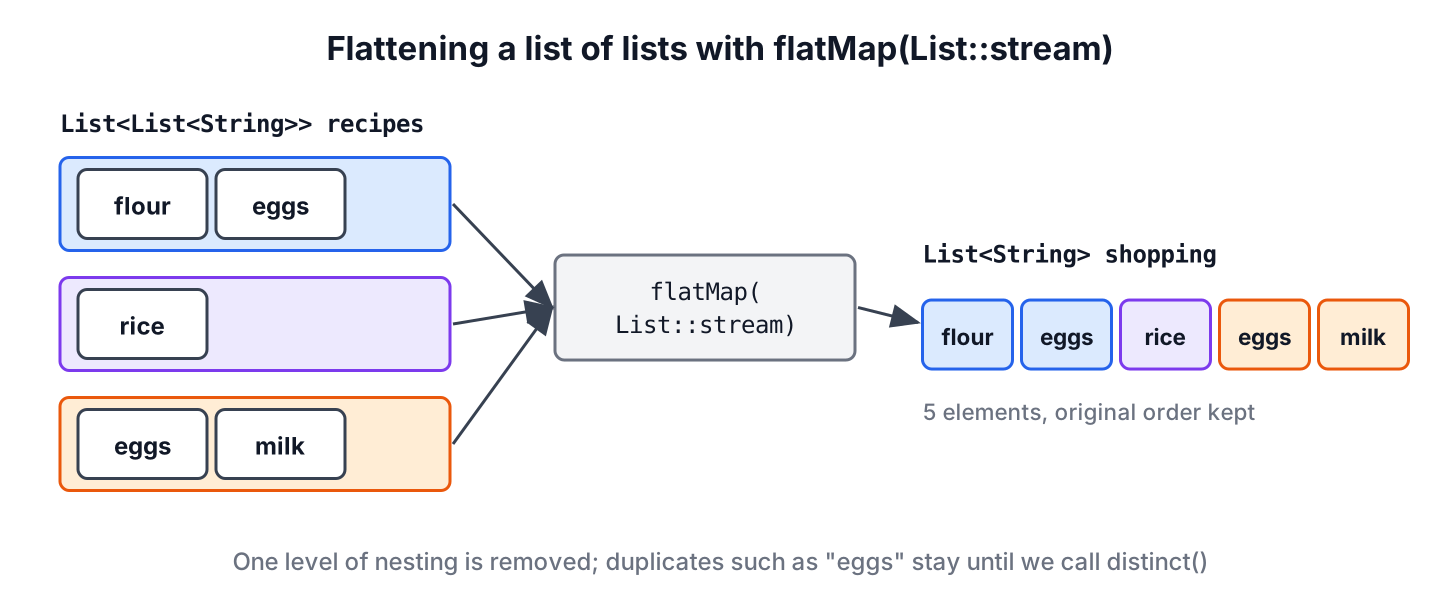
Flattening a list of lists in Java means streaming the outer list and calling flatMap(List::stream), which replaces every inner list with its elements and returns one flat List. We flatten a list of lists to turn a List<List<T>> into a List<T>, and the elements keep their original order.
We need flattening whenever data arrives grouped but we want to process it as one sequence, for example the order lines of several orders, the tags of several blog posts or the results of several paged API calls.
The following example flattens the ingredients of three recipes into one shopping list.
List<List<String>> recipes = List.of(
        List.of("flour", "eggs"),
        List.of("rice"),
        List.of("eggs", "milk"));
List<String> shopping = recipes.stream().flatMap(List::stream).toList();    // [flour, eggs, rice, eggs, milk]
The ingredient “eggs” appears twice, because flattening keeps every element. We cover the stream solution in detail, the loop with addAll(), mapMulti(), deeply nested lists, null inner lists and the Guava and Eclipse Collections helpers.
1. What Flattening a Nested List Means
A nested list is a list whose elements are lists. Flattening removes one level of nesting, so the result holds the elements of the inner lists instead of the inner lists themselves. The first inner list comes first, and inside each inner list the order stays the same.
A shopping app shows this problem clearly. The user picks three recipes for the week, and each recipe stores its ingredients as a separate list. The checkout screen needs one list to remove duplicates, sort and count, so the app flattens the recipes first.
2. Flatten a List of Lists with Stream.flatMap()
The method flatMap() takes a function that turns each element into a stream and joins all those streams into one. With List::stream as the function, each inner list becomes a stream of its elements. The plain map() method would give us a Stream<Stream<String>> instead, as we explain in map() vs flatMap().
List<List<String>> recipes = List.of(List.of("flour", "eggs"), List.of("rice"), List.of("eggs", "milk"));
List<String> all = recipes.stream().flatMap(List::stream).toList();                       // [flour, eggs, rice, eggs, milk]
List<String> unique = recipes.stream().flatMap(List::stream).distinct().sorted().toList(); // [eggs, flour, milk, rice]
long count = recipes.stream().mapToLong(List::size).sum();                                 // 5
The method toList() returns an unmodifiable list since Java 16. When the app must add items to the shopping list later, we collect into an ArrayList instead.
List<List<String>> recipes = List.of(List.of("flour", "eggs"), List.of("rice"));
List<String> editable = recipes.stream()
        .flatMap(List::stream)
        .collect(Collectors.toCollection(ArrayList::new));
editable.add("salt");                                    // editable = [flour, eggs, rice, salt]
The same pattern flattens other shapes. For a list of arrays, we pass Arrays::stream, and for a list of sets, Set::stream. More variants are in the flatMap() examples.
3. Flatten with a Loop and addAll()
A loop that calls addAll() on a new ArrayList produces the same result without streams. It returns a modifiable list, and we can presize the list so it never grows while we add elements.
List<List<String>> recipes = List.of(List.of("flour", "eggs"), List.of("rice"), List.of("eggs", "milk"));
int total = recipes.stream().mapToInt(List::size).sum();     // 5
List<String> flat = new ArrayList<>(total);
recipes.forEach(flat::addAll);                               // flat = [flour, eggs, rice, eggs, milk]
The loop is a good fit when the code already uses loops, or when we need to stop early or handle each inner list differently. Neither version is faster in a way that matters for typical list sizes, so we pick the one that reads better in the surrounding code.
4. Flatten and Filter with mapMulti()
Java 16 added mapMulti(), which passes each element to a consumer called sink any number of times. It avoids creating a new stream for every inner list, so it fits well when we flatten and filter in the same step.
List<List<String>> recipes = List.of(List.of("flour", "water"), List.of("rice", "water"), List.of("milk"));
List<String> toBuy = recipes.stream()
        .<String>mapMulti((recipe, sink) -> {
            for (String item : recipe) {
                if (!item.equals("water")) {
                    sink.accept(item);
                }
            }
        })
        .toList();
String result = toBuy.toString();                          // "[flour, rice, milk]"
We write the type witness <String> before mapMulti, because the compiler cannot infer the element type of the new stream from the lambda alone.
5. Why reduce() Is the Wrong Tool for Flattening
Some tutorials flatten with reduce() and an empty ArrayList as the identity value. The reduce() method expects an identity that never changes, but this code adds to the same list on every step. The result is correct on a sequential stream and wrong or broken on a parallel stream, where several threads share that one list.
// avoid: mutates the identity value of reduce()
List<List<String>> recipes = List.of(List.of("flour", "eggs"), List.of("rice"));
List<String> risky = recipes.stream().reduce(new ArrayList<>(), (acc, recipe) -> {
    acc.addAll(recipe);
    return acc;
});
Building a collection is a mutable reduction, and the stream API has collect() for it. The three-argument version creates a separate list for each thread and merges the lists at the end.
List<List<String>> recipes = List.of(List.of("flour", "eggs"), List.of("rice"));
ArrayList<String> merged = recipes.stream().collect(ArrayList::new, ArrayList::addAll, ArrayList::addAll);    // [flour, eggs, rice]
In practice, flatMap() is shorter than both, so we use the collect() form only when we want to see each step written out.
6. Flatten Deeply Nested Lists
The method flatMap() removes one level of nesting and no more. For lists nested to any depth, or lists that mix single values with sublists, we write a small recursive method. It uses pattern matching for instanceof to check whether an element is itself a list.
static Stream<Object> flatten(Object item) {
    return item instanceof List<?> list
            ? list.stream().flatMap(element -> flatten(element))
            : Stream.of(item);
}
List<Object> nested = List.of(1, List.of(2, List.of(3, 4)), 5);
List<Object> deep = flatten(nested).toList(); // [1, 2, 3, 4, 5]
List<Object> mixed = flatten(List.of("a", List.of("b"), "c")).toList(); // [a, b, c]The result type is List<Object>, because a mixed structure has no common element type that the compiler can check. When every leaf has the same type, we keep the data as List<List<T>> and use the one-level flatMap() instead.
7. Null Inner Lists and Map Values
A null inner list makes List::stream throw NullPointerException. Data from JSON or a database can contain such gaps, so we filter them out before flattening.
List<List<String>> withGaps = Arrays.asList(List.of("flour"), null, List.of("milk"));
List<String> safe = withGaps.stream().filter(Objects::nonNull).flatMap(List::stream).toList();    // [flour, milk]
List<String> broken = withGaps.stream().flatMap(List::stream).toList();                           // NullPointerException
The values of a Map<K, List<V>> are a collection of lists too, so we flatten them the same way, for example to collect the unique tags of all blog posts.
Map<String, List<String>> tagsByPost = new LinkedHashMap<>();
tagsByPost.put("intro", List.of("java", "lists"));
tagsByPost.put("streams", List.of("java", "streams"));
List<String> allTags = tagsByPost.values().stream().flatMap(List::stream).distinct().toList();    // [java, lists, streams]
8. Flatten Nested Lists with Guava and Eclipse Collections
Projects that already use Guava or Eclipse Collections can flatten with one call from those libraries. Neither library is worth adding only for flattening, because flatMap() does the same job.
In Guava, Iterables.concat() returns a lazy Iterable view over all inner lists, and Lists.newArrayList() copies that view into a new list.
<dependency>
    <groupId>com.google.guava</groupId>
    <artifactId>guava</artifactId>
    <version>33.7.2-jre</version>
</dependency>
List<List<String>> recipes = List.of(List.of("flour", "eggs"), List.of("rice"));
Iterable<String> view = Iterables.concat(recipes);
List<String> guavaList = Lists.newArrayList(view); // [flour, eggs, rice]In Eclipse Collections, ListAdapter.adapt() wraps a JDK list as a MutableList, and flatCollect() flattens it.
<dependency>
    <groupId>org.eclipse.collections</groupId>
    <artifactId>eclipse-collections</artifactId>
    <version>13.0.0</version>
</dependency>
List<List<String>> recipes = List.of(List.of("flour", "eggs"), List.of("rice"));
MutableList<String> ecList = ListAdapter.adapt(recipes).flatCollect(recipe -> recipe); // [flour, eggs, rice]9. Flattening Nested Lists FAQs
The answers cover the follow-up questions that appear next to flattening in search results.
9.1. What is the difference between map() and flatMap()?
The method map() turns each element into one new element, so mapping inner lists to streams gives a stream of streams. The method flatMap() turns each element into a stream and joins those streams, which removes one level of nesting.
9.2. Does flatMap() keep the order of elements?
Yes, for ordered sources such as List. The elements of the first inner list come first, in their original order, followed by the elements of the second inner list, and so on.
9.3. How do we flatten a list of lists into an int array?
We flatten to a stream of Integer and convert it with mapToInt().
List<List<Integer>> rows = List.of(List.of(1, 2), List.of(3));
int[] numbers = rows.stream().flatMap(List::stream).mapToInt(Integer::intValue).toArray();    // [1, 2, 3]
9.4. Is the flattened list modifiable?
The answer depends on the terminal operation. The method toList() returns an unmodifiable list, whereas Collectors.toCollection(ArrayList::new) and the addAll() loop return an ArrayList that we can change.
9.5. How do we flatten a list of lists without duplicates?
We add distinct() after flatMap(), or collect into a LinkedHashSet to keep the first occurrence of each element in order. More options are in removing duplicates from a list.
10. Conclusion
Flattening a list of lists in Java takes one line with stream().flatMap(List::stream).toList(). For a modifiable result, we collect into an ArrayList or use a loop with addAll(), and for flattening combined with filtering, mapMulti() avoids creating a stream per inner list.
The method flatMap() removes one level only, so deeper or mixed structures need a short recursive method. We filter out null inner lists first, and we use collect() instead of reduce() whenever we build a collection from a stream.
11. References
- Stream.flatMap() Javadoc
- Stream.mapMulti() Javadoc
- java.util.stream, Mutable Reduction
- Guava Iterables Javadoc
- Eclipse Collections
Happy Learning !!
