
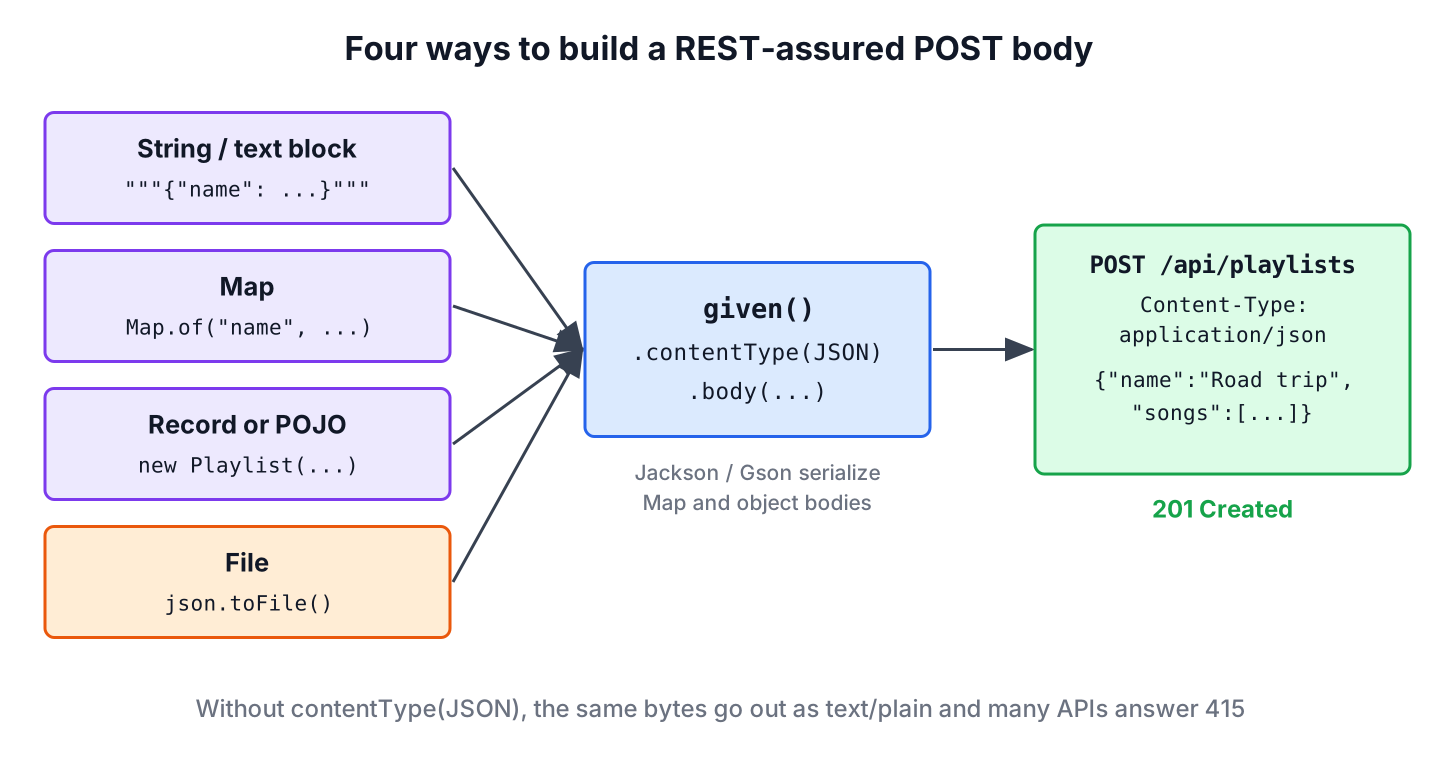
To send a REST-assured POST request, we set the content type and the body in given(), call post(path) in when(), and check the status code and the response body in then(). A PUT request works the same way with put(path), and its body carries the full new state of the resource.
We write these tests for every API endpoint that creates or changes data, such as a sign-up form, a checkout or an admin screen that edits records. They prove that the server accepts the body our clients send and answers with the right status, headers and data.
The following example creates a playlist with a JSON body and checks the response of the playlist API.
@Test
void createsPlaylist() {
    given()
        .contentType(ContentType.JSON)                       // Content-Type: application/json
        .body("""
              {"name": "Road trip", "songs": ["Hey Jude", "Africa"]}
              """)
    .when()
        .post("/playlists")                                  // POST /api/playlists
    .then()
        .statusCode(201)                                     // passes, 201 Created
        .header("Location", endsWith("/playlists/7"))        // passes, the new URL
        .body("id", equalTo(7))                              // passes, generated id
        .body("songs", hasSize(2));                          // passes, both songs saved
}
Notice the call to contentType(ContentType.JSON). Without it, REST-assured sends the JSON as text/plain, and many APIs reject the request with 415 Unsupported Media Type. The rest of the guide goes through the ways to build the request body, PUT and PATCH requests, headers, authentication and response checks.
1. A Simple REST-assured POST Request
The tests need an API that accepts a playlist. Instead of a public demo service, a WireMock stub plays the playlist API on a random local port, so the examples run offline and give the same result on every run. The stub accepts a playlist only when the body has a name and at least one song, which is the same contract a real server would enforce.
class PlaylistApiStubs {

    static void register() {
        String saved = "{\"id\":7,\"name\":\"Road trip\",\"songs\":[\"Hey Jude\",\"Africa\"]}";
        WireMock.stubFor(WireMock.post(WireMock.urlPathEqualTo("/api/playlists"))
                .withHeader("Content-Type", WireMock.containing("application/json"))
                .withRequestBody(WireMock.matchingJsonPath("$.name", WireMock.equalTo("Road trip")))
                .withRequestBody(WireMock.matchingJsonPath("$.songs[0]"))
                .willReturn(WireMock.jsonResponse(saved, 201).withHeader("Location", "/api/playlists/7")));
        WireMock.stubFor(WireMock.post(WireMock.urlPathEqualTo("/api/playlists"))
                .withRequestBody(WireMock.matchingJsonPath("$.name", WireMock.absent()))
                .willReturn(WireMock.jsonResponse("{\"error\":\"name is required\"}", 400)));
        WireMock.stubFor(WireMock.put("/api/playlists/7")
                .withRequestBody(WireMock.matchingJsonPath("$.songs[2]"))
                .willReturn(WireMock.okJson("{\"id\":7,\"name\":\"Road trip 2026\",\"songs\":[\"Hey Jude\",\"Africa\",\"Vienna\"]}")));
        WireMock.stubFor(WireMock.patch("/api/playlists/7")
                .withRequestBody(WireMock.equalToJson("{\"name\":\"Summer trip\"}"))
                .willReturn(WireMock.okJson("{\"id\":7,\"name\":\"Summer trip\",\"songs\":[\"Hey Jude\",\"Africa\"]}")));
        WireMock.stubFor(WireMock.post("/api/v2/playlists")
                .withRequestBody(WireMock.matchingJsonPath("$.duration_minutes"))
                .willReturn(WireMock.jsonResponse("{\"id\":8}", 201)));
        WireMock.stubFor(WireMock.post("/api/feedback")
                .withFormParam("rating", WireMock.equalTo("5"))
                .willReturn(WireMock.status(204)));
        WireMock.stubFor(WireMock.post("/api/private/playlists")
                .withHeader("Authorization", WireMock.equalTo("Bearer abc123"))
                .willReturn(WireMock.jsonResponse("{\"id\":9}", 201)));
    }
}
The POST stubs match the path with urlPathEqualTo(), so a query string such as ?notify=true does not stop the match. With @WireMockTest on the class, every test gets a fresh stub server, and RestAssured.port follows its random port. Each test method that follows belongs to PlaylistApiTest, which uses the same setup as the REST-assured tutorial.
@WireMockTest
class PlaylistApiTest {

    @BeforeEach
    void pointRestAssuredAtStub(WireMockRuntimeInfo wireMock) {
        RestAssured.port = wireMock.getHttpPort();
        RestAssured.basePath = "/api";
        PlaylistApiStubs.register();
    }

    @Test
    void rejectsPlaylistWithoutName() {
        given()
            .contentType(ContentType.JSON)
            .body("{\"songs\": [\"Africa\"]}")
        .when()
            .post("/playlists")
        .then()
            .statusCode(400)
            .body("error", equalTo("name is required"));
    }
}
The examples use REST-assured 6.1.0, JUnit 6.1.3, Jackson 3.2.3 (tools.jackson.core:jackson-databind) for Java objects, WireMock 3.13.2 and Java 25. REST-assured 6 needs Java 17 or later.
2. Attaching the POST Request Body
The body() method accepts a String, a Map, any Java object, a File, an InputStream or a byte[]. The choice depends on where the test data comes from, and each option has a cost.
| Body type | Good for | Watch out for |
|---|---|---|
| String or text block | Small fixed payloads, exact JSON shapes | Typos are only found at runtime |
| Map | Quick payloads built in the test | Needs a JSON library, no type checks |
| Java object (POJO or record) | Payloads that match the API model | Needs a JSON library, field names follow the mapper settings |
| File or InputStream | Large payloads kept as JSON files | Content type is not read from the file |
2.1. Using a String or a Text Block
A text block keeps the JSON readable without escaped quotes, as the intro example shows. The request carries the characters of the string unchanged, which makes this option good for testing how the server reacts to odd input, such as an unknown field or a wrong type.
Older tutorials build the string with JSONObject from the org.json library. REST-assured has no special support for JSONObject. It only sends the result of toString(), so the extra library brings nothing that a text block or a Map cannot do.
2.2. Using a Map
A Map becomes a JSON object, and nested maps and lists become nested objects and arrays. REST-assured serializes the map with the first JSON library it finds on the classpath.
@Test
void createsPlaylistFromMap() {
    Map<String, Object> playlist = Map.of(
            "name", "Road trip",
            "songs", List.of("Hey Jude", "Africa"));

    given()
        .contentType(ContentType.JSON)
        .body(playlist)
    .when()
        .post("/playlists")
    .then()
        .statusCode(201)
        .body("name", equalTo("Road trip"));
}
2.3. Using a Custom Object
A POJO or a record keeps the payload close to the API model, and the compiler catches a renamed field. When the content type is JSON, REST-assured looks for Jackson 3, Jackson 2, Gson, Johnzon and Yasson in that order and uses the first one it finds.
record Playlist(String name, List<String> songs) {}@Test
void createsPlaylistFromRecord() {
Playlist roadTrip = new Playlist("Road trip", List.of("Hey Jude", "Africa"));
given()
.contentType(ContentType.JSON)
.body(roadTrip)
.when()
.post("/playlists")
.then()
.statusCode(201)
.body("songs[1]", equalTo("Africa"));
}When the API uses another naming style, such as duration_minutes in snake case, we configure the mapper instead of renaming the Java fields. The ObjectMapperConfig takes a factory that builds the Jackson 3 JsonMapper, and config() applies it to one request.
record PlaylistV2(String name, int durationMinutes) {}@Test
void sendsSnakeCaseFields() {
RestAssuredConfig snakeCase = RestAssuredConfig.config().objectMapperConfig(
ObjectMapperConfig.objectMapperConfig().jackson3ObjectMapperFactory((type, charset) ->
JsonMapper.builder()
.propertyNamingStrategy(PropertyNamingStrategies.SNAKE_CASE)
.build()));
given()
.config(snakeCase)
.contentType(ContentType.JSON)
.body(new PlaylistV2("Road trip", 95)) // {"name":"Road trip","duration_minutes":95}
.when()
.post("/v2/playlists")
.then()
.statusCode(201);
}To pick a mapper for one call, pass the type as the second argument, for example body(roadTrip, ObjectMapperType.GSON). More options for Jackson and Gson are in their own guides.
2.4. Sending a File or an InputStream
Test teams often keep request payloads as JSON files next to the tests, so that testers can edit them without touching Java code. REST-assured streams the file content as the body, but it does not guess the content type from the file name, so we still set it.
@Test
void createsPlaylistFromFile(@TempDir Path dir) throws IOException {
    Path json = dir.resolve("road-trip.json");
    Files.writeString(json, """
            {"name": "Road trip", "songs": ["Hey Jude", "Africa"]}
            """);

    given()
        .contentType(ContentType.JSON)
        .body(json.toFile())
    .when()
        .post("/playlists")
    .then()
        .statusCode(201);
}
In a real project, the file sits in src/test/resources, and we load it with getClass().getResourceAsStream(“/requests/road-trip.json”), which works the same way inside a JAR. The JUnit @TempDir folder here only keeps the example self-contained.
2.5. Submitting Form Parameters
HTML forms and some older APIs expect application/x-www-form-urlencoded instead of JSON. The formParam() method sets that content type and encodes the fields for us.
@Test
void submitsFeedbackForm() {
    given()
        .formParam("rating", 5)
        .formParam("comment", "Great mix")
    .when()
        .post("/feedback")
    .then()
        .statusCode(204);
}
3. Sending PUT and PATCH Requests
PUT and PATCH both change an existing resource, but they mean different things. A PUT body is the complete new version, so most APIs reset or remove a field we leave out. A PATCH body contains only the fields to change.
| Method | Body contains | Repeating the same request | Typical success status |
|---|---|---|---|
| POST | A new resource without an id | Creates another resource each time | 201 Created with a Location header |
| PUT | The full resource | Gives the same result, because PUT is idempotent | 200 OK or 204 No Content |
| PATCH | Only the changed fields | Depends on the patch format | 200 OK or 204 No Content |
Say the playlist screen of a music app has a Save button that sends the whole playlist, and a separate Rename action that sends only the new name. The first maps to PUT and the second to PATCH, and a test for each one catches a server that clears the songs on rename.
@Test
void replacesAndRenamesPlaylist() {
    Playlist updated = new Playlist("Road trip 2026", List.of("Hey Jude", "Africa", "Vienna"));

    given()
        .contentType(ContentType.JSON)
        .body(updated)
    .when()
        .put("/playlists/{id}", 7)
    .then()
        .statusCode(200)
        .body("name", equalTo("Road trip 2026"))
        .body("songs", hasSize(3));

    given()
        .contentType(ContentType.JSON)
        .body(Map.of("name", "Summer trip"))
    .when()
        .patch("/playlists/{id}", 7)
    .then()
        .statusCode(200)
        .body("name", equalTo("Summer trip"))
        .body("songs", hasSize(2));
}
The path template /playlists/{id} with the value 7 works like pathParam(“id”, 7). Because PUT is idempotent, a client can repeat it after a timeout without creating a second playlist, which a repeated POST would do.
4. Adding Request Headers and Query Params
The contentType() method sets the type of the body we send, and accept() sets the type we want back. Other headers go through header(), and query parameters through queryParam().
@Test
void sendsHeadersAndQueryParams() {
    given()
        .contentType(ContentType.JSON)
        .accept(ContentType.JSON)
        .header("X-Request-Id", "test-42")
        .queryParam("notify", true)
        .body(new Playlist("Road trip", List.of("Hey Jude", "Africa")))
    .when()
        .post("/playlists")                               // POST /api/playlists?notify=true
    .then()
        .statusCode(201);
}
REST-assured adds charset=ISO-8859-1 to text content types that have no charset, such as text/plain and application/xml, while JSON goes out as UTF-8. For XML payloads with characters such as e with an accent, set the charset explicitly, as sending XML requests with REST-assured shows.
5. Sending Authentication
Most write endpoints need credentials. The auth() method covers basic authentication, digest, form login and bearer tokens.
@Test
void createsPrivatePlaylistWithToken() {
    given()
        .auth().oauth2("abc123")                          // Authorization: Bearer abc123
        .contentType(ContentType.JSON)
        .body(new Playlist("Focus", List.of("Clair de Lune")))
    .when()
        .post("/private/playlists")
    .then()
        .statusCode(201);
}
The method oauth2(token) only adds the bearer header and does not fetch a token. For basic authentication, use auth().preemptive().basic(user, password), which sends the credentials with the first request instead of waiting for a 401 challenge. A custom header, such as an API key, goes through header(“X-Api-Key”, key), and given().auth().none() removes credentials set in a shared specification when a test checks the unauthenticated case.
6. Validating the Response Status and Body
The then() part takes Hamcrest matchers for the status code, status line, headers, cookies, body and response time. Body paths are GPath expressions, so songs[0] reads the first array element and songs.size() the array length.
@Test
void validatesCreatedPlaylist() {
    given()
        .contentType(ContentType.JSON)
        .body(new Playlist("Road trip", List.of("Hey Jude", "Africa")))
    .when()
        .post("/playlists")
    .then()
        .statusCode(201)
        .statusLine(containsString("Created"))
        .contentType(ContentType.JSON)
        .header("Location", notNullValue())
        .body("id", greaterThan(0))
        .body("songs[0]", equalTo("Hey Jude"))
        .body("songs.size()", is(2))
        .time(lessThan(2000L));
}
The time() check uses milliseconds by default, and time(lessThan(2L), TimeUnit.SECONDS) uses another unit. The first request in a test run includes the client setup, so we keep the limit generous and leave real latency measurements to a load testing tool.
7. Logging and Extracting Response Data
Logging helps when a test fails on a build server, where we cannot attach a debugger. The log() method on given() logs the request, and on then() it logs the response. The variant ifValidationFails() logs only for failed tests, which keeps the build output short.
@Test
void extractsGeneratedId() {
    Response response = given()
            .log().ifValidationFails()
            .contentType(ContentType.JSON)
            .body(new Playlist("Road trip", List.of("Hey Jude", "Africa")))
        .when()
            .post("/playlists")
        .then()
            .log().ifValidationFails()
            .statusCode(201)
            .extract().response();

    int id = response.path("id");
    String location = response.header("Location");
    String json = response.asString();

    assertEquals(7, id);
    assertEquals("/api/playlists/7", location);
    assertTrue(json.contains("Road trip"));
}
A common pattern creates a resource with POST, extracts the id, and uses it in the next PUT or DELETE request of the same test. Other log variants are log().all(), log().body(), log().headers() and log().uri().
8. REST-assured POST and PUT FAQs
Tests that create or change data fail for a few recurring reasons, and they explain most questions about POST and PUT in REST-assured.
8.1. Why does the API return 415 Unsupported Media Type?
Because the request has the wrong Content-Type. Without contentType(), REST-assured sends a String, Map or object body as text/plain; charset=ISO-8859-1, and a JSON API rejects it. Add contentType(ContentType.JSON).
8.2. How do we send a JSON array as the body?
Pass a List, for example body(List.of(playlistA, playlistB)), or a text block that starts with [. REST-assured serializes the list into a JSON array with the same mapper it uses for objects.
8.3. How do we send a PATCH request in REST-assured?
Call patch(path) instead of put(path), with a body that contains only the changed fields, as in section 3. If the API uses the JSON Patch format, also set the content type to application/json-patch+json.
8.4. Can REST-assured upload a file with multipart/form-data?
Yes. The multiPart(“file”, file) method builds a multipart request and sets the content type to multipart/form-data. We can add text parts with multiPart(“title”, “Road trip”) in the same request.
8.5. How do we print the request body that REST-assured sent?
Add log().body() or log().all() to given(). The log shows the serialized JSON, which reveals mapper problems such as a null field or a wrong field name.
9. Conclusion
A REST-assured POST test sets the content type and the body in given(), calls post(), and checks the status, the Location header and the body. The body can be a text block, a Map, a record, a file or form fields, and the content type decides how the server reads it.
PUT sends the full resource and PATCH sends only the changes, so each one deserves its own test. With ifValidationFails() logging and extract() for generated ids, POST and PUT tests stay short, and a failure shows the full request and response.
10. References
- REST-assured Usage guide
- REST-assured RequestSpecification Javadoc
- RFC 9110, POST and PUT methods
- RFC 5789, PATCH Method for HTTP
Happy Learning !!
