
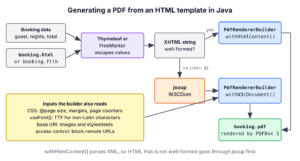
OpenHTMLtoPDF is a pure-Java renderer that turns HTML and CSS into PDF files, so to generate PDF from HTML template files in Java, we fill the template with data and pass the resulting HTML to its PdfRendererBuilder. It draws the pages with Apache PDFBox and needs no browser or external program.
We use it for documents that people download, print or receive by email, such as invoices, booking confirmations, reports and certificates. Designers can write the layout in HTML and CSS, and the Java code only fills in the data.
The following example converts an HTML string into booking.pdf with OpenHTMLtoPDF 1.1.97 on Java 25 and reads the text back with PDFBox to check the result.
String html = """
        <html><head><style>@page { size: A4; margin: 20mm; }</style></head>
        <body><h1>Booking confirmed</h1><p>Guest: Asha Rao</p></body></html>""";
Path pdf = Path.of("booking.pdf");
try (OutputStream out = Files.newOutputStream(pdf)) {
    PdfRendererBuilder builder = new PdfRendererBuilder();
    builder.withHtmlContent(html, null);
    builder.toStream(out);
    builder.run();
}

String text;
try (PDDocument doc = Loader.loadPDF(pdf.toFile())) {
    text = new PDFTextStripper().getText(doc);
}
boolean hasGuest = text.contains("Guest: Asha Rao");          // true
Notice that the HTML must be well-formed XHTML for withHtmlContent(), and the second argument, the base URI, is null here because the page loads no images or stylesheets. We add the dependencies, convert a template file, fill templates with Thymeleaf and FreeMarker, handle invalid HTML with jsoup, and control page size, page numbers, fonts and remote resources.
1. Adding OpenHTMLtoPDF to the Project
The library is maintained by the community under the group id io.github.openhtmltopdf. The original artifacts under com.openhtmltopdf stopped at version 1.0.10 in September 2021, so projects that still use them get no fixes and stay on PDFBox 2. Version 1.1.97 of the fork uses PDFBox 3.0.7.
<dependency>
    <groupId>io.github.openhtmltopdf</groupId>
    <artifactId>openhtmltopdf-pdfbox</artifactId>
    <version>1.1.97</version>
</dependency>
The openhtmltopdf-pdfbox artifact brings openhtmltopdf-core and PDFBox with it. A few optional modules come from the same group with the same version.
- The openhtmltopdf-svg-support module renders inline SVG, such as charts and logos.
- The openhtmltopdf-slf4j module sends the library’s log messages to SLF4J, see section 8.
- The openhtmltopdf-java2d module renders the HTML to images instead of PDF.
- The openhtmltopdf-mathml-support module renders MathML formulas.
For Gradle, the dependency is implementation ‘io.github.openhtmltopdf:openhtmltopdf-pdfbox:1.1.97’. The library is licensed under the LGPL 2.1 or later, which allows use in commercial, closed-source apps as long as we link to it as a library, and PDFBox is under the Apache License 2.0.
2. Generate PDF from HTML Template Files
Generating a PDF takes the same steps whatever the source of the HTML. A template engine, if we use one, merges the data into the HTML, and PdfRendererBuilder lays out the XHTML with its CSS into pages and writes them to an OutputStream.
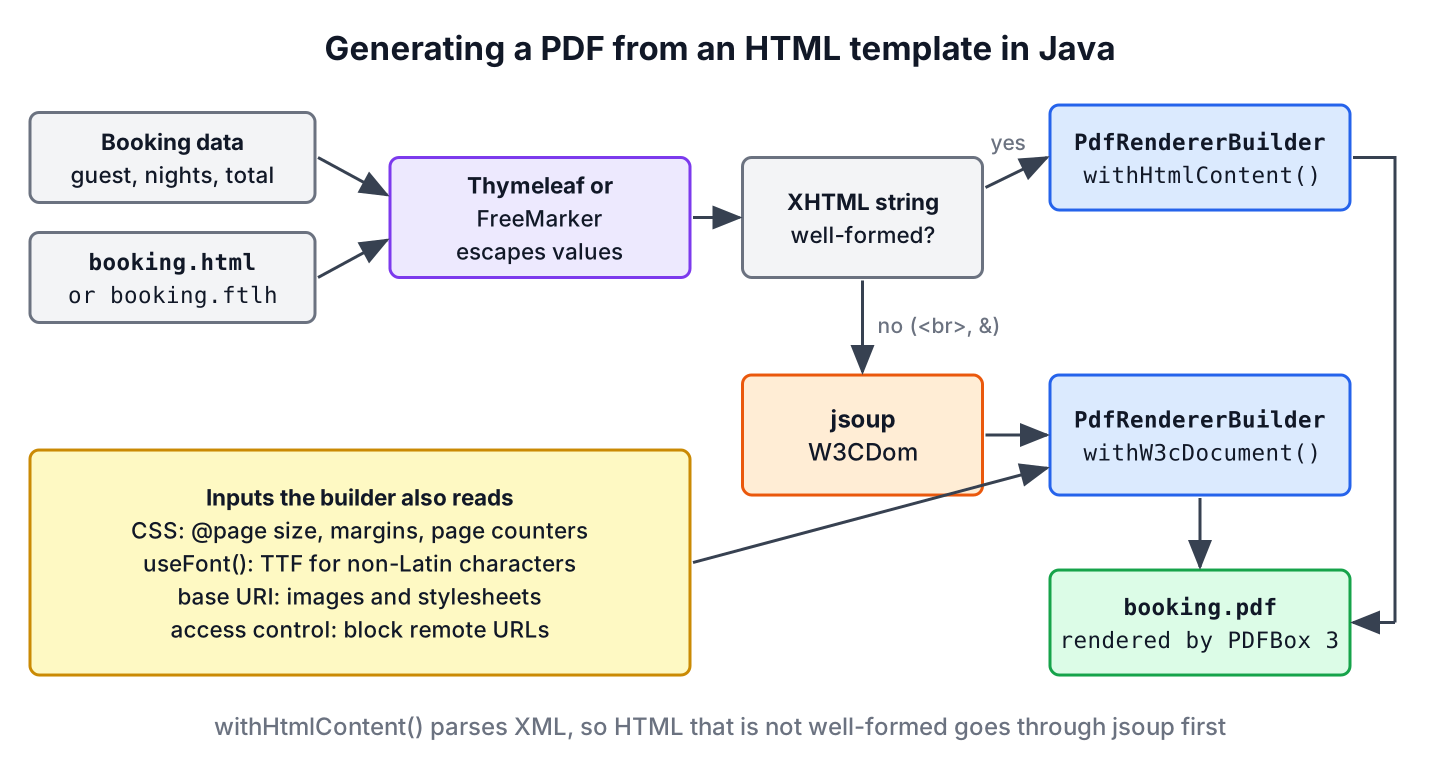
The builder takes its input in one of four ways.
| Method | Input | Relative links resolve against |
|---|---|---|
| withFile(File) | An XHTML file | The folder of the file |
| withUri(String) | A URI such as file: or a classpath URL | The URI itself |
| withHtmlContent(String, String) | XHTML in a String | The base URI in the second argument |
| withW3cDocument(Document, String) | An org.w3c.dom.Document, for example from jsoup | The base URI in the second argument |
The following example renders templates/booking-static.html, which links the stylesheet booking.css in the same folder. Since we use withFile(), the library finds the stylesheet without a base URI.
<!DOCTYPE html>
<html>
<head>
  <meta charset="UTF-8"/>
  <title>Booking confirmation</title>
  <link rel="stylesheet" href="booking.css"/>
</head>
<body>
  <h1>Booking confirmed</h1>
  <p>Guest: Asha Rao</p>
  <table>
    <thead><tr><th>Night</th><th>Room</th><th>Price</th></tr></thead>
    <tbody>
      <tr><td>2026-11-02</td><td>Double, garden view</td><td>EUR 120</td></tr>
      <tr><td>2026-11-03</td><td>Double, garden view</td><td>EUR 120</td></tr>
    </tbody>
  </table>
  <p class="total">Total: <strong>EUR 240</strong></p>
</body>
</html>
@page {
size: A4;
margin: 20mm;
@bottom-center {
content: "Page " counter(page) " of " counter(pages);
font-family: sans-serif;
font-size: 9pt;
}
}
body { font-family: sans-serif; font-size: 12pt; color: #222; }
h1 { color: #1d4ed8; border-bottom: 2px solid #1d4ed8; padding-bottom: 4px; }
table { width: 100%; border-collapse: collapse; -fs-table-paginate: paginate; }
th { background-color: #1d4ed8; color: #fff; }
th, td { border: 1px solid #999; padding: 6px; text-align: left; }
tr { page-break-inside: avoid; }
.total { text-align: right; font-size: 14pt; }Path pdf = Path.of("booking-static.pdf");
try (OutputStream out = Files.newOutputStream(pdf)) {
PdfRendererBuilder builder = new PdfRendererBuilder();
builder.withFile(Path.of("templates/booking-static.html").toFile());
builder.toStream(out);
builder.run();
}
int pages;
String text;
try (PDDocument doc = Loader.loadPDF(pdf.toFile())) {
pages = doc.getNumberOfPages();
text = new PDFTextStripper().getText(doc);
}
int pageCount = pages; // 1
boolean hasFooter = text.contains("Page 1 of 1"); // true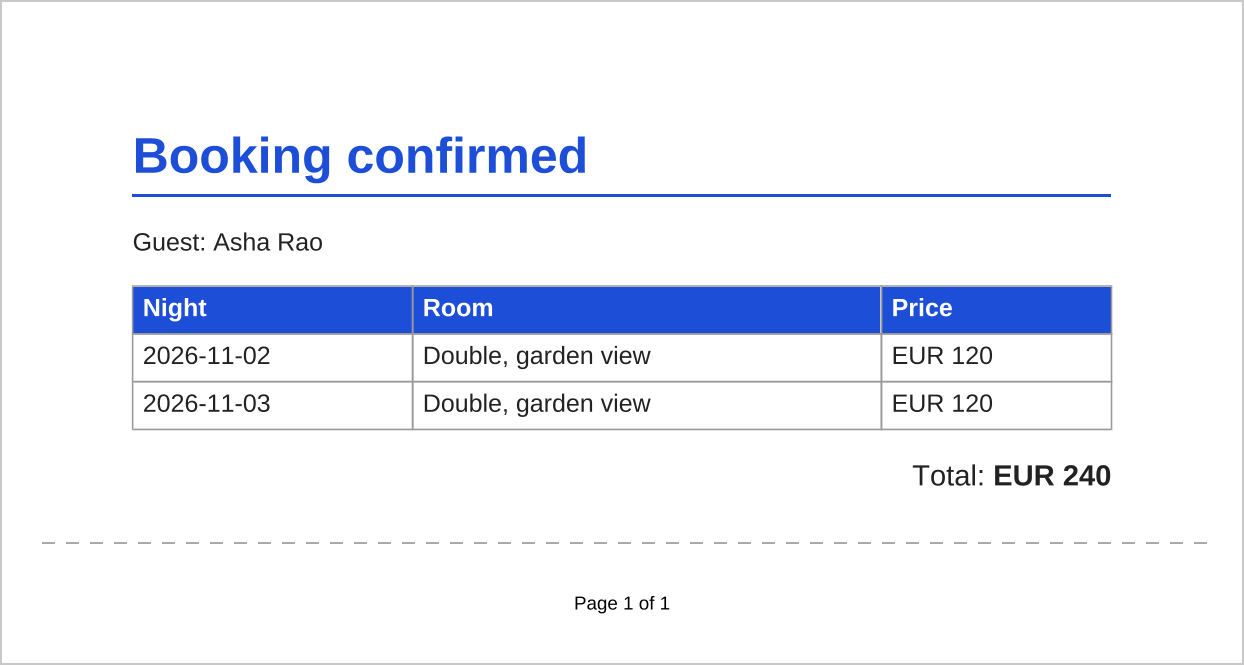
Older examples call builder.useFastMode(). Since version 1.0.11 the fast renderer is the only renderer, so the method is deprecated and does nothing, and we leave it out.
3. Generate PDF from a Thymeleaf Template
In a web app, the template contains placeholders, and the data changes per request. Say a hotel booking app emails a PDF confirmation after each booking. The app fills a Thymeleaf template with the guest and the nights, gets an HTML string back and renders that string to PDF.
The following template uses th:text to replace the sample text and th:each to repeat the table row. The asterisk syntax *{guest} reads a variable from the context, the same as the dollar syntax when no th:object is selected, and th:text escapes the value, so a name such as Asha & Ben stays valid XHTML.
<!DOCTYPE html>
<html xmlns:th="http://www.thymeleaf.org">
<head>
  <meta charset="UTF-8"/>
  <link rel="stylesheet" href="booking.css"/>
</head>
<body>
  <h1>Booking confirmed</h1>
  <p>Guest: <span th:text="*{guest}">Guest name</span></p>
  <table>
    <thead><tr><th>Night</th><th>Room</th><th>Price</th></tr></thead>
    <tbody>
      <tr th:each="night : *{nights}">
        <td th:text="*{night.date}">2026-01-01</td>
        <td th:text="*{night.room}">Room</td>
        <td th:text="*{night.price}">EUR 0</td>
      </tr>
    </tbody>
  </table>
  <p class="total">Total: <strong th:text="*{total}">EUR 0</strong></p>
</body>
</html>
public record Night(String date, String room, String price) {}static String bookingHtml(String guest, List<Night> nights, String total) {
ClassLoaderTemplateResolver resolver = new ClassLoaderTemplateResolver();
resolver.setPrefix("templates/");
resolver.setSuffix(".html");
resolver.setTemplateMode(TemplateMode.HTML);
resolver.setCharacterEncoding("UTF-8");
TemplateEngine engine = new TemplateEngine();
engine.setTemplateResolver(resolver);
Context context = new Context();
context.setVariable("guest", guest);
context.setVariable("nights", nights);
context.setVariable("total", total);
return engine.process("booking", context);
}List<Night> nights = List.of(new Night("2026-11-02", "Double", "EUR 120"),
new Night("2026-11-03", "Double", "EUR 120"));
String html = bookingHtml("Asha & Ben", nights, "EUR 240");
boolean escaped = html.contains("Asha & Ben"); // true
String baseUri = Path.of("templates").toUri().toString(); // lets the PDF find booking.css
ByteArrayOutputStream out = new ByteArrayOutputStream();
PdfRendererBuilder builder = new PdfRendererBuilder();
builder.withHtmlContent(html, baseUri);
builder.toStream(out);
builder.run();
byte[] pdf = out.toByteArray(); // attach to the confirmation emailThe template engine is created here to keep the example self-contained; a real app creates it once and reuses it, because it caches parsed templates. In a Spring Boot application with spring-boot-starter-thymeleaf, we inject the existing SpringTemplateEngine and call process() on it, as in the Spring Boot Thymeleaf tutorial. The template must stay well-formed (every tag closed, such as <meta charset=”UTF-8″/>), or we use the jsoup step from section 5.
4. Generate PDF from a FreeMarker Template
With FreeMarker as the template engine, the flow is the same, and only the template syntax changes. We name the template booking.ftlh, because the .ftlh extension turns on HTML auto-escaping. A plain .ftl template inserts Asha & Ben unescaped, and the XHTML parser of OpenHTMLtoPDF fails with SAXParseException.
FreeMarker supports two interpolation styles, the classic dollar-and-brace form and the square bracket form [=guest]. We use the square bracket form, which does not clash with other placeholders in the same file, such as JavaScript template literals or Spring properties, and we enable it with setInterpolationSyntax().
<!DOCTYPE html>
<html>
<head>
  <meta charset="UTF-8"/>
  <link rel="stylesheet" href="booking.css"/>
</head>
<body>
  <h1>Booking confirmed</h1>
  <p>Guest: [=guest]</p>
  <table>
    <thead><tr><th>Night</th><th>Room</th><th>Price</th></tr></thead>
    <tbody>
      <#list nights as night>
      <tr><td>[=night.date]</td><td>[=night.room]</td><td>[=night.price]</td></tr>
      </#list>
    </tbody>
  </table>
  <p class="total">Total: <strong>[=total]</strong></p>
</body>
</html>
Configuration cfg = new Configuration(Configuration.VERSION_2_3_35);
cfg.setDirectoryForTemplateLoading(new File("templates"));
cfg.setDefaultEncoding("UTF-8");
cfg.setInterpolationSyntax(Configuration.SQUARE_BRACKET_INTERPOLATION_SYNTAX);
Map<String, Object> model = Map.of(
"guest", "Asha & Ben",
"nights", List.of(new Night("2026-11-02", "Double", "EUR 120")),
"total", "EUR 120");
StringWriter html = new StringWriter();
cfg.getTemplate("booking.ftlh").process(model, html);
boolean escaped = html.toString().contains("Asha & Ben"); // true
ByteArrayOutputStream out = new ByteArrayOutputStream();
PdfRendererBuilder builder = new PdfRendererBuilder();
builder.withHtmlContent(html.toString(), Path.of("templates").toUri().toString());
builder.toStream(out);
builder.run();
String text;
try (PDDocument doc = Loader.loadPDF(out.toByteArray())) {
text = new PDFTextStripper().getText(doc);
}
boolean hasTotal = text.contains("Total: EUR 120"); // trueThe Configuration object is also meant to be created once per app, like the Thymeleaf engine. The constant VERSION_2_3_35 matches FreeMarker 2.3.35 and enables the current defaults, including auto-escaping for .ftlh files.
5. Rendering Invalid HTML with jsoup
The method withHtmlContent() parses its input as XML, so HTML that a browser accepts can fail. A void element without a slash, such as <br>, a bare & or a missing end tag stops the rendering with an exception.
PdfRendererBuilder builder = new PdfRendererBuilder();
builder.withHtmlContent("<html><body><p>Line one<br>Line two</p></body></html>", null);
builder.toStream(new ByteArrayOutputStream());
builder.run();                                                 // XRRuntimeException: The element type "br" must be terminated by the matching end-tag "</br>".
When the HTML is not under our control, for example content from a rich-text editor or an email, we parse it with jsoup and pass the resulting DOM to withW3cDocument(). The jsoup parser repairs the markup the same way a browser does, and its W3CDom class converts the result into an org.w3c.dom.Document. This needs the org.jsoup:jsoup dependency, version 1.23.2 at the time of writing.
static byte[] renderPdf(String html, String baseUri) throws IOException {
    org.jsoup.nodes.Document parsed = Jsoup.parse(html, baseUri);
    org.w3c.dom.Document xhtml = new W3CDom().fromJsoup(parsed);
    ByteArrayOutputStream out = new ByteArrayOutputStream();
    PdfRendererBuilder builder = new PdfRendererBuilder();
    builder.withW3cDocument(xhtml, baseUri);
    builder.toStream(out);
    builder.run();
    return out.toByteArray();
}
byte[] pdf = renderPdf("<p>Line one<br>Line two & more", Path.of("templates").toUri().toString());
String text;
try (PDDocument doc = Loader.loadPDF(pdf)) {
text = new PDFTextStripper().getText(doc);
}
boolean rendered = text.contains("Line two & more"); // trueCalling Jsoup.parse(html).html() and passing the string to withHtmlContent() does not help, because jsoup writes HTML syntax by default, so the <br> stays unclosed. The jsoup tutorial covers parsing and cleaning HTML in detail, including Safelist for content from users.
6. Page Size, Page Numbers and Fonts
OpenHTMLtoPDF reads paged-media CSS, so page layout belongs in the stylesheet. The booking.css file from section 2 uses these rules.
- The rule @page { size: A4; margin: 20mm; } sets the paper size and margins; size: letter landscape also works, and builder.useDefaultPageSize() sets a default when the CSS has none.
- A margin box such as @bottom-center with content: “Page ” counter(page) ” of ” counter(pages) prints page numbers.
- The property -fs-table-paginate: paginate repeats the table header on every page when a long table breaks.
- The property page-break-inside: avoid keeps a row or a block on one page, and page-break-before: always starts a new page.
The library implements CSS 2.1 and parts of later standards, but it has no flexbox, no grid and no transparency. A layout built with display: flex or colors with an alpha channel, such as rgba(), must use tables, floats or absolute positioning and solid colors instead.
By default the PDF uses the 14 standard PDF fonts, which cover only Western European characters. Any other character, such as the Indian rupee sign, is drawn as #. We embed a TrueType font with useFont() and refer to it by its family name in the CSS.
String html = "<html><head><style>body { font-family: 'DejaVu Sans'; }</style></head>"
        + "<body><p>Price: \u20B9 950</p></body></html>";
ByteArrayOutputStream out = new ByteArrayOutputStream();
PdfRendererBuilder builder = new PdfRendererBuilder();
builder.useFont(new File("fonts/DejaVuSans.ttf"), "DejaVu Sans");
builder.withHtmlContent(html, null);
builder.toStream(out);
builder.run();
String text;
try (PDDocument doc = Loader.loadPDF(out.toByteArray())) {
    text = new PDFTextStripper().getText(doc);
}
boolean hasRupee = text.contains("\u20B9");                     // true, without useFont() the PDF shows #
For bold and italic text, we register each font file with the useFont() overload that takes a weight and a FontStyle. Embedded fonts are subset by default, so only the used characters add to the file size.
7. Blocking Remote Resources
Every <img>, <link> or CSS url() in the HTML makes the library load a resource, and an http URL makes our server send a request. If users can put HTML or image URLs into a document, they can make the server call internal addresses, which is a server-side request forgery (SSRF) risk, or slow down rendering with a URL that never answers.
The method useExternalResourceAccessControl() takes a predicate that sees each URI and its resource type before it is loaded. The following example allows local files and rejects everything else, so the remote image is skipped with a warning in the log, and the PDF is still created.
String html = "<html><body><p>Hi</p><img src=\"http://10.255.255.1/logo.png\"/></body></html>";
ByteArrayOutputStream out = new ByteArrayOutputStream();
PdfRendererBuilder builder = new PdfRendererBuilder();
builder.useExternalResourceAccessControl((uri, type) -> uri.startsWith("file:"),
        ExternalResourceControlPriority.RUN_AFTER_RESOLVING_URI);
builder.withHtmlContent(html, null);
builder.toStream(out);
builder.run();
boolean created = out.size() > 0;                              // true, the image was rejected
Text from users still goes through the template engine’s escaping, as in section 3. The XML parser inside OpenHTMLtoPDF 1.1.97 does not expand external entities declared in a DOCTYPE, and the jsoup route never reads DTDs, so templates are not open to XML external entity (XXE) attacks.
8. OpenHTMLtoPDF FAQs
Upgrading old code and choosing between PDF libraries lead to most of the follow-up questions about OpenHTMLtoPDF.
8.1. Is OpenHTMLtoPDF still maintained?
Yes, as a community fork. The original danfickle/openhtmltopdf project published its last release, 1.0.10, in 2021. Development continues in the openhtmltopdf/openhtmltopdf repository under the group id io.github.openhtmltopdf, which moved to PDFBox 3. Upgrading means changing the group id and version; the package names stay com.openhtmltopdf.
8.2. How do we send OpenHTMLtoPDF logs to SLF4J or turn them off?
By default, the library logs through java.util.logging and prints INFO lines for every document. In a Spring Boot application, which uses SLF4J, we add openhtmltopdf-slf4j and call XRLog.setLoggerImpl(new Slf4jLogger()) once at startup. To silence it completely, we call XRLog.setLoggingEnabled(false).
8.3. Does OpenHTMLtoPDF support flexbox, grid or JavaScript?
No. It targets CSS 2.1 with paged-media extensions and runs no JavaScript, so charts drawn by scripts do not appear. We build the layout with tables and floats, and render charts as SVG on the server or as images. When a design needs modern CSS, a headless Chrome running its print-to-PDF function is the alternative, at the cost of a browser process.
8.4. Is OpenHTMLtoPDF free for commercial use?
Yes. It is licensed under the LGPL 2.1 or later, and PDFBox under the Apache License 2.0, so a closed-source app can use both as libraries. iText, by contrast, is AGPL or commercial, as described in the iText PDF tutorial, and OpenPDF with Flying Saucer is another LGPL or MPL option.
8.5. How do we add images to the PDF?
We use a normal <img src=”logo.png”/> tag and pass a base URI that points to the folder of the image, such as Path.of(“templates”).toUri().toString(). Inside a JAR, we pass a classpath URL from getClass().getResource(“/templates/”). Small images can also be embedded as data: URIs, which need no base URI.
9. Conclusion
OpenHTMLtoPDF turns XHTML and CSS into PDF with a few builder calls, and the maintained artifacts are io.github.openhtmltopdf 1.1.97 on PDFBox 3. Thymeleaf with th:text and FreeMarker with .ftlh templates fill the data and escape it, and jsoup with W3CDom handles HTML that is not well-formed.
Page size, page numbers and repeated table headers come from CSS, fonts outside the standard set need useFont(), and useExternalResourceAccessControl() keeps user content from making the server load remote URLs. Reading the generated PDF back with PDFBox gives us a simple way to test the output.
10. References
- OpenHTMLtoPDF on GitHub (community fork)
- OpenHTMLtoPDF wiki
- Apache PDFBox
- Using Thymeleaf (Thymeleaf 3.1 tutorial)
- FreeMarker alternative (square bracket) syntax
Happy Learning !!
