
The Java String isBlank() method returns true when a string is empty or contains only whitespace characters, such as spaces, tabs and line breaks, and false as soon as it contains any other character. It is the standard way to check for a blank String without trimming it first.
We use isBlank() to reject form fields that a user filled with spaces, to skip empty lines when we read a file and to treat a whitespace-only config value as missing.
The following example checks six strings, including the difference from isEmpty() and a null-safe check.
boolean emptyText = "".isBlank();                   // true
boolean spaces = "   ".isBlank();                   // true
boolean mixed = " \t\n ".isBlank();                 // true
boolean word = " hi ".isBlank();                    // false
boolean notEmpty = "   ".isEmpty();                 // false
String name = null;
boolean missing = name == null || name.isBlank();   // true
Notice that ” “ is blank but not empty, and that isBlank() cannot be called on null, so we check for null first. We look at which characters count as whitespace, compare isBlank() with isEmpty() and trim().isEmpty(), and cover the library helpers and a validation example.
1. Which Characters isBlank() Treats as Whitespace
The method isBlank() checks every code point of the string with Character.isWhitespace(int) and returns true only if all of them are whitespace. An empty string has no code points to check, so it is blank as well.
Whitespace in that sense covers the ASCII space, tab, line feed and carriage return, a few other control characters, and the Unicode space separators such as the em space U+2003. It does not cover the non-breaking space U+00A0 or the zero-width space U+200B.
boolean tab = "\u0009".isBlank();                 // true
boolean emSpace = "\u2003".isBlank();             // true
boolean nbsp = "\u00A0".isBlank();                // false
boolean zeroWidth = "\u200B".isBlank();           // false
boolean bell = "\u0007".isBlank();                // false
The last three lines matter for text copied from web pages and PDFs, as we will see in section 6. The method was added in Java 11 together with strip() and lines(), and its behavior is the same in Java 25.
2. Java String isBlank() vs isEmpty()
The two methods answer different questions. The method isEmpty() returns true only when length() is 0, whereas isBlank() also returns true for a string that has characters, as long as all of them are whitespace.
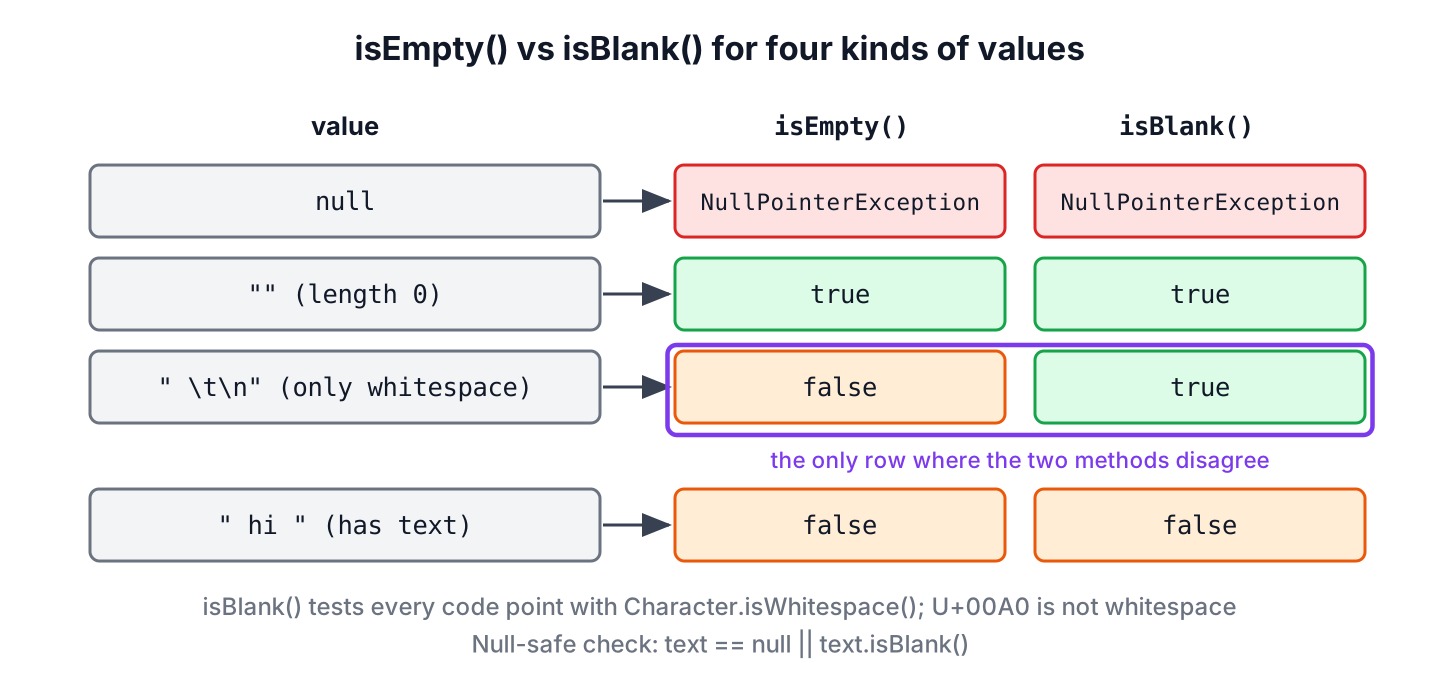
| Value | isEmpty() | isBlank() |
|---|---|---|
| “” | true | true |
| ” “ | false | true |
| “\t\n” | false | true |
| ” hi “ | false | false |
| null | NullPointerException | NullPointerException |
For user input we check isBlank(), because a value of three spaces carries no more information than an empty value. We keep isEmpty() for cases where whitespace is real data, such as a password field or the separator of a CSV file.
3. isBlank() vs trim().isEmpty()
Before Java 11, the usual blank check was str.trim().isEmpty(). It gives the same answer for ordinary spaces, tabs and line breaks, but trim() removes every character up to U+0020, including control characters, and ignores Unicode spaces.
String bellOnly = "\u0007";
boolean trimSaysBlank = bellOnly.trim().isEmpty();        // true
boolean blankSaysBlank = bellOnly.isBlank();              // false
String emOnly = "\u2003";
boolean trimEm = emOnly.trim().isEmpty();                 // false
boolean stripEm = emOnly.strip().isEmpty();               // true
The check strip().isEmpty() uses the same whitespace definition as isBlank(), so it always agrees with it. It creates a new string when there is whitespace to remove, whereas isBlank() only reads the characters. The differences between the two trimming methods are covered in removing leading and trailing whitespace.
4. Checking for null, Empty or Blank in One Call
Calling isBlank() on a null reference throws a NullPointerException, and values from JSON, databases and request parameters are often null. In plain Java, we put the null check in front, or wrap it in a small helper method.
static boolean isNullOrBlank(String text) {
    return text == null || text.isBlank();
}
String nothing = null;
boolean crash = nothing.isBlank(); // NullPointerException
boolean helper = isNullOrBlank(nothing); // true
boolean viaObjects = Objects.requireNonNullElse(nothing, "").isBlank(); // trueMost projects already have a library with a null-safe helper. They differ in whether they treat whitespace as empty, and that detail causes bugs when a team mixes them.
boolean commons = StringUtils.isBlank(null);                                    // true
boolean commonsText = StringUtils.isNotBlank("  hi ");                          // true
boolean guava = Strings.isNullOrEmpty("   ");                                   // false
boolean spring = org.springframework.util.StringUtils.hasText(" "); // false| Helper | Library | null | Whitespace only |
|---|---|---|---|
| text.isBlank() | JDK 11+ | Throws NullPointerException | Blank |
| StringUtils.isBlank(text) | Apache Commons Lang | Blank | Blank |
| Strings.isNullOrEmpty(text) | Guava | Empty | Not empty |
| StringUtils.hasText(text) | Spring Framework | No text | No text |
Notice that Spring’s hasText() answers the opposite question, so hasText(s) equals !StringUtils.isBlank(s) from Commons Lang. In request objects validated with Jakarta Validation, the @NotBlank constraint does the same check declaratively and rejects null too.
5. Validating Form Input and Skipping Blank Lines
A sign-up form sends a user name, and a user who types only spaces must get an error instead of an account named ” “. A compact record constructor is a good place for that check, because no SignUp object can exist with a blank name.
record SignUp(String username, String email) {
    SignUp {
        if (username == null || username.isBlank()) {
            throw new IllegalArgumentException("username is required");
        }
        username = username.strip();
    }
}
String user = new SignUp(" lokesh ", "lokesh@mail.com").username(); // "lokesh"
SignUp rejected = new SignUp(" ", "amit@mail.com"); // IllegalArgumentException: username is requiredThe same method filters text line by line. Here a CSV export from a spreadsheet contains empty and whitespace-only rows, and we drop them before parsing with Predicate.not(String::isBlank).
String csv = "id,fruit\n\n1,apple\n   \n2,banana\n";
List<String> rows = csv.lines().filter(Predicate.not(String::isBlank)).toList();   // [id,fruit, 1,apple, 2,banana]
For files, the same filter works on the lines we read from a file with Files.lines(path).
6. Strings That Look Blank but Are Not
Text copied from web pages, PDFs and spreadsheets often contains the non-breaking space U+00A0, and sometimes the zero-width space U+200B. Both look empty on screen, yet isBlank() returns false, so a form field that looks empty passes validation.
When we expect such input, we normalize it before the check. The regex (?U)\s matches all Unicode whitespace, including U+00A0, and we remove the zero-width space separately because Unicode does not classify it as whitespace.
String pasted = "\u00A0\u200B ";
boolean looksBlank = pasted.isBlank();                                           // false
String cleaned = pasted.replaceAll("(?U)\\s", "").replace("\u200B", "");         // ""
boolean nowBlank = cleaned.isBlank();                                            // true
7. isBlank() FAQs
The null case, older Java versions, the exact whitespace rules and the Commons Lang helper cause most of the confusion around isBlank().
7.1. Is String.isBlank() Null Safe?
No. It is an instance method, so calling it on null throws a NullPointerException. We write text == null || text.isBlank(), or use StringUtils.isBlank(text) from Commons Lang, which returns true for null.
7.2. Which Java Version Added isBlank()?
Java 11. On Java 8, we use text.trim().isEmpty(), which agrees with isBlank() for spaces, tabs and line breaks, or a library helper such as StringUtils.isBlank().
7.3. Does isBlank() Treat Tabs and New Lines as Blank?
Yes. The tab, line feed, carriage return, form feed and vertical tab are all whitespace for Character.isWhitespace(), so “\t\r\n”.isBlank() returns true.
7.4. What Is the Difference Between StringUtils.isBlank() and String.isBlank()?
Only the handling of null. Both use Character.isWhitespace() for every character, but StringUtils.isBlank(null) returns true, whereas null.isBlank() throws. The JDK method needs no dependency.
8. Conclusion
The method isBlank() returns true for an empty string and for a string made only of whitespace, as defined by Character.isWhitespace(). The method isEmpty() checks only the length, so a string of spaces is blank but not empty.
Neither method accepts null, so we check for null first or use a library helper, and we keep in mind that the non-breaking space is not whitespace for either method. For validation code, isBlank() is the check that matches what users mean by an empty field.
9. References
- Java 25 API, String.isBlank()
- Java 25 API, String.isEmpty()
- Java 25 API, Character.isWhitespace(int)
- Apache Commons Lang, StringUtils.isBlank()
- Spring Framework, StringUtils.hasText()
- Jakarta Validation, @NotBlank
Happy Learning !!
