
Compact number formatting in Java turns a large number into a short, locale-aware text such as “1K”, “2M” or “1 thousand”, and the class that does it is java.text.CompactNumberFormat. We get an instance from NumberFormat.getCompactNumberInstance() and call format(), the same way we use any other NumberFormat.
We use compact numbers wherever space is short and an exact value adds little, such as view counts under a video, follower counts on a profile or totals on a dashboard tile. The same class can also parse “1.5K” back into 1500.
The following example formats a few view counts in the US locale with both styles.
NumberFormat shortFmt = NumberFormat.getCompactNumberInstance(Locale.US, NumberFormat.Style.SHORT);
NumberFormat longFmt = NumberFormat.getCompactNumberInstance(Locale.US, NumberFormat.Style.LONG);
String views = shortFmt.format(15_300);          // "15K"
String plays = shortFmt.format(2_000_000);       // "2M"
String spoken = longFmt.format(2_000_000);       // "2 million"
String small = shortFmt.format(999);             // "999"
Notice that 15_300 became “15K” and not “15.3K”. By default, the formatter keeps no fraction digits and rounds the rest away. We cover fraction digits and rounding first, followed by other locales, parsing, custom patterns and a ready-to-use helper for view counts.
1. Creating a CompactNumberFormat
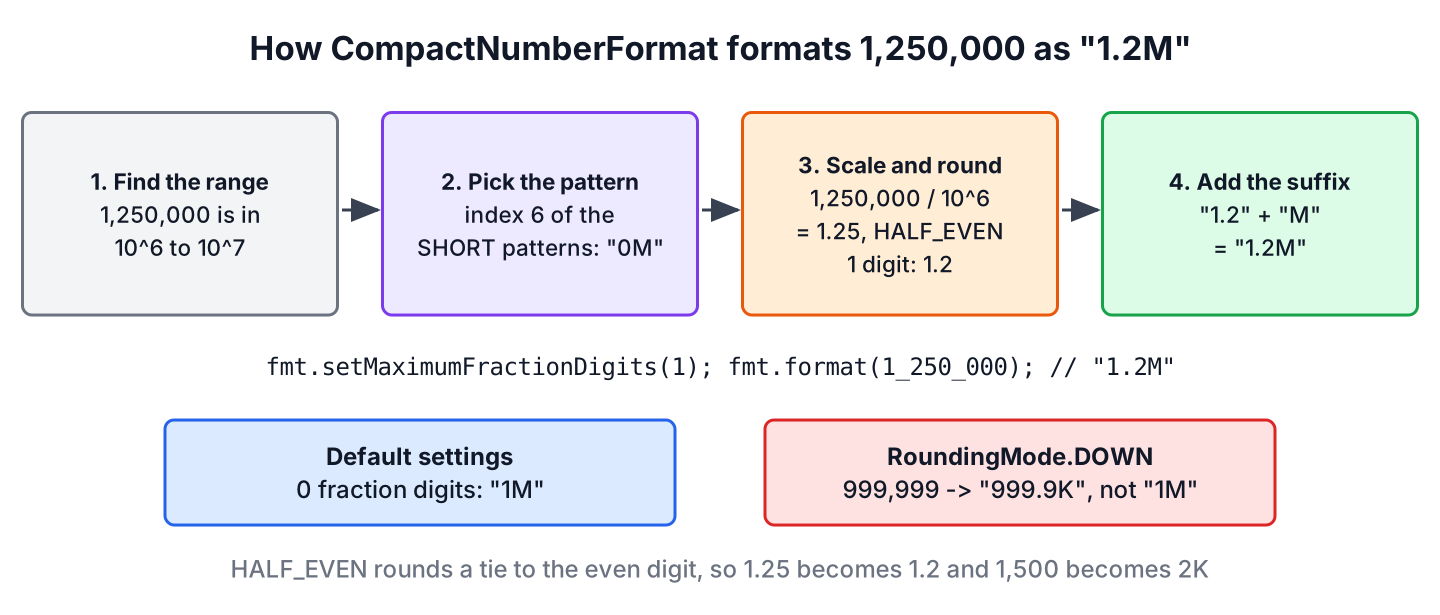
The CompactNumberFormat class is a final subclass of NumberFormat. It picks a pattern from the locale data based on the size of the number, divides the number by the matching power of ten and adds the locale’s suffix, such as “K” or “thousand”.
Three factory methods on NumberFormat create a formatter from the locale data. The no-argument version uses the default locale and the SHORT style.
NumberFormat defaultFmt = NumberFormat.getCompactNumberInstance();
NumberFormat usShort = NumberFormat.getCompactNumberInstance(Locale.US, NumberFormat.Style.SHORT);
NumberFormat ukLong = NumberFormat.getCompactNumberInstance(Locale.UK, NumberFormat.Style.LONG);
String gb = ukLong.format(15_000);               // "15 thousand"
The SHORT style uses abbreviations and the LONG style writes the word. In the US locale, both styles round the same way and differ only in the suffix.
| Number | SHORT | LONG |
|---|---|---|
| 999 | 999 | 999 |
| 1,000 | 1K | 1 thousand |
| 1,234 | 1K | 1 thousand |
| 15,300 | 15K | 15 thousand |
| 999,999 | 1M | 1 million |
| 2,000,000,000 | 2B | 2 billion |
| 7,500,000,000,000 | 8T | 8 trillion |
| 1,000,000,000,000,000 | 1000T | 1000 trillion |
| -1,234 | -1K | -1 thousand |
Numbers below 1,000 stay as they are, negative numbers get a minus sign, and “T” is the largest unit in the US data, so a quadrillion prints as “1000T”. The value 999,999 rounds up to “1M” and not to “1000K”, because the formatter picks the unit after rounding.
2. Showing Decimals Such as 1.2K
A compact formatter starts with zero fraction digits, so “1.2K” needs one call. The method setMaximumFractionDigits() allows up to that many digits and drops trailing zeros, whereas setMinimumFractionDigits() always prints that many digits.
NumberFormat oneDigit = NumberFormat.getCompactNumberInstance(Locale.US, NumberFormat.Style.SHORT);
oneDigit.setMaximumFractionDigits(1);
String a = oneDigit.format(1_234);               // "1.2K"
String b = oneDigit.format(15_300);              // "15.3K"
String c = oneDigit.format(1_000);               // "1K"
NumberFormat twoDigits = NumberFormat.getCompactNumberInstance(Locale.US, NumberFormat.Style.SHORT);
twoDigits.setMinimumFractionDigits(2);
String d = twoDigits.format(1_000); // "1.00K"
String e = twoDigits.format(15_300); // "15.30K"For counters on a screen, one maximum fraction digit is the common choice. A fixed number of digits, as with setMinimumFractionDigits(2), suits tables where the values must line up.
3. Rounding Rules and Why 1500 Becomes 2K
By default, CompactNumberFormat rounds with RoundingMode.HALF_EVEN, which rounds a tie to the nearest even digit. The value 1,500 is a tie between 1K and 2K and becomes “2K”, and 2,500 is a tie between 2K and 3K and also becomes “2K”. Many developers expect “3K” for the second one, as in the school rule that rounds half up.
NumberFormat even = NumberFormat.getCompactNumberInstance(Locale.US, NumberFormat.Style.SHORT);
String first = even.format(1_500);               // "2K"
String second = even.format(2_500);              // "2K"
String third = even.format(3_500);               // "4K"
Rounding up has a second effect on counters. A video with 999,999 views shows “1M” even though it has not reached a million. Say a creator dashboard unlocks a badge at one million views, and the page shows “1M” while the badge is still locked. Rounding toward zero with RoundingMode.DOWN never shows a value above the real count.
NumberFormat down = NumberFormat.getCompactNumberInstance(Locale.US, NumberFormat.Style.SHORT);
down.setMaximumFractionDigits(1);
down.setRoundingMode(RoundingMode.DOWN);
String almost = down.format(999_999);            // "999.9K"
String exact = down.format(1_299);               // "1.2K"
The method setRoundingMode() accepts any RoundingMode. With RoundingMode.UNNECESSARY, format() throws an ArithmeticException as soon as a value needs rounding.
4. Compact Numbers in Other Locales
The suffixes, the word forms and even the size of the groups come from the locale data in the JDK. We create locales with Locale.of(), because the Locale constructors are deprecated since Java 19.
Locale india = Locale.of("en", "IN");
Locale germany = Locale.of("de", "DE");
NumberFormat inShort = NumberFormat.getCompactNumberInstance(india, NumberFormat.Style.SHORT);
NumberFormat deLong = NumberFormat.getCompactNumberInstance(germany, NumberFormat.Style.LONG);
NumberFormat deShort = NumberFormat.getCompactNumberInstance(germany, NumberFormat.Style.SHORT);
String lakh = inShort.format(2_000_000);         // "20L"
String german = deLong.format(2_000_000);        // "2 Millionen"
String germanShort = deShort.format(15_000);     // "15.000"
The table shows a few more locales. The Indian English locale writes a thousand as “T” and counts in lakhs (100,000) and crores (10,000,000), so two million is “20L”. German has no short form for thousands, so 15_000 keeps its digits with the German grouping separator. Japanese and Chinese group by ten thousand instead of a thousand, so the scale changes as well as the suffix.
| Locale | SHORT 15,000 | LONG 2,000,000 | LONG 1,000,000 |
|---|---|---|---|
| en-US | 15K | 2 million | 1 million |
| en-IN | 15T | 20L | 10L |
| de-DE | 15.000 | 2 Millionen | 1 Million |
| it-IT | 15.000 | 2 milioni | 1 milione |
| nl-NL | 15K | 2 miljoen | 1 miljoen |
Some locales put a non-breaking space between the number and the suffix, for example in the German short form of two million. When we compare formatted strings in tests, we compare them with the output of the same JDK, not with a typed string. Locale handling in general is covered in Java Locale examples.
5. Parsing Compact Numbers Back
The parse() method reads a compact string and returns a Number. The result is a Long when the value has no fraction and fits into a long, otherwise it is a Double. Text that does not start with a number throws a checked ParseException.
NumberFormat parser = NumberFormat.getCompactNumberInstance(Locale.US, NumberFormat.Style.SHORT);
Number thousand = parser.parse("1K");            // 1000
Number half = parser.parse("1.5M");              // 1500000
Number odd = parser.parse("1.2345K");            // 1234.5
Number trailing = parser.parse("1.5K views");    // 1500
Number broken = parser.parse("K");               // ParseException: Unparseable number: "K"
By default, parsing is lenient and ignores text after the number, which is why “1.5K views” parses. Since Java 23, setStrict(true) rejects such input. The cast to CompactNumberFormat also gives access to setParseBigDecimal(true), which returns a BigDecimal instead of a Long or Double.
CompactNumberFormat strict = (CompactNumberFormat) NumberFormat
        .getCompactNumberInstance(Locale.US, NumberFormat.Style.SHORT);
strict.setStrict(true);
Number clean = strict.parse("1.5K");             // 1500
Number rejected = strict.parse("1.5K views");    // ParseException: Unparseable number: "1.5K views"
In real input handling, we wrap the call in a try block and report the ParseException as a validation error.
static OptionalLong parseCount(String text) {
    CompactNumberFormat fmt = (CompactNumberFormat) NumberFormat
            .getCompactNumberInstance(Locale.US, NumberFormat.Style.SHORT);
    fmt.setStrict(true);
    try {
        return OptionalLong.of(fmt.parse(text.strip()).longValue());
    } catch (ParseException ex) {
        return OptionalLong.empty();
    }
}
OptionalLong parsed = parseCount(" 12K "); // OptionalLong[12000]
OptionalLong invalid = parseCount("lots"); // OptionalLong.empty6. Custom Compact Patterns
When the locale data does not match our design, we build a formatter with the constructor CompactNumberFormat(decimalPattern, symbols, compactPatterns). Each entry in the compactPatterns array covers one power of ten, starting at index 0 for 100. An empty string means “no compact form”, so the number is printed in full.
String[] patterns = {"", "", "", "0k", "00k", "000k", "0m", "00m", "000m", "0b"};
DecimalFormatSymbols symbols = DecimalFormatSymbols.getInstance(Locale.US);
CompactNumberFormat lower = new CompactNumberFormat("#,##0", symbols, patterns);
lower.setMaximumFractionDigits(1);
String k = lower.format(1_250);                  // "1.2k"
String m = lower.format(1_250_000);              // "1.2m"
String plain = lower.format(999);                // "999"
Index 3 (“0k”) covers 1,000 to 9,999, index 4 (“00k”) covers 10,000 to 99,999, and so on. The array can have any length. Numbers above the last entry use the last pattern. Since Java 14, a fourth constructor argument accepts plural rules, so a pattern such as {one:0′ ‘Million other:0’ ‘Millionen} picks the singular or plural word by count.
7. Formatting View Counts in a Real App
A video platform shows the view count under every thumbnail. The count must fit in a small label, must never overstate the real number and must show one decimal for values such as 1.2K. The helper method combines the settings from the earlier sections.
static String formatViews(long views) {
    NumberFormat fmt = NumberFormat.getCompactNumberInstance(Locale.US, NumberFormat.Style.SHORT);
    fmt.setMaximumFractionDigits(1);
    fmt.setRoundingMode(RoundingMode.DOWN);
    return fmt.format(views) + " views";
}
String few = formatViews(999); // "999 views"
String some = formatViews(1_250); // "1.2K views"
String many = formatViews(999_999); // "999.9K views"
String viral = formatViews(15_349_000); // "15.3M views"The method creates a new formatter on every call because number formats are not synchronized. If profiling shows that the creation cost matters, we keep one instance per thread in a ThreadLocal instead of sharing one instance between threads.
Compared with the alternatives, CompactNumberFormat is the only option that knows the locale rules.
| Approach | Locale-aware | Handles 999,999 | Parses back |
|---|---|---|---|
| CompactNumberFormat | Yes | Yes, “1M” or “999.9K” with DOWN | Yes |
| Manual helper with String.format(“%.1fK”, n / 1000.0) | No | No, prints “1000.0K” | No |
| DecimalFormat with a pattern such as #,##0 | Yes | Full number only | Yes |
The full-number case is still the right choice for invoices and reports, where readers need the exact value, as shown in currency formatting and printf-style formatting.
8. CompactNumberFormat Changes by Java Release
Java 12 added the class, and two later releases extended it. The rest of each release is described on our Java features by version page.
| Java version | Change |
|---|---|
| Java 12 | CompactNumberFormat and NumberFormat.getCompactNumberInstance() |
| Java 14 | Constructor with plural rules |
| Java 23 | Strict parsing with setStrict() and isStrict() |
9. Compact Number Formatting FAQs
Adding compact numbers to a UI for the first time raises questions about decimals, thread safety and lowercase suffixes.
9.1. How Do We Format 1000 as 1K in Java?
We call NumberFormat.getCompactNumberInstance(Locale.US, NumberFormat.Style.SHORT).format(1000), which returns “1K”. The LONG style returns “1 thousand”.
9.2. How Do We Get 1.5K Instead of 2K?
We call setMaximumFractionDigits(1) on the formatter. Without it, the formatter keeps no fraction digits and 1,500 rounds to “2K”.
9.3. Is CompactNumberFormat Thread-Safe?
No. Like every NumberFormat, it keeps state such as the fraction digits and the rounding mode. We create one instance per thread, or one per call, instead of sharing a static instance.
9.4. Can We Use a Lowercase k?
Yes. The US locale data uses an uppercase “K”, so we pass our own patterns, such as “0k” and “00k”, to the CompactNumberFormat constructor, as in section 6.
9.5. Which Java Version Added CompactNumberFormat?
Java 12 added the class and the getCompactNumberInstance() factory methods. Any current JDK, such as Java 21 or Java 25, has it without extra libraries.
10. Conclusion
The CompactNumberFormat class formats numbers as short, locale-aware strings such as “15K” or “2 million”, and parses them back. We get it from NumberFormat.getCompactNumberInstance() with a locale and a SHORT or LONG style.
Two defaults surprise most developers. The formatter keeps no fraction digits, and it rounds with HALF_EVEN, so 1,500 and 2,500 both print as “2K” and 999,999 prints as “1M”. For counters, one fraction digit with RoundingMode.DOWN gives labels that never overstate the value.
For layouts that the locale data does not cover, custom patterns and plural rules give full control, and strict parsing since Java 23 rejects input with extra text.
11. References
- CompactNumberFormat Javadoc (Java 25)
- NumberFormat Javadoc (Java 25)
- RoundingMode Javadoc (Java 25)
- JDK-8177552, Compact Number Formatting support
Happy Learning !!
