
To find duplicate words in a string in Java, we split the string into words and count each word in a Map, or add each word to a Set, where add() returns false for a word we have already seen. Every word with a count above one is a duplicate.
We need this for interview questions, but also in real code, for example to flag repeated tags on a blog post, to count keywords in a product review, or to catch a typo such as “the the” in user text.
The following example counts every word of a sentence with streams and keeps the words that appear more than once.
String sentence = "alex brian charles alex charles david eric david";
Map<String, Long> counts = Arrays.stream(sentence.split("\\s+"))
        .collect(Collectors.groupingBy(w -> w, LinkedHashMap::new, Collectors.counting()));
                                               // {alex=2, brian=1, charles=2, david=2, eric=1}
List<String> duplicates = counts.entrySet().stream()
        .filter(e -> e.getValue() > 1)
        .map(Map.Entry::getKey)
        .toList();                             // [alex, charles, david]
We can see that the LinkedHashMap keeps the words in the order they first appear. We solve the same task with Java Streams and with plain Collections, handle letter case and punctuation, find repeated neighbors such as “the the” with a regex, remove duplicates, and compare the cost of each approach.
1. The Problem of Finding Duplicate Words in a String
Suppose we have a string with names. We want to find the names that appear more than once, and we may also want the number of occurrences of each duplicate word, or of every word.
String sentence = "alex brian charles alex charles david eric david";The string contains three duplicate words that occur twice, and two unique words.
alex=2
charles=2
david=2

brian=1
eric=1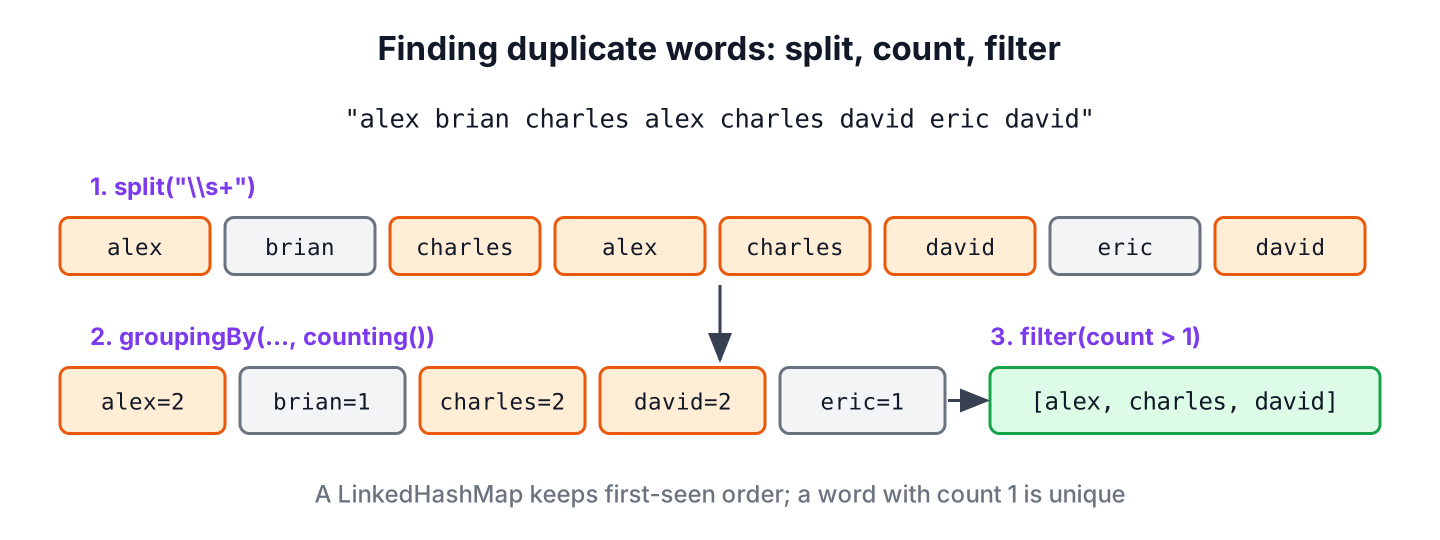
Every solution follows the same three steps. We split the text into words, count or remember each word, and keep the words seen more than once. The approaches differ only in the data structure and in how they treat case and punctuation.
2. Find Duplicate Words using Stream
The Stream API lets us split, count and filter in one pipeline. We split the string on whitespace with the regex \\s+, which also handles several spaces in a row, and turn the String[] into a stream of words.
2.1. Using a Set to Detect Repeats
The method Set.add() returns false when the element is already in the set. So a filter that keeps the words for which add() fails returns every repeated occurrence.
String sentence = "alex brian charles alex charles david eric david";
Set<String> seen = new HashSet<>();
List<String> duplicateWords = Arrays.stream(sentence.split("\\s+"))
        .filter(w -> !seen.add(w))
        .toList();                             // [alex, charles, david]
The filter changes a set from outside the lambda, so it is a stateful behavioral parameter. It works for a sequential stream, but a parallel stream can give wrong results, so the counting approach in the next section is the safer default.
2.2. Counting Each Word with groupingBy()
To count the occurrences of each word, we collect the words with Collectors.groupingBy() and Collectors.counting(). The map factory LinkedHashMap::new keeps the first-seen order, because a plain HashMap does not guarantee any order.
String sentence = "alex brian charles alex charles david eric david";
Map<String, Long> wordCounts = Arrays.stream(sentence.split("\\s+"))
        .collect(Collectors.groupingBy(w -> w, LinkedHashMap::new, Collectors.counting()));
                                               // {alex=2, brian=1, charles=2, david=2, eric=1}
Map<String, Long> dupWordsWithCount = wordCounts.entrySet().stream()
        .filter(e -> e.getValue() > 1)
        .collect(Collectors.toMap(Map.Entry::getKey, Map.Entry::getValue, (a, b) -> a, LinkedHashMap::new));
                                               // {alex=2, charles=2, david=2}
The second statement keeps only the duplicate words and their counts by filtering the entries of the map. The older form with toMap() gives the same counts as Integer values. The merge function Math::addExact adds the counts when a word appears again.
String sentence = "alex brian charles alex charles david eric david";
Map<String, Integer> wordsMapWithCount = Arrays.stream(sentence.split("\\s+"))
        .collect(Collectors.toMap(w -> w, w -> 1, Math::addExact, LinkedHashMap::new));
                                               // {alex=2, brian=1, charles=2, david=2, eric=1}
3. Find Duplicate Words using Collections
Without streams, the process is the same. We split the string, loop over the words and use the HashSet add() method to tell a new word from a repeated one.
String sentence = "alex brian charles alex charles david eric david";
String[] words = sentence.split("\\s+");
Set<String> unique = new HashSet<>();
Set<String> repeated = new LinkedHashSet<>();
for (String word : words) {
    if (!unique.add(word)) {
        repeated.add(word);
    }
}
String found = repeated.toString();            // "[alex, charles, david]"
Collecting the repeats in a LinkedHashSet reports each duplicate once, even when a word appears three or more times. To count the words in a loop, Map.merge() adds one to the existing count or stores 1 for a new word.
String[] words = "alex brian charles alex charles david eric david".split("\\s+");
Map<String, Integer> frequency = new LinkedHashMap<>();
for (String word : words) {
    frequency.merge(word, 1, Integer::sum);
}
String freq = frequency.toString();            // "{alex=2, brian=1, charles=2, david=2, eric=1}"
The method Collections.frequency(list, word) also counts how often a word appears, but it scans the whole list on every call. Calling it for each word turns a linear task into a quadratic one, so we use it only for a single lookup.
List<String> wordList = List.of("alex", "brian", "david", "eric", "david");
int davidCount = Collections.frequency(wordList, "david");  // 2
4. Ignoring Letter Case and Punctuation
Real text has capital letters and punctuation, so splitting on whitespace treats “Food”, “food” and “food,” as three different words. Before counting, we convert the text to lower case with Locale.ROOT, which gives the same result on every machine, and split on every run of characters that are not letters, digits or apostrophes.
String review = "Great food, great service. Food was hot!";
Map<String, Long> reviewCounts = Arrays.stream(review.toLowerCase(Locale.ROOT).split("[^\\p{L}\\p{N}']+"))
        .filter(w -> !w.isEmpty())
        .collect(Collectors.groupingBy(w -> w, LinkedHashMap::new, Collectors.counting()));
                                               // {great=2, food=2, service=1, was=1, hot=1}
The class \\p{L} matches letters of every alphabet, so words such as naïve stay whole, which the ASCII-only class \\W would split. The filter() drops the empty string that split() returns when the text starts with punctuation.
A review platform can use these counts to find the words customers repeat most, such as “great” and “food” here, and show them as tags above the reviews. Without the lower-case step, “Great” and “great” would land in separate tags.
5. Finding Repeated Adjacent Words with Regex
Sometimes only neighbors matter, for example when a text editor flags “the the” as a typo. A regular expression with a backreference finds those pairs without any collection.
Pattern doubled = Pattern.compile("\\b(\\w+)(\\s+\\1\\b)+", Pattern.CASE_INSENSITIVE);
String draft = "We ship the the order today. Today today it ships";
List<String> typos = doubled.matcher(draft).results().map(m -> m.group()).toList();
                                               // [the the, Today today]
String fixed = doubled.matcher(draft).replaceAll("$1");  // "We ship the order today. Today it ships"
The group (\\w+) captures a word, and \\1 must match the same word again after whitespace. The flag CASE_INSENSITIVE lets “Today today” match, and replaceAll(“$1”) keeps only the first word of each pair. Notice that “today. Today” is not a match, because the period sits between the two words.
6. Removing Duplicate Words from a String
To remove duplicate words and keep the first occurrence of each, we put the words into a LinkedHashSet and join them again. The stream version uses distinct(), which also keeps the encounter order.
String sentence = "alex brian charles alex charles david eric david";
String deduped = String.join(" ", new LinkedHashSet<>(Arrays.asList(sentence.split("\\s+"))));
                                               // "alex brian charles david eric"
String distinctWords = Arrays.stream(sentence.split("\\s+")).distinct().collect(Collectors.joining(" "));
                                               // "alex brian charles david eric"
7. Comparing the Approaches
All approaches split the text first, so they differ in how they count. With n words, the set and map solutions run in linear time, which is what an interviewer expects to hear.
| Approach | Time | Gives counts | Keeps order |
|---|---|---|---|
| HashSet.add() in a loop or filter | O(n) | No | With LinkedHashSet for the result |
| groupingBy() + counting() | O(n) | Yes | With LinkedHashMap::new |
| Map.merge() in a loop | O(n) | Yes | With LinkedHashMap |
| Collections.frequency() per word | O(n * k), k distinct words | Yes | Depends on the source list |
| Regex with backreference | O(n) | No, adjacent pairs only | Yes |
For most code, groupingBy() with counting() is the clearest choice, because it gives every count and the duplicates in two short steps. The Set.add() trick is the shortest answer when we need only a yes or no per word.
8. Duplicate Words FAQs
An interviewer who sees a working duplicate-word program tends to change one rule next, such as counting, letter case, removal or the first repeat.
8.1. How do we count the occurrences of each word in a string?
We split the string and collect the words with Collectors.groupingBy(w -> w, Collectors.counting()), or call map.merge(word, 1, Integer::sum) in a loop. Both return a map from each word to its count, as shown in section 2.
8.2. How do we find duplicate words ignoring case?
We convert the string with toLowerCase(Locale.ROOT) before splitting. For adjacent repeats, the regex flag Pattern.CASE_INSENSITIVE does the same job without changing the text.
8.3. How do we find the first repeated word?
We loop over the words and return the first word for which Set.add() returns false. The loop stops at that word, so it does not read the rest of the text.
static Optional<String> firstRepeated(String text) {
    Set<String> seen = new HashSet<>();
    for (String word : text.split("\\s+")) {
        if (!seen.add(word)) {
            return Optional.of(word);
        }
    }
    return Optional.empty();
}
Optional<String> first = firstRepeated("alex brian charles alex charles"); // Optional[alex]
Optional<String> noRepeat = firstRepeated("alex brian"); // Optional.empty8.4. Why does split(” “) give empty words?
The regex ” “ matches one space, so two spaces in a row produce an empty string between them. The regex \\s+ matches any run of whitespace and avoids empty words in the middle of the text.
9. Conclusion
Finding duplicate words always starts with splitting the text. A Set tells us whether a word was seen before, and a Map built with groupingBy() or merge() gives the count of every word, from which the duplicates are one filter away.
For real text, we lower-case with Locale.ROOT and split on non-letters, and for typos such as “the the” a regex with a backreference is enough. The same programs list unique words too, by keeping the entries with a count of one. More practice tasks are in the String interview questions.
10. References
- Java 25 API, Collectors
- Java 25 API, Set.add()
- Java 25 API, Pattern
- Java 25 API, java.util.stream package
Happy Learning !!

/*To check if the values in a map are greater than 1 using a lambda expression with Java 8, you can iterate over the entries of the map using the forEach method and then apply the condition to each value. Here’s how you can do it:
*/
String sentence = “alex brian charles alex charles david eric david”;
Map<String,Integer> ma=new HashMap<>();
for(String k1:sentence.split(” “)){
Integer l1=ma.get(k1);
ma.put(k1,(l1==null) ? 1: l1+1);
}
ma.forEach((key, value) -> {
if (value > 1) {
System.out.println(“Key: ” + key + “, Value: ” + value + ” is greater than 1.”);
}
});
————————————————–
Output :
Key: alex, Value: 2 is greater than 1.
Key: charles, Value: 2 is greater than 1.
Key: david, Value: 2 is greater than 1.
If String s = “abacdadbgbc”;
i need the output
a
and i don’t need other repeated character in my output
I need only first repeated Character as my output
ANS:
import java.util.*;
public class DisplayOnlyDuplicate {
public static void main(String[] args) {
ArrayList as=new ArrayList();
as.add(“call”);
as.add(“me”);
as.add(“call”);
as.add(“you”);
as.add(“me”);
Set s1=new HashSet();
for(String s2:s1)
{
if(s1.add(s2)==false)//Will check non duplicate element in the String
{
System.out.println(s2);
}
}
}
}
what is s2 here
package set; import java.awt.List; import java.util.ArrayList; import java.util.HashSet; import java.util.Set; public class DisplayOnlyDuplicate { public static void main(String[] args) { ArrayList l1 = new ArrayList(); l1.add("call"); l1.add("me"); l1.add("call"); l1.add("you"); l1.add("me"); System.out.println("List: " + l1); Set s1= new HashSet(); for(Object s2:l1){ if(s1.add(s2)== false){ System.out.println(s2); } } } }I hope the statement in above code should be:
//the first line here
for(String s2: as){
if(s1.add(s2)==false){
System.out.println(s2);
Hi Lokesh,
Your articles are excellent. Your website is a major base for my interview preparation. However for the benefit of people preparing for interviews like me, the complexity of the solution using Collections.frequency is O(N^2) since the complexity of the Collections.frequency by itself is O(N). Hence an alternative solution of putting the words and their count as key value pair in a LinkedHashMap will have a complexity of O(N). (LinkedHashMap is used to maintain the order just incase if you have to recreate the String removing the duplicates).
Aravind.
Hi Aravind, thanks for the feedback and suggested solution.
Hi, One of the interview they asked me to write a program for the below. mentioned logic.
input : { “abc”,”cba”,”BCa”,”bac”,”xyz”,”zyx”,”123″,”321″…} list of anagrams.
then output should be : { “abc”,”xyz”,”123″}.
Could you please helpw the logic behind this.
I have quickly written some code for this. Hope it helps:
package com.howtodoinjava; import java.util.HashSet; public class AnagramExample { public static void main(String[] args) { String[] rawList = {"abc", "cba", "BCa", "bac", "xyz", "zyx", "123", "321"}; //This will store unique strings HashSet<String> uniqueStrings = new HashSet<String>(); //Get all anagrams and sort it's chars and store in set for(String s : rawList){ uniqueStrings.add(sortString(s.toLowerCase())); } //We got unique strings here; Great !! System.out.println(uniqueStrings); } //Function to sort all chars inside a string private static String sortString(String s){ char[] c = s.toCharArray(); //Convert to array of chars java.util.Arrays.sort(c); //Sort chars return new String(c); //Return sorted String } } Output: [abc, 123, xyz]Thanks Lokesh for your response.
Hi Lokesh,
What are the things we need to take care to improve performance of the java web application?
A very broad question which is not possible to answer in few sentences. I will write my thoughts in any future post dedicated to performance improvements. For now, my only suggestion is “Keep it simple, don’t over-engineer anything”.
Hi Lokesh, can you please help me with this problem below. please i eally need your help. I’ll be glad if you response. Thank you very much :)
Problem: you are about to write a program that reads in a while bunch of words and will spit out the duplicate words. for our purposes, words are to be separated by spaces, commas, ! , ? , and period. Output the duplicate words in line, in lowercase and in sorted order.
sample input:
how much wood would a woodchuck if a woodchuck could chuck wood? are you feeling well?
sample output:
a
chuck
well
wood
woodchuck
you
Hi Lokesh,
I think this one is better appraoch plz suggest :
String words[] = { “the”, “cat”, “in”, “the”, “hat” };
HashMap wordCounts = new HashMap();
for (String w : words) {
Integer i = wordCounts.get(w);
if (i == null)
wordCounts.put(w, 1);
else
wordCounts.put(w, i + 1);
}
I can not predict if it is better, but yes it is another good approach.
In Java language, if you do not want to include any collection class then something like this will work.
Pseudo code
String[] words = sentence.split( sentense );
int length = words.length();
for(int i = 0; i < length; i++) { for(int j = 0; j < length; j++) { if(words[i].equalsIgnoreCase(words[j])) { System.out.printf("%s %s", word[i], word[j]); } } }
This will cost you O(N^2)
a Better solution will be to sort the words list which cost O(NlogN)
and then to run on the sorted list to find equal strings which cost O(N)
total cost will be = O(NLOGN) + O(N) = O(NLogN)
An approach could be after changing the text string to an arrayList, I will push them to a HashMap with the found word as and a 1 as , and will check if the key exist,if so I will increment the value to value+1. so where the value is greater than 1 are duplicates. Your comments pls..
This will also work. BUT, text.split(” “) will return you a String array. No need to convert to arraylist. You can iterate over array and push the elements in map, and increment the counter.
This way we can save at least one extra object in runtime.
List list = new ArrayList();
list.addAll(Arrays.asList(text.split(” “)));
I don’t think you need to create a new ArrayList when Arrays.asList does this exact thing for you:
List stooges = Arrays.asList(“Larry”, “Moe”, “Curly”);
A major part of the programming exercise I ask people to work on during an interview is to supply a unit test for the example code. We are finding that a lot of candidates have never written tests for any of their code and have no clue how to produce testable code. In turn, that lack of experience leads to them producing code that is impossible to maintain over the long term as well as high numbers of easy to find bugs.
We have also discovered that although many people are able to code these small examples, they are unable to handle the complexity of the real work.
Hello, I had written that piece of code for POC purpose with usage of Collections.frequency() in mind. Still, I appreciate your feedback and have corrected the unnecessary function call.
Further, I do agree with you on unit testing part. It is usually a weak area for programmers. I also had once, but now I write them with greater attention. I have summarized some good practices in this post. You also can take a look if interested.
https://howtodoinjava.com/best-practices/unit-testing-best-practices-junit-reference-guide/