
To unescape HTML in Java, we convert character references such as <, ' or é back into the characters they stand for, which turns escaped HTML text into a plain Java String. The JDK has no method for it, so we call StringEscapeUtils.unescapeHtml4() from Apache Commons Text, HtmlUtils.htmlUnescape() from Spring, or jsoup when the text uses HTML5 entity names.
We unescape HTML when text arrives already escaped and we need the real characters, for example product names from an RSS feed, titles from a CMS API, or values scraped from a web page that we want to store, search or compare.
The following example decodes one escaped string with the three libraries.
String escaped = "Fish & Chips <b>hot</b>";
String commons = StringEscapeUtils.unescapeHtml4(escaped);  // "Fish & Chips <b>hot</b>"
String spring = HtmlUtils.htmlUnescape(escaped);            // "Fish & Chips <b>hot</b>"
String jsoup = Parser.unescapeEntities(escaped, false);     // "Fish & Chips <b>hot</b>"
The result contains a real <b> tag again, so it must be escaped before it goes back into a web page. We look at the three kinds of references, the differences between the libraries for ' and HTML5 names, a plain Java method, and text that was escaped twice.
1. Named, Decimal and Hex Character References
HTML writes a special character in one of three ways. A named reference uses a word, such as &. A decimal reference uses the Unicode code point, such as &, and a hex reference uses the same code point in hexadecimal, such as &. All three stand for the same & character, and an unescaping method has to recognize each form.
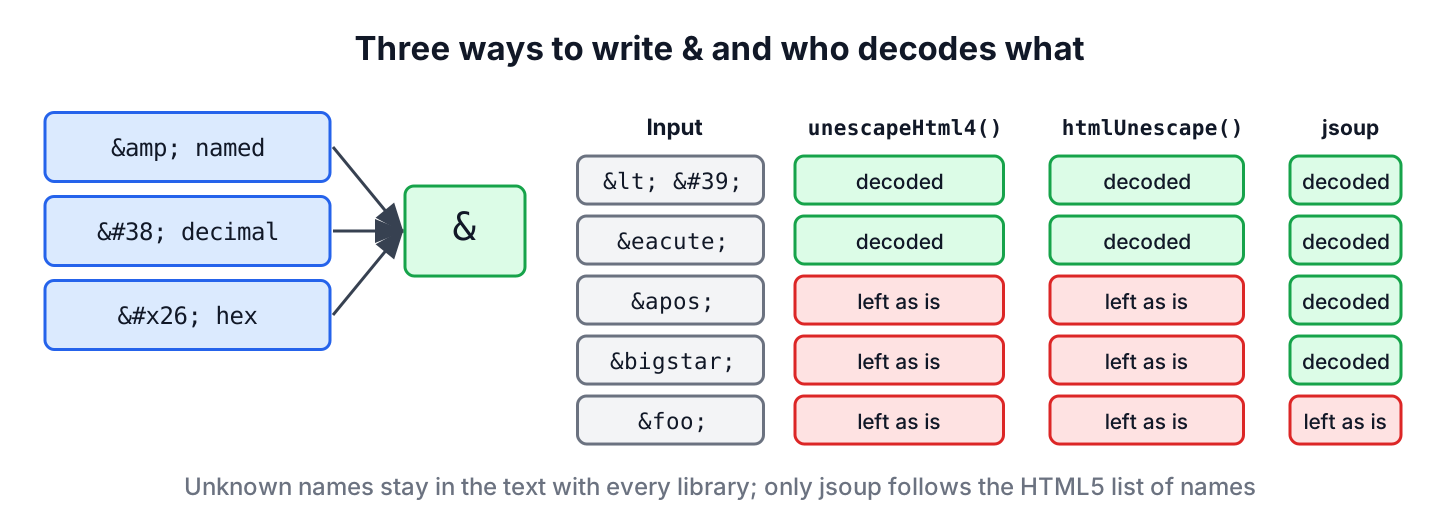
The libraries agree on the HTML 4 names and on numeric references. They differ on ', which HTML 4 does not define, and on the names that HTML5 added, which bring the list of named character references to more than 2,200 entries.
| Input | unescapeHtml4() | htmlUnescape() | jsoup unescapeEntities() |
|---|---|---|---|
| < & " | Decoded | Decoded | Decoded |
| ' ' | Decoded | Decoded | Decoded |
| é € | Decoded | Decoded | Decoded |
| ' | Left as is | Left as is | Decoded |
| HTML5 names such as ★ | Left as is | Left as is | Decoded |
| Unknown names such as &foo; | Left as is | Left as is | Left as is |
| null | Returns null | Throws NullPointerException | Throws NullPointerException |
2. Unescaping HTML with StringEscapeUtils.unescapeHtml4()
The StringEscapeUtils class from Apache Commons Text is the usual choice outside Spring. The copy of the class in commons-lang3 is deprecated, so we add commons-text.
<dependency>
    <groupId>org.apache.commons</groupId>
    <artifactId>commons-text</artifactId>
    <version>1.15.0</version>
</dependency>
The method unescapeHtml4() decodes all HTML 4 named entities and every numeric reference. A reference it does not know stays in the text unchanged, and a null input returns null, so the method never throws for ordinary input.
String quote = StringEscapeUtils.unescapeHtml4("it's & it's");  // "it's & it's"
int euro = StringEscapeUtils.unescapeHtml4("€").codePointAt(0);    // 8364
String apos = StringEscapeUtils.unescapeHtml4("it's");             // "it's"
String unknown = StringEscapeUtils.unescapeHtml4("&foo; stays");        // "&foo; stays"
String none = StringEscapeUtils.unescapeHtml4(null);                    // null
For XML input, unescapeXml() is the matching method. It decodes ' and the other four XML entities, but it leaves HTML names such as é alone.
String xmlApos = StringEscapeUtils.unescapeXml("it's & more");  // "it's & more"
String xmlName = StringEscapeUtils.unescapeXml("café");           // "café"
3. Unescaping HTML in Spring with HtmlUtils.htmlUnescape()
A Spring application already has HtmlUtils in the spring-web module. The method htmlUnescape() decodes the same HTML 4.01 names and numeric references as Commons Text, and it also leaves ' unchanged.
String title = HtmlUtils.htmlUnescape("Tea & Cake – 5 < 6");
int dash = title.codePointAt(11);                                        // 8211
String springApos = HtmlUtils.htmlUnescape("it's");                 // "it's"
The difference is null handling. In Spring Framework 7, a null input throws a NullPointerException instead of returning null, so we check the value first.
String noInput = HtmlUtils.htmlUnescape(null); // NullPointerException4. Unescaping HTML5 Entities with jsoup
Text copied from modern web pages can contain HTML5-only names, and Commons Text and Spring leave those in place. The HTML parser jsoup follows the HTML5 specification, so Parser.unescapeEntities() decodes ' and every HTML5 name. The second argument says whether the text is an attribute value, and we pass false for normal text.
String html5 = Parser.unescapeEntities("it's", false); // "it's"
int star = Parser.unescapeEntities("★", false).codePointAt(0); // 9733
int copy = Parser.unescapeEntities("© 2026", false).codePointAt(0); // 169The last line shows a browser rule that jsoup copies. Old names such as © are decoded even without the closing semicolon, so ¬ice; in plain text turns into the not sign followed by ice;. That matches what a browser displays, but it can surprise us when the input is not real HTML.
When the input is a full HTML fragment and we want only its text, we parse it instead of unescaping it. The call Jsoup.parse(html).text() removes the tags and decodes the references in one step, as the jsoup tutorial explains.
String fragment = "<p>Fish & <b>Chips</b></p>";
String visible = Jsoup.parse(fragment).text(); // "Fish & Chips"5. Unescaping HTML in Plain Java
Without a library, we match each reference with a regular expression and replace it. Since Java 9, Matcher.replaceAll() accepts a function that computes the replacement for each match, so the whole job fits in one small class. It handles decimal and hex references for any code point, plus the names we list in the map.
final class HtmlText {
    private static final Pattern ENTITY = Pattern.compile("&(#[xX][0-9a-fA-F]+|#[0-9]+|[a-zA-Z]+);");
    private static final Map<String, String> NAMES = Map.of(
            "lt", "<", "gt", ">", "amp", "&", "quot", "\"", "apos", "'", "nbsp", "\u00A0");

    static String unescape(String input) {
        if (input == null) {
            return null;
        }
        return ENTITY.matcher(input).replaceAll(match -> {
            String ref = match.group(1);
            String value;
            try {
                if (ref.startsWith("#x") || ref.startsWith("#X")) {
                    value = Character.toString(Integer.parseInt(ref.substring(2), 16));
                } else if (ref.startsWith("#")) {
                    value = Character.toString(Integer.parseInt(ref.substring(1)));
                } else {
                    value = NAMES.getOrDefault(ref, match.group());
                }
            } catch (IllegalArgumentException e) {
                value = match.group();                      // keep invalid numbers as text
            }
            return Matcher.quoteReplacement(value);
        });
    }
}
String basic = HtmlText.unescape("Fish & Chips <b>"); // "Fish & Chips <b>"
String numeric = HtmlText.unescape("it's ABC"); // "it's ABC"
String kept = HtmlText.unescape("é �"); // "é �"
int smile = HtmlText.unescape("😀").codePointAt(0); // 128512Two details keep the method safe. The call Matcher.quoteReplacement() stops a decoded dollar sign or backslash from being read as a group reference, and the catch block keeps a reference with an out-of-range number, such as �, as plain text instead of throwing. For the full list of names, a library is the better choice.
6. Double-Escaped Text and Where to Unescape
Double escaping happens when text is escaped twice, for example once by a CMS when it saves the title and again by the template that renders it. As a result, the browser shows Fish & Chips instead of Fish & Chips. One call to an unescape method removes one level only.
String twice = "Fish &amp; Chips";
String once = StringEscapeUtils.unescapeHtml4(twice); // "Fish & Chips"
String plainText = StringEscapeUtils.unescapeHtml4(once); // "Fish & Chips"Say a deals app imports product titles from a partner’s RSS feed, and the feed escapes every title. The app unescapes each title once when it reads the feed and stores the plain text, so search and sorting work on real characters. When the app shows the title on its own page, the template escapes it again, which is the only place escaping belongs, as described in escaping HTML in Java.
Unescaped text is untrusted text, so we never write it into a page without escaping it again. A feed that sends <b> becomes a real <b> tag after unescaping, and the same applies to any markup an attacker places in the feed.
7. Java Unescape HTML FAQs
Decoding works for most input on the first try, and the leftovers are a missing JDK method, the ' name, non-breaking spaces and the old Commons Lang class.
7.1. Is there a built-in Java method to unescape HTML?
No. The JDK has no public method for HTML entities. We use Apache Commons Text, Spring’s HtmlUtils, jsoup, or a small method such as the one in section 5.
7.2. Why does unescapeHtml4() not convert '?
The name ' is not part of HTML 4, so unescapeHtml4() leaves it in the text. We either use jsoup, which follows HTML5, or call unescapeXml() after unescapeHtml4().
7.3. Why does strip() not remove a decoded ?
The reference decodes to the non-breaking space U+00A0, not to a normal space, and strip() and trim() do not treat U+00A0 as whitespace. We replace it first, as shown in removing leading and trailing whitespace.
7.4. Should we use Commons Lang or Commons Text for StringEscapeUtils?
Commons Text. The class org.apache.commons.lang3.StringEscapeUtils is deprecated, and new fixes go into org.apache.commons.text.StringEscapeUtils, which has the same method names.
8. Conclusion
Unescaping HTML turns named, decimal and hex references back into characters. In plain Java projects, StringEscapeUtils.unescapeHtml4() is the simplest option, Spring applications can call HtmlUtils.htmlUnescape() without a new dependency, and jsoup is the one to use when the text contains ' or HTML5 names.
Each call removes one level of escaping, and the decoded text may contain real markup. We unescape when text enters the app and escape again when it goes out to a page.
9. References
- Apache Commons Text, StringEscapeUtils
- Spring Framework, HtmlUtils
- jsoup, Parser API
- HTML Standard, Named character references
- Java 25 API, Matcher.replaceAll(Function)
Happy Learning !!
