
To remove leading and trailing whitespace from a string in Java, we call strip(), or stripLeading() and stripTrailing() for one side only. These methods were added in Java 11 and recognize Unicode whitespace, whereas the older trim() removes only the characters with a code of U+0020 or lower.
We trim values that come from forms, files and APIs before we validate, compare or store them, for example a user name typed with a trailing space, a CSV cell padded with spaces, or a line read from a config file.
The following example removes the spaces around a name in four ways.
String name = "   Lokesh Gupta  ";
String both = name.strip();                  // "Lokesh Gupta"
String leading = name.stripLeading();        // "Lokesh Gupta  "
String trailing = name.stripTrailing();      // "   Lokesh Gupta"
String classic = name.trim();                // "Lokesh Gupta"
The space between the two words stays, because all these methods work only at the ends of the String. We compare what trim() and strip() treat as whitespace, show the regex alternatives, handle non-breaking spaces that neither method removes, and deal with null and blank values.
1. trim() vs strip(), What Counts as Whitespace
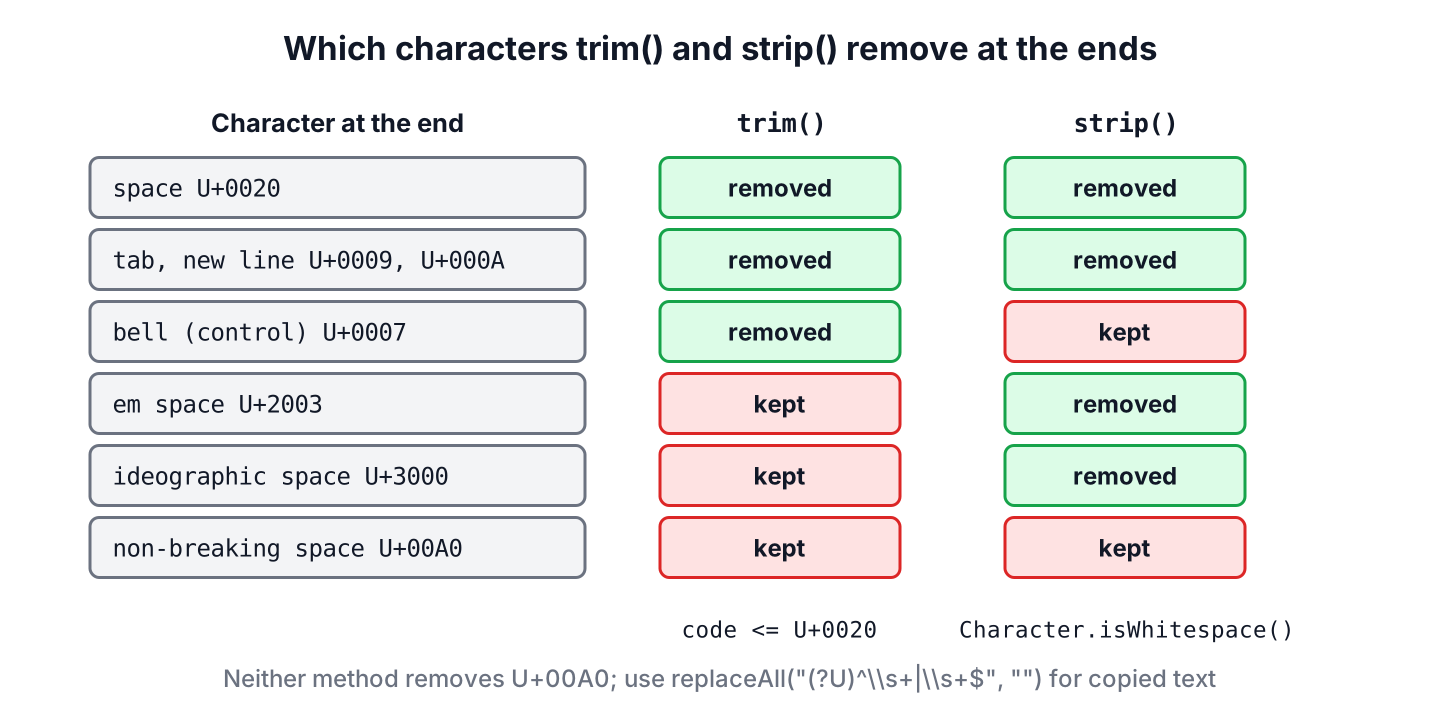
The two methods differ only in their definition of whitespace. The method trim() exists since Java 1.0 and removes every character whose code is less than or equal to U+0020, the space. That covers the space, the tab and the line breaks, but also invisible control characters such as the bell character U+0007.
The method strip() removes the characters for which Character.isWhitespace() returns true. That covers the same ASCII whitespace plus the Unicode space separators, such as the em space U+2003 and the ideographic space U+3000, but not the control characters that are not whitespace.
String emSpace = "\u2003hello\u2003";
int trimmedLength = emSpace.trim().length();      // 7
int strippedLength = emSpace.strip().length();    // 5
String bell = "\u0007hello\u0007";
int bellTrim = bell.trim().length();              // 5
int bellStrip = bell.strip().length();            // 7
We can see the two definitions in the lengths. The em space survives trim() because its code is above U+0020, and the bell character survives strip() because it is a control character, not whitespace.
| Character | Code | trim() removes it | strip() removes it |
|---|---|---|---|
| Space | U+0020 | Yes | Yes |
| Tab, line feed, carriage return | U+0009, U+000A, U+000D | Yes | Yes |
| Bell and other control characters | U+0000 to U+001F | Yes | Only the whitespace ones, such as U+001F |
| Em space, ideographic space | U+2003, U+3000 | No | Yes |
| Non-breaking space | U+00A0 | No | No |
| Narrow no-break space, figure space | U+202F, U+2007 | No | No |
For text typed by people, strip() is the better default, because it understands Unicode whitespace. We keep trim() when we also want to remove control characters, for example from data produced by old systems, or when the code must run on Java 8.
1.1. What strip(), stripLeading() and stripTrailing() Return
Java 11 added the three methods together (JDK-8200378), and all three test each code point with Character.isWhitespace(int), the same check that isBlank() uses. The return value follows the same two edge rules for each method.
- When the string is empty or contains only whitespace, the method returns an empty string.
- When there is nothing to remove, the method returns a string with the same content, so equals() on the input and the result is true.
String spaces = " \t\n ";
String stripped = spaces.strip();                     // ""
int afterLeading = spaces.stripLeading().length();    // 0
String word = "kiwi";
boolean unchanged = word.strip().equals(word);        // true
The first case matters for validation. A form field that holds only spaces becomes an empty string after strip(), so one isEmpty() check catches both the empty and the space-only input.
2. Removing Leading Whitespace
The method stripLeading() removes whitespace from the start of the string only. The regex alternative ^\\s+ matches one or more whitespace characters anchored at the start, and we replace the match with an empty string.
String code = "    return total;";
String stripped = code.stripLeading();                 // "return total;"
String viaRegex = code.replaceFirst("^\\s+", "");      // "return total;"
Removing only the leading whitespace is useful when we read indented text, such as lines of source code or YAML, and want to measure or drop the indentation while keeping the end of the line unchanged.
3. Removing Trailing Whitespace
The method stripTrailing() removes whitespace from the end only, and the regex \\s+$ matches the run of whitespace before the end of the string. Text editors use the same idea to remove trailing spaces when they save a file.
String line = "id,name,price   ";
String trimmedEnd = line.stripTrailing();              // "id,name,price"
String regexEnd = line.replaceAll("\\s+$", "");        // "id,name,price"
Both versions keep the leading whitespace. The method calls are shorter and do not compile a regex, so we use the regex forms only when we need something the methods cannot do, such as also removing a trailing comma with [\\s,]+$.
4. Remove Leading and Trailing Whitespace in Java
To remove whitespace from both ends, we call strip(), or trim() when the input is plain ASCII. The regex version combines both anchors with the alternation operator.
String blogName = "    how to do in java    ";
String strippedString = blogName.strip();               // "how to do in java"
String trimmedString = blogName.trim();                 // "how to do in java"
String regexBoth = blogName.replaceAll("^\\s+|\\s+$", "");  // "how to do in java"
None of these methods changes the original string, because strings are immutable. Each call returns the cleaned value as its result, so we always assign it, as in name = name.strip();. To also collapse the spaces between words, see removing extra spaces between words.
4.1. Removing Only Spaces and Tabs, Line by Line
The methods and \\s treat line breaks as whitespace, so strip() on a multi-line value also removes a leading or trailing line break. When we want to clean the spaces and tabs at the end of every line but keep the line structure, we use the character class [ \\t] instead of \\s and turn on multiline mode with (?m), so that $ matches before each line break.
Say a note-taking app saves the text of a multi-line note and wants to drop the trailing spaces people leave at the end of lines, without joining the lines or removing the final line break.
String note = "milk  \nbread\t\n";
String cleaned = note.replaceAll("(?m)[ \\t]+$", "");
boolean keepsLines = cleaned.equals("milk\nbread\n");          // true
String perLine = note.lines().map(String::stripTrailing).collect(Collectors.joining("\n"));
boolean lostLastBreak = perLine.equals("milk\nbread");        // true
boolean wholeStrip = note.strip().equals("milk  \nbread");    // true
We can see that the regex keeps the final line break, whereas lines() plus stripTrailing() drops it, because lines() does not return the empty text after the last line terminator. The plain strip() call only cleans the two ends of the whole value, so the spaces after “milk” stay.
5. Removing Non-Breaking Spaces at the Ends
The non-breaking space U+00A0 is the of HTML, and it ends up in our data whenever users copy text from a web page, a PDF or a spreadsheet. Neither trim() nor strip() removes it, so the value still looks padded and fails to parse.
Say an online shop imports product prices from a supplier’s spreadsheet. The cell shows 12.50, but it contains a non-breaking space before the number, so new BigDecimal(cell.strip()) throws a NumberFormatException. The fix is a regex in Unicode mode, where (?U)\\s matches every Unicode white space character, including U+00A0.
String cell = "\u00A012.50 ";
String afterStrip = cell.strip();                                   // contains U+00A0
BigDecimal broken = new BigDecimal(afterStrip);                     // NumberFormatException
String clean = cell.replaceAll("(?U)^\\s+|\\s+$", "");              // "12.50"
BigDecimal price = new BigDecimal(clean);                           // 12.50
The same cleanup is the first step before converting a String to int from any copied source. When the non-breaking space can also appear between words, we replace it with a normal space first, using text.replace(‘\u00A0’, ‘ ‘), and call strip() afterwards.
6. Handling null and Blank Strings
All the methods above are instance methods, so calling them on a null reference throws a NullPointerException. Form fields and JSON values are often null, so we decide what null means before we strip.
String missing = null;
String failed = missing.strip();                                    // NullPointerException
String safe = Objects.requireNonNullElse(missing, "").strip();      // ""
boolean blank = "  \t ".isBlank();                                  // true
boolean empty = "  \t ".strip().isEmpty();                          // true
The method isBlank(), also added in Java 11, checks whether a string is empty or contains only whitespace, using the same definition as strip(). It is shorter than strip().isEmpty() and does not create a new string.
7. Choosing Between trim() and strip()
All methods leave the inner whitespace alone, so the choice depends on which side we clean and how much of Unicode the input can contain.
| Goal | Method | Since |
|---|---|---|
| Remove whitespace at both ends | strip() | Java 11 |
| Remove whitespace at the start only | stripLeading() | Java 11 |
| Remove whitespace at the end only | stripTrailing() | Java 11 |
| Also remove control characters at the ends | trim() | Java 1.0 |
| Also remove non-breaking spaces at the ends | replaceAll(“(?U)^\\s+|\\s+$”, “”) | Java 7 (UNICODE_CHARACTER_CLASS) |
| Check for empty or whitespace-only text | isBlank() | Java 11 |
The regex forms stay useful for the cases the methods do not cover, such as a custom set of characters with [ \\t], a per-line cleanup with (?m) as in section 4, or Unicode mode for non-breaking spaces.
8. Trim and Strip FAQs
Copied text, line breaks and older Java versions are behind most questions about trimming.
8.1. What is the difference between trim() and strip()?
The method trim() removes characters with a code up to U+0020, which includes control characters. The method strip() removes characters for which Character.isWhitespace() is true, which includes Unicode spaces such as U+2003. Both work only at the ends of the string.
8.2. Does trim() remove new lines and tabs?
Yes. The tab U+0009, the line feed U+000A and the carriage return U+000D are all below U+0020, so trim() removes them at both ends, and strip() does the same.
8.3. Why does strip() not remove a non-breaking space?
The method Character.isWhitespace() returns false for U+00A0, U+2007 and U+202F, because they are defined as non-breaking. We remove them with the Unicode regex shown in section 5.
8.4. How do we trim a string in Java 8?
We use trim(), because strip(), stripLeading() and stripTrailing() do not exist before Java 11. For one side only, we use the regex forms ^\\s+ and \\s+$.
9. Conclusion
In current Java, strip(), stripLeading() and stripTrailing() remove whitespace from the ends of a string using the Unicode definition. The older trim() removes everything up to U+0020, including control characters, and misses Unicode spaces such as U+2003.
Neither method removes the non-breaking space, which is common in copied text, so we use (?U) regex anchors for that data. We check for null first and use isBlank() to detect values that contain only whitespace.
10. References
- Java 25 API, String.strip()
- Java 25 API, String.trim()
- Java 25 API, Character.isWhitespace()
- Java 25 API, Pattern.UNICODE_CHARACTER_CLASS
- JDK-8200378, String::strip, stripLeading and stripTrailing
Happy Learning !!
