
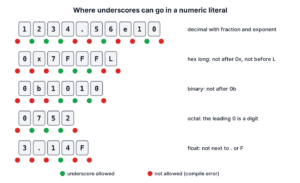
Underscores in numeric literals let us split the digits of a number in Java source code into groups, such as 1_000_000, so the number is easier to read. The compiler drops the underscores, so 1_000_000 and 1000000 are the same int value. The feature exists since Java 7.
We use underscores for long constants that people read and check in code reviews, such as timeouts in milliseconds, size limits in bytes, prices, bit masks and hex color codes.
The following example writes the same kind of values with digit groups in every number system that Java supports.
int population = 1_000_000;            // 1000000
long uploadLimit = 10_485_760L;        // 10485760
int timeoutMs = 30_000;                // 30000
int flags = 0b1010_0101;               // 165
int orange = 0xFF_88_00;               // 16746496
double price = 1_299.99;               // 1299.99
boolean same = 1_000_000 == 1000000;   // true
Notice that the underscores always sit between two digits, and that the printed values contain no underscores. We go through the placement rules, the invalid positions and the compiler error they cause, how to group digits in each number system, what happens when a string such as “1_000” is parsed at runtime, and the alternatives for very large constants.
1. Where Underscores Can Go in a Numeric Literal
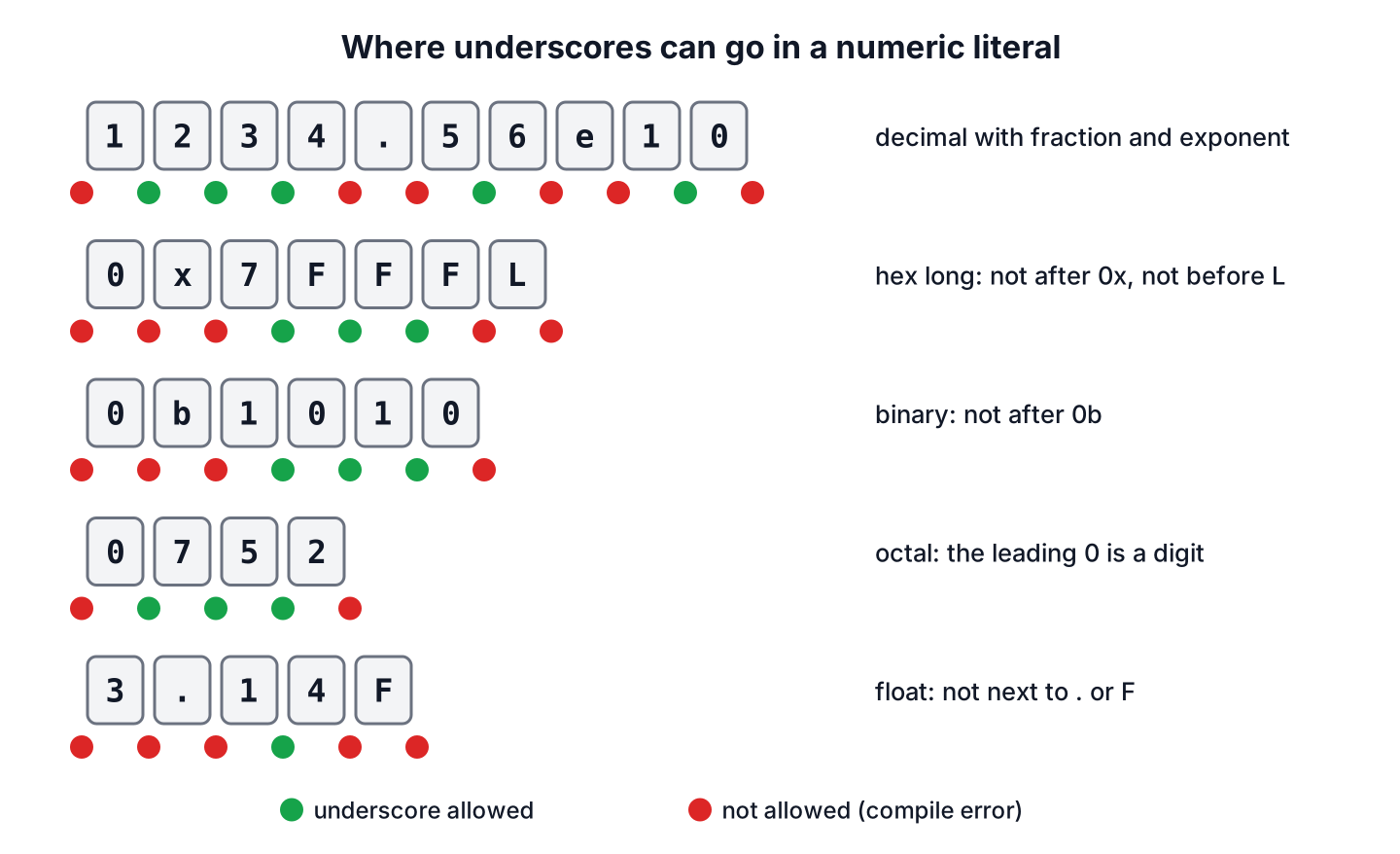
The rule in the Java Language Specification is short. Underscores can appear only between two digits of the same literal, and we can put as many of them there as we like. The rule applies to int and long literals in decimal, binary, octal and hexadecimal form, and to floating-point literals, including the digits of the exponent.
Java has no integer literal of type byte, short or char. A value such as 0b0010_0101 is an int literal, and the compiler converts it when the target type is smaller and the value fits.
byte mask = 0b0010_0101;               // 37
short port = 8_080;                    // 8080
long maxLong = 0x7FFF_FFFF_FFFF_FFFFL; // 9223372036854775807
int octal = 0_52;                      // 42
double avogadro = 6.022_140_76e2_3;    // 6.02214076E23
float ratio = 0.333_333F;              // 0.333333
double twoPowerTen = 0x1.0p1_0;        // 1024.0
int lakh = 10_00_000;                  // 1000000
int doubled = 1__000;                  // 1000
The 0_52 line shows an edge case. The leading 0 of an octal literal counts as a digit, so 0_52 is legal, whereas underscores right after 0x or 0b are not. The lakh line shows that the compiler does not care about the group size, so the Indian grouping 10_00_000 also gives one million.
2. Positions Where Underscores Are Not Allowed
Every position that has a non-digit on one side is rejected. That covers the start and the end of the literal, both sides of the decimal point, the radix prefixes 0x and 0b, the exponent marker e or p, and the type suffixes L, F and D.
// does not compile: illegal underscore in every line
int atEnd = 52_;
float beforeDot = 3_.14F;
float afterDot = 3._14F;
long beforeSuffix = 999_99_9999_L;
int afterHexPrefix = 0x_52;
int afterBinaryPrefix = 0b_101;
double afterExponent = 1e_10;
double beforeExponent = 1_e10;
The compiler stops with the same message for each line and points a caret at the misplaced character.
Rates.java:1: error: illegal underscore
int atEnd = 52_;
              ^
Leading underscores are a different case. The text _52 is not a number at all but a valid identifier, so int x = _52; fails with cannot find symbol unless a variable named _52 exists. A single _ on its own is a keyword since Java 9, and Java 22 uses it for unnamed variables.
| Literal | Compiles? | Reason |
|---|---|---|
| 1_000 | Yes | Between two digits |
| 1__000 | Yes | Several underscores in a row are allowed |
| 0_52 | Yes | Octal, the leading 0 is a digit |
| 1e1_0 | Yes | Between digits of the exponent |
| 52_ | No | Last character of the literal |
| _52 | No, it is an identifier | Starts with _, so it is a name |
| 3_.14, 3._14 | No | Next to the decimal point |
| 0x_52, 0b_1 | No | Right after the radix prefix |
| 1_e10, 1e_10 | No | Next to the exponent marker |
| 100_L, 1_0_f | No | Right before the type suffix |
3. Grouping Digits in Each Number System
Since the compiler accepts any grouping, the grouping is a choice we make for the reader. A good grouping matches the way people already read that kind of number, which is different for decimal, binary and hexadecimal values.
- Decimal amounts use groups of three, the same as the thousands separator, for example 2_500_000.
- Binary masks use groups of four bits (one hex digit) or eight bits (one byte), for example 0b1111_0000.
- Hex values use groups of two digits for bytes, such as an RGB color 0xFF_88_00, or four digits for 16-bit words.
- Long hex constants such as masks and hash seeds use groups of four, for example 0x0000_FFFF_FFFF_FFFFL.
Say a file-sharing app keeps read, write, share and delete permissions as bits of one int, with one byte per user role. Grouping the binary literal by byte shows at a glance which role gets which bits, which is hard to see in 0b111100000011.
int readWrite = 0b0000_0011;           // 3
int adminRights = 0b1111_0000_0011;    // 3843
int guestRole = adminRights & 0b1111_1111; // 3
boolean canShare = (adminRights & 0b0100_0000_0000) != 0; // true
Values that only look like numbers, such as card numbers, phone numbers and postal codes, are better kept as String values. They are never used in arithmetic, and a long loses leading zeros, so 0049 becomes 49.
4. Underscores Do Not Exist at Runtime
Underscores are part of the source code only, so the compiled class contains the plain value and the parse methods do not accept underscores. When we print 1_000_000, we get 1000000. When a configuration file contains 10_485_760 and we pass it to Long.parseLong(), the call throws a NumberFormatException, because the method accepts digits and an optional sign only.
String fromCode = String.valueOf(1_000_000);   // "1000000"
int parsed = Integer.parseInt("1_000");         // NumberFormatException: For input string: "1_000"
Say an upload service reads its size limit from a properties file, and the operations team writes 10_485_760 to match the Java constant. The safe parse method strips spaces, removes the underscores and turns a bad value into a clear error message instead of a raw stack trace.
static long parseGroupedLong(String text) {
    String digits = text.strip().replace("_", "");
    try {
        return Long.parseLong(digits);
    } catch (NumberFormatException e) {
        throw new IllegalArgumentException("Not a number: " + text, e);
    }
}
long limit = parseGroupedLong(" 10_485_760 "); // 10485760
long plain = parseGroupedLong("5000"); // 5000
long typo = parseGroupedLong("10_48O_760"); // IllegalArgumentException: Not a number: 10_48O_760For output, we add the separators back with a format pattern. The comma flag in printf-style formatting groups by thousands with the separator of the given locale, and compact number formatting prints short forms such as 1M.
String report = String.format(Locale.US, "%,d", 10_485_760);         // "10,485,760"
String german = String.format(Locale.GERMANY, "%,d", 10_485_760);     // "10.485.760"
Since the underscores never reach the bytecode, they have no effect on performance or on the class file size. The binary, octal and hexadecimal conversion methods also return plain digits without separators.
5. Alternatives for Large Constants
Underscores make a literal readable, but sometimes a different way of writing the value says more about its meaning. The choice depends on whether the reader cares about the exact digits or about the unit.
| Need | With underscores | Alternative | Better choice |
|---|---|---|---|
| Size of 10 MiB | 10_485_760L | 10L * 1024 * 1024 | The product, because it shows the unit |
| Timeout of 30 seconds | 30_000 (ms) | Duration.ofSeconds(30) | Duration, because the unit is part of the type |
| Exact money amount | 1_299.99 | new BigDecimal(“1299.99”) | BigDecimal, because double cannot store most decimal fractions |
| Large double | 6_022_000_000.0 | 6.022e9 | Scientific notation for very large or very small values |
| Exact count or limit | 2_147_483_647 | Integer.MAX_VALUE | The named constant when one exists |
The product form has one trap. In 10 * 1024 * 1024 * 1024, every factor is an int, so the result overflows before it is stored in a long. Putting an L on the first factor makes the whole calculation use long.
long wrong = 10 * 1024 * 1024 * 1024;           // -2147483648
long right = 10L * 1024 * 1024 * 1024;          // 10737418240
long sameValue = 10_737_418_240L;               // 10737418240
Duration timeout = Duration.ofSeconds(30);      // PT30S
long timeoutMillis = timeout.toMillis();        // 30000
We also give such values a name. A constant such as MAX_UPLOAD_BYTES = 10_485_760L explains the meaning, and the underscores let a reviewer check the value against a requirement. The Java naming conventions use upper case with underscores for constant names, which is unrelated to the underscores inside the value.
6. Underscores in Numeric Literals FAQs
The compiler error already points at a misplaced character, so readers mostly want the Java version, the runtime parsing rules and the syntax in other languages.
6.1. Which Java version introduced underscores in numeric literals?
Java 7. The feature came with the Project Coin language changes in Java SE 7, together with binary literals (0b), the diamond operator and try-with-resources. Every later version supports it without flags.
6.2. Do underscores change the value or the speed of a program?
No. The compiler removes them while it reads the source file, so 1_000 and 1000 produce the same bytecode. They exist only for people who read the code.
6.3. Can Integer.parseInt() read a number with underscores?
No. Integer.parseInt(“1_000”) throws a NumberFormatException, and the same holds for Long.parseLong(), Double.parseDouble() and the other String to number conversions. We remove the underscores first with replace(“_”, “”), as shown in section 4.
6.4. Are two underscores in a row allowed?
Yes. Any number of underscores is allowed between two digits, so 1__000 compiles to 1000. It does not help readability, so we keep one separator per group in real code.
6.5. Do other languages use the same syntax?
Most of them do, with small differences in the rules.
Java 7+        1_000_000
Kotlin         1_000_000
Python 3.6+    1_000_000     (PEP 515)
JavaScript     1_000_000     (ES2021)
C# 7.0+        1_000_000     (0x_FF allowed since C# 7.2)
C++14          1'000'000     (single quote)
JSON does not allow any digit separator, so a JSON document with 1_000 fails to parse.
7. Conclusion
Underscores in numeric literals group digits for the reader and disappear during compilation. Underscores must sit between two digits, so they cannot touch the start or end of a literal, the decimal point, a radix prefix, an exponent marker or a type suffix.
We group decimal values by thousands, binary values by four or eight bits and hex values by bytes. At runtime the parse methods reject underscores, so configuration values written in the same style need a small cleanup before parsing. For values with a unit, Duration or a product such as 10L * 1024 * 1024 often explains more than any grouping. More language changes by release are listed in the Java features by version overview.
8. References
- JLS 25, Integer Literals
- JLS 25, Floating-Point Literals
- Oracle, Underscores in Numeric Literals
- Integer.parseInt() Javadoc
- JEP 456, Unnamed Variables and Patterns
Happy Learning !!
