
To delete old logs in Log4j2, we add a Delete action to the DefaultRolloverStrategy of a RollingFile appender, and Log4j2 removes the matching archive files every time the log file rolls over. The action selects files by name, age, total size or count, so it works for rules such as “keep 30 days of logs” or “never use more than 5 GB”.
We need it on every server that writes rolling logs, because the rollover only creates archives and never removes them. Without a Delete action, a busy service fills its disk with old .log.gz files in a few weeks.
The following example keeps the archives of the last 30 days and deletes older ones at each rollover.
<DefaultRolloverStrategy max="10">               <!-- up to 10 files per day (%i) -->
  <Delete basePath="logs" maxDepth="2">            <!-- scan logs/ and one subfolder -->
    <IfFileName glob="archive/app-*.log.gz"/>      <!-- only our archives -->
    <IfLastModified age="P30D"/>                   <!-- 30 days or older: deleted -->
  </Delete>
</DefaultRolloverStrategy>
Notice that both conditions must match before Log4j2 deletes a file, and that maxDepth=”2″ is what lets the action see the archive subfolder. We build the complete appender, keep some old files by count or size, write the same rule in log4j2.properties, find out why logs are sometimes not deleted, and do the same cleanup in Logback with maxHistory. The examples use Log4j 2.26.1 and Logback 1.6.5.
1. Log4j2 Delete Action
In Log4j2, a RollingFileAppender needs a TriggeringPolicy and a RolloverStrategy. The triggering policy decides when a rollover happens, for example at midnight or when the file reaches 20 MB. The rollover strategy decides what happens during the rollover, that is, how the current file is renamed, compressed and cleaned up.
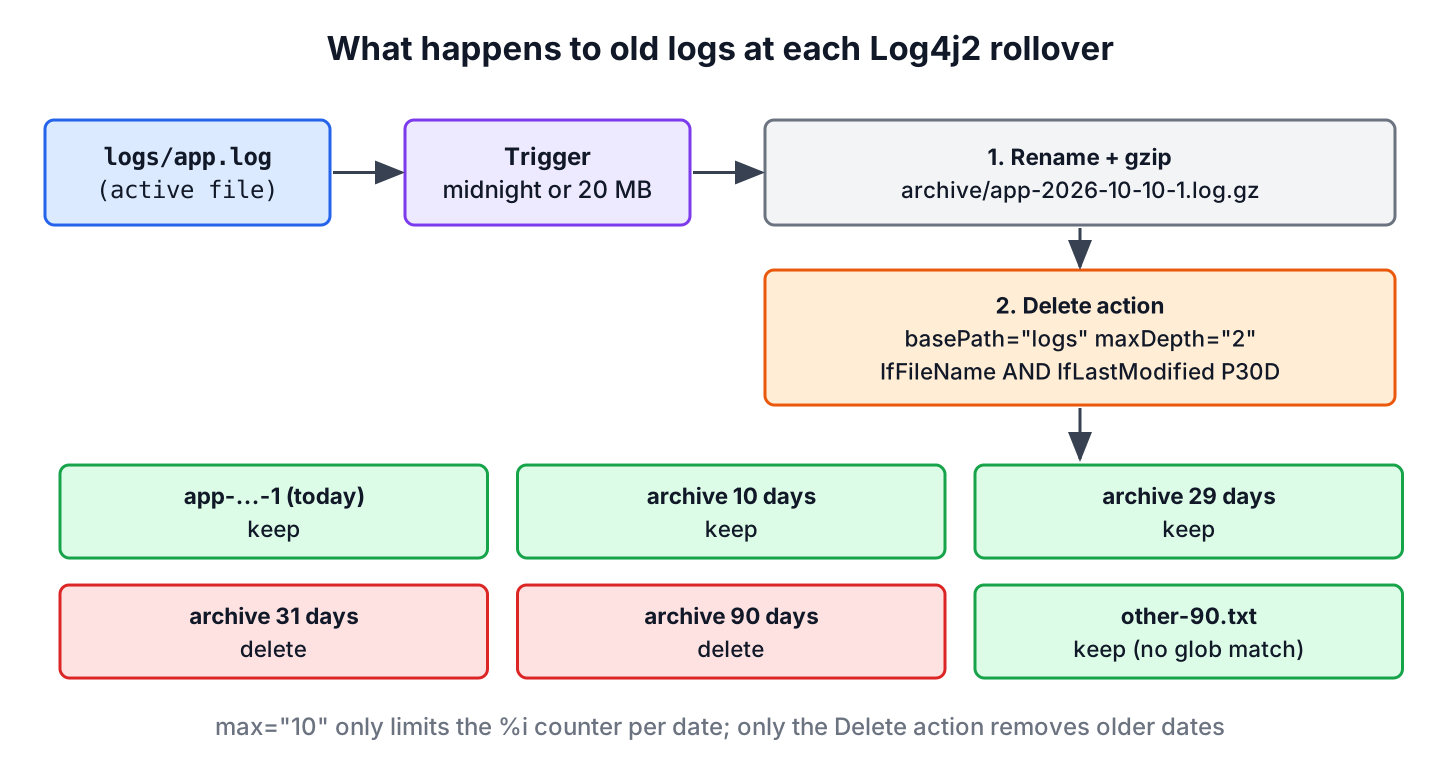
Before Log4j 2.5, the max attribute of DefaultRolloverStrategy was the only cleanup option. In the following configuration, Log4j2 creates up to 10 archive files of 20 MB per day, and the %i counter starts again at 1 on the next day.
<?xml version="1.0" encoding="UTF-8"?>
<Configuration status="warn">
  <Appenders>
    <RollingFile name="RollingFile" fileName="logs/app.log"
                 filePattern="logs/archive/app-%d{yyyy-MM-dd}-%i.log.gz">
      <PatternLayout pattern="%d %p %c{1.} [%t] %m%n"/>
      <Policies>
        <TimeBasedTriggeringPolicy/>
        <SizeBasedTriggeringPolicy size="20 MB"/>
      </Policies>
      <DefaultRolloverStrategy max="10"/>
    </RollingFile>
  </Appenders>
  <Loggers>
    <Root level="info">
      <AppenderRef ref="RollingFile"/>
    </Root>
  </Loggers>
</Configuration>
The max attribute limits only the %i index inside one date, so it never deletes the archives of earlier days. With a %d date in the file pattern, the archive folder keeps growing by up to 10 files every day.
| Option | What it removes | Works across dates | Since |
|---|---|---|---|
| max=”10″ | The oldest %i file of the current date once an 11th would be created | No | Log4j 2.0 |
| Delete action | Any file under basePath that matches all conditions | Yes | Log4j 2.5 |
Since Log4j 2.5, the Delete action gives us full control over which files are removed at rollover time, including files written by older versions of the app. The following strategy replaces the one in the configuration above and deletes archives that are 30 days old or older.
<DefaultRolloverStrategy max="10">
  <Delete basePath="logs" maxDepth="2">
    <IfFileName glob="archive/app-*.log.gz"/>
    <IfLastModified age="P30D"/>
  </Delete>
</DefaultRolloverStrategy>
The basePath is the folder where the scan starts, and the glob pattern is relative to that folder. The age uses the ISO-8601 duration format, so P30D means 30 days, PT12H means 12 hours and P1Y is not supported (a year has no fixed length). Log4j2 compares the age with the last-modified time of each file, not with the date in its name.
With archives that are 1, 10, 29, 31, 45 and 90 days old, one rollover removes the 31, 45 and 90 day files, while the newer archives and an unrelated other-90.txt file in the same folder stay.
2. Keeping Some Logs and Deleting Others
Age alone is not always the right rule. A service that logs 2 GB a day on a 50 GB volume runs out of space long before 30 days pass, while a quiet batch job may write one small file a week that we want to keep for a year. Log4j2 has a condition for each case.
| Condition | Matches a file when | Typical value |
|---|---|---|
| IfFileName | Its path relative to basePath matches glob or regex | archive/app-*.log.gz |
| IfLastModified | It is as old as age or older | P30D |
| IfAccumulatedFileCount | It comes after the first exceeds files, counted newest first | 20 |
| IfAccumulatedFileSize | The running total of file sizes, newest first, is larger than exceeds | 5 GB |
| IfAny, IfAll, IfNot | Any, all or none of its nested conditions match | Combines the others |
All conditions placed right under Delete must match. A condition can also hold nested conditions, which are checked only for the files that passed the outer one. The following strategy deletes archives that are 30 days old or older, but among those old archives it keeps the newest 10 files or the newest 100 GB, whichever limit is reached first.
<DefaultRolloverStrategy max="100">
  <Delete basePath="logs" maxDepth="2">
    <IfFileName glob="archive/app-*.log.gz">
      <IfLastModified age="P30D">
        <IfAny>
          <IfAccumulatedFileSize exceeds="100 GB"/>
          <IfAccumulatedFileCount exceeds="10"/>
        </IfAny>
      </IfLastModified>
    </IfFileName>
  </Delete>
</DefaultRolloverStrategy>
The nesting reads from the outside in. Files younger than 30 days never reach the inner conditions, so they always stay. The count and size limits apply only to the files that are already 30 days old.
The more common production rule is the opposite, namely “delete after 30 days, and also delete anything beyond the newest 20 files”. For that rule, we put the age and the count side by side in IfAny.
<Delete basePath="logs" maxDepth="2">
  <IfFileName glob="archive/app-*.log.gz">
    <IfAny>
      <IfLastModified age="P30D"/>
      <IfAccumulatedFileCount exceeds="20"/>
    </IfAny>
  </IfFileName>
</Delete>
With 11 archives aged between 1 and 90 days, and limits of 2 files for the nested rule and 5 files for the IfAny rule, the two variants keep very different files.
| Configuration | Kept | Deleted |
|---|---|---|
| Nested, P30D with count 2 inside | All files under 30 days, plus the 31 and 40 day files | 50, 60, 70 and 90 day files |
| IfAny, P30D or count 5 | The new archive and the 1, 5, 10 and 20 day files | Every file from 29 days on |
The accumulated conditions count files in the order of the pathSorter, which by default sorts by modification time with the newest file first. The archive created by the current rollover is part of that count, so a limit of 5 keeps 4 older archives.
3. Properties Configuration
We can configure the same Delete action in a log4j2.properties file. Every nested component gets an identifier of our choice, such as delete, fileName or lastModified, and its type key names the Log4j2 plugin.
appender.rolling.type = RollingFile
appender.rolling.name = RollingFile
appender.rolling.fileName = logs/app.log
appender.rolling.filePattern = logs/archive/app-%d{yyyy-MM-dd}-%i.log.gz
appender.rolling.layout.type = PatternLayout
appender.rolling.layout.pattern = %d %p %c{1.} [%t] %m%n
appender.rolling.policies.type = Policies
appender.rolling.policies.time.type = TimeBasedTriggeringPolicy
appender.rolling.policies.size.type = SizeBasedTriggeringPolicy
appender.rolling.policies.size.size = 20MB
appender.rolling.strategy.type = DefaultRolloverStrategy
appender.rolling.strategy.max = 10
appender.rolling.strategy.delete.type = Delete
appender.rolling.strategy.delete.basePath = logs
appender.rolling.strategy.delete.maxDepth = 2
appender.rolling.strategy.delete.fileName.type = IfFileName
appender.rolling.strategy.delete.fileName.glob = archive/app-*.log.gz
appender.rolling.strategy.delete.lastModified.type = IfLastModified
appender.rolling.strategy.delete.lastModified.age = P30D

rootLogger.level = info
rootLogger.appenderRef.rolling.ref = RollingFile
Log4j2 also accepts 30D without the leading P, which is why older examples on the web still work. A nested condition in properties format gets one more level in the key, for example appender.rolling.strategy.delete.fileName.lastModified.type = IfLastModified.
4. Why Old Logs Are Not Deleted
Most “Delete does nothing” reports come down to a few causes, and none of them prints an error by default. Setting status=”trace” on the Configuration element makes Log4j2 print every file that the action visits and the condition that accepted or rejected it, such as IfLastModified REJECTED.
- No rollover has happened yet. The action runs only during a rollover, never on a timer, so a quiet service that rolls over only by size may not delete anything for weeks.
- The archives are in a subfolder, but maxDepth is missing. Its default is 1, which visits only the files that sit in basePath itself. The configuration from the intro deletes nothing without maxDepth=”2″.
- The glob is written as an absolute path or does not include the subfolder. The pattern is matched against the path relative to basePath, so archive/app-*.log.gz works and app-*.log.gz does not match files inside archive.
- The JVM user cannot delete the files, for example after a package upgrade changed the owner of the log folder.
- The configuration contains testMode=”true”. In test mode, Log4j2 only reports which files it would delete, which is useful for a dry run on a production server before enabling the real cleanup.
Be careful with a broad basePath such as /var/log. The IfFileName condition is the only thing that protects the files of other apps in that folder, so always keep it as the first condition.
5. Deleting Old Logs in Logback with maxHistory
Logback has no separate delete action. Its TimeBasedRollingPolicy and SizeAndTimeBasedRollingPolicy remove old archives through the maxHistory property, which is the number of time periods to keep. With a daily pattern, maxHistory of 30 keeps 30 days of archives, however many files each day has.
<appender name="FILE" class="ch.qos.logback.core.rolling.RollingFileAppender">
  <file>logs/app.log</file>
  <rollingPolicy class="ch.qos.logback.core.rolling.SizeAndTimeBasedRollingPolicy">
    <fileNamePattern>logs/archive/app-%d{yyyy-MM-dd}.%i.log.gz</fileNamePattern>
    <maxFileSize>20MB</maxFileSize>
    <maxHistory>30</maxHistory>
    <totalSizeCap>5GB</totalSizeCap>
    <cleanHistoryOnStart>true</cleanHistoryOnStart>
  </rollingPolicy>
  <encoder>
    <pattern>%d %level %logger - %msg%n</pattern>
  </encoder>
</appender>
The totalSizeCap deletes the oldest archives once all archives together are larger than 5 GB, and it works only when maxHistory is also set. The cleanHistoryOnStart option runs the cleanup when the app starts, which helps services that restart often. Logback decides the age of a file from the date in its file name, not from its last-modified time, which is the main difference from Log4j2.
Logback looks back only a limited number of periods. With Logback 1.6.5, maxHistory of 30 and cleanHistoryOnStart, the cleanup deletes archives that are 31 to 62 days old but keeps the ones that are 63 and 90 days old, because the remover checks only about 32 days beyond maxHistory. Archives left over from a long outage, or copied in from another server, need a one-time manual cleanup.
In a Spring Boot application with the default Logback setup, we set the same values in application.properties instead of writing XML. The Spring Boot logging defaults are max-history=7 and a 10 MB file size.
logging.file.name=logs/app.log
logging.logback.rollingpolicy.max-file-size=20MB
logging.logback.rollingpolicy.max-history=30
logging.logback.rollingpolicy.total-size-cap=5GB
logging.logback.rollingpolicy.clean-history-on-start=true| Need | Log4j2 | Logback |
|---|---|---|
| Keep N days | IfLastModified age=”PND” | maxHistory N (daily pattern) |
| Keep N files | IfAccumulatedFileCount exceeds=”N” | Not available, only periods |
| Cap total size | IfAccumulatedFileSize | totalSizeCap |
| Clean at startup | Only with OnStartupTriggeringPolicy | cleanHistoryOnStart |
| Age based on | File modification time | Date in the file name |
| Dry run | testMode=”true” | Not available |
6. Log4j2 Delete Old Logs FAQs
Log files that stay on disk longer than planned, or disappear too early, trace back to one of the settings in these answers.
6.1. Does the Delete action run when the application starts?
Only when a rollover happens at startup. Log4j2 runs the Delete action only during a rollover, so it runs at startup only if the appender also has an OnStartupTriggeringPolicy, which rolls over a non-empty log file that is older than the JVM start. Logback is different, because cleanHistoryOnStart runs its cleanup at startup.
6.2. How do I delete logs older than 7 days in Log4j2?
We use IfLastModified with the age P7D next to an IfFileName condition that matches only the archives.
<Delete basePath="logs" maxDepth="2">
  <IfFileName glob="archive/app-*.log.gz"/>
  <IfLastModified age="P7D"/>
</Delete>
6.3. Can the Delete action remove the current app.log file?
Yes, if the glob matches it. For example, the glob **.log* with an IfAccumulatedFileCount limit deletes the active app.log together with the archives. We keep the archives in their own folder, or give them a name pattern that the active file cannot match.
6.4. Does max=”7″ mean seven days of logs?
No. The max attribute limits the %i counter, so it means seven files per date when the pattern has %d, or seven files in total when the pattern has only %i. Days of retention always need a Delete action in Log4j2 or maxHistory in Logback.
6.5. Does the same configuration work with log4j2-spring.xml in Spring Boot?
Yes. Spring Boot loads log4j2-spring.xml with Log4j2 itself, so the Delete action works the same way after we switch Spring Boot to Log4j2. The logging.logback.rollingpolicy properties do not apply to Log4j2.
7. Conclusion
Log4j2 does not delete old logs unless we add a Delete action to the DefaultRolloverStrategy. The max attribute only limits the index inside one date. A safe rule always starts with IfFileName, sets maxDepth when the archives are in a subfolder, and adds IfLastModified, IfAccumulatedFileCount or IfAccumulatedFileSize for the retention we need.
The cleanup runs only at rollover, and testMode shows what it would remove before we enable it. In Logback, maxHistory, totalSizeCap and cleanHistoryOnStart give the same result, with ages taken from the file names. More appender options are in the Log4j2 tutorial.
8. References
- Log4j 2 manual, Rolling file appenders
- Log4j 2 downloads
- Logback manual, RollingFileAppender
- Spring Boot reference, Logging
Happy Learning !!
