
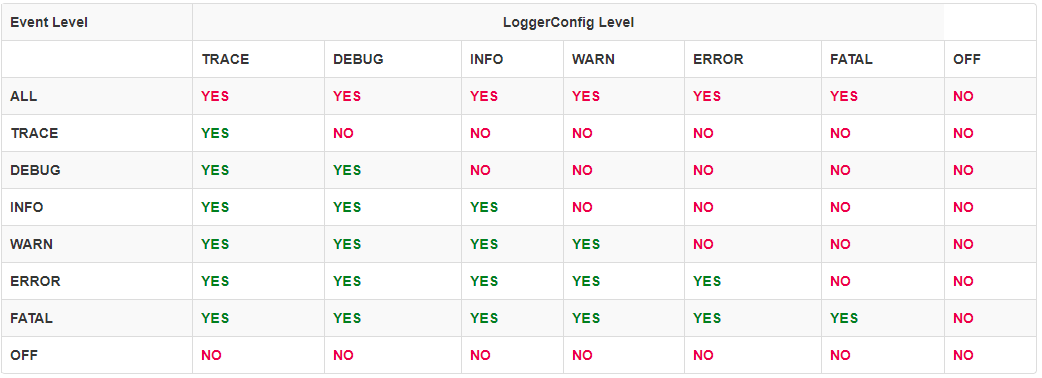
Log levels are labels such as DEBUG, INFO, WARN and ERROR that say how important a log message is. Every logger has a minimum level, and it prints only the messages at that level or above. In Log4j 2, the levels in order from the most detailed to the most severe are TRACE, DEBUG, INFO, WARN, ERROR and FATAL. The same order, with small name differences, is used by SLF4J, Logback and java.util.logging.
We use log levels to control how much our app writes to the log without changing any code. In production we keep the level at INFO or WARN, and when we investigate a bug we lower the level of one package to DEBUG for a while.
The following example logs one message at every level with a logger whose level is WARN. Only the three messages at WARN and above reach the console.
// The logger level is WARN (set in log4j2.xml)
logger.trace("Trace message");   // not printed
logger.debug("Debug message");   // not printed
logger.info("Info message");     // not printed
logger.warn("Warn message");     // WARN  LogLevelsDemo - Warn message
logger.error("Error message");   // ERROR LogLevelsDemo - Error message
logger.fatal("Fatal message");   // FATAL LogLevelsDemo - Fatal message
Notice that Log4j 2 drops the three lower messages before it formats or writes them, so they cost almost nothing. We look at what each level means, how to set the level for the whole app and for one package, how the levels map to other logging frameworks, and which level to use in production.
1. Log Levels in Order
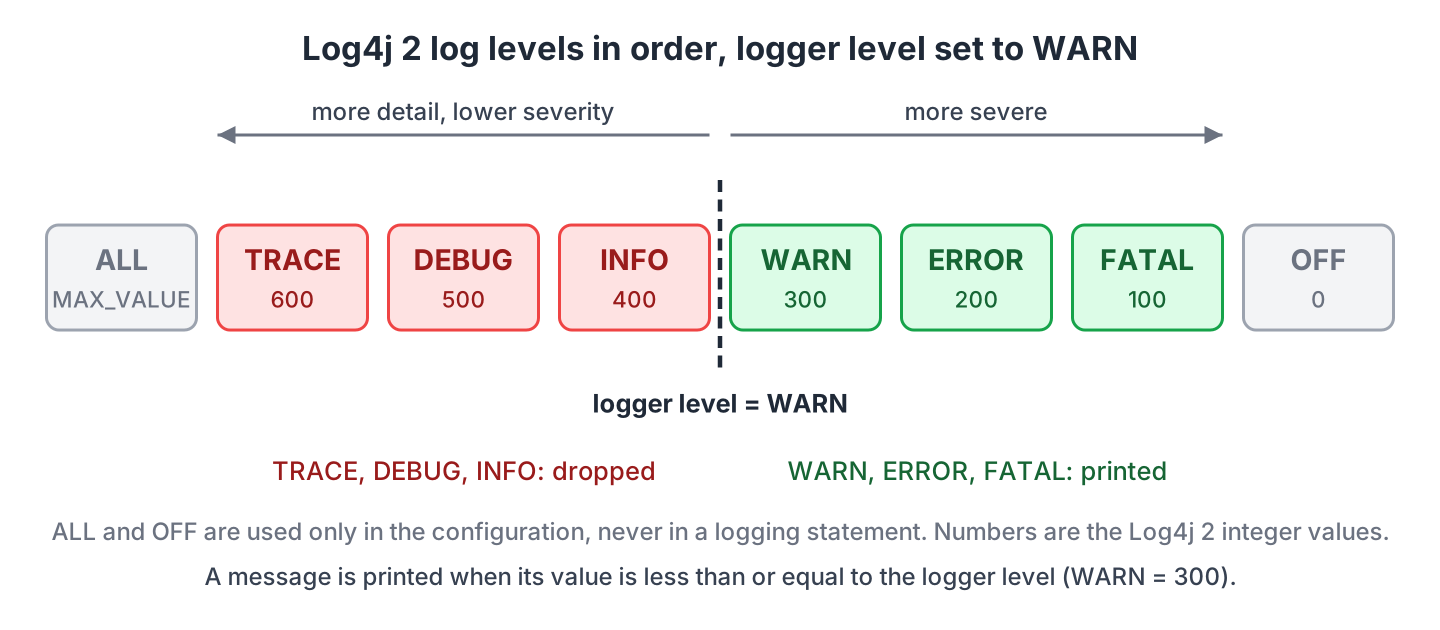
In Log4j 2, every level is an instance of the Level class with a name and an integer value. A lower integer means a more severe message, so FATAL is 100 and TRACE is 600.
| Level | Integer value | What the message means | Example message |
|---|---|---|---|
| OFF | 0 | Turns logging off for that logger. | (configuration only) |
| FATAL | 100 | The app cannot continue and is about to stop. | Recipe database is not reachable |
| ERROR | 200 | An operation failed, and someone has to look at it. | Could not load the image of recipe pancakes |
| WARN | 300 | Something unexpected happened, but the app can go on. | Recipe pancakes has no cooking time |
| INFO | 400 | A normal event that shows the app is making progress. | Recipe pancakes loaded |
| DEBUG | 500 | Details that help a developer follow the code while fixing a bug. | Looking up recipe pancakes in the cache |
| TRACE | 600 | Even finer details, such as every method call and its arguments. | findRecipe() called with name=pancakes |
| ALL | Integer.MAX_VALUE | Turns on every level, including custom levels. | (configuration only) |
By default, Log4j 2 sets the root logger to ERROR, so an app without a configuration file prints only ERROR and FATAL messages to the console. We change that in the configuration file, as section 3 shows.
2. Log Level Hierarchy
Log levels form a hierarchy, which means that enabling one level also enables every level that is more severe. A logger set to INFO prints INFO, WARN, ERROR and FATAL messages and drops DEBUG and TRACE. In Log4j 2, a message is printed when its integer value is less than or equal to the integer value of the logger level.
| Logger level | Messages that are printed |
|---|---|
| OFF | None |
| FATAL | FATAL |
| ERROR | ERROR, FATAL |
| WARN | WARN, ERROR, FATAL |
| INFO | INFO, WARN, ERROR, FATAL |
| DEBUG | DEBUG, INFO, WARN, ERROR, FATAL |
| TRACE | TRACE, DEBUG, INFO, WARN, ERROR, FATAL |
| ALL | Every level, including custom levels |
Loggers also form a hierarchy by name. The logger com.howtodoinjava.levels.recipes.RecipeService is a child of com.howtodoinjava.levels.recipes, and so on up to the root logger. A logger without its own level inherits the level of the nearest parent that has one, so we set the level once per package instead of once per class.
3. Setting the Log Level in Log4j 2
We set log levels in the configuration file, which Log4j 2 reads from the classpath at startup. The Root logger gets the level for the whole app. A Logger element with a package name overrides it for every class in that package and its sub-packages.
The following example sets the root logger to WARN and the package com.howtodoinjava.levels.recipes to DEBUG. The example runs on Java 25 with Log4j 2.26.1 and JUnit 6.1.3, and the complete project is in the GitHub repository.
3.1. Setting the Log Level in log4j2.xml
The XML format is the most common one. The level is an attribute on the Root and Logger elements.
<Configuration status="WARN">
  <Appenders>
    <Console name="Console" target="SYSTEM_OUT">
      <PatternLayout pattern="%-5level %c{1} - %msg%n"/>
    </Console>
  </Appenders>
  <Loggers>
    <!-- Our own recipes package prints DEBUG and above -->
    <Logger name="com.howtodoinjava.levels.recipes" level="DEBUG"/>
    <!-- Everything else prints WARN and above -->
    <Root level="WARN">
      <AppenderRef ref="Console"/>
    </Root>
  </Loggers>
</Configuration>
The RecipeService class in the recipes package logs one message at every level while it looks up a recipe. The LogLevelsDemo class in the parent package does the same, and its logger gets WARN from the root logger.
private static final Logger logger = LogManager.getLogger(RecipeService.class);

public String findRecipe(String name) {
  logger.trace("findRecipe() called with name={}", name);       // not printed
  logger.debug("Looking up recipe {} in the cache", name);      // printed
  logger.info("Recipe {} loaded", name);                        // printed
  logger.warn("Recipe {} has no cooking time", name);           // printed
  logger.error("Could not load the image of recipe {}", name);  // printed
  logger.fatal("Recipe database is not reachable");             // printed
  return name;
}
The console shows three messages from LogLevelsDemo and five from RecipeService. Neither logger is set to TRACE, so both drop that message.
--- LogLevelsDemo (root logger, level WARN) ---
WARN  LogLevelsDemo - Warn message
ERROR LogLevelsDemo - Error message
FATAL LogLevelsDemo - Fatal message
--- RecipeService (package logger, level DEBUG) ---
DEBUG RecipeService - Looking up recipe pancakes in the cache
INFO  RecipeService - Recipe pancakes loaded
WARN  RecipeService - Recipe pancakes has no cooking time
ERROR RecipeService - Could not load the image of recipe pancakes
FATAL RecipeService - Recipe database is not reachable
3.2. Setting the Log Level in log4j2.properties
The properties format describes the same loggers with key-value pairs. Each named logger gets a short key of our choice, such as recipes, with its name and level under it.
appender.console.type = Console
appender.console.name = Console
appender.console.layout.type = PatternLayout
appender.console.layout.pattern = %-5level %c{1} - %msg%n

# Our own recipes package prints DEBUG and above
logger.recipes.name = com.howtodoinjava.levels.recipes
logger.recipes.level = DEBUG

# Everything else prints WARN and above
rootLogger.level = WARN
rootLogger.appenderRef.console.ref = Console
Log4j 2 looks for log4j2.properties before log4j2.xml, so we keep only one of the two files on the classpath. With the properties file in place, the demo prints the same output as before.
3.3. Changing the Log Level at Runtime
Sometimes we need DEBUG output from one package on a running server, without a restart. The Configurator class in log4j-core changes the level of a logger while the app runs, for every class under that logger name.
Logger logger = LogManager.getLogger("com.howtodoinjava.levels.runtime.Checkout");
boolean infoBefore = logger.isInfoEnabled();            // false, WARN inherited from root

Configurator.setLevel(logger.getName(), Level.INFO);
boolean infoAfter = logger.isInfoEnabled();             // true
A level set with Configurator is lost at the next restart. When the new level has to stay, we edit the configuration file and let Log4j 2 reload it with monitorInterval. In a Spring Boot app, we set the same levels with logging.level.<package> properties.
4. Log Levels in SLF4J, Logback and java.util.logging
Most Java apps call the SLF4J API and let Log4j 2 or Logback do the writing. The JDK also ships its own java.util.logging package. The level names differ a little between them, but the idea is the same in each one.
| Log4j 2 | SLF4J and Logback | java.util.logging | Meaning |
|---|---|---|---|
| FATAL | ERROR | SEVERE | The app cannot continue. |
| ERROR | ERROR | SEVERE | An operation failed. |
| WARN | WARN | WARNING | Unexpected, but the app goes on. |
| INFO | INFO | INFO (and CONFIG for startup settings) | Normal progress. |
| DEBUG | DEBUG | FINE | Details for fixing a bug. |
| TRACE | TRACE | FINER and FINEST | The finest details. |
SLF4J has no FATAL level, so an SLF4J logger has no fatal() method, and a Log4j 2 FATAL message sent through SLF4J comes out as ERROR. In java.util.logging, the integer values run the other way, so SEVERE is 1000 and FINEST is 300. The root logger of Logback defaults to DEBUG rather than ERROR.
5. Which Log Level to Use in Production
In production we set our own packages to INFO and the root logger to WARN. The INFO messages show what the app did, such as which request came in and which job finished. The WARN root level keeps the frameworks and libraries quiet unless something is wrong on their side.
DEBUG and TRACE are development levels. A DEBUG logger prints many times more lines than INFO, so the disk fills up and the app slows down. When a production bug cannot be reproduced on our machine, we set only the package in question to DEBUG, as in section 3.3, and set it back when we have the log.
The level of each message matters as much as the logger level. If every caught exception goes to ERROR, the ERROR count becomes noise and nobody reacts to it when a real failure happens.
6. Log Level FAQs
6.1. What Is the Difference Between WARN and ERROR?
The difference is whether the operation finished. We log at WARN when something unexpected happened but the app handled it, for example a missing optional field replaced with a default value. We log at ERROR when the operation failed and the caller did not get the result, for example a database call that threw an exception after the last retry.
6.2. Can We Add a Custom Log Level in Log4j 2?
Yes. We declare a custom level with a name and an integer value in a CustomLevels element at the top of log4j2.xml. The value decides where the level sits in the order. A level named NOTICE with the value 350 is between WARN (300) and INFO (400), so a logger at INFO prints it and a logger at WARN drops it.
<CustomLevels>
  <CustomLevel name="NOTICE" intLevel="350"/>
</CustomLevels>
The Logger interface has no notice() method, so we log at the custom level with logger.log(Level.getLevel(“NOTICE”), “message”). The SLF4J API cannot use the level at all, so a marker on an INFO message is often the simpler choice.
7. Conclusion
Log levels order every message from TRACE to FATAL, and a logger prints only the messages at its own level or above.
We set the level for the whole app on the root logger and override it per package with a named logger, in log4j2.xml or log4j2.properties, or at runtime with Configurator.setLevel(). For production, INFO for our own code and WARN for everything else is a good start, and we switch one package to DEBUG only while we investigate a bug.
8. References
- Log4j 2 log levels and custom levels
- Log4j 2 architecture and logger hierarchy
- Log4j 2 configuration
- Logback architecture and levels
- java.util.logging.Level Javadoc
Happy Learning !!

This explanation is wrong.
`If we set log level to ‘X’ then any log request with ‘level = X’ (lesser scopes) will be logged in log files. All requests with lessor order will not be logged.`
From official documentation:
Log Level intLevel
========================
OFF 0
FATAL 100
ERROR 200
WARN 300
INFO 400
DEBUG 500
TRACE 600
ALL Integer.MAX_VALUE
Now read the statement again.
Changes required for below.
If we set log level to ‘X’ then any log request with ‘level <= X' (lesser scopes) will be logged in log files. All requests with higher order will not be logged.
“If we set log level to ‘X’ then any log request with ‘level = X’ (lesser scopes) will be logged in log files. All requests with higher order will not be logged.”
Hi Lokesh,
Good job.
Just wanted to point out contradiction in log levels priority ordering:
Following statement is not correct:
“If we set log level to ‘X’ then any log request with ‘level = X’ (higher priorities) will be logged in log files.