

Spring Batch counts the processed records of every step in the step’s StepExecution, so we get the totals by calling getReadCount(), getFilterCount(), getWriteCount() and getSkipCount() on it. The framework updates these counts after every chunk and stores them in the job repository together with the step status.
We count processed records to log how many rows a nightly import read and wrote, and to raise an alert when a job skips bad rows that someone has to fix.
The following example reads the counts in a StepExecutionListener after a step that imported a CSV file with 8 books. The value of each count is in the comment.
@Override
public ExitStatus afterStep(StepExecution stepExecution) {
  long read = stepExecution.getReadCount();          // 7
  long filtered = stepExecution.getFilterCount();    // 2
  long written = stepExecution.getWriteCount();      // 5
  long skipped = stepExecution.getSkipCount();       // 1
  long commits = stepExecution.getCommitCount();     // 3
  return stepExecution.getExitStatus();
}
Notice that the file has 8 data rows, but the read count is 7. The reader could not parse one row, so Spring Batch skipped it and counted it as a skip instead of a read.
Next, we see what each count means, and we build the book import job on Spring Boot 4.1.1 and Spring Batch 6.0.5. After that, we log the counts after the step and after each chunk, look at the count that the reader saves for restarts, and check the counts in a test.
1. How Spring Batch Counts Processed Records
A chunk-oriented step reads items one by one, processes them and writes them in groups called chunks. Each chunk runs in its own transaction. During the chunk, Spring Batch updates a StepContribution, and when the chunk ends, it adds the contribution to the StepExecution and saves the step execution in the job repository.
Every item ends up in one place only, so the counts add up. The reader either returns an item or skips the row. The processor can filter a returned item, and the writer writes the rest unless a skip happens in the processor or the writer.
| Count | StepExecution method | What it counts | Book import |
|---|---|---|---|
| Read | getReadCount() | items the reader returned | 7 |
| Filtered | getFilterCount() | items for which the processor returned null | 2 |
| Written | getWriteCount() | items passed to the writer in committed chunks | 5 |
| Read skips | getReadSkipCount() | items the reader failed on and the skip policy skipped | 1 |
| Process / write skips | getProcessSkipCount(), getWriteSkipCount() | items skipped in the processor or the writer | 0 |
| All skips | getSkipCount() | sum of the three skip counts | 1 |
| Commits | getCommitCount() | chunks committed | 3 |
| Rollbacks | getRollbackCount() | chunks rolled back | 0 |
For example, a library imports its new books from a CSV file every night. The file has 8 rows. Row 5 has abc in the year column, so the reader throws a FlatFileParseException, which the skip policy skips. The processor drops the two books published before 2005, and the writer imports the other five. With a chunk size of 3, the step needs three chunks.
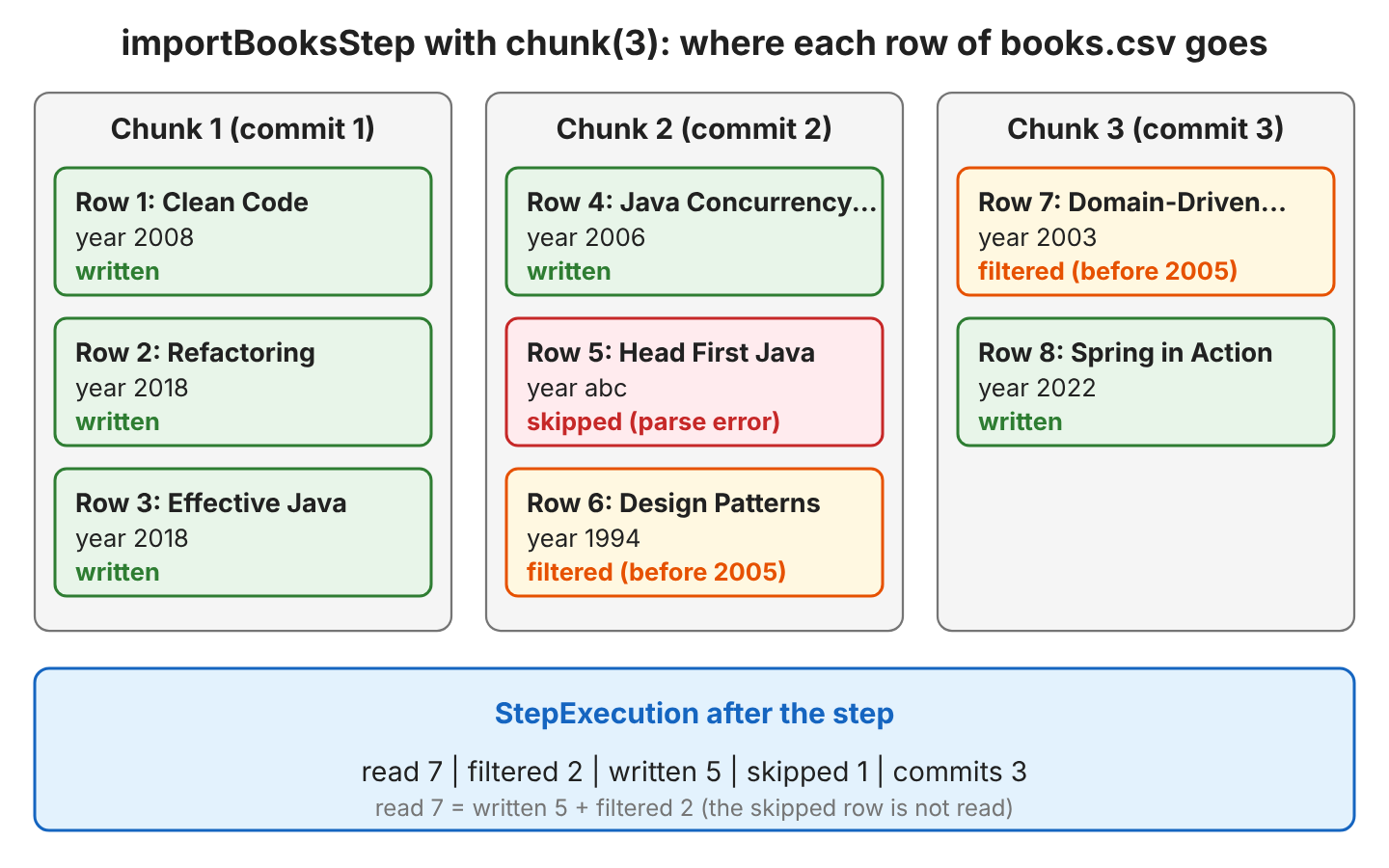
The write count tells us how many records reached the target, whereas the read count tells us how many records the reader returned. When the two differ, the filter and skip counts explain the difference.
2. The Book Import Example
The example is a Spring Boot 4.1.1 app with Spring Batch 6.0.5 on Java 25. It uses the JDBC job repository with an in-memory H2 database, so the counts are also saved in the BATCH_STEP_EXECUTION table. The starter spring-boot-starter-batch-jdbc adds Spring Batch with the JDBC job repository.
<parent>
  <groupId>org.springframework.boot</groupId>
  <artifactId>spring-boot-starter-parent</artifactId>
  <version>4.1.1</version>
</parent>

<dependencies>
  <dependency>
    <groupId>org.springframework.boot</groupId>
    <artifactId>spring-boot-starter-batch-jdbc</artifactId>
  </dependency>
  <dependency>
    <groupId>com.h2database</groupId>
    <artifactId>h2</artifactId>
    <scope>runtime</scope>
  </dependency>
  <dependency>
    <groupId>org.springframework.boot</groupId>
    <artifactId>spring-boot-starter-batch-test</artifactId>
    <scope>test</scope>
  </dependency>
</dependencies>
The input file books.csv is in src/main/resources. Row 5 has an invalid year, and rows 6 and 7 are books from before 2005.
id,title,author,year
1,Clean Code,Robert Martin,2008
2,Refactoring,Martin Fowler,2018
3,Effective Java,Joshua Bloch,2018
4,Java Concurrency in Practice,Brian Goetz,2006
5,Head First Java,Kathy Sierra,abc
6,Design Patterns,Erich Gamma,1994
7,Domain-Driven Design,Eric Evans,2003
8,Spring in Action,Craig Walls,2022
The FlatFileItemReader maps each row to a Book record. The item processor returns null for old books, which filters them out, and the writer logs the title of each imported book.
public record Book(long id, String title, String author, int year) {
}
@Bean
public Step importBooksStep(JobRepository jobRepository, PlatformTransactionManager transactionManager) {
return new StepBuilder("importBooksStep", jobRepository)
.<Book, Book>chunk(3)
.transactionManager(transactionManager)
.reader(bookReader())
.processor(skipOldBooks())
.writer(bookWriter())
.faultTolerant()
.skipPolicy(new LimitCheckingExceptionHierarchySkipPolicy(Set.of(FlatFileParseException.class), 5))
.stream(new ItemCountStream(READER_NAME))
.listener(new ChunkCountListener())
.listener(new StepCountListener())
.build();
}
@Bean
public FlatFileItemReader<Book> bookReader() {
return new FlatFileItemReaderBuilder<Book>()
.name(READER_NAME) // "bookReader"
.resource(new ClassPathResource("books.csv"))
.linesToSkip(1)
.delimited()
.names("id", "title", "author", "year")
.targetType(Book.class)
.build();
}
// Returning null filters the item out, so it is counted in the filter count
@Bean
public ItemProcessor<Book, Book> skipOldBooks() {
return book -> book.year() < 2005 ? null : book;
}In Spring Batch 6, StepBuilder.chunk(int) returns a ChunkOrientedStepBuilder, which builds the new ChunkOrientedStep. The old form chunk(int, PlatformTransactionManager) still works but is deprecated, so we pass the transaction manager with transactionManager(). The skip policy skips up to five rows that fail with a FlatFileParseException, as described in configuring skip logic.
The step registers three helpers, and each of them reports the counts in a different way. Spring Boot runs the job when the app starts, and the Spring Boot batch tutorial shows the full setup of a job.
3. Logging the Final Count With StepExecutionListener
A StepExecutionListener gets a call before the step starts and after the step ends. In afterStep(), all chunks are committed, so the counts are final. This listener is the right place for a summary line in the log or for a check such as “fail the job when more than 10 rows were skipped”.
public class StepCountListener implements StepExecutionListener {

  private static final Logger log = LoggerFactory.getLogger(StepCountListener.class);

  @Override
  public ExitStatus afterStep(StepExecution stepExecution) {
    log.info("Step {} finished with status {}", stepExecution.getStepName(), stepExecution.getStatus());
    log.info("read={}, filtered={}, written={}, skipped={}, commits={}",
        stepExecution.getReadCount(),
        stepExecution.getFilterCount(),
        stepExecution.getWriteCount(),
        stepExecution.getSkipCount(),
        stepExecution.getCommitCount());
    return stepExecution.getExitStatus();
  }
}
The method afterStep() returns an ExitStatus. Returning stepExecution.getExitStatus() keeps the status that Spring Batch set, whereas returning a custom ExitStatus changes the result of the step, for example to branch the job flow when rows were skipped.
When we start the app, the listener prints the totals after the last chunk.
INFO  TaskExecutorJobLauncher - Job: [SimpleJob: [name=bookImportJob]] launched with the following parameters: [{}]
INFO  AbstractStep           - Executing step: [importBooksStep]
INFO  BookImportJobConfig    - Imported: Clean Code
INFO  BookImportJobConfig    - Imported: Refactoring
INFO  BookImportJobConfig    - Imported: Effective Java
INFO  BookImportJobConfig    - Imported: Java Concurrency in Practice
INFO  BookImportJobConfig    - Imported: Spring in Action
INFO  AbstractStep           - Step: [importBooksStep] executed in 163ms
INFO  StepCountListener      - Step importBooksStep finished with status COMPLETED
INFO  StepCountListener      - read=7, filtered=2, written=5, skipped=1, commits=3
INFO  TaskExecutorJobLauncher - Job: [SimpleJob: [name=bookImportJob]] completed with the following parameters: [{}] and the following status: [COMPLETED] in 290ms
For a job with several steps, a JobExecutionListener gets the JobExecution in afterJob(), and jobExecution.getStepExecutions() returns the step executions with their counts. The Spring Batch event listeners article covers all listener types.
4. Logging Progress After Each Chunk With ChunkListener
A long import needs progress lines while it runs, not only a summary at the end. Say a nightly job imports 2 million rows with a chunk size of 1000. When the job is still running after an hour, a progress line after each chunk shows how far it got and whether it is still moving.
A ChunkListener gets a call before and after each chunk. In Spring Batch 6, the methods take the chunk itself. The method beforeChunk(Chunk) gets the items read for the chunk, and afterChunk(Chunk) gets the items written. The older methods with a ChunkContext parameter are deprecated for removal since 6.0.
4.1. Reading StepExecution Counts in afterChunk()
The first idea is to keep the StepExecution from beforeStep() and read its counts in afterChunk(), which the old version of the API did through the ChunkContext.
public class LaggingChunkCountListener implements ChunkListener<Book, Book>, StepExecutionListener {

  private StepExecution stepExecution;

  @Override
  public void beforeStep(StepExecution stepExecution) {
    this.stepExecution = stepExecution;
  }

  @Override
  public void afterChunk(Chunk<Book> chunk) {
    log.info("Chunk of {} written. Total so far: read={}, written={}",
        chunk.size(), stepExecution.getReadCount(), stepExecution.getWriteCount());
  }
}
The output shows a total of 0 after the first chunk, although three books were written.
INFO  LaggingChunkCountListener - Chunk of 3 written. Total so far: read=0, written=0
INFO  LaggingChunkCountListener - Chunk of 1 written. Total so far: read=3, written=3
INFO  LaggingChunkCountListener - Chunk of 1 written. Total so far: read=5, written=4
INFO  StepCountListener      - read=7, filtered=2, written=5, skipped=1, commits=3
In Spring Batch 6, the StepExecution counts inside afterChunk() lag one chunk behind. The ChunkOrientedStep collects the counts of the current chunk in a StepContribution and adds them to the StepExecution only after afterChunk() returns. So the listener always prints the totals of the previous chunk, and the last chunk never shows up.
4.2. Keeping Our Own Counters
The chunk arguments already hold the numbers we need. The input chunk in beforeChunk() contains the items read for the chunk, and the output chunk in afterChunk() contains the items written, so the listener adds up the chunk sizes. The method beforeStep() resets the counters, because Spring uses the same listener object for every run of the step.
public class ChunkCountListener implements ChunkListener<Book, Book>, StepExecutionListener {

  private static final Logger log = LoggerFactory.getLogger(ChunkCountListener.class);

  private long readCount;
  private long writeCount;

  @Override
  public void beforeStep(StepExecution stepExecution) {
    readCount = 0;   // the listener is reused by every run of the step
    writeCount = 0;
  }

  @Override
  public void beforeChunk(Chunk<Book> chunk) {
    readCount += chunk.size();    // items read in this chunk
  }

  @Override
  public void afterChunk(Chunk<Book> chunk) {
    writeCount += chunk.size();   // items written in this chunk
    log.info("Chunk done. Total so far: read={}, written={}", readCount, writeCount);
  }
}
The running totals match the final counts of the step. Notice that the second chunk read only two books, because the skipped row 5 also used one place in the chunk.
INFO  BookImportJobConfig    - Imported: Clean Code
INFO  BookImportJobConfig    - Imported: Refactoring
INFO  BookImportJobConfig    - Imported: Effective Java
INFO  ChunkCountListener     - Chunk done. Total so far: read=3, written=3
INFO  BookImportJobConfig    - Imported: Java Concurrency in Practice
INFO  ChunkCountListener     - Chunk done. Total so far: read=5, written=4
INFO  BookImportJobConfig    - Imported: Spring in Action
INFO  ChunkCountListener     - Chunk done. Total so far: read=7, written=5
INFO  StepCountListener      - read=7, filtered=2, written=5, skipped=1, commits=3
For a big import, we log only every Nth chunk, for example with a chunk counter and a check such as chunks % 100 == 0. A check on readCount % 100_000 is not reliable, because a skipped row makes a chunk smaller, so the read count can jump over the exact multiple.
5. Reading the Count Saved by the Reader With ItemStream
An ItemStream gets the step’s ExecutionContext in open(), update() and close(). The ExecutionContext is a map that Spring Batch saves after each commit, so a restarted job can continue where it stopped. Before each save, the step calls update() on every registered stream.
The FlatFileItemReader is also an ItemStream. In update(), it saves the number of lines it has read under a key made of the reader name and .read.count, which is bookReader.read.count in our example. A custom stream can log that value.
public class ItemCountStream implements ItemStream {

  private static final Logger log = LoggerFactory.getLogger(ItemCountStream.class);

  private final String countKey;

  public ItemCountStream(String readerName) {
    this.countKey = readerName + ".read.count";
  }

  @Override
  public void update(ExecutionContext executionContext) {
    if (executionContext.containsKey(countKey)) {
      log.info("Saved read count: {}", executionContext.getInt(countKey));
    }
  }
}
The containsKey() check matters, because the key does not exist before the reader saves it for the first time. The output has only two lines for three chunks, and both values belong to the previous chunk.
INFO  ChunkCountListener     - Chunk done. Total so far: read=3, written=3
INFO  ChunkCountListener     - Chunk done. Total so far: read=5, written=4
INFO  ItemCountStream        - Saved read count: 3
INFO  ChunkCountListener     - Chunk done. Total so far: read=7, written=5
INFO  ItemCountStream        - Saved read count: 6
The step registers the streams from stream() first and the reader after them, so our stream runs before the reader has saved the new value. Also, the reader counts lines, not items, so after the second chunk it saved 6, including the row it failed to parse.
We use the saved reader count for what it was made for, which is restarting a failed job. To count processed records, the StepExecution counts from section 3 and the chunk counters from section 4.2 are more accurate.
6. Checking the Counts in a Test and in the Database
The counts are a good assertion target in a job test, because they prove that the right rows were filtered and skipped. With @SpringBatchTest, Spring Batch adds a JobOperatorTestUtils bean, and its startJob() method runs the job with unique parameters and returns the JobExecution. We set spring.batch.job.enabled=false, so the job does not also run at startup.
@SpringBootTest(properties = "spring.batch.job.enabled=false")
@SpringBatchTest
class BookImportJobTest {

  @Autowired
  private JobOperatorTestUtils jobOperatorTestUtils;

  @Test
  void countsEveryRecord() throws Exception {
    JobExecution jobExecution = jobOperatorTestUtils.startJob();
    StepExecution step = jobExecution.getStepExecutions().iterator().next();

    assertEquals(BatchStatus.COMPLETED, jobExecution.getStatus());
    assertEquals(7, step.getReadCount());
    assertEquals(2, step.getFilterCount());
    assertEquals(5, step.getWriteCount());
    assertEquals(1, step.getReadSkipCount());
    assertEquals(3, step.getCommitCount());
  }
}
The JDBC job repository also stores the counts in the BATCH_STEP_EXECUTION table after each chunk, so we can read them for past runs or for a step that is still running. In the test, a JdbcTemplate query returns the same values.
Map<String, Object> row = jdbcTemplate.queryForMap("""
    SELECT READ_COUNT, FILTER_COUNT, WRITE_COUNT, READ_SKIP_COUNT, COMMIT_COUNT
    FROM BATCH_STEP_EXECUTION WHERE STEP_EXECUTION_ID = ?""", stepExecutionId);
// {READ_COUNT=7, FILTER_COUNT=2, WRITE_COUNT=5, READ_SKIP_COUNT=1, COMMIT_COUNT=3}
7. Conclusion
Spring Batch keeps the record counts of each step in its StepExecution. The read count holds the items the reader returned, whereas the write count holds the items in committed chunks. The filter count and the skip counts explain any difference between the two.
For the final numbers, we read the counts in StepExecutionListener.afterStep(). For progress while the step runs, a Spring Batch 6 ChunkListener adds up the chunk sizes itself, because the StepExecution counts inside afterChunk() still show the previous chunk.
The read count that the reader saves in the ExecutionContext is meant for restarts. It counts lines and also lags one chunk behind, so we don’t use it to count processed records.
8. References
- Chunk-oriented processing (Spring Batch reference)
- Intercepting step execution (Spring Batch reference)
- What’s new in Spring Batch 6
- StepExecution JavaDoc (Spring Batch 6.0)
- ChunkListener JavaDoc (Spring Batch 6.0)
- Unit testing (Spring Batch reference)
Happy Learning !!

Hi, I have a problem close to this.
I have a CSV with 50,000 records. And I don’t want to log every line.
I just want to log only the line number of read or write record that have failed.
Do you have any solution ?
Many Thanks !
how to read files if one file has corrupted to read remaining files using MultiResourceItemReader in spring boot?