

Spring Batch is the Spring framework for batch processing, that is, for reading many records one by one and writing them out in groups, with no user waiting for the result. A Spring Batch example with Spring Boot needs only one starter and a few beans, because Spring Boot creates the rest for us, such as the job repository and the job operator.
Batch processing can be applied to different kinds of applications such as loading records from a comma-separated value (CSV) file into a database, nontrivial processing on records in a database, or even resizing images on the file system whose metadata is stored in a database. The typical case is a nightly import or export that must restart from where it stopped when something fails.
The following example is the core of a Spring Batch 6 job on Spring Boot 4. One Step reads a CSV line into a Book, upper-cases the title and inserts the book into a table, 3 books per transaction.
@Bean
public Step importBooksStep(JobRepository jobRepository,
                            PlatformTransactionManager transactionManager,
                            FlatFileItemReader<Book> bookReader,
                            BookItemProcessor bookProcessor,
                            JdbcBatchItemWriter<Book> bookWriter) {
  return new StepBuilder("importBooksStep", jobRepository)
      .<Book, Book>chunk(3)                        // 3 items per transaction
      .transactionManager(transactionManager)      // JdbcTransactionManager from Spring Boot
      .reader(bookReader)                          // CSV line -> Book
      .processor(bookProcessor)                    // change or drop a Book
      .writer(bookWriter)                          // insert the chunk
      .build();
}
Notice that the step gets the JobRepository and the PlatformTransactionManager as method parameters, because Spring Boot has already created both beans. We will build the whole job around this step, run it on startup and on demand, skip bad lines, and test it with JobOperatorTestUtils.
1. How Does Spring Batch Work?
A batch job in Spring Batch is a Job object, and every run of the job writes its progress to a database through the JobRepository. Each Job is composed of one or more Steps, one after another. A Step can conditionally follow another Step, which gives us simple workflows, such as “import the file, then archive it”.
Spring Batch records every run in a few objects, and we meet their names in the logs and in the database tables. So it helps to know them before we write code.
| Object | What it is | Where we see it |
|---|---|---|
| Job | The batch process as a whole, built from steps. | The @Bean we define, such as importBooksJob. |
| JobParameters | The input values of one run, e.g. the file name or a date. | Passed on the command line or built with JobParametersBuilder. |
| JobInstance | A Job plus one set of identifying JobParameters. | Table BATCH_JOB_INSTANCE. |
| JobExecution | One attempt to run a JobInstance, with a status such as COMPLETED or FAILED. | Table BATCH_JOB_EXECUTION, the log line “completed with … status: [COMPLETED]”. |
| StepExecution | One attempt to run a Step, with read, write, filter and skip counts. | Table BATCH_STEP_EXECUTION, stepExecution.getWriteCount(). |
| JobRepository | Saves all of the above, so a failed job can restart where it stopped. | Auto-configured by Spring Boot. |
When a job is run, it is often coupled with JobParameters to parameterize the behavior of the Job itself. For example, a job might take a date parameter to determine which records to process. The Job plus these parameters is a JobInstance, and every attempt to run the instance is a JobExecution. We will see in section 4.3 why Spring Batch refuses to run the same instance twice.
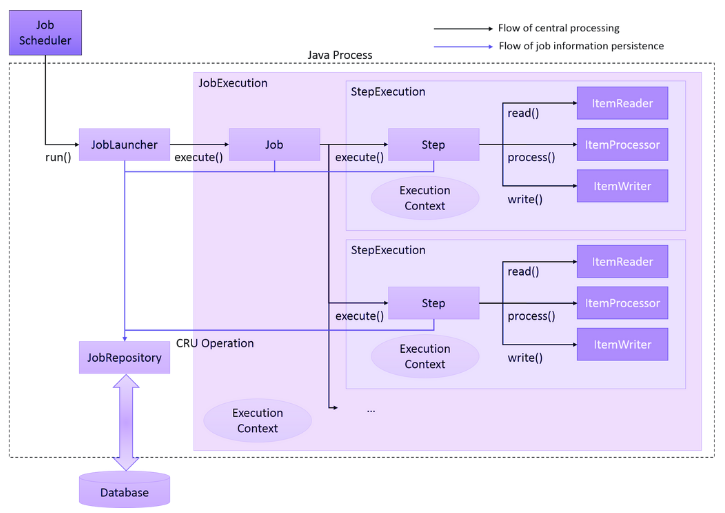
Overall, in a typical batch application, the sequence is as follows.
- The JobOperator is called by Spring Boot on startup or by our own code, such as a REST endpoint. It registers a JobInstance in the database through the JobRepository.
- The Job starts, and the JobRepository records that a JobExecution has started.
- Each Step runs. It updates its read and write counts and its status in the database through the JobRepository after every chunk.
- The Step fetches input data with an ItemReader and changes it with an ItemProcessor. It writes the result with an ItemWriter.
- When the last step finishes, the JobRepository records that the JobExecution is COMPLETED.
Inside a step, Spring Batch works in chunks. It reads and processes one item at a time and collects the results until the chunk size is reached. Only then does it call the ItemWriter once with the whole chunk and commit the transaction, so the writer can send one batched insert instead of one insert per row.
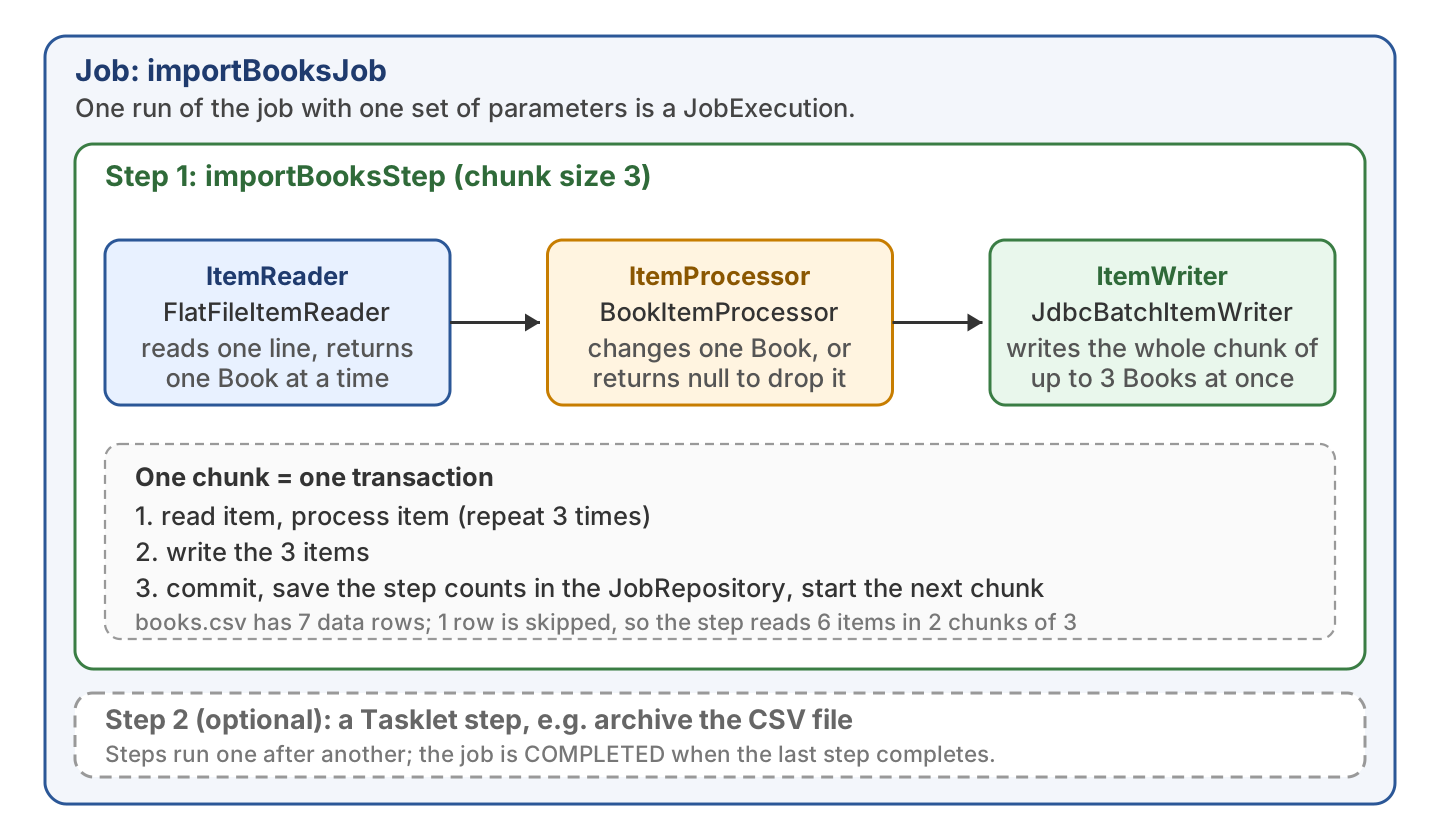
A step does not have to read items. A Tasklet step runs one method, for example to delete or archive the input file. For chunk steps, Spring Batch ships ready-made readers and writers such as FlatFileItemReader and JdbcBatchItemWriter, so we rarely write one ourselves.
2. Setting Up Spring Batch with Spring Boot
The JobRepository needs a database for its metadata tables. We use H2 in memory, which is enough for a demo and for tests, and in production we point the same configuration at the real database.
2.1. Maven Dependencies
Spring Boot 4 split the batch starter in two. The spring-boot-starter-batch starter alone gives a job repository that keeps its data only in memory. The spring-boot-starter-batch-jdbc starter adds Spring JDBC with a connection pool and a job repository that saves to the database, which is what most apps need.
<parent>
  <groupId>org.springframework.boot</groupId>
  <artifactId>spring-boot-starter-parent</artifactId>
  <version>4.1.1</version>
</parent>

<dependencies>
  <dependency>
    <groupId>org.springframework.boot</groupId>
    <artifactId>spring-boot-starter-batch-jdbc</artifactId>
  </dependency>
  <dependency>
    <groupId>com.h2database</groupId>
    <artifactId>h2</artifactId>
    <scope>runtime</scope>
  </dependency>
  <dependency>
    <groupId>org.springframework.boot</groupId>
    <artifactId>spring-boot-starter-batch-test</artifactId>
    <scope>test</scope>
  </dependency>
</dependencies>
The example also adds spring-boot-starter-webmvc, only for the REST endpoint that starts the job on demand in section 4.2. Spring Boot 4.1.1 manages Spring Batch 6.0.5 and Spring Framework 7.0.9, the H2 version is 2.4.240, and the example runs on Java 25.
2.2. What Spring Boot Auto-configures
With the starter on the classpath and one DataSource, Spring Boot creates every bean that Spring Batch needs to run and record a job. We define only the job and its steps, with their readers and writers. Do not add @EnableBatchProcessing in a Spring Boot application, because the annotation switches the auto-configuration off and we would have to configure everything by hand.
| Bean | Type that Spring Boot creates | Used for |
|---|---|---|
| JobRepository | JDBC repository on the auto-configured DataSource | Saving job and step executions in the BATCH_ tables. |
| PlatformTransactionManager | JdbcTransactionManager | One transaction per chunk. |
| JobOperator | TaskExecutorJobOperator | Starting, restarting and stopping jobs. |
| JobLauncherApplicationRunner | Spring Boot runner | Running every Job bean on startup. |
Spring Batch 6 also renamed a few things that older tutorials still show. Most old names still compile, but JobLauncher and JobLauncherTestUtils are deprecated, so a new project uses the new names.
| Spring Batch 5 (Spring Boot 3) | Spring Batch 6 (Spring Boot 4) |
|---|---|
| spring-boot-starter-batch with a DataSource | spring-boot-starter-batch-jdbc |
| JobLauncher | JobOperator (it extends JobLauncher) |
| chunk(3, transactionManager) | chunk(3).transactionManager(transactionManager) |
| org.springframework.batch.core.Job, Step | org.springframework.batch.core.job.Job, org.springframework.batch.core.step.Step |
| org.springframework.batch.item.ItemReader | org.springframework.batch.infrastructure.item.ItemReader |
| JobLauncherTestUtils | JobOperatorTestUtils |
2.3. Batch Properties
Spring Boot reads the batch settings from application.properties. The two properties that every project touches are the startup run and the creation of the BATCH_ tables.
| Property | Default | Meaning |
|---|---|---|
| spring.batch.job.enabled | true | Run every Job bean when the app starts. |
| spring.batch.job.name | none | With several jobs, the name of the one to run on startup. |
| spring.batch.jdbc.initialize-schema | embedded | Create the BATCH_ tables for an embedded database such as H2. Use always for a real database or never to create the tables ourselves. |
spring.datasource.url=jdbc:h2:mem:booksdb
spring.datasource.username=sa
spring.datasource.password=

spring.batch.job.enabled=true
spring.batch.jdbc.initialize-schema=embedded
Spring Boot runs schema.sql from the classpath on startup for an embedded database, so we create our own book table there. Spring Batch creates the BATCH_ tables from its own schema-h2.sql script, so we do not write them.
DROP TABLE IF EXISTS book;

CREATE TABLE book (
    id     BIGINT AUTO_INCREMENT NOT NULL PRIMARY KEY,
    title  VARCHAR(100),
    author VARCHAR(100),
    pages  INTEGER,
    price  DECIMAL(8, 2)
);
3. Spring Batch Example that Imports a CSV File into a Database
The following example is a job that imports a book catalog from books.csv into the book table. A Book record holds one CSV line. The reader produces one Book per line, the processor cleans it up, and the writer inserts it into the table.
title,author,pages,price
Java Basics,Asha Rao,320,29.99
Spring Boot in Practice,Lokesh Gupta,410,39.50
Clean SQL,Maria Lopez,280,24.00
Testing with JUnit,Tom Becker,250,19.99
Kotlin for Java Developers,,300,27.50
Microservices Patterns,Raj Patel,abc,45.00
Docker for Developers,Nina Berg,210,22.00
Two lines are wrong on purpose. The Kotlin book has no author, and the Microservices book has abc as the page count, so we can see how the job filters one line and skips the other.
public record Book(String title, String author, int pages, double price) {
}
3.1. ItemReader
The FlatFileItemReader reads a text file line by line and maps each line to an object. We build it with FlatFileItemReaderBuilder, which needs the file and the column names, plus the target type. The builder detects that Book is a record and calls its constructor with the four columns.
@Bean
@StepScope
public FlatFileItemReader<Book> bookReader(
    @Value("#{jobParameters['inputFile'] ?: 'books.csv'}") String inputFile) {
  return new FlatFileItemReaderBuilder<Book>()
      .name("bookReader")
      .resource(new ClassPathResource(inputFile))
      .linesToSkip(1)                                   // header line
      .delimited()
      .names("title", "author", "pages", "price")
      .targetType(Book.class)                           // Book is a record
      .build();
}
The bean is @StepScope, which means Spring creates it when the step starts, not when the app starts. Only at that moment are the job parameters known. So #{jobParameters[‘inputFile’]} reads the file name from the current run, and books.csv is the fallback when no parameter is passed.
3.2. ItemProcessor
An ItemProcessor gets one item from the reader and returns the item to write. The result can be the same object or a new one, even of another type. When it returns null, Spring Batch drops the item and counts it as filtered.
public class BookItemProcessor implements ItemProcessor<Book, Book> {

  private static final Logger log = LoggerFactory.getLogger(BookItemProcessor.class);

  @Override
  public Book process(Book book) {
    if (book.author() == null || book.author().isBlank()) {
      log.info("Filtered out (no author): {}", book.title());
      return null;   // null means: do not write this item
    }
    return new Book(book.title().trim().toUpperCase(), book.author().trim(),
        book.pages(), book.price());
  }
}
3.3. ItemWriter
The JdbcBatchItemWriter sends the insert for a whole chunk to the database in one JDBC batch. With beanMapped(), the writer fills each named parameter from the Book accessor of the same name, so :title gets the value of book.title().
@Bean
public JdbcBatchItemWriter<Book> bookWriter(DataSource dataSource) {
  return new JdbcBatchItemWriterBuilder<Book>()
      .dataSource(dataSource)
      .sql("insert into book (title, author, pages, price) "
          + "values (:title, :author, :pages, :price)")
      .beanMapped()
      .build();
}
3.4. Step and Job
The StepBuilder joins the reader, the processor and the writer into a chunk step, and the JobBuilder puts the steps in order. Both builders take the JobRepository in the constructor. We also add faultTolerant() with a skip rule, which section 5 explains.
@Bean
public Step importBooksStep(JobRepository jobRepository,
                            PlatformTransactionManager transactionManager,
                            FlatFileItemReader<Book> bookReader,
                            BookItemProcessor bookProcessor,
                            JdbcBatchItemWriter<Book> bookWriter) {
  return new StepBuilder("importBooksStep", jobRepository)
      .<Book, Book>chunk(3)
      .transactionManager(transactionManager)
      .reader(bookReader)
      .processor(bookProcessor)
      .writer(bookWriter)
      .faultTolerant()
      .skip(FlatFileParseException.class)
      .skipLimit(5)
      .skipListener(new BookSkipListener())
      .build();
}

@Bean
public Job importBooksJob(JobRepository jobRepository, Step importBooksStep,
                          JdbcTemplate jdbcTemplate) {
  return new JobBuilder("importBooksJob", jobRepository)
      .start(importBooksStep)
      .listener(new BookImportJobListener(jdbcTemplate))
      .build();
}
A second step goes after the first with .next(step2). The chunk size of 3 is small so that we can watch the chunks in the output. A real import uses a few hundred items per chunk, because every commit costs a round trip to the database.
3.5. Job Listener
A JobExecutionListener gets a callback before and after the job. In afterJob(), the JobExecution gives us the status and every StepExecution with its counts. Logging these counts is the simplest way to check that an import did what we expected.
public class BookImportJobListener implements JobExecutionListener {

  private static final Logger log = LoggerFactory.getLogger(BookImportJobListener.class);

  private final JdbcTemplate jdbcTemplate;

  public BookImportJobListener(JdbcTemplate jdbcTemplate) {
    this.jdbcTemplate = jdbcTemplate;
  }

  @Override
  public void afterJob(JobExecution jobExecution) {
    if (jobExecution.getStatus() != BatchStatus.COMPLETED) {
      log.warn("Job ended with status {}", jobExecution.getStatus());
      return;
    }
    for (StepExecution step : jobExecution.getStepExecutions()) {
      log.info("Step {}: read={}, filtered={}, skipped={}, written={}",
          step.getStepName(), step.getReadCount(), step.getFilterCount(),
          step.getSkipCount(), step.getWriteCount());
    }
    jdbcTemplate.query("select title, author, pages, price from book order by id",
        (rs, row) -> rs.getString("title") + " by " + rs.getString("author")
            + " (" + rs.getInt("pages") + " pages, " + rs.getDouble("price") + ")")
        .forEach(line -> log.info("In database: {}", line));
  }
}
Spring Batch has the same kind of listener for a step, for a chunk and for each item that is read, processed or written, for example StepExecutionListener and ItemWriteListener. We add them to the step with listener().
4. Running a Spring Batch Job
By default, Spring Boot runs every Job bean once the application has started, through JobLauncherApplicationRunner. For a nightly import that runs as its own process, that is what we want. A web app that imports when a user asks for it must switch the startup run off.
4.1. Running the Job on Startup
We start the app with mvn spring-boot:run or with the packaged jar. Arguments without the — prefix become job parameters, so the command below sets inputFile for the reader from section 3.1.
mvn package -DskipTests
java -jar target/spring-boot-batch-1.0-SNAPSHOT.jar inputFile=books.csv
The log shows the chunk flow from section 1. The reader skips the line with the bad page count, the processor filters the book without an author, and 5 of the 7 lines reach the table.
JobLauncherApplicationRunner : Running default command line with: [inputFile=books.csv]
TaskExecutorJobLauncher      : Job: [SimpleJob: [name=importBooksJob]] launched with the following parameters: [{JobParameter{name='inputFile', value=books.csv, type=class java.lang.String, identifying=true}}]
AbstractStep                 : Executing step: [importBooksStep]
BookSkipListener             : Skipped a bad line: Parsing error at line: 7 in resource=[class path resource [books.csv]], input=[Microservices Patterns,Raj Patel,abc,45.00]
BookItemProcessor            : Filtered out (no author): Kotlin for Java Developers
AbstractStep                 : Step: [importBooksStep] executed in 93ms
BookImportJobListener        : Step importBooksStep: read=6, filtered=1, skipped=1, written=5
BookImportJobListener        : In database: JAVA BASICS by Asha Rao (320 pages, 29.99)
BookImportJobListener        : In database: SPRING BOOT IN PRACTICE by Lokesh Gupta (410 pages, 39.5)
BookImportJobListener        : In database: CLEAN SQL by Maria Lopez (280 pages, 24.0)
BookImportJobListener        : In database: TESTING WITH JUNIT by Tom Becker (250 pages, 19.99)
BookImportJobListener        : In database: DOCKER FOR DEVELOPERS by Nina Berg (210 pages, 22.0)
TaskExecutorJobLauncher      : Job: [SimpleJob: [name=importBooksJob]] completed with the following parameters: [...] and the following status: [COMPLETED] in 132ms
Notice that the log says read=6 and not 7. A line that fails in the reader is skipped before it counts as read, so the step reads 6 items in 2 chunks of 3.
4.2. Running the Job on Demand
To run the job only when someone asks for it, we set spring.batch.job.enabled=false and call the JobOperator ourselves. The caller can be a REST controller as in this example, a @Scheduled method, a Quartz trigger or a message listener. The start() method runs the job in the calling thread and returns the JobExecution when the job has ended.
@RestController
public class BookImportController {

  private final JobOperator jobOperator;
  private final Job importBooksJob;

  public BookImportController(JobOperator jobOperator, Job importBooksJob) {
    this.jobOperator = jobOperator;
    this.importBooksJob = importBooksJob;
  }

  @PostMapping("/books/import")
  public String importBooks(@RequestParam(defaultValue = "books.csv") String file)
      throws Exception {
    JobParameters params = new JobParametersBuilder()
        .addString("inputFile", file)
        .addLocalDateTime("requestedAt", LocalDateTime.now())   // makes every run a new instance
        .toJobParameters();
    JobExecution execution = jobOperator.start(importBooksJob, params);
    return "Job " + execution.getId() + " finished with status " + execution.getStatus();
  }
}
A call with the default file completes. A call with a file that does not exist fails in the reader, because by default FlatFileItemReader throws an exception when the file is missing.
curl -X POST localhost:8080/books/import                      # Job 2 finished with status COMPLETED
curl -X POST "localhost:8080/books/import?file=missing.csv"   # Job 3 finished with status FAILED
The request thread waits until the job ends, which is fine for a short import. For a long import, we define a TaskExecutor bean and annotate it with @BatchTaskExecutor. The JobOperator runs the job in another thread, and the endpoint can return the execution id at once.
4.3. Job Parameters and Job Instances
Job parameters are the input of one run. By default each parameter is identifying, which means Spring Batch uses it to decide whether two runs belong to the same JobInstance. Spring Batch refuses to run a JobInstance that already completed, so a second run with the same identifying parameters throws JobInstanceAlreadyCompleteException.
JobInstanceAlreadyCompleteException: A job instance already exists and is complete for
identifying parameters={JobParameter{name='inputFile', value=books.csv, ...}}.
If you want to run this job again, change the parameters.
This rule stops a nightly import from loading the same file twice. When we do want a fresh run, we have three options.
- Add a parameter that changes on every run, such as requestedAt in section 4.2, or call incrementer(new RunIdIncrementer()) on the JobBuilder, which adds a growing run.id parameter for us.
- Mark a parameter as non-identifying with addString(“inputFile”, file, false), so Spring Batch ignores it when it compares runs.
- Restart the failed execution instead of starting a new one, as section 5.2 shows.
5. Skip and Restart
Batch jobs run over thousands of records, and one bad record must not throw away the whole run. Spring Batch has three tools for that. Skip ignores a bad item. Retry repeats an operation that failed for a temporary reason, such as a lost database lock. Restart continues a failed job from the last committed chunk.
5.1. Skipping Bad Records
The step from section 3.4 calls faultTolerant() and declares which exceptions to skip and how many times. The reader throws a FlatFileParseException when a line cannot be mapped to a Book, such as the line with the page count abc, and the step goes on with the next line.
.faultTolerant()
.skip(FlatFileParseException.class)   // ignore lines that cannot be parsed
.skipLimit(5)                         // but fail the step after 5 of them
.skipListener(new BookSkipListener())
When the limit is reached, the step fails, because a file with hundreds of broken lines is a different problem than a file with one. The SkipListener logs each skipped line, so nobody has to search the file for them by hand.
public class BookSkipListener implements SkipListener<Book, Book> {

  private static final Logger log = LoggerFactory.getLogger(BookSkipListener.class);

  @Override
  public void onSkipInRead(Throwable t) {
    log.warn("Skipped a bad line: {}", t.getMessage());
  }
}
Retry uses the same builder. For example, retry(DeadlockLoserDataAccessException.class) with retryLimit(3) writes a chunk up to three more times when the database rejected it because of a lock.
5.2. Restarting a Failed Job
When a step fails, Spring Batch rolls back the current chunk and keeps the chunks that were already committed. It also knows how far the reader got, because FlatFileItemReader saves its line count in the job repository after every chunk.
A restart is a new JobExecution of the same JobInstance. We start it with the id of the failed execution.
Long restartedId = jobOperator.restart(failedExecution.getId()); // continues after the last committed chunkThe step reopens the file and jumps past the lines it already read in committed chunks, so no record is inserted twice. A job that must never restart calls preventRestart() on the JobBuilder.
6. Testing the Job
The spring-boot-starter-batch-test dependency gives us @SpringBatchTest, which registers a JobOperatorTestUtils bean. The utility finds the single Job bean in the context and starts it with the parameters we pass.
We disable the startup run in the test. Otherwise the job would already have run once before the first test method.
@SpringBootTest(properties = "spring.batch.job.enabled=false")
@SpringBatchTest
class BookImportJobTest {

  @Autowired
  private JobOperatorTestUtils jobOperatorTestUtils;

  @Autowired
  private JdbcTemplate jdbcTemplate;

  @BeforeEach
  void cleanTable() {
    jdbcTemplate.update("delete from book");
  }

  @Test
  void importsBooksFromCsv() throws Exception {
    JobParameters params = new JobParametersBuilder()
        .addString("inputFile", "books.csv")
        .addString("run", "test-1")
        .toJobParameters();

    JobExecution execution = jobOperatorTestUtils.startJob(params);

    assertEquals(BatchStatus.COMPLETED, execution.getStatus());
    StepExecution step = execution.getStepExecutions().iterator().next();
    assertEquals(6, step.getReadCount());      // 7 lines, 1 skipped
    assertEquals(1, step.getFilterCount());    // no author
    assertEquals(1, step.getSkipCount());      // pages = abc
    assertEquals(5, step.getWriteCount());
    Integer rows = jdbcTemplate.queryForObject("select count(*) from book", Integer.class);
    assertEquals(5, rows);
  }

  @Test
  void sameParametersCannotRunTwice() throws Exception {
    JobParameters params = new JobParametersBuilder()
        .addString("inputFile", "books.csv")
        .addString("run", "test-2")
        .toJobParameters();
    jobOperatorTestUtils.startJob(params);

    assertThrows(JobInstanceAlreadyCompleteException.class,
        () -> jobOperatorTestUtils.startJob(params));
  }
}
Each test uses its own run parameter, so each one gets a fresh JobInstance in the shared H2 database. The startStep(“importBooksStep”) method of the same utility runs one step alone, which helps when a job has several steps and we want to test only one of them. Two more tests in the same class check the restart from section 5.2 and the rows in BATCH_JOB_INSTANCE.
[INFO] Tests run: 4, Failures: 0, Errors: 0, Skipped: 0
[INFO] BUILD SUCCESS
7. Spring Batch FAQs
7.1. Do We Still Need @EnableBatchProcessing with Spring Boot?
No. Since Spring Boot 3, the annotation switches the batch auto-configuration off, so Spring Boot no longer creates the JobRepository and the other beans from section 2.2 or reads the spring.batch. properties. Add the starter, define the Job and Step beans, and leave the annotation out. Use it only in a Spring application without Spring Boot.
7.2. Can We Run a Spring Batch Job Without a Database?
Yes. With spring-boot-starter-batch and no DataSource, Spring Boot configures a ResourcelessJobRepository, which keeps the job metadata in memory. The job runs, and the counts and the listeners work. But the metadata is gone when the JVM stops, so a failed job cannot be restarted after the app stops.
7.3. Why Does Spring Boot Run My Job Twice?
Because Spring Boot runs every Job bean on startup, and our own code often starts the same job a second time from a CommandLineRunner or a controller. Either remove the manual start, or set spring.batch.job.enabled=false and keep the manual one. With more than one job in the context, set spring.batch.job.name to the one that should run on startup.
8. Conclusion
In a Spring Batch example with Spring Boot, we write only the beans that describe the work, such as the reader, the step and the job, and Spring Boot provides the beans around them. The chunk model reads and processes one item at a time but writes and commits a group, which keeps the database round trips low and makes a restart possible after a failure.
In Spring Batch 6 on Spring Boot 4, we add spring-boot-starter-batch-jdbc and build steps with chunk(n).transactionManager(tm). We start jobs through the JobOperator and test them with JobOperatorTestUtils. Job parameters decide whether a run is a new instance or a restart, and faultTolerant() with skip() keeps a few bad lines from failing the whole import.
9. References
- Spring Batch reference documentation
- Spring Batch domain language
- Configuring a chunk-oriented step
- Spring Boot batch applications how-to
- Spring Batch metadata schema
- Spring Batch 6.0 migration guide
- JobOperator Javadoc
Happy Learning !!

How can we ask spring to create the batch tables in different schema?
java.io.FileNotFoundException: class path resource [org/springframework/batch/core/configuration/annotation/EnableBatchProcessing.class] cannot be opened because it does not exist I am facing this issue when I run the application before it implement in java 8 now we migrate java 17 and spring boot 3.2.4 version now we facing this issue how to resolve it
This is workspace issue. The class is very well part of current distribution.
Hi,
For example if there are two jobs job1 and job2 I want to run job2 or job1 1st like the starting of jobs should be under my control. If iam running job2 1st then job1 shouldn’t be started
Could you please help me with this scenario?
Is creating an API for this purpose an option? If yes, create an API and provide job name and action (start/stop) as the request body or header. The best part is you can create START/STOP buttons in the UI to let admins do on their own. DO NOT forget to secure the API.
How to use Spring Cloud config server using spring batch. I would like my spring batch application to behave as a client and consume the properties defined in server config.
Why are the jobs executed twice? I don’t understand that. Used the same code as in this blog article.
Add
spring.batch.job.enabled=falseinapplication.propertiesfile. The first time jobs are executed while initializing the beans. This property will prevent that first execution.In App class if you leave a blank run method still the steps run with run id of 1.
If you do not add “spring.batch.job.enabled=false” to the application.properties file then the steps run twice.
If you add “spring.batch.job.enabled=false” to the application.properties file then the steps run once.