
TypeScript utility types are built-in types that take an existing type and create a new type from it, such as a copy of an object type with every property optional. We write the base type once and derive the other TypeScript types from it, so a change to the base type updates every derived type.
We use utility types for the everyday variations of one model. For example, an update form needs a version of the model with every field optional, and a list view needs only two of its fields.
The following example derives six types from one Book interface and two union types. Each comment shows the type that TypeScript creates.
interface Book {
  title: string;
  author: string;
  pages: number;
  isbn?: string;
}

type BookDraft   = Partial<Book>;                  // every property optional
type BookPreview = Pick<Book, "title" | "author">; // { title: string; author: string }
type NewBook     = Omit<Book, "isbn">;             // { title; author; pages }
type Ratings     = Record<string, number>;         // { [key: string]: number }
type Format      = Exclude<"pdf" | "epub" | "print", "print">; // "pdf" | "epub"
type MaybeTitle  = NonNullable<string | null>;     // string
The Book interface stays the same after all six lines. A utility type never edits its input, so we can derive as many types from Book as we need.
The first section has a table of all 22 built-in types and a short example for each common one. The last part shows the tsc errors that wrong type arguments cause, with the fix for each.
1. All Built-in TypeScript Utility Types
TypeScript 7.0.2 has 22 utility types. They are global, so we use them without an import. Each one takes one or two types in angle brackets, the same way a generic function takes type arguments.
The Book rows in the table use the interface from the intro.
| Utility type | What it does | Example result |
|---|---|---|
| Partial<T> | Makes every property optional | Partial<{ a: number }> is { a?: number } |
| Required<T> | Makes every property required | Required<{ a?: number }> is { a: number } |
| Readonly<T> | Makes every property read-only | Readonly<{ a: number }> is { readonly a: number } |
| Pick<T, K> | Keeps only the keys K | Pick<Book, “title”> is { title: string } |
| Omit<T, K> | Removes the keys K | Omit<Book, “isbn” | “pages”> is { title: string; author: string } |
| Record<K, T> | Object type with keys K and values T | Record<“a” | “b”, number> is { a: number; b: number } |
| Exclude<U, E> | Removes union members that match E | Exclude<“a” | “b” | “c”, “a”> is “b” | “c” |
| Extract<T, U> | Keeps union members that match U | Extract<“a” | “b” | “c”, “a” | “z”> is “a” |
| NonNullable<T> | Removes null and undefined | NonNullable<string | null | undefined> is string |
| Parameters<F>, ConstructorParameters<C> | Parameter types of a function or a class constructor as a tuple (a fixed-length array type) | [title: string, days: number] for createLoan(title, days) |
| ReturnType<F> | Return type of a function | ReturnType<() => boolean> is boolean |
| InstanceType<C> | Type of the object a class creates | For a class Shelf, InstanceType<typeof Shelf> is Shelf |
| Awaited<T> | Type a Promise resolves to, unwrapped | Awaited<Promise<Book>> is Book |
| NoInfer<T> | Stops TypeScript from guessing T from this argument | T comes from the other arguments only |
| ThisParameterType<F>, OmitThisParameter<F>, ThisType<T> | Work with the type of this in a function or an object literal | ThisParameterType of function (this: Book) is Book |
| Uppercase<S>, Lowercase<S>, Capitalize<S>, Uncapitalize<S> | Change the case of a string literal type, either every character or only the first one | Uppercase<“dune”> is “DUNE”, Capitalize<“dune”> is “Dune” |
The first nine types cover most of the daily work. The this types and the four string types are rare in app code.
2. Partial, Required and Readonly
These three types keep every key of an object type. They only add or remove the ? mark or the readonly keyword on each property.
2.1. Partial for Update Functions
The type Partial<Book> is the common type for the argument of an update function. The caller sends only the fields that change, and the function merges them into the full object with the spread operator.
function updateBook(book: Book, changes: Partial<Book>): Book {
  return { ...book, ...changes };
}

const dune: Book = { title: "Dune", author: "Frank Herbert", pages: 412 };
const updated = updateBook(dune, { pages: 896 });  // { title: "Dune", author: "Frank Herbert", pages: 896 }
2.2. Required for Complete Records
The Required type removes the ? from every property. We use it when an optional field must be present at one point in the app, such as a book that enters the catalog only with an ISBN.
type CatalogBook = Required<Book>; // { title; author; pages; isbn: string }2.3. Readonly for Values We Must Not Change
The Readonly type marks every property as readonly, so assigning to one fails with error TS2540 (cannot assign because it is a read-only property). The check exists only at compile time, so to change a value we create a new object, such as const longer = { …frozen, pages: 896 };.
const frozen: Readonly<Book> = dune;
const title = frozen.title;                         // "Dune", reading is fine

const shelf: Readonly<{ books: string[] }> = { books: ["Dune"] };
shelf.books.push("Emma");                           // compiles, books is ["Dune", "Emma"]
The Readonly type protects only the top-level properties, so arrays and objects inside them stay mutable. For a nested array, we type it as readonly string[], and for a runtime guarantee we call Object.freeze().
3. Pick and Omit for a Subset of Properties
The Pick and Omit types both create a smaller object type from Book. With Pick we list the keys we want to keep, whereas with Omit we list the keys we want to remove.
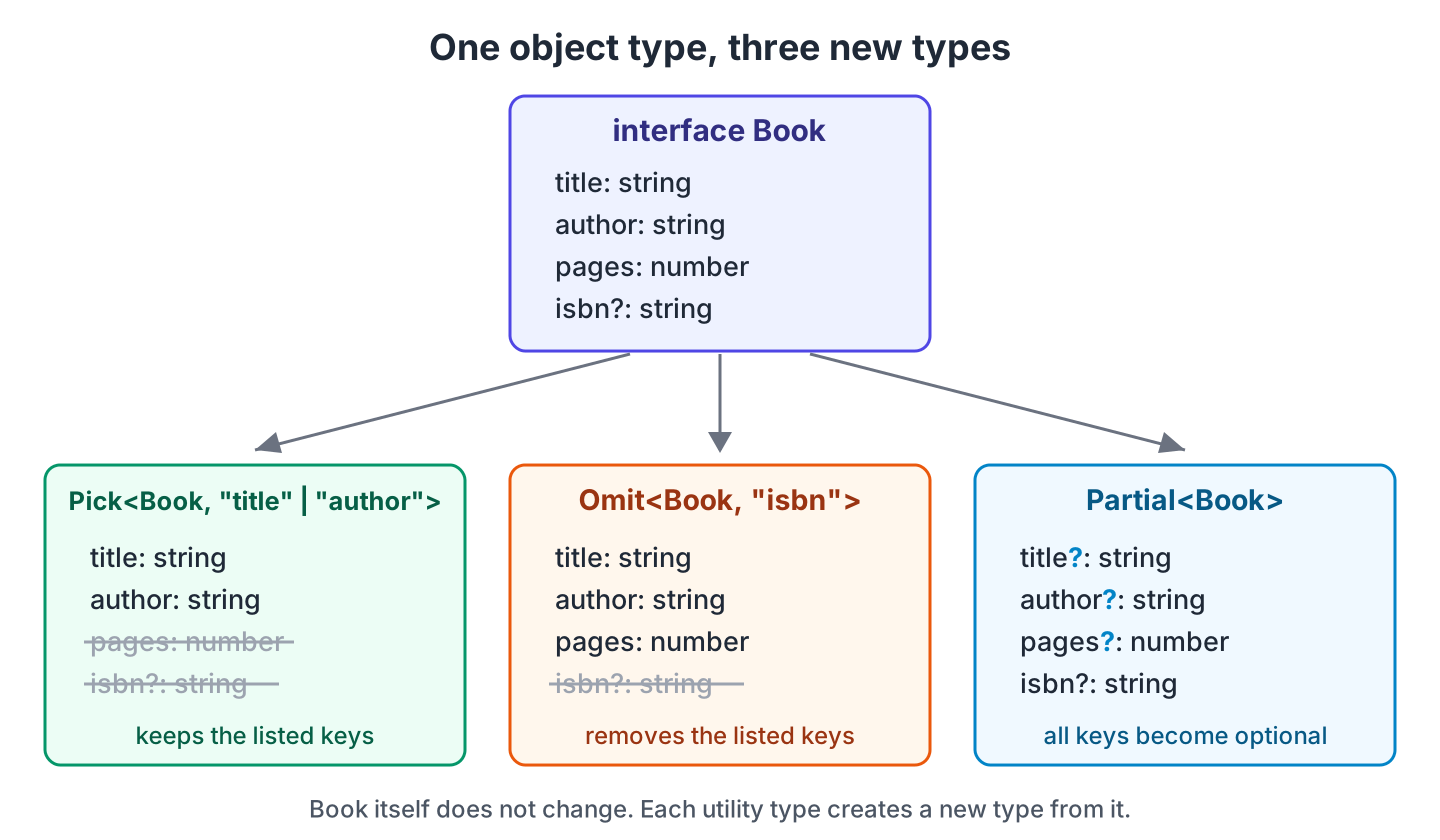
Say a book list page shows a card with the title and the author, and a “new book” form sends everything except the ISBN. Two keys are shorter to list with Pick, and one key is shorter to remove with Omit.
type BookCard  = Pick<Book, "title" | "author">;    // { title: string; author: string }
type BookInput = Omit<Book, "isbn">;                // { title: string; author: string; pages: number }

const input: BookInput = { title: "Emma", author: "Jane Austen", pages: 474 };
const card: BookCard = { title: input.title, author: input.author }; // { title: "Emma", author: "Jane Austen" }
We write the keys as a union of string literal types, such as “title” | “author”. The Pick type accepts only keys that Book has, and any other key fails with error TS2344. The Omit type accepts any string, so a typo compiles and removes nothing.
type Typo = Omit<Book, "isbm">; // no error, still has isbn?: string4. Record for Objects With One Value Type
The Record<K, T> type describes an object whose keys come from K and whose values all have the type T. A typical case is a count or a setting per category.
With a union of keys, every key is required. With string keys, any key is allowed, and TypeScript still types a missing key such as stock[“emma”] as number. So we read it with a ?? fallback.
type Genre = "fiction" | "poetry" | "history";

const counts: Record<Genre, number> = { fiction: 12, poetry: 3, history: 5 };
const fiction = counts.fiction;                     // 12

const stock: Record<string, number> = { dune: 2 };
const emma = stock["emma"] ?? 0;                    // 0, the key is missing
5. Exclude, Extract and NonNullable for Union Types
These three types work on union types, not on object properties. Each one keeps or drops members of a union.
- Exclude<U, E> drops the members of U that match E.
- Extract<T, U> keeps only the members of T that match U.
- NonNullable<T> drops null and undefined.
type Status = "available" | "borrowed" | "lost";

type OnShelf = Exclude<Status, "lost">;             // "available" | "borrowed"
type Missing = Extract<Status, "lost" | "sold">;    // "lost"
type Isbn    = NonNullable<string | null | undefined>; // string
The Extract type ignores “sold” because Status has no such member. The NonNullable type does not check values at runtime. Before we assign a string | null value to Isbn, we still replace the null with a default value, for example with the ?? operator.
6. ReturnType, Parameters and Awaited for Functions
These types read a type from a function we already wrote, so we do not declare it twice. They expect the type of the function, so we put the typeof operator in front of the function name.
function createLoan(title: string, days: number) {
  return { title, days };
}

async function fetchBook(title: string): Promise<Book> {
  return { title, author: "Frank Herbert", pages: 412 };
}

type Loan        = ReturnType<typeof createLoan>;   // { title: string; days: number }
type LoanArgs    = Parameters<typeof createLoan>;   // [title: string, days: number]
type BookPromise = ReturnType<typeof fetchBook>;    // Promise<Book>
type FetchedBook = Awaited<BookPromise>;            // Book
For an async function, ReturnType gives a Promise. The Awaited type removes the Promise, the same way the await keyword does at runtime. We use it for a variable that holds the result of an await, such as const book: FetchedBook = await fetchBook(“Dune”);.
7. Compile Errors From Wrong Type Arguments
A wrong type argument to a utility type stops the build, so these mistakes never reach runtime. The messages are from tsc 7.0.2 with strict mode on.
7.1. Passing a Partial Where the Full Type Is Expected
A Partial<Book> value can be missing any property, so TypeScript does not accept it where a full Book is required.
const draft: Partial<Book> = { title: "Dune" };
saveBook(draft);
error TS2345: Argument of type 'Partial<Book>' is not assignable to parameter of type 'Book'.
Types of property 'title' are incompatible.
Type 'string | undefined' is not assignable to type 'string'.
Type 'undefined' is not assignable to type 'string'.We merge the draft into a complete Book first, as updateBook() does in section 2.1.
7.2. Forgetting typeof With ReturnType
The ReturnType type expects a function type, but createLoan is a value.
type Loan = ReturnType<createLoan>;error TS2749: 'createLoan' refers to a value, but is being used as a type here. Did you mean 'typeof createLoan'?The fix is ReturnType<typeof createLoan>. The same rule applies to Parameters and InstanceType.
8. TypeScript Utility Types FAQs
8.1. Is Partial Deep in TypeScript?
No. The Partial type, like Required and Readonly, changes only the top-level properties, and TypeScript has no built-in deep version. For nested objects, we write our own type with mapped types, which are types that loop over the keys of another type.
8.2. What Is the Difference Between Omit and Exclude?
The Omit type removes properties from an object type, whereas the Exclude type removes members from a union type, such as the union of keys that keyof Book gives.
type NoIsbn = Omit<Book, "isbn">;                   // { title; author; pages }
type Keys   = Exclude<keyof Book, "isbn">;          // "title" | "author" | "pages"
9. Conclusion
With utility types, we declare one model such as Book and derive the other types from it, so a change to Book updates all of them. For functions, ReturnType and Awaited read the types from code we already have.
Two limits cause most surprises. All object utility types are shallow, and Omit does not check its keys.
10. References
- Utility Types (TypeScript Handbook)
- Keyof Type Operator (TypeScript Handbook)
- Mapped Types (TypeScript Handbook)
- TypeScript 5.4 Release Notes (NoInfer)
Happy Learning !!
