
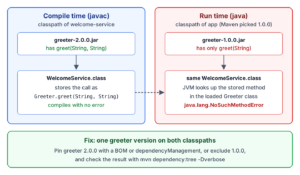
java.lang.NoSuchMethodError means that our code calls a method that the loaded class does not have, because the code was compiled against one version of a library and runs with another version. The compiler never sees the jar used at run time, so the JVM reports the problem on the first call.
Most NoSuchMethodError reports come after a dependency upgrade, or from two libraries that need different versions of the same jar. We find the wrong jar with mvn dependency:tree -Dverbose or the JVM option -verbose:class, and change the build to use the version the code was compiled against.
The following example compiles GreetApp against greeter-2.0.0.jar, which has greet(String, String), and runs it with each version.
javac -cp out/greeter-2.0.0.jar -d out/app-v2 src/com/howtodoinjava/app/GreetApp.java   # compiles
java -cp out/app-v2:out/greeter-2.0.0.jar com.howtodoinjava.app.GreetApp   # Hola, Lokesh
java -cp out/app-v2:out/greeter-1.0.0.jar com.howtodoinjava.app.GreetApp   # NoSuchMethodError: 'java.lang.String com.howtodoinjava.greeter.Greeter.greet(java.lang.String, java.lang.String)'
Notice that GreetApp is the same class file in both runs. Only the jar on the runtime classpath changes, so the fix goes into the build, not into GreetApp.
Next, we read the message, reproduce the common causes (including a Spring Boot startup failure), find the wrong jar and fix the versions.
1. The Method Signature in a NoSuchMethodError Message
The message shows the full signature of the method the caller expected, in single quotes. It says nothing about the methods the loaded class does have.
Exception in thread "main" java.lang.NoSuchMethodError: 'java.lang.String com.howtodoinjava.greeter.Greeter.greet(java.lang.String, java.lang.String)'
	at com.howtodoinjava.app.GreetApp.main(GreetApp.java:11)
The class name, com.howtodoinjava.greeter.Greeter, tells us which jar to look for. The first “at” line is the caller, which in a real app is the library compiled against the other version. Java 8 prints the signature in the JVM’s internal format, e.g. Greeter.greet(Ljava/lang/String;Ljava/lang/String;)Ljava/lang/String;.
1.1. A Changed Return Type Breaks Old Callers Too
A class file stores each method call with its parameter types and its return type, and the JVM matches both. The Java Language Specification treats a changed return type as removing the old method and adding a new one. In our library, greeter 2.0.0 changed count() from int to long, so CountApp, compiled against 1.0.0, fails with 2.0.0.
Exception in thread "main" java.lang.NoSuchMethodError: 'int com.howtodoinjava.greeter.Greeter.count()'
	at com.howtodoinjava.app.CountApp.main(CountApp.java:12)
A library upgrade can compile cleanly and still fail at run time, so we recompile and test every module that calls the upgraded library.
2. What Causes NoSuchMethodError
In every cause, the build or the server puts a different version of the class on the runtime classpath than the one we compiled against.
| Cause | What happens | How we spot it |
|---|---|---|
| Transitive version conflict | Two of our dependencies need different versions of one library, and Maven keeps only one | mvn dependency:tree -Dverbose shows “omitted for conflict” |
| Two copies on the classpath | A fat jar (one jar with all dependencies inside) or the server’s lib folder has an older copy that loads first | -verbose:class shows an unexpected jar |
| Mixed framework generations | A library built for Spring Boot 3 runs in a Spring Boot 4 app, or a Jackson 2 BOM sets an older jackson-annotations than Jackson 3 needs | The Spring Boot startup failure report |
| Stale build output | An old .class file or an old SNAPSHOT jar is left over from an earlier build | The error goes away after a clean build |
| -source/-target instead of –release | Our code calls a JDK method that the older JDK at run time does not have | The missing method belongs to a java.* class |
For the last row, javac -source 21 -target 21 on JDK 25 still checks our calls against the JDK 25 classes. So a call to Reader.of(CharSequence), added in Java 24, compiles and fails on JDK 21. The –release 21 option from JEP 247 (maven.compiler.release in Maven) checks against the Java 21 classes, so the same call becomes a compile error.
2.1. Two Versions of One Library in a Maven Build
The following example is a Maven multi-module build with Java 25, Maven 3.9.16 and Spring Boot 4.1.1 (source code on GitHub). The module legacy-report needs greeter 1.0.0, welcome-service needs 2.0.0, and app depends on both, with legacy-report first.
<dependency>
  <groupId>com.howtodoinjava</groupId>
  <artifactId>legacy-report</artifactId>      <!-- needs greeter 1.0.0 -->
  <version>1.0.0</version>
</dependency>
<dependency>
  <groupId>com.howtodoinjava</groupId>
  <artifactId>welcome-service</artifactId>    <!-- needs greeter 2.0.0 -->
  <version>1.0.0</version>
</dependency>
Maven puts only one version of a library on the classpath. It picks the nearest definition, i.e. the shortest path in the dependency tree, and on a tie the first declaration wins. Both greeter versions come in through another dependency (a transitive dependency), two levels down, so the app gets 1.0.0, although welcome-service was compiled against 2.0.0.
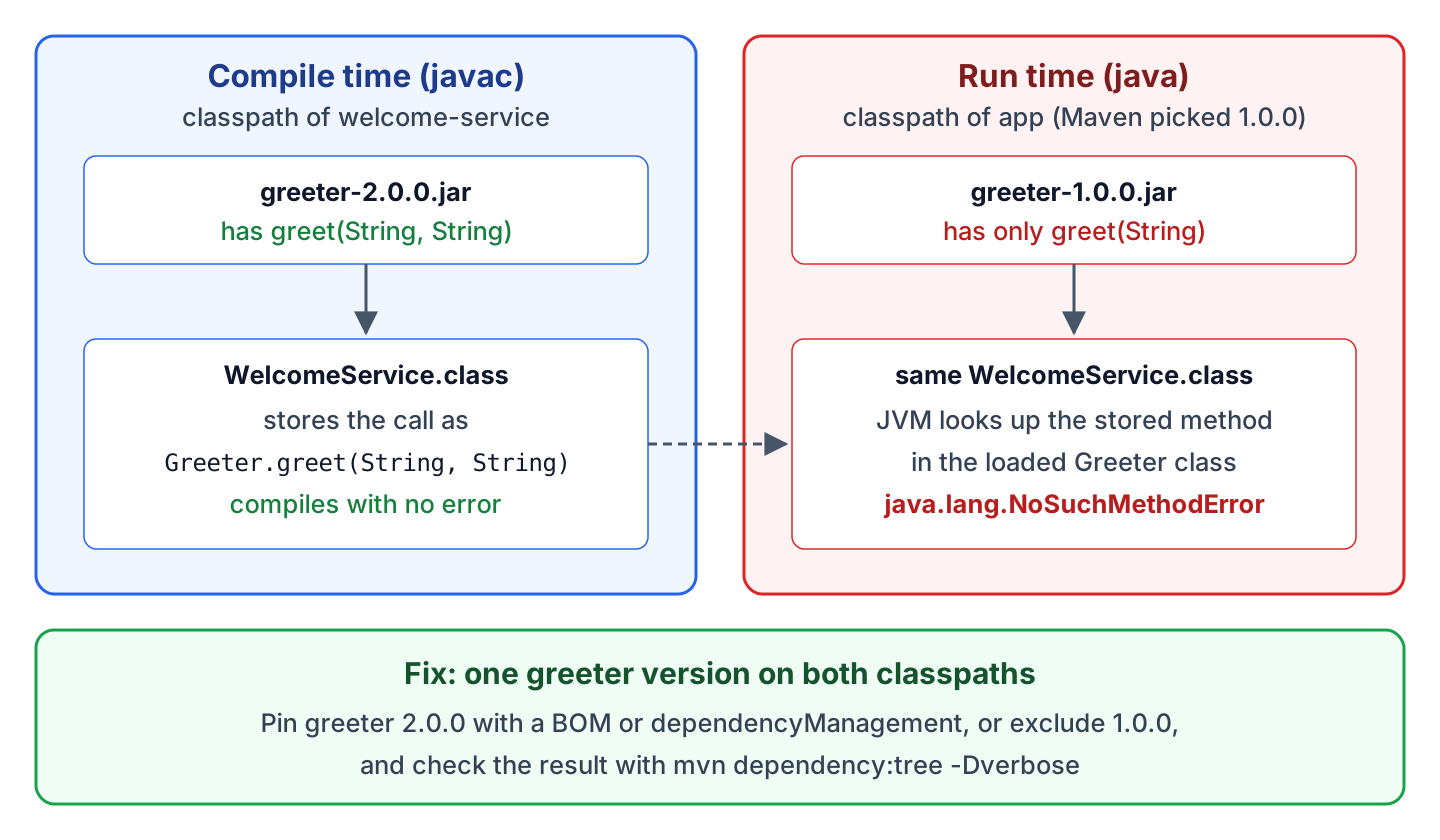
When we run Main, the report line prints, because greet(String) exists in 1.0.0. The welcome line fails with the NoSuchMethodError from the intro, at WelcomeService.welcome(WelcomeService.java:11), which is in the library compiled against 2.0.0.
2.2. NoSuchMethodError in a Spring Boot Application
Spring Boot catches a NoSuchMethodError during startup and prints a failure report with the jar locations. The boot-app module adds spring-boot-starter to the same two dependencies and calls WelcomeService from a CommandLineRunner bean at startup.
APPLICATION FAILED TO START

An attempt was made to call a method that does not exist. The attempt was made from the following location:

    com.howtodoinjava.welcome.WelcomeService.welcome(WelcomeService.java:11)

The following method did not exist:

    'java.lang.String com.howtodoinjava.greeter.Greeter.greet(java.lang.String, java.lang.String)'

The called method's class, com.howtodoinjava.greeter.Greeter, is available from the following locations:

    jar:file:/.../boot-app/target/lib/greeter-1.0.0.jar!/com/howtodoinjava/greeter/Greeter.class
When the “available from” section lists two jars, the same class is on the classpath twice. When it lists one jar, as here, that jar has the wrong version. Either a dependency overrides one of the Spring Boot dependency versions, or a library built for Spring Boot 3 runs in a Spring Boot 4 app.
3. Finding Which Jar Loaded the Class
We need the jar the class loaded from, which the JDK tools show, and why the build picked it, which Maven or Gradle show.
3.1. Reading the Conflict With mvn dependency:tree -Dverbose
A plain mvn dependency:tree shows only the versions that Maven picked, so we cannot see the conflict. The verbose option also shows the versions Maven left out, and includes limits the tree to one library.
mvn dependency:tree -Dverbose -Dincludes=com.howtodoinjava:greeter[INFO] com.howtodoinjava:app:jar:1.0.0
[INFO] +- com.howtodoinjava:legacy-report:jar:1.0.0:compile
[INFO] | \- com.howtodoinjava:greeter:jar:1.0.0:compile
[INFO] \- com.howtodoinjava:welcome-service:jar:1.0.0:compile
[INFO] \- (com.howtodoinjava:greeter:jar:2.0.0:compile - omitted for conflict with 1.0.0)The line “omitted for conflict with 1.0.0” shows that welcome-service asked for 2.0.0 and Maven left that version out.
Gradle handles the same conflict differently. By default, Gradle picks the highest requested version, 2.0.0 here. The error comes instead from the old library when it calls a changed method, such as int count(). The command gradle dependencyInsight –dependency greeter shows which version won and why.
3.2. Logging the Jar of Every Class With -verbose:class
The JVM option -verbose:class prints every loaded class with its jar, for any build tool or server.
java -verbose:class -cp "app/target/app-1.0.0.jar:app/target/lib/*" com.howtodoinjava.app.Main | grep "greeter.Greeter "[0.132s][info][class,load] com.howtodoinjava.greeter.Greeter source: file:/.../app/target/lib/greeter-1.0.0.jar3.3. Listing the Methods of a Jar With javap
Once we know the jar, javap lists its public methods. We compare their parameter types and return types with the signature in the error message.
javap -cp out/greeter-1.0.0.jar com.howtodoinjava.greeter.Greeterpublic class com.howtodoinjava.greeter.Greeter {
public com.howtodoinjava.greeter.Greeter();
public static java.lang.String greet(java.lang.String);
public static int count();
}We can see that version 1.0.0 has only the one-argument greet(), whereas greeter-2.0.0.jar also lists greet(java.lang.String, java.lang.String) and long count().
4. Fixing the Version Conflict
The fix is one version of the library that works for every caller, in most projects the newest one. Before we pin it, we check with javap that it still has every method the older callers use, or the error moves to the other library.
4.1. Aligning Versions With a BOM or dependencyManagement
A version set in dependencyManagement applies everywhere the library appears in the tree, including transitive paths. A Maven BOM (bill of materials) is a pom that contains only such versions, so several projects can import the same set.
<dependencyManagement>
  <dependencies>
    <dependency>
      <groupId>com.howtodoinjava</groupId>
      <artifactId>greeter-bom</artifactId>     <!-- manages greeter 2.0.0 -->
      <version>1.0.0</version>
      <type>pom</type>
      <scope>import</scope>
    </dependency>
  </dependencies>
</dependencyManagement>
The verbose tree shows that the legacy-report path resolves to 2.0.0 as well, and FixedMain prints both lines without an error.
[INFO] +- com.howtodoinjava:legacy-report:jar:1.0.0:compile
[INFO] |  \- com.howtodoinjava:greeter:jar:2.0.0:compile (version managed from 1.0.0)
4.2. Excluding the Old Transitive Version
An exclusion removes the old version from one path in the tree, so the version from the other path is the only one left. We use an exclusion when a single library brings in the old version. For conflicts across many libraries, dependencyManagement is easier to maintain.
<dependency>
  <groupId>com.howtodoinjava</groupId>
  <artifactId>legacy-report</artifactId>
  <version>1.0.0</version>
  <exclusions>
    <exclusion>
      <groupId>com.howtodoinjava</groupId>
      <artifactId>greeter</artifactId>
    </exclusion>
  </exclusions>
</dependency>
4.3. Failing the Build Early With dependencyConvergence
The Maven Enforcer plugin checks rules during the build. Its dependencyConvergence rule fails the build when two paths ask for different versions of the same library and no managed version decides between them. So we see the conflict in CI instead of in production.
<plugin>
  <groupId>org.apache.maven.plugins</groupId>
  <artifactId>maven-enforcer-plugin</artifactId>
  <version>3.6.3</version>
  <executions>
    <execution>
      <id>enforce-convergence</id>
      <goals>
        <goal>enforce</goal>
      </goals>
      <configuration>
        <rules>
          <dependencyConvergence/>
        </rules>
      </configuration>
    </execution>
  </executions>
</plugin>
On the app module, mvn validate fails with “Dependency convergence error for com.howtodoinjava:greeter:jar:1.0.0” and prints both paths to greeter. The app-fixed module passes the rule, because the BOM import sets the greeter version.
4.4. Clean Builds and Server-Provided Jars
When the dependency tree looks right, the old version comes from the build output or the server.
- Run mvn clean verify or gradle clean build, so no old .class file is left. Also delete an old SNAPSHOT of our own library from ~/.m2/repository.
- When the server already provides a library, such as the Servlet API on Tomcat, mark it with the provided scope and remove older copies from the server’s lib folder. The classpath order decides which copy loads.
5. NoSuchMethodError vs NoSuchMethodException
NoSuchMethodException is a checked exception from reflection. Our code gets it when it asks for a missing method by name. The JVM throws NoSuchMethodError when compiled code calls a missing method.
| NoSuchMethodError | NoSuchMethodException | |
|---|---|---|
| Type | Error, subclass of IncompatibleClassChangeError | Checked exception, subclass of ReflectiveOperationException |
| Thrown by | The JVM when compiled code calls the method | Class.getMethod(), getDeclaredMethod(), getConstructor() |
| Typical cause | Wrong library version on the classpath | Wrong name or parameter types in our reflection code |
A wrong jar version gives NoSuchMethodError. A missing jar gives NoClassDefFoundError instead, for the first class from that jar that the code uses.
6. Build and Runtime Questions on NoSuchMethodError
Both questions come up when the code looks correct in the IDE.
6.1. Can a try-catch Block Keep the App Running After a NoSuchMethodError?
Not in a useful way. The catch (NoSuchMethodError e) block compiles and runs, but the method stays missing until the JVM stops. Every other call to it fails the same way. When our code must work with two library versions on purpose, we look the method up with Class.getMethod(). If that call throws NoSuchMethodException, we call an older method instead.
6.2. Does mvn clean install Fix NoSuchMethodError?
Yes, but only when the cause is old build output. A clean build compiles everything again, but Maven resolves the same dependency tree, so a version conflict stays. If the error survives mvn clean install, we run mvn dependency:tree -Dverbose as shown in section 3.1.
7. Conclusion
NoSuchMethodError tells us that the class at run time is a different version from the one we compiled against. The top frame of the stack trace names the library that expects the other version.
We find the wrong jar with mvn dependency:tree -Dverbose or -verbose:class. A managed version (a BOM or dependencyManagement) or an exclusion leaves one working version on the classpath. The Enforcer dependencyConvergence rule keeps it that way. For JDK methods, –release turns the run-time error into a compile error.
8. References
- NoSuchMethodError Javadoc
- JLS Chapter 13. Binary Compatibility
- Maven Introduction to the Dependency Mechanism
- Maven dependency:tree goal
- Maven Enforcer dependencyConvergence rule
- The javac command
Happy Learning !!
