
Java throws java.lang.IllegalStateException: No match found when we call Matcher.group() before any match was attempted, or after the last call to matches(), find() or lookingAt() returned false. The fix is to call one of these methods first and read the groups only when it returns true.
We see the exception most often with named groups, because code that extracts parts of a string, such as a time, a date or a log level, tends to jump straight to group(“name”). A Matcher has no result until a match operation runs, so there is nothing to read yet.
The following example reads a named group from a delivery time, once without a match and once the safe way.
Pattern time = Pattern.compile("(?<hour>\\d{2}):(?<minute>\\d{2})");
Matcher matcher = time.matcher("18:45");
String early = matcher.group("hour");                     // IllegalStateException: No match found
boolean found = matcher.matches();                        // true
String hour = found ? matcher.group("hour") : "none";     // "18"
Notice that the same matcher works once matches() has returned true. We go through the state rule behind the exception, the fix for single values and loops, the difference between matches(), find() and lookingAt(), and the named group mistakes that throw other exceptions.
1. Why Matcher.group() Throws No match found
A Matcher keeps state. When we create it with pattern.matcher(input), it only knows the pattern and the input. The groups get values when a match operation succeeds, and the matcher keeps them until the next operation or a reset().
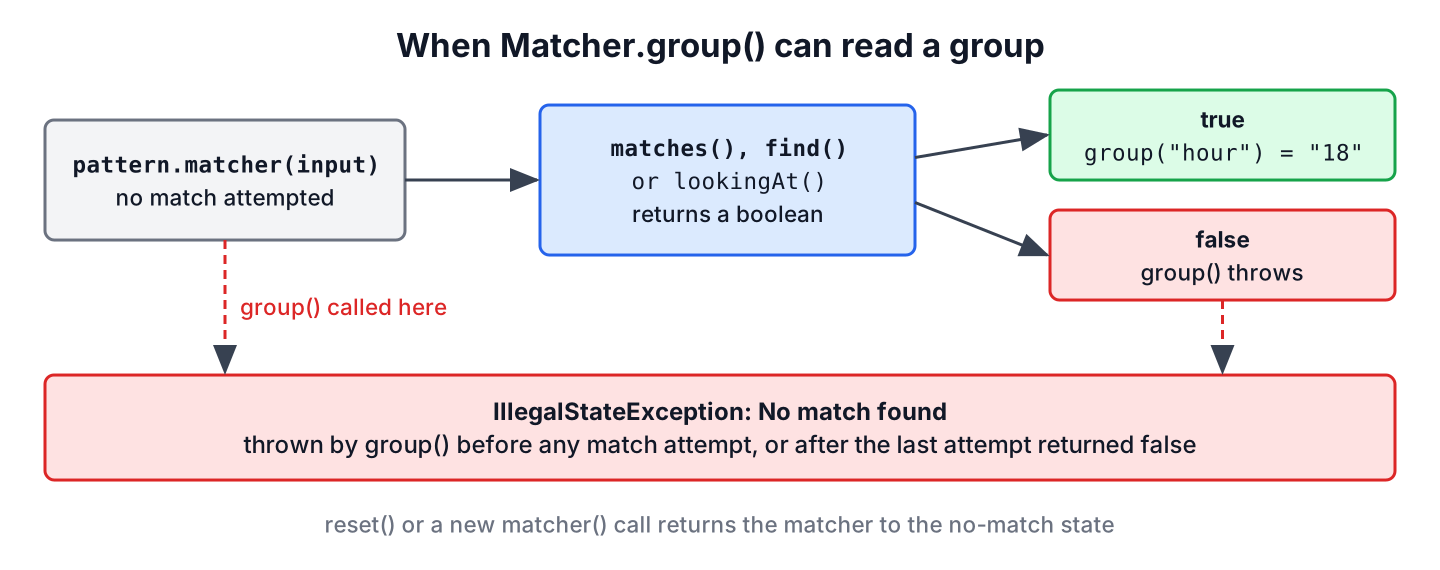
The method group() throws IllegalStateException “if no match has yet been attempted, or if the previous match operation failed“. The two cases look different in code.
- No attempt at all. The code calls group() right after matcher(), as in the intro example.
- A failed attempt. The code calls matches() or find() but ignores the boolean result, so it reads groups even when the input does not match.
The second case is the sneaky one, because the code works in tests with valid input and breaks in production on the first value that does not fit the pattern.
Pattern time = Pattern.compile("(?<hour>\\d{2}):(?<minute>\\d{2})");
Matcher bad = time.matcher("6:45 pm");
boolean badMatch = bad.matches();                         // false, and the next line ignores it
String badHour = bad.group("hour");                       // IllegalStateException: No match found
2. Reading Groups Only After a Successful Match
Every match method returns a boolean, and that value guards the group calls. For a single value, we test it in an if and handle the other case on purpose, for example with an Optional or a clear error message.
static Optional<LocalTime> parseSlot(String text) {
    Matcher slot = Pattern.compile("(?<hour>\\d{2}):(?<minute>\\d{2})").matcher(text.strip());
    if (!slot.matches()) {
        return Optional.empty();
    }
    int hour = Integer.parseInt(slot.group("hour"));
    int minute = Integer.parseInt(slot.group("minute"));
    return hour < 24 && minute < 60 ? Optional.of(LocalTime.of(hour, minute)) : Optional.empty();
}
Optional<LocalTime> evening = parseSlot("18:45"); // Optional[18:45]
Optional<LocalTime> invalid = parseSlot("6:45 pm"); // Optional.empty
Optional<LocalTime> outOfRange = parseSlot("25:10"); // Optional.emptyThe range check matters, because a regex checks only the shape of the text. The pattern accepts 25:10, and a date pattern accepts 02/31/2011, so we validate the values with date validation or LocalDate.parse() when the meaning counts.
For several matches in one string, we put find() in the while condition. The loop body runs only after a successful find(), and the loop ends on the first false, so group() never sees a failed state.
Pattern time = Pattern.compile("(?<hour>\\d{2}):(?<minute>\\d{2})");
Matcher slots = time.matcher("Lunch 12:30, dinner 19:15");
List<String> hours = new ArrayList<>();
while (slots.find()) {
    hours.add(slots.group("hour"));
}
List<String> foundHours = hours;                          // [12, 19]
For example, a food delivery app reads courier log lines such as WARN 18:45 late pickup to build a report of late orders. The first version calls find() on each line and reads group(“hour”) without checking the result. One line from a different service has no time in it, so the whole report job stops with No match found. Checking the result of find() and skipping such lines keeps the report running.
3. matches(), find() and lookingAt() Compared
The three methods differ in how much of the input must match, and picking the wrong one is the most common reason for an unexpected false. All three update the groups when they return true.
| Method | Matches when | Input “18:45” | Input “Delivery at 18:45” | Input “18:45 today” |
|---|---|---|---|---|
| matches() | the whole input matches the pattern | true | false | false |
| lookingAt() | the pattern matches at the start of the input | true | false | true |
| find() | the pattern matches anywhere after the last match | true | true | true |
Pattern time = Pattern.compile("(?<hour>\\d{2}):(?<minute>\\d{2})");
boolean whole = time.matcher("Delivery at 18:45").matches();     // false
boolean prefix = time.matcher("18:45 today").lookingAt();         // true
boolean anywhere = time.matcher("Delivery at 18:45").find();      // true
So if the old code calls matches() on a sentence that only contains the value, it gets false, and a following group() call throws. Using find() fixes such code. The anchors guide shows how ^ and $ turn find() into a full-input check.
4. Named Group Mistakes That Throw Other Exceptions
A named capturing group such as (?<hour>…) has existed since Java 7. Besides the state problem, three named group mistakes show up in the same kind of code, and each has its own exception or result.
Pattern time = Pattern.compile("(?<hour>\\d{2}):(?<minute>\\d{2})");
Matcher named = time.matcher("18:45");
boolean ok = named.matches();                             // true
String typo = named.group("hours");                       // IllegalArgumentException: No group with name <hours>
Pattern optional = Pattern.compile("(?<hour>\\d{2}):(?<minute>\\d{2})(?<suffix> ?[AP]M)?");
Matcher noSuffix = optional.matcher("18:45");
boolean matched = noSuffix.matches(); // true
String suffix = noSuffix.group("suffix"); // nullPattern underscore = Pattern.compile("(?<delivery_hour>\\d{2})"); // PatternSyntaxException: named capturing group is missing trailing '>' The outcomes follow simple rules.
- An unknown name throws IllegalArgumentException with the text No group with name <hours>, even after a successful match.
- An optional group that took no part in the match returns null, so we check for null before calling methods on the value.
- A group name must start with a letter and contain only ASCII letters and digits. A name such as delivery_hour makes Pattern.compile() throw PatternSyntaxException.
The Java regex tutorial covers group syntax and back references such as \k<hour> in more depth.
5. Newer Matcher Methods That Avoid the Exception
Java added methods over several releases that make the match state explicit or skip the manual loop. All of them are available in Java 25.
| Method | Since | What it does |
|---|---|---|
| results() | Java 9 | Returns a Stream<MatchResult> with one entry per successful find() |
| hasMatch() | Java 20 | Returns true if the last match operation succeeded, so group() is safe |
| namedGroups() | Java 20 | Returns a map from group name to group number |
| toMatchResult() | Java 5 | Returns an unmodifiable snapshot of the current match |
Pattern time = Pattern.compile("(?<hour>\\d{2}):(?<minute>\\d{2})");
List<String> hourList = time.matcher("12:30, 19:15").results().map(r -> r.group("hour")).toList();   // [12, 19]
Matcher check = time.matcher("noon");
boolean tried = check.find();                             // false
boolean safeToRead = check.hasMatch();                    // false
Map<String, Integer> names = time.matcher("").namedGroups();   // {minute=2, hour=1} in any order
With results(), the stream contains only successful matches, so there is no state to get wrong. The group(String) method on MatchResult also has a default implementation since Java 20, which is why the lambda can read the group by name.
6. Regex No match found FAQs
Once the boolean check is in place, the open points are group numbers, null values and sharing a matcher between threads.
6.1. What is the difference between group() and group(0)?
There is none. Both return the whole text matched by the pattern, and both throw IllegalStateException when there is no successful match.
6.2. Why does find() work while matches() returns false?
Because matches() needs the entire input to match the pattern, while find() accepts a match anywhere in the input. The table in section 3 shows the three methods on the same inputs.
6.3. Can I share one Matcher between threads?
No. A Matcher is not thread-safe because it keeps the match state. A compiled Pattern is immutable, so we share the Pattern in a static final field and create a new Matcher per call.
6.4. Does group() ever return null instead of throwing?
Yes. After a successful match, a group that did not take part in the match returns null, as with the optional suffix group in section 4. The exception comes only from the matcher state, never from an empty group.
7. Conclusion
A Matcher has no groups to read until a match operation succeeds, and No match found is what group() throws before that. We call matches(), find() or lookingAt() first, read the groups only when the call returns true, and loop with while (matcher.find()) for repeated matches.
Named groups add their own checks, namely IllegalArgumentException for an unknown name, null for an optional group that did not match and letters and digits only in names. Since Java 9, results() removes the manual loop, and Java 20 added hasMatch() to test the state. Because IllegalStateException is an unchecked exception, the compiler never reminds us of it, so the check has to come from our own code.
8. References
- Java 25 API, Matcher
- Java 25 API, Pattern
- Java 25 API, MatchResult
- Java 25 API, IllegalStateException
Happy Learning !!

Implementation for this kind of cases smells like non transparent behavior with object mutations inside the methods.
matcher.matches() and matcher.lookingAt() returnbool state – gorgeous
Thanks for the tip.