
A custom exception in Java is an exception class we write ourselves, extending RuntimeException for an unchecked exception or Exception for a checked one, so that callers can catch a failure by its business meaning and read the details they need to handle it. A good custom exception has a name ending in Exception, a clear message and a constructor that keeps the original cause.
We create custom exceptions when the JDK has no class that names the failure, when callers must handle one failure differently from others, or when the handler needs extra data, such as the seat that was already sold in a ticketing app.
The following example defines a minimal custom exception and throws it.
class SoldOutException extends RuntimeException {
    SoldOutException(String event) {
        super("sold out: " + event);
    }
}
SoldOutException soldOut = new SoldOutException("jazz night");
String message = soldOut.getMessage(); // "sold out: jazz night"
boolean unchecked = soldOut instanceof RuntimeException; // trueThe class adds nothing but a name and a message, and that is often enough. We cover when a custom exception is worth writing, how to write one correctly, how to keep the cause, how to group several exceptions in a small sealed hierarchy, how to add context fields and how to test them.
1. When a Custom Exception Is Worth Writing
The JDK already has exceptions for most programming errors, and other developers know them. A custom exception earns its place when it carries business meaning that a caller acts on, so we check the standard classes first.
| Situation | Use |
|---|---|
| An argument is invalid, such as a negative quantity | IllegalArgumentException |
| An object is in the wrong state for the call | IllegalStateException |
| A required value is null | NullPointerException via Objects.requireNonNull() |
| A lookup finds nothing | NoSuchElementException, or an empty Optional |
| An I/O failure must pass through a lambda | UncheckedIOException |
| A business rule fails and callers react to it, such as a sold seat | A custom exception |
| The handler needs data, such as the seat number or an error code | A custom exception with fields |
Say a concert ticketing app sells seats online. Two users click the same seat at the same moment, and one of them gets a failure. The web layer must answer with HTTP 409 and offer other seats, while a declined card needs a different answer. An IllegalStateException cannot tell these cases apart, so the app needs its own exception types.
2. Writing Custom Exceptions in Java
A custom exception is an ordinary class, and it follows the same conventions as the exceptions in the JDK.
- The name ends with Exception, such as SeatTakenException, so readers know the type at a glance.
- The class extends RuntimeException or Exception, never Throwable or Error.
- It has a constructor with a message and one with a message and a cause, which pass both to super.
- Its fields are final, so the exception does not change after it is thrown.
- It declares a serialVersionUID, because Throwable implements Serializable.
class BookingException extends RuntimeException {
    @Serial
    private static final long serialVersionUID = 1L;

    BookingException(String message) {
        super(message);
    }

    BookingException(String message, Throwable cause) {
        super(message, cause);
    }
}
BookingException plain = new BookingException("event cancelled");
String text = plain.getMessage(); // "event cancelled"
Throwable none = plain.getCause(); // nullWe do not store the message in our own field or override getMessage(). The class Throwable already keeps the message, and a second copy only adds code that can get out of sync.
3. Choosing Between Checked and Unchecked
The superclass decides whether the compiler forces callers to handle the exception. We extend Exception when every caller can and should react, for example by retrying. We extend RuntimeException when the failure is handled in one central place, such as a web error handler, or when it reports a bug.
Most business exceptions in current Java code are unchecked, because they pass through many layers and through lambdas before one handler deals with them. The full rules and the trade-offs are in checked vs unchecked exceptions in Java.
4. Keeping the Original Cause
When a custom exception replaces a lower-level one, we always pass the original as the cause. Without it, the stack trace ends at our throw statement, and nobody can see that a network timeout was the real problem.
The following example wraps a SocketTimeoutException from a payment call.
class PaymentFailedException extends RuntimeException {
    PaymentFailedException(String message, Throwable cause) {
        super(message, cause);
    }
}
static void charge(String order) throws SocketTimeoutException {
throw new SocketTimeoutException("Read timed out");
}
static void checkout(String order) {
try {
charge(order);
} catch (SocketTimeoutException e) {
throw new PaymentFailedException("Payment for " + order + " failed", e);
}
}PaymentFailedException failure = null;
try {
checkout("concert");
} catch (PaymentFailedException e) {
failure = e;
}
String reason = failure.getMessage(); // "Payment for concert failed"
String root = failure.getCause().getMessage(); // "Read timed out"An uncaught PaymentFailedException prints both exceptions, with the cause under a Caused by: line. The line … 2 more stands for the frames that the cause shares with the outer exception.
Exception in thread "main" PaymentFailedException: Payment for concert failed
	at Checkout.checkout(Checkout.java:8)
	at Checkout.main(Checkout.java:10)
Caused by: java.net.SocketTimeoutException: Read timed out
	at Checkout.charge(Checkout.java:5)
	... 2 more
The throw vs throws guide covers rethrowing in more detail, and suppressed exceptions explain how to attach a second, unrelated failure.
5. A Small Sealed Hierarchy Instead of One Catch-All Exception
A single exception for a whole module, such as one TicketException with different messages, forces handlers to parse the message text to find out what went wrong. A small hierarchy fixes that, because each failure has its own type, and the base class still lets a handler catch all of them at once.
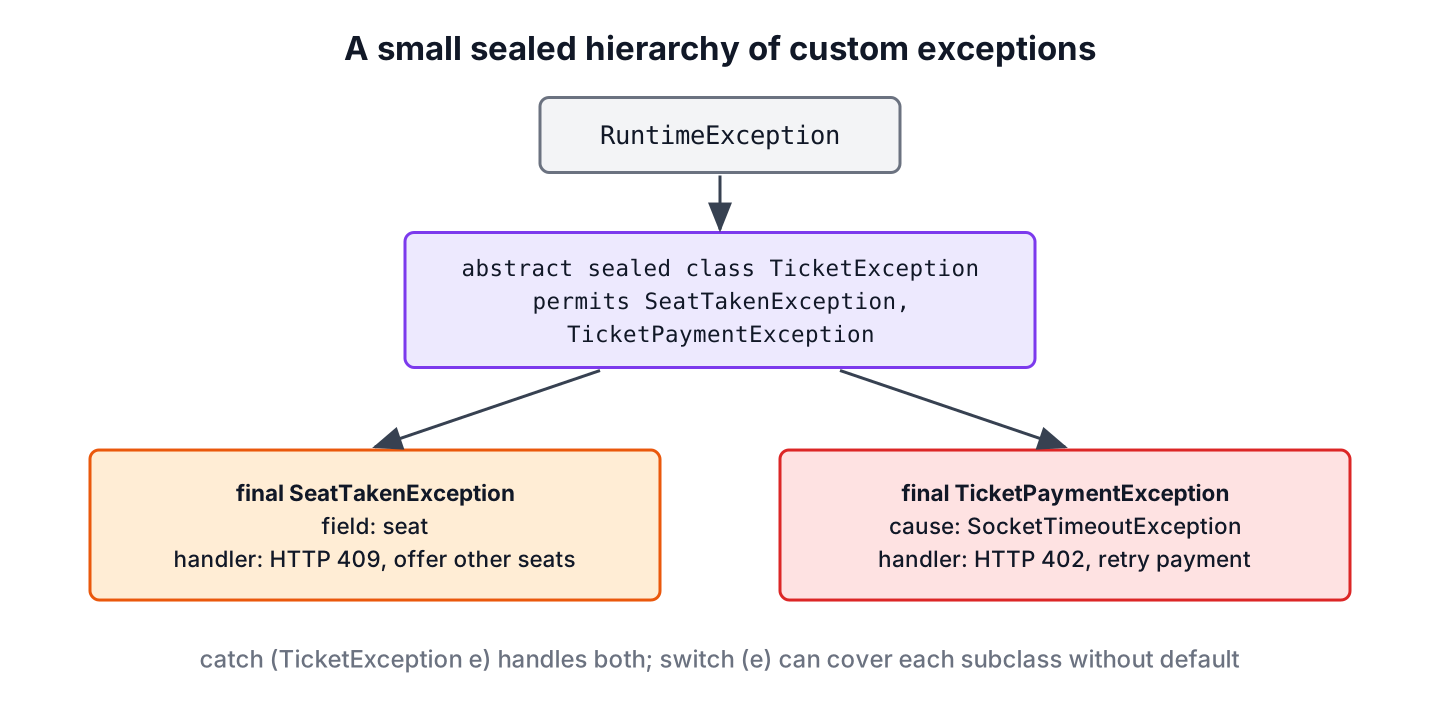
Since Java 17, sealed classes let the base class list its subclasses. A switch over the base type can be exhaustive without a default branch, and the compiler flags every such switch that misses a new subclass.
abstract sealed class TicketException extends RuntimeException
        permits SeatTakenException, TicketPaymentException {
    TicketException(String message, Throwable cause) {
        super(message, cause);
    }
}
final class SeatTakenException extends TicketException {
private final String seat;
SeatTakenException(String seat) {
super("seat already taken: " + seat, null);
this.seat = seat;
}
String seat() {
return seat;
}
}final class TicketPaymentException extends TicketException {
TicketPaymentException(String message, Throwable cause) {
super(message, cause);
}
}A web layer maps each type to a status code with a pattern-matching switch.
static int httpStatus(TicketException e) {
    return switch (e) {
        case SeatTakenException taken -> 409;
        case TicketPaymentException payment -> 402;
    };
}
int conflict = httpStatus(new SeatTakenException("A1")); // 409
int declined = httpStatus(new TicketPaymentException("card declined", null)); // 402We keep the hierarchy small and add a subclass only for a failure that some caller handles differently. Ten subclasses that all end up in the same log line add classes without adding information.
6. Adding Context Fields
A message is for people, while fields are for code. The seat() accessor of SeatTakenException lets the handler offer nearby seats without parsing “seat already taken: A1”. Other useful fields are an error code for API responses or the ID of the entity that failed.
SeatTakenException taken = new SeatTakenException("A1");
String seat = taken.seat();                         // "A1"
String detail = taken.getMessage();                 // "seat already taken: A1"
The fields must not hold passwords, card numbers or other secrets, because exceptions end up in logs and error reports. We also keep them small and immutable, since an exception object can travel through many layers and threads.
7. Testing a Custom Exception
A test for a failure path checks the exception type and its data. With JUnit 5 or 6, assertThrows() returns the thrown exception, so the test can also assert on its fields.
class SeatMap {
    private final Set<String> sold = new HashSet<>(Set.of("A1"));

    void reserve(String seat) {
        if (!sold.add(seat)) {
            throw new SeatTakenException(seat);
        }
    }
}
SeatMap seats = new SeatMap();
SeatTakenException thrown = assertThrows(SeatTakenException.class, () -> seats.reserve("A1"));
String takenSeat = thrown.seat(); // "A1"8. Common Mistakes With Custom Exceptions
Most problems with custom exceptions come from habits that hide information. All five make production errors harder to diagnose.
- Creating the exception without the cause when wrapping another exception, which cuts the stack trace in half.
- Using one exception class with a message string as the only way to tell failures apart.
- Extending Throwable or Error, which escapes catch (Exception e) handlers.
- Writing a custom class where IllegalArgumentException or IllegalStateException says the same thing.
- Catching the custom exception and logging only e.getMessage(), which drops the stack trace and the cause.
The general rules for handling exceptions, such as where to catch and how to log, are collected in Java exception handling best practices, and the order of catch blocks is covered in try-catch-finally.
9. Custom Exception FAQs
The design questions in this group come up the first time a team adds its own exception classes.
9.1. Should a custom exception extend Exception or RuntimeException?
Extend RuntimeException unless every caller can recover in a useful way. Checked custom exceptions force a throws clause on every method in between, which pays off only for failures such as a retryable remote call.
9.2. Does a custom exception need a serialVersionUID?
Yes, it should. Throwable implements Serializable, so the compiler warns with -Xlint:serial when the field is missing. Exceptions are serialized when they cross RMI calls or are stored by some frameworks.
9.3. Can a custom exception be a record?
No. A record cannot extend a class, and every exception must extend Throwable. We get the same effect with final fields and accessor methods.
9.4. How many constructors does a custom exception need?
Two cover almost every case, one with a message and one with a message and a cause. A no-argument constructor creates an exception with a null message, which helps nobody reading the log.
9.5. How do we create a custom checked exception?
We extend Exception instead of RuntimeException. The rest of the class stays the same, and callers must catch it or declare it with throws.
10. Conclusion
A custom exception is worth writing when callers handle a failure by its meaning or need extra data. We extend RuntimeException in most cases, end the name with Exception, add constructors for a message and a cause, and keep every field final.
For a module with several failures, a small sealed hierarchy beats one catch-all class, because handlers can switch on the type and the compiler checks that each case is covered. Passing the cause on every wrap keeps the full stack trace in the logs.
11. References
- Creating Exception Classes (Java Tutorials)
- Throwable (Java SE 25 API)
- Serial annotation (Java SE 25 API)
- JEP 409, Sealed Classes
- JUnit Assertions API
Happy Learning !!

Is it still good or java 11 changes something, and this become obsolete?
Thanks for posting this question. I will check and update.
It was very nice topic with such a great and easy way to make people understand. Thank You
Creating specific exception types is good idea but grouping them in a Class is not better (at least for me). This is against design principle “Strong Cohession”. Are classes really intended for grouping types or it can be done better with packages ?
Moreover, using inner classes leads to memory leaks !
Packaging them in groups is also a good idea if developers are intelligent enough for using correct class in case of any exception.
Memory leak? I don’t think so. Can you please elaborate more on memory leak issue?
Thanks for this post. I am in the learning phase of java.
Hey Lokesh,
thanks for writing this article. Reminding developers of being mindful with exception handling is a good idea, as it’s too often done in a sloppy way.
I have a few remarks though:
* BaseException reinvents the wheel: the class “Exception” already has a way to store a message; no need to duplicate that in BaseException. Just pass the message parameter on to the superclass constructor.
* BaseException has no constructor that takes a cause-exception (BaseException(String message, Throwable cause)). This is important in case you’re throwing a BaseException (or derived class) as a result of catching another exception. By specifying the original exception as cause, it’s much easier to debug what really happened as if you’re logging the stacktrace, you’ll get information about the inner exception as well.
A good point you’re making is that having detailed exceptions is often more helpful than using one generic exception for everything. But there’s one thing I don’t get: why do you put them into DBException, as static inner classes? Why not just putting them top-level, without a wrapping class. You get exactly the same advantages of having detailed exceptions, without the weirdness of having so many inner classes.
My intention is to group related exception classes in one class, just like we use packages. We can create some classes denoting broad exception categories and then use inner classes to create specific failure cases.
Apart from above, code example is more to represent idea. Anyone can refine the code as per his/her need.
correct me if I’m wrong, but aren’t you using the outer classes just to create a new namespace?
why do you group your exceptions in one class and not a package? Is it to circumvent the Java restriction to have multiple classes in the same file?
Yes, I am trying to create a logical namespace.
You want to group them in package.. no problem..It will still be beneficial.. at least more than having a generic exception for a group of failures.
Yeah, that is (at least for me) the main point here: Create exceptions that are meaningful and describe the problem well enough.
Don’t you think this will create classes for each and every static inner class, which is a huge, if we keep on adding for every error one static class. Pls let me know if am wrong and suggest me..
Yes, effort is more than usual. But rewards are far better. Believe me, I have used this technique in one project and it works like a charm. Also, you do not need to teach every tiny detail of exception handling logic to team members, most of the things are self-explanatory. This is highly recommended if you are building a product which you will be managing for 5-10 years.
although there are many classes created, but still I believe these classes are accessible just like a method on an object with out a need to create an object for it, other than the parent class like as you shown “new DBExeption.NoData(“No row found for id : x”);”, which will not load JVM with more objects.
But, I have a doubt, if the growing no of errors increases to support “Logging is more meaningful and informative.”, does that not make the object huge for jvm.
what happens if there are many scenarios and you created/covered all those in your product/application, where u create an object every time, for exception handling, making JVM fully loaded with many huge DBExeption objects.
So, do we have to make this “DBExeption” class a singleton?
Pls let me know if am wrong with my assumption.
If such thing happen when there are plenty of exceptions all the time, then application will crash anyway. No fault of object creation logic or JVM load.
Regarding singleton. I believe we should treat exception objects as first class citizen in our application. If there is an exception occurred, let’s have a fresh new exception object and populate it with complete context information. They have same importance in your application as much DTO objects.
“DBExeption class as a singleton?”. Need thorough review but its possible.
Please never, ever try to use singletons as exceptions! Here’s why:
* When an exception instance is created, its constructor (the one in class Throwable) automatically captures the stack trace, so you can later (e.g. in a log) find out where excactly the exception was thrown.
If you’re reusing exception instances, you lose this information. You will always get the stacktrace showing where the instance was originally created, giving you now way to find out where it was actually thrown.
Regarding your worries about memory:
Exception instances are not huge. Maybe you are worried about the size of the class DBException in this example. But there’s no need to be. First of all, you’ll not throw instances of this class, but only of its inner classes (which again are rather small). Second, With static inner classes, there’s no real connection between the outer and the inner class. In fact, on the level of the classloader, there’s nearly no difference between a static inner class and a “normal” class.
And third: exception instances are usually short-lived, so the garbage collector will remove them pretty soon.
In the end, I think you’ll never see a case where an application runs into out-of-memory problems because of exceptions.
Thanks(Rolf Schäuble) for a detailed Information.
Also, I would like to know in a real time scenario, how and when actually the JVM triggers the grabage collector. is there any specific config changes that we have to do on JVM for this.