
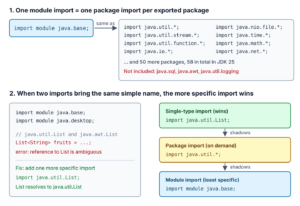
A module import declaration, written as import module java.base;, imports all public classes and interfaces from every package that a module exports, with one line. Module import declarations are a final feature in Java 25 (JEP 511), so they need no preview flag. They also work in ordinary classes that are not part of a module.
We use import module to replace long import lists in small programs, scripts, tests and demos, where we care more about writing code fast than about listing each import. In Java 25 compact source files (a .java file with only a main() method), the compiler adds import module java.base; for us.
The following example replaces the imports from java.util, java.util.stream, java.nio.file and java.time with one module import.
import module java.base;      // all 58 packages that java.base exports

List<String> fruits = List.of("apple", "banana", "avocado");          // java.util.List
Map<Character, List<String>> groups = fruits.stream()
    .collect(Collectors.groupingBy(f -> f.charAt(0)));                // {a=[apple, avocado], b=[banana]}
Path file = Path.of("fruits.txt");                                    // java.nio.file.Path
LocalDate today = LocalDate.of(2026, 10, 5);                          // 2026-10-05
Notice that none of the five types needs its own import line. Next, we look at what one import module line brings in and at the “reference to List is ambiguous” error it can cause. We also see when normal imports are the better choice.
1. What “import module java.base” Imports
A module is a named group of packages, added in Java 9 with the Java Platform Module System. Each module decides which of its packages other code may use. We say the module “exports” these packages. For example, the JDK module java.base exports java.util, java.io, java.time and many more.
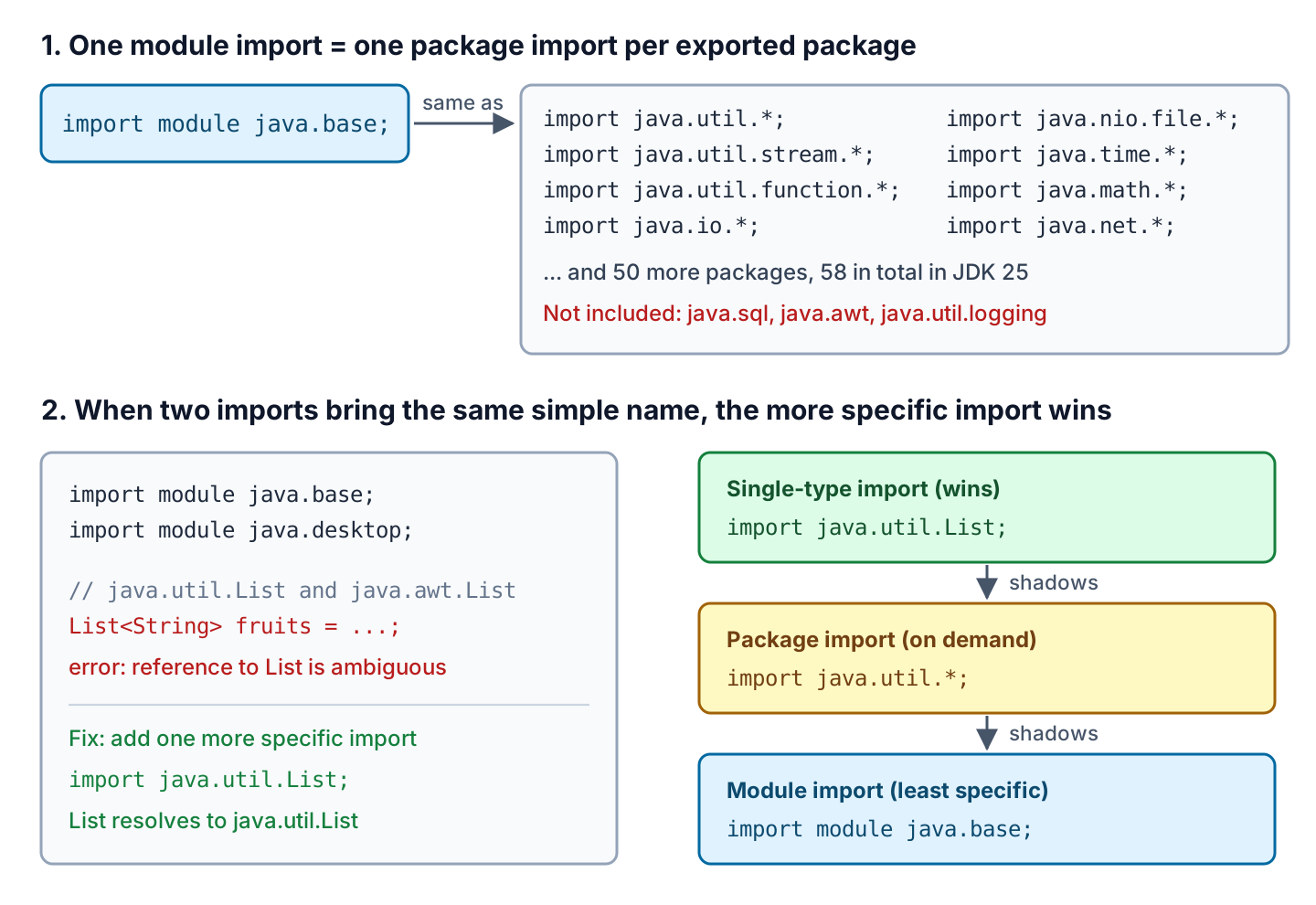
The declaration import module M; works like a package import (import java.util.*) for every package that module M exports. In JDK 25, java.base exports 58 packages, so import module java.base; has the same effect as 58 lines of import package.*. Imports exist only at compile time, so the class file is the same as with single-type imports, and the app does not run any slower.
Some modules pass other modules on to their users. In module-info.java, this is written as requires transitive. A module import also brings in the packages of these passed-on modules, as we see in section 4.
| Module | Packages we get (examples) | Typical classes |
|---|---|---|
| java.base | java.util, java.util.stream, java.io, java.nio.file, java.time, java.math | List, Map, Stream, Path, LocalDate, BigDecimal |
| java.sql | java.sql, javax.sql, plus java.util.logging and javax.xml.* (transitive) | Connection, Date, DataSource, Logger |
| java.desktop | java.awt, javax.swing, plus java.xml packages (transitive) | Color, JFrame, java.awt.List |
| java.se | Every package of the Java SE API, java.base included | All of the above |
Static members are not part of a module import. For Math.max() without the class name, we still need a static import.
2. Module Import Declarations in Classes That Are Not in a Module
Most applications have no module-info.java file and run on the class path. Module import declarations work in these classes too, so we don’t need to turn our project into a module. The following example is a normal class in a Maven project built with JDK 25.0.4.1, Maven 3.9.16 and JUnit 6.1.3 tests.
package com.howtodoinjava.moduleimport;

import module java.base;

public class FruitStats {

  public static long countLines(Path file) throws IOException {
    try (Stream<String> lines = Files.lines(file)) {
      return lines.filter(Predicate.not(String::isBlank)).count();
    }
  }
}
The class uses types from java.nio.file, java.io, java.util.stream and java.util.function with one import line. Two rules decide which modules we can import.
- Code on the class path can import the JDK modules that javac loads by default, such as java.base, java.sql, java.desktop and java.net.http. The aggregator module java.se needs an extra flag, as we see in section 4.
- Code inside a module (a project with a module-info.java file) must also declare requires java.sql; in module-info.java. Without it, javac stops with error: module app does not read: java.sql.
A library JAR on the class path has no module name, so we cannot import it with import module. Its packages still need normal imports.
3. Fixing Ambiguous Names Such as List
Two modules can export classes with the same simple name. Say a desktop app shows a fruit price list in a window, so it imports java.base for collections and java.desktop for the window. Both modules have a public type named List.
import module java.base;
import module java.desktop;

List<String> fruits = List.of("apple", "banana");   // compile error
The compiler reports the clash only when the code uses the name List, not at the import line.
AmbiguousList.java:6: error: reference to List is ambiguous
    List<String> fruits = List.of("apple", "banana");
    ^
  both class java.awt.List in java.awt and interface java.util.List in java.util match
The same error appears for other common names. The Duration clash comes from the java.xml module, which java.desktop passes on.
| Imports | Ambiguous name | Clashing types |
|---|---|---|
| java.base + java.desktop | List | java.util.List, java.awt.List |
| java.base + java.desktop | Label | java.lang.classfile.Label, java.awt.Label |
| java.base + java.desktop | Duration | java.time.Duration, javax.xml.datatype.Duration |
| java.base + java.sql | Date | java.util.Date, java.sql.Date |
3.1. Resolving the Name With a Single-Type Import
A single-type import names one class, such as import java.util.List;. A single-type import always wins over module imports and package imports, so one extra line fixes the error. The other class stays available by its full name, such as java.awt.List.
import module java.base;      // java.util.List
import module java.desktop;   // java.awt.List and java.awt.Color
import java.util.List;        // List resolves to java.util.List

Color appleColor = Color.RED;                       // java.awt.Color[r=255,g=0,b=0]
List<String> fruits = List.of("apple", "banana");   // [apple, banana]
3.2. Resolving Many Names With a Package Import
When several names clash with one package, a package import such as import java.util.* fixes all of them in one line. A package import wins over a module import, but loses to a single-type import. The second part of the image in section 1 shows this order.
import module java.base;
import module java.desktop;
import java.util.*;           // List, Date and every other java.util type win

List<String> fruits = List.of("apple", "banana");   // [apple, banana]
JEP 511 suggests listing module imports first and single-type imports last, with package imports between them. With this grouping, the order of the lines matches which import wins.
4. Transitive Module Imports With java.sql and java.se
Some modules use types from other modules in their own methods. For example, java.sql.Driver.getParentLogger() returns a java.util.logging.Logger. That’s why the module java.sql requires java.logging transitively, and import module java.sql imports java.util.logging as well.
import module java.sql;       // java.sql, javax.sql, java.util.logging, javax.xml.*, ...

Date priceDate = Date.valueOf("2026-10-05");        // java.sql.Date: 2026-10-05
Logger logger = Logger.getLogger("prices");         // java.util.logging.Logger
Notice that Date is not ambiguous here. The java.sql module does not pass on java.base, so java.util.Date is not imported.
The java.se module exports no packages of its own. It passes on 20 other modules, including java.base, so import module java.se; imports the whole Java SE API. On the class path, the compiler does not load java.se by default.
WholeApi.java:1: error: unnamed module does not read: java.se
import module java.se;        // every package of the Java SE API, java.base included
^
1 error
The “unnamed module” in the message is the module that holds all classes on the class path. We fix the error by adding java.se to the compile command.
javac --add-modules java.se -d out WholeApi.java     # compiles
java -cp out WholeApi                               # [apple, banana] 2026-10-05 255
In Maven, we pass the same flag to the maven-compiler-plugin. The compiled class runs without the flag, because the class file refers to the classes it uses, not to the java.se module.
<plugin>
  <groupId>org.apache.maven.plugins</groupId>
  <artifactId>maven-compiler-plugin</artifactId>
  <version>3.16.0</version>
  <configuration>
    <compilerArgs>
      <arg>--add-modules</arg>
      <arg>java.se</arg>
    </compilerArgs>
  </configuration>
</plugin>
Keep in mind that java.se includes java.desktop, so List clashes again and needs import java.util.List;.
5. Compact Source Files Import java.base for Us
A compact source file is a .java file with a main() method and no class declaration. Compact source files are final in Java 25 (JEP 512), and they started as unnamed classes and instance main methods in Java 21. The compiler adds import module java.base; to every compact source file, so List, Map and Collectors work without any import.
void main() {
    List<String> fruits = List.of("apple", "banana");
    Map<String, Integer> lengths = fruits.stream()
        .collect(Collectors.toMap(f -> f, String::length));
    IO.println(lengths);                             // {banana=6, apple=5}
}
We run it with java Hello.java. A compact source file can import more modules, such as import module java.sql;, and the same ambiguity rules apply. JShell in JDK 25 also imports java.base, which its /imports command shows as import java.base.
6. When to Use import module and When Not
A module import saves lines, but the reader of the class can no longer see which package each type comes from. The missing package names matter more in a large code base with many readers than in a 30-line script.
Use import module in these cases.
- Scripts, compact source files and prototypes that we run with the java launcher.
- Unit tests and small demo classes that use many types from java.base.
- JShell sessions and teaching material, where the reader should not learn package names first.
Prefer single-type imports in these cases.
- Production code where the team style asks for explicit imports.
- Classes that use types from java.desktop, java.sql or java.se, because they collide with java.base names.
- Code that must also compile on older JDKs. Java 22 and older reject import module, and Java 23 and 24 accept it only with –enable-preview.
A module import also has a risk at upgrade time. A new JDK version can add a class to an exported package, and its simple name can clash with a name our code already uses. The fix is the same single-type import as in section 3.1.
7. Conclusion
A module import declaration imports every package a module exports, including the packages of its transitive dependencies. In Java 25, the feature is final and works in classes that are not in a module. The most common use is import module java.base;, which compact source files get without writing it.
The main problem is name clashes such as List or Date. We fix them with a single-type import, which always wins, or with a package import, which wins over module imports. For java.se on the class path, we add –add-modules java.se. The Java 25 features overview lists the other language changes that shipped with this one.
8. References
- JEP 511: Module Import Declarations
- JEP 512: Compact Source Files and Instance Main Methods
- JLS 25, Chapter 7.5: Import Declarations
- Java 25 Language Guide, Module Import Declarations
- Module java.base (Java SE 25)
- Module java.se (Java SE 25)
Happy Learning !!
