

To convert XML to properties in Java, we load the XML file into a java.util.Properties object with loadFromXML() and write it as a .properties file with store(); the opposite conversion uses load() and storeToXML(). Both directions are part of the JDK, so no library is needed, as long as the XML follows the Properties XML format.
We need the conversion when an older app keeps its settings in XML and a newer one, such as a Spring Boot application, expects application.properties, or when a tool exports key-value settings as XML for another system.
The following example converts app-config.xml to app.properties and back to XML on Java 25.
Properties props = new Properties();
try (InputStream in = Files.newInputStream(Path.of("app-config.xml"))) {
    props.loadFromXML(in);                                             // XML -> Properties
}
try (Writer out = Files.newBufferedWriter(Path.of("app.properties"), StandardCharsets.UTF_8)) {
    props.store(out, "Converted from app-config.xml");                 // Properties -> .properties
}
String port = props.getProperty("server.port");                        // "8080"

Properties back = new Properties();
try (Reader in = Files.newBufferedReader(Path.of("app.properties"), StandardCharsets.UTF_8)) {
    back.load(in);                                                     // .properties -> Properties
}
try (OutputStream out = Files.newOutputStream(Path.of("app-copy.xml"))) {
    back.storeToXML(out, "Converted from app.properties", StandardCharsets.UTF_8);   // Properties -> XML
}
boolean sameEntries = back.equals(props);                              // true
Notice that the Properties object sits in the middle of both conversions, so the same four methods cover every direction. We look at the XML format it expects, run each conversion with its real output, flatten XML that is not in that format, and go through the errors these methods throw.
1. The XML Format That Properties Understands
The Properties class reads and writes one fixed XML format. The root element is <properties>, an optional <comment> comes first, and each key-value pair is an <entry> element with a key attribute and the value as its text. The document must start with the properties DOCTYPE.
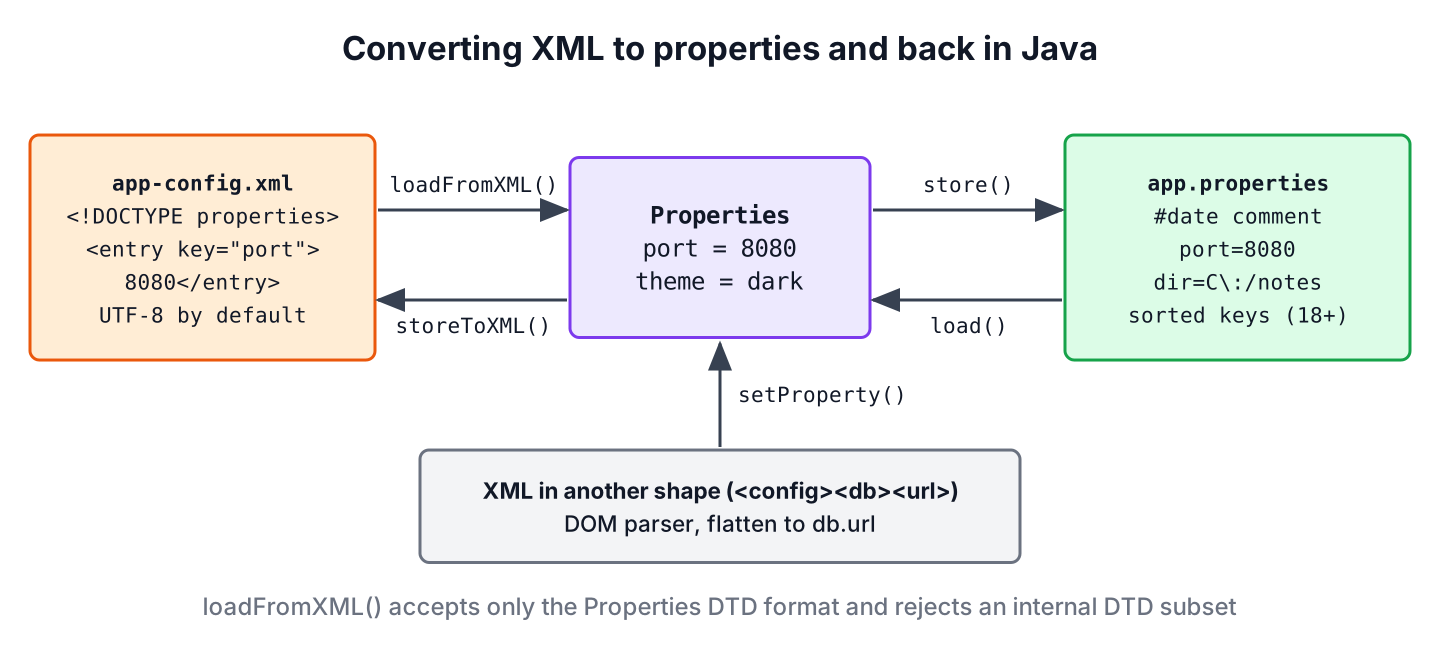
The examples use this app-config.xml file. The greeting contains the character reference ë, which is the letter e with two dots, so we can see how each format handles characters outside ASCII.
<?xml version="1.0" encoding="UTF-8" standalone="no"?>
<!DOCTYPE properties SYSTEM "http://java.sun.com/dtd/properties.dtd">
<properties>
<comment>Settings for the notes app</comment>
<entry key="server.port">8080</entry>
<entry key="app.theme">dark</entry>
<entry key="app.greeting">Hi, Zoë</entry>
<entry key="upload.dir">C:/notes/uploads</entry>
</properties>The Properties XML format has a few strict rules.
- The DOCTYPE <!DOCTYPE properties SYSTEM “http://java.sun.com/dtd/properties.dtd”> is required. Without it, loadFromXML() throws InvalidPropertiesFormatException.
- The DTD URL is never downloaded. It only identifies the format, and the JDK checks the document against its own built-in copy, so the conversion works offline.
- An internal DTD subset, which is where an attacker would declare an external entity, is rejected with InvalidPropertiesFormatException. That makes loadFromXML() safe against XML external entity (XXE) attacks without extra settings.
- Any element other than <properties>, <comment> and <entry> is rejected, and when a key appears twice, the last value wins.
The two file formats also differ in encoding and layout, and those differences explain most surprises in converted files.
| XML (storeToXML()) | .properties (store()) | |
|---|---|---|
| Default encoding | UTF-8 | ISO-8859-1 with an OutputStream; the writer’s charset with a Writer |
| Characters outside the encoding | Numeric character references | \uXXXX escapes with an OutputStream |
| Escaping | XML escapes such as & | Backslash before :, =, #, ! and leading spaces |
| Comment | A <comment> element | A # line, followed by a date line |
| Order of entries | Not sorted | Sorted by key since Java 18 |
2. Convert XML to Properties with loadFromXML() and store()
The XML-to-properties direction is the one most readers search for. We open the XML file, call loadFromXML(), and pass the filled object to store(). The method loadFromXML() closes the input stream itself, but we still open it in try-with-resources so the stream is closed when parsing fails.
Properties props = new Properties();
try (InputStream in = Files.newInputStream(Path.of("app-config.xml"))) {
    props.loadFromXML(in);
}
try (OutputStream out = Files.newOutputStream(Path.of("app.properties"))) {
    props.store(out, "Converted from app-config.xml");
}
List<String> lines = Files.readAllLines(Path.of("app.properties"), StandardCharsets.ISO_8859_1);
String greeting = lines.get(2);               // "app.greeting=Hi, Zo\u00EB"
String uploadDir = lines.get(5);              // "upload.dir=C\:/notes/uploads"
The complete app.properties file looks like this. The date line comes from the current time.
#Converted from app-config.xml
#Sat Oct 10 14:21:42 IST 2026
app.greeting=Hi, Zo\u00EB
app.theme=dark
server.port=8080
upload.dir=C\:/notes/uploads
Three details in that output confuse people.
- The colon in C\:/notes/uploads is escaped because a colon, like =, can separate a key from its value. The method load() removes the backslash, so the value is still C:/notes/uploads when we read it back.
- The letter in Zo\u00EB became a Unicode escape, because store(OutputStream, String) always writes ISO-8859-1 and escapes everything else. When we pass a Writer with UTF-8, as in the intro example, the letter is written as is, and the reader must also use UTF-8.
- The keys are in alphabetical order. Since Java 18, store() sorts entries by key, and the system property java.properties.date, set on the command line, replaces the date line with a fixed text for reproducible builds.
3. Converting a .properties File to XML
The reverse direction reads a .properties file with load() and writes XML with storeToXML(). We read the file with a Reader in the charset it was written in, because load(InputStream) assumes ISO-8859-1 and would turn UTF-8 letters into two wrong characters.
Properties props = new Properties();
try (Reader in = Files.newBufferedReader(Path.of("app.properties"), StandardCharsets.ISO_8859_1)) {
    props.load(in);
}
try (OutputStream out = Files.newOutputStream(Path.of("app-copy.xml"))) {
    props.storeToXML(out, "Converted from app.properties", StandardCharsets.US_ASCII);
}
String dir = props.getProperty("upload.dir");                // "C:/notes/uploads"
String xml = Files.readString(Path.of("app-copy.xml"));
boolean hasDoctype = xml.contains("properties.dtd");         // true
The written app-copy.xml file contains the DOCTYPE, so loadFromXML() can read it again. The entries come out in the internal hash order of the map, not sorted. Because we passed US_ASCII, the letter that ASCII cannot encode is written as the numeric character reference ë, which any XML parser reads back as the original letter.
<?xml version="1.0" encoding="US-ASCII"?>
<!DOCTYPE properties SYSTEM "http://java.sun.com/dtd/properties.dtd">
<properties>
<comment>Converted from app.properties</comment>
<entry key="app.theme">dark</entry>
<entry key="upload.dir">C:/notes/uploads</entry>
<entry key="server.port">8080</entry>
<entry key="app.greeting">Hi, Zoë</entry>
</properties>The method storeToXML() has three overloads.
- The call storeToXML(out, comment) writes UTF-8, the same as passing “UTF-8”.
- The call storeToXML(out, comment, “UTF-16”) takes the encoding name as a String; implementations must support UTF-8 and UTF-16.
- The call storeToXML(out, comment, StandardCharsets.UTF_8) takes a Charset, exists since Java 10, and writes characters that the charset cannot encode as numeric character references.
Unlike loadFromXML(), storeToXML() leaves the stream open, so the try-with-resources block is what closes the file.
4. Converting Any XML File to Properties
Many XML configuration files do not use the <entry> format at all. A common case is a migration, where an old app stores its settings in nested elements such as <db><url>, and the Spring Boot application that replaces it expects keys such as db.url in application.properties. Calling loadFromXML() on such a file throws InvalidPropertiesFormatException, so we read it with DOM and build the keys ourselves.
The following example reads this legacy-config.xml file and turns every leaf element and attribute into a dotted key, skipping the root element.
<?xml version="1.0" encoding="UTF-8"?>
<config>
  <server port="8080"/>
  <db>
    <url>jdbc:h2:mem:notes</url>
    <user>sa</user>
  </db>
</config>
static Properties flatten(Path file) throws Exception {
DocumentBuilderFactory factory = DocumentBuilderFactory.newInstance();
factory.setFeature("http://apache.org/xml/features/disallow-doctype-decl", true);
Document doc = factory.newDocumentBuilder().parse(file.toFile());
Properties props = new Properties();
addEntries(doc.getDocumentElement(), "", props);
return props;
}static void addEntries(Element element, String key, Properties props) {
NamedNodeMap attributes = element.getAttributes();
for (int i = 0; i < attributes.getLength(); i++) {
Node attribute = attributes.item(i);
props.setProperty(key + "." + attribute.getNodeName(), attribute.getNodeValue());
}
boolean hasChildElements = false;
for (Node child = element.getFirstChild(); child != null; child = child.getNextSibling()) {
if (child instanceof Element childElement) {
hasChildElements = true;
String childKey = key.isEmpty() ? childElement.getTagName() : key + "." + childElement.getTagName();
addEntries(childElement, childKey, props);
}
}
if (!hasChildElements && attributes.getLength() == 0) {
props.setProperty(key, element.getTextContent().strip());
}
}Properties props = flatten(Path.of("legacy-config.xml"));
Set<String> keys = new TreeSet<>(props.stringPropertyNames()); // [db.url, db.user, server.port]
String url = props.getProperty("db.url"); // "jdbc:h2:mem:notes"
String port = props.getProperty("server.port"); // "8080"The DOM factory rejects DOCTYPE declarations, because unlike loadFromXML(), a plain DocumentBuilder resolves external entities by default. The DOM parser tutorial explains the node types used here, and the XPath tutorial is the better tool when we need only a few values from the file.
5. Errors During the Conversion
Most failures come from XML that does not match the Properties format, and the exception message names the rule that was broken. One more error comes from the fact that Properties extends Hashtable<Object, Object>.
String noDoctype = "<properties><entry key=\"a\">1</entry></properties>";
Properties props = new Properties();
props.loadFromXML(new ByteArrayInputStream(noDoctype.getBytes(StandardCharsets.UTF_8)));   // InvalidPropertiesFormatException: An XML properties document must contain the DOCTYPE declaration
Properties props = new Properties();
props.put("retries", 3); // compiles, the value is an Integer
String retries = props.getProperty("retries"); // null, getProperty() ignores non-String values
props.store(new StringWriter(), null); // ClassCastExceptionWe always add entries with setProperty(), which accepts only String keys and values, and never with put(). A value such as 3 becomes setProperty(“retries”, String.valueOf(3)), and the conversion works in both directions. The properties file tutorial covers the other Properties methods, such as default values and reading from the classpath.
6. XML and Properties Conversion FAQs
Converted files that look different from the input lead to most of the questions, along with framework support for the XML format.
6.1. Does loadFromXML() download properties.dtd from the internet?
No. The JDK never accesses the DTD URI when it imports or exports properties, because it uses its own copy of the DTD, so the conversion works on a machine without network access.
6.2. How can we keep the original order of the keys?
The Properties class does not keep insertion order, because it is a hash table. Since Java 18, store() sorts by key, which gives stable files for version control. If the original order matters, we write the file ourselves by looping over the keys in the order we want.
6.3. Can Spring read properties from an XML file?
Yes. The @PropertySource annotation accepts XML files in the Properties format, for example @PropertySource(“classpath:app-config.xml”), and Spring reads them with loadFromXML(). Spring Boot does not read application.xml as configuration, so for Spring Boot we convert the file to application.properties or YAML.
6.4. Why are there backslashes in the converted .properties file?
The method store() escapes characters that have a meaning in the format, such as :, =, # and !, and it writes characters outside ISO-8859-1 as \uXXXX when it writes to an OutputStream. The method load() reverses both, so the values are unchanged after a round trip.
7. Conclusion
The Properties class converts in both directions with four methods. We use loadFromXML() and store() to go from XML to a .properties file, and load() and storeToXML() to go back, with try-with-resources around each stream.
The XML must follow the Properties format with its DOCTYPE, which also makes it safe against XXE. Escaped colons, Unicode escapes and sorted keys in the output are expected behavior. XML in any other shape needs a DOM parser with DOCTYPE processing turned off and a few lines of code to build dotted keys.
8. References
- java.util.Properties Javadoc (Java 25)
- JDK 18 Release Notes
- @PropertySource Javadoc (Spring Framework)
- DocumentBuilderFactory Javadoc (Java 25)
Happy Learning !!

Hi! this method is not working with tomcat’s server.xml file… any ideas?